A Cloud Run region is chosen in this order: where the data must stay, where the database is, where most users are, then the cheaper price tier and the Google products the app needs next to it. Tier 2 regions cost 1.2 to 1.4 times Tier 1 per second. For a new app with users spread over Europe, that gives europe-west1 (Belgium).
In short
- Cloud Run had 43 regions on October 11, 2026; a service stays in the region of its first deploy, and moving it means deploying a copy.
- Tier 2 regions cost 1.2 times Tier 1 per second with instance-based billing and 1.4 times with request-based billing.
- Transfer inside a region is free; between Europe and North America it is $0.05 per GiB, and Cloud SQL charges $0.12 per GiB to another continent.
- From one of our machines all 13 European regions answered in 81 to 112 ms, Singapore in 395 ms.
- Domain mapping works in 10 regions, Cloud Tasks in 28 locations.
Prices are Google's list prices read on October 11, 2026, in US dollars.
What a region is
Google Cloud is split into regions, each a geographic area such as Belgium (europe-west1) or Iowa (us-central1). A region has three or more zones, separate failure domains inside it. Cloud Run is a regional product: it spreads a service's instances over the zones of its region on its own, and if one zone fails, traffic goes to the others without any setting on your side. You never pick a zone.
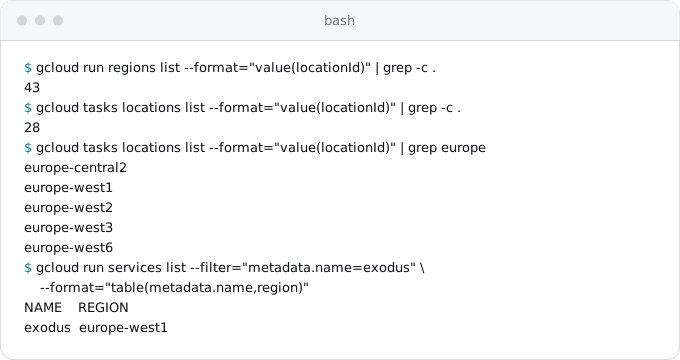
You pick the region at the first deploy with --region. After that it is part of the service: its address, its logs, its bill and the path of every request. There is no command that moves a service to another region; you deploy a copy there and delete the old one. On October 11, 2026, gcloud run regions list returned 43 regions. The service's data stays in the region you pick: Google's locations page says customer data associated with a Cloud Run resource is stored there.
The region shows up in three places you will see every day. The --region flag on almost every gcloud run command. The service address: a deterministic URL has the form https://SERVICE-PROJECT_NUMBER.REGION.run.app, so the region is spelled out in it, and the second, hash-based URL ends in a short code such as -ew.a.run.app, which Google says not to parse. And the bill, where the same CPU second has a different price in different regions.
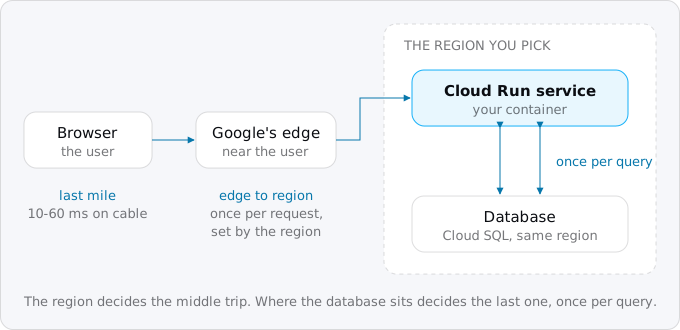
Put the service next to its data
The first rule is the one people skip: the service should be in the same region as its database. Cloud SQL's own guide to connecting from Cloud Run says to create the instance in the same region as the service, for latency and so that one region's failure does not take down half of the app. The guide to connecting Cloud Run to Cloud SQL has the setup.
The reason is arithmetic. A request from a user crosses the distance to the region once. A request inside the app crosses the distance to the database once per query, and a page that runs ten queries one after another pays that distance ten times. Inside one region a query's round trip is a few milliseconds. Between Europe and the US east coast it is tens of milliseconds: in our measurement below, us-east4 answered 81 ms later than europe-west1 from the same machine, which is roughly the price of one trip across the Atlantic. Ten sequential queries over that gap add the better part of a second to every page.
Data transfer adds money to the latency. Cloud Run's pricing page says traffic to Google Cloud resources in the same region is free. Across regions it is not, and the guide to egress on Google Cloud has the rest of the price list:
- Cloud SQL charges for data leaving the instance: free to Google products on the same continent, $0.12 per GiB to another continent.
- Between Google Cloud regions in general, the network price list charges $0.02 per GiB within North America or within Europe, $0.05 between them, and $0.08 to $0.14 per GiB to and from Asia, Oceania, the Middle East, Africa and South America.
- Artifact Registry is free when the image and the service are in the same location, $0.02 per GiB between two European locations and $0.08 per GiB between continents. An image of a hundred megabytes or more, pulled again for new instances, adds up when the repository is far away.
If the database already exists, on another platform or in Google Cloud, start with the region closest to it. If it does not, choose the region for the users and create the database there.
Close to most of your users
The second question is latency to the people using the app. A request from a browser has three parts: the last mile to the user's provider, the trip from Google's nearest edge to the region on Google's own network, and the time the app takes. Region choice changes only the middle part. Google's guide to choosing regions gives the last mile as 1-10 ms on modern networks, 10-60 ms on DSL and cable, and 100-500 ms on a 3G phone, and says that apps that tolerate 100 ms or more can run in one region without hurting the user.
To see what the middle part looks like, we timed a small request from one of our machines to every Cloud Run region, using gcping, a set of Cloud Run services Google publishes in each region for this purpose. Six requests per region over a warm connection, the median kept:
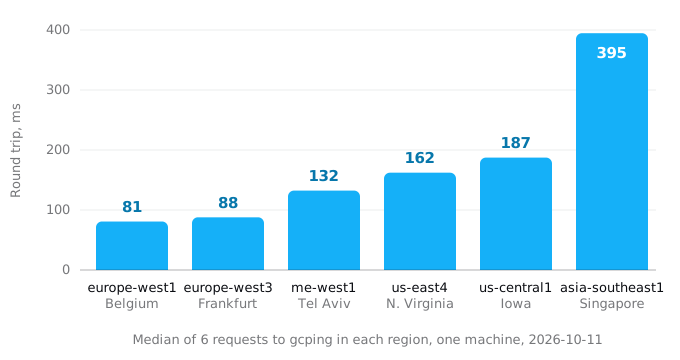
From this machine all 13 European regions answered in 81 to 112 ms, the nearest nine within 98 ms, so for its users any of them would do and the choice comes down to price and neighbours. The US east coast was twice as far, Iowa a little further, and Singapore five times. Your numbers will differ by where your users sit; the shape will not. Inside one continent regions differ by tens of milliseconds, between continents by hundreds.
You can run the same measurement from your own laptop, or better from where your users are, with plain curl. Each regional gcping service answers /api/ping, and the list of addresses is at https://gcping.com/api/endpoints:
curl -s https://gcping.com/api/endpoints \
  | jq -r 'to_entries[] | "\(.key) \(.value.URL)"' \
  | while read region url; do
      t=$(curl -s -o /dev/null -w '%{time_total}\n' "$url/api/ping" "$url/api/ping" | tail -1)
      echo "$region $t"
    done | sort -k2 -n | head
The second request in each pair reuses the connection, so its time is one round trip without the TLS handshake. For a global audience, look at where most of the traffic comes from today, from analytics or the current provider's logs, not where the company is registered.
The price tier: 20 to 40% for the same second
Cloud Run regions are in two price tiers. On Google's locations page, 20 regions are in Tier 1, among them us-central1 (Iowa), us-east1 (South Carolina), us-east4 (Northern Virginia), us-west1 (Oregon), europe-west1 (Belgium), europe-west4 (Netherlands), europe-north1 (Finland), europe-west9 (Paris), europe-southwest1 (Madrid), asia-northeast1 (Tokyo), asia-east1 (Taiwan) and asia-south1 (Mumbai). The other 23 are Tier 2, among them europe-west2 (London), europe-west3 (Frankfurt), europe-west6 (Zurich), asia-southeast1 (Singapore), australia-southeast1 (Sydney), northamerica-northeast1 (Montreal), southamerica-east1 (Sao Paulo) and us-west2 (Los Angeles).
The pricing page shows only Tier 1 numbers, and what Cloud Run costs walks through each of its lines. The Tier 2 numbers are in the Cloud Billing Catalog, which is what the bill is computed from. On October 11, 2026 the catalog said:
- Instance-based billing, jobs and worker pools: Tier 2 is 1.2 times Tier 1. A vCPU-second costs $0.000018 in Tier 1 and $0.0000216 in Tier 2; a GiB-second of memory $0.000002 and $0.0000024.
- Request-based billing: Tier 2 is 1.4 times Tier 1. A vCPU-second costs $0.000024 and $0.0000336; a GiB-second $0.0000025 and $0.0000035; an idle minimum instance's CPU $0.0000025 and $0.0000035.
- Requests: $0.40 per million everywhere, after the first 2 million a month.
The free tier makes the gap wider for a small app. Google applies it "as a spending based discount using Tier 1 pricing", which means it is a fixed amount of dollars, not of seconds, so in Tier 2 it buys about 29% fewer of them; the free tier guide has the arithmetic.
Two examples, each on 1 vCPU and 512 MiB for a 730-hour month:
- One instance kept on all month with instance-based billing: $49.93 in Tier 1 and $59.92 in Tier 2 before the free tier; $44.71 and $54.70 after it.
- 3 million requests of 250 ms each, request-based, never overlapping on an instance (750,000 billed seconds): $20.14 and $27.71 before the free tier; $14.12 and $21.69 after it, which is 54% more in Tier 2.
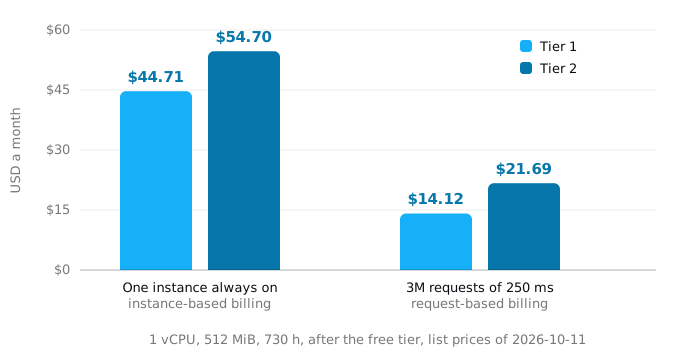
The worked examples of Cloud Run costs by traffic price a whole app, database and egress included, in a Tier 1 region. Ten dollars a month is not a reason to put European users in Iowa. It is a reason to prefer Belgium or the Netherlands to Frankfurt or London when the users are spread over Europe and the round trips differ by a few milliseconds, as they did in our measurement.
Google's own pages disagree on a few regions. The locations page lists africa-south1 (Johannesburg) in Tier 2; the pricing page and the Billing Catalog put it in Tier 1, at Tier 1 prices. The pricing page also lists asia-southeast4 (Kuala Lumpur) and us-west8 (Phoenix), which gcloud run regions list did not return on October 11, 2026. The catalog is what you are billed from, so when it matters, ask it. Its numbers are in billionths of a dollar (nanos), so 33600 below is $0.0000336 per vCPU-second:
umask 077
printf 'Authorization: Bearer %s\n' "$(gcloud auth print-access-token)" > ~/.gcp-h
curl -s -H @$HOME/.gcp-h \
  "https://cloudbilling.googleapis.com/v1/services/152E-C115-5142/skus?pageSize=5000" \
  | jq -r '.skus[] | select(.serviceRegions | index("europe-west2"))
      | "\(.description): \(.pricingInfo[0].pricingExpression.tieredRates[-1].unitPrice.nanos)"' \
  | grep -i cpu
rm ~/.gcp-h
The access token goes through a file only you can read, not through the command line, and the file is removed at the end. For europe-west2 this printed Services CPU Tier 2 (Request-based billing): 33600 and Services CPU (Instance-based billing) in europe-west2: 21600, among the other lines.
What the region has next to it
Cloud Run itself is in all 43 regions, but the products around it are not, and some of its own features are limited to a list. These are the ones a small app runs into:
- Custom domains through Cloud Run domain mapping work in 10 regions:
asia-east1,asia-northeast1,asia-southeast1,europe-north1,europe-west1,europe-west4,us-central1,us-east1,us-east4andus-west1. Domain mappings are in Preview, and Google's page says they are not recommended for production because of latency issues. Elsewhere, and for production anywhere, the options are a global external Application Load Balancer, from $0.025 an hour for the first five forwarding rules ($18.25 for a 730-hour month) plus $0.008 per GiB processed, or Firebase Hosting. - Cloud Tasks had 28 locations in
gcloud tasks locations list; in Europe onlyeurope-central2,europe-west1,europe-west2,europe-west3andeurope-west6. Cloud Scheduler's page lists 34. Neither is ineurope-north1oreurope-west10, and Cloud Tasks is not ineurope-west4. A queue in another region can still call your service, but every task then crosses regions. - Cloud SQL was available in the same 43 regions as Cloud Run (
gcloud sql tiers list). - GPUs: the L4 in 6 regions (
asia-southeast1,asia-south1by invitation,europe-west1,europe-west4,us-central1,us-east4), the RTX PRO 6000 Blackwell in 4 (asia-southeast1,asia-south2,europe-west4,us-central1). - Cloud Run instances, in Preview, are available everywhere except
europe-west1,us-central1andus-east1. Serverless VPC Access connectors are not available inasia-southeast3. - Capacity: the quotas page says the regional CPU and memory quotas "might be greater in high-capacity regions or lower in recently opened regions". A new region is a fine home for a small app; a burst to hundreds of instances is more likely to hit a quota there.
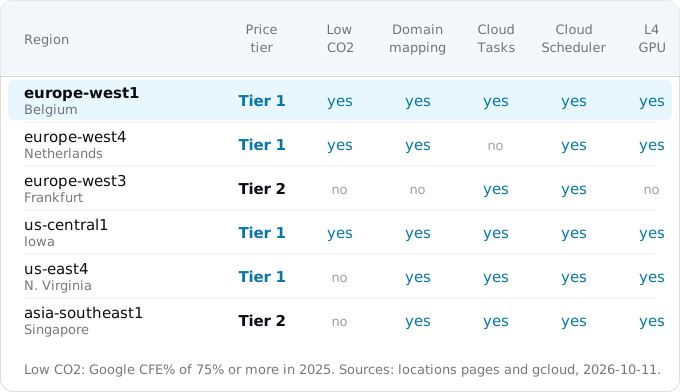
You can check the lists from the command line before you deploy. These commands only read:
Rules, contracts and carbon
Data residency. If a contract or a law says the data must stay in the EU, or in one country, pick from those regions and keep the database, the storage buckets and the image repository there too. Cloud Run stores a resource's customer data in its region. For a team with a Google Cloud organization, the organization policy gcp.resourceLocations can enforce it: with the value group in:eu-locations, nobody can create a Cloud Run service outside the EU's regions. The policy is checked when a service is created, not on existing services or their updates, so set it before the first deploy.
Uptime. The Cloud Run SLA is 99.95% a month in every region except Mexico (northamerica-south1) and Stockholm (europe-north2), where it is 99.9%. Google also notes that Stockholm, Osaka and Montreal have their three zones in one or two physical data centers, while the expansion to three is under way.
Carbon. Google publishes, for every region, the share of hours its consumption was matched by carbon-free energy (CFE%) and the grid's carbon intensity. For 2025: europe-north2 (Stockholm) 100%, europe-north1 (Finland) 98%, europe-west9 (Paris) 96%, us-central1 (Iowa) 88%, europe-west1 (Belgium) 79%, us-east4 (Northern Virginia) 57%, asia-southeast1 (Singapore) 5%. Google marks a region "Low CO2" at a CFE% of at least 75%. The pricing page puts that mark on Frankfurt and Berlin too; the carbon page gives both 70% and no mark, and that page is the source, so they are not low-carbon regions by Google's own rule. When two regions are otherwise equal, this is a fair tie-breaker.
One region or several
Google's guide to choosing regions says that even an app with users around the world is often best served from a single region, because the latency gained does not outweigh the work of running several, and a CDN in front of the static parts removes most of the distance for most pages. That is the right default for a small team.
Cloud Run can run one service in several regions. gcloud run deploy SERVICE --image IMAGE --regions europe-west1,us-east4 creates a multi-region service, and the gcloud run multi-region-services commands describe, update and delete it. On its own that gives you two regional addresses, not one. To send each user to the nearest region you add a global external Application Load Balancer with a serverless network endpoint group per region, a managed certificate and a static anycast IP; Google's page walks through the eight gcloud compute commands. Since July 2026 Cloud Run can also report each region's health to that load balancer from readiness probes, so traffic moves away from a failing region on its own.
What it costs: each region runs and bills its own instances, and minimum instances apply per region, so --min 1 across two regions is two instances. The load balancer adds about $18 a month plus its per-GiB fee. And the database is still in one place unless you replicate it, so a second region only helps the requests that can be answered without it. A second region earns its cost when the app must survive the loss of a whole region, or when a large share of users is on another continent and most pages can be served from a cache or a nearby replica.
Setting the region, and moving a service later
Set the region once, so you do not have to repeat it on every command:
gcloud config set run/region europe-west1
gcloud run deploy my-app --source .
gcloud run deploy --region overrides it per command. Put the Artifact Registry repository, the Cloud SQL instance, the Cloud Storage buckets and the Cloud Tasks queues in the same region from the start, so nothing crosses regions by accident.
To move a service later, copy it. Google's guide for this exports the service's configuration, which you then deploy into the new region under the same name:
gcloud run services describe my-app --region europe-west1 --format export > service.yaml
# in service.yaml, delete spec.template.metadata.name (the old revision name) if it is there
gcloud run services replace service.yaml --region europe-west4 --dry-run
gcloud run services replace service.yaml --region europe-west4
The --dry-run line only validates the configuration in the new region; the second one creates the copy. The copy gets a new address, because the region is part of it, so anything that calls the old URL has to change: a custom domain's DNS record or load balancer backend, webhooks registered with other services, other services calling this one. The service account and Secret Manager secrets carry over as they are, because they belong to the project, not the region (unless you created regional secrets). The image keeps its old path, so the new region pulls it across regions until you push it to a repository next to the service.
The hard part is never the service; it is the data. A database moves with a dump and a restore or a replica in the new region, which means a short write freeze. Once traffic is on the copy and the old service has served nothing for a few days, delete it with gcloud run services delete my-app --region europe-west1.
How to choose, in order
- List the rules. If the data must stay in a country or in the EU, only those regions are candidates; set
gcp.resourceLocationsif you have an organization. - Find the data. If a database already exists, start from the region closest to it, or plan its move in the same step.
- Find the users. Take the continent most of the traffic comes from and measure the round trips to its regions from there.
- Within a few milliseconds, take the Tier 1 region. In Europe that is usually
europe-west1oreurope-west4, in North Americaus-central1,us-east4orus-east1, in Asiaasia-northeast1orasia-east1. - Check the neighbours: domain mapping if you want it, Cloud Tasks and Cloud Scheduler if the app uses them, GPUs if it needs them.
- Use carbon as the tie-breaker, and stay in one region until a measurement or a contract says otherwise.
- Set
run/regiononce and create everything else in the same region.
For a new app with users spread over Europe that answers to all seven: europe-west1, Tier 1, 79% carbon-free, with domain mapping, Cloud Tasks, Cloud Scheduler and Cloud SQL next to it.
FAQ
Can I move a Cloud Run service to another region?
Not in place: no command moves a service. You export its configuration, deploy it under the same name in the new region, point everything that called the old address at the new one, and delete the old service. The database is the harder part; it moves with a dump and a restore or a replica, which means a short write freeze.
Which Cloud Run regions are cheapest?
The 20 Tier 1 regions, among them Iowa, South Carolina, Northern Virginia, Belgium, the Netherlands, Tokyo and Taiwan. Tier 2 regions such as London, Frankfurt and Singapore cost 1.2 times as much per second with instance-based billing and 1.4 times with request-based billing. Requests cost $0.40 per million in every region.
Should Cloud SQL be in the same region as Cloud Run?
Yes. Cloud SQL's guide to connecting from Cloud Run says to create the instance in the service's region. Every query crosses the distance to the database, so ten sequential queries across the Atlantic add the better part of a second to a page, and Cloud SQL charges $0.12 per GiB sent to another continent.
Does a small app need more than one Cloud Run region?
Usually not. Google's guide to choosing regions says even an app with users around the world is often best served from one region, with a CDN in front of the static parts. A second region bills its own instances, needs a load balancer at about $18 a month, and still reaches one database.
Do custom domains work in every Cloud Run region?
No. Cloud Run domain mapping works in 10 regions and is in Preview, which Google does not recommend for production. Elsewhere, and for production anywhere, the options are a global external Application Load Balancer, from $18.25 a month plus $0.008 per GiB processed, or Firebase Hosting.
Sources
24
- docs.cloud.google.comCloud Run locations, Google
- cloud.google.comCloud Run pricing, Google
- docs.cloud.google.comCloud Billing Catalog API, Cloud Run service 152E-C115-5142, SKU prices effective Oct 11, 2026
- cloud.google.comNetwork pricing, Google
- cloud.google.comCloud SQL pricing, Google
- cloud.google.comArtifact Registry pricing, Google
- docs.cloud.google.comConnect from Cloud Run, Cloud SQL for PostgreSQL, Google
- docs.cloud.google.comBest practices for Compute Engine regions selection, Google
- docs.cloud.google.comGeography and regions, Google
- docs.cloud.google.comUnderstand zonal redundancy, Cloud Run, Google
- cloud.google.comCloud Run SLA, Google
- cloud.google.comCarbon free energy for Google Cloud regions, Google
- docs.cloud.google.comMapping custom domains, Cloud Run, Google
- docs.cloud.google.comCloud Tasks locations, Google, and gcloud tasks locations list
- docs.cloud.google.comCloud Scheduler locations, Google
- docs.cloud.google.comCloud Run quotas and limits, Google
- docs.cloud.google.comHTTPS requests and service URLs, Cloud Run, Google
- docs.cloud.google.comManage Cloud Run services, Google
- docs.cloud.google.comServe traffic from multiple regions, Cloud Run, Google
- cloud.google.comMaking highly available, multi-region Cloud Run services just got easier, Google Cloud blog, Jul 20, 2026; read Oct 11, 2026
- docs.cloud.google.comRestricting resource locations, organization policy, Google
- docs.cloud.google.comgcloud run regions list, run deploy, services replace, multi-region-services --help, Google Cloud SDK 587.0.0
- github.comgcping, Google Cloud Platform
- Exodus team: round trips from one of our machines to gcping's service in every Cloud Run region, 6 requests each over a warm connection, Oct 11, 2026 14:49 UTC