A Google Cloud bill is a list of SKU lines: usage in the SKU's unit times its price is the cost, credits such as the free tier are negative amounts on it, and cost plus credits plus tax is what you pay. A self-serve account is charged on the 1st and at a threshold, or on the 2nd, and its monthly document is a statement, not a bill.
In short
- A self-serve card is charged on the 1st and whenever the balance reaches a threshold (for example $100), or on the 2nd; invoiced accounts get an invoice by the fifth business day.
- A new account usually starts as a free trial: $300 of credit for 90 days, with a card on file.
- Cloud Run's free 180,000 vCPU-seconds and 360,000 GiB-seconds a month appear as cost cancelled by a credit; the first 2 million requests appear as $0.
- Check a line by hand: our 35,361 vCPU-seconds at $0.000024 come to $0.849, billed $0.848; every line we checked matched within a cent.
- Of our $4.24 of commitment credits, $2.81 paid back the commitment's own fees, so it saved $1.43.
Every example is from our own billing account's October 2026 lines, read on October 11, 2026, with the account's projects left unnamed. The commands are read-only and were checked with gcloud 587.0.0 and bq 2.1.39.
How a bill is built
A first bill confuses almost everyone: it arrives after your card was charged, half its lines say $0.00, some are negative, and it lists services you do not remember turning on. Everything you pay for on Google Cloud runs in a project. A project does not pay; it is linked to a Cloud Billing account, and that account pays for every project linked to it. The billing account in turn is tied to a Google payments profile: the name, address, tax ID and card or bank account that actually pay.
Inside the bill, costs are grouped by service (Cloud Run, Cloud SQL, Cloud Storage) and, inside a service, by SKU, a stock-keeping unit: one priced thing, such as "Services CPU (Request-based billing)" or "Artifact Registry Storage". Each SKU has a price per unit, and every line of the bill is the same sum:
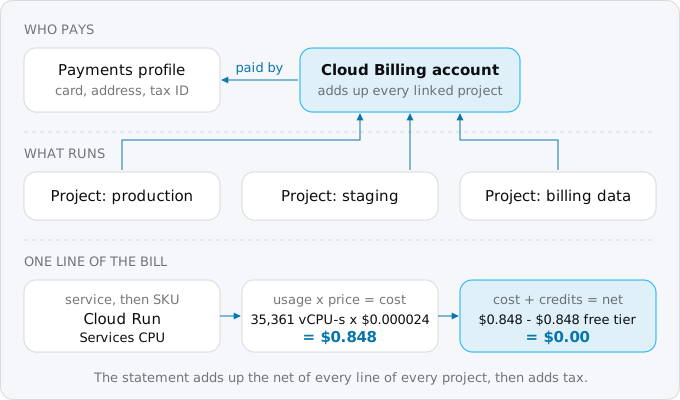
Usage times price gives the cost. Credits are negative amounts attached to that cost: the free tier, the free trial, discounts for commitments. Cost plus credits is the net, and the net of all lines plus tax is what you pay. To find which billing account pays for a project, ask gcloud:
gcloud billing projects describe PROJECT_IDIt prints billingAccountName: billingAccounts/XXXXXX-XXXXXX-XXXXXX and billingEnabled: true. gcloud billing accounts list shows the accounts you can see and their currency.
When you are charged, and what you receive
Google has two kinds of billing account, and which one you have decides almost everything about the paperwork.
Self-serve (online) is what you get when you sign up with a card. It is paid automatically, and Google assigns it one of two charging cycles; you cannot choose or change which:
- Threshold billing. The card is charged on the 1st of each month for the previous month, and also any time the balance reaches a payment threshold. The threshold is set by Google ("for example, $100" on its page), depends on your country and currency, and is raised automatically as the account builds a payment history. A busy month can be charged several times, and a charge can be larger than the threshold when costs grow fast.
- Monthly billing. The card is charged on the 2nd of each month for the previous month.
The Payment overview page in the Billing section of the console shows your cycle, the threshold, the balance and the last payment.
Invoiced accounts are for companies that asked Google for a line of credit. Costs accrue, an invoice arrives by the fifth business day of the next month, and you pay it by bank transfer within the agreed terms, such as Net 30.
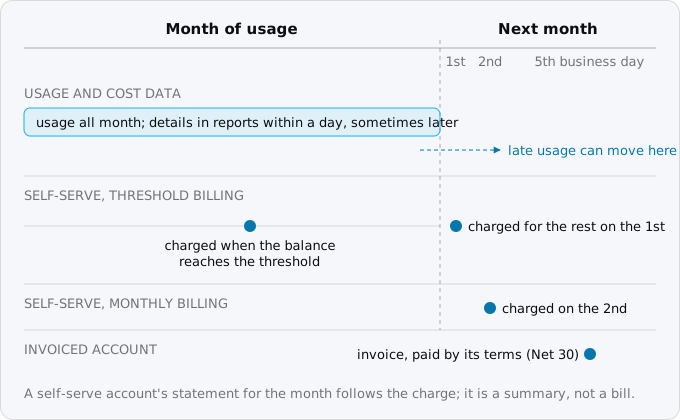
So on a self-serve account the document you get is a statement, and Google's page is direct about it: "A statement isn't a bill. It's a summary of monthly billing activity". It lists your business address and tax IDs, the payments made during the month, the taxes, and a summary of usage costs. You find statements, tax invoices and any credit or debit memos on the Invoices page of your billing account, and payment receipts on Transactions. An invoiced account finds the same on Payment status. Seeing these pages needs a billing role with the billing.accounts.getPaymentInfo permission; a project owner without a billing role sees none of it.
Two consequences of the timing catch people out. First, Google says charges "typically occur sooner than the usage and cost details are available": the card can be charged before the reports show what the charge was for. Cost details usually arrive within a day, sometimes later. Second, usage reported late at the end of a month can land on the next month's invoice, so one document can carry costs from two calendar months. Reports call these two views Charge period (when the usage happened, formerly "usage date") and Billing period (which invoice it landed on, formerly "invoice month"). Totals that match your statement come only from the Billing period view.
The free trial is a different account
A new account usually starts as a Free Trial: $300 of credit for 90 days, with a card on file. You are not charged during the trial, and some things are locked (GPUs, Marketplace, quota increases). The trial ends when you upgrade to a paid account or when the credit or the days run out. If you upgrade, unused credit stays usable until day 90 and anything beyond it goes to the card. If you do not, the trial account closes, billing is disabled, and after a 30-day grace period the resources are deleted. So "my first bill" is often the first month after an upgrade, and the trial credit may still be covering part of it.
Where to read it
The PDF statement is a summary. Since January 2021 even the CSV invoice only mirrors it, and Google sends you to reports for the detail. Four console pages under Billing answer most questions, and each needs one of the billing roles (Billing Account Administrator, Costs Manager or Viewer) on the billing account:
- Reports. A chart and a table of costs. It opens on "Services this month", grouped by service, with a forecast for the rest of the month. Change Group by to project or SKU, and pick a preset such as Last invoice by service to see totals that match the last statement, tax included. Tax and adjustments only appear with a Billing period range and no project, service or SKU filter.
- Cost breakdown. One waterfall for a period: what your usage would cost at list price, then each kind of saving, then the subtotal, then tax.
- Cost table. The detail of one invoice or statement, row by row, with service and SKU IDs, taxes by project, rounding errors and adjustments. This is the page to download as CSV when someone asks "what is this charge".
- Pricing table. Your account's price for every SKU.
The BigQuery billing export holds every line, per hour, and keeps history as long as you want; the budgets and billing export guide turns it on. The queries below run on it.
A line, read slowly
Take Cloud Run, the service most of this blog is about. This query lists one service's lines for the current invoice month, with usage, the unit it is measured in, the cost and the credits. Save it as lines.sql, with your project and table name:
SELECT
  LEFT(sku.description, 26) AS sku,
  ROUND(SUM(usage.amount_in_pricing_units), 1) AS used,
  ANY_VALUE(usage.pricing_unit) AS unit,
  ROUND(SUM(cost), 3) AS cost,
  ROUND(SUM(IFNULL((SELECT SUM(c.amount) FROM UNNEST(credits) c), 0)), 3)
    AS credits
FROM `PROJECT.billing_export.gcp_billing_export_v1_XXXXXX_XXXXXX_XXXXXX`
WHERE invoice.month = FORMAT_DATE('%Y%m', CURRENT_DATE('America/Los_Angeles'))
  AND service.description = @service
GROUP BY sku
HAVING used > 0.05
ORDER BY cost DESC
LIMIT 8
Run it from the project that holds the dataset, naming the service:
bq query --nouse_legacy_sql --format=sparse \
  --parameter=service::'Cloud Run' < lines.sql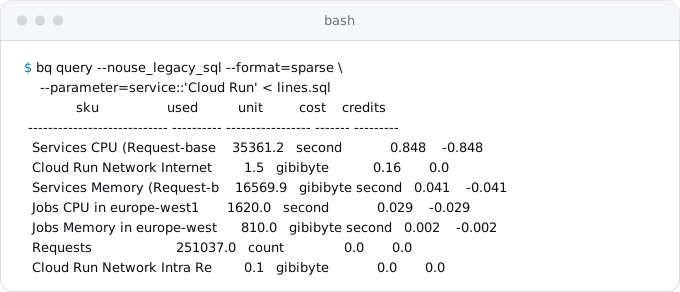
Read the first line. "Services CPU (Request-based billing)" is CPU time of Cloud Run services in request-based billing, the default mode in which you pay only while a request is being handled. The unit is second, meaning a vCPU-second: one vCPU busy for one second. Our services used 35,361 of them between October 1 and 11, and at $0.000024 each (Cloud Run's pricing page, October 11, 2026) that is $0.849, against $0.848 on the bill; Cloud Run rounds each instance's time up to 100 milliseconds, and the bill adds up exact amounts, so a cent of difference is normal.
The credit next to it is the same size and negative. That is Cloud Run's free tier: 180,000 vCPU-seconds and 360,000 GiB-seconds a month per billing account in request-based billing. Google's pricing page says it "is applied as a spending based discount using Tier 1 pricing" (Tier 1 is the price group of regions such as europe-west1), so the cost is shown at full price and then cancelled by a credit. On our export that credit has the type DISCOUNT and the name "CPU Allocation Time", although Google's export schema lists a separate FREE_TIER type; the free tier guide shows how to measure what is left of it.
Requests work differently. 251,037 requests cost zero with no credit at all, because the first 2 million a month are priced at $0 and only the requests after them at $0.40 per million. Egress has no free amount in Europe: 1.5 GiB to users in Europe cost $0.16, which is $0.105 per GiB on Cloud Run's own SKU, as the egress guide explains. Traffic inside the region costs nothing.
So "35,361" is a count of units, the $0.848 is what they would cost, and the free tier wipes it out. A Cloud Run service with this much traffic pays only for its egress.
Check the arithmetic yourself
Every line can be checked the same way: usage, minus what is free that month, times the unit price. We did it for the lines a small Cloud Run app tends to have, with prices from each service's pricing page on October 11, 2026:
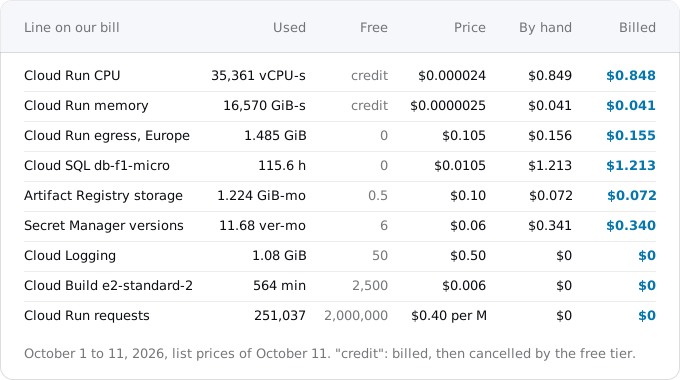
Three things from that table are worth knowing before your own bill arrives.
Units are not the ones you think in. CPU and memory are counted in seconds of use. Storage is counted in GiB-months: one GiB kept for a whole month. Our Artifact Registry line says 1.224 GiB-months after ten days of data, which means about 3.7 GiB of container images stored on average, not 1.2. Secret Manager counts version-months the same way: each version of a secret you keep, for the time it exists. Hours are hours: the Cloud SQL micro instance ran for 115.6 hours.
Free amounts belong to different owners. Cloud Run's free tier, Artifact Registry's 0.5 GiB and Cloud Build's 2,500 minutes are per billing account, shared by all its projects. Cloud Logging's 50 GiB is per project. Secret Manager's six free versions are per account. A second project does not get a second Cloud Run free tier, but it does get its own 50 GiB of logs.
Free shows up two ways. Some free amounts are a price of $0 for the first units (requests, build minutes, logs), and the line costs nothing. Others are billed and then credited (Cloud Run CPU and memory). Either way the net is the same, but only the second kind shows up in the "savings" of the cost breakdown, and a spend cap counts the credited kind at full price.
The negative numbers
Credits are the part of a bill that changes most between accounts, so it helps to know the kinds Google names:
- Free tier credits, described above.
- Promotional credits: the free trial, credits from programs and campaigns. Google says they are "typically considered a form of payment", applied to reduce the total. To see what the account will cost once the trial ends, clear Promotional credits in the Savings filter of Reports.
- Committed use discounts (CUDs), for capacity you commit to for one or three years. A resource-based CUD on virtual machines appears as three parts: a commitment fee, the usage at list price, and a credit that cancels the covered usage. Group the report by SKU to see the parts; by service you see only their sum.
- Sustained use discounts, earned automatically by eligible Compute Engine resources that run through the billing month.
- Spending-based discounts and others, shown as type
DISCOUNTin the export.
Here is our month so far, as the cost breakdown report would draw it:
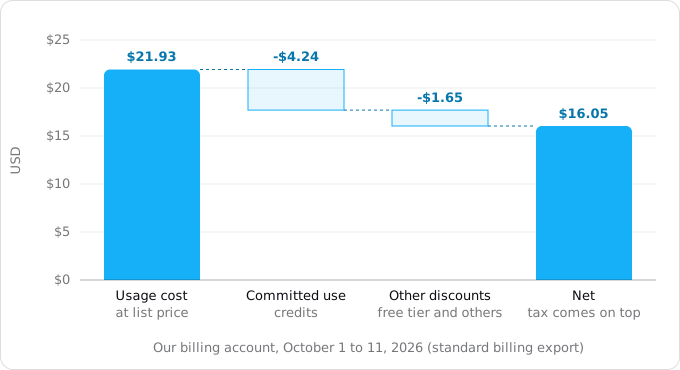
Of the $4.24 of commitment credits, part is our own money: the commitment's fees, $2.81 so far, are ordinary lines named "Commitment v1: E2 Cpu in EMEA for 1 Year" and the like. The commitment has saved $1.43 this month, not $4.24. The other $1.65 is mostly Cloud Run's free tier ($0.92) and three Network Intelligence Center features that Google bills and credits in full ($0.72). To list your own credits, save this as credits.sql:
SELECT c.type, LEFT(c.name, 34) AS name, ROUND(SUM(c.amount), 2) AS amount
FROM `PROJECT.billing_export.gcp_billing_export_v1_XXXXXX_XXXXXX_XXXXXX`,
  UNNEST(credits) AS c
WHERE invoice.month = FORMAT_DATE('%Y%m', CURRENT_DATE('America/Los_Angeles'))
GROUP BY 1, 2
ORDER BY amount
and run it with bq query --nouse_legacy_sql --format=sparse < credits.sql.
Lines that confuse people the first time
Most questions about a first bill are about lines like these, all of which were on ours:
A service with another product's name. Exodus team: on our bill, Firestore's reads, writes and storage are listed under the service "App Engine", with SKUs that start with "Cloud Firestore". We never used App Engine. Search for the SKU, not the service.
Services you did not deploy. Deploying to Cloud Run from source runs a build in Cloud Build and stores the image in Artifact Registry, as Cloud Run's pricing page says, so both appear on the bill of an app that "only uses Cloud Run". Builds on the default e2-standard-2 machine are free for 2,500 minutes a month (Google calls that free tier promotional and subject to change); ours showed 564 minutes at $0. One day of builds on another machine type was billed instead as CPU and RAM minutes, $2.10. Logging and Monitoring appear because Cloud Run writes its logs and metrics there, and Secret Manager if your service reads secrets from it.
Dozens of $0.00 lines. Traffic into Google Cloud, traffic inside a region, the first 50 GiB of logs, the first 2 million requests: they are measured and priced at zero, so they appear. Our October lines so far cover 167 SKUs; 78 of them are network SKUs of one virtual machine, and 60 of those cost $0.0000.
Charges that are not in any project. Support plans and some account-level fees show as [Charges not specific to a project] in the cost table. A per-project view never adds up to the statement for this reason.
Tax, rounding and adjustments. Tax is added when the statement is made, so it is not in the month's running total; in the export it arrives as rows of cost_type tax, next to rounding error and adjustment. An adjustment is Google changing your balance, usually in your favour with a credit memo. A debit memo is an extra bill.
A fee on a quiet day. A commitment's fee is billed for the whole term, Google's page says, so its line is there on days with little usage, and the free trial's credit can hide a whole month of costs. If a line does not make sense, find its SKU in the cost table, read its unit, and do the arithmetic.
Your first bill, step by step
The cutover day checklist has reading the first bill as one of its steps; this is how:
- Find your account type and cycle on Payment overview: threshold or monthly billing, and the threshold amount.
- Open the statement on the Invoices page and note its total.
- Open Reports with "Last invoice by service" and check that its total matches the statement, tax included.
- Switch Group by to SKU and sort by cost. The top five lines are usually most of the bill.
- For each top line, read the unit and the usage, find the SKU's price on the pricing page, subtract the month's free amount and multiply. A difference of a few cents is rounding; anything more is a question for the cost table.
- Open the cost breakdown to see what credits saved, and clear promotional credits if a trial is still running.
- Set a budget at about one and a half times this total with a forecast threshold, as the budgets guide describes, and turn on the billing export if it is not on yet.
Where Exodus comes in
The report Exodus writes for a repository ends with an estimated monthly cost on Cloud Run, part by part: compute, requests, database, storage, egress, with the free tier applied. Those parts are the same SKUs you will find on the bill, and what Cloud Run costs lists their prices. After the move, exodus bill, with read-only access to your billing export, reads the month's real lines and the cabinet puts them next to the estimate, one service at a time, with the reason for each difference: a free tier used by another project, egress higher than measured, a build machine that is not the free one.
FAQ
Why was my card charged before I got a Google Cloud bill?
A self-serve account on threshold billing is charged on the 1st of each month and also whenever the balance reaches a payment threshold that Google sets, for example $100, and raises as the account builds a history. Google says charges typically come sooner than the cost details, which usually appear in reports within a day.
Why does my Google Cloud bill show services I never turned on?
A source deploy to Cloud Run builds in Cloud Build and stores the image in Artifact Registry, so both appear. Logging and Monitoring appear because Cloud Run writes its logs and metrics there. On our bill Firestore's lines sit under the service App Engine, so search for the SKU, not the service.
What are the negative numbers on a Google Cloud bill?
They are credits: the free tier, promotional credits such as the $300 free trial, committed use discounts, sustained use discounts and spending-based discounts. Each is a negative amount attached to a line's cost, and cost plus credits is the net. A commitment's credits are not all savings, because its fees are billed too.
Is the Cloud Run free tier per project or per billing account?
Per billing account. Its 180,000 vCPU-seconds, 360,000 GiB-seconds and 2 million requests a month are shared by every linked project, and so are Artifact Registry's 0.5 GiB and Cloud Build's 2,500 minutes. Cloud Logging's 50 GiB is per project, so a second project gets its own logs allowance but no second Cloud Run free tier.
Sources
21
- docs.cloud.google.comFind out your Cloud Billing account type and charging cycle, Google
- docs.cloud.google.comGet your invoices, statements, and payment receipts, Cloud Billing, Google
- docs.cloud.google.comUnderstand your monthly invoice, Cloud Billing, Google
- docs.cloud.google.comCloud Billing concepts, Google
- docs.cloud.google.comCloud Billing reports, Google
- docs.cloud.google.comView invoice charges in reports, Cloud Billing, Google
- docs.cloud.google.comCost breakdown report, Cloud Billing, Google
- docs.cloud.google.comSavings and credits in reports, Cloud Billing, Google
- docs.cloud.google.comCost table report, Cloud Billing, Google
- docs.cloud.google.comUnderstand memos and adjustments, Cloud Billing, Google
- docs.cloud.google.comFree Google Cloud features and trial offer, Google
- docs.cloud.google.comStructure of Standard data export, Cloud Billing, Google
- cloud.google.comCloud Run pricing, Google
- cloud.google.comCloud SQL pricing, Google
- cloud.google.comCloud Build pricing, Google
- cloud.google.comArtifact Registry pricing, Google
- cloud.google.comSecret Manager pricing, Google
- cloud.google.comGoogle Cloud Observability pricing, Google
- docs.cloud.google.comCommitted use discounts, Google
- docs.cloud.google.comManage spend cap budgets, Cloud Billing, Google
- Exodus team: our billing account's standard export for the October 2026 invoice month, read Oct 11, 2026