Google Cloud has no spending limit, so two tools do the watching. A budget emails billing administrators, by default at 50%, 90% and 100% of actual spend, or publishes to Pub/Sub, and a spend cap can stop Cloud Run in one project. The billing export writes every cost line into BigQuery, where two queries explain most bills, inside BigQuery's free tier for a small team.
In short
- Cost data reaches budgets and the export typically within a day, sometimes after more than 24 hours, so every alert describes the past.
- A new budget emails at 50%, 90% and 100% of actual spend; up to five Cloud Monitoring email channels reach other addresses.
- Set one account budget at about 1.5 times the expected bill with a 100% forecast threshold, plus $1 tripwires per app.
- BigQuery's free tier is 10 GiB of storage and 1 TiB of queries a month; our export held 20.8 MB after ten days.
Commands were checked with gcloud 587.0.0 and bq 2.1.39 on October 11, 2026; the outputs are from our own billing account.
How cost data travels
A loop that calls an API, a forgotten test database, a build machine one size too big: each bills at full price until a person notices, and nothing in the default setup tells you. Everything here depends on one fact: Google learns what you spent hours after you spent it. Services report usage to Cloud Billing at their own intervals, Cloud Billing turns usage into costs, and only then do budgets, reports and the export see them. Google's export reference says cost details are "typically available within a day, but can sometimes take more than 24 hours".
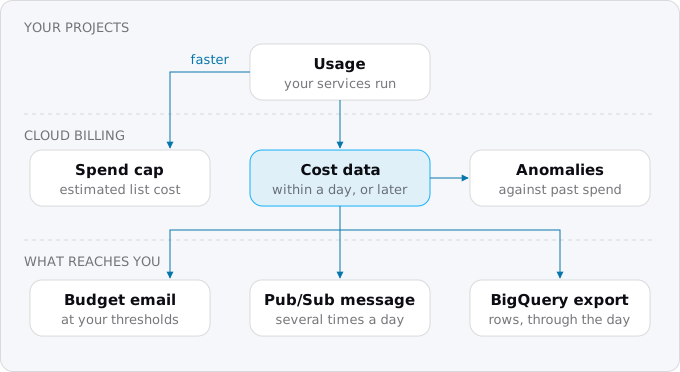
So every alert is about the past, and the usage has continued since. Google's budget page says to set the budget below the money you actually have, to allow for the delay. On our export, on the afternoon of October 11, 2026, the newest rows covered usage up to about six hours earlier. The one exception is the spend cap, which reads gross estimated costs at list price and can stop Cloud Run in one project; it is a kind of budget, covered below.
A budget, setting by setting
A budget lives on the billing account, not in a project. The project setup guide creates a first budget in its step 4; this section explains every setting behind it. You create it on the console's Billing, Budgets & alerts page or with gcloud billing budgets create. A budget for the whole account needs the Billing Account Administrator or Billing Account Costs Manager role; a project owner can create budgets for their own project. An account can hold 50,000 budgets.
The settings, in the order the console asks for them:
Scope. What the budget counts: the whole account, some projects (or folders), some services such as Cloud Run, or resources with a given label. Label filters exist only on account-level budgets, and the console offers only labels that already have usage.
Period. Monthly by default; quarterly, yearly or a custom date range otherwise. On the first day of a new month the actual cost resets to zero.
Amount. A fixed amount in the account's currency, or "last period's spend", which follows your previous month. The second fits a stable bill: it tells you when this month is heading above the last.
Credits. Google calls them "Savings": committed use discounts, free tier credits, promotional credits such as the free trial. By default a budget counts cost after all of them. That is the bill you will pay, but it hides two things:
- A free trial. While the trial credit covers your usage, cost after credits is zero and the budget stays silent. Google suggests clearing promotions to see what the account will cost once the trial ends.
- The free tier. Cloud Run's free tier arrives as a credit against list price, as the free tier guide shows from our bill, so with credits a small service costs zero.
In gcloud, --credit-types-treatment picks include-all-credits (the default), exclude-all-credits, or include-specified-credits with a list in --filter-credit-types.
Thresholds. Each is a percentage of the amount on one of two bases: actual spend so far, or forecasted spend at the end of the period. New budgets start with 50%, 90% and 100% of actual spend. A 110% forecast threshold on a $100 budget fires when the month is heading past $110. Custom date ranges cannot use forecasts.
Three details from Google's page change how you read the email. A monthly budget keeps tracking for the first two days of the next month, so an alert on September 1 can be about August. Taxes such as VAT count once charged. And if credits keep the cost below the line, no email is sent.
Who gets the email. By default, everyone with the Billing Account Administrator or Billing Account User role. For a single-project budget, project owners can be added (in Preview). For anyone else, link up to five Cloud Monitoring notification channels; only email channels work here. They are the same channels the alerting policies in the logs, metrics and alerts guide send to, and the way alerts reach a shared inbox without giving it a billing role.
Creating one from the command line
Find your billing account ID with gcloud billing accounts list. To reach an address without a billing role, create an email channel in Cloud Monitoring and read its full name:
gcloud beta monitoring channels create --display-name="Cloud costs" \
  --type=email --channel-labels=email_address=ops@example.com
gcloud beta monitoring channels list --format="value(name,displayName)"
Then the budget: the whole account at $40 a month, emails at 50%, 90% and 100% of actual spend and when the forecast passes 100%, sent to the channel and to the billing administrators:
gcloud billing budgets create --billing-account=XXXXXX-XXXXXX-XXXXXX \
  --display-name="account monthly" --budget-amount=40USD \
  --calendar-period=month \
  --threshold-rule=percent=0.5 --threshold-rule=percent=0.9 \
  --threshold-rule=percent=1.0 \
  --threshold-rule=percent=1.0,basis=forecasted-spend \
  --notifications-rule-monitoring-notification-channels=projects/PROJECT_ID/notificationChannels/CHANNEL_ID
The currency after the amount must be the account's own. --disable-default-iam-recipients leaves the billing administrators out; --filter-projects=projects/PROJECT_ID or --filter-services=services/152E-C115-5142 (Cloud Run) narrows the scope; --filter-labels=app=shop keeps one app. The first email can take several hours to become possible, so create budgets before you need them.
What to set
A small team does well with two layers:
- One budget for the whole account at about one and a half times the expected bill, with actual thresholds at 90% and 100% and a forecasted one at 100%. The forecast is the early warning.
- A small budget per app or environment, by project or label, as a tripwire that tells you the first time something costs money.
Exodus team: our account has eight monthly budgets. Two cover groups of projects at $30 and $25, with 90% of actual and 100% of forecasted spend. Six are $1 tripwires on one project each, four of them narrowed to one app by label. We raise a tripwire once its app has a normal bill. The list, printed without names:
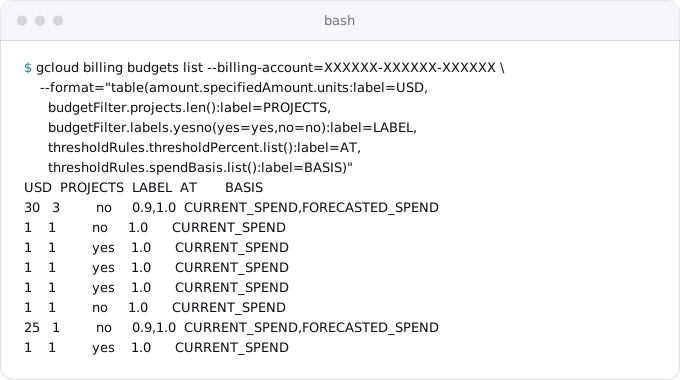
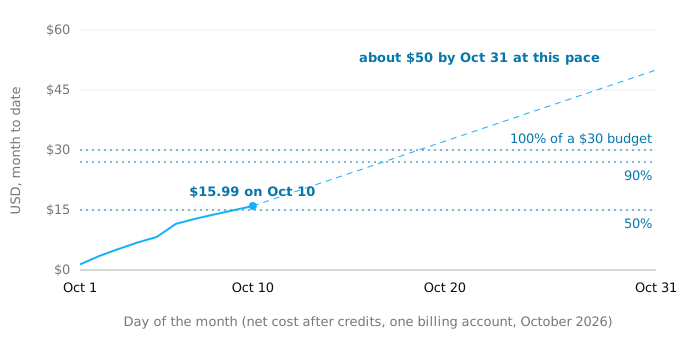
Over a month it plays out like this. The chart is our account's net cost in October 2026 against a $30 budget. At this pace the 50% email arrives on October 10, the 90% email around October 17, and the month ends near $50. Only a forecast threshold speaks up in the first days, because the pace is visible then.
Spend caps: the budget that stops something
A budget on one project and one service can be a spend cap, and Cloud Run is one of the services that can have one. When the service's gross estimated cost in that project passes the amount, new requests are refused until the first of the next month or until you lift the cap. The project setup guide explains how it works and where to set it, since gcloud billing budgets create has no flag for it. For budgeting, two things matter. A cap counts list price before credits, so set it above your gross cost, not your net bill. And enforcement is not instant: usage before it triggers is billed. On staging a cap is a good default; in production it takes the app offline, so set it well above a bad month.
When an email is not enough: Pub/Sub
A budget can also publish to a Pub/Sub topic (Pub/Sub is Google's message service: a program publishes a message to a topic and other programs receive it), so code can react. Create the topic in a billing administration project with gcloud pubsub topics create budget-alerts, then connect it in the console or with --notifications-rule-pubsub-topic=projects/PROJECT_ID/topics/budget-alerts on budgets create or update. Whoever connects it needs Pub/Sub Admin on that project, so Cloud Billing can be allowed to publish.
The message is not the email. Google sends the budget's state several times a day, whether or not a threshold was crossed, even with no usage. The data is base64-encoded JSON:
budgetDisplayName,budgetAmount,budgetAmountType,currencyCode;costAmount, the cost so far, andcostIntervalStart, when the period began;alertThresholdExceededandforecastThresholdExceeded, the highest thresholds passed as fractions (0.9 is 90%), absent until one is passed.
Delivery is at least once and can be out of order, so a handler must be safe to run twice. If delivery fails because the topic was deleted or lost its permission, Google says you will not be told.
Google's examples act in two ways. One Cloud Run function compares costAmount with budgetAmount and removes the billing account from the project. Google's page opens with a warning: this "removes Cloud Billing from your project, shutting down all resources. Resources might be irretrievably deleted", and recovery is not guaranteed. Spending can still pass the budget, because of the delay. A gentler example stops Compute Engine instances and leaves storage alone. For a Cloud Run app the spend cap does what the first example was written for, without deleting anything; keep disabling billing for sandboxes. If you need more than a cap, copy the second pattern: scale a worker pool to zero, pause a Cloud Scheduler job, lower --max-instances.
Anomaly detection
Cloud Billing also looks for spikes on its own, comparing costs with their history. By default it emails the billing administrators about every anomaly; the thresholds are set from your usage, and you can raise them (ignore anything under $20, say) or add a Pub/Sub topic on Billing, Anomalies. It needs no setup. It does not replace a budget: an anomaly is "unusual for this project", a budget is "more than we can spend".
The billing export
Budgets tell you that something happened; the export tells you what. Cloud Billing writes your cost lines into a table in BigQuery, Google's SQL database for analysis, several times a day, one row per service, SKU, project and hour, with cost, credits, labels and region. Only the export lets you ask questions the console's reports were not built for and keep history as long as you want. There are four exports, configured separately:
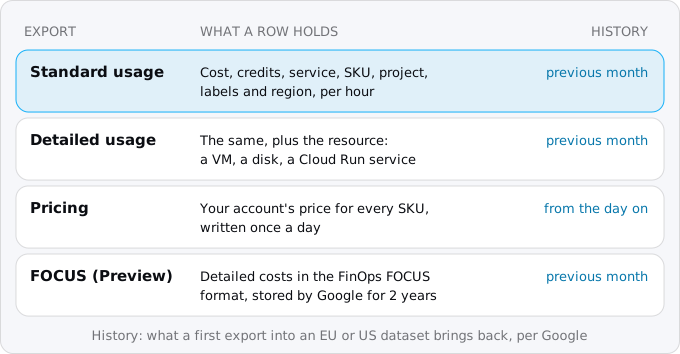
Turn on standard usage cost first. Add detailed for costs per resource, for example which of several Cloud Run services is the expensive one; its queries scan more. Pricing puts your account's prices in SQL; FOCUS is the FinOps Foundation's format for teams that combine several clouds.
Turning it on
- A project for billing data, linked to the same billing account. Google suggests a separate billing administration project.
- Billing enabled on it, because BigQuery needs a billing account.
- The BigQuery Data Transfer Service API, only for the pricing export.
- A dataset in the EU or US multi-region, with no table expiration:
bq --location=EU mk --dataset --description="Cloud Billing export" \
PROJECT_ID:billing_export- The export. In the console, open Billing, Billing export, pick the account, and on the BigQuery export tab enable "Standard usage cost" with your project and dataset. Google's page gives only console steps for this. You need Billing Account Administrator (or Costs Manager) and BigQuery User on the project.
The table appears within a few hours as gcp_billing_export_v1_ plus your account ID with underscores; bq ls PROJECT_ID:billing_export shows it. It holds every project on the billing account. Four rules are hard to undo later:
- The location is permanent. Google says a first export into the EU or US multi-region brings back the previous month, and a single-region dataset starts the day you enable it. Exodus team: ours was created in the EU multi-region on October 1, 2026, and its rows start at 11:00 UTC that day, with nothing from September. Google's page is the rule, but our account did not get the backfill, so do not count on it.
- History starts with the export. Move it to another dataset and the new one starts empty; you join the two in queries.
- No table expiration. Google warns that deleted billing records cannot be filled in again.
- Do not write to the table. The export may delete what you add. Put your logic in views, which also protect your reports when the schema changes, as Google's page says it can.
What it costs
Loading is free; storage and queries are BigQuery's, and a small team stays inside its free tier of 10 GiB of storage and 1 TiB of queries a month. Our table held 35,381 rows and 20.8 MB after ten days for four projects, about 60 MB a month. A query is billed for at least 10 MB, so the free terabyte is about 100,000 queries. Beyond it, on-demand queries cost $6.25 per TiB in us-central1 (October 11, 2026). Add --dry_run to see what a query would scan.
Queries that answer most questions
The guide to reading your first Google Cloud bill explains the statement these rows add up to. The columns are named for what they hold: service.description, sku.description, project.id, labels, usage_start_time, cost, credits, invoice.month. Three rules make the numbers match the invoice:
- Net cost is
costplus credits. Credits are negative amounts in a repeated field, added withUNNEST(credits), as in Google's own invoice query. - "This month's bill" is
invoice.month. Late usage can land on the next invoice and corrections arrive as new rows; timestamps answer "what happened that day". - Cut days in Pacific time. Google's examples use
'US/Pacific'; the queries below use its other name,America/Los_Angeles.
Save this as month.sql, with your project and table name:
SELECT
  service.description AS service,
  ROUND(SUM(cost), 2) AS gross,
  ROUND(SUM(IFNULL((SELECT SUM(c.amount) FROM UNNEST(credits) c), 0)), 2)
    AS credits,
  ROUND(SUM(cost) + SUM(IFNULL((SELECT SUM(c.amount)
    FROM UNNEST(credits) c), 0)), 2) AS net
FROM `PROJECT.billing_export.gcp_billing_export_v1_XXXXXX_XXXXXX_XXXXXX`
WHERE invoice.month = FORMAT_DATE('%Y%m', CURRENT_DATE('America/Los_Angeles'))
GROUP BY service
ORDER BY net DESC
LIMIT 8
Group by project.id instead to see projects, or add AND EXISTS (SELECT 1 FROM UNNEST(labels) l WHERE l.key = 'app' AND l.value = 'shop') to the WHERE to see one app. Exodus team: the app label we put on resources shows up on the Cloud Run, Cloud SQL, Cloud Storage, Artifact Registry and Secret Manager rows of our export, which is why labelling every resource pays off here.
When a budget email arrives, the question is what changed. Save this as spike.sql; it compares one day with the average of the seven before it, per SKU, and keeps lines that grew by more than five cents:
SELECT
  service.description AS service,
  LEFT(sku.description, 28) AS sku,
  ROUND(SUM(IF(DATE(usage_start_time, 'America/Los_Angeles') = @day,
    cost, 0)), 2) AS on_day,
  ROUND(SUM(IF(DATE(usage_start_time, 'America/Los_Angeles') < @day,
    cost, 0)) / 7, 2) AS week_avg
FROM `PROJECT.billing_export.gcp_billing_export_v1_XXXXXX_XXXXXX_XXXXXX`
WHERE DATE(usage_start_time, 'America/Los_Angeles')
  BETWEEN DATE_SUB(@day, INTERVAL 7 DAY) AND @day
GROUP BY service, sku
HAVING on_day - week_avg > 0.05
ORDER BY on_day - week_avg DESC
LIMIT 6
Run both from the project that holds the dataset:
bq query --nouse_legacy_sql --format=pretty < month.sql
bq query --nouse_legacy_sql --format=pretty \
  --parameter=day:DATE:2026-10-06 < spike.sql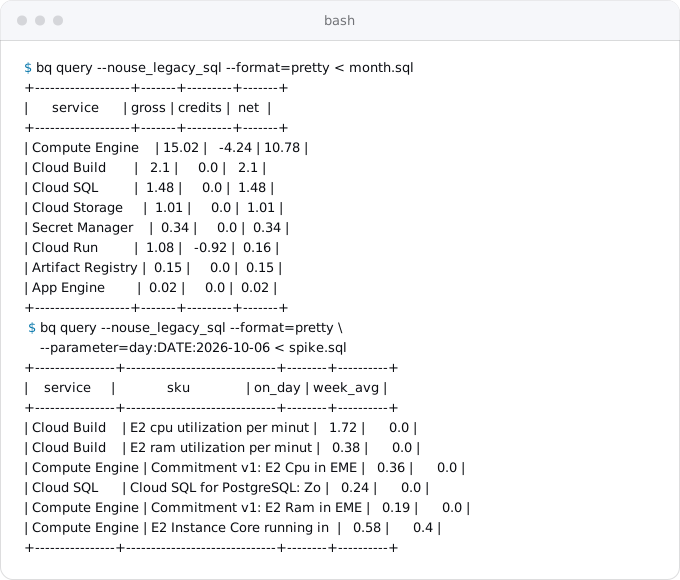
Our output answers both questions at a glance. This month Cloud Run costs $1.08 at list price and $0.16 after the free tier's credits, while virtual machines and builds are most of the bill. October 6, where the line in the chart above jumps by $3.28, was a day of Cloud Build: $2.10 of build machine time against nothing before, plus a commitment's first fees.
The third query is Google's invoice total: cost plus credits per invoice.month, with a total_exact column that adds as NUMERIC to avoid rounding. It is on Google's example queries page, with queries for labels, tags and corrections. The console's billing reports also have a Generate query button that writes the SQL for the report on screen.
Two habits make the export useful. Run the month query once a week, before the budget has anything to say. When an email arrives, run the day query for the day before it.
Where Exodus comes in
The report Exodus writes for a repository ends with a monthly cost on Cloud Run, part by part: compute, requests, database, storage, egress. That total, priced as in what Cloud Run costs, is the right first budget for the account, with its forecast threshold, and the Cloud Run part sets a spend cap per environment. After the move, the export closes the loop: with read-only access to it, exodus bill reads a month of the real bill, and the cabinet shows it next to the estimate, line by line, with the reason for each difference.
FAQ
Does a Google Cloud budget stop spending?
No. A budget with alerts only sends email or Pub/Sub messages; usage continues. A spend cap, a budget on one project and one service such as Cloud Run, refuses new requests once its gross estimated cost passes the amount, but enforcement is not instant and usage before it triggers is billed.
How long does a budget alert take?
Cost data is typically available within a day, but can take more than 24 hours, so every alert is about the past. The first email of a new budget can take several hours to become possible. Set budgets before you need them, and below the money you actually have.
Why did my budget not alert during the free trial?
By default a budget counts cost after credits, and while the trial credit covers your usage that cost is zero. Exclude promotional credits from the budget to see what the account will cost once the trial ends. Cloud Run's free tier is also a credit, so a small service shows zero.
How much does the BigQuery billing export cost?
Loading is free; storage and queries are BigQuery charges. A small team stays inside the free tier of 10 GiB of storage and 1 TiB of queries a month. Our table held 20.8 MB after ten days for four projects, and a query is billed for at least 10 MB.
Sources
16
- docs.cloud.google.comCreate, edit, or delete budgets and budget alerts, Cloud Billing, Google
- docs.cloud.google.comCustomize budget alert email recipients, Cloud Billing, Google
- docs.cloud.google.comSet up programmatic notifications, Cloud Billing, Google
- docs.cloud.google.comDisable billing usage with notifications, Cloud Billing, Google
- docs.cloud.google.comControl resource usage with notifications, Cloud Billing, Google
- docs.cloud.google.comManage spend cap budgets, Cloud Billing, Google
- docs.cloud.google.comgcloud billing budgets create, Google Cloud SDK reference
- docs.cloud.google.comView and manage cost anomalies, Cloud Billing, Google
- docs.cloud.google.comExport Cloud Billing data to BigQuery, Google
- docs.cloud.google.comSet up Cloud Billing data export to BigQuery, Google
- docs.cloud.google.comUnderstand the Cloud Billing data tables in BigQuery, Google
- docs.cloud.google.comStructure of Standard data export, Google
- docs.cloud.google.comStructure of Detailed data export, Google
- docs.cloud.google.comExample queries for Cloud Billing data export, Google
- cloud.google.comBigQuery pricing, Google
- Exodus team: our billing account on Oct 11, 2026