Cutover day for a move to Cloud Run runs in five moments. A week before, the new app serves on its run.app address with alerts and a written way back. A day before, the DNS TTL drops to 300 seconds. In the hour, writes freeze, the data is copied and compared, and the record switches. Then a week of watching, with the old app kept as the rollback.
In short
- Lower the DNS TTL to 300 seconds a day before: the new TTL applies only after the old one expires, an hour later for 3600 and a day later for 86400.
- A Cloud Run domain mapping issues its certificate only after DNS points at it, in about 10 minutes when the record existed first and up to 24 hours by Google's page; a load balancer with DNS authorization or Firebase Hosting's Advanced Setup issues it ahead.
- Stripe retries a refused webhook for up to 3 days in live mode, so events refused by the old app's maintenance page reach the new app later.
- A warm minimum instance of 1 vCPU and 512 MiB costs $0.32 a day, $2.27 a week; the old platform keeps billing for the week it stays as the way back.
Commands were checked against gcloud 587.0.0 --help, and the read-only ones were run on October 12, 2026.
The rule: the old app is the way back
The cutover is the hour when the address your users know stops pointing at the old host and starts pointing at Cloud Run. Everything before it can be redone; the cutover touches real users, payments and data. This checklist works for an app leaving Heroku, Render, Railway, Fly, a VPS or anything else, and keeps one rule: the old app stays able to take traffic back until the new one has served real users for a week.
Until then the rollback is to point DNS back. Writes made on the new app after the switch would have to be copied back by hand, so keep the time between the switch and the decision short and know which tables take writes.
The data half, with every flag of pg_dump and pg_restore and the compare query, is in moving a Postgres database without losing data. This guide is the rest of the day around it.
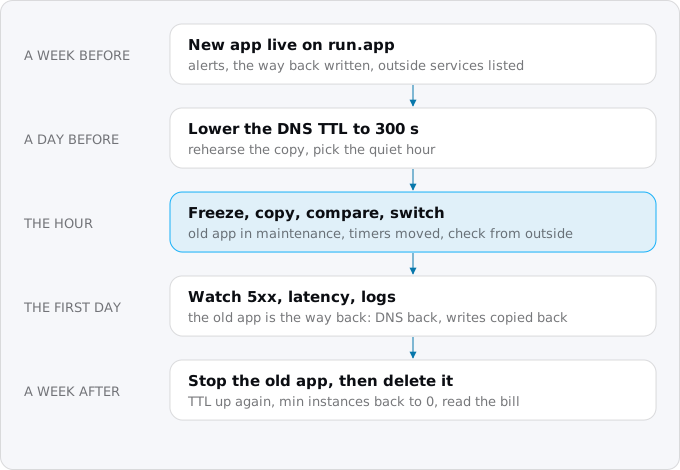
A week before
The new app serves real requests on run.app
Every Cloud Run service gets an HTTPS address ending in run.app when it is created, and keeps it until you turn it off with --no-default-url. Deploy the new app there from CI, without a JSON key, with its secrets in Secret Manager. Point it at a rehearsal copy of the data and walk every path a user takes: sign up, sign in, the main pages, anything that writes, uploads or sends an email.
Two settings matter. By default Cloud Run allows up to 100 instances per revision, and a small Cloud SQL instance accepts far fewer connections than that many instances would open, so set a maximum your database can serve, as connection pooling on Cloud Run works out. And the first requests after the switch may each start a new instance, so for the day keep one warm:
gcloud run services update SERVICE --region=REGION --min-instances=1 --max-instances=10Set up the three alerts from logs, metrics and alerts for a Cloud Run app too (uptime, 5xx, error logs), and test that each reaches you.
List everything outside that knows the old app
This is the step people skip. Write down every place that holds an address, a secret or an IP of the old app:
- Webhooks from a payment provider, a Git host, a mail provider. A webhook URL on your own domain follows DNS and needs no change. One on the platform's address (
*.herokuapp.com,*.onrender.com,*.up.railway.app,*.fly.dev) must be changed. Copy the signing secret too: Stripe gives each endpoint its own secret starting withwhsec_, and the new app must verify with the same one. - OAuth sign-in. Google requires the
redirect_urito match one of the client's authorized redirect URIs exactly, or sign-in fails withredirect_uri_mismatch. If you also move from a platform address to your own domain, add the new URI now, while both work. - IP allow lists. A partner's API or a firewall may accept only your old server's IP. Cloud Run has no fixed outbound IP by default; one takes VPC egress through a Cloud NAT gateway with a reserved static address. Set it up and send the new IP now.
- Timers and workers on the old platform and their counterparts here (see cron and timers with Cloud Scheduler and background workers with Cloud Tasks). Create the Cloud Scheduler jobs now and pause them, so that on the day you resume them:
gcloud scheduler jobs pause JOB --location=REGION- Files on the old platform's disk or storage, copied to a bucket now and again during the freeze, as files and uploads with Cloud Storage shows.
Choose the front and its certificate path
Custom domains and HTTPS on Cloud Run compares the three fronts: Cloud Run domain mapping, a load balancer and Firebase Hosting. For the cutover one question matters: can the certificate be issued before the switch?
- With a load balancer and Certificate Manager's DNS authorization, or Firebase Hosting's Advanced Setup, yes. You prove control of the domain with a separate DNS record, the certificate is issued while the old app still serves users, and the switch is one record change. Google's migration page says a certificate authorized by the load balancer itself is not suitable for a move with no downtime "because you can't issue them in advance". You can then test the new front under the real name before anyone uses it, by giving curl the address instead of DNS:
curl -sI --resolve app.example.com:443:203.0.113.10 https://app.example.com/- With Cloud Run domain mapping, no: the certificate is issued once the name points at it. The custom domains guide measured about 10 minutes when the record existed first; Google's page allows up to 24 hours. Plan for HTTPS errors in those minutes, or pick a front that issues ahead.
Write the way back down
Write the rollback as commands now, while you are calm. Usually it is three steps: point the DNS record back at the old host, take the old app out of maintenance mode, undo the database freeze. Check whether the old host's certificate needs DNS to point at it. If it does, your way back carries its own HTTPS gap.
Exodus team: when we moved two public names between hosts, the fast way back kept the names on the new host and passed their traffic to the old app behind it, so no certificate changed hands: one config deploy, of the kind that took 17 seconds at the switch. Pointing DNS back would have needed a fresh certificate and up to an hour of HTTPS errors.
A day before
Lower the TTL
Google's Cloud DNS documentation describes how a change spreads: first to the authoritative servers, then to resolvers "when their cache of the records expires", and the TTL in seconds sets how long they cache. For a change that needs a narrow window it advises lowering the TTL beforehand, with a catch: "the new shorter TTL value is applied after the previous TTL value expires". A record at 3600 lowered to 300 takes effect for everyone an hour later; one at 86400, a day later. Hence a day before.
Look up the current TTL (the checks below show how) and set it to 300 seconds. Google's page also says some resolvers ignore TTLs, so a few users may reach the old app for a while whatever you do. So the old app must keep running and refuse writes, not accept them.
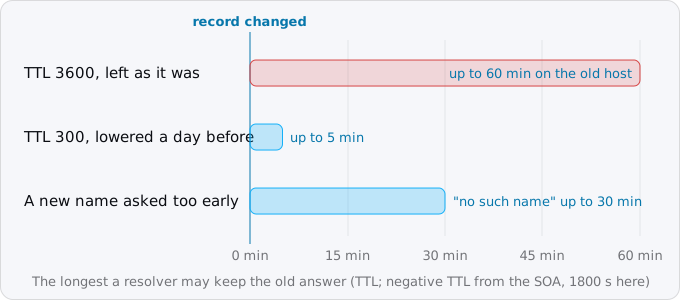
There is a second cache, for answers that say a name does not exist. RFC 2308 sets its length from the zone's SOA record: the smaller of its last field and its own TTL. Ours gives 1800 seconds, so a resolver that asked for a new name a minute before it was created may answer "no such name" for 30 minutes. Google adds that many resolvers, Windows and the Java runtime among them, cache negative answers for up to 15 minutes. So create new records, such as a certificate's TXT record, well before anything looks them up.
Rehearse the copy and pick the hour
Run the data rehearsal once more and write down its time. That, plus a few minutes for the compare, is the length of the freeze. If it is longer than users can accept, the Postgres guide covers Database Migration Service, which shortens the freeze to the last changes.
Then pick the hour from your current platform's metrics, or from Cloud Run's request_count by hour if the new app has served test traffic.
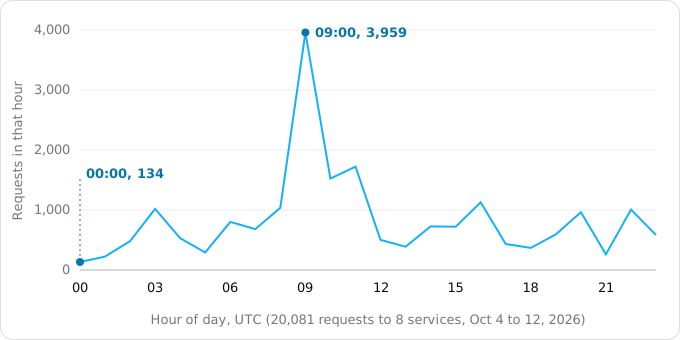
A freeze in our quietest hour would touch 30 times fewer people than in the busiest. The quietest hour is often the middle of the night, though, and someone must be awake to watch; a quiet working afternoon with the whole team there is often better. Tell users the time and the length of the window.
The hour
Do these in order, with one person reading the list and one typing.
- Warm the new app. Check that one minimum instance is set and that the health route answers on
run.app. - Put the old app in maintenance mode. On Heroku it serves a static page to every visitor and logs error H80, but Heroku's page says Scheduler jobs can still run and worker dynos keep running, so stop them too, for example with
heroku ps:scale worker=0. Elsewhere, use the platform's maintenance page or scale the web process to zero. - Freeze writes in the database as well, because a worker or timer you forgot will otherwise write after the copy. The Postgres guide does this with
default_transaction_read_only. - Copy the data and the files again and compare. This time counts, checksums and sequence values must match line for line.
- Point the DNS record at the new front. If your DNS provider can proxy traffic, keep the record DNS-only.
- Check from outside (next section) until public resolvers return the new target and HTTPS on your domain reaches the new app.
- Resume the timers on the new side, after checking the old side's are stopped:
gcloud scheduler jobs resume JOB --location=REGION- Update what does not follow DNS: webhook URLs on the platform address, OAuth redirect URIs, partners' allow lists, if any are left from the week before.
- Walk the main paths on the real domain: sign in, the page that sells, a write, an upload, a webhook.
- Leave the old app in maintenance and its database read-only. Delete nothing.
Webhooks sent during the switch are less of a worry than they look, if the old app refused them. Stripe retries a failed delivery for up to three days in live mode (Stripe webhooks on Cloud Run has the details), so events refused by the maintenance page reach the new app later, as long as the endpoint URL is on your domain. An old app that accepts a webhook and writes it into a database you will throw away loses the event. That is why the freeze goes in the database too.
Checking from outside
Your own machine is the worst place to check DNS from: it has its own cache, perhaps a VPN, a corporate resolver or an old line in /etc/hosts. Ask public resolvers and your zone's name servers directly:
dig +noall +answer app.example.com @8.8.8.8
dig +noall +answer app.example.com @1.1.1.1
dig +noall +answer app.example.com @NAMESERVER_OF_YOUR_ZONE
If dig returns an address that makes no sense, something between you and the resolver answered. Google Public DNS also answers over HTTPS, with JSON, which nothing on port 53 can intercept:
curl -s 'https://dns.google/resolve?name=app.example.com&type=A' \
  | jq -r '.Answer[] | "\(.name) \(.TTL) \(.data)"'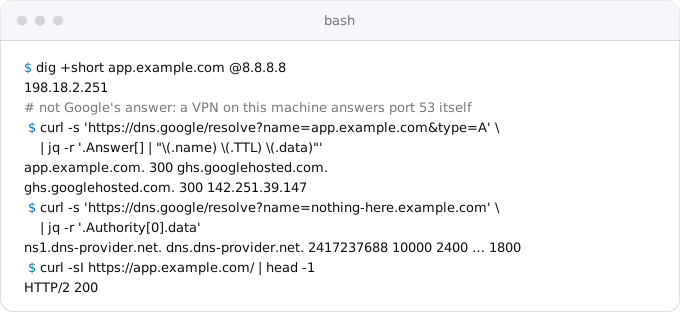
Exodus team: when we switched two names between hosts on October 11, Google's and Cloudflare's DNS over HTTPS returned the new target 6 seconds after the record changed, because the TTL had been 300 for weeks.
Then check what answers. curl -sI https://app.example.com/ should print a status line, but the old app in maintenance answers too, so check something only the new app sends: a header, or a version on its health route.
The first day
Watch the 5xx alert, latency and the error logs; the logs guide has the 5xx query by revision. Watch the old app's logs too: anything still reaching it is a resolver with an old answer, a webhook with an old URL or a client with a hard-coded address.
If the new code is at fault, not the switch, roll back to the previous revision:
gcloud run services update-traffic SERVICE --region=REGION --to-revisions=PREVIOUS_REVISION=100That is not a rollback of the cutover: users stay on Cloud Run and the new database, with older code. A rollback of the cutover is the plan from a week before: DNS back, the old app out of maintenance, the old database writable. Decide early which one a problem needs, because the longer the new app takes writes, the more you would copy back by hand.
A week after
When the new app has served a week of real traffic without a reason to go back:
- Stop the old app, scaling its web and worker processes to zero, but keep it for now.
- Take a final backup of the old database somewhere you control, then delete the old database and the old app.
- Raise the TTL back to its old value, as Google's page suggests, to reduce load on resolvers.
- Set min instances back to 0 if the app does not need a warm instance.
- Remove what only the old app needed: webhook entries, OAuth redirect URIs and allow-list entries for its address and IP. Rotate the secrets that sat in the old platform's dashboard, because it still holds their values.
- Read the first bill, as reading your first Google Cloud bill explains, and check that a budget alert exists.
What it costs
On Google's side the day costs little; the overlap costs a week of the old platform's bill.
- A warm instance. At list prices of October 12, 2026 in europe-west1, an idle minimum instance is billed $0.0000025 per vCPU-second and $0.0000025 per GiB-second. One with 1 vCPU and 512 MiB, idle all day, is 86,400 × ($0.0000025 + 0.5 × $0.0000025) = $0.32 a day, $2.27 a week, before the free tier. Idle instances that are not minimum instances are not charged.
- The old platform bills until you stop it; Heroku's page says dynos keep accruing billing hours in maintenance mode. A week of overlap is about a quarter of a month of the old bill, the price of the way back.
- A fixed outbound IP, if partners need one, is a Cloud NAT gateway and a reserved address: an ongoing cost to price before the day.
What breaks
- Users still see the old app hours later. The TTL was lowered too late, or a resolver ignores it. Keep the old app refusing writes until its logs go quiet.
- A new name answers "no such name" for half an hour. It was looked up before the record existed. Make records early.
- HTTPS fails right after the switch. The certificate is issued only once DNS points at the front. Wait, or use a front that issues ahead.
- Sign-in fails. The error is
redirect_uri_mismatch: the OAuth client lacks the exact new redirect URI. - The first request answers 403. The service is private: see IAM for a Cloud Run app for the public setting.
- Webhooks fail signature checks. The new app has a different signing secret from the endpoint's.
- A partner's API refuses calls. It allow-lists the old IP; use a static outbound IP through Cloud NAT.
- Customers get two emails from a nightly job. The timer runs on both platforms. Pause one side before resuming the other.
- The first requests are slow, or the database refuses connections. No warm instance, or more instances than the database can serve.
The checklist
A week before:
- New app on
run.app, deployed from CI, secrets in Secret Manager, main paths walked against a copy. - Max instances matched to the database; min instances 1 for the day; three alerts tested.
- Webhooks, OAuth redirect URIs, allow lists, timers, workers and files listed; Cloud Scheduler jobs created and paused.
- The front chosen, its certificate path known, tested under the real name with
curl --resolvewhere possible. - The way back written as commands.
A day before:
- TTL lowered to 300 seconds; new records created.
- Copy rehearsed and timed; the hour picked; users told.
The hour:
- Old app in maintenance, workers and timers stopped, writes frozen in the database.
- Data and files copied again; counts, checksums and sequences identical.
- DNS switched and checked over HTTPS from public resolvers; the new app answering under the real name.
- Timers resumed here; webhooks, OAuth and allow lists updated; main paths walked.
After:
- 5xx, latency and logs watched on both apps for a day.
- After a week: old app stopped, backed up, deleted; old secrets rotated; TTL raised; min instances 0; first bill read.
Where Exodus comes in
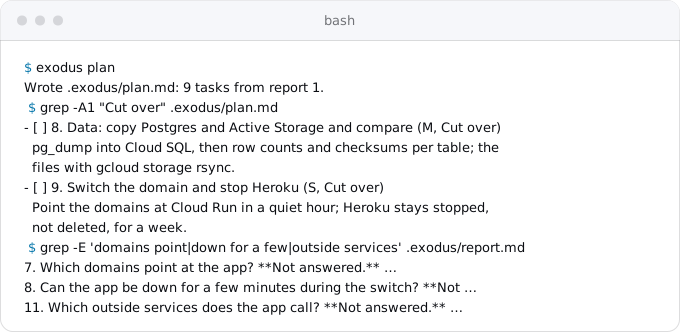
When Exodus audits a repository, the cutover is the last phase of the plan it writes: a data copy with a compare, and "Switch the domain and stop" the old platform, in a quiet hour, keeping it stopped, not deleted, for a week. Three of the audit's questions exist for this day: which domains point at the app, whether it can be down for a few minutes, and which outside services it calls.
FAQ
How far ahead should I lower the DNS TTL before a migration?
A day before, to 300 seconds. Google's Cloud DNS page says a new, shorter TTL applies only after the previous one expires, so a record at 3600 takes an hour to pick it up and one at 86400 a day. Some resolvers ignore TTLs, so the old app keeps running and refuses writes.
Why does a new DNS record answer "no such name" after I create it?
A resolver cached the negative answer from before the record existed. RFC 2308 sets that cache from the zone's SOA record; ours gives 1800 seconds, 30 minutes. Many resolvers, Windows and the Java runtime among them, cache negative answers for up to 15 minutes. Create new records well before anything looks them up.
How do I roll back a move to Cloud Run?
It depends on what failed. If the new code is at fault, send traffic back to the previous revision; users stay on Cloud Run. If the move itself is at fault, point DNS back, take the old app out of maintenance and make the old database writable. Writes made on the new app since the switch are copied back by hand.
Will webhooks be lost during the cutover?
Not if the old app refuses them and the endpoint URL is on your own domain. Stripe retries a failed delivery for up to three days in live mode, so events refused by the maintenance page reach the new app later. An old app that accepts a webhook and writes it into a database you will throw away loses the event.
How do I check DNS propagation after the switch?
Ask public resolvers and your zone's name servers directly, not your own machine, which may have a cache, a VPN or an old hosts entry. Google Public DNS also answers over HTTPS with JSON, which nothing on port 53 can intercept. Then request something only the new app sends, such as a header or a version on its health route.
Sources
19
- docs.cloud.google.comCloud DNS overview, Google
- rfc-editor.orgRFC 2308, Negative Caching of DNS Queries, IETF
- developers.google.comGoogle Public DNS JSON API, Google
- curl.securl man page, curl project
- docs.cloud.google.comMap custom domains, Cloud Run, Google
- docs.cloud.google.comMigrate load balancer certificates to Certificate Manager, Google
- firebase.google.comConnect a custom domain, Firebase Hosting
- docs.cloud.google.comSet minimum instances for services, Cloud Run, Google
- docs.cloud.google.comSet maximum instances for services, Cloud Run, Google
- cloud.google.comCloud Run pricing, Google
- docs.cloud.google.comDefault URL for Cloud Run, Google
- docs.cloud.google.comStatic outbound IP address, Cloud Run, Google
- docs.cloud.google.comManage cron jobs, Cloud Scheduler, Google
- docs.stripe.comReceive Stripe events in your webhook endpoint, Stripe
- developers.google.comUsing OAuth 2.0 for Web Server Applications, Google for Developers
- devcenter.heroku.comMaintenance Mode, Heroku Dev Center
- devcenter.heroku.comMaintenance mode behavior changed for worker dynos, Heroku changelog
- docs.cloud.google.comgcloud reference, Google Cloud SDK 587.0.0
- Exodus team: a switch of two public names between two hosts on Oct 11, 2026