Setting up a Google Cloud project for a small team takes about an hour and costs nothing: an organization on your domain, a billing account with two administrators, one project per environment, a budget, the APIs, roles granted to groups, two service accounts without keys, and Essential Contacts. Each step prevents a later problem, such as a project that leaves with a person's account.
In short
- Organizations created on or after May 3, 2024 refuse service account keys, give default service accounts no Editor role, and grant roles only inside your domain.
- A project ID has 6 to 30 characters, can never be changed, and can never be reused, even after the project is deleted.
- A budget emails at 50%, 90% and 100% and stops nothing; a spend cap budget pauses new Cloud Run requests in one project at 100%.
- A Free Trial gives $300 for 90 days; if the account is not upgraded by then, Google closes it and stops every resource.
- Cloud Identity Free covers 50 people, and projects, budgets, roles and service accounts cost nothing.
Commands checked against gcloud 587.0.0 on October 11, 2026.
What you are setting up
Four things, and it helps to keep them apart from the start.
- A Google account is a person. It signs in, runs
gcloud, and receives roles. - A billing account is who pays: a card or an invoice. It is linked to projects, but it is not their parent, so a role on the billing account gives nothing inside a project, and the other way round.
- A project is the unit everything else lives in. Google's page names four jobs for it: APIs are turned on and resources created in it, it is a trust boundary (by default resources in one project cannot reach another), it is a line on the bill, and it is where people and programs usually get their roles.
- An organization is optional. It is the root above the projects, tied to your company's domain, and roles and policies set on it pass down to every project under it.
Two more words come up in every step. A role is a named bundle of permissions, such as "may deploy Cloud Run services", and you grant it to a person, a group of people or a program. Google calls whoever receives a role a principal. A service account is the identity of a program rather than a person: your app runs as one, your deploy script signs in as one, and it gets roles like anyone else.
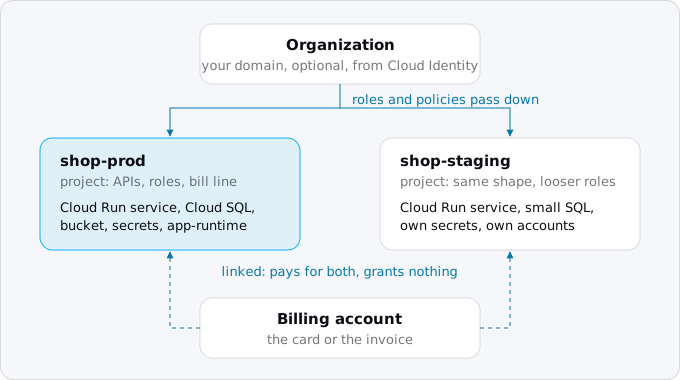
For a team of two to ten people with one app and nobody whose job is cloud administration, the shape is two projects, production and staging, under an organization, paid by one billing account.
Step 1: an organization, or not
Without an organization, a project belongs to the person who made it. That is fine for an experiment and awkward for a company: when that person leaves, the project leaves with their account, and you cannot set a rule once for every project.
An organization needs a Google Workspace or Cloud Identity account for your domain. Workspace is Google's paid office suite (mail, Docs, Drive); Cloud Identity is the same account and group system without the office apps. If you already pay for Workspace, you have one. If you do not, Cloud Identity's free edition is enough: Google's pricing page says it comes with 50 user licenses by default, more can be requested at no cost, and the paid edition is not required for Google Cloud. You verify the domain once, and from then on people sign in as name@yourcompany.com.
Google provisions the organization resource automatically when someone from the domain first signs in to Google Cloud or creates a billing account. Organizations created on or after May 3, 2024 come with a security baseline already switched on. Three of its rules matter to a Cloud Run app on day one:
- No service account keys. Creating or uploading a key for a service account is refused. That is what you want (step 7 shows how to work without keys), but a tutorial that says "download the JSON key" will fail.
- No automatic Editor for default service accounts. The accounts Google creates for you no longer get the broad Editor role on the project.
- Identities restricted to your domain. Roles can only go to accounts of your organization. This also blocks the usual way to make a Cloud Run service public, which is to give the Invoker role (the permission to call the service) to
allUsers, the special member that means anyone on the internet. Google's answer is to switch off the Invoker IAM check on that service instead, so that Cloud Run stops asking callers for the role:gcloud run deploy SERVICE --no-invoker-iam-check.
Older organizations may have none of these. You can check one rule without extra setup:
gcloud resource-manager org-policies describe \
  iam.disableServiceAccountKeyCreation --project=PROJECT_ID --effective
An empty booleanPolicy: {} means the rule is not enforced. The newer gcloud org-policies describe needs the Organization Policy API enabled in the project first; in ours it was not, and the command refused with SERVICE_DISABLED.
Step 2: a billing account
The person who creates a billing account becomes its Billing Account Administrator. Give that role to a second person straight away, so that the card can be changed when the first one is on holiday.
If nobody in the company has used Google Cloud before, the account starts as a Free Trial: $300 of credit for 90 days, with a card on file to verify who you are. The trial has limits: no GPUs, no quota increases, no Marketplace. If you neither spend the $300 nor upgrade in 90 days, Google closes the trial account, stops every resource in its projects, and deletes them after a 30-day grace period. Upgrading to a paid account keeps the unused credit until day 90, so for a team that means to stay there is no reason to wait.
The billing roles a small team needs are three:
- Billing Account Administrator (
roles/billing.admin): the payment method, invoices, linking projects, other people's billing roles. Two people. - Billing Account Viewer (
roles/billing.viewer): reads costs and invoices. Whoever does the books. - Billing Account User (
roles/billing.user): links projects to the account. With Project Creator, it lets someone create billable projects without seeing the payment details.
Roles on the billing account are granted on the account itself:
gcloud billing accounts list
gcloud billing accounts add-iam-policy-binding XXXXXX-XXXXXX-XXXXXX \
  --member=group:finance@yourcompany.com --role=roles/billing.viewer
Step 3: one project per environment
A project ID is the name every command, URL and service account will carry, so choose it with care. Google's rules: 6 to 30 characters, lowercase letters, digits and hyphens, starting with a letter. It can never be changed, and it can never be reused, even after the project is deleted, by you or anyone else in the world. The display name, by contrast, can change at any time.
A short suffix keeps you clear of IDs someone else took years ago:
gcloud projects create shop-prod-7f3a --name="shop prod" \
  --organization=ORGANIZATION_ID --labels=env=prod
gcloud projects create shop-staging-7f3a --name="shop staging" \
  --organization=ORGANIZATION_ID --labels=env=staging
Pass --organization explicitly. Google's page says a parent is picked automatically from the account's domain if you leave it out; gcloud projects create --help says projects are not created under a parent by default. Whichever applies to you, the flag removes the question, and gcloud projects describe shop-prod-7f3a shows the parent afterwards.
Creating a project does not attach a billing account. Link both:
gcloud billing projects link shop-prod-7f3a --billing-account=XXXXXX-XXXXXX-XXXXXX
gcloud billing projects link shop-staging-7f3a --billing-account=XXXXXX-XXXXXX-XXXXXX
Why two projects and not one with two services? Because the project is the trust boundary. In separate projects, a staging bug cannot read production's database password, a developer can have wide rights in staging and narrow ones in production, and the bill shows the two apart without any tagging.
Now point gcloud at the right one. A named configuration per project is cheaper than one wrong command:
gcloud config configurations create shop-prod
gcloud config set project shop-prod-7f3a
gcloud config configurations create shop-staging
gcloud config set project shop-staging-7f3a
gcloud config configurations activate shop-prod
create also activates the new configuration, so each config set lands in the one just made. Exodus team: while writing this guide, a read-only gcloud run services describe failed with "Cloud Run Admin API has not been used in project ..." naming a different project, because the active configuration still pointed there. A read failed loudly; a deploy would not have. Put --project in every script.
Step 4: a budget, and a spend cap for Cloud Run
Do this before the first deploy, while the number is easy to choose.
A budget watches spending and sends email. It can cover the whole billing account or a set of projects, services or labels. When you create one in the console, it starts with thresholds at 50%, 90% and 100% of actual spend; you can add forecasted thresholds, which fire when the month is on track to pass the number. The same from the command line:
gcloud billing budgets create --billing-account=XXXXXX-XXXXXX-XXXXXX \
  --display-name="shop-prod monthly" --budget-amount=50USD \
  --calendar-period=month --filter-projects=projects/shop-prod-7f3a \
  --threshold-rule=percent=0.5 --threshold-rule=percent=0.9 \
  --threshold-rule=percent=1.0,basis=forecasted-spend
The currency in --budget-amount must be the billing account's own. Emails go to the billing account's administrators and users by default; budget alerts and the billing export explains every setting.
The thing to understand about a budget is what it does not do. Google's page is blunt: an alerts-only budget does not cap usage or spending. It also reads costs with a delay, which is why a monthly budget keeps counting for the first two days of the next month.
There is a second kind, the spend cap budget, and Cloud Run is one of four services it covers (with Cloud Run functions, the Gemini API and Gemini Enterprise Agent Platform). It applies to one project and one service, monthly. When the estimated gross cost of that service passes the amount, new usage of the service in that project is paused for the rest of the month: requests in flight finish, new ones are refused. The cap lifts itself on the 1st, or you lift it by hand, after which recovery can take up to an hour. Emails go out at 50%, 80% and 100% to the billing administrators and project owners, and you cannot change them.
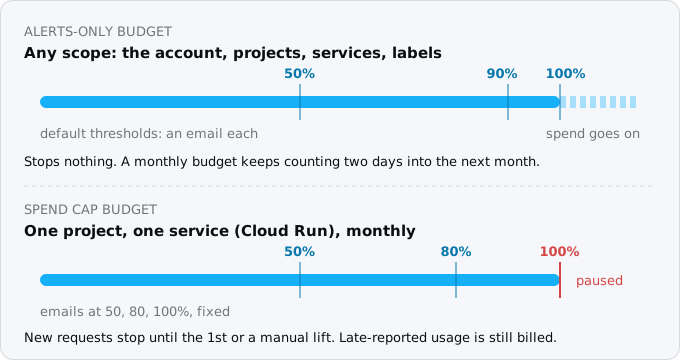
A spend cap is not instant either. It works from estimated list prices, faster than the bill, but anything used before it triggers is billed as usual. And it pauses only the service it names: a Cloud SQL instance or a bucket in the same project keeps billing. In gcloud 587.0.0, billing budgets create has no flag for it, so set it in the console under Billing, Budgets & alerts, choosing "Spend cap enforcement".
In production, set a cap only well above a bad month, because the cap takes the app down. On staging and side projects, "stopped" is a fine answer to a runaway loop.
Step 5: turn on the APIs
Each Google service is an API that is off in a new project. Cloud Run needs its own, and a typical app needs four or five more:
gcloud services enable run.googleapis.com artifactregistry.googleapis.com \
  cloudbuild.googleapis.com secretmanager.googleapis.com sqladmin.googleapis.com \
  --project=shop-prod-7f3a
You pay for what you use through an API, not for having it on. Turning one off is the dangerous direction. Google's page says it plainly: disabling the Cloud Run API deletes the Cloud Run resources in the project. Leave APIs on that you have used.
Step 6: people, through groups and predefined roles
Every new project has one Owner, the account that made it. Make a second Owner, so that nothing depends on one login, and stop there. Owner, Editor and Viewer are the old "basic" roles, and Google's guidance on them is direct: they include thousands of permissions across all services, and in production you should not grant them unless there is no alternative. They are acceptable in test and development projects, which is where the staging project earns its keep.
Grant roles to groups, not to people. When someone joins or leaves, you change the group's members and no project's policy.
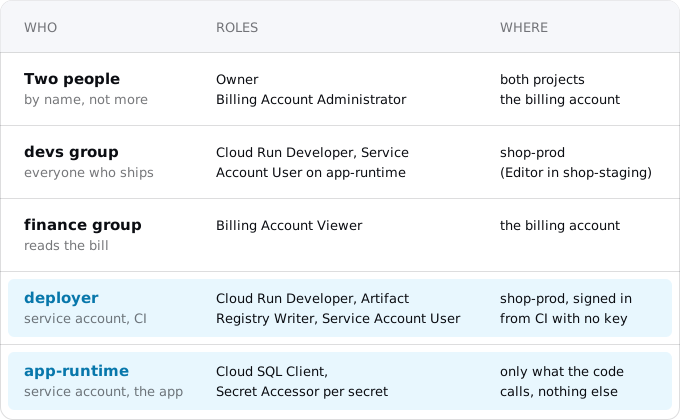
For a small team the people part comes to this:
gcloud projects add-iam-policy-binding shop-prod-7f3a \
  --member=group:devs@yourcompany.com --role=roles/run.developer
gcloud projects add-iam-policy-binding shop-staging-7f3a \
  --member=group:devs@yourcompany.com --role=roles/editor
Cloud Run Developer can create, change and delete services and jobs. Cloud Run Admin adds changing who has access to them, which two people need, not ten. To deploy, a developer also needs Service Account User on the account the service runs as, which step 7 creates. Developers who deploy from source need more roles; buildpacks or a Dockerfile lists them.
Once a month, check who has what:
gcloud projects get-iam-policy shop-prod-7f3a \
  --flatten='bindings[].members' --format='table(bindings.role,bindings.members)'
Step 7: two service accounts, and no keys
A service account is an identity for a program. Your app needs one to run as, and your CI needs one to deploy with. Google will offer a default for both, and the default is the part to replace.
By default a Cloud Run service runs as the Compute Engine default service account, PROJECT_NUMBER-compute@developer.gserviceaccount.com. In projects without the 2024 baseline, Google gives that account the Editor role when it is created. An app running as Editor can delete your database if someone finds a hole in it. Google's own pages recommend a user-managed account with the fewest permissions instead; IAM for a Cloud Run app lists which ones.
gcloud iam service-accounts create app-runtime --display-name="shop runtime" \
  --project=shop-prod-7f3a
gcloud iam service-accounts create deployer --display-name="CI deployer" \
  --project=shop-prod-7f3a
The runtime account gets exactly what the code calls, and where possible on the single resource rather than the whole project. A service that calls no Google API needs no roles at all. One that connects to Cloud SQL needs Cloud SQL Client; one that reads a secret needs Secret Accessor on that one secret:
gcloud projects add-iam-policy-binding shop-prod-7f3a \
  --member=serviceAccount:app-runtime@shop-prod-7f3a.iam.gserviceaccount.com \
  --role=roles/cloudsql.client
gcloud secrets add-iam-policy-binding DATABASE_URL --project=shop-prod-7f3a \
  --member=serviceAccount:app-runtime@shop-prod-7f3a.iam.gserviceaccount.com \
  --role=roles/secretmanager.secretAccessor
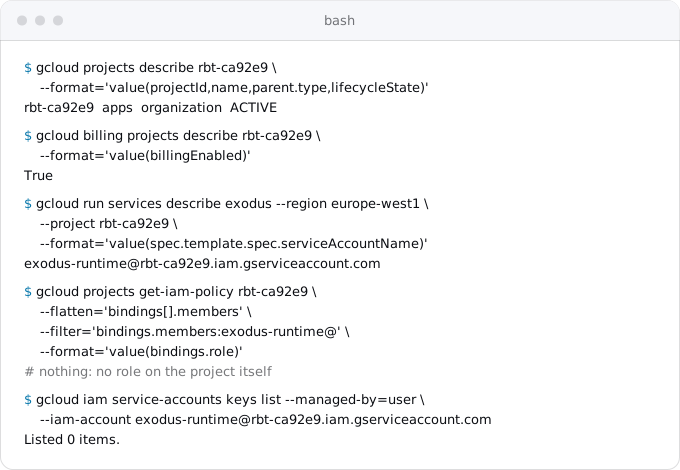
Then deploy with --service-account=app-runtime@shop-prod-7f3a.iam.gserviceaccount.com. Exodus team: the staged Exodus site runs this way. Its runtime account holds no role on the project at all and has no user-managed keys:
The deployer account needs Cloud Run Developer on the project, Artifact Registry Writer to push images, and Service Account User on app-runtime, so that it may deploy a service that runs as that account:
gcloud iam service-accounts add-iam-policy-binding \
  app-runtime@shop-prod-7f3a.iam.gserviceaccount.com --project=shop-prod-7f3a \
  --member=serviceAccount:deployer@shop-prod-7f3a.iam.gserviceaccount.com \
  --role=roles/iam.serviceAccountUser
How does CI sign in as deployer? Not with a key. A JSON key is a password that never expires, copied into a CI setting where anyone with access to the settings can read it, and the 2024 baseline refuses to create one anyway. A key is also worse in a project where people hold the Editor role, because Editor can create a key for any service account and then act as it. The replacement is Workload Identity Federation: GitHub Actions and similar systems present a short-lived token that proves which repository is running, Google is set up to trust that one repository, and it hands back a short-lived Google token. It takes one pool, one provider and one role binding; deploying from GitHub without keys walks through it.
Step 8: contacts and the logs you already have
Google sends notices that matter: outages, suspensions, billing problems, and the email when someone deletes a project. By default they go to whoever Google finds. Name the people with Essential Contacts:
gcloud essential-contacts create --email=ops@yourcompany.com \
  --notification-categories=technical,security,suspension --language=en-US \
  --project=shop-prod-7f3a
With the 2024 baseline, the address must be in your own domain.
Admin Activity audit logs record every change to configuration and access. They are always written and cannot be turned off, so "who gave the deployer Owner last Tuesday" has an answer; Data Access audit logs are off by default except for BigQuery. Your app's own logs go to Cloud Logging, where Google's price page gives the first 50 GiB per project per month free and $0.50 per GiB after that.
What all this costs
Nothing, for a small team. A project, a billing account, budgets, roles, service accounts and audit logs carry no charge, and Cloud Identity's free edition covers 50 people. The bill starts with what runs in the projects: the Cloud Run service, the database, the logs above 50 GiB.
What breaks
- The wrong project. Without named configurations and
--projectin scripts, sooner or later a command runs against the wrong one. Ours did, harmlessly, while writing this. - A public service that will not go public. In an organization with domain restricted sharing, the
allUsersgrant behind--allow-unauthenticateddoes not work for people outside your domain. Use--no-invoker-iam-check. - A tutorial that needs a key. Refused under the 2024 baseline. Find the keyless way rather than switching the rule off.
- Billing switched off. Every billable service in the project stops; after re-linking, Google allows up to 24 hours for resources to come back, and some may be gone.
- Deleting a project. It becomes unusable at once and is gone for good after 30 days. Restoring it within that window does not re-link billing, and the ID is never usable again.
Where Exodus comes in
Exodus does not touch your Google Cloud account. When the agent working through a move reaches the step that needs a project and a billing account, it stops and asks you to do it by hand, with the commands to copy:
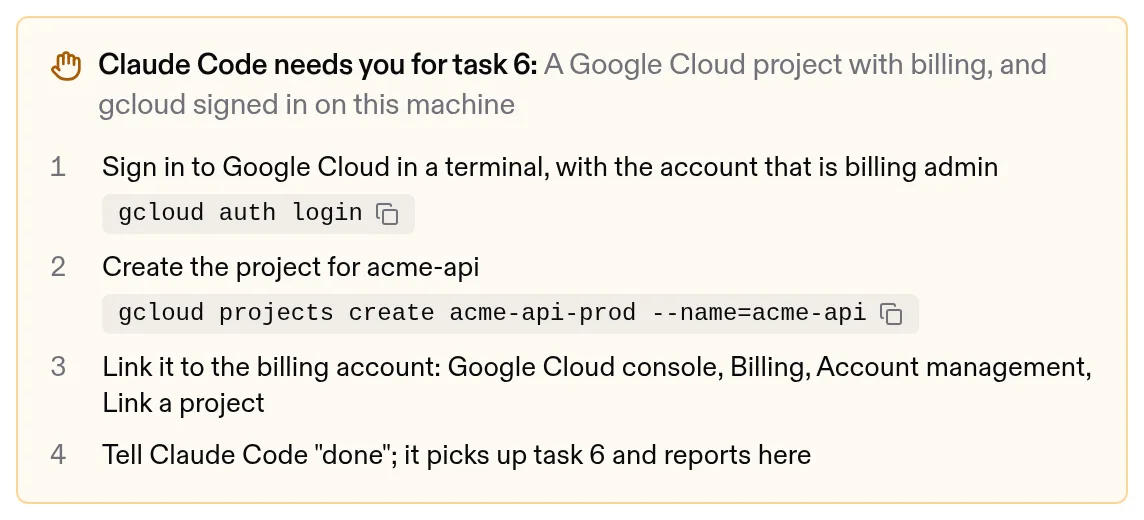
That is deliberate: creating projects, linking a card and granting roles belong to the people who answer for the bill.
The hour, in order
- Verify your domain with Cloud Identity Free or Workspace, so the projects belong to the company.
- Create or upgrade the billing account; two Billing Account Administrators.
- Create
-prodand-stagingprojects with a suffix,--organizationand anenvlabel; link billing. - One named
gcloudconfiguration per project;--projectin every script. - A monthly budget per project; a spend cap on staging's Cloud Run.
- Enable Cloud Run, Artifact Registry, Cloud Build, Secret Manager and the database API.
- Two Owners. Groups for everyone else: Cloud Run Developer in production, Editor in staging.
- Service accounts
app-runtimeanddeployer; roles on single resources; no keys; CI through Workload Identity Federation. - Essential Contacts for technical, security and suspension notices.
Once a month, read the IAM policy and the budget emails. To see what the first bill will hold, read the Cloud Run free tier explained, which covers what the billing account gives you for free, and Cloud Run costs, worked examples by traffic; what Cloud Run costs is the short version.
FAQ
Do I need Google Workspace to create a Google Cloud organization?
No. An organization needs Google Workspace or Cloud Identity for your domain, and Cloud Identity's free edition is enough: it comes with 50 user licenses, more can be requested at no cost, and the paid edition is not required for Google Cloud. You verify the domain once.
Should production and staging be separate Google Cloud projects?
Yes. The project is the trust boundary: in separate projects a staging bug cannot read production's database password, developers can have wide rights in staging and narrow ones in production, and the bill shows the two apart without any tagging.
Does a Google Cloud budget stop spending?
An alerts-only budget does not; it sends email, and it reads costs with a delay. A spend cap budget, available for Cloud Run and three other services, pauses new usage of that service in one project for the rest of the month once its estimated cost passes the amount.
Why can't I create a service account key in Google Cloud?
Organizations created on or after May 3, 2024 have a security baseline that refuses to create or upload service account keys. Sign CI in through Workload Identity Federation instead: it presents a short-lived token that proves which repository is running and gets a short-lived Google token back.
What happens when the Google Cloud Free Trial ends?
If you neither spend the $300 nor upgrade within 90 days, Google closes the trial account, stops every resource in its projects, and deletes them after a 30-day grace period. Upgrading to a paid account keeps the unused credit until day 90.
Sources
33
- docs.cloud.google.comCreate projects: name, ID and number rules, parent, quotas, Google
- docs.cloud.google.comDelete and restore projects: the 30-day recovery window, Google
- docs.cloud.google.comResource hierarchy: organization, folders, projects, Google
- cloud.google.comCloud Identity pricing: the free edition and its 50 licenses, Google
- docs.cloud.google.comCloud Identity editions, Google
- docs.cloud.google.comGoogle Cloud security baseline constraints for organizations created on or after May 3, 2024, Google
- docs.cloud.google.comRestricting identities by domain: Cloud Run public services, Google
- docs.cloud.google.comRestricting service account usage: default service accounts and key creation, Google
- docs.cloud.google.comBest practices for managing service account keys, Google
- docs.cloud.google.comUsing IAM securely: basic roles and groups, Google
- docs.cloud.google.comRoles and permissions overview, Google
- docs.cloud.google.comBest practices for using Google groups, Google
- docs.cloud.google.comCloud Run access control with IAM: predefined roles, the Invoker IAM check, Google
- docs.cloud.google.comCloud Run IAM roles: what a deployer needs, the default service identity, Google
- docs.cloud.google.comConfigure service identity for services, Google
- docs.cloud.google.comArtifact Registry access control: Artifact Registry Writer, Google
- docs.cloud.google.comSecret Manager access control: Secret Accessor on one secret, Google
- docs.cloud.google.comConnect from Cloud Run to Cloud SQL for PostgreSQL: the Cloud SQL Client role, Google
- docs.cloud.google.comWorkload Identity Federation with deployment pipelines, Google
- docs.cloud.google.comCloud Billing access control: billing roles and small-company examples, Google
- docs.cloud.google.comEnable, disable, or change billing for a project, Google
- docs.cloud.google.comCreate, edit, or delete budgets and budget alerts, Google
- docs.cloud.google.comManage spend cap budgets: Cloud Run is eligible, Google
- docs.cloud.google.comCloud Billing quotas and limits: 50,000 budgets per billing account, Google
- docs.cloud.google.comFree Trial and Free Tier: $300 for 90 days, what happens at the end, Google
- docs.cloud.google.comEnable and disable services: disabling the Cloud Run API deletes its resources, Google
- docs.cloud.google.comManaging gcloud CLI configurations, Google
- docs.cloud.google.comEssential Contacts: notification categories, Google
- docs.cloud.google.comCloud Audit Logs overview: Admin Activity always on, Data Access off by default, Google
- cloud.google.comGoogle Cloud Observability pricing: Logging $0.50/GiB, first 50 GiB per project free
- docs.cloud.google.comLabels overview, Google
- docs.cloud.google.comgcloud reference, Google Cloud SDK 587.0.0: projects create, billing, services enable, iam, essential-contacts --help
- Exodus team: read-only checks of the project behind the staged Exodus site