A custom domain on Cloud Run goes through one of three fronts. A domain mapping costs nothing extra and needs one DNS record, but Google labels it Preview and not production-ready, in 10 regions. A global external Application Load Balancer, which Google recommends, costs about $18.25 a month plus $0.008 per GiB. Firebase Hosting is free at low traffic but cuts requests at 60 seconds.
In short
- A domain mapping is free, works in 10 regions, and its certificate came in 9.5 to 11.7 minutes when the DNS record existed first, about an hour when it did not.
- A load balancer costs $18.25 a month plus $0.008 per GiB and adds a TLS policy, path routing, Cloud CDN and Cloud Armor.
- Firebase Hosting is free to 360 MB a day, then $0.15 per GB, cuts requests at 60 seconds and passes only the
__sessioncookie. - Make the DNS record first with a 300-second TTL, keep the DNS provider's proxy off, and let CAA records allow
pki.googandletsencrypt.org.
Prices are Google's europe-west1 list prices from the Cloud Billing Catalog API, read on October 12, 2026.
What you already have without a domain
Every Cloud Run service gets an HTTPS address the moment it deploys, something like https://api-123456789012.europe-west1.run.app. An app that moves from Heroku, DigitalOcean App Platform, Render or a VPS already has a domain that users, OAuth providers and webhooks know, though, and Google's three fronts put that domain on the service. Every gcloud command here was checked against gcloud 587.0.0 --help on October 12, 2026.
The run.app address is a full HTTPS endpoint. Cloud Run "redirects all HTTP requests to HTTPS but terminates TLS before they reach your web service", so your container receives plain HTTP on $PORT and learns the original scheme from the X-Forwarded-Proto header. This holds for every option below. An app that builds absolute links or forces HTTPS itself must read that header, usually through the framework's "trust proxy" setting, or it produces http:// links, mixed-content warnings and redirect loops.
When we sent a plain HEAD http:// request to one of our services, both the run.app address and the mapped domain answered with 302 Found and a location on https://. That redirect is temporary, so if you want browsers to remember HTTPS, send a Strict-Transport-Security header from the app. Our app sets it itself.
Google is also testing custom URLs like https://NAME.cloud.run. They are Preview, and Google "reserves the right to ... revoke or reassign subdomains", so this guide leaves them aside.
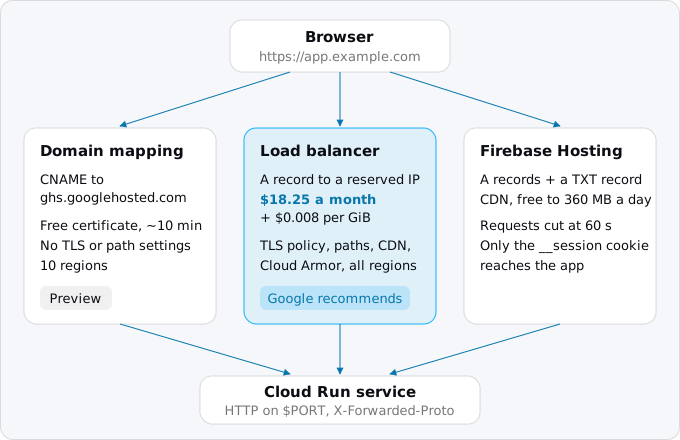
Option 1: Cloud Run domain mapping
A domain mapping tells Google's front end that requests for app.example.com belong to your service. Google issues a certificate for the name and renews it. There is no line for it on Cloud Run's pricing page, so you pay only for the requests and the traffic, as on the run.app address.
Google is direct about the limits. Mappings are in Preview and, "due to latency issues, they are not production-ready". The known-issues page says requests through custom domains "might have a very high latency from some locations", more so for services in asia-northeast1 and us-east4, and points to the load balancer. Beyond that:
- Mappings work in 10 regions only:
asia-east1,asia-northeast1,asia-southeast1,europe-north1,europe-west1,europe-west4,us-central1,us-east1,us-east4andus-west1. - You cannot bring your own certificate, cannot use a wildcard, and cannot turn off TLS 1.0 and 1.1. We checked the last one: a handshake with TLS 1.0 and with TLS 1.1 against our mapped name both succeeded.
- A mapping covers the whole domain from
/. You cannot send/apito one service and the rest to another. - The name is limited to 64 characters.
- The service must have its default
run.appURL enabled when you create the mapping.
Step 1: prove you own the domain
Google wants to know that the domain is yours before it routes it, unless you bought it from Google. Ownership is checked through Google Search Console, per Google account. Verify the base domain once, and every subdomain under it is covered.
gcloud domains list-user-verified --project PROJECT_ID
gcloud domains verify example.com
The first command lists the domains your account has verified. It runs against a project and needs the Cloud Run Admin API enabled there. Without --project, it used our default project, which does not have that API, and failed with "Cloud Run Admin API has not been used in project ... before or it is disabled". The second command opens Search Console in a browser, where you prove ownership, usually with a TXT record that Search Console gives you.
Verification belongs to the person who did it. If a colleague or a deploy service account must create mappings for the domain, add them as owners in Search Console under the property's Verified owners. A verified owner can also take over a mapping of the same domain in another project, so keep that list short.
Step 2: create the DNS record first
For a subdomain, the record is one CNAME:
app CNAME ghs.googlehosted.com.For the bare domain, a CNAME is not allowed, and Google gives four A and four AAAA records instead. These are the ones our apex mapping returned:
@    A       216.239.32.21
@    A       216.239.34.21
@    A       216.239.36.21
@    A       216.239.38.21
@    AAAA    2001:4860:4802:32::15
@    AAAA    2001:4860:4802:34::15
@    AAAA    2001:4860:4802:36::15
@    AAAA    2001:4860:4802:38::15
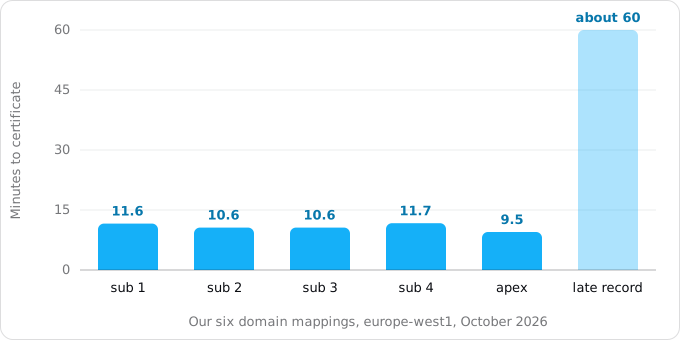
Google's page shows the records after the mapping, but you can create them before, and we recommend it. Exodus team: one of our mappings was created a few minutes before its CNAME existed. Google's certificate check got "no such name" from DNS, and our DNS provider let resolvers cache that negative answer for 30 minutes. The certificate came about an hour after the mapping. For five other mappings we made the record first, and each certificate arrived 10 to 12 minutes after the mapping.
If your DNS is on Cloudflare, create the record as DNS only (grey cloud), not proxied. Google's page warns that a CDN in front "might inadvertently intercept validation requests" and asks Cloudflare users to turn off Always Use HTTPS. All our mapped records are DNS-only.
If the domain has CAA records, which name the certificate authorities that may issue for it, they must allow both pki.goog and letsencrypt.org. With no CAA record, both are allowed. Our certificate came from Google Trust Services.
Step 3: create the mapping
gcloud beta run domain-mappings create \
  --service SERVICE --domain app.example.com \
  --region europe-west1
The command is under beta. --force-override moves a domain that is already mapped to another service. You can also map at deploy time with gcloud beta run deploy SERVICE --image IMAGE --domain app.example.com, and Terraform has the resource google_cloud_run_domain_mapping, which is what we use.
Step 4: watch the certificate
gcloud beta run domain-mappings describe \
  --domain app.example.com --region europe-west1 \
  --format='yaml(spec,status.conditions,status.resourceRecords)'
Three conditions matter. DomainRoutable turns true when Google accepts the name; ours did 6 seconds after the mapping was created. CertificateProvisioned turns true when the certificate is issued. Ready follows it. resourceRecords repeats the DNS records the mapping expects, which is the quickest way to check what you typed at the DNS provider.
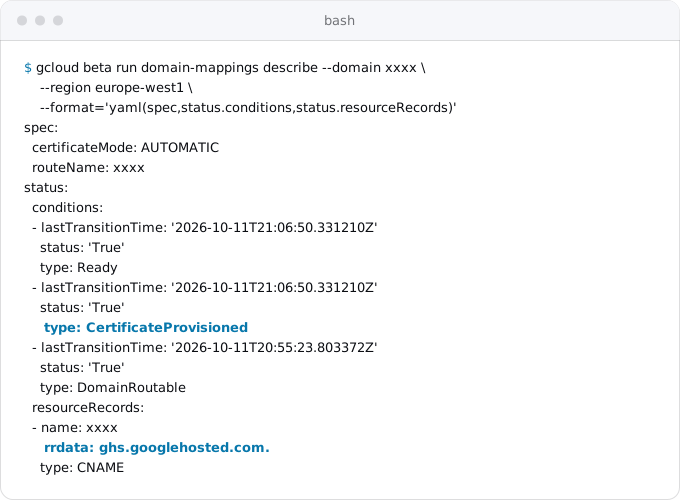
Google says provisioning "usually takes about 15 minutes but can take up to 24 hours". Our five took between 9.5 and 11.7 minutes, and the one created before its record took about an hour.
When Ready is true, check from outside:
curl -sI https://app.example.com/ | head -3
echo | openssl s_client -servername app.example.com \
  -connect app.example.com:443 2>/dev/null \
  | openssl x509 -noout -issuer -dates
Our mapped name answered over HTTP/2 with a 90-day certificate and no alt-svc header, so browsers do not try HTTP/3.
To remove a mapping, gcloud beta run domain-mappings delete --domain app.example.com --region europe-west1, then the DNS record.
Option 2: a global external Application Load Balancer
A load balancer is Google's general front door for HTTP. It takes more pieces than a mapping, and gives what a mapping lacks: your own certificate or a Google-managed one, a minimum TLS version, routing by host and path to several services, Cloud CDN, Cloud Armor and Identity-Aware Proxy, in every Cloud Run region. A subdomain per tenant in a SaaS architecture on Cloud Run needs it, because a mapping cannot use a wildcard.
The chain is: a static IP address, a forwarding rule on port 443, a target HTTPS proxy holding the certificate, a URL map, a backend service, and a serverless network endpoint group (NEG) that points at your Cloud Run service. These are Google's commands, with names filled in:
gcloud compute addresses create app-ip \
  --network-tier=PREMIUM --ip-version=IPV4 --global
gcloud compute network-endpoint-groups create app-neg \
  --region=europe-west1 --network-endpoint-type=serverless \
  --cloud-run-service=SERVICE
gcloud compute backend-services create app-backend \
  --load-balancing-scheme=EXTERNAL_MANAGED --global
gcloud compute backend-services add-backend app-backend --global \
  --network-endpoint-group=app-neg \
  --network-endpoint-group-region=europe-west1
gcloud compute url-maps create app-map --default-service app-backend
gcloud compute ssl-certificates create app-cert \
  --domains app.example.com --global
gcloud compute target-https-proxies create app-proxy \
  --ssl-certificates=app-cert --url-map=app-map
gcloud compute forwarding-rules create app-https \
  --load-balancing-scheme=EXTERNAL_MANAGED --network-tier=PREMIUM \
  --address=app-ip --target-https-proxy=app-proxy \
  --global --ports=443
Then read the address with gcloud compute addresses describe app-ip --format="get(address)" --global and create an A record for the name pointing at it. Health checks are not supported for serverless NEGs, so there is no firewall rule to add.
The certificate starts as PROVISIONING and turns ACTIVE once Google sees the A record pointing at the forwarding rule's IP. Google gives up to 60 minutes for that, and then up to 30 minutes more before the load balancer serves the new certificate. Watch it with:
gcloud compute ssl-certificates describe app-cert --global \
  --format="get(name,managed.status,managed.domainStatus)"
FAILED_NOT_VISIBLE usually means DNS has not propagated yet or points somewhere else. The records must point only at the load balancer's address: an extra A record, GeoDNS, or a CDN that proxies traffic makes validation fail, and later it makes renewal fail too. Certificates last 90 days, and renewal starts about a month before expiry. You cannot add a name to an existing Google-managed certificate. To change the names, you create a new certificate and swap it in.
Plain HTTP. The load balancer above listens only on 443. The console has an "Enable HTTP to HTTPS Redirect" checkbox that creates a second, partial load balancer on the same IP answering 301. There is no gcloud flag for it. From the command line you import a URL map with defaultUrlRedirect set to httpsRedirect: true, then create a target HTTP proxy and a forwarding rule on port 80, as Google's redirect page shows. The second forwarding rule costs nothing extra while you have five or fewer.
TLS versions. An SSL policy sets the minimum. It defaults to TLS 1.0 here too, so set it explicitly:
gcloud compute ssl-policies create app-tls \
  --profile MODERN --min-tls-version 1.2 --global
gcloud compute target-https-proxies update app-proxy \
  --ssl-policy app-tls --global-ssl-policy
Close the back door. The run.app address still answers and bypasses Cloud Armor and everything else on the load balancer. Google's fix is ingress that admits only internal traffic and load balancers:
gcloud run services update SERVICE --region europe-west1 \
  --ingress internal-and-cloud-load-balancing
You can also turn off the default URL with --no-default-url. Read the list first: Cloud Scheduler, Cloud Tasks, Pub/Sub push, Eventarc, Workflows, uptime checks and Firebase Hosting all call the run.app address, and they stop working when it is off.
Moving from a mapping or another host without downtime. A Google-managed certificate of the kind above is not provisioned until DNS points at the load balancer, so switching a live name can leave it without a valid certificate for a while. Google says "typically less than an hour". Certificate Manager's DNS authorization avoids that: you prove control with a DNS record, the certificate is issued before any traffic moves, and the switch is a change of the A record. Certificate Manager charges nothing for the first 100 certificates in a project.
Option 3: Firebase Hosting in front of Cloud Run
Every Google Cloud project can also be a Firebase project, and Firebase Hosting serves files from a CDN with your domain and a free certificate. A rewrite rule passes matching requests to a Cloud Run service. That makes it a fit for a single-page app whose /api lives on Cloud Run, or for any app whose responses can be cached. Moving a whole site this way, rules and all, is in moving a Netlify site to Firebase Hosting and Cloud Run.
A firebase.json in a folder of its own:
{
  "hosting": {
    "rewrites": [{
      "source": "**",
      "run": {"serviceId": "SERVICE", "region": "europe-west1"}
    }]
  }
}
Then deploy it with firebase deploy --only hosting --project PROJECT_ID, and connect the domain in the Firebase console. The console gives a TXT record for ownership, which must stay in DNS for as long as you use the domain, and A records to point the name at Hosting. Remove any other A, AAAA or CNAME records for the name, or the certificate will not be issued. Firebase allows up to 24 hours for it and says most take a few hours. Its Advanced Setup issues the certificate through a DNS challenge before traffic moves, which is the zero-downtime path for a domain that is already live elsewhere.
What Firebase changes about your requests matters more than the setup:
- 60 seconds. Hosting cuts a request at 60 seconds and returns
504, whatever the Cloud Run timeout says. Long uploads, reports and streaming do not fit. - One cookie. With Cloud Run behind it, Hosting strips cookies from incoming requests except one named
__session, so that its CDN can cache. An app that keeps its session in a cookie called anything else will see every user as logged out. - Caching. A response with
Cache-Control: public, s-maxage=600is cached at the CDN for 10 minutes. That is the reason to use Hosting, and also the way to serve one user's page to another if you set it on the wrong response. - Regions and plans. Rewrites to Cloud Run work in 39 regions, listed on Firebase's page. A project with a Cloud Billing account is moved to the Blaze plan automatically, and Cloud Run needs one.
- Subdomains. Hosting allows 20 per apex domain, under Firebase's terms rather than Google Cloud's.
Who calls the service by token
If the service requires authentication, callers mint an identity token for an audience, which by default is the run.app URL. A token minted for https://app.example.com is refused unless you add that name as a custom audience:
gcloud run services update SERVICE --region europe-west1 \
  --add-custom-audiences=https://app.example.com
Callers such as Cloud Tasks usually keep the run.app URL; the Cloud Tasks guide covers that.
What it costs
- Domain mapping: no separate charge. Responses leave Cloud Run as internet egress at $0.105 per GiB to users in Europe.
- Load balancer: $0.025 an hour for up to five forwarding rules, $18.25 for a 730-hour month with one rule or two. The load balancer charges $0.008 per GiB it processes in each direction. With a serverless backend, Cloud Run's own egress is not charged; the load balancer's internet egress is, at $0.12 per GiB to Europe up to 1 TiB instead of Cloud Run's $0.105. The reserved IP is free while a forwarding rule uses it. Google-managed certificates have no per-connection charge.
- Firebase Hosting: 360 MB a day of data transfer free, then $0.15 per GB. Both cache hits and misses count, so everything Cloud Run sends through Hosting counts too. Firebase's own usage page states the free amount as 10 GB a month. Storage for static files is free to 10 GB, then $0.026 per GB.
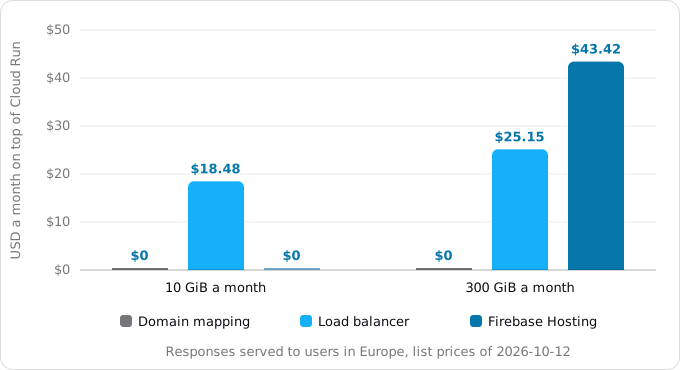
At small traffic the load balancer's fixed $18.25 is nearly the whole cost, and Firebase Hosting is free. The two cross at about 156 GiB a month; above that the load balancer is cheaper. Requests coming in are left out as small, and Cloud CDN, which has its own prices, is not counted. For egress in general, see egress on Google Cloud.
What breaks
- The certificate never comes. Usually the DNS record points somewhere else, a proxy sits in front, or a CAA record does not list
pki.googandletsencrypt.org. Check withdescribe, then with a public resolver such asdig @8.8.8.8 app.example.com. - The certificate takes an hour. Resolvers cached "no such name" from before the record existed. Make the record first, with a short TTL (we use 300 seconds).
- Slow requests through a mapping from some locations. A known issue; Google's answer is the load balancer.
- Redirect loops or plain-HTTP links. The app does not read
X-Forwarded-Proto. Turn on the framework's trust-proxy setting. - Logged out behind Firebase. The session cookie is not called
__session. A504at 60 seconds is Hosting's limit too. - Scheduler, Tasks or Pub/Sub stopped calling. The default URL was turned off.
- A path ending in z returns Google's 404. Paths starting with
/_ah/and some ending inzare reserved on Cloud Run, which is why health checks named/healthzcan fail. Use/health(health checks). - The bare domain and www. A mapping maps a name; it does not redirect. Map both and redirect in the app, or use the load balancer's URL map, or Firebase's redirect checkbox.
Checklist
- Pick the front: a mapping for small apps in its 10 regions, a load balancer for production or for TLS and routing control, Firebase Hosting for static files plus an API.
- Verify the base domain in Search Console, and add colleagues and deploy accounts as owners.
- Lower the TTL of the existing record a day before, and check CAA records.
- Create the DNS record first, DNS-only, then the mapping or the certificate.
- Wait for
CertificateProvisionedorACTIVE, then test withcurl -sIandopenssl s_client. - Make the app trust
X-Forwarded-Protoand sendStrict-Transport-Security. - With a load balancer: an SSL policy with TLS 1.2, a port 80 redirect, ingress
internal-and-cloud-load-balancing. - Add the domain as a custom audience if callers mint tokens for it.
- Update OAuth redirect URIs, webhook URLs such as Stripe's webhook endpoint, and anything else that knows the old address.
Where Exodus comes in
The move plan Exodus writes ends with a step called "Switch the domain and stop" the old host: point the domains at Cloud Run in a quiet hour, and leave the old host stopped, not deleted, for a week, as in the cutover day checklist. This guide is what the agent running the move follows for that step. It picks the front, makes the record before the mapping, waits for the certificate, and checks the name from outside before the old host is stopped.
FAQ
Is Cloud Run domain mapping ready for production?
No, by Google's own label. Domain mappings are in Preview, Google says they are not production-ready because of latency, and requests through them can be slow from some locations, more so for services in asia-northeast1 and us-east4. Google points production apps to the global external Application Load Balancer.
How long does a Cloud Run certificate take to issue?
Google says about 15 minutes, up to 24 hours, for a domain mapping. Our five mappings with the DNS record in place first took 9.5 to 11.7 minutes; one created before its record took about an hour. A load balancer's certificate can take up to 60 minutes, then up to 30 more.
Why is my Cloud Run certificate stuck provisioning?
Usually the DNS record points somewhere else, a proxy such as Cloudflare's sits in front, or a CAA record does not allow pki.goog and letsencrypt.org. Check the mapping with gcloud describe, then the name with a public resolver such as 8.8.8.8, and keep the record DNS-only.
Can I use a wildcard or my own certificate with Cloud Run domain mapping?
No. A domain mapping takes neither your own certificate nor a wildcard, and it cannot turn off TLS 1.0 and 1.1. A load balancer takes your own certificate or a Google-managed one and sets a minimum TLS version through an SSL policy.
How much does a load balancer in front of Cloud Run cost?
About $18.25 a month for up to five forwarding rules, plus $0.008 per GiB processed in each direction, at europe-west1 list prices. Internet egress is then charged at the load balancer's $0.12 per GiB to Europe instead of Cloud Run's $0.105. Google-managed certificates add nothing.
Sources
20
- docs.cloud.google.comMap custom domains, Cloud Run, Google
- docs.cloud.google.comCloud Run known issues, Google
- docs.cloud.google.comSet up a global external Application Load Balancer with Cloud Run, Google
- docs.cloud.google.comUse Google-managed SSL certificates, Google
- docs.cloud.google.comSet up an HTTP-to-HTTPS redirect for global external Application Load Balancers, Google
- docs.cloud.google.comRestrict network ingress for Cloud Run, Google
- docs.cloud.google.comInvoke with an HTTPS request, Cloud Run, Google
- docs.cloud.google.comCreate custom URLs, Cloud Run, Google
- docs.cloud.google.comConfigure custom audiences, Cloud Run, Google
- firebase.google.comServe dynamic content and host microservices with Cloud Run, Firebase
- firebase.google.comConnect a custom domain, Firebase Hosting
- firebase.google.comManage cache behavior, Firebase Hosting
- firebase.google.comHosting usage, quotas and pricing, Firebase
- firebase.google.comFirebase pricing
- cloud.google.comCloud Load Balancing pricing, Google
- cloud.google.comCertificate Manager pricing, Google
- cloud.google.comCloud Run pricing, Google
- cloud.google.comCloud Billing Catalog API, Google
- docs.cloud.google.comgcloud reference, Google Cloud SDK 587.0.0
- Exodus team: five Cloud Run domain mappings in europe-west1