For a Cloud Run app that already speaks Postgres or MySQL, the database is Cloud SQL in the same region, from $9.37 a month. A new app with small or spiky traffic and simple reads can run on Firestore's free default database for $0. A serverless Postgres such as Neon or Supabase scales to zero, but runs on AWS, outside Google's network.
In short
- Cloud SQL's
db-f1-microcosts $9.37 a month with 10 GiB of SSD, idle or busy; the smallest machine with one vCPU is $51.01. - Firestore's default database is free up to 50,000 reads and 20,000 writes a day; a named database pays from the first read, $0.033 per 100,000 reads.
- At 10 reads and 1 write per request, Firestore passes the micro's price at about 80,000 requests a day.
- Neon scales to zero only after 5 quiet minutes and costs $19.53 a month when it never does; Supabase Pro is $25.
Prices are Google's catalog for europe-west1 (Belgium) and the vendors' pricing pages, read on October 12, 2026, before VAT, with a month of 730 hours.
What each one is
Cloud Run keeps nothing between requests, so everything your app must remember lives in a database. The choice sets the floor of your bill, because a database machine costs the same idle or busy, and the shape of your code, because SQL tables and Firestore documents are queried differently.
Cloud SQL is a managed database server. Google runs a virtual machine with PostgreSQL, MySQL or SQL Server, patches it, backs it up and can keep a standby in a second zone. You pick a machine size and pay for it every hour it exists, plus its disk. The cheapest one, db-f1-micro, is $7.67 a month plus $1.70 for 10 GiB of SSD; the smallest dedicated machine with one vCPU is $51.01 with the same disk. The smallest Cloud SQL instances prices every rung and the charges people miss, so this guide does not repeat them.
Firestore is a document database with no server to size. Data is stored as documents (a set of fields, up to 1 MiB) grouped into collections, and you pay per document read, written and deleted, plus storage. Google runs and scales it. Two choices are made when you create a database and cannot be changed afterwards:
- The edition. Standard edition bills per document and has the standard query engine, in which every query needs an index and there are no joins. Enterprise edition bills per 4 KiB read and 1 KiB written, adds an advanced query engine that can join and aggregate, and is the edition that speaks the MongoDB protocol.
gcloudcreates Standard unless told otherwise, and this guide prices Standard. - The API. Native mode is the Firestore API with real-time listeners and the mobile and web SDKs. Datastore mode is kept for older App Engine apps and, in Google's words, turns off the newer Firestore features. A new app picks Native mode, which is the default.
A serverless Postgres is Postgres sold by usage. Neon separates storage from compute and stops the compute after 5 minutes without queries; you pay per CU-hour (a CU is about 4 GB of memory with its CPU) and per GB stored. Supabase runs a regular Postgres instance per project, from $25 a month on the Pro plan, with authentication and storage products around it. Both run in AWS regions, Frankfurt and London among them, so from Cloud Run every query leaves Google's network.
Google also sells AlloyDB, which is not the first database of a small app either. It is a Postgres-compatible database for heavy workloads; its N2 machines start at 2 vCPUs and 16 GB, which is $250.03 a month in Belgium for compute alone.
How each one connects to Cloud Run
The three connect in very different ways, and the difference matters more on Cloud Run than on a server, because Cloud Run starts and stops instances on its own.
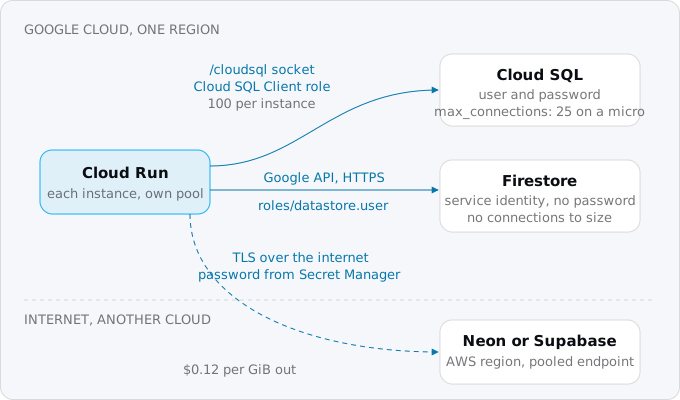
Cloud SQL. You deploy with --add-cloudsql-instances=PROJECT:REGION:INSTANCE and the service's account gets the Cloud SQL Client role. Cloud Run then exposes the instance as a Unix socket under /cloudsql/, and your driver connects to it with a database user and password. Google's page sets a limit of 100 connections from each Cloud Run instance, and the database has its own: Postgres's max_connections is 25 on a micro. Because every Cloud Run instance opens its own pool (the few connections an app opens once and reuses), ten instances with a pool of five already take 50 connections. The concurrency guide shows how to size the pool and the maximum number of instances so they fit. A private IP through your VPC is the other path, with more setup; connecting Cloud Run to Cloud SQL walks through both.
Firestore. There is no socket, no password and no pool. Your code uses Google's client library, which calls Firestore's API over HTTPS with the service's own identity, so the only setup is one IAM role, roles/datastore.user, on the service's account. Traffic between Cloud Run and Firestore in the same region is free.
A serverless Postgres. Your service connects to a host name on the internet with TLS and a password, which belongs in Secret Manager rather than in an environment variable you type. Both vendors offer a pooled endpoint for clients that open many short connections: Neon's PgBouncer accepts up to 10,000 client connections on the host name with -pooler, and Supabase's Supavisor listens in transaction mode on port 6543. Pick the vendor region nearest your Cloud Run region, because every query is a round trip between two clouds, and remember that the region of a Neon project cannot be changed after it is created.
What each one costs a small app
Take a small app: 3,000 requests a day, each reading 10 documents or rows and writing one, with 0.5 GiB of data. That is 30,000 reads and 3,000 writes a day.
- Firestore, the project's default database: $0.00. Firestore gives each project exactly one free database, with 50,000 reads, 20,000 writes and 20,000 deletes a day, 1 GiB stored and 10 GiB of egress a month. The app fits inside it.
- Firestore, a named database: $0.47. Any database other than
(default)gets no free quota and pays from the first read: 30,000 reads a day at $0.033 per 100,000 is $0.30 a month, 3,000 writes at $0.099 per 100,000 is $0.09, and 0.5 GiB at $0.165 is $0.08. - Cloud SQL `db-f1-micro`: $9.37, with 10 GiB of SSD. The same at no traffic.
- Neon Launch: $19.53. One request every 29 seconds means the compute never sees 5 quiet minutes, so it never scales to zero: 0.25 CU for 730 hours is 182.5 CU-hours at $0.106, plus $0.19 of storage. The Free plan's 100 CU-hours a month would run out after 400 hours.
- Supabase Pro: $25.00, the plan price, whose $10 of compute credit covers one Micro instance with 1 GB of memory and 8 GB of disk.
- Cloud SQL with 1 vCPU and 3.75 GiB: $51.01, the smallest dedicated-core Cloud SQL machine.
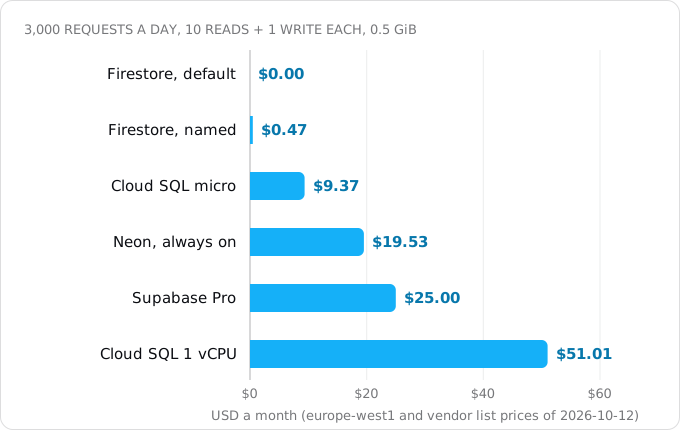
Two details in that list change real decisions. The first is the named database: if you create a database with --database=app because it reads better, you lose the free quota. Our own project has one default and four named Firestore databases, and its bill shows exactly that, as the last picture in this guide does.
The second is scale to zero. It saves money only when the app has quiet gaps of 5 minutes or more. An internal tool used 8 hours a workday needs about 44 CU-hours a month at 0.25 CU, which fits Neon's free 100 and costs $4.66 on Launch. A public app with a steady trickle of visitors, health checks or a cron job never goes quiet and pays for compute all month. Supabase's free plan works the other way: it pauses projects with too little database activity over 7 days, and a paused project does not answer until someone restores it.
Network adds little at this size. Traffic from Cloud Run to Cloud SQL or Firestore in the same region is free. Traffic to Neon or Supabase crosses the internet at $0.12 per GiB to Europe after the first GiB, and the vendors include egress (Neon 500 GB per project on paid plans, Supabase 250 GB on Pro). The egress guide covers the cases where it grows.
When the bill turns
Firestore costs nothing at the start and more with every request; Cloud SQL costs the same until the machine is too small. So they cross somewhere.
With the same 10 reads and 1 write per request and 1 GiB stored, the Firestore default database costs $0.50 a month at 10,000 requests a day, $11.94 at 100,000 and $129.38 at a million. It passes the micro's $9.37 at about 80,000 requests a day, Neon's always-on $19.53 at about 158,000, and the 1-vCPU Cloud SQL machine's $51.01 at about 399,000.
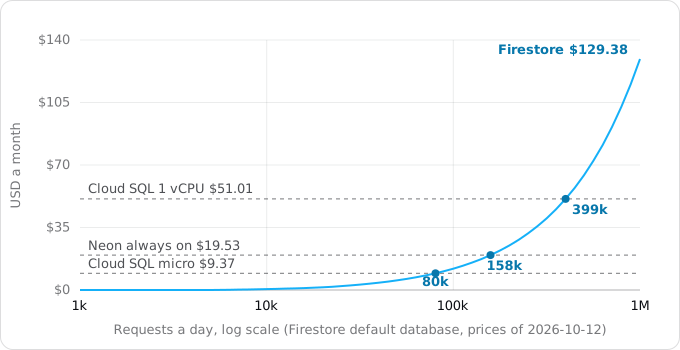
The lever is reads per request, not requests. Firestore Standard bills one read for every document a query returns, with a minimum of one read per query even when it returns nothing. A page that lists 50 items is 50 reads; with 50 reads a request the crossing with the micro moves down to about 20,000 requests a day. Before you choose Firestore for a busy app, count the documents your busiest pages read, multiply by their traffic, and price it at $0.033 per 100,000.
The flat lines are not flat forever either: a micro with about 0.6 GiB of memory and 25 connections by default needs a bigger machine long before a million requests a day, and Neon bills its autoscaled compute. The chart only shows where Firestore's per-read price outgrows a database billed by the hour.
What the data model costs your code
The bill is half of the choice. The other half is that Firestore is not SQL, and the difference shows on the first page you build.
To see it, we ran the same page, "the 20 latest orders with the customer's name", on Postgres 17 and on the Firestore emulator, with 50 customers and 1,000 orders in each. The script is in our research notes and runs locally with Docker and gcloud; it touches no project.
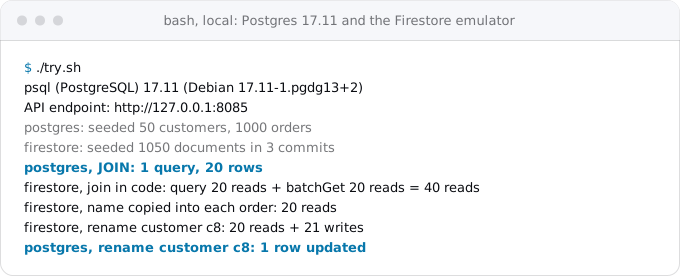
In Postgres the page is one query with a JOIN, and renaming a customer is one UPDATE. In Firestore Standard there is no join. You either fetch the orders and then the customers, 40 reads, or copy the customer's name into each order, 20 reads, and then renaming a customer means finding and rewriting every one of their orders: 20 reads and 21 writes for this one. Copying data so that reads are cheap is the normal way to model Firestore, and it moves work from reading to writing and into your code.
The other rules of Firestore Standard that change code:
- Every query needs an index. Single fields are indexed automatically; a query that filters on one field and sorts on another needs a composite index you create. The emulator does not track composite indexes, so a query that works locally can fail in production until the index exists.
- Limits. A document is at most 1 MiB, a request at most 10 MiB, and a transaction at most 270 seconds with a 60-second idle expiry.
- Hot spots. Google recommends starting a new collection at no more than 500 operations a second and adding 50% every 5 minutes, the "500/50/5" rule. A collection with an indexed field that only grows, such as a timestamp, takes at most 500 writes a second, and heavy sustained traffic to one document, such as a global counter, causes contention.
- No SQL tools. No
psql, no ad hoc reporting query, no ORM migrations. Exports go to Cloud Storage withgcloud firestore export.
Enterprise edition removes some of this, with joins and aggregations in its advanced query engine and documents up to 16 MiB through the MongoDB API, at a different price per operation. For an app that already uses MongoDB it is the edition to look at.
An app that grew on relational data, reports and joins belongs on Postgres, whatever Firestore's free quota says. For an app not written yet, planning a new product for Cloud Run weighs the same choice before the first table.
Moving an existing app
Most apps that move to Cloud Run already have a database, and the move should not become a rewrite. Postgres or MySQL from Heroku, Render, Railway or a server goes to Cloud SQL with the same engine, by dump and restore. An app already on Neon or Supabase can keep it and move only the app, to the Google region nearest the database (moving from Railway or Render covers the app's side). A MongoDB app can look at Firestore Enterprise with MongoDB compatibility, after checking the features it uses against Google's list. Moving a relational app to Firestore to save $9 a month is rarely worth it.
Step by step: Firestore
Firestore needs its API, a database and one role. Choose the location with care: Google's page says it cannot be changed after the database is created. europe-west1 is a single region; eur3 is a multi-region over Belgium and the Netherlands with a 99.999% SLA against 99.99% for a region.
gcloud services enable firestore.googleapis.com
gcloud firestore databases create --location=europe-west1
Leave --database out: the default name is (default), the one database with the free quota. --edition defaults to standard and --type to firestore-native. Then let the service's account read and write data, with your own project and account:
gcloud projects add-iam-policy-binding PROJECT \
  --member=serviceAccount:SERVICE_ACCOUNT_EMAIL \
  --role=roles/datastore.user
Your code creates a client with no credentials; on Cloud Run the library uses the service's identity. For local work run the emulator, and set FIRESTORE_EMULATOR_HOST so the library talks to it instead of production:
gcloud emulators firestore start --host-port=127.0.0.1:8085
export FIRESTORE_EMULATOR_HOST=127.0.0.1:8085
Check what a project has:
gcloud firestore databases list --format='table(name.basename(),type,databaseEdition,locationId)'Step by step: Cloud SQL or a serverless Postgres
For Cloud SQL, create the instance as the smallest instances guide shows, with --edition=enterprise said out loud, then attach it to the service:
gcloud run deploy app --image=IMAGE --region=europe-west1 \
  --add-cloudsql-instances=PROJECT:europe-west1:app-db
For a serverless Postgres, copy the pooled connection string from the vendor's console and pipe it into Secret Manager, so it never lands in your shell history or in the service's visible settings. Here pbpaste stands for whatever puts the clipboard on standard input; --data-file=- reads it:
pbpaste | gcloud secrets create database-url --data-file=-
gcloud run deploy app --image=IMAGE --region=europe-west1 \
  --set-secrets=DATABASE_URL=database-url:latest
The service's account needs the Secret Manager Secret Accessor role on that secret. --set-secrets replaces all of the service's existing secrets; use --update-secrets to add one to a service that already has some.
Read it on your bill
Firestore has a surprise on the bill: in the billing export its lines appear under the service "App Engine", not under a service called Firestore. A query by SKU finds them; this one shows reads and writes, and dropping the REGEXP_CONTAINS line shows storage, backups and egress too. Save it as firestore.sql, with your own project and table:
SELECT
  REGEXP_REPLACE(sku.description, r'^Cloud Firestore | Belgium$', '') AS sku,
  ROUND(SUM(usage.amount_in_pricing_units)) AS qty,
  ROUND(SUM(cost), 4) AS usd
FROM `PROJECT.billing_export.gcp_billing_export_v1_XXXXXX_XXXXXX_XXXXXX`
WHERE REGEXP_CONTAINS(sku.description, r'^Cloud Firestore (Read Ops|Entity Writes)')
  AND project.id = 'PROJECT'
  AND DATE(usage_start_time) BETWEEN '2026-10-04' AND '2026-10-11'
GROUP BY sku
ORDER BY usd DESC, qty DESC
Then run bq query --nouse_legacy_sql --format=pretty < firestore.sql.
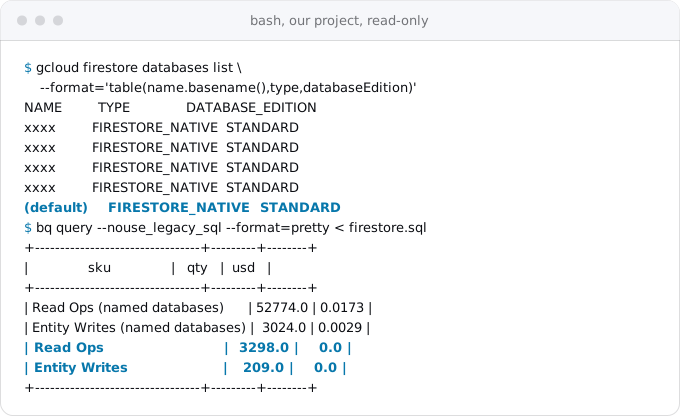
Exodus team: on our own project, over eight days, the four named databases read 52,774 documents for $0.0173, while 3,298 reads on the default database cost nothing. Cents, because the traffic is small; the rule is the same at any size.
What breaks
- A query that works on the emulator only. The emulator ignores composite indexes; deploy the index before the code.
- Cold starts in two places. A Neon compute that scaled to zero takes a few hundred milliseconds to wake, longer after 7 idle days, and its memory starts cold. If your Cloud Run service also scales to zero, the first visitor waits for both.
- A paused free project. Supabase pauses free projects after a quiet week, and the app's database errors begin the next morning.
- Cloud SQL out of connections. Every new Cloud Run instance brings its own pool; a traffic spike becomes a connection spike.
- Data with a second company. A serverless Postgres means a second vendor's terms, region and outages. Check that this is allowed for your data.
Checklist
- Write down the database your code speaks today. If it is SQL, the choice is between Cloud SQL and a serverless Postgres.
- Count reads and writes per request on your three busiest pages, and multiply by daily traffic.
- Price Firestore at $0.033 per 100,000 reads and $0.099 per 100,000 writes after the free quota, and compare with $9.37 for a micro or $51.01 for one vCPU.
- For a serverless Postgres, check whether your app ever has 5 quiet minutes; if not, price compute for the whole month.
- Put the database in the Cloud Run service's region, or the vendor region nearest it.
- Firestore: create
(default), not a named database, and grantroles/datastore.user. - Cloud SQL: say
--edition, and size connection pools againstmax_connections. - Keep any connection string in Secret Manager.
- After the first week, read the database lines on your bill, under "App Engine" for Firestore.
Where Exodus comes in
When Exodus audits a repository, it reads what the data layer expects: the engine and version, the ORM, the queries that join. The report proposes the database that keeps the code as it is, usually Cloud SQL, prices it for your region, and names the alternatives with what each would change in the code and on the bill.
FAQ
Is Firestore free for a small app?
Yes, on the project's default database. Firestore gives each project exactly one free database, with 50,000 reads, 20,000 writes and 20,000 deletes a day, 1 GiB stored and 10 GiB of egress a month. Any named database pays from the first read, at $0.033 per 100,000 reads in Belgium.
When does Firestore cost more than Cloud SQL?
At 10 reads and 1 write per request, Firestore's default database passes the $9.37 Cloud SQL micro at about 80,000 requests a day and the $51.01 one-vCPU machine at about 399,000. Reads per request move the line: at 50 reads, the crossing with the micro falls to about 20,000 requests a day.
Does Firestore support joins?
Firestore Standard edition has no joins, and every query needs an index. You fetch related documents separately or copy fields into each document, which moves work from reading to writing. Enterprise edition adds an advanced query engine with joins and aggregations, at a different price per operation.
Can a Cloud Run service use Neon or Supabase?
Yes, over the internet with TLS and a password kept in Secret Manager, through the vendor's pooled endpoint. Both run in AWS regions, so pick the one nearest your Cloud Run region, because every query is a round trip between two clouds. Traffic to them costs $0.12 per GiB to Europe after the first GiB.
How many connections does Cloud SQL allow from Cloud Run?
Postgres on a db-f1-micro allows 25 connections by default, and Google limits each Cloud Run instance to 100 connections to a Cloud SQL database. Every Cloud Run instance opens its own pool, so ten instances with a pool of five already take 50 connections.
Sources
34
- cloud.google.comFirestore pricing, Google
- firebase.google.comFirestore Enterprise edition pricing, Firebase
- docs.cloud.google.comFirestore editions overview, Google
- docs.cloud.google.comFirestore quotas and limits, Google
- firebase.google.comBest practices for Cloud Firestore, Firebase
- firebase.google.comUnderstand reads and writes at scale, Firebase
- docs.cloud.google.comFirestore locations, Google
- cloud.google.comFirestore Service Level Agreement, Google
- docs.cloud.google.comChoose between Firestore APIs, Google
- docs.cloud.google.comFirestore with MongoDB compatibility overview, Google
- docs.cloud.google.comUse the Firestore emulator, Google
- docs.cloud.google.comFirestore roles and permissions, Google
- docs.cloud.google.comConnect to Google Cloud services, Cloud Run, Google
- docs.cloud.google.comConnect from Cloud Run, Cloud SQL for PostgreSQL, Google
- docs.cloud.google.comDatabase flags, Cloud SQL for PostgreSQL, Google
- docs.cloud.google.comConfigure secrets for services, Cloud Run, Google
- docs.cloud.google.comExport and import data, Firestore, Google
- cloud.google.comCloud SQL pricing, Google
- cloud.google.comAlloyDB for PostgreSQL pricing, Google
- docs.cloud.google.comCreate a cluster and its primary instance, AlloyDB, Google
- cloud.google.comCloud Run pricing, Google
- cloud.google.comNetwork pricing, Virtual Private Cloud, Google
- neon.comNeon pricing
- neon.comNeon compute lifecycle and scale to zero
- neon.comNeon regions
- neon.comNeon connection pooling
- neon.comNeon cost optimization
- supabase.comSupabase pricing
- supabase.comAbout billing on Supabase
- supabase.comSupabase project pausing
- supabase.comSupabase available regions
- supabase.comSupabase dedicated IPv4 and connection strings
- docs.cloud.google.comgcloud reference, Google Cloud SDK 587.0.0
- Exodus team: Cloud Billing Catalog API for europe-west1 read Oct 12, 2026