Moving from Railway or Render to Cloud Run maps each piece to Google Cloud: a web service runs the same image on Cloud Run, a worker becomes Cloud Tasks, cron becomes Cloud Scheduler, the pre-deploy command a Cloud Run job, Postgres Cloud SQL and a volume a Cloud Storage bucket. Our small sample project costs $10.00 a month on Cloud Run, about $12 on Railway and $31.25 on Render.
In short
- Of the $10.00 a month on Cloud Run, $9.37 is the smallest Cloud SQL instance; the services stay inside the free tier at 500 visitors a day.
- Cloud Run's SLA promises 99.95% a month on every service with no plan to buy; Railway and Render offer contractual SLAs on Enterprise.
- Cloud Run runs in 43 regions, Railway in 4 and Render in 5.
- Render's paid instances run every hour, and its free web services take about a minute to wake after 15 minutes idle; a request-based Cloud Run service costs nothing between requests.
Prices are list prices read on October 12, 2026, with Cloud Run in europe-west1.
How each one bills today
Railway and Render are closer to Cloud Run than Heroku is: they build from a repository or a Dockerfile, a project of several services is their normal shape, and Railway already bills by the resources a service uses.
Railway charges a plan and the resources you use. The Hobby plan is $5 a month and includes $5 of usage; Pro is $20 and includes $20. On top of that, a service pays for the memory it holds, $10 per GB a month, the CPU it uses, $20 per vCPU a month, traffic out at $0.05 per GB and volumes at $0.15 per GB a month, all metered by the minute. Builds are free. A service that sits idle still holds its memory, so it still costs something, unless you turn on Railway's serverless mode, which puts a service to sleep 5 to 10 minutes after its last outbound traffic and wakes it on the next request.
Render charges a workspace plan and an instance per service. The Hobby workspace is free, Pro is $25 a month and Scale $499. A web service or a worker is $7 a month for half a CPU and 512 MB, $25 for one CPU and 2 GB. Paid instances run every hour; only free web services spin down, after 15 minutes without inbound traffic, and take about a minute to come back. A cron job is billed by the second with a $1 monthly minimum, Postgres starts at $6 a month, Key Value (Redis) at $10, a persistent disk is $0.25 per GB a month, and traffic out above the included 5 GB (Hobby) or 25 GB (Pro) is $0.15 per GB.
Cloud Run bills a service, with request-based billing, for the time its instances spend handling requests: in europe-west1, $0.000024 per vCPU-second, $0.0000025 per GiB-second and $0.40 per million requests, after a monthly free tier of 180,000 vCPU-seconds, 360,000 GiB-seconds and 2 million requests per billing account. A service with no traffic scales to zero and costs nothing; the cost guide works through every line.
When the move is worth it, and when it is not
Four reasons come up most often:
- An uptime commitment in writing. Cloud Run's SLA promises 99.95% a month on every service, with no plan to buy (99.9% in Mexico and Stockholm). Railway's Pro plan states a 99.99% availability target, and a contractual SLA comes with its Enterprise offering; Render lists contractual uptime SLAs on its Enterprise plan.
- Regions. Cloud Run runs in 43 regions. Railway has four (California, Virginia, Amsterdam, Singapore) and Render five (Oregon, Ohio, Virginia, Frankfurt, Singapore).
- Paying nothing while idle on a paid service. Render's paid instances run every hour; Cloud Run's request-based services cost nothing between requests.
- The rest of Google Cloud: Cloud SQL with point-in-time recovery, Cloud Storage, BigQuery, Pub/Sub and Gemini on one bill and one identity system.
The price alone is a weaker reason than it looks, as the cost section shows, because Cloud SQL's smallest instance costs more than a small Railway Postgres. If the app keeps a CPU busy all day, or holds thousands of open connections, stay where you are or take a server; Cloud Run or a VPS works out where the line falls. Exodus says so in its verdict when the numbers point that way.
What the CLI reads
Exodus's CLI reads railway.json or railway.toml, render.yaml, the Procfile, the Dockerfile, docker-compose.yml and your language's manifest (package.json, pyproject.toml, requirements.txt, Gemfile, Cargo.toml). Each service in them becomes a part of the report, with its start command, its variables and what it talks to. Here it is on the Render example from the CLI's open repository, a Django app with a web service, a Celery worker with a disk, a Redis and a Postgres:
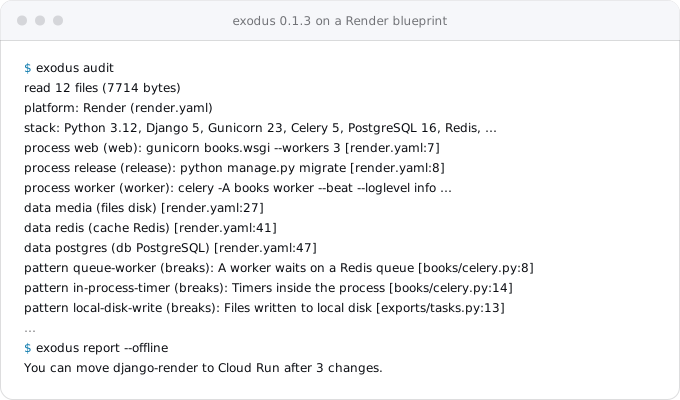
The report then prices both sides from list prices: $30.55 a month on Render for this blueprint and $10.00 on Cloud Run at 500 visitors a day. For the Railway example, an Express app with a BullMQ worker, a node-cron clock, Postgres, Redis and uploads on disk, it found four patterns to change and put Railway at $35.55 against $10.02. These "today" figures are the CLI's estimates from each platform's smallest paid sizes; once you answer its question about your current bill, the real figure replaces them.
What each piece becomes
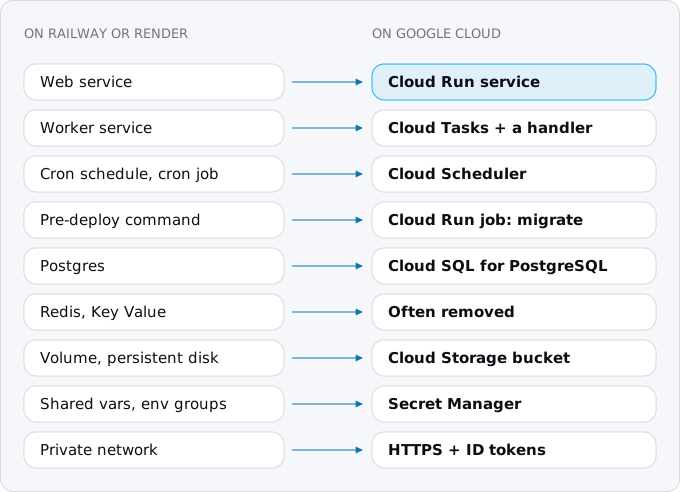
A web service becomes a Cloud Run service. If it has a Dockerfile, the same image runs; if Railway or Render built it from source, Cloud Run can build it with Google's buildpacks from the same source. The service must listen on the port in $PORT (8080 by default), on 0.0.0.0.
A worker service that pulls jobs from Redis becomes Cloud Tasks calling a handler in the web service, one request per job, with retries and rate limits kept by the queue. Keep a worker pool, Cloud Run's resource for pull-based processes, for the rare worker that has to hold a loop, such as a stream consumer.
A cron job becomes Cloud Scheduler. Railway runs a service's start command on its cron schedule, at least 5 minutes apart, in UTC, and skips a run while the previous one is still active. Render's cron jobs also run in UTC and are stopped after 12 hours. A Scheduler job calls an endpoint for short work or starts a Cloud Run job for long work, and has its own time zone, so a schedule written for UTC can be set in local time.
The pre-deploy command (preDeployCommand in railway.json or render.yaml) becomes a Cloud Run job that runs the migration before the new revision takes traffic. On Railway it is not retried and has no time limit unless you set one; on Render it runs on a separate instance and a failure cancels the deploy. A job behaves like the second: it runs once, and your deploy script stops if it fails.
A Postgres becomes Cloud SQL for PostgreSQL, or a serverless Postgres outside Google when it is small. Railway's Postgres is a container with a volume; Render's is a managed instance. Either way the data moves with pg_dump and pg_restore.
A Redis or Key Value often goes away: sessions move to signed cookies, the queue to Cloud Tasks, a cache to memory or the database. Keep a managed Redis only when the app needs one for something else.
A volume or a persistent disk becomes a Cloud Storage bucket, read and written through the bucket's API rather than a path on disk. Both platforms already limit a service with a disk: Railway allows one volume per service and no replicas with it, Render allows one instance and no zero-downtime deploys. A bucket removes both limits.
Shared variables and environment groups become Secret Manager for secrets and plain environment variables for the rest. Railway's ${{shared.KEY}} references and Render's generateValue have no equivalent; each secret is created once and attached to the services that need it.
Private networking between services becomes HTTPS between Cloud Run services, with Google identity instead of a private address. Railway's services find each other at SERVICE.railway.internal; Render's on internal hostnames within one region. On Cloud Run the receiving service allows the caller's service account with the Cloud Run Invoker role, and the caller sends an ID token.
The commands
The sequence below deploys a web service with its secrets and database and a migrate job, in europe-west1. It assumes an image in Artifact Registry, a Cloud SQL instance named db, a secret database-url holding the connection string and a service account named web; the Heroku guide shows how to create each.
printf '%s' "$SESSION_KEY" | gcloud secrets create session-key \
  --data-file=-

gcloud run deploy web \
  --image="$IMAGE" \
  --region=europe-west1 \
  --service-account="web@$PROJECT.iam.gserviceaccount.com" \
  --add-cloudsql-instances="$PROJECT:europe-west1:db" \
  --set-secrets="SESSION_KEY=session-key:latest,DATABASE_URL=database-url:latest" \
  --allow-unauthenticated

gcloud run jobs create migrate \
  --image="$IMAGE" \
  --region=europe-west1 \
  --service-account="web@$PROJECT.iam.gserviceaccount.com" \
  --set-cloudsql-instances="$PROJECT:europe-west1:db" \
  --set-secrets="DATABASE_URL=database-url:latest" \
  --command=npm \
  --args=run,migrate

gcloud run jobs execute migrate \
  --region=europe-west1 \
  --wait
The secret's value goes in through a pipe, so it never appears in the shell's history or the process list. For a private service that another one calls, the receiving side grants the caller:
gcloud run services add-iam-policy-binding reports \
  --region=europe-west1 \
  --member="serviceAccount:web@$PROJECT.iam.gserviceaccount.com" \
  --role=roles/run.invoker
and the caller gets an ID token for the receiving service's URL from the metadata server and sends it as a bearer token. Tokens last about an hour; the client libraries fetch and refresh them for you.
curl -s -H "Metadata-Flavor: Google" \
  "http://metadata.google.internal/computeMetadata/v1/instance/service-accounts/default/identity?audience=$REPORTS_URL"
One service or several
A Railway project or a Render blueprint often has three or four services because the platform made that cheap to express. On Cloud Run the worker usually folds into the web service as handlers, and the cron service disappears into Scheduler. Many projects end as one service, one job and a few Scheduler entries.
Cloud Run can deploy a Compose file with gcloud run compose up, generally available since March 25, 2026, but it does not do what a Railway project does. It deploys the whole file as one Cloud Run service with several containers in it, set to at most one instance by default, and Google recommends it for development and Terraform for production. For services that scale on their own, deploy one image per service from CI, as above.
Sleeping services and cold starts
Render's free web services spin down after 15 minutes without traffic and take about a minute to come back; its paid services never sleep. Railway's serverless mode sleeps a service after 5 to 10 minutes without outbound traffic, and Railway warns that the first request to a sleeping service may get a 502.
Cloud Run scales a request-based service to zero by default and starts an instance when a request arrives; the request waits for that start and gets its answer, not an error. How long the start takes depends on the container. Exodus team: a small Rust API of ours had a median instance startup of 94 ms over a week in October 2026, and a generated Rails 8 app took about 3 seconds to its first answer in our local tests. If even that matters, keep one minimum instance; the minimum instances guide prices it.
What it costs on each side
Take a small project: a web service, a worker, a job once a day, Postgres, Redis and 1 GB of uploaded files, with modest traffic (500 visitors a day, 5 GB out a month).
- Railway, Hobby: usage depends on what each service holds. Assume each of the four always-on services (web, worker, Postgres, Redis) holds 0.25 GB of memory and averages 2% of a vCPU: $2.50 + $0.40 = $2.90 each, $11.60 for four, plus two 1 GB volumes ($0.30) and 5 GB of egress ($0.25). Usage $12.15, of which the plan's $5 is included: $12.15 a month.
- Render, Hobby workspace: web $7, worker $7, the cron job's $1 minimum, Postgres $6, Key Value $10 and a 1 GB disk $0.25: $31.25 a month, at list prices.
- Cloud Run: the web service and the worker's jobs stay inside the free tier at this traffic, the daily job is free with Scheduler's three free jobs, 1 GB in a bucket is $0.02, images in Artifact Registry about $0.01, 5 GB of egress $0.60, and Cloud SQL db-f1-micro with 10 GB of SSD $9.37: $10.00 a month.
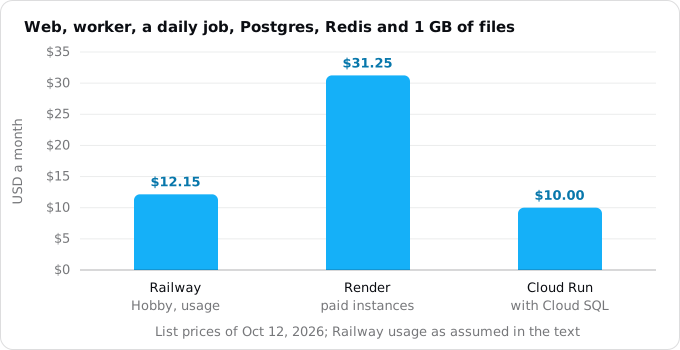
The Railway figure moves with its assumption: double the memory each service holds and it is about $22. The Cloud Run figure barely moves with traffic at this size, because 94% of it is the database. So the honest summary is: compared with Render's paid instances, the move saves money for a small project; compared with Railway, it is about even, and the reasons to move are the ones above. A serverless Postgres from another provider can lower the Cloud Run line; the database choice guide compares them.
Our own small services are the other data point. Exodus team, October 2026, europe-west1, Google's bill after the free tier: an API on a document database $0.13 a month, an API, web app and worker on Postgres $9.79 (of which the database $9.34), five tiny services sharing a project $0.69, and $2.10 of one-off builds in the first days after a move. They are idle most of the day, and request-based billing charges nothing for idle. An app that is busy all day would not see that.
The order of the move
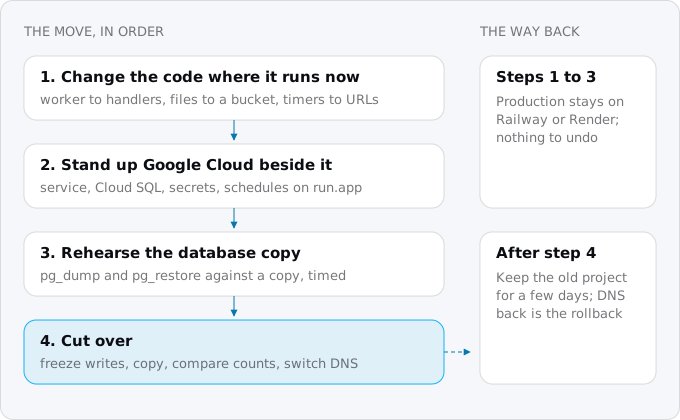
- Change the code where it is today: the worker to handlers, files to a bucket, timers to endpoints, sessions to signed cookies. Each change deploys to Railway or Render and is tested there. The patterns guide goes through each one.
- Stand up Google Cloud beside it: the Cloud Run service, Cloud SQL, the secrets, the queue and the schedules, all at the service's
run.appaddress while production stays where it is. - Rehearse the database copy against a copy of production and time it. Railway's Postgres is reachable from outside through its TCP proxy, which bills its traffic as egress; Render gives each database an external URL next to the internal one, behind an IP allow list. Then:
pg_dump "$OLD_DATABASE_URL" \
  --format=custom \
  --no-owner \
  --no-acl \
  --file=app.dump
pg_restore \
  --dbname="$NEW_DATABASE_URL" \
  --no-owner \
  --no-acl \
app.dump- Cut over: freeze writes, take the final dump, restore it, compare row counts table by table, switch the domain, and keep the old project running, but not writing, for a few days as the way back. The cutover day checklist lists every check, and moving a Postgres database covers larger databases.
Where Exodus comes in
Exodus runs this move with your own coding agent. The CLI audits the repository on your machine, as above; the report prices your current platform against Cloud Run and lists the changes in order; the plan turns them into tasks, from the Dockerfile and the health check to the switch of the domain. Nothing signs in to Google Cloud for you: your agent uses your own gcloud.
FAQ
Is Cloud Run cheaper than Railway?
For a small project it is about even. Our sample project costs $10.00 a month on Cloud Run and about $12.15 on Railway's Hobby plan with the usage we assumed, or about $22 if each service holds twice the memory. 94% of the Cloud Run figure is the database, so the reasons to move are the SLA, the regions and Google Cloud.
Is Cloud Run cheaper than Render?
Against Render's paid instances, yes for a small project: the same sample costs $31.25 a month on Render and $10.00 on Cloud Run at list prices. Render's paid web services and workers run every hour, while a request-based Cloud Run service costs nothing between requests.
What replaces private networking between Railway or Render services?
HTTPS between Cloud Run services, with Google identity instead of a private address. The receiving service grants the caller's service account the Cloud Run Invoker role, and the caller sends an ID token from the metadata server. Tokens last about an hour, and the client libraries fetch and refresh them.
Can Cloud Run deploy a Compose file the way Railway runs a project?
Not the same way. Compose deploys, generally available since March 25, 2026, put the whole file into one Cloud Run service with several containers, at most one instance by default, and Google recommends them for development. For services that scale on their own, deploy one image per service from CI.
Do Cloud Run services sleep like Render's free web services?
A request-based Cloud Run service scales to zero, but the next request waits for an instance to start and gets its answer, not an error. A small Rust API of ours had a median instance startup of 94 ms; Render's free services take about a minute. One minimum instance removes the wait.
Sources
28
- docs.railway.comPlans and resource pricing, Railway docs
- railway.comPricing, Railway
- docs.railway.comSupport, Railway docs
- docs.railway.comRegions, Railway docs
- docs.railway.comCron jobs, Railway docs
- docs.railway.comServerless, Railway docs
- docs.railway.comPre-deploy command, Railway docs
- docs.railway.comConfig as code, Railway docs
- docs.railway.comVolumes, Railway docs
- docs.railway.comVariables and private networking, Railway docs
- render.comPricing, Render
- render.comDeploy for free, Render docs
- render.comCron jobs, Render docs
- render.comDeploys, Render docs
- render.comPersistent disks, Render docs
- render.comRegions, Render docs
- render.comOutbound bandwidth, Render docs
- cloud.google.comCloud Run pricing, Google
- cloud.google.comCloud Run SLA, Google
- docs.cloud.google.comCloud Run locations, Google
- docs.cloud.google.comDeploy services using Compose, Cloud Run docs, Google
- docs.cloud.google.comCloud Run release notes, Google
- docs.cloud.google.comAuthenticating service-to-service, Cloud Run docs, Google
- render.comCreate and connect to Render Postgres, Render docs
- docs.railway.comPostgres on Railway, Railway docs
- docs.cloud.google.comDeploy from source code, Cloud Run docs, Google
- cloud.google.comCloud SQL pricing, Google
- Exodus team: exodus 0.1.3 audit and report on the open CLI's Railway and Render examples; our own services' bills on Cloud Run and their instance start times, October 2026