The smallest Cloud SQL instance, db-f1-micro, costs $7.67 a month, or $9.37 with the default 10 GiB of SSD. It is shared-core, with 25 connections and no SLA, and Google calls it a test and development machine. The smallest dedicated machine, db-custom-1-3840, costs $51.01 with the same disk, and $102.02 with the high availability the SLA requires.
In short
- Enterprise Plus starts at $184.69 a month and is the default edition for PostgreSQL 16 and later, so always pass
--edition. - A stopped instance still pays for its disk and $7.30 a month for an IPv4 address: a stopped micro costs $9.00, a running one $9.37.
- Extended support for an old Postgres version adds $13.14 a month to a micro and $51.10 per vCPU to a dedicated machine.
- Committed use discounts take 25% for one year or 52% for three off dedicated CPU and memory only.
Every price is Google's list price for europe-west1 (Belgium), read on October 11, 2026, for Google's month of 730 hours. Most other regions in Europe and North America are the same or close; the pricing page has a region selector.
What you pay for
This guide prices PostgreSQL. MySQL uses the same machines and the same prices; SQL Server adds a license and is left out. Cloud SQL is a managed database: Google runs a virtual machine with Postgres on it, keeps the operating system and Postgres patched, takes daily backups and can keep a standby copy in a second zone. You never log in to the machine. You connect to the database, and you pay for the pieces underneath it:
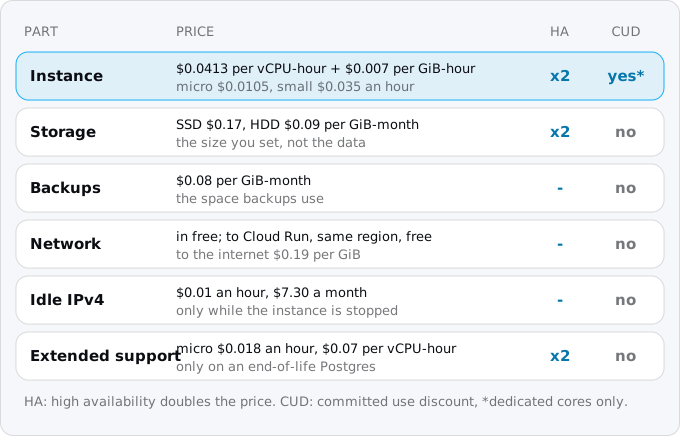
- The instance. For dedicated-core machines, a price per vCPU-hour ($0.0413) plus a price per GiB of memory per hour ($0.007). For the two shared-core machines, a flat price per hour. Billing is per second while the instance runs.
- Storage. The disk you provision, used or not: $0.17 per GiB a month for SSD, $0.09 for HDD.
- Backups. $0.08 per GiB a month for the space backups actually use.
- Network. Traffic into the database is free. Traffic out to Cloud Run in the same region is free; to the internet it is $0.19 per GiB.
- An IPv4 address while the instance is stopped. $0.01 an hour.
- Extended support, if your Postgres major version has reached its end of life. It is added on top of everything else.
High availability (Google calls it a regional instance) keeps a standby in a second zone and doubles the instance and storage prices. Read replicas cost the same as a standalone instance.
There is no permanent free tier for Cloud SQL the way there is for Cloud Run. The Cloud Run free tier does not cover the database, so for many small apps the database is the largest line on the bill. When a machine billed every hour is the wrong shape for the app, Cloud SQL, Firestore or a serverless Postgres compares the alternatives.
Two editions
Before choosing a machine you choose an edition, because each edition has its own machines.
Enterprise is the original Cloud SQL. It has the two shared-core machines, the general purpose dedicated-core machines with any CPU and memory inside the rules below, and the newer N4 series. Its SLA, when it applies, is 99.95%, excluding maintenance, and maintenance takes the database away for less than 30 seconds.
Enterprise Plus has only larger machines (N2, C4A and C4 series), a 99.99% SLA that includes maintenance, sub-second maintenance downtime, up to 35 days of point-in-time recovery against Enterprise's 7, a data cache on local SSD and read pools. It is built for databases that matter to a business, and it is priced for them.
One detail matters for cost from the first command. Google's editions page says that for PostgreSQL 16 or later the default edition is Enterprise Plus, and the smallest Enterprise Plus machine costs about twenty times the smallest Enterprise one. Whatever tool creates your instance, say the edition out loud.
The ladder of small instances
Here are the five cheapest starting points, each with the default 10 GiB of SSD, single zone, no extended support:
- db-f1-micro, shared core, 0.6 GiB of memory: $7.67 for the instance, $9.37 with the disk.
- db-g1-small, shared core, 1.7 GiB: $25.55, $27.25.
- db-custom-1-3840, Enterprise's smallest dedicated machine, 1 vCPU and 3.75 GiB: $30.15 for the vCPU plus $19.16 for memory is $49.31, $51.01.
- N4 with 2 vCPUs and 4 GB, the smallest machine of Enterprise's N4 series: $80.74, $82.44.
- db-perf-optimized-N-2, Enterprise Plus's smallest, 2 vCPUs and 16 GB: $78.40 plus $106.29 is $184.69, $186.39.
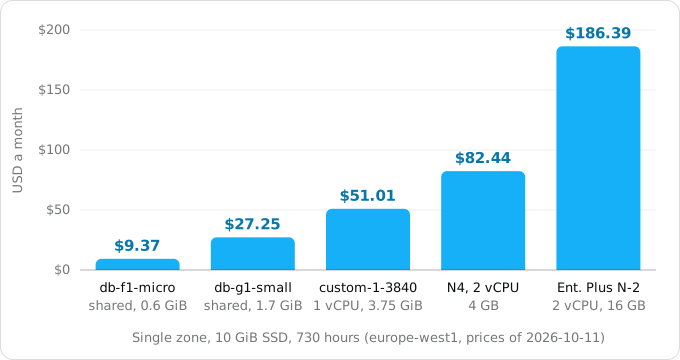
The steps are not even. From the micro to the smallest dedicated machine the price grows five times; from there to Enterprise Plus it grows almost four times again. Most small apps live on the first three rungs, so the rest of this guide spends its time there.
The shared-core machines: db-f1-micro and db-g1-small
"Shared core" means the instance does not own a whole vCPU. It gets a share of one, on a machine shared with other customers, and can use more for short bursts. Google's machine series page lists db-f1-micro with 0.614 GB of memory and db-g1-small with 1.7 GB; the pricing page rounds the first to 0.6 GiB.
What you get for $9.37 a month is a real Postgres with daily backups, point-in-time recovery, automatic patching and the same connection options as any other instance. What you do not get:
- An SLA. The pricing page, the instance settings page and the SLA itself all say it: shared-core instances are not covered. The settings page goes further and says these machines are "designed to provide low-cost test and development instances only" and should not be used in production.
- Many connections. Cloud SQL sets Postgres's
max_connectionsfrom the instance's memory: 25 on a micro, 50 on a small, 100 from 3.75 GiB. On Cloud Run every instance of your service opens its own connection pool, so ten Cloud Run instances with a pool of five each already take 50 connections. The concurrency guide shows how to size the pool and the maximum number of instances so they fit, and connection pooling on Cloud Run covers what to do when they do not. - Memory for caching. With 0.6 GiB, Postgres keeps little of your data in memory, so queries that a larger machine answers from memory read from disk instead.
- Committed use discounts. They do not apply to shared-core machines.
So the micro fits a staging copy, a side project, an internal tool for a few people, or the first weeks of a product while you measure what it needs. The small fits the same work with more memory and twice the connections, at almost three times the price. For anything people pay for, the next rung is the one to use.
The smallest dedicated machine: db-custom-1-3840
On Enterprise you build a dedicated machine from two numbers, with three rules from the machine series page: the vCPU count is 1 or an even number up to 96; memory is 0.9 to 6.5 GB per vCPU, in steps of 256 MB; and memory is at least 3.75 GB. The smallest machine that passes all three is 1 vCPU with 3,840 MB, named db-custom-1-3840.
It costs $49.31 a month, $51.01 with 10 GiB of SSD. For that you get a whole vCPU, 3.75 GiB of memory, 100 connections by default and a machine type that counts toward an SLA. Toward, because the SLA has a second exclusion that people miss: single-zone instances are excluded too. Only an instance with high availability is covered. The same machine with a standby in a second zone costs $102.02 a month with 10 GiB of SSD, because the instance and the disk are both charged twice.
That leaves a real decision for a small production app:
- $51.01, single zone. A zone outage or a host failure takes the database down until Google restarts it elsewhere, and there is no SLA credit. Maintenance takes it away for under 30 seconds.
- $102.02, high availability. A failure moves the database to the standby in the other zone, and the 99.95% SLA applies.
Both work. A product with paying customers and no other replica usually takes the second. A product with few users and good backups often starts with the first and adds the standby once the product earns it.
The N4 series, Enterprise's newer machines, starts at 2 vCPUs with 2 to 8 GB each. Its prices per vCPU and per GiB are the same as the general purpose machines, so the smallest N4 machine is just a larger instance at $80.74. It makes sense when you need two vCPUs anyway.
Enterprise Plus: where it starts
The smallest Enterprise Plus machine, db-perf-optimized-N-2, has 2 vCPUs and 16 GB at $0.0537 per vCPU-hour and $0.0091 per GiB-hour: $184.69 a month for one zone, $369.38 with high availability. For that you get the features in the editions section above. A small app rarely needs them at the start, and Google's editions page describes how to upgrade an existing Enterprise instance to Enterprise Plus later.
The risk is getting Enterprise Plus without choosing it. If you create a PostgreSQL 16, 17 or 18 instance and leave the edition to the default, Google's editions page says you get Enterprise Plus.
The rest of the bill
The instance is most of the bill only while everything else stays small. Each of these can change that.
Storage you cannot take back. The disk is billed for its provisioned size whether the database fills it or not. Google's settings page says you can increase the size but not decrease it by editing the instance. Automatic storage increases are on by default, with no limit by default: when free space falls below a threshold, Cloud SQL adds space, and the page calls these increases permanent. A one-off import or a table that bloats can leave you paying for a disk several times larger than your data. The page mentions a separate manual shrink operation, but plan as if growth is permanent: set an upper limit with --storage-auto-increase-limit, and watch the disk size. HDD halves the storage price to $0.09 per GiB but is slower and only exists on Enterprise; at 10 GiB the saving is $0.80 a month, so it only matters for large, cold data.
Backups. Daily backups are on by default, and gcloud keeps 7 of them on Enterprise and 15 on Enterprise Plus. You pay $0.08 per GiB a month for the space they use, which for a small database is cents: our own micro instance's backups cost about a hundredth of a cent a day. Point-in-time recovery keeps up to 7 days of write-ahead logs on Enterprise, and the gcloud reference warns that logs kept on the instance's disk take storage, so a write-heavy database needs room for them. The settings to check on a new instance, and how to get a table back after a bad change, are in backups and point-in-time recovery on Cloud SQL.
High availability. Twice the instance price and twice the storage price, as above.
Network. Traffic between Cloud Run and Cloud SQL in the same region is free, which is one more reason to put them in the same region (see the region guide). Reading from the database to a laptop or another provider is internet egress at $0.19 per GiB, more than Cloud Run charges for its own internet traffic (the worked examples price that). A nightly pg_dump of a 5 GiB database to a server outside Google is about $29 a month on its own.
Three charges people miss
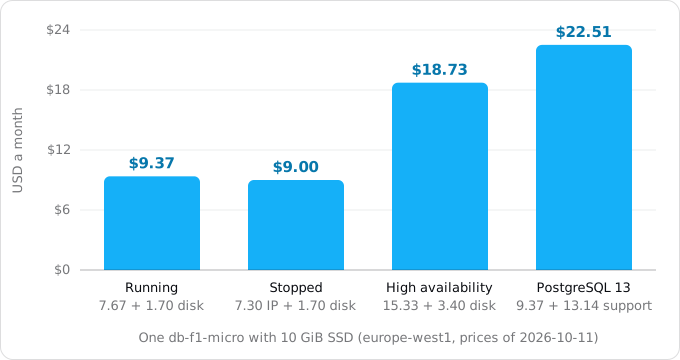
An IP address while the instance is stopped. You can stop an instance by setting its activation policy to NEVER. Google's page says stopping suspends instance charges, but storage and IP address charges continue, and the pricing page lists "IPv4 addresses while idle" at $0.01 an hour: $7.30 a month. For a micro with a public IP, that changes the arithmetic. Running, it costs $9.37. Stopped, it costs $1.70 for the disk plus $7.30 for the address: $9.00. Stopping a micro saves 37 cents a month. On our own bill, the running micro with a public IP has no address line at all; the charge appears only when the instance is idle. Stopping pays off on larger machines, where the instance price is much more than $7.30.
Extended support. Every Postgres major version reaches the end of its community support some years after release. Cloud SQL keeps running it, but three months after that date it enrolls every instance on the old version in extended support and charges for it in addition to the instance. PostgreSQL 13 entered extended support on February 1, 2026; PostgreSQL 14 enters on February 1, 2027. The price for a micro is $0.018 an hour, $13.14 a month in the first two years: more than the instance itself, so a micro on Postgres 13 costs $22.51 a month instead of $9.37. In the third year it is $0.035 an hour. For dedicated machines it is $0.07 per vCPU-hour, $51.10 a month per vCPU, which more than doubles the price of db-custom-1-3840. When you move a database, move it to a current version; PostgreSQL 17 is in regular support until February 1, 2030.
The free trial instance. Google offers a 30-day free trial instance, one per new project. It is large: Enterprise Plus, 8 vCPUs, 64 GB of memory, 100 GB of storage and a 375 GB data cache. It has no SLA and no backups. After 30 days it stops serving, and Google keeps it for 90 days in case you upgrade. The upgrade keeps the machine as it is, and at list price that machine is $738.76 a month for compute, about $816 with its storage and cache. The trial is a good way to load-test a schema. It is a poor way to start production, unless the first thing you do after the upgrade is resize it.
There is one more small offering, the developer edition: 0.5 vCPU and 2 GB that pause when idle, with 50 compute units and 10 GB free a month per billing account. Google's page says it can only be created from Google AI Studio, not from the console, gcloud or the API, so it is not an option for an existing app.
Committed use discounts
If you know the database will run for a year, Cloud SQL sells committed use discounts: 25% off the CPU and memory price for one year, 52% off for three. A commitment is an amount of on-demand spend per hour in one region, billed monthly for the whole term whether you use it or not, and it covers dedicated-core instances only. Storage, backups, IP addresses and network traffic are not discounted, and neither are the shared-core machines. On db-custom-1-3840 a one-year commitment takes the instance from $49.31 to $36.98, a three-year one to $23.67. That is worth doing once the machine size is settled, not in the first month.
Create the instance with the edition you chose
The command below creates the smallest machine on Enterprise, single zone, with an upper limit on disk growth. It costs money from the moment it runs, so check the region and the name first.
gcloud sql instances create app-db \
  --database-version=POSTGRES_17 \
  --edition=enterprise \
  --tier=db-f1-micro \
  --region=europe-west1 \
  --storage-type=SSD \
  --storage-size=10 \
  --storage-auto-increase-limit=20
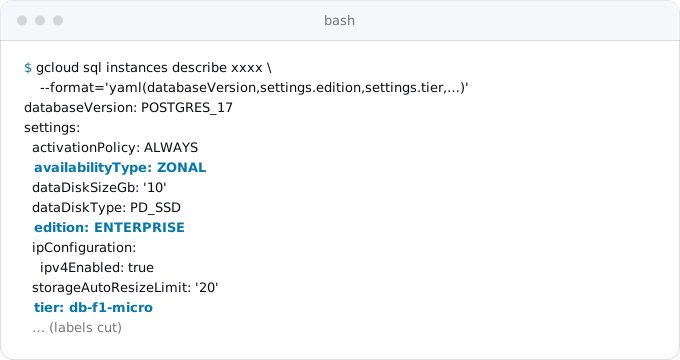
For the smallest dedicated machine, replace --tier=db-f1-micro with --cpu=1 --memory=3840MiB; gcloud takes CPU and memory instead of a tier for Enterprise dedicated machines. Add --availability-type=regional for high availability; the default is zonal. Every flag here is in the gcloud sql instances create reference for gcloud 587.0.0, and our own micro instance runs with these settings, as the next picture shows.
Connecting Cloud Run to Cloud SQL attaches the new instance to a service. Afterwards, or on an instance someone else created, check what you are paying for:
gcloud sql instances describe app-db \
  --format='yaml(databaseVersion,settings.edition,settings.tier,settings.availabilityType,settings.dataDiskType,settings.dataDiskSizeGb,settings.storageAutoResizeLimit,settings.activationPolicy,settings.ipConfiguration.ipv4Enabled)'
The fields that set the price are edition and tier (the machine), availabilityType (ZONAL or REGIONAL, the latter twice the price), dataDiskSizeGb, and databaseVersion (an old one means extended support).
Read the real cost from your bill
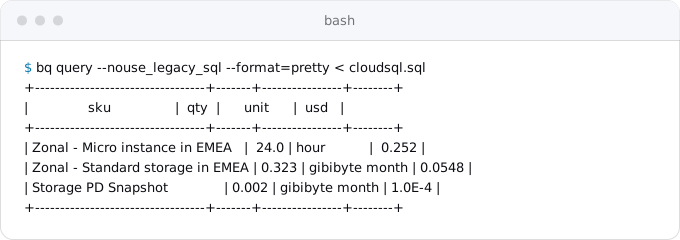
The prices above are list prices. The bill is what you actually paid, and if you export billing to BigQuery (the free tier guide shows a query on the same export), one query shows a day of Cloud SQL line by line. Save it as cloudsql.sql, with your own project and table name:
SELECT
  REGEXP_REPLACE(sku.description, r'^Cloud SQL for \w+: ', '') AS sku,
  ROUND(SUM(usage.amount_in_pricing_units), 3) AS qty,
  usage.pricing_unit AS unit,
  ROUND(SUM(cost), 4) AS usd
FROM `PROJECT.billing_export.gcp_billing_export_v1_XXXXXX_XXXXXX_XXXXXX`
WHERE service.description = 'Cloud SQL'
  AND DATE(usage_start_time) = '2026-10-10'
GROUP BY sku, unit
HAVING usd > 0
ORDER BY usd DESC
Then run bq query --nouse_legacy_sql --format=pretty < cloudsql.sql. For our micro instance, a full day was 24 hours of "Micro instance" at $0.252, 0.323 GiB-months of "Standard storage" at $0.0548 (10 GiB for one day) and "Storage PD Snapshot", the backups, at $0.0001. That is $0.307 a day, $9.33 for a month of 730 hours, within a few cents of the list price arithmetic. Network lines to Google services and between zones appeared on the same days at $0, and no IP address line appeared while the instance ran.
Which one to choose
- A staging copy, a side project, an internal tool:
db-f1-micro, $9.37 a month with 10 GiB. Keep the Cloud Run connection pool and maximum instances within 25 connections. - The same, with more data in memory or more connections:
db-g1-small, $27.25. Still no SLA. - A small product people pay for:
db-custom-1-3840, $51.01 single zone or $102.02 with high availability, which is the only way to get the SLA. - Two vCPUs or more: a custom machine or N4 on Enterprise, at the same per-vCPU and per-GiB prices.
- Enterprise Plus: when you need its 99.99% SLA, sub-second maintenance or 35 days of recovery, from $184.69 a month.
In every case: say --edition when you create the instance, set a storage growth limit, run a Postgres version in regular support, and keep the database in the same region as the Cloud Run service. What Cloud Run costs by traffic puts these database prices next to the rest of an app's bill at four levels of traffic.
Where Exodus comes in
When Exodus audits a repository, it reads how the app uses its database: the engine and version, the size of the data, the connection settings, and what the current provider charges for it. The report proposes a Cloud SQL machine from this ladder, prices it with storage and backups at list price for your region, and says when the proposal is a shared-core machine without an SLA or when your Postgres version would fall into extended support. The dump and the restore are in the App Platform guide and the Fly guide; for a Postgres that runs on the app's own VM, see moving from a Compute Engine VM.
FAQ
Is there a free tier for Cloud SQL?
There is no permanent free tier. Google offers a 30-day free trial instance, one per new project: Enterprise Plus with 8 vCPUs and 64 GB, no SLA and no backups. After 30 days it stops serving, and upgrading keeps the same machine, $738.76 a month for compute at list price.
Can db-f1-micro be used in production?
Google says no: its settings page calls the shared-core machines test and development instances, and the SLA does not cover them. A micro also has 25 connections and about 0.6 GiB of memory. It fits a staging copy, a side project or an internal tool; a product people pay for starts on a dedicated machine.
Does a stopped Cloud SQL instance still cost money?
Yes. Stopping suspends the instance charge, but the disk and the IPv4 address keep billing, the address at $0.01 an hour. A stopped micro with 10 GiB of SSD costs $9.00 a month against $9.37 running, so stopping pays off only on larger machines.
How much does high availability add to Cloud SQL?
High availability keeps a standby in a second zone and charges the instance and the storage twice. The smallest dedicated machine goes from $51.01 to $102.02 a month with 10 GiB of SSD. Only an instance with high availability is covered by the SLA.
Sources
14
- cloud.google.comCloud SQL pricing, Google
- docs.cloud.google.comChoose a machine series, Cloud SQL for PostgreSQL, Google
- docs.cloud.google.comCloud SQL editions overview, Cloud SQL for PostgreSQL, Google
- docs.cloud.google.comAbout instance settings, Cloud SQL for PostgreSQL, Google
- docs.cloud.google.comDatabase flags, Cloud SQL for PostgreSQL, Google
- docs.cloud.google.comStart, stop, and restart instances, Cloud SQL for PostgreSQL, Google
- cloud.google.comCloud SQL Service Level Agreement, Google
- docs.cloud.google.comExtended support for Cloud SQL, Google
- docs.cloud.google.comDatabase version policies, Cloud SQL, Google
- docs.cloud.google.comCommitted use discounts, Cloud SQL, Google
- docs.cloud.google.comFree trial instance overview, Cloud SQL for PostgreSQL, Google
- docs.cloud.google.comBuild vibe-coded applications with AI Studio and Cloud SQL, Google
- docs.cloud.google.comgcloud sql instances create reference, Google Cloud SDK 587.0.0
- Exodus team: Cloud Billing Catalog API read Oct 11, 2026 for Cloud SQL's europe-west1 SKUs