Connection pooling on Cloud Run comes down to one sum: maximum instances times each instance's pool, plus jobs and a console, must fit under the database's max_connections: 25 on the smallest Cloud SQL machine, 22 of them for your app. Start with a pool of about 5, cap the instances in the same change, and reach for a bigger machine or a pooler only when that does not fit.
In short
- A Cloud SQL micro accepts 25 connections; 3 are reserved for superusers, so your app gets 22.
- Google's samples use a pool of 5; SQLAlchemy defaults to 15 per engine and node-postgres to 10 with no wait limit.
- On a micro, with 4 connections kept for a migration and a console, a pool of 5 plus 2 fits 2 instances.
- A 1 vCPU, 3.75 GB machine accepts 100 connections for $49.31 a month, against $7.67 for the micro.
- Managed Connection Pooling needs Enterprise Plus, from $184.69 a month; PgBouncer on an e2-micro adds $6.73.
Prices are list prices in europe-west1 of October 12, 2026, before storage. Pages were read and commands run that day.
How the numbers multiply
Postgres starts one process for every connection, and a pool is a set of open connections your app keeps and lends to requests. Every Cloud Run instance is a separate process with its own pool, so the connections your database sees add up (how to connect at all is in connecting Cloud Run to Cloud SQL):
connections =
    max instances x (pool + overflow)
  + migration jobs and other jobs
  + you, in psql or a console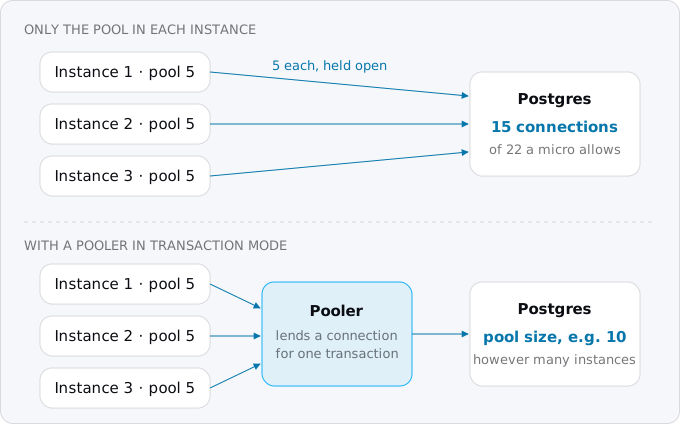
The other side of the sum is small. Cloud SQL for PostgreSQL sets max_connections from the machine's memory: 25 on the shared-core micro of about 0.5 GB, 50 on the small of about 1.7 GB, 100 from 3.75 GB, 400 from 7.5 GB, 500 from 15 GB. Postgres keeps 3 of those slots for superusers by default, and Cloud SQL gives no user the superuser attribute, so on a micro your app's users get 22. Cloud Run adds a limit of its own: through its built-in Cloud SQL connection, each instance can open at most 100 connections, and the connecting guide says which paths that covers.
Concurrency on Cloud Run has the chart of this sum against the default of 100 instances, and the note that during a deploy or a spike the instance count can briefly pass the maximum. So keep headroom: on a micro, leave room for one migration job and one person in psql. A database per tenant multiplies the sum again, one pool per database, which is why a SaaS architecture on Cloud Run keeps all tenants in one.
Step 1: count what you have
Three numbers decide everything: the database's limit, how many instances the service may run, and the pool size in your code. The first two are a read away:
gcloud sql instances list \
    --format='table(databaseVersion,settings.tier,settings.edition)'
gcloud sql instances describe app-db --format='value(settings.databaseFlags)'
gcloud run services describe app --region europe-west1 --format='value(
    spec.template.metadata.annotations."autoscaling.knative.dev/maxScale",
    spec.template.spec.containerConcurrency)'
An empty answer from the second command means no flags are set, so max_connections is the machine's default. To see the value itself and what is connected right now, ask the database:
show max_connections;
select usename, state, count(*)
  from pg_stat_activity
  group by 1, 2 order by 3 desc;
For history, Cloud Monitoring keeps the Cloud SQL metric database/postgresql/num_backends, the number of connections per database, and num_backends_by_state, which splits them into active and idle. Metrics Explorer in the console charts it.
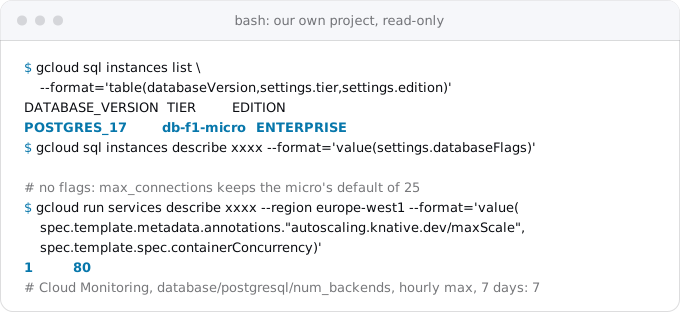
Exodus team: on our own project, the one service that uses Cloud SQL runs at most 1 instance against a micro, and the busiest hour of the last week saw 7 connections. The cap came first, so the pool cannot multiply past the limit.
Step 2: size the pool inside the app
Each library has its own name for the same two numbers: how many connections the pool keeps, and how many more it may open in a burst. Their defaults are not small, which is the usual way a service exceeds a micro without anyone choosing to:
- node-postgres (
pg.Pool):maxis 10 by default.connectionTimeoutMillisis 0, which means a request waits for a free connection forever. - Prisma 7 uses the pool of the driver adapter, which for Postgres is node-postgres: 10 connections and no wait timeout by default. Prisma 6 set
connection_limitto twice the physical CPU count plus one, and waited 10 seconds. - SQLAlchemy:
pool_size5 plusmax_overflow10, so up to 15 connections per engine, and per process. Google's sample sets 5 and 2. - Django closes its connection at the end of every request by default (
CONN_MAX_AGE = 0), so each request opens a new one. The"pool"option inOPTIONS, in Django 6.1's documentation, gives a real pool with psycopg 3 andpsycopg[pool]; with it,CONN_MAX_AGEmust stay 0. Under ASGI, Django says to turn persistent connections off and use the pool. - Rails:
poolindatabase.yml, 5 in the guide's example, per process. The guide warns that threads contend for the pool when it is smaller than the threads that query at once, so with Puma give each process as many connections as threads. - pgx (Go,
pgxpool):pool_max_connsis the greater of 4 and the CPU count. Google's Go sample fordatabase/sqlsetsSetMaxOpenConns(7).
Then do the sum backwards from the limit. On a micro: 25 minus 3 for superusers leaves 22; keep 4 for a migration job and a console session, and 18 remain. With Google's sample of 5 plus 2, that is 2 instances. With SQLAlchemy's defaults of 15, it is one, and the second instance already fails. So set the pool and the cap together, in the same commit:
gcloud run services update app --region europe-west1 --max-instances=2The same cap belongs on the cutover day checklist, before real traffic arrives.
How big should one instance's pool be? As big as the number of queries it really runs at the same moment, not the requests it serves. A threaded server needs about one connection per thread that queries. An async server with concurrency 80 does not need 80: requests wait briefly for the pool instead.
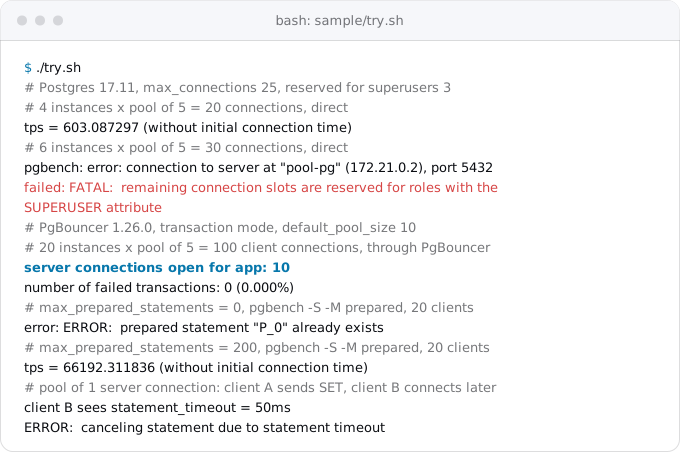
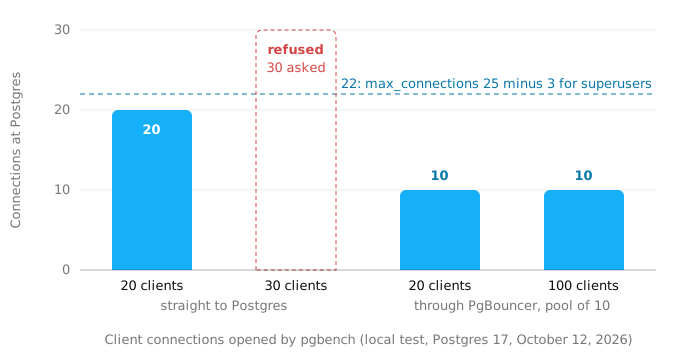
To check the arithmetic before production does, we ran Postgres 17 at max_connections 25 with a role that is not a superuser, as on Cloud SQL, and let pgbench stand in for instances opening their pools. Twenty connections passed; thirty were refused with the exact error you would see on a micro:
Step 3: the pool settings that matter on Cloud Run
Cloud Run treats instances differently from a long-lived server in four ways, and each has a setting.
Connections get dropped. Google's Cloud Run page says connections "may be dropped, either by the database server itself, or by the platform infrastructure", and recommends a pool that reconnects broken connections. So check a connection before lending it: pool_pre_ping=True in SQLAlchemy, CONN_HEALTH_CHECKS = True in Django, and pgx pings a connection idle for more than a second by default. Then give connections a maximum age, so none lives long enough to meet a stale network path: Google's samples recycle after 30 minutes, which is pool_recycle=1800 in SQLAlchemy, maxLifetimeSeconds: 1800 in node-postgres and SetConnMaxLifetime(30 * time.Minute) in Go. pgx closes connections after an hour by default.
CPU can stop between requests. With request-based billing, the default, Cloud Run gives an instance CPU only while it processes requests. A pool's idle timers and background health checks run on that CPU, so between requests they wait, and an idle connection is closed late or found broken on the next checkout. The checkout check above covers that. Do not count on the pool to clean up on a timer.
Requests should not wait forever. If every connection is busy, a request waits for one. node-postgres and Prisma 7 default to no limit, so a burst turns into requests that hang until Cloud Run's request timeout. Set a short wait, such as connectionTimeoutMillis: 5000, so the error says what happened. Rails raises ActiveRecord::ConnectionTimeoutError after 5 seconds; SQLAlchemy waits 30.
Instances get shut down. An idle instance can be stopped at any time and is kept idle no longer than 15 minutes, unless it is one of the minimum instances. Before stopping it, Cloud Run sends SIGTERM and waits 10 seconds. Close the pool in that handler, await pool.end() in node-postgres, engine.dispose() in SQLAlchemy, so the connections end cleanly instead of lingering on the database side.
And always return connections: Google's page calls unreturned ones "leaked", and enough of them exhaust the pool. Use a with block in Python, try/finally around client.release() in node-postgres.
When the arithmetic does not fit
When 2 instances are too few, or several services share one database, there are three ways out, in order of effort.
A bigger machine. The limit grows with memory. A dedicated-core Enterprise machine with 1 vCPU and 3.75 GB accepts 100 connections and costs $49.31 a month in europe-west1 before storage, against $7.67 for the micro (list prices of October 12, 2026). That is often the cheapest fix, and it changes nothing in the code. The smallest Cloud SQL instances has the whole ladder.
Raise the flag. gcloud sql instances patch --database-flags can set max_connections; it replaces every flag already set, so list them all. Each connection is a process with its own memory, so on a micro more connections leave less memory for queries.
A pooler. A pooler holds a fixed set of server connections to Postgres and lends one to a client for as long as a transaction lasts. That is transaction mode, and it is what makes 100 clients fit into 10 connections. In our test, 100 pgbench clients through PgBouncer with a pool of 10 held exactly 10 server connections and finished with no failed transaction.
What transaction mode changes
Between two transactions, a client may get a different server connection. Anything your code leaves in the session, rather than in a transaction, can be lost or leak to another client. PgBouncer's feature table and Google's limits list for Managed Connection Pooling name the same things that do not work in transaction mode:
SETandRESETof session settings, such assearch_path,statement_timeoutor a time zone set by the appLISTEN- cursors
WITH HOLD - SQL-level
PREPAREandDEALLOCATE - temporary tables with
ON COMMIT PRESERVE ROWSorDELETE ROWS LOAD- session-level advisory locks, which some migration tools take
In our test with a pool of one connection, one client ran SET statement_timeout = '50ms' and disconnected. The next client saw 50 ms and had its query cancelled. Use SET LOCAL inside a transaction, or set the value on the role with ALTER ROLE app SET ....
Prepared statements are the other trap. Many drivers prepare statements at the protocol level, Prisma among them. PgBouncer supports that in transaction mode when max_prepared_statements is above 0, and its default is 200. Managed Connection Pooling's default is 0. With 0, our test failed at once with prepared statement "P_0" already exists; with 200 it ran. Prisma's page adds that pgbouncer=true in the URL is only for PgBouncer older than 1.21.0, and that Prisma Migrate needs a direct connection, so give the CLI a second URL that bypasses the pooler. Django needs DISABLE_SERVER_SIDE_CURSORS = True for a connection that goes through a pooler in transaction mode.
Run migrations around the pooler: a migration job connects straight to the database and often takes a session lock.
Managed Connection Pooling
Cloud SQL's own pooler runs next to the database, so nothing new runs in your project. Its requirements are strict:
- The instance is in the Enterprise Plus edition. The smallest Enterprise Plus machine,
db-perf-optimized-N-2with 2 vCPUs and 16 GB, costs $184.69 a month in europe-west1 before storage, at the list prices of October 12, 2026, about 24 times a micro. It also comes with a defaultmax_connectionsof 500, which may be enough without a pooler. - The client connects directly or through the Cloud SQL Auth Proxy 2.15.2 or later. Port 6432 is the pooler for direct connections, 3307 for the Auth Proxy; 5432 still goes straight to Postgres.
- The instance uses the new network architecture and a recent maintenance version, and enabling the pooler on an existing instance restarts the database.
gcloud sql instances patch app-db --enable-connection-pooling
gcloud sql instances patch app-db \
  --connection-pool-flags=max_pool_size=20,max_prepared_statements=200
The second command sets the pooler's own flags. The defaults are transaction mode, max_pool_size 50 per database and user pair, 5,000 client connections, a 120-second wait for a free connection, and max_prepared_statements 0. Every value applies per pooler, and there is one pooler for every 4 vCPUs, at least one. Google asks for at least 15 server connections per CPU reserved for the pooler in max_connections.
One gap in Google's pages: the requirements name direct connections and the Auth Proxy, and Cloud Run's page links to the pooler, but no page we read says whether Cloud Run's built-in /cloudsql socket reaches it. The documented paths from Cloud Run are a direct connection to port 6432 over private IP, or the Auth Proxy as a sidecar container. Test the built-in socket on a staging instance before you depend on it.
Your own PgBouncer
PgBouncer is an open-source pooler for Postgres that uses about 2 kB of memory per connection. The question on Google Cloud is where to run it:
- Not as a Cloud Run service. A service receives HTTP and gRPC requests, not raw Postgres traffic, and services have no Direct VPC ingress.
- Not as a sidecar in each instance: every instance still has its own, so the total does not fall.
- A worker pool with Direct VPC ingress can accept TCP connections on a private IP. An instance learns its address when it starts, so Google's tutorial registers each one in Cloud DNS from a startup script. It works, and it is the most moving parts.
- A small Compute Engine VM with a fixed internal IP is the plain choice. An
e2-micro, 0.25 vCPU and 1 GB, costs $6.73 a month in europe-west1 before its disk, at the list prices of October 12, 2026. Create it with--no-addressand a--private-network-ipin your subnet, and reach it from Cloud Run through Direct VPC egress, as moving a Compute Engine VM to Cloud Run shows.
The core of the configuration is short. PgBouncer's own default mode is session, which does not reduce connections, so set transaction mode explicitly:
[databases]
app = host=DB_PRIVATE_IP port=5432 dbname=app

[pgbouncer]
listen_addr = 0.0.0.0
listen_port = 6432
auth_type = scram-sha-256
auth_file = /etc/pgbouncer/userlist.txt
pool_mode = transaction
default_pool_size = 10
max_client_conn = 500
max_prepared_statements = 200
The VM is then yours: a single point of failure that needs patching, with credentials in its auth_file, which should come from Secret Manager at boot. Admit only your Cloud Run subnet in the firewall. Weigh that upkeep against $41.64 a month, the difference between the micro and the 100-connection Enterprise machine.
What it costs
The in-app pool costs nothing. A month in europe-west1, at the list prices of October 12, 2026, before storage and backups, with 730 hours: the micro with 25 connections is $7.67; the 1 vCPU, 3.75 GB Enterprise machine with 100 is $49.31; Enterprise Plus, which Managed Connection Pooling needs and which has no price line of its own on the pages we read, starts at $184.69; PgBouncer on an e2-micro adds $6.73 plus its disk and your time.
What breaks
- "FATAL: remaining connection slots are reserved for roles with the SUPERUSER attribute". Instances times pool passed
max_connections. Lower the pool, cap--max-instances, or raise the limit. - Requests hang, then time out. The pool is exhausted and has no wait limit, or connections leak. Set the wait timeout and check that every code path returns its connection.
- "could not obtain a database connection within 5.000 seconds" from Rails,
ActiveRecord::ConnectionTimeoutError. Rails' pool is smaller than Puma's threads. - Errors on the first query after a quiet hour. The pool lent a connection that was dropped. Turn on the checkout check and a maximum lifetime.
- Prepared statement "P_0" already exists, or "s0" from Prisma Migrate. A pooler in transaction mode without prepared statement support, or migrations sent through the pooler.
- A setting or a lock that seems to belong to someone else. A session
SETor advisory lock under transaction pooling. - "query_wait_timeout". A client waited for a pooled connection longer than the pooler allows, 120 seconds by default on Managed Connection Pooling. The pool is too small for the work, or a long transaction holds connections.
- Connections jump during a deploy or a spike. The instance count can briefly pass the maximum, as the concurrency guide explains. Keep the headroom from Step 1.
Checklist
- Read
max_connections, max instances and the pool size of every service and job on the database. - Subtract 3 for superusers and a few for migrations and a console; set
--max-instancesand the pool to fit. - Start with a pool of about 5 per instance and change it only after measuring
num_backends. - Turn on a checkout check, a maximum lifetime of about 30 minutes and a pool wait timeout.
- Close the pool on
SIGTERM. - If you need more, price a bigger machine before a pooler.
- With a pooler: transaction mode, prepared statements on, no session
SET, migrations on a direct connection.
Where Exodus comes in
When Exodus audits a repository, it reads the database driver and its pool settings, the web server's threads, and the service's concurrency. The report lists the pool size and --max-instances that fit the Cloud SQL machine in the plan, flags defaults that would exceed it, such as SQLAlchemy's 15 or Django's connection per request, and says whether the app uses session features that a pooler in transaction mode would break.
FAQ
How many connections does the smallest Cloud SQL instance allow?
Cloud SQL for PostgreSQL sets max_connections from memory: 25 on the shared-core micro of about 0.5 GB, 50 on the small, 100 from 3.75 GB and 400 from 7.5 GB. Postgres keeps 3 slots for superusers, and Cloud SQL gives no user that attribute, so on a micro your app's users get 22.
What pool size should a Cloud Run service use?
About as many connections as queries an instance really runs at the same moment, not the requests it serves. Google's samples use 5, with 2 more in a burst. A threaded server needs about one per thread that queries; an async server at concurrency 80 does not need 80, because requests wait briefly for the pool.
Why does Cloud Run fail with "remaining connection slots are reserved"?
Instances times pool size passed the database's max_connections. Each Cloud Run instance opens its own pool, and during a deploy or a spike the instance count can briefly pass the maximum. Lower the pool, cap the maximum instances, or move to a machine with a higher limit.
Do I need PgBouncer on Cloud Run?
Usually not at first. A bigger machine is often the cheaper fix: 100 connections for $49.31 a month. PgBouncer cannot run as a Cloud Run service, which takes only HTTP and gRPC, so it goes on a small VM, an e2-micro at $6.73 a month, which you then patch and secure yourself.
Sources
27
- docs.cloud.google.comManaged Connection Pooling overview, Cloud SQL for PostgreSQL, Google
- docs.cloud.google.comConfigure Managed Connection Pooling, Cloud SQL for PostgreSQL, Google
- docs.cloud.google.comConnect from Cloud Run, Cloud SQL for PostgreSQL, Google
- docs.cloud.google.comManage database connections, Cloud SQL for PostgreSQL, Google
- docs.cloud.google.comQuotas and limits, Cloud SQL for PostgreSQL, Google
- docs.cloud.google.comConfigure database flags, Cloud SQL for PostgreSQL, Google
- docs.cloud.google.comAbout PostgreSQL users and roles, Cloud SQL, Google
- docs.cloud.google.comMachine series overview, Cloud SQL for PostgreSQL, Google
- cloud.google.comCloud Billing Catalog API, Cloud SQL and Compute Engine SKUs in europe-west1
- docs.cloud.google.comGeneral-purpose machine family, Compute Engine, Google
- docs.cloud.google.comBilling settings for services, Cloud Run, Google
- docs.cloud.google.comContainer runtime contract, Cloud Run, Google
- docs.cloud.google.comDirect VPC with a VPC network, Cloud Run, Google
- docs.cloud.google.comRegister private IP addresses for worker pools using Cloud DNS, Cloud Run, Google
- docs.cloud.google.comCloud SQL metrics, Google
- pgbouncer.orgPgBouncer features
- pgbouncer.orgPgBouncer configuration
- postgresql.orgConnections and authentication, PostgreSQL 18 documentation
- node-postgres.comnode-postgres, new Pool
- prisma.ioPrisma ORM 7, Connection pool
- prisma.ioPrisma ORM 7, Configure Prisma Client with PgBouncer
- docs.sqlalchemy.orgSQLAlchemy 2.0, Connection Pooling
- docs.djangoproject.comDjango 6.1, Databases
- guides.rubyonrails.orgRails Guides, Configuring Rails Applications, Database Pooling
- pkg.go.devpgxpool, pgx v5
- docs.cloud.google.comgcloud reference, Google Cloud SDK 587.0.0
- Exodus team: a local test with Postgres 17.11 at max_connections 25 and PgBouncer 1.26.0 in transaction mode