Cloud Run concurrency is the maximum number of requests one instance of a service works on at the same time. A service created with gcloud or Terraform gets 80 per vCPU, the console sets 80, the ceiling is 1,000, and below 1 vCPU it must be 1. The autoscaler plans for 60% of it, and your web server decides how many requests an instance really serves at once.
In short
- A new service gets 80 at 1 vCPU, 160 at 2 and 320 at 4; the maximum is 1,000.
- The autoscaler aims for 60% of the setting: about 48 requests per instance at concurrency 80.
- gunicorn with no options served 9.9 requests a second in our test, against 788 for Node.js, on 1 CPU with 80 clients.
- 100 requests a second of 100 ms each cost $768.69 a month at concurrency 1 and $171.48 at 80.
- Instances times pool size must fit under Cloud SQL's
max_connections, 25 on the smallest instance.
Prices are Google's list prices for tier 1 regions, read on October 11, 2026.
What the setting is
A Cloud Run service runs as copies of your container called instances. Concurrency is a ceiling per instance. With concurrency 80, Cloud Run sends an instance at most 80 requests in flight at once. When all instances are at their ceiling and more requests arrive, Cloud Run starts another instance or makes the request wait for a free slot.
Facts from Google's pages that people get wrong:
- The default is 80 times the vCPUs, when you create a service with
gcloudor Terraform. The console sets 80. The default is applied when the service is created; later deployments keep whatever the service has. We checked this with validate-only calls to the Cloud Run API, which create nothing: a new service asked for 80 at 1 vCPU, 160 at 2 and 320 at 4. Google's page on setting concurrency still says--concurrency defaultgives you 80; for a 1 vCPU service it does, for a larger one expect 80 per vCPU. - It is a maximum, not a promise. If an instance's CPU is already busy, Cloud Run may send it fewer requests than the setting allows, and start more instances instead.
- Below 1 vCPU it must be 1. Google's CPU page lists the rules for fractional CPU: concurrency 1, request-based billing and the first generation execution environment. The API refuses the rest. Asking for 0.5 vCPU with concurrency 80 returns
Total cpu < 1 is not supported with concurrency > 1. - A request that cannot get a slot waits. It stays in a pending queue for up to 10 seconds or 3.5 times the service's average startup time, whichever is longer. If an instance frees up or a new one starts in that window, it is served. If the service is already at its maximum instances and nothing frees up, the request fails with HTTP
429. Google's page on maximum instance limits says up to 30 seconds for the same case; treat 10 seconds as the floor. - A long connection holds its slot for its whole life. A WebSocket or a server-sent events stream is one long request, and it counts against concurrency for as long as it is open. Google suggests raising concurrency for WebSocket services, since each connection is mostly idle. An instance with any open WebSocket is active, so it is billed the whole time; WebSockets and SSE on Cloud Run covers those services.
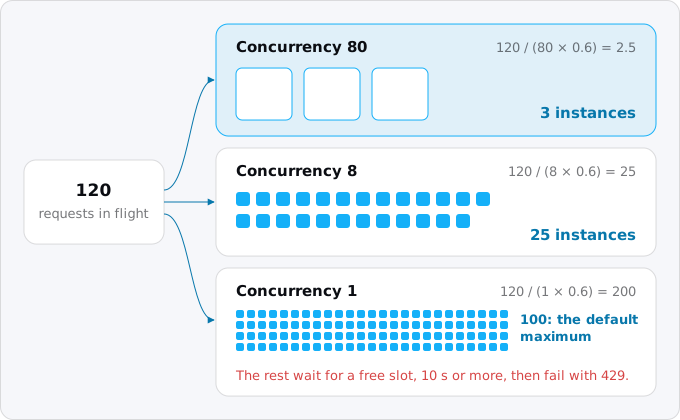
Here is the same moment of traffic, 120 requests in flight, under three settings:
How the autoscaler reads it
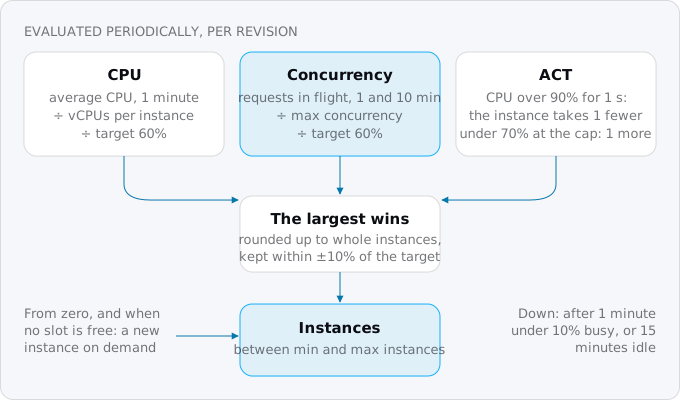
Cloud Run decides how many instances a revision needs from two measurements, each turned into a recommended number of instances. The larger one wins.
- CPU. The average CPU use over one minute, divided by the vCPUs per instance, divided by the CPU target.
- Concurrency. The average number of requests in flight, over one minute and over ten minutes, divided by the maximum concurrency, divided by the concurrency target.
Both targets are 60% by default. So with concurrency 80 the autoscaler plans for about 48 requests per instance, not 80, and keeps the remaining 40% as room for a burst. The result is rounded up to a whole instance, so a service that needs 4.1 instances runs 5. Inside a band of 10% around the target, from 54% to 66% with the default, nothing changes; the band keeps the count from flapping.
A third mechanism, adaptive concurrency tuning (ACT), works per instance. Each second an instance's CPU is above 90%, ACT lowers the number of requests that instance accepts by one. When the instance is at its limit and CPU stays under 70% for a second, ACT raises it by one. This is why a CPU-heavy service never reaches its setting.
Scaling from zero happens only on demand, when a request arrives and there is no instance; there is nothing to average yet. And scaling down is gradual: instances that were less than 10% busy over a minute are stopped first, others stay up to 15 minutes idle in case the traffic returns. Cloud Run never scales on memory.
You can move both targets. --scaling-concurrency-target takes 0.1 to 0.95 and --scaling-cpu-target takes 0.1 to 0.90; either can be disabled, but not both. A lower target starts instances earlier and costs more; a higher one packs instances fuller and, because the 10% band grows with the target, scales in bigger steps. Google says to find the driver in charge first: the metric scaling/recommended_instances (in full, run.googleapis.com/ and that name), unaggregated, shows the recommendation of each driver, and the highest one is the one deciding.
On an instance with 2 or more vCPUs, the CPU driver uses the average over all of them. A single-threaded program keeps one vCPU at 100% and the average at 50% or less, so CPU-based scaling never fires while requests queue inside the instance. Google calls this a vCPU hotspot. If memory forces you onto several vCPUs for a single-threaded app, lower concurrency so that the concurrency driver starts instances instead.
Your server decides the real number
Cloud Run's concurrency is how many requests it will send. How many your container can work on at once is decided by your web server and language, set somewhere else. When Cloud Run's number is higher, the extra requests wait inside the instance, where the autoscaler does not see them as waiting.
We measured this on one machine. One container, limited with Docker to 1 CPU and 512 MiB like a 1 vCPU Cloud Run instance, ran three servers with two endpoints: one that waits 100 ms, the way a handler waits on a database or an API, and one that spends about 50 ms of CPU. A load tool sent from 1 to 80 requests at once for 10 seconds per run. The servers:
- gunicorn with no options, a Flask app started as
gunicorn -b :8080 main:app. This is the entrypoint Google's Python buildpack sets for a source deploy when you have not chosen one. Gunicorn's defaults are one worker process, of thesynctype, with one thread: one request at a time. - gunicorn with 8 threads,
--workers 1 --threads 8, the command Google's Python tips page gives for Cloud Run. - Node.js with the built-in HTTP server and
awaitfor the wait.
On the waiting endpoint the difference is the whole story:
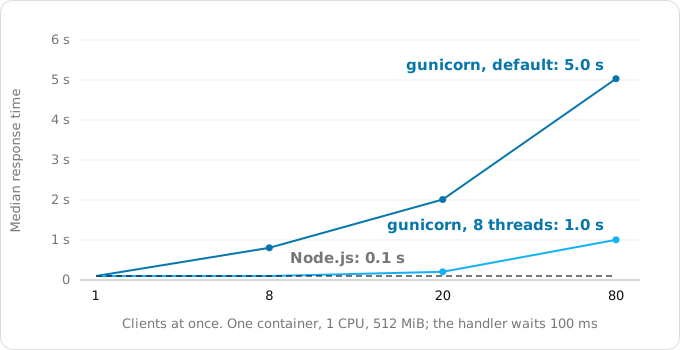
- gunicorn with defaults completed 9.9 requests a second whatever the load: ten 100 ms waits a second, one after another. With 80 clients the median response took 5.0 seconds.
- gunicorn with 8 threads completed 79.2 requests a second, eight waits at a time, and with 80 clients the median was 1.0 second.
- Node.js completed 788 requests a second with 80 clients, all of them waiting at once, at a median of 101 ms.
On the CPU endpoint every server completed 19 to 22 requests a second, because one CPU does about twenty 50 ms jobs a second whatever the server. More requests in flight only made each one slower: with 8 clients the median was about 0.4 seconds, with 80 clients 0.7 to 3.7 seconds, and the slowest 1% took up to 8.6 seconds. Threads do not help Python here; the standard interpreter runs one thread of Python code at a time. Node.js runs JavaScript on one thread too. Google's page says it plainly: Node.js is single-threaded and gets its concurrency from asynchronous code, so a handler that computes blocks every other request on the instance.
What to take from this, per stack (start commands for each are in Node, Python, Rails and Go on Cloud Run):
- Python. Give the server as many threads as the concurrency you set; Google's concurrency page suggests an environment variable such as
THREADS=8and the same number for both. If you deploy from source without aProcfileor entrypoint, check what the buildpack starts, becausegunicorn -b :8080 main:apphandles one request at a time while Cloud Run sends 80. Asynchronous servers such as uvicorn handle many waits on one thread, like Node.js. - Node.js. Waiting is cheap; computing is not. Move heavy computation out of the request path, or lower concurrency for the routes that compute.
- Go, Java, .NET, Rust and other threaded or async runtimes usually take parallel requests by default. Their limit is memory, connection pools and whatever shared state the code keeps.
With concurrency above 1, Cloud Run gives no isolation between requests on the same instance. A global variable written by one request is read by the next, at the same time, so mutable global state needs a lock or has to go. Google suggests starting a source deploy at a low concurrency, such as 8, and moving up.
When to set it to 1, and when higher
Set concurrency to 1 when each request uses most of the instance's CPU or memory, for example image processing, a PDF render or a model call that runs on the instance; when the code keeps global state that two requests cannot share; or when you run under 1 vCPU, where Cloud Run requires it. Expect more instances and more cold starts during a spike, because every new request in a burst needs its own instance.
Set it between 1 and the default when your server has a fixed number of workers or threads. Match Cloud Run's number to the server's: there is no gain in sending 80 requests to an instance that works on 8, since 72 of them wait inside it.
Leave it at 80 or raise it when the work is mostly waiting: an API that calls a database and other services, a proxy, a WebSocket or SSE service where each connection is idle most of the time. Raise memory with it. Google's formula for the peak is the memory your process needs at rest, plus the memory per request times the concurrency.
What it costs
With the default request-based billing, Cloud Run bills an instance while it starts, while it shuts down, and while at least one request is in flight on it. The billed time starts with the first request and ends with the last, so requests that overlap on one instance are paid for once. That is where concurrency saves money: the same requests, overlapping on fewer instances, add up to fewer billed instance-seconds.
A worked example. A service gets 100 requests a second, all month, and each takes 100 ms of waiting on a database. It runs on 1 vCPU and 512 MiB in a tier 1 region, at $0.000024 per vCPU-second, $0.0000025 per GiB-second and $0.40 per million requests (prices of October 11, 2026, before the free tier).
- At concurrency 1 no two requests share an instance, so every second adds 10 billed instance-seconds: $663.57 a month for CPU and memory.
- At concurrency 80 the ten requests in flight fit on one instance, so at most one instance-second is billed per second: $66.36 a month.
- The 262.8 million requests cost $105.12 either way, so the totals are $768.69 and $171.48.
Google's pricing page has the same comparison with its own assumptions. Its first example is 10 million requests a month of 400 ms each, on 1 vCPU, 512 MiB and concurrency 20, in Belgium: $13.69 a month, or $18.91 without the free tier. Its second example is the same traffic for an app that handles one request at a time: $81.72, or $86.49 without the free tier.
Lower is not always dearer: if a lower value makes requests finish faster, billed time can drop. Google's advice is to load test a few values and compare the metric container/billable_instance_time. And if one instance is busy around the clock, as in the worked example at concurrency 80, look at instance-based billing, which charges less per second for an instance that is never idle; our guide request-based or instance-based billing has the break-even point.
What it does to your database
Every instance opens its own connections to the database, so the number your database sees is the number of instances times the size of each instance's connection pool. Concurrency raises the first number when it is low, and tempts you to raise the second when it is high.
The limits on the other side are small. Cloud SQL for PostgreSQL sets max_connections from the instance's memory: 25 on the smallest instances of about 0.5 GB, 50 at about 1.7 GB, 100 from 3.75 GB, 400 from 7.5 GB; the smallest Cloud SQL instances lists their prices. Cloud Run, for its part, allows each instance up to 100 connections through its built-in Cloud SQL connection, and the default maximum is 100 instances per revision. See connection pooling, and connecting Cloud Run to Cloud SQL for the connection itself.
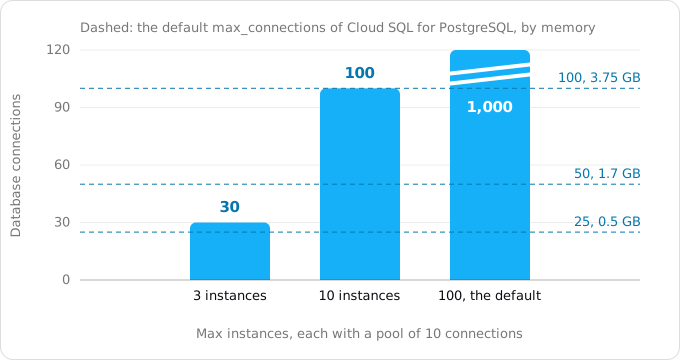
So set the two numbers together:
- Size the pool for the work your code really runs in parallel: the thread count for a threaded server, a small number such as 5 to 10 for an async one, since queries wait for the pool rather than open new connections.
- Set maximum instances so that instances times pool stays under the database's
max_connections, with room left for migrations and a console session. Leave room for bursts too: Google's autoscaling page says that during a deploy, a traffic spike or maintenance the instance count can go above the maximum for a short time, usually by less than twice. - When the arithmetic does not fit, use a pooler between the service and the database. Cloud SQL has Managed Connection Pooling for this.
Maximum instances also caps the bill, so set it on day one. gcloud run services update SERVICE --max 10 sets it for the service, takes effect at once and creates no new revision.
Measure your service, then set the value
The describe command prints the setting, and the --help of update shows the flag that changes it:
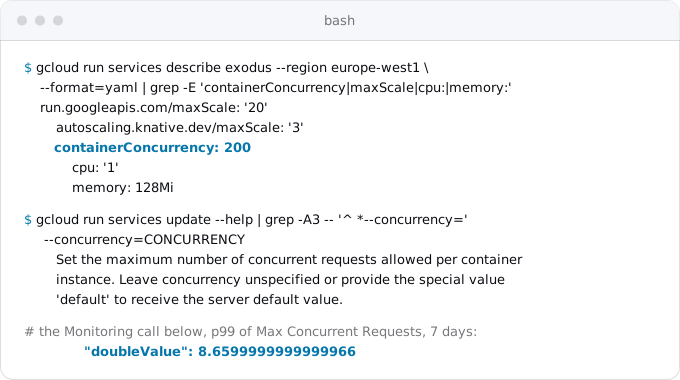
Then read what the instances see. The metric container/max_request_concurrencies records, per instance and per minute, the most requests that were in flight at once. This reads its 99th percentile over the last seven days with the Monitoring API; the access token goes into a file readable only by you, never onto the command line:
(umask 077; gcloud auth print-access-token | sed 's/^/Authorization: Bearer /' > /tmp/auth)
curl -s -H @/tmp/auth -G \
  "https://monitoring.googleapis.com/v3/projects/PROJECT_ID/timeSeries" \
  --data-urlencode 'filter=metric.type="run.googleapis.com/container/max_request_concurrencies" AND resource.labels.service_name="SERVICE"' \
  --data-urlencode "interval.startTime=$(date -u -d '7 days ago' +%FT%TZ)" \
  --data-urlencode "interval.endTime=$(date -u +%FT%TZ)" \
  --data-urlencode 'aggregation.alignmentPeriod=604800s' \
  --data-urlencode 'aggregation.perSeriesAligner=ALIGN_PERCENTILE_99' \
  --data-urlencode 'aggregation.crossSeriesReducer=REDUCE_MAX' | grep doubleValue
rm /tmp/auth
On macOS, date -d is GNU syntax; use date -u -v-7d +%FT%TZ for the start time. Exodus team: on our staged site this printed 8.66. In the 7 days to October 11 the service served 979 requests over 1,412 instance-minutes; in 1,211 of those minutes no request was in flight, in 182 one was, in 18 two were, and once eight were. The setting of 200 is harmless there, because the site's server is asynchronous and the traffic is small, but the number says nothing about what the server could take. A low value tells you about your traffic; a value close to your setting, together with rising latency, tells you the setting is the limit.
To find what your service can take, test it. Google's tips describe a loop: set the concurrency of your server in code, set Cloud Run's concurrency equal to or below it, send load from a tool where you choose how many clients run at once, and raise the number until latency or errors climb. Google also suggests testing with a fixed number of instances first, by setting maximum instances, so that the test measures one instance and not the autoscaler. With the oha tool, a run looks like this:
oha -c 20 -z 30s https://SERVICE_URL/your/slowest/routeRun it at 1, at your expected concurrency and above, watching the median and 99th percentile. The value just below the point where latency starts to grow with the number of clients is your concurrency. For large tests Google recommends europe-west1, and asks you to talk to them before going past 100 instances.
Then set it. Each of these changes creates a new revision, except --max:
gcloud run services update SERVICE --region REGION --concurrency 8
gcloud run services update SERVICE --region REGION --concurrency default
gcloud run services update SERVICE --region REGION --max 10
gcloud run services update SERVICE --region REGION --scaling-concurrency-target 0.8
In a service.yaml the setting is containerConcurrency under spec.template.spec. In Terraform, inside a Cloud Run v2 service resource:
template {
  max_instance_request_concurrency = 8
}
How to choose, in order
- Count the requests your server works on at once, its workers, threads or event loop, and set Cloud Run's concurrency to that or a little below: 8 for code you cannot vouch for, 1 for code that is not safe to run twice at once.
- Size memory for that concurrency, and maximum instances so that instances times the pool fits under the database's limit.
- Load test a few values, keep the one with the lowest billable instance time that meets your latency, and after a week of real traffic read
max_request_concurrenciesagain.
FAQ
What is the default concurrency on Cloud Run?
A service created with gcloud or Terraform gets 80 requests per vCPU: 80 at 1 vCPU, 160 at 2 and 320 at 4. The console sets 80. The default is applied when the service is created, and later deployments keep whatever the service has. The highest value Cloud Run accepts is 1,000.
What happens when every Cloud Run instance is full?
The request waits in a pending queue for up to 10 seconds or 3.5 times the average startup time, whichever is longer. If an instance frees up or a new one starts in that window, it is served. If the service is at its maximum instances and nothing frees up, it fails with HTTP 429.
Why does my Python service on Cloud Run handle one request at a time?
A source deploy without a Procfile or entrypoint starts gunicorn with its defaults: one sync worker with one thread. In our test it completed 9.9 requests a second with 100 ms waits, while Cloud Run would send it 80. Give gunicorn as many threads as the concurrency you set, for example 8.
Does a higher concurrency make Cloud Run cheaper?
Usually, because requests that overlap on one instance are billed once. A service with 100 requests a second of 100 ms each costs $768.69 a month at concurrency 1 and $171.48 at 80. A lower value can still cost less if it makes requests finish faster, so compare container/billable_instance_time after a load test.
How many database connections can a Cloud Run service open?
Maximum instances times the connection pool of each instance. With the default maximum of 100 instances and a pool of 10, that is 1,000, while Cloud SQL for PostgreSQL accepts 25 to 100 by default on its smaller instances. Set maximum instances so the product fits, or put a pooler in between.
Sources
25
- docs.cloud.google.comMaximum concurrent requests for services, Google
- docs.cloud.google.comSet maximum concurrent requests per instance, Google
- docs.cloud.google.comAbout instance autoscaling in Cloud Run services, Google
- docs.cloud.google.comConfigure custom scaling controls for services, Google
- docs.cloud.google.comSet maximum instances for services, Google
- docs.cloud.google.comMaximum instances limits, Google
- docs.cloud.google.comGeneral development tips: optimize concurrency, throughput versus latency versus cost, Google
- docs.cloud.google.comOptimize Python applications for Cloud Run
- docs.cloud.google.comBuild a Python application with buildpacks
- docs.cloud.google.comConfigure CPU limits for services
- docs.cloud.google.comConfigure memory limits for services
- docs.cloud.google.comCloud Run quotas and limits, Google
- cloud.google.comCloud Run pricing, Google
- docs.cloud.google.comUsing WebSockets, Google
- docs.cloud.google.comLoad testing best practices, Google
- docs.cloud.google.comConnect from Cloud Run to Cloud SQL for PostgreSQL
- docs.cloud.google.comCloud SQL for PostgreSQL quotas and limits
- docs.cloud.google.comCloud SQL for PostgreSQL database flags
- docs.cloud.google.comCloud Run metrics: max_request_concurrencies and recommended_instances, Google
- docs.cloud.google.comgcloud run services update --help, Google Cloud SDK 587.0.0
- gunicorn.orgGunicorn settings: workers, threads, worker_class, timeout
- github.comoha, an HTTP load generator
- Exodus team: a load test of one container limited to 1 CPU and 512 MiB, gunicorn default, gunicorn with 8 threads and Node.js, 1 to 80 clients, Oct 11, 2026
- Exodus team: validate-only create calls to the Cloud Run Admin API in our project, default concurrency 80, 160 and 320 for 1, 2 and 4 vCPU, Oct 11, 2026
- Exodus team: the staged Exodus site's Cloud Run service, concurrency 200, 979 requests in the 7 days to 15:05 UTC on Oct 11, 2026, read from Cloud Monitoring