Cloud Run rolls back with one command that sends 100% of traffic to an earlier revision, with no rebuild: every deploy or settings change creates an immutable revision, kept next to the old ones. A release can take 5% of traffic first, after a test at its own tag URL. Afterwards, hand traffic back to the latest revision, or every later deploy serves 0% of users.
In short
- Roll back with
gcloud run services update-traffic SERVICE --to-revisions OLD_REVISION=100: no build, no new revision. - Release gradually: deploy with
--no-traffic --tag green, test the tag URL, then--to-tags green=5, thengreen=100. - After either one, run
update-traffic --to-latest; until you do, every new deploy gets 0% of traffic. - Revisions that serve nothing cost nothing; a revision-level minimum instance of 1 vCPU and 512 MiB on a tagged revision costs $9.72 a month.
- Google keeps an image only while a revision serves it: 19 of the 49 revisions in our project point to an image that is gone.
What a revision is
On most platforms a deploy replaces what was running. On Cloud Run a deploy adds a revision next to the old ones, and the service in front of them only decides which revision gets which share of requests.
Google's revisions page puts it in one line: when you deploy to a service or change its configuration, an immutable revision is created. "Configuration" means everything in the container spec: the image, environment variables, secrets, memory, CPU, concurrency, the service account. One changed environment variable makes a new revision, the same as a new image.
A revision has a name. Cloud Run makes it from the service name, a five-digit counter and a random suffix, as in my-app-00012-k4p. You can set your own suffix with --revision-suffix, for example the commit: --revision-suffix=abc1234 gives my-app-abc1234. The full name uses only lowercase letters, numbers and dashes, and is at most 63 characters.
When you deploy an image by tag, such as my-app:latest, Cloud Run resolves the tag to a digest and the revision serves that digest forever. Pushing a new latest later changes nothing in the running service. That is why rolling back to a revision brings back exactly the code it ran, not whatever the tag points to now.
Cloud Run keeps at most 1000 revisions per service; past that it deletes the oldest ones that receive no traffic and have no tag. The limit cannot be raised; 1000 deploys is about three a day for a year. gcloud run revisions delete removes one by hand, except one that can receive traffic or the latest; it cannot be undone and leaves the image in the registry.
Here is what a list looks like on one of our services, read-only and with names masked:
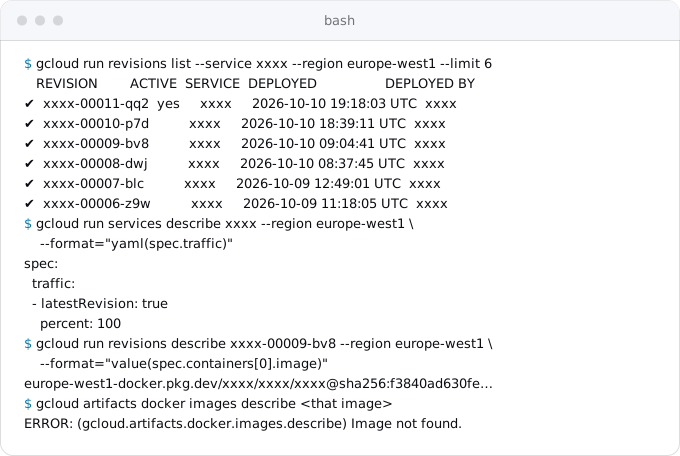
The ACTIVE column marks the revision that serves traffic. The others are kept and ready. Google's page says a revision that receives no requests consumes no resources and is not billed, and a revision that has not served for a while may show the status RETIRED, which Google explains as Cloud Run having retired the infrastructure that revision used.
How traffic reaches revisions
A service has one list called traffic. Each entry names a revision, or "the latest revision", and gives it a percentage; the percentages add up to 100. A new service starts with one entry: latestRevision: true, percent: 100. As long as that entry stands, every deploy takes all traffic as soon as it is ready.
An entry can also carry a tag. A tag is a short lowercase name, such as green or candidate, and it gives the revision its own address: https://green---my-app-abcdef.a.run.app, the tag, three dashes, then the service's own address. Requests to that address always reach that revision, whatever percentage it has, even 0%.
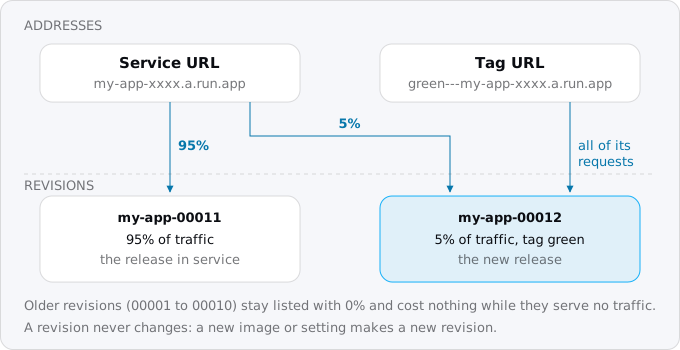
Three details from Google's pages matter in practice:
- A change of traffic is not instant. Requests already running finish where they started; during the switch a new request can land on either revision. Nothing is dropped.
- Percentages are whole numbers. The smallest share is 1%. If you assign less than 100% in one command, gcloud scales the other serving revisions to fill the rest: with 40/60 between two revisions, giving the first 45 moves the second to 55.
- A pin outlives the command. Once traffic names a revision instead of "latest", Google's page says all later deployments keep that pattern. This is the trap in the next sections.
A gradual release, step by step
Every command below is in Google's rollout page or gcloud's own help (gcloud 587.0.0). Replace my-app, the region and the image with yours, or set defaults once with gcloud config set run/region europe-west1.
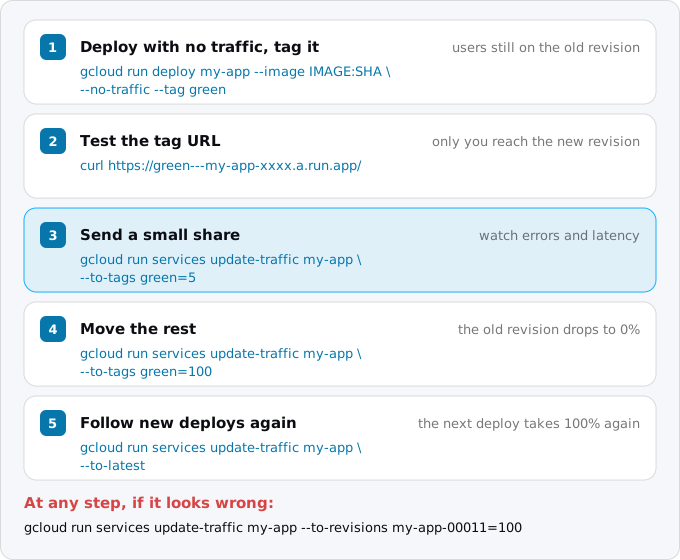
1. Note what serves now. You need the name to go back to:
gcloud run services describe my-app --region europe-west1 \
  --format="yaml(status.traffic)"
The answer lists each serving revision by name with its percentage. Write the name down; in the examples below it is my-app-00011-qq2.
2. Deploy the new release with no traffic and a tag.
gcloud run deploy my-app --region europe-west1 \
  --image europe-west1-docker.pkg.dev/PROJECT/REPO/my-app:abc1234 \
  --no-traffic --tag green
Cloud Run starts one instance and waits for its startup probe, as on every deploy. If the probe fails, the revision is marked not ready and gets no traffic, so a release that does not boot never reaches users (the guide on health checks and startup probes shows such a failure).
3. Test it at the tag URL. Open it in a browser, run your smoke tests against it, call the endpoints that changed:
curl -sS https://green---my-app-abcdef.a.run.app/api/versionFor a private service, add a token: curl -H "Authorization: Bearer $(gcloud auth print-identity-token)" .... The new code runs against production data here, so it is a real test, and so is any write it makes.
4. Give it a small share.
gcloud run services update-traffic my-app --region europe-west1 \
  --to-tags green=5
Five percent of new requests now reach the new revision; the old one gets 95% (gcloud scales it). How much is that? At 100,000 requests a day, about 4,170 come in an hour, so about 210 of them reach the new release in its first hour. Enough to show a new error, while most users never meet it. At 1,000 requests a day, 5% is two requests an hour, so use 25% or 50%, or rely on the tag URL test.
5. Watch it. Cloud Run's logs and metrics carry the revision name, so you can look at the new release alone. Errors of one revision in the last hour:
gcloud logging read 'resource.type="cloud_run_revision"
  AND resource.labels.revision_name="my-app-00012-k4p"
  AND httpRequest.status>=500' --freshness=1h --limit=20
In Cloud Monitoring, the metric run.googleapis.com/request_count is reported per revision with a response_code_class label (2xx, 4xx, 5xx), and request_latencies per revision too. Group by revision name and compare the two lines. Google samples them every 60 seconds and shows them after up to 120 seconds, so give each step a few minutes at least.
6. Move everyone, then hand traffic back to "latest".
gcloud run services update-traffic my-app --region europe-west1 \
  --to-tags green=100
gcloud run services update-traffic my-app --region europe-west1 \
  --to-latest
gcloud run services update-traffic my-app --region europe-west1 \
  --remove-tags green
The second command matters most. gcloud's help for --no-traffic says that after such a deployment the latest revision will not receive traffic on future deployments until you run update-traffic --to-latest. Skip it, and next week's ordinary gcloud run deploy builds, starts, passes its health check and then serves nobody. Removing the tag is tidiness; it costs nothing to keep, except in the case described under minimum instances.
You can do the same without tags: --to-revisions my-app-00012-k4p=5 instead of --to-tags green=5. Tags are easier to script, because you know the tag before the deploy and the revision name only after it.
Rolling back
When a release is bad, send all traffic to the revision that worked:
gcloud run services update-traffic my-app --region europe-west1 \
  --to-revisions my-app-00011-qq2=100
This builds nothing and creates no revision. The old revision is already there; traffic moves as soon as the change is applied, and requests already running on the bad revision finish where they are. Rehearse it once on a quiet day, so that nobody looks up the flag during an incident.
If you do not know the name, gcloud run revisions list --service my-app --region europe-west1 lists them newest first, with who deployed each and when.
What a rollback brings back, and what it does not
A revision holds the image and the container settings, so a rollback restores both: the old code with its old environment variables, memory, concurrency and secret references. It does not touch:
- The database. If the bad release ran a migration, the old code now meets the new schema. Rolling back traffic does not roll back the schema. The way out is to write migrations that both the old and the new code can live with; the guide on database migrations as Cloud Run jobs shows the expand and contract steps.
- Secrets read as latest. A revision that references
my-secret:latestreads whatever version is newest when its instances start. If the incident is a bad secret value, rolling back code does not help; pin version numbers, as the guide on secrets on Cloud Run explains. - Service-level settings. Ingress, IAM, service-level minimum instances and the domain mapping belong to the service, not to a revision.
- Data the bad release wrote, messages it queued, emails it sent, files it uploaded.
The trap after a rollback
The rollback pins traffic to one named revision, and the pin stays. You fix the bug, deploy, the deploy succeeds, and the fix serves 0% of users while the old revision keeps 100%. gcloud does print "serving 0 percent of traffic" at the end of the deploy, but in a CI log nobody reads it.
So after a rollback, the next release either goes through the gradual steps above and ends with --to-latest, or is followed straight away by:
gcloud run services update-traffic my-app --region europe-west1 --to-latestA check in CI catches the case for good: after the deploy, read status.traffic and fail the job if the new revision's percent is not what you expected.
Keep the images your rollbacks need
Google's deploy page says the image is imported when a revision is deployed, and Cloud Run keeps that copy as long as a serving revision uses it. Instances do not pull from the registry when they start. Read the other way round: once a revision stops serving, Cloud Run gives no promise that it still holds the image, and the registry is where it would come from.
Exodus team: on October 12, 2026 we checked every revision of the eight services in our own project against Artifact Registry, read-only. Of 49 revisions, 19 point to an image digest that is no longer in the registry. Every serving revision had its image; the gaps are all in older ones, the most in the services we redeploy most. None of our repositories has a cleanup policy, so these images were removed by hand, during clean-ups that did not think of rollbacks.
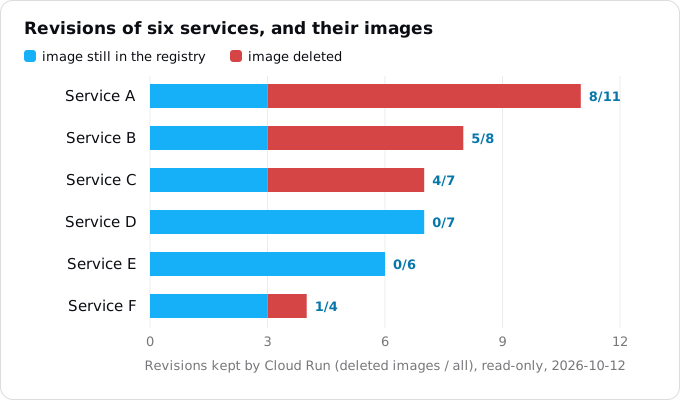
We have not tried a rollback to one of those revisions, and this guide will not guess what happens. The safe reading of Google's sentence is: a revision whose image is gone is not a rollback target you can count on. If you want ten releases to go back to, keep ten images.
If you clean up the registry, which you should because storage is billed, do it with a policy that keeps the most recent versions. A policy file with one delete rule and one keep rule:
[
  {"name": "delete-old", "action": {"type": "Delete"},
   "condition": {"olderThan": "30d"}},
  {"name": "keep-last-10", "action": {"type": "Keep"},
   "mostRecentVersions": {"keepCount": 10}}
]
When an image matches both rules, keep wins, so this deletes images older than 30 days except the newest ten of each image. Apply it in dry-run mode first:
gcloud artifacts repositories set-cleanup-policies REPO \
  --location europe-west1 --policy policy.json --dry-run
Google's page says policies run in a background job and changes take effect within about a day. Tag your images with the commit (my-app:abc1234), as the guide on deploying from GitHub without keys does, so that you can always find the image of a revision by its commit, too.
Traffic splits and other settings
Session affinity
With session affinity on, Cloud Run sets a 30-day cookie and sends a client back to the same instance when it can. Google's page says affinity takes precedence over the split: only requests without the cookie are split at random, so the real share can drift from your percentages, and moving 90/10 to 80/20 moves only the extra 10%. Read the shares from the per-revision metrics.
Minimum instances
Minimum instances can be set on the service or on a revision. Google recommends the service level, and a split is the reason. Service-level minimum instances are divided by the split: 10 at 50/50 gives each revision 5. Revision-level minimum instances start for every revision that is in the split or has a tag, even a 0% tag, and those instances are billed while idle.
So a forgotten tag can cost money. Take a revision-level minimum of one instance with 1 vCPU and 512 MiB under request-based billing: the idle rate in Tier 1 regions is $0.0000025 per vCPU-second and $0.0000025 per GiB-second (list prices, read October 12, 2026), so that is $0.00000375 a second, or $9.72 for a 30-day month, for a revision nobody uses. Use service-level minimum instances, or remove tags when a release is done.
Automating the release
For a team that deploys a few times a week, a CI script running the commands above is enough: deploy, smoke-test the tag URL, move to a share, wait, read the revision's error count, then go to 100% and --to-latest, or go back.
Google's own tool for this is Cloud Deploy. A delivery pipeline with a canary strategy for Cloud Run takes percentages such as [25, 50, 75], splits traffic itself between the last good revision and the new one, can run a verify job at each phase, and waits for gcloud deploy rollouts advance to move on. The first release to a service skips the canary, and jobs are not supported.
Its price, read October 12, 2026: a pipeline with one target is free, and the first active pipeline with several targets is free per billing account; each further one costs $5.00 a month. Its render and deploy steps run on Cloud Build, billed separately. It pays off with staging and production stages and approvals between them; for one service, the script is shorter.
What it costs
- Revisions: nothing. A revision that serves no traffic consumes no resources and is not billed.
- Traffic splitting and tags: nothing on top of the requests and instance time each revision uses.
- Revision-level minimum instances on tagged or split revisions: idle time, $9.72 a month per idle instance of 1 vCPU and 512 MiB in our example.
- Images kept for rollback: Artifact Registry storage, free up to 0.5 GiB per billing account, then $0.000136986 per GiB-hour, about $0.10 per GiB-month (read October 12, 2026). Ten images of 150 MiB are about 1.5 GiB, so about $0.10 a month.
What breaks
- New deploys serve 0% after a rollback or a no-traffic release. Traffic is pinned. Run
update-traffic --to-latest, and check the traffic in CI after every deploy. - The old code fails against the new schema after a rollback. A migration in the bad release removed or renamed something. Split such changes over several releases.
- A rollback does not fix a bad secret. The revisions read
latest. Pin secret versions in revisions so that a rollback also brings back the old value. - A rollback target has no image. Someone cleaned up the registry. Keep the newest images with a keep policy.
- A 5% release gets far more or far less than 5%. Session affinity is on. Read per-revision request counts.
- The bill grows after a release. A tag on an old revision with revision-level minimum instances keeps instances warm. Remove the tag or move minimum instances to the service.
- Updating traffic fails after deleting a revision. A tag still points at it. Cloud Run tries to remove such tags itself; if it did not, use
--remove-tags. - YAML and gcloud fight over traffic.
gcloud run services replace service.yamlsets traffic to whatever the file says, undoing a split made with gcloud. Pick one tool per service.
A checklist
- Note the serving revision's name before a release, and try the rollback once on a quiet day.
- Release with
--no-traffic --tag, test the tag URL, then a share, then 100%; end with--to-latest. - Write migrations the previous release can live with, and pin secret versions.
- Use service-level minimum instances; remove tags you do not need.
- Keep the images of your last ten releases.
- In CI, fail the job when the new revision does not get the traffic you expected.
Where Exodus comes in
The Exodus report lists "Releases without downtime" among what a move to Cloud Run gives you: "Each deploy is a revision. Send 5% of the traffic to it first, move everyone when it holds, and go back in one click." The click is the console's; this guide gives the command. The move plan also puts migrations in a Cloud Run job that runs before the new revision takes traffic. Exodus does not deploy for you and does not sign in to your Google Cloud; your agent does, with your gcloud.
FAQ
Why is my new Cloud Run revision serving 0% of traffic?
Traffic is pinned to a named revision, after a rollback or a deploy with no traffic. Google's page says such a pin applies to all later deployments, so a new deploy builds, passes its health check and serves nobody. Send traffic back to the latest revision with update-traffic and the to-latest flag, and check the traffic in CI.
Does a Cloud Run rollback undo database migrations?
No. A rollback restores the revision's image and container settings: code, environment variables, memory, concurrency and secret references. It does not touch the database schema, secrets read as latest, service-level settings such as ingress and IAM, or data the bad release wrote. Write migrations that the previous release can live with.
Do old Cloud Run revisions cost money?
A revision that serves no traffic consumes no resources and is not billed. The exception is revision-level minimum instances: they start for every revision in a split or with a tag, and one idle instance of 1 vCPU and 512 MiB costs $9.72 for a 30-day month. Use service-level minimum instances instead.
How many revisions does Cloud Run keep?
At most 1000 per service, and the limit cannot be raised. Past it, Cloud Run deletes the oldest revisions that receive no traffic and have no tag. A kept revision is a rollback target only while its image is still in Artifact Registry, so keep the images of your last ten releases with a keep policy.
Sources
17
- docs.cloud.google.comRollbacks, gradual rollouts, and traffic migration, Cloud Run, Google
- docs.cloud.google.comManage revisions, Cloud Run, Google
- docs.cloud.google.comDeploy container images to Cloud Run services, Google
- docs.cloud.google.comCloud Run quotas and limits, Google
- docs.cloud.google.comRestrict network endpoint ingress, Cloud Run, Google
- docs.cloud.google.comSession affinity, Cloud Run, Google
- docs.cloud.google.comMinimum instances, Cloud Run, Google
- cloud.google.comgcloud run services update-traffic, Google Cloud SDK reference
- cloud.google.comgcloud run deploy, Google Cloud SDK reference
- cloud.google.comCloud Run pricing, Google
- docs.cloud.google.comGoogle Cloud metrics P through Z, Cloud Monitoring
- docs.cloud.google.comCanary deployments to Cloud Run, Cloud Deploy, Google
- cloud.google.comArtifact Registry pricing, Google
- cloud.google.comCloud Deploy pricing, Google
- docs.cloud.google.comConfigure cleanup policies, Artifact Registry, Google
- docs.cloud.google.comCloud Run release notes, Google
- Exodus team: revisions, traffic and images of the eight services in our own project, read-only