Secrets on Cloud Run live in Secret Manager, and Cloud Run hands them to the container in one of three ways: as an environment variable read once when an instance starts, as a mounted file fetched again on each read, or through the client library. The service's own account needs the Secret Accessor role on each secret, and each active version costs $0.06 a month after the first 6.
In short
- Secret Manager bills $0.06 a month per active version after the first 6, and $0.03 per 10,000 reads after the first 10,000; the free allowance is shared by every project on the billing account.
- A rotation is 5 steps: add a version, deploy its number, check, disable the old one, destroy it a week later.
- A destruction delay of 1 to 1,000 days turns a mistaken destroy into a disable you can undo.
- A project may read secrets 90,000 times a minute, so code that uses the API keeps the value in memory rather than reading it on every request.
- In our test on Docker 29.3.0, a build argument and a deleted
.envfile stayed in the image; a BuildKit secret mount did not.
Prices are Google's list prices, read on October 12, 2026.
Where a secret must not be
A database password, an API key, the key that signs session cookies: on a server they live in a .env file, on a platform in its dashboard, and on Cloud Run in Secret Manager. Four places they must not be:
Plain environment variables. gcloud run deploy --set-env-vars DB_PASSWORD=... works, and the value then sits in the service's configuration in clear text. Google's page on environment variables for jobs says it directly: they "are visible to anyone with project Viewer permissions or greater". The Cloud Run Viewer role alone can view the state of every Cloud Run resource, plain variables included. It has also been typed on a command line, so it is in your shell history.
The image. A value passed with --build-arg, or a .env file copied into the image and deleted in a later step, stays in the image's history or in a layer. Anyone who can pull the image can read it.
The repository. A .env committed once stays in the history after it is deleted.
Logs. A library that prints its configuration, or a debug page that dumps process.env, puts every environment variable into Cloud Logging. Google's best practices name this risk for secrets in environment variables.
Secret Manager removes the first three; the last one is up to your code.
How Secret Manager is organised
A secret is a name in a project, such as session-key. It holds versions, numbered 1, 2, 3 and up, and each version is one value of up to 64 KiB. A version is enabled, disabled or destroyed. Enabled versions can be read; disabled ones cannot, but can be enabled again; destroyed ones are gone for good. latest is an alias for the newest enabled version.
A secret has a replication policy, chosen at creation and impossible to change later. Automatic replication, the default, keeps the value in several regions and is what Google recommends for most secrets. User-managed replication keeps it only in the regions you list, for rules about where data may be stored. Cloud Run does not support Secret Manager's separate regional secrets, so a secret that must stay in one region is a normal secret with user-managed replication to it.
Access is controlled with IAM on the secret itself. Secret Accessor (roles/secretmanager.secretAccessor) reads the value, and the service gets it. Secret Version Manager adds, disables and destroys versions, for whoever rotates. Viewer sees names and metadata, not values. Project Owner can read every secret; Google's access control page says Editor and Viewer cannot.
Three ways to hand a secret to the container
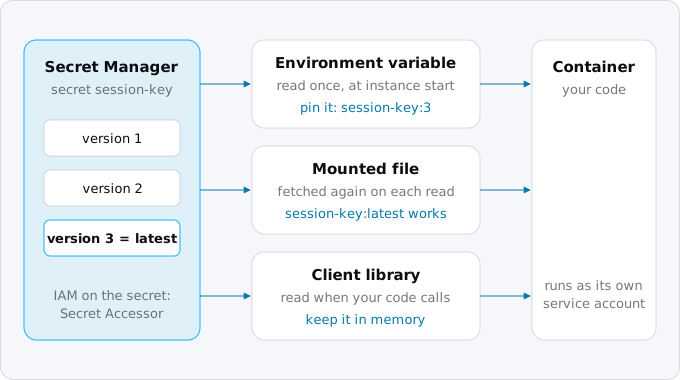
As an environment variable. Cloud Run reads the secret before it starts each instance and sets the variable. Your code reads process.env.SESSION_KEY as on any platform, which is why this is the usual choice when moving an app. The value is fixed for the life of the instance. If the read fails, because the version is disabled or the account lost access, the instance does not start. Google recommends pinning a version number here, so a new version reaches instances only through a deploy you can roll back.
As a mounted file. Cloud Run mounts the secret as a file, for example /secrets/session-key. Google's page says that when the volume is read, Cloud Run "always fetches the secret value from the Secret Manager to use the value with the latest version", which is what makes latest useful here: a new version reaches running instances the next time the code reads the file. Cloud Run does not check the secret when the instance starts, so a missing permission shows up later as a failed read. Code that reads the file once at startup and keeps the value behaves like an environment variable.
Through the client library. Your code calls Secret Manager itself, with the service's own identity and no key file:
import { SecretManagerServiceClient } from "@google-cloud/secret-manager";

const client = new SecretManagerServiceClient();
const [version] = await client.accessSecretVersion({
  name: "projects/PROJECT_ID/secrets/session-key/versions/latest",
});
const key = version.payload.data.toString();
Google's best practices prefer this form in general, and it suits values that change while the app runs. Each read is a network call and a billed access operation, and a project is allowed 90,000 reads a minute, so keep the value in memory and refresh it on an interval rather than reading on every request.
Step 1: give the service its own service account
If you deploy without --service-account, Cloud Run runs the service as the Compute Engine default service account. Google's service identity page recommends against it. Depending on the organisation's policy, that account may hold Editor on the whole project, shared by every service and VM that runs as it. Create one account per service:
gcloud iam service-accounts create api-runtime \
  --display-name="Runtime account of the api service"
The account starts with no roles; the steps below give it exactly the secrets it needs, and IAM for a Cloud Run app covers the rest of its roles.
Step 2: create the secret without putting it on a command line
Google's page on adding versions warns that a value given on the command line "appears as plaintext in the list of processes" and lands in the shell history. Give gcloud a file, or - for standard input:
# from a file you already have, readable only by you
gcloud secrets create session-key \
  --replication-policy=automatic \
  --data-file=session-key.txt

# or generate one and pipe it in, so it never touches the disk
openssl rand -base64 48 | tr -d '\n' | \
  gcloud secrets create session-key --data-file=-
The tr -d '\n' matters: echo and most generators end with a newline, and it becomes part of the secret: a Stripe webhook secret stored that way rejects every event. To keep the value in one region, replace --replication-policy=automatic with --replication-policy=user-managed --locations=europe-west1; this is fixed once the secret exists.
Moving an app off another platform is also the moment to rotate the important values, because the old platform still holds them. Moving from Heroku to Cloud Run pipes its config vars into Secret Manager this way.
Step 3: grant access on the secret, not on the project
gcloud secrets add-iam-policy-binding session-key \
  --member="serviceAccount:api-runtime@PROJECT_ID.iam.gserviceaccount.com" \
  --role="roles/secretmanager.secretAccessor"
Granting the role on the project is one command instead of many, and it lets every service read every other service's secrets. Google's best practices recommend bindings on each secret. IAM changes propagate eventually rather than at once, so a deploy straight after a grant can still fail; wait and deploy again.
Step 4: deploy with the secret
As an environment variable, pinned to version 1:
gcloud run deploy api --image=IMAGE_URL --region=europe-west1 \
  --service-account=api-runtime@PROJECT_ID.iam.gserviceaccount.com \
  --update-secrets=SESSION_KEY=session-key:1
As a file, following the newest version:
gcloud run deploy api --image=IMAGE_URL --region=europe-west1 \
  --service-account=api-runtime@PROJECT_ID.iam.gserviceaccount.com \
  --update-secrets=/secrets/session-key=session-key:latest
Several secrets go in one flag, separated by commas. The related flags differ:
--update-secretsadds or changes the ones you name and keeps the rest.--set-secretsremoves every existing secret first, as its--helpsays, then sets the list you give. A deploy script that uses it with a partial list silently drops the others.--remove-secretsand--clear-secretstake some or all away.
The same flags work on gcloud run jobs deploy. On every deploy Cloud Run checks that the service account can read each secret named, and the deploy fails if it cannot.
Two path rules for files. The part before the last / is a directory Cloud Run mounts, hiding whatever the image had there: mounting at /app/config/key hides the rest of /app/config. And two secrets cannot share a mount directory, so use /secrets/db/password and /secrets/session/key.
Step 5: check what the service actually has
gcloud run services describe shows where each variable comes from. A plain variable shows its value; a secret shows only its name and version:
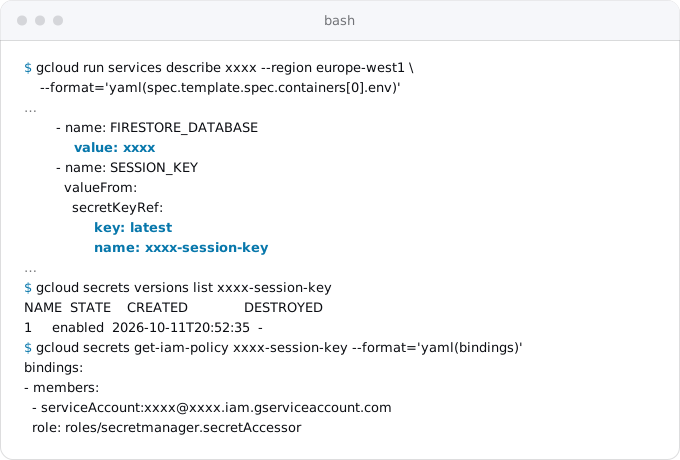
Across our project, 7 of 8 services read secrets, each under its own service account, and each secret has one reader. Four mount a whole env file at /secrets; three take each secret as an environment variable. All use latest, against Google's advice for environment variables: a bad new version reaches the next instance that starts, with no deploy to roll back. That works for a small team that adds versions by hand and deploys right after; with automation adding versions, pin the number.
One secret for a whole env file
An app that reads twenty variables from a .env can get twenty secrets or one. One secret holding the whole file, mounted as /secrets/app.env, is how four of our services work: the app loads it at startup, and a plain ENV_FILE=/secrets/app.env variable says where. The deploy command stays short and the billed versions few.
The price: every reader sees every value, the file must stay under 64 KiB, and changing one value means a new version of the whole file. Loaders such as dotenv read the file once, so a new version arrives when instances restart. Services that need different subsets get different files.
Secrets at build time
Some builds need a secret, such as a token for a private package registry. A build argument is the obvious tool and the wrong one. Docker's own documentation says build arguments and environment variables "persist in the final image". We checked it with a fake token on Docker 29.3.0:
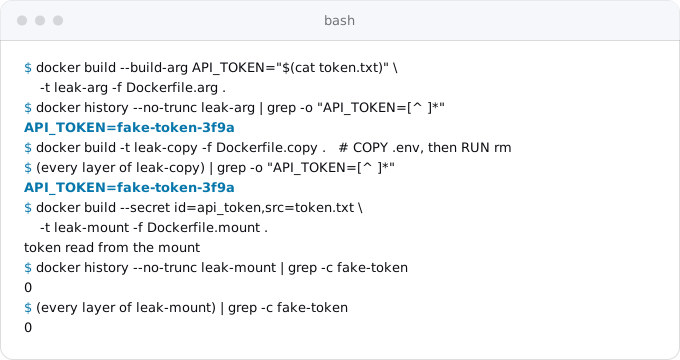
The fix is a BuildKit secret mount. The Dockerfile reads the secret as a file during one RUN step, and nothing of it is written into the image:
# syntax=docker/dockerfile:1
RUN --mount=type=secret,id=npm_token \
    NPM_TOKEN="$(cat /run/secrets/npm_token)" npm ci
Build it with docker build --secret id=npm_token,src=npm_token.txt . on your machine. In Cloud Build, a build config takes the value from Secret Manager with availableSecrets; a step lists the names it may use in secretEnv and refers to them as $$NAME inside bash -c. The build's service account needs Secret Accessor on that secret, like the service does. Google itself needs no stored secret in CI: deploying from GitHub without keys signs in with a short-lived token.
Values that frameworks bake into the browser bundle, such as Next.js NEXT_PUBLIC_ variables, are public by design and belong in the build, not in Secret Manager. The Vercel guide covers that case.
Rotating a secret without an outage
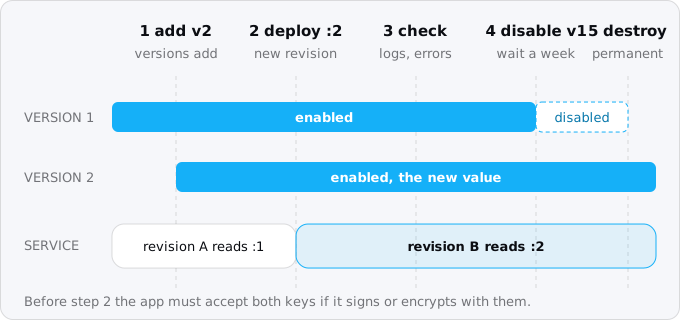
A rotation replaces a value while the app keeps running. With versions pinned in environment variables, it goes like this:
- Add the new version.
gcloud secrets versions add session-key --data-file=-, with the new value piped in. Nothing reads it yet. - Deploy the new version number.
gcloud run services update api --region=europe-west1 --update-secrets=SESSION_KEY=session-key:2. The new revision reads version 2; the old revision's instances keep version 1 until they shut down. - Check. Watch errors and logs for a while. If something breaks, route traffic back to the previous revision, which still reads version 1.
- Disable the old version.
gcloud secrets versions disable 1 --secret=session-key. Anything still reading it now fails, and you can turn it back on withversions enable. Google suggests waiting a week here before the next step. - Destroy it.
gcloud secrets versions destroy 1 --secret=session-key. This is permanent, and a destroyed version stops being billed.
Two things make this safe in practice. First, for keys that sign or encrypt, the app has to accept the old key and the new one for a while, or every session and token signed with the old key fails at step 2. The usual pattern is a list, newest first: sign with the first, accept any; the sessions guide shows it for cookies. Second, set a destruction delay on secrets that matter: gcloud secrets update session-key --version-destroy-ttl=7d makes a destroy request disable the version and destroy it only after 7 days (Google allows 1 to 1,000 days), so a mistaken destroy can be undone.
Two cautions about latest. Reading a new version by its number right after adding it is strongly consistent; reading through latest is not, and Google says it usually converges within minutes, sometimes hours. And Secret Manager's rotation schedules do not rotate anything. A schedule sends a SECRET_ROTATE message to a Pub/Sub topic at the set time, at most once an hour; making the new value, adding it and deploying is your code's job.
Who read the secret
Adding, disabling and destroying versions go to the Admin Activity audit log, which is always written. Reading a value (AccessSecretVersion) is a Data Access log, and Cloud Audit Logs says Data Access logs "are disabled by default for all services but some BigQuery services". So by default you can see who changed a secret but not who read it. Google's best practices recommend turning on Data Access logs for Secret Manager in the project's audit configuration.
What it costs
List prices of 2026-10-12, from Google's pricing page and the Cloud Billing Catalog API:
- Active versions: $0.06 a month each, after 6 free. Enabled and disabled versions are active; destroyed ones are free.
- Reads (access operations): $0.03 per 10,000, after 10,000 free a month.
- Rotation notifications: $0.05 each, after 3 free a month.
- Creating, disabling, destroying and changing secrets: free.
- Replication: an automatic secret is billed as one location; a user-managed secret is billed once per region in its list.
The free allowance belongs to the billing account, not the project. Our billing account has Secret Manager in 6 projects. From October 1 to 11, 2026, our project's versions cost $0.0576 because the other projects had already used the 6 free versions, and our 668 reads in 8 days (52 to 138 a day) cost nothing because the account's 3,362 reads stayed under 10,000.
Worked examples at those prices, assuming the billing account has no other secrets:
- 5 secrets, one version each, read when instances start: $0.
- 20 secrets, one version each: 14 billed versions, $0.84 a month. During a rotation, the old version adds $0.06 a month until it is destroyed.
- One secret read through the API on every request, 1 million requests a month: 990,000 billed reads, $2.97 a month. Read once per instance and keep it in memory, and it drops back to zero.
The quota matters more than the price: 90,000 reads a minute per project, and a deploy that starts many instances at once, each reading many secrets, is the "thundering herd" Google's best practices warn about.
What breaks
- The deploy fails with a permission error on a secret. The service account lacks Secret Accessor on that secret, the grant has not propagated yet, or the service runs as a different account than you granted. Check
--service-accountin the deploy and the secret's policy. - Instances stop starting after a rotation. An environment variable points at a version you disabled. Running instances keep going, so the failure shows up later.
- The value has a newline at the end. It was created with
echoinstead ofecho -norprintf. Add a new version without it. - A deploy removed other secrets. It used
--set-secretswith a partial list. - A new version did not reach the app. It was an environment variable, or the app read the file once at startup. Deploy, or restart instances.
- Every service can read every secret. Secret Accessor was granted on the project. Move the grants to the secrets.
- A secret is readable in the console. It was set with
--set-env-vars. Move it to Secret Manager, and since it was exposed, rotate it. - The image has a token in it. It came in as a build argument or a copied file. Rebuild with a secret mount, delete the old image, and rotate the token.
Checklist
- One service account per service, set with
--service-account. - Every password, key and connection string with credentials in Secret Manager; plain variables only for values you would show a colleague.
- Secret Accessor granted per secret, to the one account that reads it.
- Environment variables pinned to version numbers;
latestonly for files the app re-reads. - Deploy scripts use
--update-secrets, not--set-secrets, unless they list every secret. - No secrets in build arguments or copied files; BuildKit secret mounts or Cloud Build's
availableSecretsinstead. - Signing keys accepted as a list, so a rotation logs nobody out.
- A destruction delay on the secrets that matter, and old versions disabled for a week before they are destroyed.
- Data Access logs on for Secret Manager if you need to know who read a value.
Where Exodus comes in
The Exodus CLI's audit reads the names of your environment variables, never their values, and never opens a .env file. Names that look like secrets (with SECRET, _KEY, TOKEN or PASSWORD, and database or broker URLs, which carry passwords) are counted, and the report lists them as Secret Manager secrets with a monthly cost line; the rest stay plain variables. The rules Exodus gives your coding agent say secret values are never printed or put on a command line, and IAM changes wait for your yes. The cost line counts the 6 free versions; if other projects on your billing account use them, add $0.06 a month per secret.
FAQ
Can a Cloud Run service pick up a new secret version without a deploy?
Yes, if the secret is a mounted file read through latest. Cloud Run fetches the value from Secret Manager each time the file is read, so a new version reaches running instances at the next read. A secret in an environment variable is read once when an instance starts, so it needs a deploy or new instances.
Why does my Cloud Run deploy fail with a permission error on a secret?
On every deploy Cloud Run checks that the service account can read each secret named. The deploy fails when that account lacks the Secret Accessor role on the secret, when the grant has not propagated yet, or when the service runs as a different account than the one you granted.
Who can see the environment variables of a Cloud Run service?
Anyone with Viewer on the project, and anyone with the Cloud Run Viewer role alone, can read plain environment variables in the service's configuration. A variable taken from Secret Manager shows only the secret's name and version, so passwords and keys belong there.
How much does Secret Manager cost for a small Cloud Run app?
Usually nothing. The first 6 active versions and 10,000 reads a month are free per billing account, then $0.06 a month per version and $0.03 per 10,000 reads. Twenty secrets with one version each cost $0.84 a month; a secret read through the API on every request of 1 million costs $2.97.
Sources
24
- docs.cloud.google.comConfigure secrets for services, Cloud Run, Google
- docs.cloud.google.comConfigure secrets for jobs, Cloud Run, Google
- docs.cloud.google.comConfigure environment variables for jobs, Cloud Run, Google
- docs.cloud.google.comConfigure environment variables for services, Cloud Run, Google
- docs.cloud.google.comCloud Run IAM roles, Google
- docs.cloud.google.comIntroduction to service identity, Cloud Run, Google
- cloud.google.comSecret Manager pricing, Google
- docs.cloud.google.comSecret Manager quotas and limits, Google
- docs.cloud.google.comChoose a secret replication policy, Secret Manager, Google
- docs.cloud.google.comSecret Manager best practices, Google
- docs.cloud.google.comSecret Manager access control, Google
- docs.cloud.google.comManage access to secrets, Secret Manager, Google
- docs.cloud.google.comAdd a secret version, Secret Manager, Google
- docs.cloud.google.comAccess a secret version, Secret Manager, Google
- docs.cloud.google.comDisable and destroy secret versions, Secret Manager, Google
- docs.cloud.google.comDelayed destruction of secret versions, Secret Manager, Google
- docs.cloud.google.comCreate rotation schedules, Secret Manager, Google
- docs.cloud.google.comSecret Manager audit logging, Google
- docs.cloud.google.comCloud Audit Logs overview, Google
- docs.cloud.google.comUse secrets from Secret Manager, Cloud Build, Google
- docs.docker.comBuild secrets, Docker docs
- docs.cloud.google.comCloud Billing Catalog API, Secret Manager SKUs
- docs.cloud.google.comgcloud CLI reference, Google
- Exodus team: read-only look at our own project on Oct 12, 2026