Database migrations on Cloud Run go in a Cloud Run job that runs the new image once, with --wait, before gcloud run deploy, because Cloud Run has no release phase. A migration in the start command runs on every instance that starts, in parallel, and must finish inside a 240-second startup probe. A job run costs $0.00114 at list prices, usually $0.00 after the free tier.
In short
- A migration in the start command runs on each new instance at once, and one still running after 240 seconds fails the revision.
- The job runs the same image with
--max-retries 0, since the default is 3 retries, and a task timeout above the 10-minute default, up to 168 hours. - A 20-second run on 1 vCPU and 512 MiB bills as 60 seconds, $0.00114; the jobs free tier covers about 4,000 such runs a month.
- Each migration must work with the revision still serving: a column rename takes 4 deploys, and
lock_timeout = '2s'turns a lock queue into a failed migration.
Prices are europe-west1 list prices of October 12, 2026.
What goes wrong when the container migrates at start
On Heroku the release: line of a Procfile runs your migrations before the new version takes traffic; Fly has release_command, Render a pre-deploy command. Each runs the migration once, with the new code, and stops the deploy if it fails. Cloud Run has no such step, so the migration usually lands in the start command, as migrate && start. It works on the first deploy with one instance and breaks later.
A Cloud Run service runs as many copies of your container as traffic needs, and each copy runs the start command from the beginning. A migration in that command runs as many times as there are instance starts, and four things follow from that.
Several instances run it at once. Since April 2023 Cloud Run "starts enough instances of the new revision before directing traffic to it", so a busy service starts several new instances together on every deploy, and each of them reaches the migration at about the same time. Whether that is safe depends on your tool. Rails and Prisma take a database advisory lock (a named lock the tool asks Postgres for: whoever holds it migrates, the others wait or fail) and so run it only once. Django's migrate takes no lock of its own that its documentation mentions. Laravel's --isolated needs a cache server shared by all instances, and Cloud Run has none unless you add one.
A slow migration fails the deploy. Cloud Run decides that a new instance has started when it accepts a TCP connection on its port. This default startup probe, described in the health checks guide, waits 240 seconds, once. A migration that rebuilds a big index runs before the server listens, and after 240 seconds the revision fails with "The user provided container failed to start and listen on the port defined by PORT=8080 environment variable within the allocated timeout". The failed instance is shut down, whether or not its migration had finished.
A failure crashes instances instead of stopping the deploy. If the migration fails, migrate && start never starts the server. The new revision never becomes ready, and the old one keeps serving, which sounds safe. But the error is now a crash-looping container rather than a red step in your pipeline, and you find it by reading container logs.
Every cold start pays for it. After the deploy, each new instance still runs the migration tool to find out that nothing is pending. In our sample that no-op run took 0.4 seconds on a laptop, and a framework that boots the whole app first takes longer. It is added to every scale-up, and the service account that serves your web traffic needs the right to change the schema, all the time. Google's Django tutorial recommends the opposite, limiting the database user the service runs as.
See it before you deploy
The sample in our research folder runs this on a laptop: a throwaway postgres:17 in Docker, a migration that creates a table and takes two seconds, and node-pg-migrate 9.0.0 as the tool. Three processes start together, as three new instances would, and each runs the migration first. Then the same migration runs as a job would: once, then a second time, then with a migration that fails.
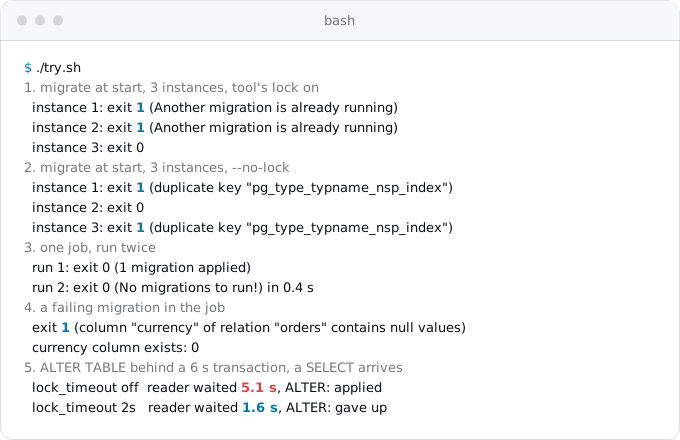
With the tool's default lock, one instance applies the migration and the other two exit with code 1, because node-pg-migrate's default --advisory-lock-mode is fail. On Cloud Run those are two containers that failed to start. With --no-lock, all three try, and the two losers fail inside Postgres on a duplicate key in the catalog: they tried to create the same table. A tool that waits for the lock instead (Prisma, or node-pg-migrate with --advisory-lock-mode wait) avoids the crash but holds every new instance until the migration ends, so a long migration still runs into the 240-second probe.
As a job, the same migration runs once and exits 0. A second run finds nothing to do and exits 0. A migration that adds a NOT NULL column without a default to a table with rows fails, exits 1, and Postgres rolls the whole transaction back: the column does not exist afterwards. That exit code is what a job turns into a failed deploy.
What a job is
A Cloud Run job runs a command until it exits, with no URL and no port, so no startup probe applies. The services, jobs and worker pools guide explains jobs, executions and tasks; three facts from it matter here. A job takes the same settings as a service (image, secrets, a Cloud SQL connection, a service account, a VPC network), so it can run the image you just built and only the migration command. A migration is one task, which may run for 10 minutes by default and up to 168 hours with --task-timeout. And a failed task is retried 3 times by default, which a migration usually should not be (Step 3). The container must exit with code 0 on success and anything else on failure, as migration tools do.
Two flags make a job usable in a deploy. --execute-now runs it right after gcloud run jobs deploy creates or updates it. --wait makes gcloud wait until the execution ends and fail if the execution failed; without it, gcloud "exits successfully when the execution has started". Google's own tutorials differ here: the Rails tutorial runs its migration job with --execute-now --wait, the Django tutorial with --execute-now alone, so its build step succeeds as soon as the migration starts.
What it costs
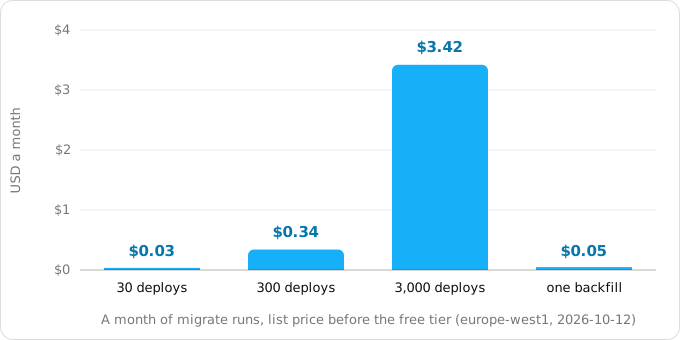
A job bills for the whole life of its container with a minimum of one minute, at $0.000018 per vCPU-second and $0.000002 per GiB-second in europe-west1 and no request fee (the jobs guide has the details). A migration that runs 20 seconds on 1 vCPU and 512 MiB is billed as 60 seconds, $0.00114.
- 30 deploys a month: $0.03.
- 300 deploys a month: $0.34.
- 3,000 deploys a month: $3.42.
- A 20-minute data backfill on 2 vCPU and 2 GiB, run once: $0.05.
These are list prices before the free tier. Jobs have a free tier of their own, 240,000 vCPU-seconds and 450,000 GiB-seconds a month per billing account, which is 4,000 such one-minute runs, so all four lines cost $0.00 unless something else already uses it.
The build costs more. Cloud Build gives 2,500 build-minutes a month, then charges $0.006 a minute, so 3,000 builds of 3 minutes cost $39.00, about eleven times the migration job.
Step 1. Find where migrations run today
Look in every place a platform or a container could start a command:
grep -rnE 'release:|release_command|preDeployCommand|PRE_DEPLOY' \
  Procfile fly.toml render.yaml .do/ app.json 2>/dev/null
grep -rnE 'migrate|db:prepare|alembic upgrade|flyway' \
  Dockerfile* docker-compose*.yml entrypoint*.sh bin/ package.json 2>/dev/null
The first line finds the platform's release step. The second finds a migration in the image's start path: a CMD ["sh", "-c", "npx prisma migrate deploy && node server.js"], an entrypoint.sh that runs python manage.py migrate before gunicorn, a "start": "prisma migrate deploy && next start" in package.json, or the bin/docker-entrypoint that Rails generates with a new app, which runs ./bin/rails db:prepare before rails server. Note each command and its arguments, because the job will run exactly that.
Step 2. Take the migration out of the start command
The service's start command becomes only the server. The migration command stays in the same image and runs from the job. Typical commands:
- Rails:
bin/rails db:migrate, orbin/rails db:prepare, which also creates the database on the first run. - Django:
python manage.py migrate --noinput. - Laravel:
php artisan migrate --force. Without--forceit asks for confirmation in production and a job has nobody to answer. - Prisma 7 and earlier:
npx prisma migrate deploy. The newest Prisma replaces it withnpx prisma db migrate. - Alembic:
alembic upgrade head. - Flyway:
flyway migrate. - node-pg-migrate:
npx node-pg-migrate up.
With Google's buildpacks and a Procfile, add a line such as migrate: python manage.py migrate --noinput and run it with --command migrate. With a Dockerfile, pass the command and its arguments to the job, as below.
Step 3. Create the job
Build the image once and tag it with something unique, such as the commit, so that the job and the service run the same code:
IMAGE=europe-west1-docker.pkg.dev/PROJECT_ID/apps/web:$(git rev-parse --short HEAD)
gcloud builds submit --tag "$IMAGE"

gcloud run jobs deploy migrate \
  --image "$IMAGE" \
  --region europe-west1 \
  --service-account web@PROJECT_ID.iam.gserviceaccount.com \
  --set-cloudsql-instances PROJECT_ID:europe-west1:main \
  --set-secrets DATABASE_URL=DATABASE_URL:latest \
  --command bin/rails --args db:migrate \
  --cpu 1 --memory 512Mi \
  --max-retries 0 \
  --task-timeout 30m \
  --wait
jobs deploy creates the job the first time and updates it later, so the same command works on every deploy. --wait implies --execute-now. --set-cloudsql-instances gives the job the same Unix socket at /cloudsql/PROJECT_ID:europe-west1:main that the service uses (connecting Cloud Run to Cloud SQL); a database on a private IP needs --network, --subnet and --vpc-egress instead, as for the service.
Two settings differ from the defaults on purpose. --max-retries 0: on Postgres a failed migration rolls back and a retry fails the same way, while on MySQL, which has no transactions around schema changes, a retry starts again on a half-changed schema. Neither is worth three more attempts. --task-timeout 30m: the default 10 minutes is enough for most migrations, but an index on a large table can take longer, and a killed migration is worse than a slow one.
The job can run as a service account of its own whose database user may change the schema, while the service's user only reads and writes rows.
Step 4. Put the three steps in one script
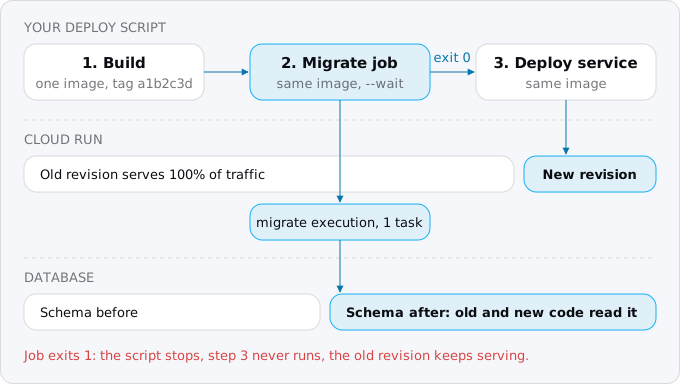
The order is build, migrate, deploy, and the deploy runs only if the job exits 0:
#!/usr/bin/env bash
set -euo pipefail
IMAGE=europe-west1-docker.pkg.dev/PROJECT_ID/apps/web:$(git rev-parse --short HEAD)

gcloud builds submit --tag "$IMAGE"
gcloud run jobs deploy migrate --image "$IMAGE" --region europe-west1 --wait
gcloud run deploy web --image "$IMAGE" --region europe-west1
After the first full jobs deploy from Step 3, a later deploy changes only the image, and the job keeps its command, secrets and Cloud SQL connection. set -e stops the script at the first failed command, so a failed migration leaves the old revision serving and the new one never created.
The same three steps fit Cloud Build, GitHub Actions or any CI service (the one that builds and deploys on each push) that can run gcloud; in a cloudbuild.yaml the middle step uses the gcr.io/google.com/cloudsdktool/cloud-sdk image. Teams on Cloud Deploy can use its predeploy hooks, which run as a job of the rollout before the deploy.
To run the job by hand, for example after fixing the data that made it fail:
gcloud run jobs execute migrate --region europe-west1 --waitexecute also takes --args for one run, so the same job can roll back one step (--args db:rollback) or run a one-off data fix without a new job.
Step 5. Write migrations the old revision survives
The job changes the database while the old revision serves traffic, and the new revision takes traffic only afterwards. If you deploy with --no-traffic and move traffic gradually, or roll back to an earlier revision with gcloud run services update-traffic, old and new code run against the same schema for hours. Rolling back traffic does not roll back the schema. So every migration has to work with the code before it and the code after it.
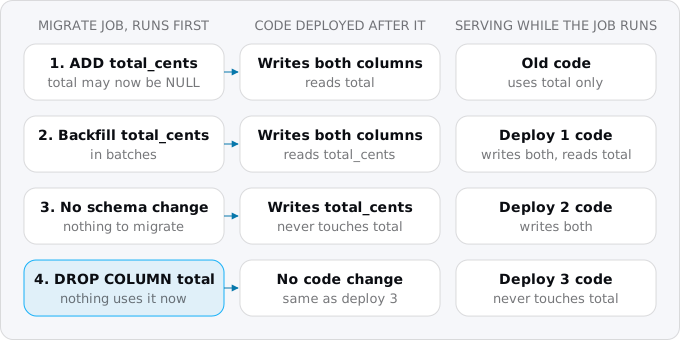
The rule is called expand and contract. A change that breaks old code is split over several deploys, and each deploy's job only does what the code still serving can live with:
- Expand. Add what the new code needs, remove nothing: a nullable column, a new table, a column with a constant default. Deploy code that writes both the old and the new place.
- Move the data. Backfill the new place in batches, as a job of its own if it is large. Deploy code that reads the new place.
- Stop using the old place. Deploy code that neither reads nor writes it.
- Contract. Drop the old place in the next deploy's job.
Renaming a column is the common case. ALTER TABLE orders RENAME COLUMN total TO total_cents breaks every request the old revision serves during and after the job. Four deploys break nothing.
Locks are the other half. Most forms of ALTER TABLE in Postgres take an ACCESS EXCLUSIVE lock, the only lock mode that blocks a plain SELECT. The statement itself is often quick, but it has to wait for every transaction that already touched the table, and while it waits, every new query on that table queues behind it. In the sample's last run, a transaction that keeps the table open for 6 seconds made an ALTER TABLE ... ADD COLUMN wait, and a plain SELECT that arrived next waited 5.1 seconds behind the ALTER. On a live service that is every request touching the table.
lock_timeout turns that into a failed migration instead of an outage. Set it at the start of the migration:
SET lock_timeout = '2s';
ALTER TABLE orders ADD COLUMN note text;
With it, the sample's ALTER gave up after 2 seconds, and the SELECT, which arrived half a second after it, waited 1.6. The job exits 1, the deploy stops, and you run it again at a quieter moment. A few more Postgres rules:
ADD COLUMNwith a constant default or no default does not rewrite the table, even on a large one. Changing a column's type usually does.- Adding
NOT NULLor aCHECKconstraint scans the whole table under the lock. CREATE INDEXblocks writes until it ends.CREATE INDEX CONCURRENTLYdoes not, but it cannot run inside a transaction, so the migration must turn its transaction off:disable_ddl_transaction!in Rails,atomic = FalsewithAddIndexConcurrentlyin Django.
Step 6. When the job fails
gcloud run jobs deploy ... --wait returns non-zero when the execution fails. To list recent runs and read the failed one's logs:
gcloud run jobs executions list --job migrate --region europe-west1 --limit 5
gcloud beta run jobs executions logs read EXECUTION_NAME --region europe-west1
Or search all of the job's errors of the last week:
gcloud logging read \
  'resource.type="cloud_run_job" AND resource.labels.job_name="migrate" AND severity>=ERROR' \
  --freshness 7d --limit 20 --format 'value(timestamp,textPayload)'
On Postgres, Django, Rails and node-pg-migrate run migrations in a transaction, so a failure leaves the schema as it was and you fix the migration and deploy again. On MySQL, Django's documentation is plain: a failed migration has to be unpicked by hand. golang-migrate marks the database "dirty" after a failure and refuses to run until you check the schema and force the version. In both cases, look at the schema before you run anything again.
What breaks
- The job runs an older image. A job created once with
:latestruns whatever:latestwas when the job was last updated, which can be older than the service. Update the job's image on every deploy, as Step 4 does. - The job is not connected to the database. A job does not inherit the service's Cloud SQL connection, secrets or network. Copy them, or the job fails with a connection error the service never had.
- Rails behind PgBouncer. Rails takes an advisory lock for migrations, and the Rails guide says you might need to turn it off with
advisory_locks: falsebehind an external pooler such as PgBouncer. The job runs once, so it does not need the lock; you can also connect the job to the database directly, not through the pooler. - Laravel's isolated mode in a job.
migrate --isolatedneeds a cache shared by all servers and exits 0 when another run holds the lock. One job run needs neither. - Prisma's lock timeout. Prisma's advisory lock waits 10 seconds, not configurable, so of two deploys at once the second fails. That is the right outcome; run it again.
- Seeds in the migration. A seed that inserts rows every time it runs fails or duplicates them on the second deploy. Make it idempotent (safe to run twice), or make it a separate job you run once.
Checklist
- The service's start command starts only the server; nothing in the Dockerfile, entrypoint or
package.jsonstart script migrates. - A job named
migrateruns the migration command with the same image, secrets, Cloud SQL connection and network as the service. - The job has
--max-retries 0and a task timeout longer than your slowest migration. - The deploy script builds once, runs
gcloud run jobs deploy migrate --image "$IMAGE" --wait, then deploys the service with the same image, and stops on the first failure. - Every migration works with the code before it: no renames or drops in the same deploy as the code change.
- Migrations on large tables set
lock_timeoutand build indexes concurrently. - The service's database user cannot change the schema; the job's can.
- You have run a failing migration on a staging database and seen the deploy stop.
Where Exodus comes in
Exodus's CLI reads your repository with your coding agent and finds where migrations run: a release line in the Procfile, release_command in fly.toml, a pre-deploy command, or a migrate step inside the Dockerfile's CMD or an entrypoint script. The report lists each one with file and line and proposes the job, with this guide as the explanation. The move plan puts the job between the build and the deploy and prices it next to the rest of your Cloud Run bill, where it usually shows as $0.00.
FAQ
Does Cloud Run have a release phase like Heroku?
No. Heroku runs the Procfile's release line before the new version takes traffic, Fly has release_command and Render a pre-deploy command, but Cloud Run's deploy only starts the container. A Cloud Run job run with --wait before gcloud run deploy takes that place and stops the deploy when it fails.
Why does my Cloud Run deploy fail with "failed to start and listen on the port"?
A migration in the start command may be the cause. Cloud Run's default startup probe waits 240 seconds for the container to accept a connection on its port, and a migration that rebuilds a big index runs before the server listens. Move the migration into a job, which has no port and no probe.
How do I run Django migrations on Cloud Run?
Run python manage.py migrate --noinput as a Cloud Run job with the same image, secrets and Cloud SQL connection as the service, before the deploy. Use --wait: Google's Django tutorial runs the job with --execute-now alone, so its build step succeeds as soon as the migration starts.
Should a Cloud Run migration job retry on failure?
No, set --max-retries 0. A job retries a failed task 3 times by default. On Postgres a failed migration rolls back and a retry fails the same way; on MySQL, which has no transactions around schema changes, a retry starts again on a half-changed schema.
How much does a migration job cost on Cloud Run?
A 20-second migration on 1 vCPU and 512 MiB is billed as one minute, $0.00114 at europe-west1 list prices, so 300 deploys a month cost $0.34. The jobs free tier, 240,000 vCPU-seconds and 450,000 GiB-seconds a month, covers about 4,000 such runs.
Sources
33
- cloud.google.comRunning database migrations with Cloud Run Jobs, Google Cloud blog
- docs.cloud.google.comExecute jobs, Cloud Run
- docs.cloud.google.comCreate jobs, Cloud Run
- docs.cloud.google.comSet maximum retries for jobs, Cloud Run
- docs.cloud.google.comSet task timeout for jobs, Cloud Run
- docs.cloud.google.comContainer runtime contract, Cloud Run
- cloud.google.comCloud Run pricing, Google
- docs.cloud.google.comConfigure container health checks for services, Cloud Run
- docs.cloud.google.comTroubleshoot Cloud Run issues
- cloud.google.comCloud Run release notes, April 10, 2023
- docs.cloud.google.comRollbacks, gradual rollouts, and traffic migration, Cloud Run
- docs.cloud.google.comConnect from Cloud Run, Cloud SQL for PostgreSQL
- docs.cloud.google.comRunning Django on the Cloud Run environment, Google
- docs.cloud.google.comRunning Rails on the Cloud Run environment, Google
- docs.cloud.google.comLogging and viewing logs in Cloud Run
- cloud.google.comCloud Build pricing, Google
- docs.cloud.google.comRun hooks before and after deploying, Cloud Deploy
- guides.rubyonrails.orgConfiguring Rails Applications, Rails guides
- guides.rubyonrails.orgActive Record Migrations, Rails guides
- docs.djangoproject.comMigrations, Django 6.1 docs
- docs.djangoproject.comDatabase migration operations, django.contrib.postgres
- laravel.comDatabase: Migrations, Laravel
- prisma.ioDevelopment and production, Prisma 6 docs
- prisma.ioApplying a migration, Prisma docs
- salsita.github.ioCLI usage, node-pg-migrate
- documentation.red-gate.comFrequently asked questions, Flyway
- github.commigrate.go, golang-migrate
- github.comdocker-entrypoint template, Rails
- postgresql.orgExplicit locking, PostgreSQL docs
- postgresql.orgALTER TABLE, PostgreSQL docs
- postgresql.orgCREATE INDEX, PostgreSQL docs
- postgresql.orgClient connection defaults, PostgreSQL docs
- Exodus team: a local sample with postgres:17 and node-pg-migrate 9.0.0