IAM for a Cloud Run app decides three things: who may call the service, what its code may touch, and who may deploy it. A public site switches off the invoker check with --no-invoker-iam-check. Each service runs as its own service account, with roles on single resources and no keys. A deployer needs Cloud Run Developer, Artifact Registry Reader and Service Account User. IAM itself costs nothing.
In short
- Organizations created on or after May 3, 2024 refuse a grant to
allUsersby default, so a public service uses--no-invoker-iam-check. - A missing token or missing Invoker gets a 403, a token for the wrong audience a 401; an ID token expires about an hour after it is made.
- A deployer needs 3 roles: Cloud Run Developer, Artifact Registry Reader, and Service Account User on the runtime account.
- An IAM change typically takes 2 minutes and potentially 7 or more; Firestore caches permissions for 5 minutes.
- IAM is free, and Admin Activity audit logs are kept 400 days at no charge.
The words first
Three kinds of access surround a service: someone calls it, its code calls Google Cloud, and someone changes it. A wrong setting in any of them shows up as a 403 from a container that works. IAM answers one question: may this principal do this action to this resource? Four words cover it.
- A principal is whoever asks: a person's Google account, a Google group, a service account, or one of two special values,
allUsers(anyone on the internet) andallAuthenticatedUsers(anyone signed in to any Google account). - A permission is one action, such as
run.routes.invoke, "send a request to this service". - A role is a named set of permissions, such as
roles/run.invoker. - A binding says "this principal has this role on this resource". The bindings on one resource are its allow policy.
A binding sits on a resource: an organization (the top level, which only some accounts have), a project, or one thing inside a project, such as one Cloud Run service, one secret or one bucket. A binding on a project applies to everything in it, so the habit to build is granting on the single resource whenever the product allows it.
A service account is an identity for a program instead of a person. It has an email address such as api-runtime@my-project.iam.gserviceaccount.com. A service agent is a service account Google creates for one of its own products, for example the one Cloud Run uses to pull your image. You will see service agents in the project's policy, and you rarely touch them.
Three identities around a service
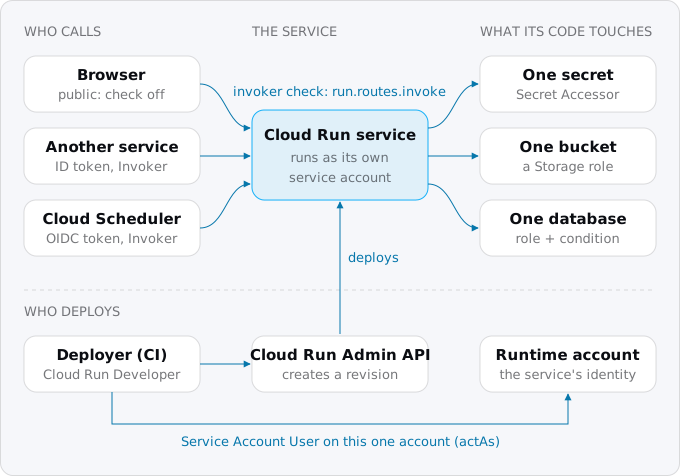
Google's service identity page names two: the deployer account, which calls the Cloud Run Admin API to create and update the service, and the service identity, the service account the running container acts as when it calls Google APIs. The third is the caller, whoever sends HTTP requests. Each needs its own roles, and mixing them up causes most permission errors: a deployer with every role still cannot make the running code read a secret, because the code is not the deployer.
The roles that matter
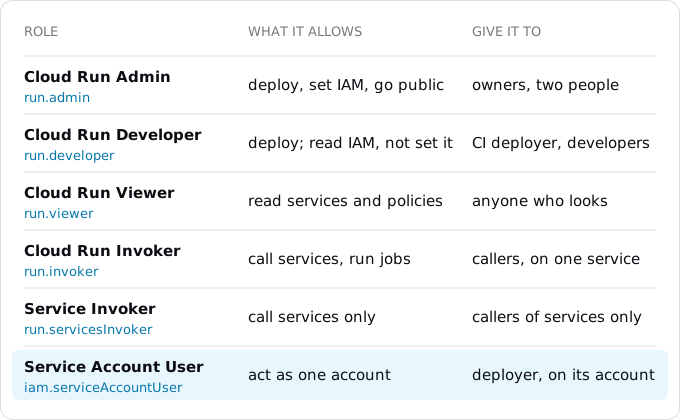
By default only project Owners and Editors can create, change or call Cloud Run resources, and only Owners and Cloud Run Admins can change who may call them. The predefined roles narrow that down:
- Cloud Run Admin (
roles/run.admin) does everything, including reading and setting IAM policies on services. That last part is what makes a service public, so keep this role for the people who own the project. - Cloud Run Developer (
roles/run.developer) creates, updates and deletes services, jobs and worker pools, and can read IAM policies but not set them. This is the role for a CI pipeline and for developers. - Cloud Run Invoker (
roles/run.invoker) holdsrun.routes.invoke,run.jobs.runandrun.instances.invoke: call services, start jobs. - Cloud Run Service Invoker (
roles/run.servicesInvoker) holds onlyrun.routes.invoke. Use it for a caller that should reach a service and nothing else. - Service Account User (
roles/iam.serviceAccountUser) is an IAM role every deploy needs, as the deploy section explains.
Two oddities: Cloud Run roles do not cover domain mappings, which need the project Editor role, and the Source Developer and Builder roles matter only for gcloud run deploy --source.
Question 1: who may call the service
Cloud Run runs an invoker IAM check on every request, and it is on by default. A request without a valid token, or from a principal without run.routes.invoke, gets HTTP 403 before it reaches your container. Google's troubleshooting page pairs the two error codes: 403 means "no token, or no permission", 401 means "a token, but malformed or for the wrong audience". A rejected request never reaches your code.
A public website or API
Most apps moved from Heroku or Render are public: a website, or an API with its own login. There are two ways to open the service, and Google recommends the first:
gcloud run deploy web --image IMAGE --region europe-west1 --no-invoker-iam-checkThis switches the check off, which the service records in its run.googleapis.com/invoker-iam-disabled annotation. The other way grants Invoker to everyone:
gcloud run deploy web --image IMAGE --region europe-west1 --allow-unauthenticated
# or, on an existing service:
gcloud run services add-iam-policy-binding web --region europe-west1 \
  --member=allUsers --role=roles/run.invoker
Why the first is recommended: an organization created on or after May 3, 2024 enforces domain restricted sharing by default, an organization policy that allows roles only for accounts of your own domain. Under it, the allUsers grant is refused, and the service stays private. Disabling the check is not a grant, so it works there. Both ways need run.services.setIamPolicy, which is in Cloud Run Admin and not in Developer. A project without an organization, such as one created with a personal Gmail account, has no such policy, and both ways work.
Two smaller rules: allUsers and allAuthenticatedUsers cannot be granted on a project, only per service; and turning the check back on in the console removes existing allUsers bindings. An administrator can forbid disabling the check with the constraint run.managed.requireInvokerIam, not enforced by default.
Ingress settings are a separate layer: they decide which networks may reach the service at all (all, internal, or internal-and-cloud-load-balancing). IAM still applies on every path, so a service can be internal and require IAM at the same time.
An internal tool for your team
An admin panel or a staging site should be reachable by your people and nobody else. Identity-Aware Proxy (IAP) puts a Google sign-in page in front of a Cloud Run service with no load balancer and no login code in your app:
gcloud run deploy admin --image IMAGE --region europe-west1 \
  --no-allow-unauthenticated --iap
gcloud run services add-iam-policy-binding admin --region europe-west1 \
  --member=serviceAccount:service-PROJECT_NUMBER@gcp-sa-iap.iam.gserviceaccount.com \
  --role=roles/run.invoker
gcloud iap web add-iam-policy-binding --region=europe-west1 \
  --resource-type=cloud-run --service=admin \
  --member=group:team@example.com --role=roles/iap.httpsResourceAccessor
The second command lets IAP's service agent call the service; the third lets the group in. IAP's features here have no charge. Two limits: in a project without an organization, enable IAP the first time in the console, because the OAuth client it needs cannot be created from the command line; and IAP cannot be on both a load balancer and the service.
A developer testing a private service
Grant the developer, or better their group, Invoker on that service, then let gcloud attach the token:
gcloud run services add-iam-policy-binding api --region europe-west1 \
  --member=group:devs@example.com --role=roles/run.invoker
gcloud run services proxy api --region europe-west1 --port 8080
# http://localhost:8080 now reaches the private service with your credentials
curl -H "Authorization: Bearer $(gcloud auth print-identity-token)" https://api-xxxx.europe-west1.run.app/health
Google calls these tokens development-only. We decoded one without printing it: it lives 3,600 seconds and its audience is gcloud's own OAuth client, not your service, so it works on any service you may call, and production code must not use it.
Question 2: one service calling another
Say a public web service calls a private billing service. Google's recommendation: the caller runs under its own service account, that account gets Invoker on the receiving service, and every request carries a Google-signed ID token, a short signed statement of "this request comes from account X, meant for service Y".
gcloud run services add-iam-policy-binding billing --region europe-west1 \
  --member=serviceAccount:web-runtime@PROJECT_ID.iam.gserviceaccount.com \
  --role=roles/run.invoker
The grant is on billing; a project-level Invoker would let web call every service in the project. In the code, Google's auth library fetches the token from the instance's metadata server and refreshes it:
import { GoogleAuth } from "google-auth-library";

const BILLING = "https://billing-xxxx.europe-west1.run.app"; // the audience: the receiving service's URL
const client = await new GoogleAuth().getIdTokenClient(BILLING);
const res = await client.fetch(`${BILLING}/invoices/42`);
Without a library, ask the metadata server directly; it answers only inside Google Cloud:
curl -H "Metadata-Flavor: Google" \
  "http://metadata.google.internal/computeMetadata/v1/instance/service-accounts/default/identity?audience=https://billing-xxxx.europe-west1.run.app"
The details that cost an afternoon when missed:
- The audience is the service URL on
run.app, even when you call a traffic tag. A custom domain is not accepted as the audience unless you add it withgcloud run services update billing --add-custom-audiences=https://billing.example.com; that change creates a revision. - The header. Put the token in
Authorization: Bearer ..., or inX-Serverless-Authorization: Bearer ...if your app already usesAuthorizationfor its own users. When both are sent, Cloud Run checks onlyX-Serverless-Authorizationand removes its signature before your code sees it. - Lifetime. An ID token expires about an hour after it is made. The library and the metadata server handle that; a token you cache yourself must be refreshed.
- Cost. Google states there are no networking charges for service-to-service traffic within one region.
Cloud Tasks and Cloud Scheduler call your service the same way, with an OIDC token from a service account you name; background workers with Cloud Tasks and cron with Cloud Scheduler give their commands, and Stripe webhooks on Cloud Run applies them to a private payment worker. For callers outside Google Cloud, use Workload Identity Federation (an outside system proves who it is and gets a short-lived token, with no key to store), as deploying from GitHub without keys shows, instead of a downloaded key.
Question 3: what the code may touch
If you deploy without --service-account, the service runs as the Compute Engine default service account, PROJECT_NUMBER-compute@developer.gserviceaccount.com. Depending on the organization's policy, that account may have been given the project Editor role automatically, which lets your web app delete databases. Google recommends a user-managed account per service instead:
gcloud iam service-accounts create api-runtime --display-name="api at runtime"
gcloud run deploy api --image IMAGE --region europe-west1 \
  --service-account=api-runtime@PROJECT_ID.iam.gserviceaccount.com
A new account has no roles. Grant each on the resource the code uses:
- A secret: Secret Manager Secret Accessor on that secret, as secrets on Cloud Run shows.
- A bucket: a Storage role on that bucket, with
gcloud storage buckets add-iam-policy-binding gs://BUCKET. - Another service: Invoker on that service, as above.
- Firestore: its roles are granted on the project, so add an IAM Condition (a rule attached to a grant, here "only for this database"):
gcloud projects add-iam-policy-binding PROJECT_ID \
  --member=serviceAccount:api-runtime@PROJECT_ID.iam.gserviceaccount.com \
  --role=roles/datastore.user \
  --condition='expression=resource.name=="projects/PROJECT_ID/databases/api",title=api-db-only'
The condition is Google's own example from the Firestore page. We limit a Cloud SQL Client grant the same way, with resource.name == "projects/PROJECT_ID/instances/INSTANCE"; connecting Cloud Run to Cloud SQL covers that role. A condition cannot be put on the basic roles Owner, Editor and Viewer; gcloud refuses.
The client libraries find the account on their own (Google calls this Application Default Credentials: they look for a key file, then ask the metadata server). Google's page is plain: never set GOOGLE_APPLICATION_CREDENTIALS on a Cloud Run service. A JSON key copied from your old platform is a password that never expires, and the runtime account makes it unnecessary.
Question 4: who may deploy
Google's role page lists what a deployer needs:
- Cloud Run Developer on the service (or on the project, if the deployer creates new services).
- Artifact Registry Reader on the repository that holds the images.
- Service Account User on the runtime account the service runs as.
The third one surprises people. Attaching a service account to a service needs iam.serviceAccounts.actAs on it, and without it the deploy fails with "Permission 'iam.serviceaccounts.actAs' denied". Grant it on the account, not the project:
gcloud iam service-accounts add-iam-policy-binding \
  api-runtime@PROJECT_ID.iam.gserviceaccount.com \
  --member=serviceAccount:deployer@PROJECT_ID.iam.gserviceaccount.com \
  --role=roles/iam.serviceAccountUser
Google's caution: whoever can act as an account effectively has its roles. If the runtime account had Editor, every developer with Service Account User on it would have Editor too. That is the second reason to keep runtime accounts narrow. How the CI pipeline signs in as deployer without a key is in deploying from GitHub without keys; how people get roles through groups is in setting up a project for a small team.
Note what Developer cannot do: set IAM policies. A pipeline with Developer that deploys with --allow-unauthenticated lacks run.services.setIamPolicy, so the public grant cannot come from it. Make the service public once, by an Admin, or with --no-invoker-iam-check, which also needs Admin.
Checking what you have
Four read-only commands answer most questions:
gcloud run services get-iam-policy api --region europe-west1
gcloud run services describe api --region europe-west1 \
  --format='value(spec.template.spec.serviceAccountName)'
gcloud projects get-iam-policy PROJECT_ID --flatten='bindings[].members' \
  --filter='bindings.members:api-runtime@' --format='table(bindings.role,bindings.condition.expression)'
gcloud iam service-accounts keys list --iam-account=api-runtime@PROJECT_ID.iam.gserviceaccount.com --managed-by=user
Every IAM change lands in the Admin Activity audit log, always written and kept 400 days in the _Required bucket at no charge. Who changed what in the last month:
gcloud logging read 'logName:"cloudaudit.googleapis.com%2Factivity" AND protoPayload.methodName:"SetIamPolicy"' \
  --freshness=30d --limit=50 --format='value(timestamp,protoPayload.serviceName,protoPayload.authenticationInfo.principalEmail)'
Google's role recommendations compare a principal's roles with the permissions it used over up to 90 days and suggest removing the rest. They need the Recommender API turned on, and are free only for the basic roles (Owner, Editor, Viewer); other roles need a paid tier of Security Command Center.
What we found in our own project
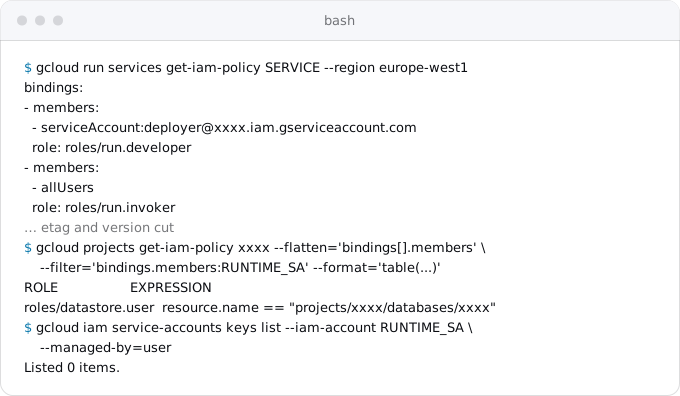
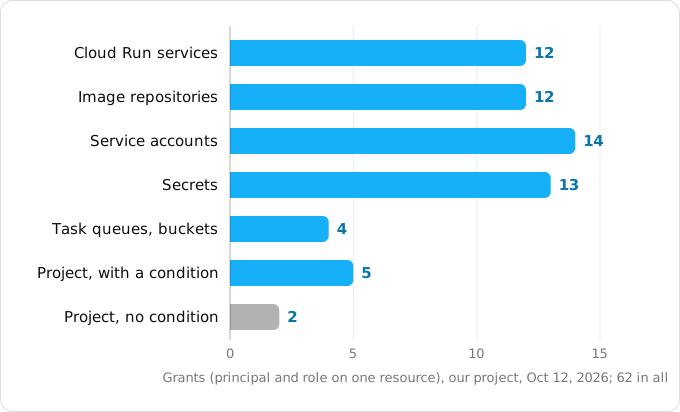
Exodus team: we read our own project's IAM on October 12, 2026, with read-only commands. It runs 8 Cloud Run services:
- All 8 are public, through
allUserswith the invoker check on, the older of the two ways. It works because no policy above the project refusesallUsers; in a newer organization the same deploy would leave all 8 private. - 8 runtime accounts, one per service. None runs as the default account, and the default account holds no roles. Across the 12 service accounts in the project there are 0 user-managed keys.
- Grants sit on single resources. Each of 13 secrets has exactly one reader. Of 6 project-level grants to runtime accounts, 5 carry a condition limiting them to one database or one instance. The sixth, an older one, gives one service the Firestore user role on all 5 databases of the project.
- Deploy rights are per service: the CI account holds Cloud Run Developer on 4 services and Service Account User on their 4 runtime accounts, not on the project.
- 118 IAM changes in 30 days, all in the free audit log.
- The Recommender API is off, so no role recommendations have been made.
What it costs
Nothing, for a small app. Google's IAM pricing page: "All use of Identity and Access Management API is free of charge." IAP's features used here and Admin Activity audit logs are free too. Two things can cost money: Data Access audit logs, which are off by default and, if you turn them on, are billed as logs at $0.50 per GiB after the first 50 GiB per project per month (Google's price list, read October 12, 2026); and role recommendations beyond the basic roles, which come with Security Command Center's paid tiers.
What breaks
- 403 on the first request after a deploy. The service is private and the caller has no token or no Invoker. For a website, use
--no-invoker-iam-check; the cutover day checklist lists this failure for the day of the switch. - The public grant is refused. Domain restricted sharing blocks
allUsers; disable the invoker check instead. - 401 between services. The token's audience is a custom domain or a path, not the
run.appURL; fix the audience or add a custom audience. - "Permission 'iam.serviceaccounts.actAs' denied" on deploy. The deployer lacks Service Account User on the runtime account, or no
--service-accountwas given and the default account does not exist. - A grant that does not work yet. IAM changes typically take 2 minutes and potentially 7 or more; a group membership change can take hours; Firestore caches permissions for 5 minutes. Wait before you add a broader role.
- The app's own login stops working behind service auth. Both use
Authorization; send the service token inX-Serverless-Authorization. - Pub/Sub push fails after IAP is turned on. IAP replaces the caller's identity; keep push targets on a service without IAP.
- A service account granted through a group. Google advises against it; grant service accounts directly. One allow policy holds at most 1,500 principals, which matters only when many services each add their own account to one repository's policy.
Checklist
- Decide per service: public (
--no-invoker-iam-check), team-only (IAP), or private (Invoker for named callers). - One user-managed runtime account per service, set with
--service-account. - Grants on the single secret, bucket or service; project-level database roles with a condition.
- No service account keys;
GOOGLE_APPLICATION_CREDENTIALSunset on Cloud Run. - Service-to-service calls with an ID token for the receiving
run.appURL. - A deployer with Developer, Artifact Registry Reader and Service Account User on its runtime accounts only.
- Cloud Run Admin and Owner for two people, through a group.
- Read the
SetIamPolicyaudit entries after the move.
Where Exodus comes in
Exodus never signs in to Google Cloud and never changes IAM. The instructions exodus init gives your coding agent forbid IAM changes without your yes: when a move needs a role granted, the agent stops and records it with exodus need, with the steps and the commands to copy, and you run them with your own gcloud. When the agent is unsure which role a step needs, it reads this guide through exodus kb and exodus ask.
FAQ
How do I make a Cloud Run service public?
Deploy it with --no-invoker-iam-check, which Google recommends. The other way, --allow-unauthenticated, grants Cloud Run Invoker to allUsers, and organizations created on or after May 3, 2024 refuse that grant by default, which leaves the service private. Both ways need run.services.setIamPolicy, which Cloud Run Admin has and Cloud Run Developer does not.
Why does my Cloud Run service return 403?
The invoker check rejected the request before it reached the container: it carried no token, or the caller lacks run.routes.invoke on the service. A 401 means a token arrived but was malformed or meant for another audience. For a public website, switch the check off with --no-invoker-iam-check.
How does one Cloud Run service call another privately?
The caller runs as its own service account, which gets Cloud Run Invoker on the receiving service only. Each request carries a Google-signed ID token whose audience is the receiving service's run.app URL. Google's auth library fetches it from the metadata server and refreshes it before it expires.
Why does a deploy fail with "Permission 'iam.serviceaccounts.actAs' denied"?
The deployer lacks Service Account User on the runtime account the service runs as, and attaching an account to a service needs that permission. Grant the role on that one account, not on the project, because whoever can act as an account effectively has its roles.
Should a Cloud Run service use a service account key?
No. The client libraries get credentials from the metadata server, and Google says never to set GOOGLE_APPLICATION_CREDENTIALS on a Cloud Run service. A JSON key copied from another platform is a password that never expires; a user-managed runtime account per service makes it unnecessary.
Sources
23
- docs.cloud.google.comAccess control with IAM, Cloud Run, Google
- docs.cloud.google.comCloud Run IAM roles, Google
- docs.cloud.google.comAllowing public
- docs.cloud.google.comRestricting identities by domain, Resource Manager, Google
- docs.cloud.google.comAuthenticating service-to-service, Cloud Run, Google
- docs.cloud.google.comSet custom audiences for services, Cloud Run, Google
- docs.cloud.google.comAuthenticate developers, Cloud Run, Google
- docs.cloud.google.comMethods for getting an ID token, Google Cloud authentication
- docs.cloud.google.comIntroduction to service identity, Cloud Run, Google
- docs.cloud.google.comConfigure service identity for services, Cloud Run, Google
- docs.cloud.google.comConfigure IAP for Cloud Run, Google
- cloud.google.comIdentity-Aware Proxy pricing, Google
- docs.cloud.google.comIngress settings, Cloud Run, Google
- docs.cloud.google.comAccess change propagation, IAM, Google
- docs.cloud.google.comSecurity for server client libraries, Firestore, Google
- docs.cloud.google.comCreate and manage databases, Firestore, Google
- docs.cloud.google.comTroubleshoot Cloud Run issues, Google
- docs.cloud.google.comRole recommendations overview, Policy Intelligence, Google
- docs.cloud.google.comCloud Audit Logs overview, Google
- cloud.google.comGoogle Cloud Observability pricing, Google
- cloud.google.comIAM pricing and quotas, Google
- docs.cloud.google.comgcloud run deploy, gcloud run services proxy, gcloud run services add-iam-policy-binding, gcloud auth print-identity-token
- Exodus team: read-only look at our own project on Oct 12, 2026