Cloud Run builds your container with one command, gcloud run deploy --source .: if the folder has a Dockerfile at its root, Cloud Build runs it; if not, Google's buildpacks detect the language and build the image. Buildpacks fit a plain Node.js, Python, Go, Java, Ruby, PHP or .NET app, and Google can patch their base image; a Dockerfile fits everything else.
In short
- Cloud Build gives 2,500 free build-minutes a month, then $0.006 a minute; building on your own machine costs no build-minutes.
- The same Express app was 390 MB with buildpacks, 239 MB on node:24-slim and 181 MB on node:24-alpine; on Cloud Run, image size does not affect startup.
- Artifact Registry stores the first 0.5 GiB free, then $0.10 per GiB a month, and source deploys never delete old images.
- Node.js 20 is decommissioned on October 30, 2026; pin the runtime version, because an open range like >=16 built with Node.js 26 in our test.
Commands were checked against Google Cloud SDK 587.0.0 on October 11, 2026; prices are Google's list prices of the same day.
What one command does
Cloud Run does not run your code directly. It runs a container image: a packed file system with your code, its packages, a language runtime and a small Linux, plus the command that starts it (what Cloud Run is covers the rest of the model). From a folder with your code, this builds and deploys a service called my-app:
gcloud run deploy my-app --source . --region europe-west1Nothing is built on your machine. gcloud uploads the folder, leaving out what .gcloudignore lists; when there is no .gcloudignore but there is a .gitignore, gcloud generates an ignore file from it. Cloud Build, Google's build service, then checks for a Dockerfile. With one, it runs a normal Docker build. Without one, it runs Google's buildpacks. The finished image goes to Artifact Registry, Google's image store, in a repository called cloud-run-source-deploy in the same region, created on the first deploy if it is missing. Cloud Run then starts a new revision from that image and, once it passes its startup check, sends it 100% of the traffic.
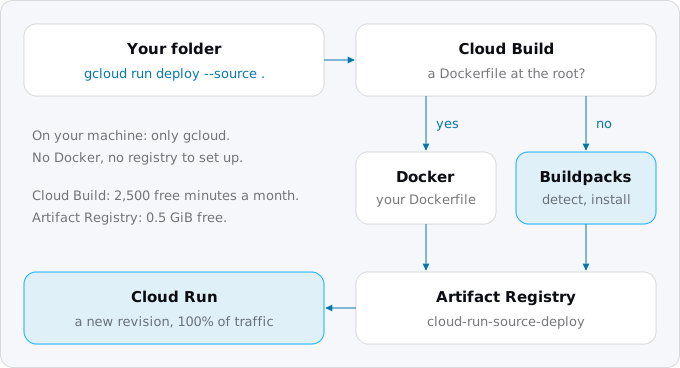
Google calls this a convenience feature and says plainly that it "does not allow full customization of the build". For full control you build the image yourself, with Cloud Build or Docker, and deploy it by its address with --image.
The first deploy from source in a new project needs two APIs and some roles. You, the deployer, need Cloud Run Source Developer (roles/run.sourceDeveloper), Service Usage Consumer and Service Account User on the service's identity. The build itself runs as the Compute Engine default service account, which needs the Cloud Run Builder role. In organizations created on or after May 3, 2024, Google no longer grants that account the broad Editor role automatically (the guide on setting up a Google Cloud project covers that baseline), so on a fresh project this grant is often the missing piece:
gcloud projects add-iam-policy-binding PROJECT_ID \
  --member=serviceAccount:PROJECT_NUMBER-compute@developer.gserviceaccount.com \
  --role=roles/run.builder
Google recommends going further and giving the build its own service account with only that role, through --build-service-account projects/PROJECT_ID/serviceAccounts/EMAIL on the deploy.
What buildpacks do
Buildpacks are an open standard, Cloud Native Buildpacks, and Google publishes its own set of them as an open source project. A buildpack handles one piece of the job, such as installing Node.js or running npm ci. A builder is an image that bundles many buildpacks; it looks at your folder, picks the ones that apply, and runs them in order. gcloud run deploy --source always uses gcr.io/buildpacks/builder:latest, which today is the google-24 builder on Ubuntu 24.
The google-24 builder supports Python 3.13 and 3.14, Node.js 22, 24 and 26, Go 1.x, Java 17, 21 and 25, Ruby 3.2 to 4.0, PHP 8.2 to 8.5, .NET 8 and 10, and an "OS only" runtime for a binary you compiled yourself. Rust, Elixir and anything else outside that list need a Dockerfile. The guide to Node, Python, Rails and Go on Cloud Run has the traps of each stack.
You can run the same builder on your own machine with pack, the buildpacks command line tool, and Docker. This is the real output of pack on Google's own Node.js sample, an Express app of a few lines:
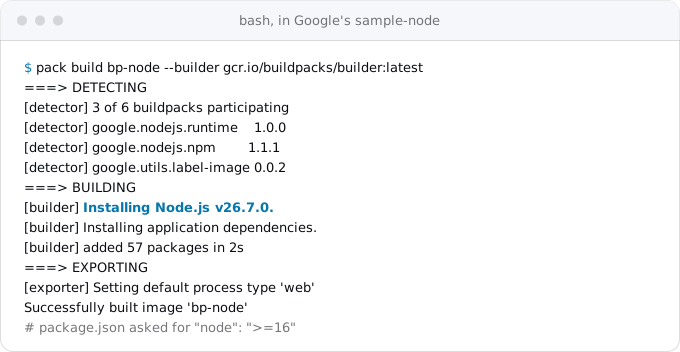
Three of the builder's six buildpacks took part: the Node.js runtime, npm, and one that labels the image. The runtime buildpack read package.json, found "engines": {"node": ">=16"}, and installed Node.js 26.7.0, the newest version the range allows. Google's Node.js page warns about exactly this: avoid "greater than" ranges in engines.node, because the build takes the highest version that matches, and on the next build that may be a new major version you never tested.
The rest of the build did what a careful Dockerfile would do: npm ci with NODE_ENV=production, so only production packages; a start command taken from scripts.start; a non-root user (uid 33); PORT=8080 set in the image. pack inspect on the result reports the run image gcr.io/buildpacks/google-24/run and Rebasable: true, which matters later in this article.
Telling buildpacks what you want
Buildpacks read the files your language already uses, so most settings live there.
- Node.js. Pin the version in
package.jsonwith"engines": {"node": "24.x.x"}. The package manager follows the lockfile:yarn.lock, thenpnpm-lock.yaml, thenbun.lock, thenpackage-lock.json; with no lockfile, npm. Ifpackage.jsonhas abuildscript, it runs; agcp-buildscript replaces it, and"gcp-build": ""runs nothing. When custom build steps are set, dev dependencies are installed for them first. Without a Procfile, the app starts throughnpm start. - Python. Put the version in
.python-version. Python 3.14 and later installrequirements.txtwith uv, 3.13 and earlier with pip; if bothrequirements.txtandpyproject.tomlexist,requirements.txtwins. On a source deploy with Python 3.13 or later, the start command is guessed fromrequirements.txt: withfastapianduvicornit isuvicorn main:app --host 0.0.0.0 --port 8080, and with no web server listed it falls back togunicorn -b :8080 main:app. That fallback expects a filemain.pywith an object calledapp; if yours isserver.py, the deploy fails at startup. - Any language. A file called
Procfileat the root sets the start command and overrides the guess:web: gunicorn -b :$PORT server:app. Google recommends one for Node.js too, because it starts your app directly instead of through npm.
For anything else, there are build environment variables. They exist only while the image is built and are passed with the deploy:
gcloud run deploy my-app --source . --region europe-west1 \
  --set-build-env-vars GOOGLE_ENTRYPOINT="node server.js",GOOGLE_NODEJS_VERSION=24.x.x
--update-build-env-vars adds or changes some, --remove-build-env-vars and --clear-build-env-vars drop them. The limit is 100 variables and 64 KiB. They are stored with the service, so they are no place for a token: Google sends secrets to Secret Manager. The full list of GOOGLE_* variables is on Google's buildpacks configuration page; the ones you will meet first are GOOGLE_ENTRYPOINT (the start command), GOOGLE_RUNTIME_VERSION, and GOOGLE_BUILDABLE (which Go package or Java module to build).
What a Dockerfile gives you
A Dockerfile is the other answer. You choose the base image, install exactly what you need, and decide what goes into the final image. Cloud Run accepts any image built by any tool, as long as it keeps to the container contract: Linux x86_64 binaries, and a web server listening on 0.0.0.0 at the port in the PORT variable, 8080 by default.
The same Express app, built with a Dockerfile:
FROM node:24-slim
WORKDIR /app
COPY package.json package-lock.json ./
RUN npm ci --omit=dev
COPY . .
USER node
CMD ["node", "web.js"]
Next to it, a .dockerignore keeps node_modules, .git and local .env files out of the build:
node_modules
.git
.env
Copying the lockfiles before the code pays off on every build: Docker reuses the npm ci layer until the dependencies change, so a code change rebuilds in seconds. On our build box a rebuild of this image after a one-line change took under a second.
Reach for a Dockerfile when:
- the language is not on the buildpacks list (Rust, Elixir, Deno, a C++ server);
- the app needs system packages you would install with
apt, such as the libraries of a PDF renderer or a headless browser; buildpacks can be extended for that, but a Dockerfile is the simpler place; - the build is unusual: a monorepo where one service depends on another package, a frontend built in the same image, generated code;
- you want the same image to run on your laptop, in CI and on Cloud Run, byte for byte;
- you already have one. If the app ran on Fly, Render, Railway or a server with Docker, its Dockerfile usually runs on Cloud Run as it is, once it listens on
PORTand is built forlinux/amd64.
For compiled languages a multi-stage Dockerfile is the norm: the first stage has the compiler, the second only the finished binary, so the tools never ship. Docker's own example builds a Go program in golang and copies the binary into an empty scratch image.
To deploy a Dockerfile you can still use gcloud run deploy --source . and let Cloud Build run it. Or build it yourself and push the image:
gcloud artifacts repositories create my-repo \
  --repository-format=docker --location=europe-west1
gcloud auth configure-docker europe-west1-docker.pkg.dev
docker build --platform linux/amd64 \
  -t europe-west1-docker.pkg.dev/PROJECT_ID/my-repo/my-app:v1 .
docker push europe-west1-docker.pkg.dev/PROJECT_ID/my-repo/my-app:v1
gcloud run deploy my-app --region europe-west1 \
  --image europe-west1-docker.pkg.dev/PROJECT_ID/my-repo/my-app:v1
gcloud builds submit --tag IMAGE_URL does the build and push on Cloud Build instead of your machine, and gcloud builds submit --pack image=IMAGE_URL does the same with buildpacks, for when you want a buildpacks image under your own name and repository.
Image size, and why it matters less than you think
We built the same Express app four ways and measured the file system of each image:
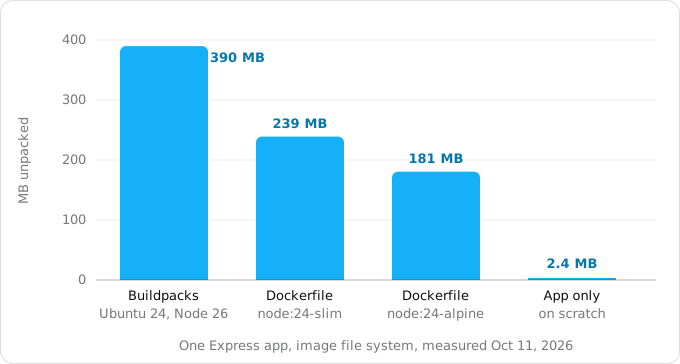
The buildpacks image is the largest: the Ubuntu 24 run image plus Node.js 26. The Debian slim image is about 60% of it, Alpine less. The last bar is the app with its node_modules alone, which is what an image for automatic base image updates contains.
On Cloud Run, size costs less than on most platforms. Google's tips page says that because of Cloud Run's image streaming, "the size of your container image does not affect container startup times or request processing time", and the image does not count against the instance's memory. Cold starts measured shows what does move startup. What size does cost is storage, a little, and attack surface: every package in the image is one more thing a scanner flags and somebody has to patch.
Who patches the operating system
An image is frozen at build time. If OpenSSL in it gets a security fix next month, your running service keeps the old one until someone rebuilds and redeploys. Google's source deploy page states it directly: "By default, security fixes are only applied when the Cloud Run service is deployed."
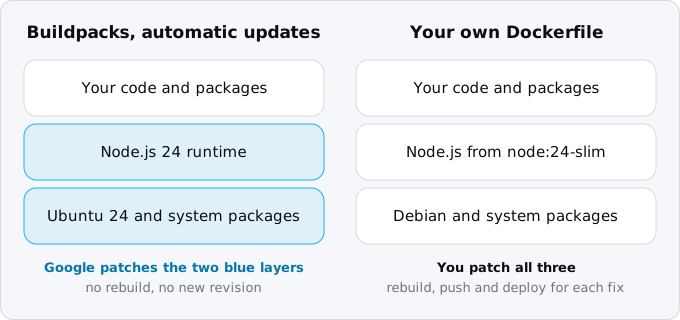
Services built from source on Google's base images can opt in to automatic base image updates. The image is then split in two: your code and packages on top, and Google's base image (operating system plus language runtime) underneath. When Google patches the base, it swaps the lower part under your running service: no rebuild, no redeploy, no new revision, no downtime. Buildpacks make this possible because their images are built in layers that can be rebased, which is what Rebasable: true meant above.
To turn it on, name the base image on the deploy:
gcloud run deploy my-app --source . --region europe-west1 \
  --base-image nodejs24 --automatic-updates
Google's pages disagree on whether this is already the default: the runtimes page says automatic updates are on by default for source deploys, the source deploy page says fixes arrive only on deploy. Do not rely on either; pass both flags and check the service:
gcloud run services describe my-app --region europe-west1 --format=yaml \
  | grep -E 'image:|runtimeClassName|base-images'
A service with automatic updates shows runtimeClassName: run.googleapis.com/linux-base-image-update and a run.googleapis.com/base-images annotation. A service without them shows only its image: line.
There are limits. It works only with Google's base images, never your own. Compiled languages are not recompiled, so a fix in Go's or Java's standard library still needs a build. You can get the same updates with a Dockerfile, but only by Google's recipe: a multi-stage build that copies the app onto scratch, deployed with --image APP_IMAGE --base-image nodejs24; that app-only image no longer runs on your laptop without reassembling it.
Base images also have an end date. Each runtime has a deprecation date and a decommission date; Google notifies you 90 days before deprecation, and after decommission you cannot deploy with that runtime and "workloads that continue to use a decommissioned runtime may be disabled". Node.js 20 is decommissioned on October 30, 2026, Python 3.10 on April 4, 2027, .NET 8 on May 10, 2027. Upgrading in time is your job. Images you build yourself are outside this policy entirely: nobody disables them, and nobody patches them either.
Exodus team: the staged Exodus site itself is the second kind. Its Cloud Run service runs an image built from a five-line Dockerfile on an Alpine nginx image, built on our own machine and deployed by digest; its project has never enabled Cloud Build, and the service has no base image set. For a static page with one dependency that works, and the patching is ours.
What it costs
Both ways cost the same at run time: Cloud Run bills the instance, not how its image was made. The build side has two small bills, with prices read on October 11, 2026.
Cloud Build charges per build-minute. Each billing account gets 2,500 free build-minutes a month on the default e2-standard-2 machine (2 vCPU, 8 GB), which Google labels a promotional tier that may change; after that it is $0.006 a minute, billed by the second, and time in the queue is free. That covers 833 builds of three minutes a month. A team that deploys 30 times a day with three-minute builds uses 2,700 minutes and pays $1.20; at five minutes a build it is 4,500 minutes and $12.00. Building on your own machine or in your CI and pushing the image costs no build-minutes at all.
Artifact Registry charges for stored images: the first 0.5 GiB per billing account is free, then $0.10 per GiB a month. Every source deploy adds an image to cloud-run-source-deploy, and nothing removes them. Keeping 30 full copies of the buildpacks image above would be at most 3.5 GiB, $0.30 a month. Small, but it grows with every deploy. A cleanup policy keeps it bounded; save this as policy.json:
[
  {"name": "delete-old", "action": {"type": "Delete"}, "condition": {"tagState": "any", "olderThan": "30d"}},
  {"name": "keep-recent", "action": {"type": "Keep"}, "mostRecentVersions": {"keepCount": 10}}
]
Then try it without deleting anything, and apply it once the dry run looks right:
gcloud artifacts repositories set-cleanup-policies cloud-run-source-deploy \
  --location=europe-west1 --policy=policy.json --dry-run
The keep rule matters: a rollback to an older revision needs that revision's image, so keep at least as many as you would ever roll back to. Policies run in the background and take effect within about a day.
What breaks
- A version range picks a new major.
"node": ">=16"built with Node.js 26 in our test. Pin24.x.x, or.python-version, orGOOGLE_RUNTIME_VERSION. - The wrong start command. Python without a web server in
requirements.txtstartsgunicorn -b :8080 main:app; Node.js runsnpm start. A Procfile orGOOGLE_ENTRYPOINTends the guessing. - Browser caching of static files. Buildpacks set every file's modification time to January 1, 1980, for reproducible builds. If your framework derives
ETagorLast-Modifiedfrom it, browsers may keep stale files; Google suggests turning those headers off. - An image built on a Mac with Apple silicon. Docker builds
arm64there by default, and Cloud Run runs onlylinux/amd64. Add--platform linux/amd64, or let Cloud Build build it. - Uploading too much, or too little. Without
.gcloudignore, the upload follows.gitignore. A 2 GBdata/folder that git does not ignore is uploaded on every deploy; a generated file that git does ignore is missing from the build. - A missing role. A build that fails with a permission error on a new project is usually
roles/run.buildermissing on the build's service account. - Secrets in the build. Build environment variables are stored with the service's configuration, and Google says not to use them for secrets; a value baked into the image during a Docker build is no safer. Read secrets at run time from Secret Manager.
- A Google credentials file in the image. If your Dockerfile runs
gcloudduring the build, keep~/.config/gcloud/gceout of the image; Google warns it breaks authentication on Cloud Run. - A runtime past its date. A service on a decommissioned runtime cannot be redeployed until you move it to a newer one, which is a bad thing to learn during an incident.
How to choose
Start with buildpacks when your app is Node.js, Python, Go, Java, Ruby, PHP or .NET, builds with that language's normal tools, and has no Dockerfile yet. Pin the runtime version, add a Procfile, turn on automatic updates, and you have an image you do not maintain. This is the shortest way from a Heroku-style app to Cloud Run, because buildpacks read the same package.json, requirements.txt or Gemfile Heroku did; the Heroku to Cloud Run guide covers the rest of that move.
Write or keep a Dockerfile when the language is not supported, the app needs system packages, the build is unusual, or you want one image everywhere. Then own its patching: rebuild on a schedule, not only when the code changes, and scan the image.
Moving from source deploys to your own pipeline later is not a rewrite. gcloud builds submit --pack builds the same buildpacks image under a name you choose, and a Dockerfile can be added at any time; the next --source deploy starts using it. The guide to deploying from GitHub without keys shows the pipeline that replaces your laptop.
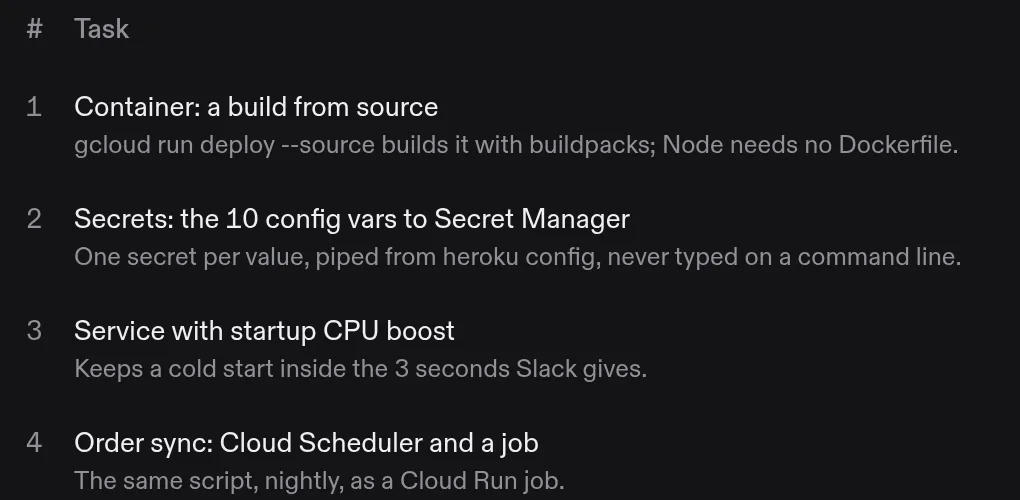
This is also the first task in an Exodus plan. When the report finds a supported language and no system dependencies, the checklist says to build from source; when the repository already has a working Dockerfile, it says to keep it.
Checklist
- Decide: supported language and a plain build, buildpacks; otherwise a Dockerfile.
- Grant
roles/run.builderto the build's service account, or give the build its own account with--build-service-account. - Pin the runtime version in the language's own file; no open ranges.
- Set the start command with a Procfile or
GOOGLE_ENTRYPOINT, and make the app listen onPORT. - Write a
.gcloudignore(and a.dockerignorewith a Dockerfile) so the upload holds only what the build needs. - Deploy with
--base-imageand--automatic-updateson buildpacks, and checkruntimeClassNamein the service's YAML. - With a Dockerfile, build for
linux/amd64, run as a non-root user, and rebuild on a schedule for patches. - Put a cleanup policy on the image repository that keeps enough images to roll back.
- Note the decommission date of your runtime and upgrade before it.
FAQ
Does Cloud Run need a Dockerfile?
No. Without a Dockerfile at the root of the folder, a source deploy builds the image with Google's buildpacks, which support Node.js, Python, Go, Java, Ruby, PHP and .NET, plus an OS-only runtime for a binary you compiled yourself. Rust, Elixir and other languages need a Dockerfile.
Does a bigger image make Cloud Run start slower?
Google's tips page says that, because of image streaming, the size of the container image does not affect startup or request processing time, and the image does not count against the instance's memory. Size still costs a little storage and adds packages a scanner flags.
Who patches the operating system in a Cloud Run container?
By default nobody until you deploy again: an image is frozen at build time. Services built from source on Google's base images can turn on automatic base image updates, and Google then swaps a patched base under the running service. An image from your own Dockerfile waits for your next build.
How much does building from source cost?
Cloud Build gives each billing account 2,500 free build-minutes a month on the default machine, then $0.006 a minute. A team deploying 30 times a day with three-minute builds pays $1.20 a month. Artifact Registry adds $0.10 per GiB a month above the first free 0.5 GiB.
Sources
26
- docs.cloud.google.comDeploy services from source code, Google
- docs.cloud.google.comBuild sources to containers, Google
- docs.cloud.google.comGoogle Cloud's buildpacks, overview
- docs.cloud.google.comBuildpacks builders: google-24, google-22, v1 and their runtimes, Google
- docs.cloud.google.comBuildpacks base images and their security patches, Google
- docs.cloud.google.comSupported language runtimes and base images, Google
- docs.cloud.google.comCloud Run runtime lifecycle, Google
- docs.cloud.google.comConfigure automatic base image updates, Google
- docs.cloud.google.comBuildpacks environment variables for Cloud Run services, Google
- docs.cloud.google.comSet build environment variables
- docs.cloud.google.comSet build service account
- docs.cloud.google.comAbout Procfiles, Google Cloud's buildpacks
- docs.cloud.google.comBuild a Node.js application with buildpacks, Google
- docs.cloud.google.comBuild a Python application with buildpacks, Google
- docs.cloud.google.comContainer runtime contract, Google
- docs.cloud.google.comGeneral development tips for Cloud Run, Google
- cloud.google.comCloud Build pricing, Google
- cloud.google.comArtifact Registry pricing, Google
- docs.cloud.google.comArtifact Registry cleanup policies, Google
- docs.cloud.google.comBest practices for speeding up builds, Google Cloud Build
- docs.cloud.google.comgcloud run deploy, gcloud builds submit and gcloud topic gcloudignore --help, Google Cloud SDK 587.0.0
- docs.docker.comMulti-stage builds, Docker
- docs.docker.comBuild context and .dockerignore, Docker
- buildpacks.ioWhat happens during rebase, Cloud Native Buildpacks
- Exodus team: Google's sample-node built with pack 0.40.9 and the google-24 builder, and with three Dockerfiles, sizes measured on Oct 11, 2026
- Exodus team: the staged Exodus site's Cloud Run service, built from a Dockerfile on our own machine, checked with gcloud on Oct 11, 2026