Moving from Heroku to Cloud Run turns the web dyno into a Cloud Run service, workers into Cloud Tasks, Heroku Scheduler into Cloud Scheduler, the release phase into a migrate job, Heroku Postgres into Cloud SQL, and config vars into Secret Manager. Users stay on Heroku for 4 of 5 steps. A small app with Postgres costs $19.00 a month on Basic dynos, about $11.09 on Cloud Run.
In short
- Heroku has run a sustaining engineering model since February 6, 2026: no new features, and credit-card customers keep their prices and service.
- A web dyno, a worker and Essential-0 Postgres cost $19.00 a month on Basic dynos and $55.00 on Standard-1X; on Cloud Run with Cloud SQL, $11.09 at 2,000 visits a day.
- Cloud SQL's smallest instance with 10 GiB is $9.37 a month, more than Essential-0's $5, so the savings come from the dynos.
- Heroku Scheduler jobs become Cloud Scheduler jobs, 3 of them free per billing account.
- Cloud Run domain mappings are in Preview in 10 regions; lower the DNS TTL to 300 seconds a day before the switch.
Prices are Heroku's and Google's list prices, read on October 12, 2026.
Why teams move now
Since February 6, 2026, Heroku keeps running and gets security and stability work, but no new features. New customers can no longer sign an Enterprise contract, and existing contracts are honored. Nothing forces you to leave tomorrow, but many teams took it as the moment to plan where their app goes next. An outage in June 2025, up to 24 hours for many customers, with the status page down too, had already made some of them look.
Cloud Run is a close fit for a Heroku app, because both run a stateless web process from your code and both scale it for you. What changes is billing: Heroku bills a dyno for every hour it exists, and Cloud Run, by default, only for the seconds it handles requests. That one rule is why a few habits of a Heroku app have to change before the move, and why the bill usually falls. If you have never used Google Cloud, what Cloud Run is explains the basics first.
What each part becomes
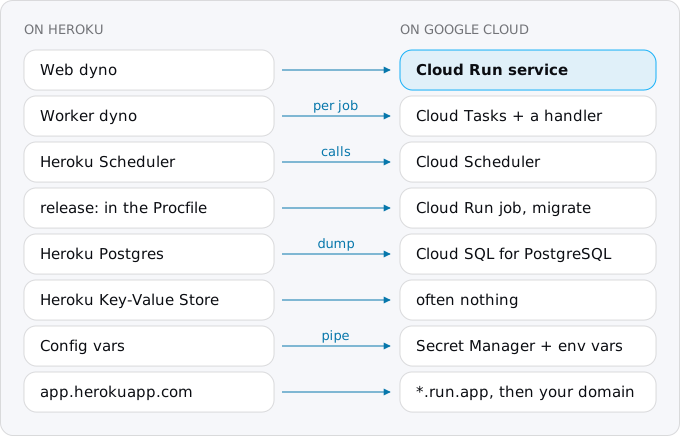
- Web dyno becomes a Cloud Run service, built from the same code. It listens on the port in
PORT, as on Heroku. - Worker dyno (Sidekiq, Celery, BullMQ, RQ) becomes Cloud Tasks calling a handler in your service, one HTTP request per job. A worker that must keep a loop running, such as a stream consumer, goes to a worker pool, generally available since April 2026, which bills all the time it runs.
- Heroku Scheduler becomes Cloud Scheduler, which calls an endpoint of the service for short work or starts a Cloud Run job for long work. A clock process (a
clock:line in the Procfile) goes the same way. - The release phase (
release:in the Procfile, usually migrations) becomes a migrate job that runs before the new revision takes traffic. - Heroku Postgres becomes Cloud SQL for PostgreSQL, or a serverless Postgres outside Google when the database is small.
- Heroku Key-Value Store, the Redis add-on, often becomes nothing: sessions move into signed cookies and the queue into Cloud Tasks. A cache shared between instances is the case where a Redis stays.
- Config vars become Secret Manager secrets for the secret ones and plain environment variables for the rest.
- The `herokuapp.com` address becomes the service's
run.appaddress, and later your own domain in front of it. heroku run bashbecomes a one-off Cloud Run job with your command. Google announced SSH into a running instance in April 2026 (gcloud beta run services ssh), but it is in preview for selected customers.- Review apps become revisions deployed with a tag and no traffic, each at its own address.
What breaks first
A web dyno runs all the time with its CPU on. A Cloud Run instance gets CPU only while a request is in flight, its disk is memory, and it may stop whenever traffic falls. Four habits of a Heroku app break because of that: timers inside the process, work done after the response is sent, files written to local disk, and sessions or queues held in memory. The patterns that break on Cloud Run goes through each with its replacement.
The Exodus CLI reads a Heroku repository's Procfile, app.json and code and lists them. Here it is on a small Express app with a web, a worker and a release line, Postgres, the Key-Value Store and Scheduler:
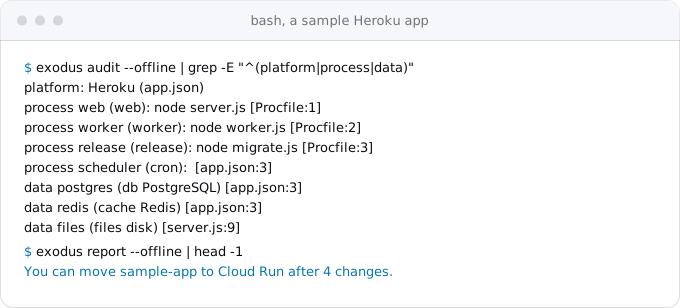
Its four changes were the uploads to disk, the sessions in memory, a node-cron timer and the BullMQ worker. It did not flag the signup handler, which sends a welcome email after the response; that is the habit to look for by hand.
The order of the move
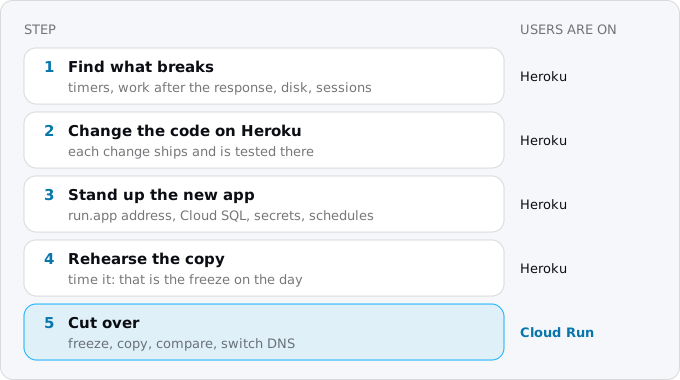
- Find what breaks. Timers in the code, work after the response, files written to disk, sessions in memory. Exodus's audit lists them with file and line; the patterns guide shows each replacement.
- Change the code on Heroku first. Move the worker to HTTP handlers, uploads to a bucket, sessions to cookies. Each change can ship to Heroku and be tested there before anything moves, and each one is small to roll back.
- Stand up the new app at its
run.appaddress, with Cloud SQL, the secrets and the schedules, against an empty database or a copy. Deploy from CI with keyless auth, as deploying from GitHub without keys shows, not with a JSON key in a CI variable. - Rehearse the copy of the data. Time it, because that is how long writes will be frozen on the day.
- Cut over: freeze writes, copy, compare, switch the domain. Keep the Heroku app stopped, not deleted, for a while as the way back. The cutover day checklist has the hour of the switch minute by minute.
Building the image
You do not need a Dockerfile on day one. gcloud run deploy with a source folder builds the code with Google's buildpacks, which read the same package.json, Gemfile or requirements.txt that Heroku's did, and a Procfile's web: line if it has one:
gcloud run deploy web \
  --source . \
  --region europe-west1 \
  --max-instances 3
Write a Dockerfile later if the build needs something the buildpack does not do; buildpacks or a Dockerfile compares the two.
Google has its own guide for moving a Node.js app from Heroku. It was updated in March 2026, but it still pushes images to Container Registry, which stopped accepting new images on March 18, 2025, and connects to the database through a Serverless VPC Access connector. Use Artifact Registry, which gcloud run deploy uses on its own, and the Cloud SQL connection Cloud Run mounts with one flag, as connecting Cloud Run to Cloud SQL shows.
Secrets
Move each config var with a pipe, so its value never lands in your shell history or on a command line:
heroku config:get STRIPE_SECRET_KEY -a my-app \
  | gcloud secrets create STRIPE_SECRET_KEY --data-file=-
Then mount the secret into the service as an environment variable of the same name, and the code does not change:
gcloud run services update web \
  --region europe-west1 \
  --set-secrets STRIPE_SECRET_KEY=STRIPE_SECRET_KEY:latest
The service's identity needs the right to read secrets, which secrets on Cloud Run sets up. Variables that are not secret, such as NODE_ENV, go in as plain environment variables with the set-env-vars flag of the same command. Heroku sets DATABASE_URL and REDIS_URL itself; on Google you write the new database's address into a secret yourself. Rotate the keys that sat in Heroku's dashboard once the move is done.
The release phase and the schedules
On Heroku the release: command runs before new dynos boot, and a failed release stops the deploy. On Cloud Run, make the migration a job from the same image, and run it before the deploy that needs it:
gcloud run jobs create migrate \
  --image IMAGE_URL \
  --region europe-west1 \
  --command node \
  --args migrate.js \
  --set-cloudsql-instances PROJECT:europe-west1:db \
  --set-secrets DATABASE_URL=DATABASE_URL:latest

gcloud run jobs execute migrate \
  --region europe-west1 \
  --wait
In CI the order is: build the image, update the job to it, execute the job and wait, then deploy the service. Database migrations as Cloud Run jobs covers migrations that must stay compatible with the old revision while both run.
Heroku Scheduler runs its commands as one-off dynos every 10 minutes, every hour or every day, and its jobs live in the dashboard, not the repository, so list them by hand before you move. Each becomes a Cloud Scheduler job with a cron line and a time zone, calling an endpoint of the service with a token or starting a job; cron and timers with Cloud Scheduler has the commands. Three Scheduler jobs per billing account are free.
The database
For a database under a few GB, a dump and a restore is the whole method. Take a fresh backup on Heroku and download it:
heroku pg:backups:capture -a my-app
heroku pg:backups:download -a my-app
That writes latest.dump, in Postgres's custom format. For such a dump Google's page says to list the archive, comment out the extension statements, and restore from that list:
pg_restore --list latest.dump \
  | sed -E 's/(.* EXTENSION )/; \1/g' > latest.toc
pg_restore \
  --use-list=latest.toc \
  --no-owner \
  --no-acl \
  -d "$CLOUD_SQL_URL" \
  latest.dump
Run it from a machine that reaches Cloud SQL, for example through the Cloud SQL Auth Proxy. Create the extensions the app needs on the new database first, with CREATE EXTENSION. Then count the rows of every table on both sides and checksum the tables that matter before you switch. Run the new app against the copy and walk its main paths. Moving a Postgres database without losing data covers the comparison and logical replication with Database Migration Service, for databases where a dump takes hours.
Files uploaded by users go the same way: copy them to a bucket before the day and again for what changed, keeping the keys, so the rows that point at them stay right.
The domain
Cloud Run's own domain mappings are in Preview, work in 10 regions, and Google says they are not production-ready. For production, put Firebase Hosting in front of the service, or a global load balancer, which bills by the hour; custom domains and HTTPS compares them. Lower the DNS record's TTL to 300 seconds a day before, switch it in a quiet hour, and watch errors and latency for a day before you turn the Heroku app off. Webhooks from Stripe and OAuth redirect URLs point at the domain, so check each outside service that calls you.
What it costs
A Basic dyno is $7 a month at most, and a web and a worker are two of them, before the database and add-ons. A Standard-1X is $25. An Essential-0 Heroku Postgres is $5 a month.
On Cloud Run the same web process at a few thousand visits a day often stays inside the free tier, and a worker turned into Cloud Tasks costs cents. The database is usually the largest line: Cloud SQL's smallest instance, db-f1-micro, with 10 GiB of SSD is $9.37 a month, more than Essential-0, so a small app's savings come from the dynos, not the database.
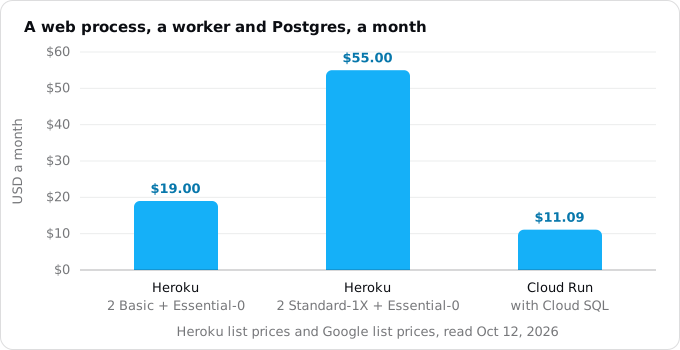
The Cloud Run bar is the small app priced in what Cloud Run costs: $11.09 a month at 2,000 visits a day, with egress and images. The database machines are not the same size, so compare your own app. For the sample above, the Exodus report put Heroku at $22.00 a month, counting the Key-Value Store, and Cloud Run at $10.02 at 500 visits a day.
If the database is small, a serverless Postgres outside Google can bring the whole bill to a few dollars; Cloud SQL, Firestore or serverless Postgres compares the choices.
From Railway, Render or Fly
The same map holds for the other platforms:
- A Railway or Render web service, or a Fly app, becomes a Cloud Run service; their background workers become Cloud Tasks or a worker pool.
- Railway cron and Render cron jobs become Cloud Scheduler.
- Render's pre-deploy command and Railway's deploy command become the migrate job.
- Their Postgres becomes Cloud SQL, their variables and environment groups become Secret Manager, and
*.up.railway.app,*.onrender.comand*.fly.devbecome*.run.app.
The CLI reads railway.json and railway.toml, render.yaml and fly.toml as it reads a Procfile. A Compose file deploys, generally available since March 2026, but as one Cloud Run service with several containers and one instance at most by default, so services that scale on their own deploy one image each. Fly machines that stop and start already behave like Cloud Run; volumes are the part to replace. Railway or Render to Cloud Run and Fly to Cloud Run go through each.
Where Exodus comes in
Exodus runs this move with your own coding agent. The CLI audits the repository on your machine, as above, and the report prices Heroku against Cloud Run and lists the changes in order. The plan it writes has eleven tasks for the sample app, from a Dockerfile and a health check to the switch of the domain with Heroku stopped, not deleted, for a week.
FAQ
Is Heroku shutting down?
No. Since February 6, 2026, Heroku runs a sustaining engineering model: it keeps running and gets security and stability work, but no new features. Customers who pay by credit card, existing and new, keep their prices and service; new customers can no longer sign an Enterprise contract, and existing contracts are honored.
What replaces Heroku worker dynos on Cloud Run?
Cloud Tasks calling a handler in your service, one HTTP request per job, for Sidekiq, Celery, BullMQ or RQ workers. A worker that must keep a loop running, such as a stream consumer, goes to a Cloud Run worker pool, generally available since April 2026, which bills all the time it runs.
How do I move a Heroku Postgres database to Cloud SQL?
For a database under a few GB, capture and download a fresh backup with the Heroku CLI, then restore it into Cloud SQL with pg_restore, skipping the extension statements and the owners. Create the extensions on the new database first, then count the rows of every table on both sides before you switch.
Is Cloud Run cheaper than Heroku?
For a small app, usually. A web dyno, a worker and Essential-0 Postgres cost $19.00 a month on Basic dynos and $55.00 on Standard-1X; the same kind of app at 2,000 visits a day is $11.09 on Cloud Run with Cloud SQL. The savings come from the dynos, because Cloud SQL's smallest instance costs more than Essential-0.
What replaces the Heroku release phase on Cloud Run?
A Cloud Run job built from the same image, usually named migrate, which you execute and wait for before the deploy that needs it. In CI the order is: build the image, update the job to it, execute the job and wait, then deploy the service.
Sources
19
- heroku.comAn update on Heroku, Heroku blog
- heroku.comSummary of Heroku June 10 outage, Heroku blog
- devcenter.heroku.comUsage and billing, Heroku Dev Center
- devcenter.heroku.comRelease phase, Heroku Dev Center
- devcenter.heroku.comHeroku Scheduler, Heroku Dev Center
- devcenter.heroku.comHeroku Postgres backups, Heroku Dev Center
- devcenter.heroku.comHeroku CLI commands, Heroku Dev Center
- docs.cloud.google.comMigrate Node.js apps from Heroku to Cloud Run, Google
- docs.cloud.google.comContainer Registry deprecation, Google
- docs.cloud.google.comGoogle Cloud's buildpacks, Google
- docs.cloud.google.comExport and import using pg_dump, pg_dumpall and pg_restore, Cloud SQL for PostgreSQL, Google
- docs.cloud.google.comMap custom domains, Cloud Run, Google
- docs.cloud.google.comCloud Run release notes, Google
- docs.cloud.google.comDeploy services using Compose, Cloud Run docs, Google
- cloud.google.comWhat's new in Cloud Run at Next '26, Google Cloud blog
- cloud.google.comCloud Run pricing, Google
- cloud.google.comCloud SQL pricing, Google
- docs.cloud.google.comgcloud reference, Google Cloud SDK 587.0.0
- Exodus team: exodus 0.1.3 audit, report and plan on a sample Express app written for Heroku