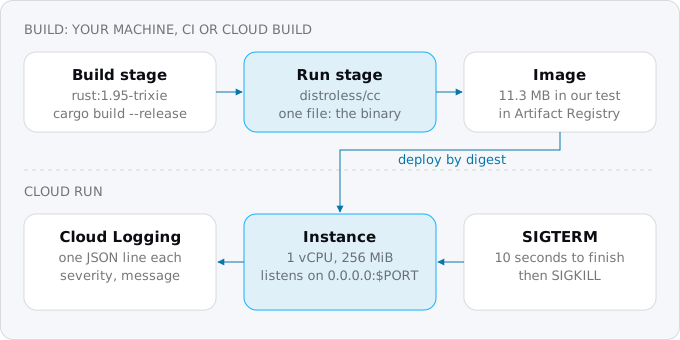
Rust runs on Cloud Run as one binary in a two-stage Docker image, 11.3 MB on distroless in our sample, because Google's buildpacks do not build Rust. The server listens on 0.0.0.0 at $PORT and stops on SIGTERM. Our Rust API's container starts in a median 94 ms at 256 MiB, and at low traffic its compute stays inside the free tier.
In short
- Listen on
0.0.0.0at$PORT, handle SIGTERM within the 10 seconds before SIGKILL, and log one JSON object per line with aseverityfield. - Build in two stages: our sample image is 11.3 MB on
distroless/ccand 31.0 MB ondebian:trixie-slim. - Compile where a cache survives: a 228-crate API of ours took 59 seconds with 8 jobs and 170 with 2, and Cloud Build compiles every crate on every deploy.
- Start at 1 vCPU and 512 MiB; at 256 MiB the service runs on the first generation, and memory is under 5% of an instance's price.
- Our Rust API on Postgres bills $9.79 a month, of which Cloud SQL is $9.34; Cloud Run's compute is inside the free tier.
Measurements are from our build machine and our own services, October 5-12, 2026; prices are Google's list prices, read October 12, 2026.
What Rust changes on Cloud Run
Every backend we ship is Rust, in a two-stage Dockerfile, and several of them run on Cloud Run; this guide is what we do, and it assumes you know what Cloud Run is. Cloud Run runs any container that answers HTTP, so Rust needs no special support. What it does not get is a buildpack. When you deploy from source, Cloud Run uses a Dockerfile if it finds one, and otherwise asks Google's buildpacks to detect the language; the list is Go, Node.js, Python, Java, Kotlin, Groovy, Scala, .NET, Ruby and PHP. A Rust repository without a Dockerfile does not deploy. The guide to Node, Python, Rails and Go on Cloud Run covers the stacks on that list. That is the one piece of work Node or Python teams skip and Rust teams do not.
The rest mostly works in Rust's favor. The binary links a few system libraries at most, so the image can be tiny. It starts as fast as the process can bind a socket. And a typical API spends its time waiting on a database, so one small instance handles a lot of concurrent requests. Our measured numbers are below; first, the code.
Step 1: the server
Cloud Run's container contract asks three things of a service. It must listen on 0.0.0.0 on the port Cloud Run sends requests to, which is 8080 unless you change it and arrives in $PORT. A server bound to 127.0.0.1 is invisible from outside the container, and the deploy fails with "Container failed to start". When Cloud Run stops an instance, it sends SIGTERM, waits 10 seconds and sends SIGKILL; requests in flight should finish in that window. And logs go to stdout, where a line of JSON becomes a structured entry.
Here is the whole sample, an Axum service. It is src/main.rs of the sample in our research folder, and it ran as printed:
use std::{net::SocketAddr, time::Duration};

use axum::{Router, routing::get};
use tokio::signal::unix::{SignalKind, signal};

// One JSON object per line on stdout: Cloud Logging takes `severity` and `message` from it.
fn log(severity: &str, message: &str) {
    println!("{}", serde_json::json!({ "severity": severity, "message": message }));
}

#[tokio::main]
async fn main() {
    // Cloud Run passes the port in $PORT; the server must listen on 0.0.0.0, not 127.0.0.1.
    let port: u16 = std::env::var("PORT").ok().and_then(|p| p.parse().ok()).unwrap_or(8080);
    let app = Router::new()
        .route("/", get(|| async { "hello\n" }))
        .route("/slow", get(|| async {
            tokio::time::sleep(Duration::from_secs(3)).await;
            "done\n"
        }));
    let listener = tokio::net::TcpListener::bind(SocketAddr::from(([0, 0, 0, 0], port)))
        .await
        .expect("bind");
    log("INFO", &format!("listening on {port}"));

    // On SIGTERM stop accepting, let requests in flight finish, then exit.
    axum::serve(listener, app)
        .with_graceful_shutdown(async {
            signal(SignalKind::terminate()).expect("SIGTERM handler").recv().await;
            log("INFO", "SIGTERM, finishing requests in flight");
        })
        .await
        .expect("serve");
    log("INFO", "stopped");
}
The dependencies are axum = "0.8", serde_json = "1" and tokio with the macros, net, rt-multi-thread, signal and time features.
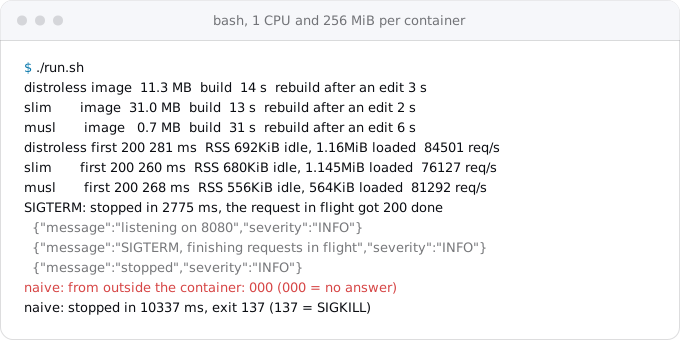
Two details are worth knowing. The SIGTERM handler matters more than it looks: the binary is process 1 in its container, and Linux delivers a signal to process 1 only if it has a handler for it, so a Rust server with no handler never sees SIGTERM and runs until SIGKILL. Google's page says those 10 seconds are billed either way. In our test, the naive version took 10.3 seconds to stop and died with exit code 137; the sample above finished a 3-second request and exited in 2.8 seconds.
The logging line is the other detail. The popular tracing-subscriber crate with its json feature writes "level":"ERROR" and nests the text under fields.message. Cloud Logging reads the level only from a top-level field named severity, and an entry without one keeps the default severity, so your errors are not stored as errors and a filter on ERROR finds nothing. Either write the fields yourself as above, or use a formatter that names them severity and message. The logs and alerts guide shows what to do with them next.
Step 2: the Dockerfile
Two stages. The first has the Rust toolchain and compiles; the second gets one file, the binary:
# build: the full Rust toolchain, never shipped
FROM rust:1.95-trixie AS build
WORKDIR /src
COPY . .
# cache mounts keep crates and builds between runs on one machine
RUN \
    --mount=type=cache,target=/usr/local/cargo/registry \
    --mount=type=cache,target=/src/target \
    cargo build \
      --release \
      --locked \
      --bin hello \
    && cp target/release/hello /hello

# run: glibc, libgcc, CA certificates and a nonroot user, no shell
FROM gcr.io/distroless/cc-debian13:nonroot
COPY \
    --from=build /hello /hello
ENTRYPOINT ["/hello"]
Add a .dockerignore with target in it, or Docker sends your local build directory, which can run to gigabytes, as the build context. The cp out of the cache mount is needed because the mount does not exist in the image layer.
Which run image? We measured the same service on three. debian:trixie-slim gave a 31.0 MB image and has a shell and apt, which helps when you need a system package. gcr.io/distroless/cc-debian13 gave 11.3 MB: it carries glibc, libgcc, libssl, CA certificates and time zone data, and nothing to log in with. A static build with musl on Alpine, copied onto the empty scratch image, gave 0.7 MB, but scratch has no CA certificates, so any HTTPS call out fails unless you copy certificates in or the binary carries its own.
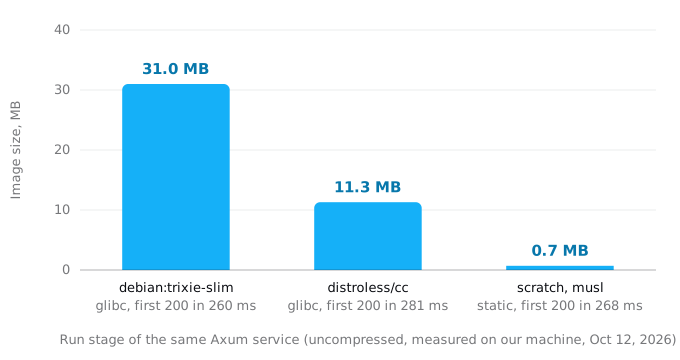
We use distroless. The size did not change start time in our local runs, so the reason is what is missing: no shell and no package manager means less to patch and less to break into. If your binary links OpenSSL through native-tls, distroless cc already has libssl; on scratch it would not.
Step 3: where to compile
A Rust build is the slow part of a deploy. A real API of ours with 228 crates in its lock file took 59 seconds to compile from nothing with 8 parallel jobs on our build machine, and 170 seconds with 2. There are three places to do it.
Cloud Build, through a source deploy. Run gcloud run deploy with the source flag in a folder with the Dockerfile, and Cloud Build builds it on its default machine, e2-standard-2 with 2 CPUs. Each build starts on a fresh machine, so the cache mounts above are empty every time and every deploy compiles every crate, about three minutes or more for a project like ours. The money is small: 2,500 build-minutes a month are free on that machine, and past that a minute costs $0.006. To get caching back on Cloud Build, use cargo-chef, which compiles only the dependencies in a layer of their own, and point Docker's cache-from option at the previous image, so that layer is reused while Cargo.lock does not change. When we moved a Rust API, worker and web app, the first day's builds on Cloud Build cost $2.10 on a larger machine; we have built on our own machine since.
Your machine or CI, then push. Build with Docker where the cache persists, push to Artifact Registry and deploy the image. A one-line change rebuilt in 2 to 6 seconds in our test. Two warnings. Cloud Run runs only x86_64 Linux binaries, so on a Mac with Apple silicon give docker build the platform linux/amd64, as in step 4. And deploy from a commit, not from whatever is in your working tree; the GitHub deploy guide shows a CI that does both.
A prebuilt binary, no image at all. Cloud Run can take a compiled binary and run it on Google's osonly24 base image, which is Ubuntu 24.04 with glibc 2.39, supported until April 30, 2029:
cargo build \
  --release
mkdir -p deploy && cp target/release/hello deploy/
cd deploy
gcloud beta run deploy hello \
  --source . \
  --no-build \
  --base-image=osonly24 \
  --command=./hello \
  --region=europe-west1
This skips Docker and Cloud Build, but the binary must not need a newer glibc than the base image has. Ours, built on Debian 13 with glibc 2.41, needs only GLIBC_2.34 and ran on the osonly24 image; check yours with objdump -T and look for the highest GLIBC_ version, or build static with musl.
Step 4: deploy
With an image built on your machine, the first deploy is five commands. Replace PROJECT_ID with your project:
gcloud artifacts repositories create app \
  --repository-format=docker \
  --location=europe-west1
gcloud auth configure-docker europe-west1-docker.pkg.dev
docker build \
  --platform linux/amd64 \
  -t europe-west1-docker.pkg.dev/PROJECT_ID/app/hello:v1 .
docker push europe-west1-docker.pkg.dev/PROJECT_ID/app/hello:v1
gcloud run deploy hello \
  --image=europe-west1-docker.pkg.dev/PROJECT_ID/app/hello:v1 \
  --region=europe-west1 \
  --cpu=1 \
  --memory=512Mi \
  --max-instances=3 \
  --allow-unauthenticated
The allow-unauthenticated flag makes the service public; leave it out for an internal one and read the IAM guide. The max-instances flag caps the bill as well as the scale. The registry keeps every version you push: Artifact Registry gives 0.5 GiB free per billing account, then about $0.10 per GiB a month, and a Rust image of ours is about 16.4 MB compressed, so 30 versions fit in the free part.
Memory, CPU and the execution environment
Cloud Run gives a service 512 MiB unless you say otherwise, and a Rust API rarely needs it. Our API runs at 256 MiB: over the week of Oct 5-12, 2026, its 99th percentile of memory use was 15% of that, about 38 MiB, and its CPU use 2.5%. Going below 512 MiB has a consequence that is easy to miss. Cloud Run has two execution environments. The first generation runs on gVisor, emulates most system calls and starts faster; the second is a microVM with full Linux compatibility and faster CPU and network under sustained load. They cost the same. The second generation needs at least 512 MiB, so a service at 256 MiB runs on the first; one at 512 MiB or more that sets no environment gets whichever Cloud Run picks. Jobs and worker pools only use the second generation, with 512 MiB at least.
For most HTTP APIs, the first generation is the right one anyway. Choose the second, by setting the execution environment to gen2 with 512 MiB or more, if your code needs a system call gVisor does not emulate, a network file system, or sustained CPU.
Memory is not where the money is. At request-based prices in Tier 1 regions, a vCPU-second costs $0.000024 and a GiB-second $0.0000025, so 512 MiB is under 5% of the price of a 1 vCPU instance, and halving it saves 2.5%. Two more limits matter. Below 1 vCPU, Cloud Run forces a concurrency of 1, which throws away what an async server is good at, so keep 1 vCPU. And the container's filesystem lives in memory: a file written to /tmp counts against those 256 MiB until it is deleted.
The first second: cold starts, measured
When a request arrives and no instance is free, Cloud Run starts one and the request waits, for up to 3.5 times the service's average startup time or 10 seconds, whichever is greater. For a Rust service that wait is short. Cloud Monitoring's container startup latency metric (Beta) for our API, at 1 vCPU and 256 MiB with startup CPU boost on, recorded 17 instance starts over Oct 5-12, 2026: a median of 94 ms, a mean of 103 ms, and none slower than 280 ms. Cloud Run cold starts, measured puts that next to other languages and platforms.
That is the container. The user sees more. When we measured another Rust API we moved, on Oct 5, 2026 in europe-west1, the requests that started an instance spent 0.36 to 0.57 seconds in the server and took 0.79 to 1.69 seconds to the first byte at the client. The difference between the 94 ms and the 0.36 seconds is the app's own first work: opening the database connection, fetching a token from the metadata server, loading configuration. The agent backend guide saw a first database query take 3.75 seconds against 7 ms after it.
So the work that remains is in your code, not in Rust. Open the connection pool lazily or in the background, keep startup free of network calls you can postpone, and if the first request after a quiet hour matters, min instances and startup CPU boost set out what one idle instance costs. Boost doubles the CPU of a 1 vCPU instance during startup and for 10 seconds after, and that CPU is billed; with a binary that starts in 100 ms, it has less to speed up than it has for a runtime that loads code.
Google APIs and the database
Google publishes official Rust client libraries, more than 140 APIs as crates named google-cloud-* (storage, Secret Manager, Pub/Sub, Agent Platform and others), with Application Default Credentials built in. They need Rust 1.91 or newer. On Cloud Run, the credentials come from the metadata server as the service's own service account, so the code holds no key. Check the crate list for the API you need before you write a REST client by hand; we wrote small REST clients of our own before the official crates covered what we use, and both ways work.
For Cloud SQL, attach the instance to the service and connect through the Unix socket Cloud Run mounts:
gcloud run services update hello \
  --region=europe-west1 \
  --add-cloudsql-instances=PROJECT_ID:europe-west1:INSTANCE
The socket is at /cloudsql/PROJECT_ID:europe-west1:INSTANCE/.s.PGSQL.5432. With sqlx, give PgConnectOptions::socket the directory, /cloudsql/PROJECT_ID:europe-west1:INSTANCE, and it adds the file name itself. Keep the pool small: each instance holds its own pool, so the maximum is the pool size times max instances, and that number must fit the database. The Cloud SQL connection guide and the connection pooling guide cover the private IP route and the limits.
What it costs
Rust's share of the bill is small, and the free tier usually covers it. Two of our setups, measured on the billing export in October 2026, show where the money goes:
- A Rust API on a document database, with a scheduled call every minute, at 1 vCPU and 512 MiB. A month is 70,879 vCPU-seconds, 35,440 GiB-seconds and 589,110 requests. At list prices that is $1.70 of CPU, $0.09 of memory and $0.24 of requests, $2.03 in all; inside the free tier (180,000 vCPU-seconds, 360,000 GiB-seconds and 2 million requests a month per billing account) the compute bills $0, and the whole project billed $0.13, mostly a secret and egress.
- A Rust API, worker and web app on Postgres. $9.79 a month, of which the smallest Cloud SQL instance and its 10 GB disk are $9.34. Cloud Run's compute was again inside the free tier.
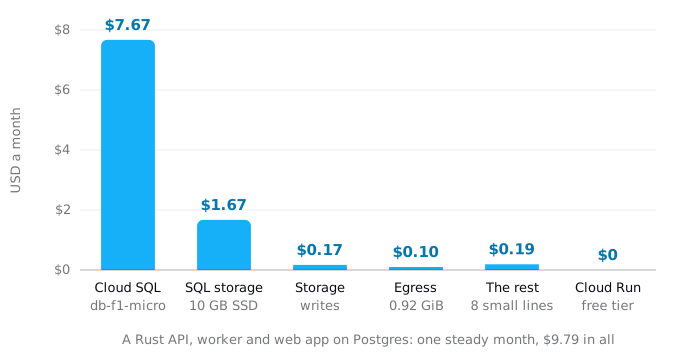
The same pattern holds for any small service, in any language that idles cheaply: the database and the fixed lines cost money, the compute does not. Past the free tier, the worked examples by traffic show how the compute line grows. The one cost that is Rust's own is build time, and as above it is minutes, not dollars.
What breaks
- No Dockerfile. A Rust repository deployed from source without one fails, because no buildpack covers Rust.
- Binding 127.0.0.1 or a fixed port. The revision never becomes ready; the error names the PORT variable.
- No SIGTERM handler. The process ignores SIGTERM as process 1, requests in flight are cut by SIGKILL after 10 seconds, and those seconds are billed.
- An ARM image. Built on Apple silicon without the
linux/amd64platform, it does not run. - No CA certificates. On
scratch, every HTTPS call out fails with a certificate error. - Logs without `severity`. Errors are stored with the default severity; alerts on ERROR never fire.
- Memory under 512 MiB with a second-generation feature. Cloud Run refuses the combination; pick one.
- Files in `/tmp`. They use the instance's memory, and at 256 MiB an export written to disk ends in an out-of-memory restart.
- A large pool times max instances. Twenty connections each across ten instances is 200; check that against the database's connection limit before you raise either.
Checklist
- The server reads
$PORT, binds0.0.0.0and stops gracefully on SIGTERM. - Logs are one JSON object per line with
severityandmessage. - A two-stage Dockerfile,
.dockerignorewithtarget, a run image ofdistroless/ccordebian:trixie-slim. - Builds happen where the cache survives, or with cargo-chef and a cache-from image on Cloud Build.
- The image is built for
linux/amd64and deployed from a commit. - 1 vCPU; 512 MiB, or 256 MiB if you accept the first generation.
- A max-instances limit set, and pool size times instances fits the database.
- Startup does no network work it can postpone; first-request time measured after deploy.
Where Exodus comes in
exodus audit reads Cargo.toml and names the stack and the web framework; on our sample it printed "Rust, Axum 0.8" and found the process from the Dockerfile. The report then says what the container will be, "Your Dockerfile, on debian slim or distroless", and puts "Dockerfile and a health check route" first in the plan. exodus check looks for what breaks or idles on Cloud Run and can run in CI. The steps above, the server, the image, the build and the deploy, are what your coding agent does with that plan.
FAQ
Can Cloud Run build a Rust app from source without a Dockerfile?
No. A source deploy uses a Dockerfile when it finds one and otherwise Google's buildpacks, which cover Go, Node.js, Python, Java, Kotlin, Groovy, Scala, .NET, Ruby and PHP, not Rust. Write a two-stage Dockerfile, or compile the binary yourself and deploy it on the osonly24 base image with no build.
Why does my Rust server take 10 seconds to stop on Cloud Run?
The binary is process 1 in its container, and Linux delivers SIGTERM to process 1 only if it has a handler. A Rust server with none ignores the signal and runs until SIGKILL 10 seconds later, and those seconds are billed. In our test the naive version stopped in 10.3 seconds, the one with a handler in 2.8.
Why are my Rust errors not marked as errors in Cloud Logging?
Cloud Logging reads the level only from a top-level field named severity. The tracing-subscriber JSON output writes a level field and nests the text under fields.message, so errors keep the default severity and a filter on ERROR finds nothing. Write severity and message yourself, or use a formatter that names them that way.
How much memory does a Rust service need on Cloud Run?
Less than the 512 MiB default in our case. Our API runs at 256 MiB, and its 99th percentile of memory use over a week was about 38 MiB. Below 512 MiB the service runs on the first generation environment, and memory is under 5% of a 1 vCPU instance's price, so there is little to save.
Sources
28
- docs.cloud.google.comContainer runtime contract, Cloud Run, Google
- docs.cloud.google.comSelect an execution environment for services, Cloud Run, Google
- docs.cloud.google.comConfigure memory limits for services, Cloud Run, Google
- docs.cloud.google.comConfigure CPU limits for services, Cloud Run, Google
- docs.cloud.google.comDeploy services from source code, Cloud Run, Google
- docs.cloud.google.comConfigure the OS only runtime, Google Cloud's buildpacks
- docs.cloud.google.comSupported language runtimes and base images, Cloud Run, Google
- cloud.google.comCloud Build pricing, Google
- docs.cloud.google.comBuild configuration file schema, Cloud Build, Google
- docs.cloud.google.comBest practices for speeding up builds, Cloud Build, Google
- cloud.google.comArtifact Registry pricing, Google
- cloud.google.comCloud Run pricing, Google
- docs.cloud.google.comLogging and viewing logs in Cloud Run, Google
- docs.cloud.google.comLogEntry, Cloud Logging API reference, Google
- docs.cloud.google.comGeneral development tips, Cloud Run, Google
- docs.cloud.google.comConnect from Cloud Run, Cloud SQL for PostgreSQL, Google
- docs.rsPgConnectOptions, sqlx-postgres 0.9.0 on docs.rs
- github.comGoogle Cloud client libraries for Rust, Google on GitHub
- cloud.google.comNow available: Rust SDK for Google Cloud, Google Cloud blog
- github.comDistroless container images, GoogleContainerTools on GitHub
- github.comcargo-chef, on GitHub
- github.comaxum graceful-shutdown example, tokio-rs on GitHub
- docs.cloud.google.comGoogle Cloud metrics P-Z, Cloud Monitoring
- docs.cloud.google.comgcloud CLI reference, Google
- docs.cloud.google.comTroubleshoot Cloud Run issues, Google
- docs.cloud.google.comSpeed up builds with cache images, Google Cloud's buildpacks
- man7.orgpid_namespaces(7), Linux man-pages
- Exodus team: the sample in this guide