Node, Python, Rails and Go all run on Cloud Run when the container listens on the port in PORT (8080), exits within 10 seconds of SIGTERM, logs JSON to stdout and keeps nothing on disk. Each stack breaks one rule by default: npm start drops requests, gunicorn's defaults serve one request at a time, Rails 8 listens on port 80, and a go line below 1.25 counts the host's CPUs.
In short
- In our test,
npm startcut a 3-second request in flight;node server.jsin the exec form answered it and exited in 2.8 seconds. - Gunicorn's defaults answered 8 requests of 3 seconds in 24.0 seconds; 1 worker with 8 threads took 3.1 seconds.
- The Dockerfile of Rails 8.1.4 listens on port 80, runs
db:prepareat every start and uses SQLite: setHTTP_PORT=8080, migrate in a job, use Postgres. - On a 1-CPU container, a
go 1.22line gave GOMAXPROCS 20 andgo 1.25gave 2. - Time to the first answer: Go 271 ms, Node 328 ms, Python 503 ms, Rails 3,077 ms.
The rules every stack shares
We built a small service in Node.js, Python, Ruby on Rails and Go, ran each with 1 CPU and 512 MiB, the size of a default Cloud Run instance, and reproduced the traps one by one. Rust has its own guide, and the choice between Google's buildpacks and your own Dockerfile is in buildpacks or a Dockerfile.
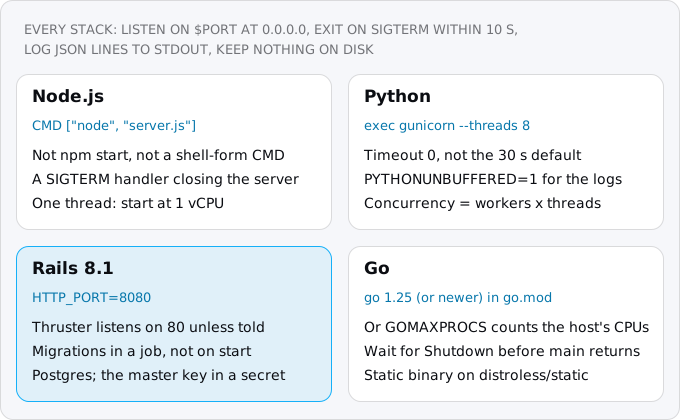
Cloud Run's container contract asks four things, whatever the language (what Cloud Run is covers the platform itself).
Listen on the port in `$PORT`, on all interfaces. Requests arrive on 8080 unless you change it. A server bound to localhost cannot be reached from outside its container, and the deploy fails with "Container failed to start and listen on the port defined by PORT=8080".
Stop cleanly on SIGTERM. When Cloud Run removes an instance, it sends SIGTERM, waits 10 seconds and sends SIGKILL. Your process should stop taking connections, finish its requests and exit. The catch is a Linux rule: the first process in a container is process 1, and it receives a signal only if it has installed a handler for it. A server with no handler, or a shell that started your server and does not pass signals on, ignores SIGTERM and dies 10 seconds later from SIGKILL. In a Dockerfile, the shell form CMD node server.js runs your command under /bin/sh -c; the exec form CMD ["node", "server.js"] runs it directly. Use the exec form, or put exec in front of the command when a shell must expand a variable.
Write logs to stdout, one JSON object per line. Cloud Run sends stdout and stderr to Cloud Logging, and a JSON line with severity and message fields becomes an entry you can filter by level (logs and alerts).
Keep nothing on the local disk. The filesystem is in memory and belongs to one instance, so uploads, SQLite files and caches written there use memory and vanish with it (patterns that break).
One setting matters for every stack: concurrency, the number of requests Cloud Run sends to one instance at once. A service created with gcloud gets 80 per vCPU, and Google's advice is to set it no higher than what your server is configured to handle, which differs by stack (concurrency).
Node.js
Node runs your JavaScript on one thread and handles many requests by not blocking on I/O, so the default concurrency of 80 suits a typical API. CPU-heavy work blocks every request on the instance, and a single-threaded app cannot use a second vCPU, so start at 1 vCPU. A minimal server that keeps the contract:
import http from "node:http";

const port = Number(process.env.PORT) || 8080;
const server = http.createServer(async (req, res) => {
  if (req.url === "/slow") await new Promise((r) => setTimeout(r, 3000));
  res.end(req.url === "/slow" ? "done\n" : "hello\n");
});
server.listen(port, "0.0.0.0", () =>
  console.log(JSON.stringify({ severity: "INFO", message: `listening on ${port}` })));

// Node as PID 1 ignores SIGTERM unless it has a handler.
process.on("SIGTERM", () => {
  console.log(JSON.stringify({ severity: "INFO", message: "SIGTERM, finishing requests in flight" }));
  server.close(() => process.exit(0));
});
With Express or Fastify the shape is the same: keep the object listen returns and close it on SIGTERM. The Dockerfile:
FROM node:24-slim
WORKDIR /app
ENV NODE_ENV=production
COPY package*.json ./
RUN npm ci \
    --omit=dev
COPY . .
USER node
# exec form: node is PID 1 and gets SIGTERM itself
CMD ["node", "server.js"]
Add node_modules to .dockerignore, so local modules do not overwrite the installed ones.
The trap is how the server is started. We started the same image three ways and stopped it with a 3-second request in flight. With node server.js in the exec form, the request got its 200 and the container exited cleanly in 2.8 seconds. With npm start, npm forwarded SIGTERM to the shell it runs scripts in, exited with an error, and the server went down with the container before its handler ran: the request got no answer, after 0.9 seconds. With the shell form, the request finished, but Node never saw SIGTERM and was killed after 10.3 seconds. Google's Node page recommends node over npm for start time, and Node's Docker guide says npm swallows the signal. Google's example is written in the shell form, so take the advice and write the exec form.
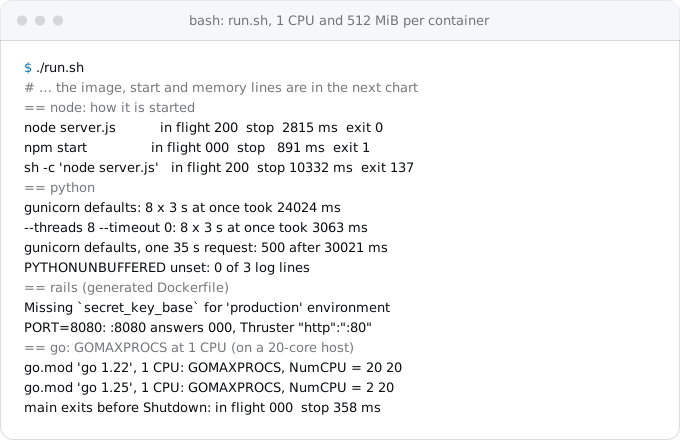
A source deploy without a Dockerfile runs the start script of your package.json, and there Cloud Run replaces npm start with a direct node call for you.
Two numbers are worth knowing. At 512 MiB, Node 24 allowed a heap of 259 MiB; at 256 MiB it still allowed 259 MiB, more than the container has, so a large heap ends in an out-of-memory kill rather than a JavaScript error. Below 512 MiB, or when the heap needs more than half the memory, set the limit to about three quarters of the instance. With a flag to pass, the shell form with exec keeps node as process 1:
CMD exec node \
    --max-old-space-size=384 \
    server.js
And since Node 18 the HTTP server gives a client 300 seconds to send its whole request, so an upload slower than that fails even with an hour-long Cloud Run timeout (timeouts).
Python
Python web apps run under a separate server: gunicorn for Flask and Django, uvicorn for FastAPI. The server's settings decide how many requests an instance handles, and gunicorn's defaults are one worker process with one thread. Google's Python page gives the command; here is the Dockerfile around it:
FROM python:3.14-slim
# print() reaches the logs at once, not when a buffer fills
ENV PYTHONUNBUFFERED=1
WORKDIR /app
COPY requirements.txt .
RUN pip install \
    --no-cache-dir \
    -r requirements.txt
COPY . .
RUN useradd \
    --create-home app
USER app
# exec: gunicorn replaces the shell, becomes PID 1 and gets SIGTERM
CMD exec gunicorn \
    --bind :$PORT \
    --workers 1 \
    --threads 8 \
    --timeout 0 \
    main:app
The shell form expands $PORT, and exec keeps the shell from holding the signal: without it, our container was killed after 10.3 seconds.
The first trap is concurrency. We sent 8 requests that each wait 3 seconds, like calls to another API. Gunicorn's defaults answered them one after another in 24.0 seconds; with 8 threads, all 8 took 3.1 seconds. On Cloud Run all 8 can land on one instance, since 8 is under the default concurrency of 80, so the last user waits 24 seconds and the instance is billed for all of it.
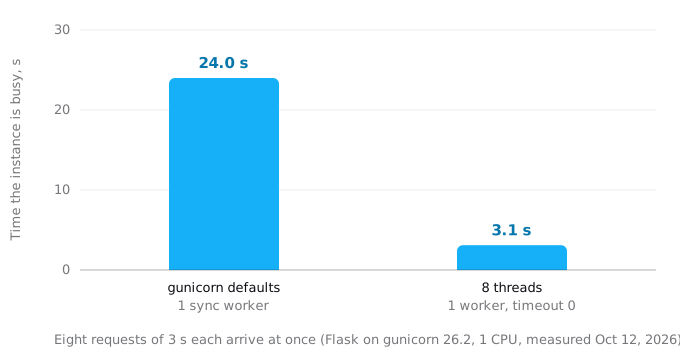
Match the two settings: Google says Python needs as many threads as the concurrency you allow, so with 1 worker and 8 threads deploy with a concurrency of 8:
gcloud run deploy api \
  --source . \
  --region=europe-west1 \
  --concurrency=8
Google suggests one worker per vCPU first, then threads, measuring after each change, since workers cost memory and start time.
The second trap is the timeout. Gunicorn kills a worker silent for 30 seconds. Our 35-second request got a 500 at 30.0 seconds with "WORKER TIMEOUT" in the log, while Cloud Run allows 5 minutes by default. A timeout of 0 leaves it to Cloud Run.
The third is buffering. When stdout is not a terminal, Python buffers print(). Without PYTHONUNBUFFERED, three requests that each printed a line left nothing in the log; with it, all three lines were there.
Two smaller ones. A source deploy without a Dockerfile starts gunicorn -b :8080 main:app (Python 3.12 and earlier, or no server named in requirements.txt), which has both traps above; set your own command in a Procfile. And gunicorn listens before it has loaded your app, so the default startup check passes early; gunicorn's preload option or a startup probe closes that gap. For FastAPI, run uvicorn main:app with host 0.0.0.0 and port $PORT.
Rails
rails new writes a production Dockerfile, and since Rails 8 it puts Thruster, a small proxy for compression and static files, in front of Puma. A source deploy uses a Dockerfile when it finds one, so gcloud run deploy on a fresh Rails 8 app builds that file. We generated an app with Rails 8.1.4 and ran its image unchanged. Four things stood in the way.
It listens on port 80. The image ends with EXPOSE 80 and starts ./bin/thrust ./bin/rails server. Thruster listens on HTTP_PORT, 80 by default, and starts Puma on 3000, so nothing answers on 8080 and the deploy fails with "Container failed to start". In our run the logs said "http":":80". Add one line to the final stage of the Dockerfile:
# Thruster listens here; Cloud Run sends requests to 8080
ENV HTTP_PORT=8080
It cannot start without its secret. Rails in production needs secret_key_base, which normally lives in the encrypted credentials file opened with RAILS_MASTER_KEY. Without it the container exited with "Missing secret_key_base for 'production' environment". Keep the key in Secret Manager and pass it at run time (secrets). Google's Rails tutorial passes it into the image as a build argument, which leaves the key in the image for anyone who can pull it.
It has no production database. The generated config/database.yml uses SQLite, with the production paths commented out under a warning that SQLite needs a persistent disk; the app would not start until we set them. On Cloud Run those files, and the cache, queue and Action Cable databases Rails 8 adds, would live in one instance's memory. Use Postgres on Cloud SQL through the socket Cloud Run mounts (Cloud SQL), and a Cloud Storage bucket for Active Storage.
rails new myapp \
  --database=postgresql
It migrates the database at every start. The generated bin/docker-entrypoint runs rails db:prepare before the server. On Cloud Run that happens on every new instance: a scale-up to 5 instances runs it five times, a failing migration crash-loops all of them, and each cold start pays for it. Our first answer came after 2.8 to 3.1 seconds with it and 1.8 to 2.1 without. Delete that block and run migrations as a job from the same image before the deploy (migrations as jobs):
gcloud run jobs create migrate \
  --image=europe-west1-docker.pkg.dev/PROJECT_ID/app/web:v2 \
  --region=europe-west1 \
  --set-cloudsql-instances=PROJECT_ID:europe-west1:db \
  --set-secrets=RAILS_MASTER_KEY=rails-master-key:latest \
  --command=./bin/rails \
  --args=db:migrate \
  --execute-now \
  --wait
Then the service. The generated config/puma.rb runs one process with 3 threads (RAILS_MAX_THREADS), so match the concurrency to it:
gcloud run deploy web \
  --image=europe-west1-docker.pkg.dev/PROJECT_ID/app/web:v2 \
  --region=europe-west1 \
  --add-cloudsql-instances=PROJECT_ID:europe-west1:db \
  --set-secrets=RAILS_MASTER_KEY=rails-master-key:latest \
  --concurrency=3 \
  --cpu-boost
If you raise RAILS_MAX_THREADS, raise the concurrency too; the generated database pool follows the same variable. Rails is the slowest of the four to start, so startup CPU boost, extra CPU while an instance starts, is worth its small cost (min instances and boost). Rails 8 logs to stdout in production without the RAILS_LOG_TO_STDOUT variable Google's tutorial mentions, in plain text rather than JSON.
Go
Go compiles to one static binary, so the image can be almost empty. Two stages:
FROM golang:1.27 AS build
WORKDIR /src
COPY go.mod ./
COPY *.go ./
RUN CGO_ENABLED=0 go build -trimpath -ldflags="-s -w" -o /hello .

# no shell and no libc: the static binary runs as a nonroot user
FROM gcr.io/distroless/static-debian13:nonroot
COPY \
    --from=build /hello /hello
ENTRYPOINT ["/hello"]
With dependencies, copy go.sum too and run go mod download before copying the code, so that layer is cached. Our image was 3.8 MB compressed.
The first trap was in our own code. The usual Go shutdown calls srv.Shutdown from a goroutine when the signal arrives. But ListenAndServe returns the moment Shutdown starts, and if main returns right after it, the process exits with requests still running. Our first version did that: the request in flight got no answer, and the container stopped in 0.36 seconds. The net/http documentation warns about it. The fix is a channel main waits on:
ctx, stop := signal.NotifyContext(context.Background(), syscall.SIGTERM, os.Interrupt)
defer stop()
done := make(chan struct{})
go func() {
	<-ctx.Done()
	shutdown, cancel := context.WithTimeout(context.Background(), 9*time.Second)
	defer cancel()
	srv.Shutdown(shutdown)
	close(done)
}()
if err := srv.ListenAndServe(); err != http.ErrServerClosed {
	log.Error(err.Error())
	os.Exit(1)
}
// ListenAndServe returns as soon as Shutdown starts; wait for the requests in flight.
<-done
With it, the request got its 200 and the container exited in 3.0 seconds. Our full sample also logs JSON through log/slog, with the level key renamed to severity.
The second trap is GOMAXPROCS, the number of threads that run Go code at once. Before Go 1.25 it defaulted to the CPUs of the machine, not the container's limit, so a 1 vCPU service on a large host scheduled work for every core and got throttled. Go 1.25 reads the CPU limit, rounds it up and never goes below 2. But the new default depends on the go line in go.mod, not on the compiler. On our 20-core machine, with the container held to 1 CPU and Go 1.27 building both, go 1.22 gave 20 and go 1.25 gave 2. Raise the line or set GOMAXPROCS yourself, and log the value at start to see what the instance reports.
For memory, GOMEMLIMIT tells the garbage collector when to work harder. It is a soft limit, and the Go guide suggests 5 to 10 percent of headroom, so about 460MiB on a 512 MiB instance. Our service used 10 MiB under load, so many services never need it.
Start time, memory and what it costs
The same small service in four stacks, each held to 1 CPU and 512 MiB, started very differently:
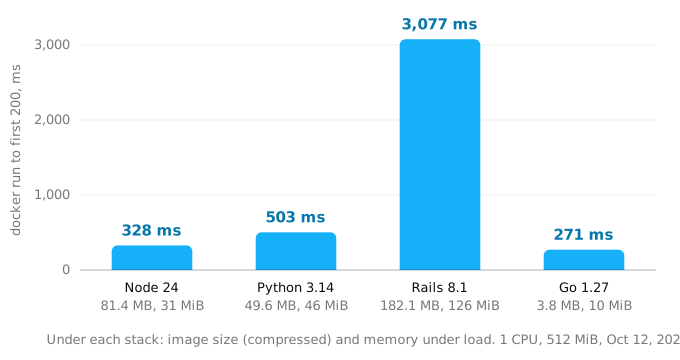
These are local numbers for a service that does almost nothing; across three runs they ranged Node 328 to 485 ms, Python 503 to 626, Rails 2,845 to 3,077, Go 271 to 328. On Cloud Run the instance is created first, and your app's own work, loading code and opening database connections, comes on top; Google's Node and Python pages suggest loading heavy modules only when a request needs them. The order is what the chart shows: a Rails start is the one users are most likely to notice.
Memory is cheap. At list prices of October 12, 2026 in a Tier 1 region such as europe-west1, request-based billing costs $0.000024 per vCPU-second and $0.0000025 per GiB-second, so the 512 MiB of a 1 vCPU instance is 5% of its price. Rails, the largest, used 126 MiB under load.
Concurrency is where the stack changes the bill. Cloud Run bills an instance for the time it has at least one request open, so overlapping requests on one instance are billed once. Take 100,000 requests a month that each wait 3 seconds and arrive 8 at a time. Served one at a time, as gunicorn's defaults do, the instance is busy for 300,000 seconds: $7.62 at list price, or $2.88 after the monthly free tier of 180,000 vCPU-seconds if nothing else uses it. Served by 8 threads, it is busy for 37,500 seconds: $0.99 at list price, inside the free tier. Costs by traffic works through larger cases.
What breaks
- A server on `localhost` or a fixed port: "Container failed to start".
- `npm start`, a shell-form CMD, or no SIGTERM handler in Node: requests cut, or a 10-second wait for SIGKILL.
- Gunicorn's defaults: one request at a time, and a 500 after 30 seconds.
- Python without `PYTHONUNBUFFERED`: log lines missing.
- A Rails 8 image as generated: port 80, no production database,
db:prepareat every start. - A Rails master key baked into the image: anyone who can pull it has the key.
- A Go `main` that returns before `Shutdown`: requests in flight dropped.
- A `go` line of 1.24 or older: GOMAXPROCS counts the host's CPUs.
Checklist
- The server reads
PORTand listens on0.0.0.0. - The server starts in exec form (or after
exec) and handles SIGTERM: locally,docker stopreturns well under 10 seconds and a request in flight is answered. - Logs are JSON lines on stdout with
severityandmessage; Python hasPYTHONUNBUFFERED=1. - Cloud Run concurrency matches the server: 80 for Node and Go, workers times threads for gunicorn,
RAILS_MAX_THREADStimes workers for Puma. - Timeouts inside the app (gunicorn, Node) are at least the Cloud Run timeout.
- Nothing on local disk: databases on Cloud SQL, files in Cloud Storage.
- Secrets come from Secret Manager at run time, not from the image.
- Rails:
HTTP_PORT=8080, nodb:preparein the entrypoint, migrations in a job. - Go:
go 1.25or later ingo.mod, andmainwaits forShutdown.
Where Exodus comes in
The Exodus CLI reads a repository and reports what will break on Cloud Run before you move. On the generated Rails app, exodus audit named the stack (Ruby 3.4, Rails 8, Solid Queue, SQLite), found the web process in the Dockerfile with its entrypoint and Thruster, and listed SQLite as a data store, and exodus check flagged Active Storage writing to the local disk, with a Cloud Storage bucket as the fix. It did not flag the port, the migration at start, npm start or gunicorn's defaults, so the checklist above is still yours to run.
FAQ
Why does my Cloud Run deploy fail with "Container failed to start and listen on the port"?
The server listens on localhost or on a port other than the one in PORT, 8080 by default. Bind to 0.0.0.0 and read PORT. A Rails 8 image as generated has the same failure: Thruster listens on port 80 until HTTP_PORT is set to 8080.
How many gunicorn workers and threads should I run on Cloud Run?
Google's Python page starts gunicorn with 1 worker, 8 threads and a timeout of 0, and Cloud Run's concurrency should then be 8, the workers times the threads. Add a worker per vCPU before more threads, and measure after each change, since workers cost memory and start time.
Should a Dockerfile for Cloud Run start Node with npm start?
No. In our test npm start lost a request in flight when the container was stopped, and a shell-form CMD left Node without SIGTERM until it was killed after 10.3 seconds. Start node server.js in the exec form of CMD and close the server on SIGTERM.
Does Go set GOMAXPROCS from the Cloud Run CPU limit?
Since Go 1.25 it does, rounding the limit up and never going below 2, but only when the go line in go.mod is 1.25 or later. With a go 1.22 line our 1-CPU container reported 20, the host's cores. Raise the line or set GOMAXPROCS yourself.
Should Rails run its migrations when the container starts on Cloud Run?
No. The generated entrypoint runs db:prepare on every new instance, so a scale-up to 5 instances runs it five times and a failing migration crash-loops all of them. Delete that block and run db:migrate as a Cloud Run job from the same image before the deploy.
Sources
30
- docs.cloud.google.comContainer runtime contract, Cloud Run, Google
- docs.cloud.google.comSelect an execution environment for services, Cloud Run, Google
- cloud.google.comGraceful shutdowns on Cloud Run: deep dive, Google Cloud blog
- docs.cloud.google.comOptimize Node.js applications for Cloud Run, Google
- docs.cloud.google.comOptimize Python applications for Cloud Run, Google
- docs.cloud.google.comMaximum concurrent requests for services, Cloud Run, Google
- docs.cloud.google.comGeneral development tips, Cloud Run, Google
- docs.cloud.google.comConfigure CPU limits for services, Cloud Run, Google
- docs.cloud.google.comBuilding a Node.js application, Google Cloud's buildpacks
- docs.cloud.google.comBuild a Python application, Google Cloud's buildpacks
- docs.cloud.google.comBuilding a Ruby application, Google Cloud's buildpacks
- docs.cloud.google.comDeploy services from source code, Cloud Run, Google
- docs.cloud.google.comRunning Rails on the Cloud Run environment, Google
- docs.cloud.google.comTroubleshoot Cloud Run issues, Google
- docs.cloud.google.comConfigure request timeout for services, Cloud Run, Google
- docs.cloud.google.comLogging and viewing logs in Cloud Run, Google
- cloud.google.comCloud Run pricing, Google
- docs.cloud.google.comgcloud CLI reference, Google Cloud SDK 587.0.0
- github.comDocker and Node.js best practices, nodejs/docker-node
- nodejs.orgHTTP, Node.js documentation
- gunicorn.orgSettings, gunicorn
- gunicorn.orgSignal handling, gunicorn
- docs.python.orgsys, Python documentation
- guides.rubyonrails.orgTuning performance for deployment, Rails Guides
- github.comThruster README, Basecamp
- pkg.go.devGo 1.25 release notes and runtime package documentation, the Go project
- go.devContainer-aware GOMAXPROCS, the Go blog
- go.devA guide to the Go garbage collector, the Go project
- pkg.go.devnet/http, Server.Shutdown, the Go project
- Exodus team: four sample services