A Cloud Run cold start takes about half a second at the median: 0.53 s in a TU Berlin study with startup CPU boost off, and 0.57 s from start to ready for 703 instance starts in our project, 99 in 100 within 1.5 s. Your code adds the rest, from 0.27 s for a small Go server to 40.6 s for an old Spring Boot app.
In short
- In the TU Berlin study a stopped Cloud Run app answered in 0.53 s at the median, 0.35 s in Go and 0.70 s in JavaScript, with startup CPU boost off.
- In the same study Fly.io took 1.60 s, about three times longer, AWS Lambda 0.28 to 0.31 s, and JavaScript isolates 15 to 50 ms.
- In our project 3.4% of requests were the first on a new instance; they had a median latency of 0.43 s, later requests 0.002 s.
- Startup CPU boost (on by default for new services deployed with gcloud) adds CPU during the start and for 10 seconds after; a minimum of one instance costs about $9.86 a month at 1 vCPU and 512 MiB.
What a cold start is
A Cloud Run service runs as instances: copies of your container that Cloud Run starts and stops on its own. With the default settings it keeps none when no requests arrive, which is why a quiet night costs nothing. An instance that finishes its requests may stay idle for up to 15 minutes in case more come, and is then shut down. The next request finds nothing running, and Cloud Run has to start an instance before it can answer.
The same happens on a busy service when traffic grows faster than the running instances can take: each new instance starts cold, and the requests sent to it wait. A deploy starts new instances too; in our project those were 53 of 703 starts.
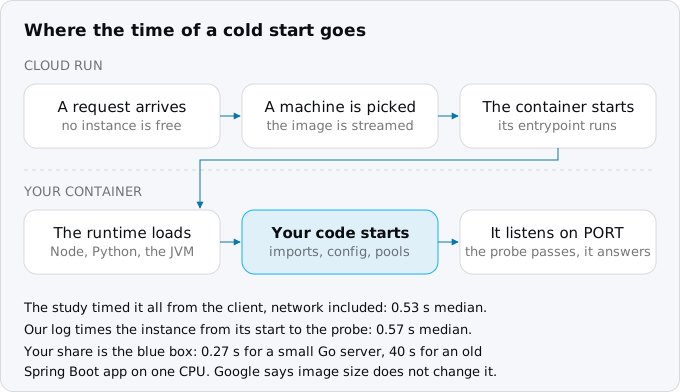
Google's general tips page names the parts: downloading the container image, which Cloud Run streams, so the container can start before the whole image arrives; running the entrypoint; and waiting for the server to listen on its port. The same page says that the size of the image does not affect startup time. What does affect it is what your process does before it listens: the runtime it loads, the files it reads, the connections it opens.
While a request waits for an instance, Cloud Run keeps it in a queue for up to 3.5 times the service's average startup time, or 10 seconds, whichever is greater. The request must also be answered within the request timeout, and the startup time counts against it.
The study: what was measured
A team at TU Berlin ran the same small function on eight serverless platforms from November 13, 2025 to January 5, 2026, 38,165,688 calls in all. For cold starts, a client in Frankfurt called each platform once every 15 minutes, long enough for it to scale to zero, and timed the first byte of the answer. The function returned an empty result, so the number is the platform's own start plus the network round trip, which was about 40 ms for the regional platforms.
Each platform was set up the way its users would set it up, and the details matter when you read the result:
- Google's platform was Cloud Run functions, which deploys a Cloud Run service, in europe-west3, with startup CPU boost turned off and fractional CPUs (128, 512 or 1,024 MiB of memory). Functions go through Google's Functions Framework, a thin layer on top of a web server.
- Fly.io ran Fly Machines, microVMs started from a Dockerfile with the defaults of
fly launch, which stop a machine when it is idle and start it on the next request. - AWS Lambda ran zip packages on its managed runtimes, its fastest path, both on x86 and on ARM.
- Cloudflare Workers and Deno Deploy ran JavaScript in V8 isolates: no container, no process of your own, 128 to 512 MB of memory and limits on CPU time.
- Oracle Functions ran containers, and Fastly ran WebAssembly.
What the numbers say
The medians come from the study's own statistics notebook:
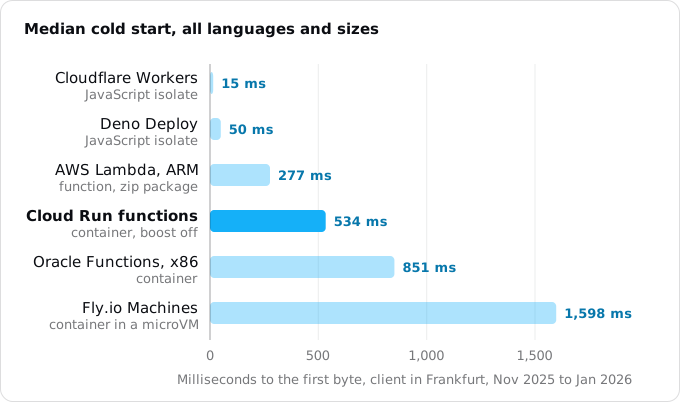
- Cloud Run functions: 534 ms overall, 345 ms in Go, 702 ms in JavaScript. The 95th percentile was 1,094 ms and the 99th 1,707 ms.
- Fly.io Machines: 1,598 ms overall, 1,100 ms in Go, 2,389 ms in JavaScript, with a 95th percentile of 3,015 ms.
- AWS Lambda: 277 ms on ARM and 305 ms on x86, with tight tails (95th percentile 335 and 350 ms).
- Oracle Functions: 851 ms on x86, 1,914 ms on ARM.
- Deno Deploy 50 ms and Cloudflare Workers 15 ms.
Among the platforms that run your container as an ordinary web server and stop it when idle, Cloud Run started about three times faster than Fly.io: 2.99 times overall, 3.19 times in Go, 3.40 times in JavaScript. The paper's own text rounds Fly's median slightly differently (1,523 ms) from another aggregation; the ratio holds either way. The guide to moving an app from Fly.io to Cloud Run covers what else differs between the two.
Lambda started faster than Cloud Run, about 1.9 times. It ran zip packages on runtimes AWS manages, which is not the same as running your own web server in a container: a plain Express or Flask app needs an adapter to run there, and since August 1, 2025 Lambda bills the init phase of those functions too. The guide to moving from AWS Lambda to Cloud Run weighs that trade for a whole app. Workers and Deno start fastest because there is no container to start at all, and they limit what the code can do in exchange.
Two more findings apply to any platform. JavaScript cold starts were at least 18% slower than Go on every platform in the study. And more memory, which on Cloud Run also means more CPU, made Cloud Run start faster: in JavaScript the median fell from 797 ms at 128 MiB to 664 ms at 512 MiB.
What the study did not measure is as useful to know. It did not test a Cloud Run service deployed the usual way, with a whole vCPU and startup CPU boost on, so it says nothing about that setup directly. It did not test App Runner, Render, Railway or Azure. And its function did nothing at startup, so the numbers are the floor of each platform, not what your app will see.
Our own project: 703 starts
To see what a real service sees, we read Cloud Run's system log in our own project, read-only. It has eight services, each with 1 vCPU, 128 to 512 MiB of memory, startup CPU boost on and no minimum instances. Every instance writes "Starting new instance" when Cloud Run starts it and a line when its startup probe succeeds (the guide to health checks and startup probes explains the probe); the time between the two is how long the instance took to become ready.
The log held 703 starts, the earliest on October 4, 2026: 650 started by autoscaling, when requests needed an instance, and 53 by deploys. The median was 0.57 s, the 90th percentile 0.85 s, the 99th 1.49 s, and the slowest 2.25 s.
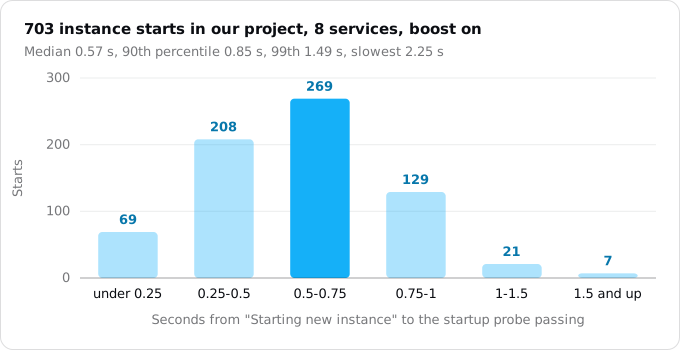
The request log shows the same from the user's side. Over a 30-day window read the same day, 636 of 18,602 requests (3.4%) were the first request on a new instance. Their median latency was 0.43 s; every later request had a median of 0.002 s. So about one request in thirty paid for a start, and paid roughly half a second. Our minimum instances guide breaks these numbers down by service.
What your app adds
Cloud Run's share of the start is roughly fixed. The rest is your process: the runtime, the framework, the files it reads, the work it does before it listens. To show how wide that range is, we timed five containers on our build machine, each limited to one CPU with Docker, from docker run to the first HTTP 200. This is not Cloud Run, and Docker's own overhead (about 0.27 s for a do-nothing server) is included, but the order holds.
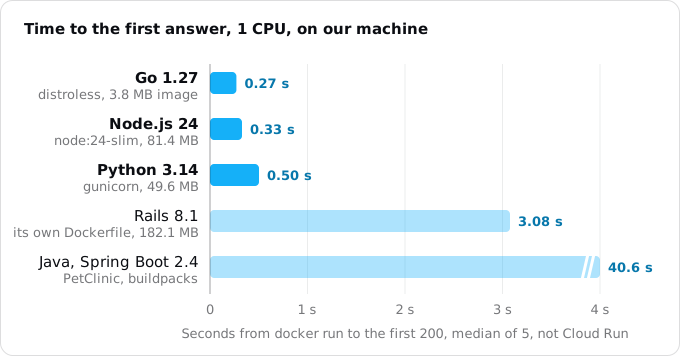
- Go, Node.js and Python small servers were ready in 0.27 to 0.50 s. On Cloud Run they add little to the platform's own half second, and Rust on Cloud Run measures a compiled binary's starts on Cloud Run itself.
- The Rails app generated by
rails new8.1 took 3.08 s, and about a second of that wasdb:prepare, which its generated entrypoint runs at every start. Moving migrations to a job took the start to about 2 s. Our stacks guide has the details for each. - Spring PetClinic, an old Spring Boot 2.4 app on Java 8, took 40.6 s on one CPU and 20.4 s on two. An app like that needs boost and a warm instance, or a newer runtime.
Image size did not decide the order: the Python image was smaller than the Node.js one and slower, and Google states that image size does not affect startup on Cloud Run because the image is streamed. Whether you build with buildpacks or a Dockerfile, what counts is the work the process does before it listens.
Measure your own
Two numbers matter: how long an instance takes to become ready, and how many requests wait for one. Both are in the logs Cloud Run writes for every service, with nothing to set up. This command, run as written against our project, prints the latest starts and probe results; the time between a pair of lines is one start:
gcloud logging read \
    'logName:"varlog%2Fsystem" AND
     (textPayload:"Starting new instance" OR textPayload:"STARTUP")' \
    --freshness=1d \
    --limit=4 \
    --format='value(timestamp.date("%H:%M:%S.%3f"),textPayload)'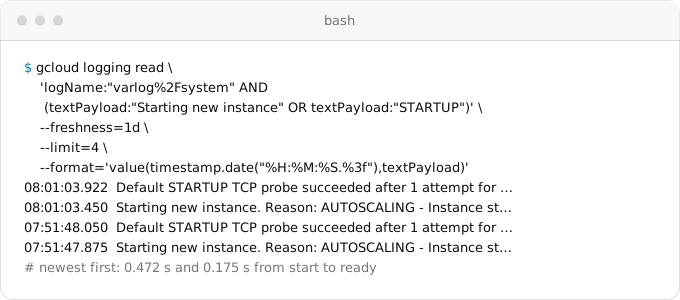
Name the project with the project flag if your default is another one, raise the limit and the freshness to read a month, and add resource.labels.service_name="NAME" to the filter to read one service. The script we used to turn a month of these lines into the chart above is in our research notes: it groups the lines by instance and subtracts the timestamps.
Cloud Monitoring has the same number as the metric container/startup_latencies. Do not read the request_latencies metric for this: it leaves startup time out, so it can look fine while users wait. For how often users wait, count the first request on each instance in the request log, as we did above.
Making the wait shorter
- Startup CPU boost. While an instance starts, and for 10 seconds after, Cloud Run gives it more CPU: 2 vCPU for a limit of 1 or less, 4 for 2, 8 for 4 and up. Google reported up to 50% shorter starts for Java apps and 30% for Node.js; our local test of PetClinic halved its time with a second CPU.
gcloud run deployturns boost on for new services; check older ones. - A minimum of one instance. The instance stays up between requests, so the first visitor after a quiet hour finds it warm. On request-based billing it is billed at the idle rate while it waits. It also removes nothing on a busy service that needs a second and third instance: those still start cold.
- Less work before listening. Open the database pool after the server listens, or on first use; load rarely used libraries on demand. On Node.js, Google's tips page notes that every file loaded at startup is streamed from a remote location, so a bundled app with fewer files starts faster, and it recommends starting with
node, notnpm. - Higher concurrency. An instance that takes 80 requests at once needs fewer siblings in a burst, so fewer requests meet a cold start. Our concurrency guide shows how to pick the number.
- The execution environment. Google's page says the first generation environment has fast cold starts and the second generation has longer ones for some services. A service with no environment set gets one picked by Cloud Run; try both if starts matter more than throughput.
What it costs
Boost is billed: the extra CPU counts while the instance starts and for the 10 seconds after. For our median start of 0.57 s, the extra vCPU costs at most 10.57 vCPU-seconds, $0.00025 at the list price of $0.000024 per vCPU-second. Our 703 starts would have cost about $0.18 more in a month.
A minimum instance costs the idle rate around the clock. In europe-west1 at the prices read on October 12, 2026, with request-based billing, one idle instance of 1 vCPU and 512 MiB is 2,628,000 seconds a month at $0.0000025 for the vCPU and the same for 0.5 GiB: $6.57 plus $3.29, $9.86 a month. On instance-based billing the same instance is billed at the full rate, $49.93. The request-based or instance-based billing guide explains the difference.
What breaks
- A keep-warm ping instead of a minimum instance. A request every few minutes keeps one instance warm only while it holds; Cloud Run may stop it anyway, and any second instance still starts cold.
- Initialisation in the request path. Lazy initialisation moves the cost to the first request instead of removing it. Do the work after the server listens but before traffic needs it, or accept that the first user pays.
- A client timeout shorter than a start. A mobile app or a webhook sender that gives up after 1 s will fail on cold starts of slow apps. Set the timeout above your 99th percentile.
- Starts that fail. A container that exits or hangs during startup never passes its probe. The system log shows these as a start with no probe success after it; find them before tuning anything else.
- Measuring the wrong number. A dashboard of request latency without startup, or a benchmark of a warm service, hides the wait.
Checklist
- Read your own starts from the system log for a week: median, 99th percentile, how many a day.
- Count how many requests were the first on their instance.
- Check that startup CPU boost is on for every service.
- Move migrations, cache warming and anything slow out of the start, into a job or after listening.
- Decide per service: is a half-second wait after a quiet spell acceptable? If not, set a minimum of one and put $9.86 a month in the budget.
- Set client timeouts above the 99th percentile of the start.
Where Exodus comes in
The Exodus report states what a move changes about starts, in its "What works differently" list: "A copy that starts after a quiet spell answers in about 0.5 to 2 seconds. Startup CPU boost shortens that; one copy kept warm removes it, for a few dollars a month." Its cost assumes scale to zero, so the price of a warm instance is not in the total; the numbers above give it. exodus check flags timers inside the process, which keep an instance busy and are a common reason teams reach for a minimum instance when a scheduled job would do.
FAQ
How long is a Cloud Run cold start?
About half a second at the median for a small app. The TU Berlin study measured 0.53 s with startup CPU boost off; our 703 starts took 0.57 s to become ready, 0.85 s at the 90th percentile and 1.49 s at the 99th. A slow runtime or framework adds its own time on top.
Does Cloud Run start faster than AWS Lambda?
No. In the TU Berlin study Lambda started about 1.9 times faster, 277 ms on ARM against Cloud Run's 534 ms. Lambda ran zip packages on runtimes AWS manages, while Cloud Run starts your own web server in a container. Cloud Run started about three times faster than Fly.io.
How do I avoid cold starts on Cloud Run?
Set a minimum of one instance: it stays warm between requests and costs about $9.86 a month at 1 vCPU and 512 MiB on request-based billing. Keep startup CPU boost on, move migrations and other slow work out of the start, and raise concurrency so fewer new instances start in a burst.
Does image size affect Cloud Run cold starts?
No, according to Google: Cloud Run streams the image, so the container can start before all of it arrives. What counts is the work before the server listens. In our local test the Python image was smaller than the Node.js one and still slower to answer.
Does a keep-warm ping replace a minimum instance?
No. A request every few minutes keeps one instance warm only while it holds; Cloud Run may stop it anyway, and any second instance still starts cold. A minimum instance stays up, and on request-based billing it is billed at the idle rate while it waits.
Sources
17
- arxiv.orgSchirmer et al., New Kids: An Architecture and Performance Investigation of Second-Generation Serverless Platforms, TU Berlin, arXiv 2604.15916v2, accepted in ACM Transactions on Internet Technology
- github.comThe study's statistics notebook, 08_stats.ipynb
- github.comThe study's benchmark and Terraform
- docs.cloud.google.comConfigure CPU limits for services, Cloud Run docs, Google
- docs.cloud.google.comGeneral development tips, Cloud Run docs, Google
- docs.cloud.google.comOptimize Java applications for Cloud Run, Google
- docs.cloud.google.comOptimize Node.js applications for Cloud Run, Google
- cloud.google.comNew startup CPU boost improves cold starts in Cloud Run, Cloud Functions, Google Cloud blog, Sep 26, 2022
- docs.cloud.google.comSet minimum instances for services, Cloud Run docs, Google
- docs.cloud.google.comAbout instance autoscaling, Cloud Run docs, Google
- cloud.google.comCloud Run pricing, Google
- docs.cloud.google.comBilling settings for services, Cloud Run docs, Google
- docs.cloud.google.comSelect an execution environment for services, Cloud Run docs, Google
- docs.cloud.google.comContainer runtime contract, Cloud Run docs, Google
- fly.ioAutostop and autostart Machines, Fly.io docs
- aws.amazon.comAWS Lambda standardizes billing for the INIT phase, AWS Compute blog, Apr 29, 2025
- Exodus team: 703 instance starts of 8 Cloud Run services