Cloud Run is Google's service for running a container that answers HTTP. You hand it an image or source code, and it gives back an HTTPS address, starts as many copies of the app as the traffic needs and stops them when it falls, down to none. By default it bills only while a request is handled: $0.000024 per vCPU-second in Tier 1 regions, after 180,000 free a month.
In short
- A service answers requests for up to 60 minutes each, a job runs a task for up to 168 hours, and a worker pool, generally available since April 14, 2026, keeps processes up.
- Request-based billing, the default, costs $0.000024 per vCPU-second and $0.0000025 per GiB-second in Tier 1, after 180,000 vCPU-seconds and 360,000 GiB-seconds free a month.
- One instance takes up to 1,000 requests at once, 80 by default at 1 vCPU, and a revision scales to 100 instances unless you lower it.
- For one instance of 1 vCPU and 512 MiB, request-based billing costs less than instance-based until it is busy about 18 hours a day.
- Every service without a GPU has a 99.95% monthly uptime commitment, in 43 regions.
Prices are Google's Tier 1 list prices, read on October 12, 2026.
What it runs
There is no server to pick and no cluster to keep: you say how much CPU and memory one copy of the app gets, and Cloud Run does the rest. If you came from Heroku, Railway, Render or Fly, most of it will feel familiar: a web process built from your repository, environment variables, logs in a console, a URL. The difference that matters is how it bills, and that one rule changes a few habits in the code.
Your app is a container, a packaged Linux process with its files, that listens for HTTP on the port Cloud Run passes in the PORT environment variable, 8080 unless you change it. Anything that runs in Docker runs here: Node, Python, Ruby, Go, Rust, Java, PHP, a binary you compiled yourself. If you have no Dockerfile, gcloud run deploy with a source folder builds the image with Google's buildpacks, which read the same package.json, requirements.txt or Gemfile a PaaS reads; buildpacks or a Dockerfile compares the two.
Each running copy of the container is an instance. You set its size, for example 1 vCPU and 512 MiB of memory, which is enough for most small web apps. A deploy creates a revision, an unchangeable snapshot of the image and its settings, and the service sends traffic to revisions.
One instance takes many requests at once. Google's page gives two defaults: 80 when a service is created in the console, and 80 times the number of vCPUs when it is created with gcloud or Terraform, so 80 at 1 vCPU either way. The maximum is 1,000. When requests pile up beyond that, Cloud Run starts another instance, up to 100 per revision by default. You can lower that ceiling, and you should, because it is also the ceiling on the bill. Concurrency on Cloud Run explains how to pick the number for your stack.
The container has to follow a short contract. It must listen on 0.0.0.0, not localhost, or nothing reaches it. Its disk is memory: whatever it writes counts against the memory limit and disappears with the instance. When Cloud Run stops an instance it sends SIGTERM, waits 10 seconds and then kills the process, so the app should finish its requests and exit in that time. A request that arrives while no instance is ready waits for one, for up to 3.5 times the service's average startup time or 10 seconds, whichever is longer.
Three shapes
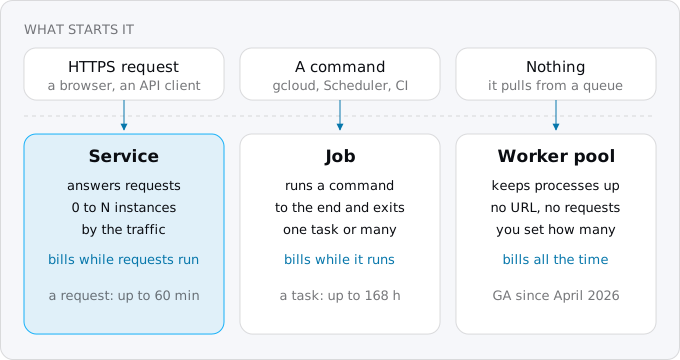
- A service answers requests. This is your web process. A request may run for 5 minutes by default and up to 60 minutes if you raise the timeout. Each service gets a
run.appaddress with HTTPS. - A job runs a command to the end and exits: a migration, a nightly export, anything a cron used to start. It has no URL. A job's task runs for up to 10 minutes by default and up to 168 hours, seven days, if you raise it; with a GPU the limit is one hour. A job can also split into many tasks that run in parallel.
- A worker pool keeps processes running that pull work instead of answering requests: a Pub/Sub or Kafka consumer, a loop that holds one connection for hours. It became generally available on April 14, 2026. It has no URL, you set how many instances it runs, and it bills all the time those instances exist.
Most apps from a PaaS become one service, a job or two and nothing else, because a background worker usually turns into requests to the service (more on that below). Services, jobs and worker pools goes through each shape with its commands and limits.
How it bills
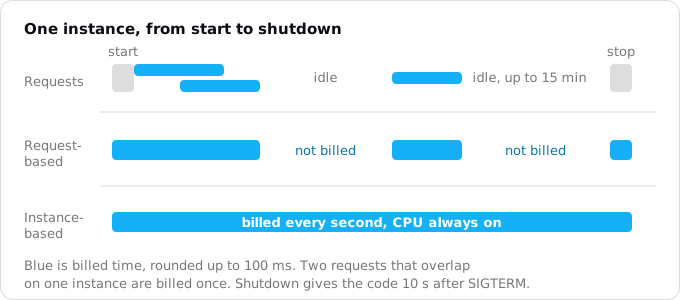
By default a service uses request-based billing. An instance is billed while it starts, while it handles at least one request, and while it shuts down, rounded up to the nearest 100 ms. Between requests it is not billed. Two requests that overlap on one instance are billed once, for the time either of them is open, which is why concurrency saves money. After the last request Cloud Run may keep the instance around, idle and unbilled, for up to 15 minutes, so the next visitor does not wait for a start. When nobody calls the service at all, it has no instances and costs nothing.
Google prices CPU per vCPU-second, memory per GiB-second and requests per million. In Tier 1 regions, such as us-central1 in Iowa and europe-west1 in Belgium, the list prices on October 12, 2026 were:
- Request-based: $0.000024 per vCPU-second, $0.0000025 per GiB-second, $0.40 per million requests. Free each month: 180,000 vCPU-seconds, 360,000 GiB-seconds and 2 million requests.
- Instance-based: $0.000018 per vCPU-second and $0.000002 per GiB-second, with no charge per request. Free each month: 240,000 vCPU-seconds and 450,000 GiB-seconds.
The free tier belongs to the billing account, not to the service, and resets every month: two apps on one account share it. 180,000 vCPU-seconds is 50 hours of one busy vCPU. A web app with a couple of thousand visits a day, ten requests a visit and a third of a second each, uses about 210,000 vCPU-seconds a month and pays for the 30,000 over the line: 72 cents. The free tier explained shows what else counts against it.
Instance-based billing is the other setting: the CPU stays on for the whole life of the instance, and every second the instance exists is billed, busy or not. Each second is cheaper, so the choice comes down to how much of the day an instance is busy. For one instance of 1 vCPU and 512 MiB, request-based billing stays under the always-on price until the instance is busy about 18 hours a day.
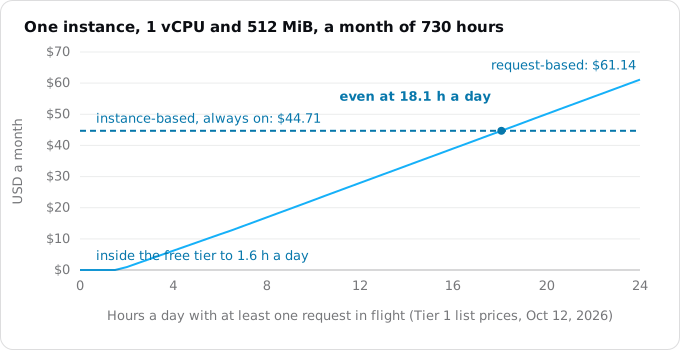
That suits a process that keeps a CPU busy most of the day, and for such a process Cloud Run is often not the cheapest home at all: Cloud Run or a VPS compares the two under steady load. Request-based or instance-based billing works the choice through with more cases, and what Cloud Run costs prices a whole small app line by line. In Tier 2 regions, such as London or Frankfurt, request-based prices are 1.4 times these and instance-based 1.2 times.
What changes for your code
Under request-based billing the CPU is there only while a request is in flight. The disk is memory and goes away with the instance. An instance can stop whenever traffic falls, and the next request may land on a different one. Four habits of a PaaS app break because of this:
- Timers inside the process (
setInterval,node-cron, APScheduler, a clock process) fire late or never, because there is no CPU between requests and no process at all when the service is at zero. With three instances they fire three times. - Work done after the response is sent stalls. A handler that answers and then sends an email loses its CPU the moment the response is out, so the email goes when the next request arrives, or never.
- Files written to local disk vanish with the instance and are not shared between instances. An upload saved on one instance is a 404 on the next.
- Sessions and queues held in memory are lost when the instance stops, and moving them to a Redis that runs all month brings back the bill you left.
Each one has a standard replacement on Google Cloud: Cloud Scheduler for timers, Cloud Tasks for workers and work after the response, a Cloud Storage bucket for files and signed cookies for sessions. The patterns that break on Cloud Run lists the rest, such as WebSockets held for hours and in-memory caches.
The Exodus CLI looks for these in a repository. Here is its check on a small Express app written for Heroku, with a timer, a session store in memory, uploads to disk and a BullMQ worker:
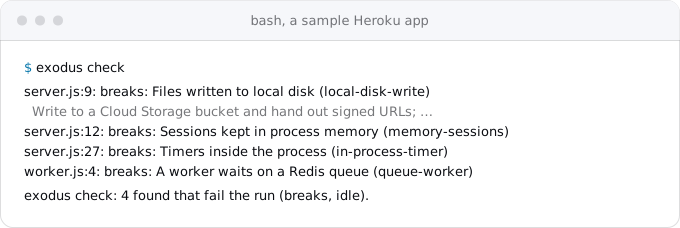
It missed one thing in that sample: the signup handler sends its welcome email after the response, the second habit above. A search for code after res.send or res.json in your handlers is worth five minutes before you move.
Cold starts
When a service at zero gets a request, an instance has to start before it can answer: Cloud Run pulls the image, starts the container and waits for it to listen on the port. That wait is the cold start, and Google publishes no figure for it, because it depends mostly on your app.
The numbers we have are these. In an independent study by TU Berlin, run from Frankfurt between November 2025 and January 2026, Google's function platform, which is built on Cloud Run, had a median cold start of 534 ms with startup CPU boost off; Cloud Run cold starts, measured has the study's setup and the other platforms. Exodus team: one of our Rust APIs at 1 vCPU and 256 MiB started 17 instances in a week of October 2026, with a median container startup of 94 ms and none over 280 ms; another Rust API we moved answered its first byte 0.8 to 1.7 s after a request that had to start an instance. A Node or Python app that loads many packages at start takes longer, so measure your own.
Two settings help:
- Startup CPU boost gives an instance more CPU while it starts and for 10 seconds after: 2 vCPU for a service of up to 1, 4 for 2, 8 for 4. The extra CPU is billed for those seconds, which on a small service is cents a month.
- A minimum number of instances keeps that many instances running between requests, so the first visitor after a quiet hour does not wait. Their idle time bills at a lower rate: one instance of 1 vCPU and 512 MiB kept all month costs about $9.86 at Tier 1 list prices.
Min instances and startup CPU boost shows when each one pays for itself.
What comes with it
- A 99.95% monthly uptime commitment on every service without a GPU, with credits on the bill when Google misses it, and no plan to buy. In Mexico and Stockholm it is 99.9%.
- 43 regions, as
gcloud run regions listprinted on October 12, 2026. Choosing a region weighs price tier, latency and what each region offers. - HTTPS by default. Every service gets a
run.appaddress with a certificate, ended at Google's edge close to the visitor. - Revisions. Every deploy is kept, and traffic can be split between revisions by percent, so a rollback is one command and a new version can take 5% of traffic first. Revisions, traffic splitting and rollbacks has the commands.
- Logs and metrics in Cloud Logging and Cloud Monitoring, with no add-on: whatever the app prints to stdout is a log line, and a JSON line becomes a structured entry. Logs, metrics and alerts sets them up.
What it is not
Cloud Run is not a VM. You cannot SSH into a long-lived box and change things by hand: an instance is replaced at the next deploy and may be stopped at any time. Google announced SSH into a running instance in April 2026, and gcloud beta run services ssh exists, but it is in preview for selected customers; for a one-off command, run it as a job.
It is not a fit for a process that holds thousands of open connections all day, or keeps a CPU busy around the clock: both bill all the time, and the chart above shows where that crosses a fixed price.
It does not give you a free custom domain in production. Cloud Run's own domain mappings are in Preview, in 10 regions, and Google says they are not production-ready; for production you put Firebase Hosting or a load balancer in front, as custom domains and HTTPS explains.
And it has no spending limit unless you set one. Google bills what runs: a loop or a crawler scales the service up and the bill with it. Set a maximum number of instances on every service and a budget alert on the billing account. A spend cap budget can also pause Cloud Run in one project when its estimated cost passes an amount, but it is not instant and it takes the app down; setting up a project for a small team covers both.
A first deploy
This needs a Google account with billing, the gcloud CLI, and a folder with an app that listens on PORT. Sign in and choose the project:
gcloud auth login
gcloud config set project YOUR_PROJECT_ID
Turn on the three services a deploy from source uses, Cloud Run, Cloud Build and Artifact Registry:
gcloud services enable run.googleapis.com cloudbuild.googleapis.com artifactregistry.googleapis.comDeploy from the folder. The command builds the image, stores it, creates the service and prints its URL. The last two flags make it public and cap it at three instances:
gcloud run deploy hello \
  --source . \
  --region europe-west1 \
  --allow-unauthenticated \
  --max-instances 3
Read the last lines of its log:
gcloud run services logs read hello \
  --region europe-west1 \
  --limit 20
The first build takes a few minutes; later deploys reuse the cached layers. A build on Cloud Build and an image in Artifact Registry each have their own small bill and free tier, which what Cloud Run costs adds to the total. To roll back, send all traffic to the revision before:
gcloud run services update-traffic hello \
  --region europe-west1 \
  --to-revisions hello-00001-abc=100
The revision names are in gcloud run revisions list. Replace hello-00001-abc with yours.
Where Exodus comes in
If your app is an ordinary web service with a database, a few background jobs and a schedule, it fits Cloud Run. Exodus reads your repository and tells you which parts need to change before it does, with file and line, as in the check above. Its report prices today's host against Cloud Run from Google's list prices, and its plan orders the work: change the code where it runs now, stand up the new app beside it, copy the data, switch the domain.
FAQ
Can Cloud Run scale to zero?
Yes. When nobody calls a Cloud Run service, it has no instances and costs nothing. The first request after that waits while an instance starts: one of our Rust APIs started in a median of 94 ms, and a Node or Python app that loads many packages takes longer. A minimum instance avoids the wait for about $9.86 a month.
How long can a Cloud Run request run?
A request to a Cloud Run service may run for 5 minutes by default and up to 60 minutes if you raise the timeout. Longer work belongs in a job, whose task runs for up to 10 minutes by default and up to 168 hours, seven days, if you raise it; with a GPU the limit is one hour.
What languages does Cloud Run support?
Cloud Run runs any container that listens for HTTP on the port in the PORT variable, 8080 by default: Node, Python, Ruby, Go, Rust, Java, PHP or a binary you compiled yourself. Without a Dockerfile, a deploy from a source folder builds the image with Google's buildpacks.
Can I SSH into a Cloud Run container?
Not as a rule. Google announced SSH into a running instance in April 2026, but it is in preview for selected customers. An instance is replaced at the next deploy and may be stopped at any time, so a one-off command, such as a migration, runs as a Cloud Run job.
Can Cloud Run use a custom domain?
Cloud Run's own domain mappings are in Preview in 10 regions, and Google says they are not production-ready. For production, put Firebase Hosting or a load balancer in front of the service. Every service also gets a run.app address with HTTPS and a certificate, ended at Google's edge.
Sources
20
- docs.cloud.google.comContainer runtime contract, Cloud Run, Google
- docs.cloud.google.comDeployment options and resource model, Cloud Run, Google
- docs.cloud.google.comMaximum concurrent requests for services, Cloud Run, Google
- docs.cloud.google.comSet maximum instances for services, Cloud Run, Google
- docs.cloud.google.comConfigure request timeout for services, Cloud Run, Google
- docs.cloud.google.comSet task timeout for jobs, Cloud Run, Google
- docs.cloud.google.comCloud Run release notes, Google
- cloud.google.comCloud Run pricing, Google
- docs.cloud.google.comBilling settings for services, Cloud Run, Google
- docs.cloud.google.comAbout instance autoscaling, Cloud Run, Google
- docs.cloud.google.comConfigure CPU limits for services, Cloud Run, Google
- arxiv.orgSchirmer et al., New Kids: An Architecture and Performance Investigation of Second-Generation Serverless Platforms, TU Berlin, arXiv 2604.15916 v2
- cloud.google.comCloud Run SLA, Google
- docs.cloud.google.comCloud Run locations, Google, and gcloud run regions list
- docs.cloud.google.comRollouts, rollbacks and traffic migration, Cloud Run, Google
- docs.cloud.google.comMap custom domains, Cloud Run, Google
- cloud.google.comWhat's new in Cloud Run at Next '26, Google Cloud blog
- docs.cloud.google.comManage spend cap budgets, Cloud Billing, Google
- docs.cloud.google.comgcloud reference, Google Cloud SDK 587.0.0
- Exodus team: a Rust API of ours on Cloud Run