Cloud Run GPUs are an NVIDIA L4 with 24 GB or an RTX PRO 6000 Blackwell with 96 GB, one per instance, started in about 5 seconds and scaled to zero. A GPU service needs instance-based billing and, for an L4, at least 4 vCPU and 16 GiB. The smallest L4 instance costs $1.05 an hour in europe-west1, and most of a cold start is loading the model.
In short
- A project starts with a quota of 3 GPUs per region, granted on the first deploy; an RTX PRO 6000 needs at least 20 vCPU and 80 GiB.
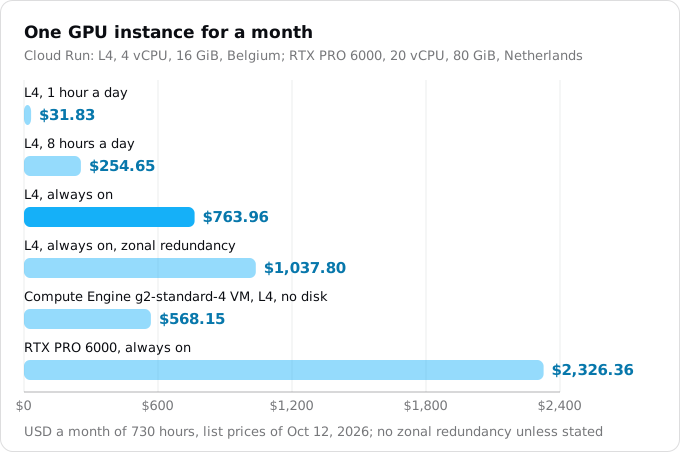
- The smallest L4 instance costs $1.05 an hour without zonal redundancy, $763.96 a month if it never stops; a
g2-standard-4VM with the same L4 costs $568.15, so above roughly 18 hours a day the VM is cheaper. - An idle GPU instance is kept up to 10 minutes after its last request and billed for them: about $0.17 each time on the small L4.
- In our test the port answered in 3.5 s and the model was ready at 59.5 s. Keep the model small, ship it in the image or in Cloud Storage, and warm it up before the first user arrives.
Prices are list prices of October 12, 2026, in europe-west1. Scaled to zero, a GPU service costs nothing.
What Cloud Run gives you
Google's GPU page lists two GPUs. The L4 has 24 GB of GPU memory (VRAM), enough for a quantized model (stored with fewer bits per weight) of a few billion parameters. The RTX PRO 6000 Blackwell has 96 GB; Google's announcement says it serves "up to 70B+ parameter models". Both are on demand, and a GPU service still scales to zero.
The rules from the same page:
- One GPU per instance. With sidecar containers, the GPU goes to one of them.
- Drivers are installed by Google, version 580.x.x with CUDA 13.0, mounted under
/usr/local/nvidia/lib64and added toLD_LIBRARY_PATH. - About 5 seconds. An instance with a GPU starts in approximately 5 seconds "at which point the processes running in your container can start to use the GPU". Loading your model comes after.
- Services, jobs and worker pools all take a GPU. GPUs for services became generally available on April 7, 2025, for jobs on October 21, 2025, and the RTX PRO 6000 on April 13, 2026, per the release notes.
Regions
The L4 is offered in europe-west1, europe-west4, us-central1, us-east4, asia-southeast1 and, by invitation only, asia-south1. The RTX PRO 6000 is offered in europe-west4, us-central1, asia-southeast1 and asia-south2. If your other services run elsewhere, the GPU service can live in a GPU region alone; our region guide covers the trade-off.
When it fits, and when it does not
A GPU on Cloud Run fits work that comes and goes: an internal assistant used in office hours (an AI agent backend that calls a hosted model needs no GPU at all), a transcription or embedding service called a few hundred times a day, a nightly batch job. You pay for the hours instances exist and nothing for the rest.
It fits badly when the GPU is busy all day. An L4 instance that never stops costs $763.96 a month on Cloud Run; a g2-standard-4 Compute Engine VM with the same L4, 4 vCPU and 16 GB costs $568.15 a month in the same region at on-demand list prices, before its disk. Above roughly 18 hours of use a day the VM is cheaper; our VM guide covers the other differences. It also fits badly when users cannot wait for a cold start and you cannot pay for a warm instance.
Before the first deploy
Instance-based billing
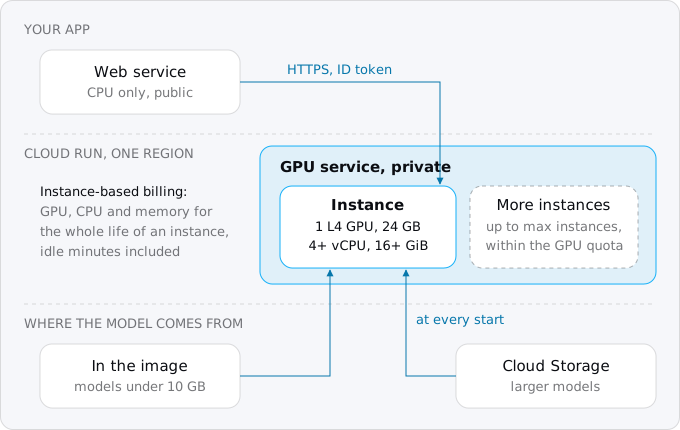
Most Cloud Run services bill only while a request is in flight. A GPU service cannot: Google's page says "You must use instance-based billing to use the GPU feature". The GPU, CPU and memory are billed for the whole life of each instance, from the start to the shutdown, with a minimum of one minute. There is no per-request fee. In gcloud this is the flag --no-cpu-throttling. Our billing guide explains the two modes.
The consequence is in the autoscaling page: Cloud Run keeps an idle instance for up to 10 minutes after its last request when it has a GPU. With instance-based billing those minutes are billed. One request after a quiet hour can therefore cost the start, the answer and up to ten idle minutes: about $0.17 of idle time alone for the smallest L4 instance.
CPU and memory
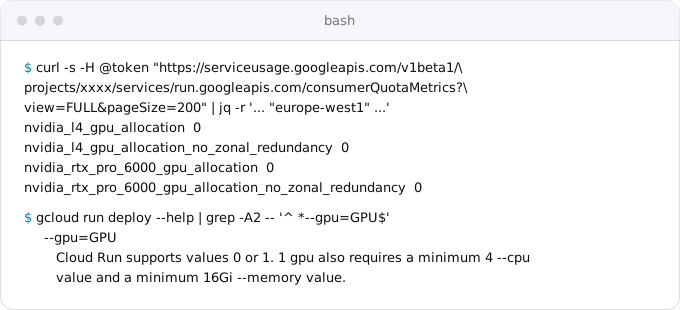
An L4 needs at least 4 vCPU and 16 GiB of memory; Google recommends 8 vCPU and 32 GiB. An RTX PRO 6000 needs at least 20 vCPU and 80 GiB. The help of gcloud run deploy says the same for the L4:
Quota
GPUs are limited per project and per region. Google's quotas page lists the GPU quotas at 0 by default; the first deploy that uses an L4 or an RTX PRO 6000 in a region grants 3 GPUs without zonal redundancy. That is three instances at once, across all services in the region. A service's maximum instances cannot be set above the quota.
Our project, which has never deployed a GPU, shows all four quotas at 0 in europe-west1. You can read yours through the Service Usage API with your own token:
(umask 077; gcloud auth print-access-token | sed 's/^/Authorization: Bearer /' > token)
curl -s -H @token \
  "https://serviceusage.googleapis.com/v1beta1/projects/PROJECT_ID/services/run.googleapis.com/consumerQuotaMetrics?view=FULL&pageSize=200" \
  | jq -r '.metrics[] | select(.metric | test("gpu")) | .metric as $m
      | .consumerQuotaLimits[].quotaBuckets[] | select(.dimensions.region == "europe-west1")
      | "\($m | ltrimstr("run.googleapis.com/"))  \(.effectiveLimit // 0)"'
rm token
More GPUs take a quota request in the console. Google says requests without zonal redundancy "are more likely to be granted and will be made available more quickly".
Zonal redundancy
A Cloud Run service runs across the zones of its region, and traffic moves away from a failed zone. For GPUs the other zones may have no spare capacity, so Cloud Run offers a choice:
- Zonal redundancy on, the default for services and worker pools: Google reserves GPU capacity in other zones for your service. The L4 costs $0.0002909 a second instead of $0.0001867, and the SLA is 99.95%.
- Zonal redundancy off (
--no-gpu-zonal-redundancy): failover is best effort. The GPU is about 36% cheaper and the SLA is 99.5%.
Jobs support only the second. Google's tutorials turn it off, and so does this guide; turn it on when users would notice an hour of outage.
A sample: Ollama with a model inside the image
Ollama runs open-weight models behind a small HTTP API, and Google's Cloud Run tutorial uses it. That tutorial pulls the model from the internet at every start, which Google's best practices page calls the slowest and least predictable way, so our sample downloads the weights at build time. The Dockerfile:
FROM ollama/ollama:0.40.3

# Ollama listens on Cloud Run's port, keeps models in the image and never unloads them.
ENV OLLAMA_HOST=0.0.0.0:8080 \
    OLLAMA_MODELS=/models \
    OLLAMA_KEEP_ALIVE=-1 \
    OLLAMA_NUM_PARALLEL=4

# Download the weights at build time, so a new instance never fetches them from the internet.
ARG MODEL=gemma3:4b
ENV MODEL=${MODEL}
RUN ollama serve & sleep 5 && ollama pull "$MODEL"

COPY start.sh /start.sh
ENTRYPOINT ["/bin/sh", "/start.sh"]
And start.sh next to it:
#!/bin/sh
# Start the server, then load the model into GPU memory and answer one short prompt,
# so the first real request does not pay for the loading and the warm-up.
ollama serve &
until ollama list >/dev/null 2>&1; do sleep 0.2; done
ollama run "$MODEL" "Reply with one word: ready" >/dev/null
wait
gemma3:4b is 3.2 GB on disk; on our machine it took 3.5 GB of GPU memory with four parallel slots, far inside the L4's 24 GB. Pass another model with --build-arg MODEL=....
Build it with Cloud Build on a larger machine, because the image is big, then deploy it to an L4 in Belgium:
gcloud artifacts repositories create models \
  --repository-format=docker --location=europe-west1

gcloud builds submit \
  --tag europe-west1-docker.pkg.dev/PROJECT_ID/models/ollama-gemma:1 \
  --machine-type=e2-highcpu-32 --disk-size=100

gcloud run deploy ollama-gemma \
  --image europe-west1-docker.pkg.dev/PROJECT_ID/models/ollama-gemma:1 \
  --region europe-west1 \
  --gpu 1 --gpu-type nvidia-l4 --no-gpu-zonal-redundancy \
  --cpu 8 --memory 32Gi --no-cpu-throttling \
  --concurrency 4 --max-instances 1 \
  --timeout 600 \
  --no-allow-unauthenticated
The service is private: a request without an identity token gets 403. To try it from your machine, run the proxy and call it on localhost:
gcloud run services proxy ollama-gemma --region europe-west1 --port 9090

curl http://localhost:9090/api/generate \
  -d '{"model": "gemma3:4b", "prompt": "What is a container?", "stream": false}'
Your app calls it with an ID token and the Invoker role, as our IAM guide shows.
We built and ran this image on our build machine but did not deploy it: a GPU deploy in our project is a production change.
Where a cold start goes
Google's guide to AI cold starts splits a start into four phases: about 5 s to attach the GPU and its drivers, 1 to 2 s to stream the image, 5 to 15 s for the inference engine to initialize, and then the time to move the weights into GPU memory, which depends on the model's size and where it comes from.
We timed the sample image on our build machine, which has an NVIDIA RTX 3080 with 10 GB, mounting the driver libraries where Cloud Run mounts them. This is not Cloud Run and not an L4, so the absolute numbers are ours; the shape is what matters.
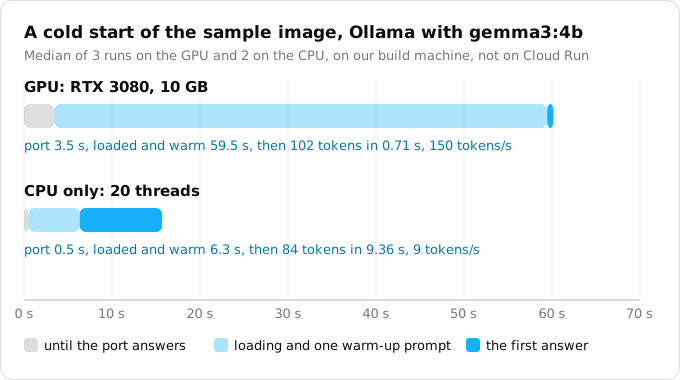
Three things stood out:
- The port opens long before the model is ready. Ollama answered on its port in 3.5 s; the model was loaded and warm at 59.5 s. Cloud Run's default startup probe only checks the port, so it passes at 3.5 s and requests then wait inside Ollama.
- Loading is not the end. Without the warm-up line in
start.sh, the model was loaded at 40.6 s and the first real request still took 17 s; the next ones took 0.9 s. A one-word prompt at startup moves that wait out of a user's request. - The GPU is for answers, not starts. On the CPU alone the same image was ready in 6.3 s, then answered at 9 tokens a second instead of 150.
What helps, from Google's pages:
- Small, quantized models. Google recommends 4-bit models in fast formats such as GGUF, never pickle checkpoints.
- The model in the image for models under 10 GB. Cloud Run streams images, so a large image starts without being downloaded whole first.
- Cloud Storage for larger models, downloaded in parallel at startup with
gcloud storage cpor mounted as a volume, with Direct VPC and Private Google Access, as Google advises. Our Cloud Storage guide covers volume mounts. - A longer startup probe when the model takes minutes. With a GPU the probe may wait up to 1,800 seconds instead of 600; our health checks guide has the settings.
- A wake-up call. Google's cold start guide suggests calling a cheap endpoint, such as Ollama's
/api/tags, when the user opens a chat, so the start runs while they type. - A minimum instance removes the cold start at the full price, $763.96 a month for the smallest L4, because the idle rate does not apply to GPUs. Our minimum instances guide covers the setting.
Concurrency: one instance, how many requests
Cloud Run scales on request concurrency and CPU, not on GPU use: Google says Cloud Run "does not automatically scale the number of instances based on GPU utilization". So the concurrency setting decides when a second GPU instance starts.
For Ollama, Google's tutorial sets --concurrency equal to OLLAMA_NUM_PARALLEL, 4 in our sample, and at most twice that for a busier GPU. Above it, requests queue inside Ollama, and that queue does not make Cloud Run scale out. For other servers, Google's rule of thumb is (model instances x parallel queries per model) + (model instances x ideal batch size): 3 copies taking 4 queries each in batches of 4 give 24. Then test under load; our concurrency guide covers the setting.
Set --max-instances too: within the quota, it caps what a spike can cost.
What it costs
GPU prices are the same in europe-west1, europe-west4, us-central1 and us-east4; asia-southeast1 costs about 20% more. Per second, at list prices of October 12, 2026:
- L4 GPU: $0.0001867 without zonal redundancy, $0.0002909 with it.
- RTX PRO 6000 GPU: $0.00036522 without, $0.00056913 with.
- CPU on instance-based billing: $0.000018 per vCPU-second; memory $0.000002 per GiB-second.
So an hour of one instance costs:
- L4 at the minimum, 4 vCPU and 16 GiB: $1.05 without zonal redundancy, $1.42 with it.
- L4 at Google's recommended 8 vCPU and 32 GiB: $1.42.
- RTX PRO 6000 at its minimum, 20 vCPU and 80 GiB: $3.19, or $3.92 with zonal redundancy.
The GPU is 64% of the small L4 instance's price.
A few rules move these numbers:
- The free tier covers CPU and memory only. Instance-based services get 240,000 vCPU-seconds and 450,000 GiB-seconds a month, worth $5.22; there is no free GPU time. Google's own example of an L4 service in
europe-west1comes to $822.40 a month, and $827.62 without that free tier: the same $5.22. Our free tier guide explains how it is applied. - No committed use discount for GPUs. The pricing page lists 1-year and 3-year discounts for CPU and memory and none for the GPU lines.
- Idle minutes are billed. Each scale-up can leave up to 10 idle minutes behind it, $0.17 each on the small L4.
- Source deploys build on a bigger machine. With a GPU,
gcloud run deploy --sourcebuilds one2-highcpu-8instead ofe2-standard-2, which costs more per build minute. - The image is stored. A model inside the image is a copy in Artifact Registry for every version you keep.
Jobs and worker pools with a GPU
A Cloud Run job runs tasks to completion, which suits batch work such as transcription or embedding a document set. With a GPU a task may run for at most 1 hour, instead of 168 hours without one, and jobs must turn zonal redundancy off. Each parallel task takes a GPU, so keep --parallelism below your quota. An hour of an L4 task at the minimum size costs $1.05.
gcloud run jobs create transcribe \
  --image IMAGE_URL --region europe-west1 \
  --gpu 1 --gpu-type nvidia-l4 --no-gpu-zonal-redundancy \
  --cpu 4 --memory 16Gi \
  --tasks 10 --parallelism 3 --task-timeout 1h
A worker pool, an always-on group of instances without a URL, takes a GPU the same way, with zonal redundancy on by default. Our services, jobs and worker pools guide explains which to choose.
What breaks
- No quota. The first deploy grants 3 GPUs, shared by every service in the region, and
--max-instancescannot be set above the quota. - Zonal redundancy on, quota off. Services default to zonal redundancy, but the automatic grant of 3 GPUs is for GPUs without it. Deploy with
--no-gpu-zonal-redundancy, or request the other quota first. - Request-based billing. A GPU service must use instance-based billing; Google's tutorial says
--no-cpu-throttling"is required for enabling GPU". - The wrong region.
europe-west1has the L4 but not the RTX PRO 6000. Check the list before you pick a region for the rest of the app. - A probe that passes too early. A TCP probe passes before the model loads, so the first requests wait and may hit the request timeout. Warm the model in the start script and set
--timeoutfor that wait, or probe an endpoint that answers only when the model is ready. - A model pulled at startup. Every new instance downloads gigabytes from outside Google and fails when that registry is down.
- A model too large for the GPU. What does not fit in VRAM spills to system memory and slows sharply. Pick a quantized size that fits with its context.
- CUDA newer than the driver. The driver supports CUDA 13.0. A newer CUDA needs NVIDIA's forward compatibility packages.
- A public endpoint. A model behind
--allow-unauthenticatedis a GPU anyone on the internet can keep busy at your expense.
Checklist
- Pick a GPU region; check that it has the GPU you need.
- Read your GPU quotas; plan on 3 GPUs per region until a request is granted.
- Choose a model that fits the GPU's memory with its context, quantized, in a fast format.
- Put the model in the image if it is under 10 GB, else in Cloud Storage with Direct VPC; never download it from the internet at startup.
- Load and warm the model in the start script, and give the startup probe and the request timeout room for it.
- Deploy with
--gpu 1,--gpu-type,--no-cpu-throttling, at least 4 vCPU and 16 GiB for an L4,--max-instanceswithin the quota, and--no-allow-unauthenticated. - Set
--concurrencyto what the model server runs at once. - Decide on zonal redundancy: off for a first service, on when an hour of outage matters.
- Work out the month: hours a day times $1.05 for the small L4, plus idle minutes, against $568.15 for a VM.
Where Exodus comes in
Exodus does not plan GPUs today. We added torch and transformers to a copy of one of the CLI's sample apps and ran exodus audit and exodus report: neither mentions a GPU, and the estimate prices CPU and memory only. If your app needs a GPU, the report's cost is short by the GPU's hours, and the split in this guide is a decision for you and your coding agent, which can read this guide through exodus kb and exodus ask.
FAQ
How much does a GPU on Cloud Run cost per hour?
An L4 instance at its minimum size, 4 vCPU and 16 GiB, costs $1.05 an hour in europe-west1 without zonal redundancy and $1.42 with it. An RTX PRO 6000 at 20 vCPU and 80 GiB costs $3.19, or $3.92 with zonal redundancy. There is no free GPU time and no committed use discount for the GPU.
How long does a Cloud Run GPU instance take to start?
The GPU and its drivers are ready in about 5 seconds; the rest is the model. On our build machine, not on Cloud Run, the port opened in 3.5 s and the model was loaded and warm at 59.5 s. Without the warm-up prompt the model was loaded at 40.6 s and the first request still took 17 s.
Which regions offer GPUs on Cloud Run?
The L4 is offered in europe-west1, europe-west4, us-central1, us-east4, asia-southeast1 and, by invitation, asia-south1. The RTX PRO 6000 is offered in europe-west4, us-central1, asia-southeast1 and asia-south2.
Can Cloud Run jobs use a GPU?
Yes. A job task with a GPU may run for at most 1 hour instead of 168, jobs must turn zonal redundancy off, and each parallel task takes a GPU from the quota, so keep --parallelism below it.
Does Cloud Run scale on GPU utilization?
No. Cloud Run scales on request concurrency and CPU, so the concurrency setting decides when a second GPU instance starts. For Ollama, Google's tutorial sets it equal to the number of parallel requests the server runs.
Sources
19
- docs.cloud.google.comGPU support for services, Cloud Run, Google
- docs.cloud.google.comBest practices: AI inference on Cloud Run services with GPUs, Google
- cloud.google.comCloud Run pricing, Google
- docs.cloud.google.comCloud Billing Catalog API, Cloud Run SKUs
- cloud.google.comCloud Billing Catalog API, Compute Engine SKUs
- docs.cloud.google.comGPU machine types, Compute Engine, Google
- docs.cloud.google.comConfigure GPUs for Cloud Run jobs, Google
- docs.cloud.google.comGPU support for worker pools, Cloud Run, Google
- docs.cloud.google.comCloud Run quotas and limits, Google
- cloud.google.comCloud Run SLA, Google
- docs.cloud.google.comCloud Run release notes, Google
- docs.cloud.google.comAbout instance autoscaling, Cloud Run, Google
- docs.cloud.google.comConfigure container health checks, Cloud Run, Google
- docs.cloud.google.comRun LLM inference on GPUs with Gemma 4 and Ollama, Cloud Run tutorial, Google
- cloud.google.comA Guide to AI Cold Starts on Cloud Run, Google Cloud blog, May 27, 2026
- cloud.google.comHigh-performance inference meets serverless compute with NVIDIA RTX PRO 6000 on Cloud Run, Google Cloud blog, Feb 2, 2026
- docs.ollama.comOllama FAQ
- docs.cloud.google.comgcloud run deploy, gcloud run jobs create, gcloud run worker-pools deploy, gcloud builds submit, Google Cloud SDK
- Exodus team: on Oct 12, 2026 we read our own project's Cloud Run GPU quotas in europe-west1