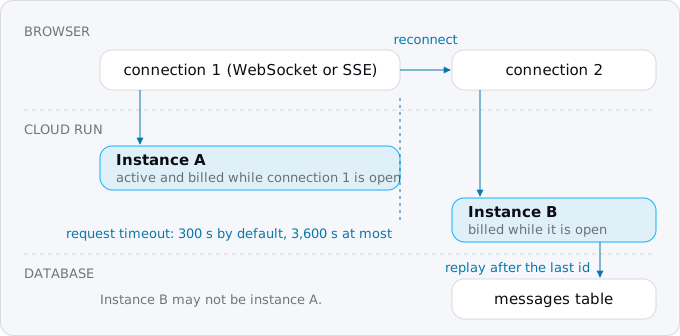
WebSockets and server-sent events run on Cloud Run with no configuration, but each open connection is a request: it ends at the request timeout, 5 minutes by default and 60 at most, a reconnect can land on another instance, and the instance is billed while any connection is open. Clients reconnect with their last message id, and messages fan out between instances through Postgres or Redis.
In short
- The request timeout is 300 seconds by default and 3,600 at most; every stream on a service left at the default ends after 5 minutes.
- Each open connection holds a concurrency slot: 80 per vCPU by default, up to 1,000 per instance.
- One instance of 1 vCPU and 512 MiB with a connection open through office hours costs $14.78 a month on request-based billing; open around the clock, $44.71 on instance-based billing.
- Postgres LISTEN and NOTIFY fans messages out between instances with no new service, for payloads under 8,000 bytes; the smallest Memorystore for Valkey node is $25.55 a month.
- End SSE streams every 10 minutes and ping every 25 seconds; on SIGTERM Cloud Run waits 10 seconds before SIGKILL.
Prices are europe-west1 list prices, read on October 11, 2026.
WebSockets, server-sent events and polling
Cloud Run runs all three common ways to push updates to a browser.
- WebSocket. The browser sends an HTTP request asking to upgrade, and the connection becomes a two-way channel: either side can send a message at any time. It suits chat, games, collaborative editing, anything where the browser talks back often.
- Server-sent events (SSE). An ordinary GET that the server never finishes. The response has the type
text/event-stream, and the server writes short text blocks to it as things happen. It is one way, server to browser. The browser'sEventSourcereconnects by itself and sends the last event id it got in aLast-Event-IDheader, so the server can resend what was missed. It suits notifications, dashboards, progress and token-by-token AI output, as in an AI agent backend on Cloud Run. - Polling. The browser asks "anything new?" every few seconds. It is not a long connection at all: each poll is a short request.
If the browser only listens, SSE is the simpler choice: plain HTTP, reconnects for free, cookies like any request. MDN warns that over HTTP/1 a browser allows only 6 SSE connections per domain across all tabs. Cloud Run speaks HTTP/2 to browsers and allows 100 streams per HTTP/2 connection, so that limit does not bite on a run.app address.
What Cloud Run does with a long connection
- It is a request, and requests end. A WebSocket or an SSE stream is subject to the service's request timeout, even if your server never times out anything. The default is 5 minutes (300 seconds); the maximum is 60 minutes (3,600 seconds). When it runs out, Cloud Run closes the connection, and the client has to open a new one.
- The next connection can reach another instance. Google's timeout page says a client that reconnects is not guaranteed the same instance. Session affinity, a cookie that asks Cloud Run to send a client back to the same instance, is best effort; the sessions guide shows why it is not a fix.
- It holds a concurrency slot. Each open connection counts against the instance's maximum concurrent requests: 80 per vCPU by default, up to 1,000. With the default, the 81st open socket on a 1 vCPU service starts a second instance. Our concurrency guide explains the setting.
- It keeps the instance awake and billed. An instance with any open WebSocket is active, so it has CPU and is billed for all of that time. The same holds for an SSE stream, which is a request in progress.
- Messages do not cross instances. A message that arrives on instance A is in A's memory. A client connected to B never sees it unless something outside both instances carries it over.
- Shutdowns are announced. Before Cloud Run stops an instance, it sends
SIGTERMand waits 10 seconds beforeSIGKILL. Requests in progress normally get time to finish, but in exceptional cases an instance that is still serving getsSIGTERM. - Streaming needs nothing special. Cloud Run streams any chunked response, and the 32 MiB response limit does not apply to it.
- Leave HTTP/2 end-to-end off for WebSockets. Google's WebSocket page says so. By default Cloud Run speaks HTTP/2 to the browser and HTTP/1 to your container, and WebSockets work over that.
What an open connection costs
Cloud Run's default, request-based billing, charges an instance from the start of its first request to the end of its last, and requests that overlap are paid once. A connection that stays open is a request that never ends, so one browser that leaves a tab open keeps a whole instance billed. A thousand browsers on the same instance cost the same as one, because their time overlaps.
So the bill follows the hours with at least one connection, not the number of users. The model uses europe-west1 list prices of 2026-10-11 (Google's pricing page and the Cloud Billing Catalog API, before VAT), one instance of 1 vCPU and 512 MiB, a 730-hour month, and a free tier nothing else uses:
- Request-based billing charges $0.000024 per vCPU-second and $0.0000025 per GiB-second while the instance is active, after 180,000 free vCPU-seconds and 360,000 free GiB-seconds a month, and $0.40 per million requests after 2 million.
- Instance-based billing charges $0.000018 and $0.000002 for the whole life of the instance, after 240,000 vCPU-seconds and 450,000 GiB-seconds free.
Six cases:
- 10 users polling every 30 seconds in office hours (22 days of 10 hours): 264,000 polls, each billed 100 ms, about 26,400 busy seconds. That is inside the free tier, so $0.00 ($0.67 without it).
- An SSE stream open through the same office hours, request-based: 792,000 active seconds, $14.78 ($20.00 without the free tier). It is the same for 10 users or 200.
- The same on instance-based billing: the instance lives up to 15 idle minutes longer each day, 811,800 seconds, $10.29.
- A connection open around the clock, request-based: 2,628,000 seconds, $61.14.
- The same on instance-based billing: $44.71.
- Two instances around the clock with Memorystore for fan-out: instance-based, plus the smallest Memorystore for Valkey node at $25.55, $120.19.
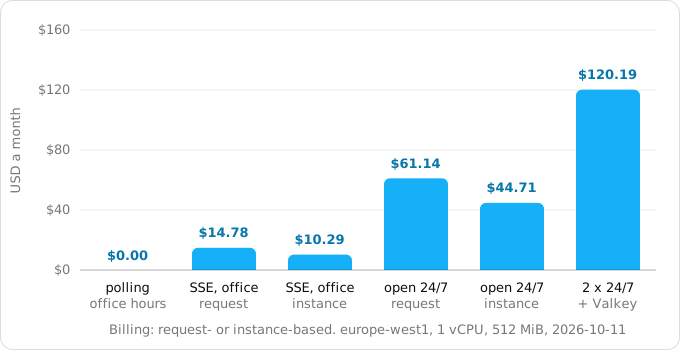
Three things follow. A few users with long sessions are cheaper to serve by polling, because short polls leave the instance idle most of the time, while one open stream keeps it billed for the whole session. Once something is open around the clock, instance-based billing is about 27% cheaper for the same hours. And a separate Redis for fan-out, at $25.55 a month, costs more than an instance kept busy through office hours.
Google's WebSocket page says an instance with an open WebSocket is billed "as instance-based billing", while the pricing page bills request-based active time at the request-based rate. The model uses the pricing page's rate, the higher one, so a real bill should not be above it. If connections are open most of the day, switch the service to instance-based billing (--no-cpu-throttling) and the lower rate is certain; our billing guide covers the switch.
Requests themselves cost almost nothing here: 1,000 clients that reconnect every hour around the clock make 730,000 requests a month, inside the free 2 million. Messages sent to browsers are outbound data, priced in our egress guide; a million 200-byte messages is about 0.19 GiB, about $0.02 at $0.105 per GiB to users in Europe.
Step 1: find the long connections in your code
Run these at the root of the repository. Each prints the files that open a long connection or keep its state in memory.
grep -rlE "WebSocketServer|socket\.io|text/event-stream|EventSource|ActionCable|channels\.layers|reverb" --include=*.{js,ts,mjs,py,rb,php,go} . | grep -v node_modules
grep -rnE "adapter: async|InMemoryChannelLayer|REVERB_SCALING_ENABLED" config/ */settings*.py .env* 2>/dev/null
The second line finds single-process setups. Rails' Action Cable defaults to the async adapter, which the Rails guide says is for development and tests only. Django Channels' in-memory layer is marked "do not use in production". Laravel Reverb shares messages between servers only when REVERB_SCALING_ENABLED is on, and then through Redis. Socket.IO needs an adapter between nodes, and sticky sessions while HTTP long-polling is enabled, which is the default.
Step 2: set the timeout and concurrency
Check what the service has now. This is a read-only command; replace SERVICE and the region.
gcloud run services describe SERVICE --region europe-west1 \
  --format='value(spec.template.spec.timeoutSeconds,
  spec.template.spec.containerConcurrency)'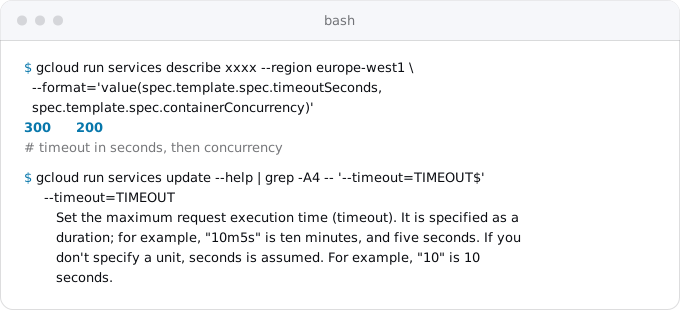
Then set them. A new revision is created, so this is a deploy.
gcloud run services update SERVICE --region europe-west1 \
  --timeout=3600 --concurrency=250
--timeout=3600 lets a connection live the full 60 minutes; Google's tutorial suggests a lower value if instances linger after a traffic spike. --concurrency is how many connections one instance takes before Cloud Run starts another. Idle sockets use memory, not CPU, so raise it above the default, measure the memory per connection, and stay under 1,000. Add --session-affinity if rebuilding a client's state on a new instance is expensive; it is best effort, so the code still has to work without it.
Step 3: make the client reconnect
The browser's WebSocket does not reconnect by itself. Wrap it so it does, with a growing delay, and tell the server where you left off:
let lastId = 0;
let delay = 1000;
function connect() {
  const ws = new WebSocket(`wss://${location.host}/ws?after=${lastId}`);
  ws.onopen = () => { delay = 1000; };
  ws.onmessage = (e) => { const m = JSON.parse(e.data); lastId = Number(m.id); show(m); };
  ws.onclose = () => { setTimeout(connect, delay + Math.random() * 1000); delay = Math.min(delay * 2, 30000); };
}
connect();
show stands for whatever draws a message on the page, and the sample server replays everything after after the same way its SSE handler does in Step 4. The random part of the delay matters: when an instance restarts, all its clients lose their sockets at once, and without it they all come back at once. Close code 1012 ("Service Restart" in the IANA registry) and 1006 ("Abnormal Closure", the connection dropped without a close message) both mean "try again".
EventSource already does this: it reconnects after the stream ends, waits the time the server set with a retry: line, and sends Last-Event-ID. A server answer of HTTP 204 tells it to stop.
Step 4: send server-sent events that survive a reconnect
The handler below is from our sample (Step 6). It stores nothing in the instance: every message has an id from the database, so whichever instance the browser reconnects to can send what was missed.
async function events(req, res) {
  res.writeHead(200, {
    "content-type": "text/event-stream",
    "cache-control": "no-cache",
  });
  res.write("retry: 2000\n\n"); // the browser waits 2 s before it reconnects
  const last = Number(req.headers["last-event-id"] ?? 0);
  if (last > 0) { // a reconnect: send what was missed
    const { rows } = await pool.query(
      "SELECT id, body FROM messages WHERE id > $1 ORDER BY id LIMIT 500", [last]);
    for (const m of rows) res.write(`id: ${m.id}\ndata: ${JSON.stringify(m)}\n\n`);
  }
  streams.add(res);
  const ping = setInterval(() => res.write(": ping\n\n"), 25_000);
  const end = setTimeout(() => res.end(), streamSeconds * 1000); // a browser that left is not reported over HTTP/1.1
  res.on("close", () => { streams.delete(res); clearInterval(ping); clearTimeout(end); });
}
Three details matter on Cloud Run:
- A ping comment every 25 seconds (
: ping) keeps proxies between the server and the browser from closing a connection that has been silent for a while. - The stream ends on its own after
STREAM_SECONDS, 10 minutes by default. Google's troubleshooting page says that over HTTP/1.1 a client's disconnect is not passed on to the container. A browser that closed its tab can leave its stream open on your instance, and billed, until the request timeout. Ending streams every 10 minutes caps that at 10 minutes, and costs one cheap request per reconnect. WebSockets pass a disconnect on, so this applies to SSE. - Do not compress the stream. Compression buffers output to compress it well; Express's
compressionmiddleware says it does not work with server-sent events unless you callres.flush()after each event. Leavetext/event-streamout of it.
Step 5: fan messages out between instances
A message saved on one instance must reach the clients of every instance. Google's WebSocket page recommends a message channel that each instance subscribes to over a connection it opens itself: Redis Pub/Sub on Memorystore, or Firestore real-time updates. Cloud Pub/Sub, Google's message queue, does not fit here: a push subscription sends each message to one URL of the service, and Cloud Run picks the instance behind it, so the message does not reach every instance.
If the app already has Postgres, it has a channel: LISTEN and NOTIFY. Every instance keeps one connection that listens; whichever instance saves a message notifies, and Postgres delivers the notification to every listening session when the transaction commits.
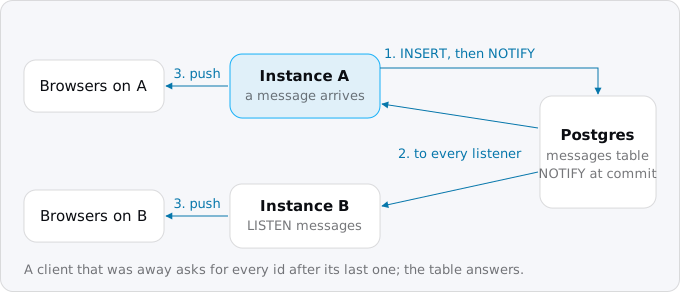
// Every instance keeps one connection that LISTENs; any instance that saves a message NOTIFYs.
async function listen() {
  const client = new pg.Client({ connectionString: process.env.DATABASE_URL, keepAlive: true });
  client.on("notification", (n) => deliver(JSON.parse(n.payload)));
  client.on("error", () => setTimeout(listen, 1000)); // reconnect: Cloud Run resets idle connections
  await client.connect();
  await client.query("LISTEN messages");
}

async function publish(body) {
  const { rows } = await pool.query(
    "INSERT INTO messages (body) VALUES ($1) RETURNING id, body", [body]);
  if (process.env.BUS === "none") deliver(rows[0]); // this instance only
  else await pool.query("SELECT pg_notify('messages', $1)", [JSON.stringify(rows[0])]);
}

function deliver(msg) {
  for (const ws of sockets) ws.send(JSON.stringify(msg));
  for (const res of streams) res.write(`id: ${msg.id}\ndata: ${JSON.stringify(msg)}\n\n`);
}
The limits come from the PostgreSQL and Google pages:
- A payload must be shorter than 8,000 bytes. Send the id and a small body, and let clients fetch anything larger.
- A notification sent while nobody listens is lost. That is why messages go into a table first, and a reconnecting client asks for everything after its last id.
- The listening connection is long-lived and mostly idle. Cloud Run closes outbound connections after 10 idle minutes to a VPC and 20 to the internet, and resets them now and then during maintenance. Turn on TCP keepalive (
keepAlive: truein node-postgres) and reconnect on error, as the code does. - It uses one database connection per instance, on top of the pool. Cloud SQL's built-in connection allows 100 per Cloud Run instance; count
max_instancestimes the pool plus one against the database's ownmax_connections.
The other options, priced as of 2026-10-11:
- Memorystore for Redis or Valkey. Google's chat tutorial uses it. The smallest Valkey node in Belgium is $25.55 a month, and it is reached over a VPC. Worth it if Redis is already there for other work; the Redis guide prices the Memorystore options and shows how a service reaches one.
- Firestore listeners. Each instance listens to a collection. Firestore charges a read for every changed document delivered to every listener, so ten instances pay ten reads per message.
- Framework adapters. Socket.IO has Redis and Postgres adapters. Rails' Action Cable has a PostgreSQL adapter (8 kB payload limit) and Solid Cable, which stores messages in a table and polls it, no Redis needed. Django Channels supports only Redis in production, and Laravel Reverb scales through Redis.
For Socket.IO, also turn off HTTP long-polling on the client (transports: ["websocket"]). Long-polling sends several requests per session that must reach the same instance, and Cloud Run's affinity is only best effort; Google's tutorial says the same.
Step 6: shut down cleanly and try it locally
On SIGTERM, close every WebSocket with code 1012 and end every SSE stream, so clients reconnect at once to an instance that is staying, instead of waiting for a timeout:
process.on("SIGTERM", () => {
  for (const ws of sockets) ws.close(1012, "restarting");
  for (const res of streams) res.end();
  server.close(() => process.exit(0));
});
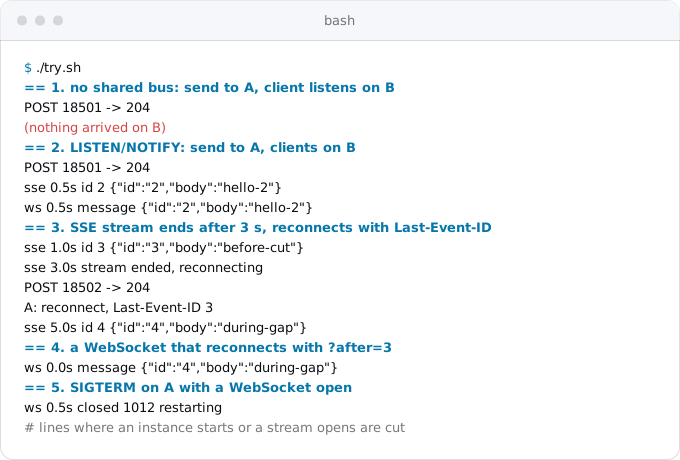
Before you deploy, run two copies of the service against one database, the way Cloud Run will. Our sample's try.sh starts a throwaway postgres:17 in Docker, two instances of the server on two ports, and test clients. Its output, from a run on 2026-10-11:
When Cloud Run is the wrong home
- Thousands of connections open all day, every day, on many instances. Instance-based billing makes this predictable, but compare it with a single always-on server, as our VPS comparison does, or with a managed realtime service.
- The browser can listen to the database directly. If the data already lives in Firestore, the browser's own Firestore listener gets updates without your service holding any connection at all.
This is the long version of the long-connections section in our patterns guide.
What breaks
- Every client disconnects after exactly 5 minutes. The request timeout is still the default 300 seconds. Raise it (Step 2).
- Users on the same page see different messages. There is more than one instance and no fan-out. Add one (Step 5).
- Messages are lost around a reconnect. The client does not send its last id, or the server keeps messages only in memory. Store them and replay (Steps 3 and 4).
- Socket.IO answers 400 at the handshake. Long-polling requests reached another instance. Use the WebSocket transport only.
- The bill shows instances active all night. A tab left open, or an SSE stream whose browser left, keeps an instance billed. End streams on a schedule, and look at instance-based billing if this is the normal state.
- The stream stays blank, then arrives all at once. Something buffers it: compression, a proxy, or a framework response that is not flushed.
- Live updates stop after 10 or 20 quiet minutes. The listening database connection was closed as idle. Turn on keepalive and reconnect.
- An instance restarts and new instances start in a burst. All its clients reconnected in the same second. Add the random delay.
Checklist
- Find the long connections and the in-memory adapters (Step 1).
- Set
--timeoutup to 3600 and a concurrency that fits memory. - Store messages with ids; make clients reconnect with a growing random delay and their last id.
- Fan out through
LISTEN/NOTIFY, or the Redis you already pay for, never through instance memory. - End SSE streams every 10 minutes, ping every 25 seconds, close sockets with 1012 on
SIGTERM. - Run two local instances against one database before the deploy.
- Check the bill after a week, and switch to instance-based billing if connections are open most hours.
Where Exodus comes in
Exodus's CLI reads the repository with your coding agent and finds the long connections: a WebSocket server, an SSE endpoint, Socket.IO with long-polling, Action Cable on async, an in-memory channel layer. Each becomes a finding in the report with this guide as its fix, and your agent can read the guide from the terminal.
FAQ
Does Cloud Run support WebSockets?
Yes, with no configuration. Each WebSocket is a request subject to the service's request timeout, up to 60 minutes, and an instance takes up to 1,000 connections. Google's WebSocket page says to leave HTTP/2 end-to-end off: Cloud Run speaks HTTP/2 to the browser and HTTP/1 to the container, and WebSockets work over that.
Why do my WebSocket connections close after 5 minutes on Cloud Run?
The service still has the default request timeout of 300 seconds, and Cloud Run closes any connection that reaches it. Raise the timeout to at most 3,600 seconds. Clients still have to reconnect after it, and a reconnect is not guaranteed the same instance, so they send the id of the last message they got.
Can Cloud Pub/Sub fan out messages to every Cloud Run instance?
No. A push subscription sends each message to one URL of the service, and Cloud Run picks the instance behind it, so the message reaches one instance only. Use a channel each instance subscribes to over its own connection: Redis Pub/Sub on Memorystore, Firestore real-time updates, or LISTEN and NOTIFY in the Postgres the app already has.
Is polling cheaper than server-sent events on Cloud Run?
For a few users with long sessions, yes. Ten users polling every 30 seconds through office hours stay inside the free tier, $0.00 a month, because short polls leave the instance idle. One SSE stream open through the same hours keeps the instance billed: $14.78 a month, the same for 10 users or 200.
Sources
27
- docs.cloud.google.comUsing WebSockets, Google
- docs.cloud.google.comBuilding a WebSocket Chat service for Cloud Run tutorial, Google
- docs.cloud.google.comConfigure request timeout for services, Google
- docs.cloud.google.comCloud Run quotas and limits, Google
- docs.cloud.google.comInvoke with an HTTPS request, Google
- docs.cloud.google.comTroubleshoot Cloud Run issues, Google
- docs.cloud.google.comContainer runtime contract, Google
- docs.cloud.google.comUse HTTP/2 for services, Google
- docs.cloud.google.comSet session affinity for services, Google
- docs.cloud.google.comMaximum concurrent requests for services, Google
- docs.cloud.google.comBilling settings for services, Google
- cloud.google.comCloud Run pricing, Google
- docs.cloud.google.comPush subscriptions, Pub/Sub
- cloud.google.comMemorystore for Valkey pricing, Google
- cloud.google.comFirestore pricing, Google
- docs.cloud.google.comCloud SQL for PostgreSQL quotas and limits, Google
- postgresql.orgNOTIFY and LISTEN, PostgreSQL
- html.spec.whatwg.orgServer-sent events, WHATWG HTML Living Standard
- developer.mozilla.orgEventSource, MDN
- socket.ioSocket.IO: Using multiple nodes
- guides.rubyonrails.orgAction Cable Overview, Rails guides
- github.comrails/solid_cable
- channels.readthedocs.ioDjango Channels: channel layers
- laravel.comLaravel Reverb
- github.comcompression, Express
- iana.orgWebSocket Close Code Number Registry, IANA
- Exodus team: Cloud Billing Catalog API read for Cloud Run and Memorystore SKUs in europe-west1, gcloud 587.0.0 help for every flag shown, a read-only describe of a service, and a local run of the sample