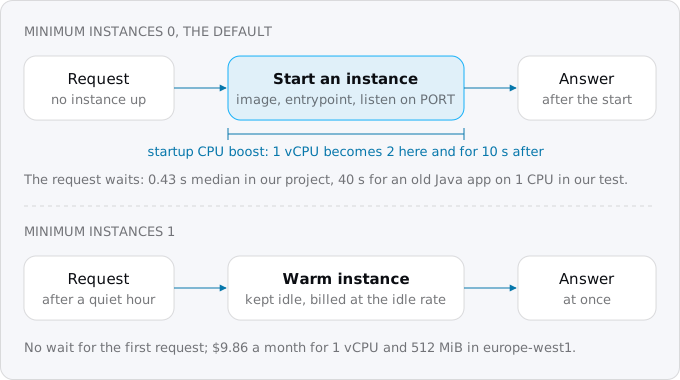
A cold start on Cloud Run is the wait for a new instance when none is running; for a small app it is usually under a second, 0.57 s at the median for our eight services. Startup CPU boost shortens every start for a fraction of a cent and is on by default for new services. One minimum instance removes the wait for about $8 to $10 a month.
In short
- Our eight services started an instance in 0.57 s at the median and 2.25 s at worst; a first request on a new instance took 0.43 s, later ones 0.002 s.
- Startup CPU boost raises a 1 vCPU instance to 2 during startup and for 10 seconds after, at most $0.000252 for a half-second start.
- One idle minimum instance of 1 vCPU and 512 MiB costs $9.86 a month on request-based billing in europe-west1, $49.93 on instance-based.
- Set it at the service level with
--min 1; it is a best-effort target, and Google suggests 3 for a service that must stay up.
Prices are list prices of October 12, 2026.
What a cold start is and when it happens
An instance is one running copy of your container. Cloud Run adds instances when traffic grows and removes them when it falls; Google calls this autoscaling. When a revision gets no traffic, it scales to zero by default. From zero, the only thing that starts an instance is a request that finds none: Google's autoscaling page calls this on-demand scaling and says it is "the only driver for scaling from zero".
The start itself has three parts, in Google's words: downloading the container image, running the entrypoint command, and waiting for the container to listen on its port. Requests go to the container as soon as it listens. While it starts, the request waits in a queue, for up to 3.5 times the service's average startup time or 10 seconds, whichever is longer.
An idle instance does not vanish at once: Cloud Run may keep it for up to 15 minutes after its last request, and stops the least busy ones sooner. So a service with a request every few minutes usually finds an instance up, and one with a request an hour starts cold almost every time.
Cold starts also happen when traffic grows and when a new revision is deployed. Minimum instances help only from zero to one; Google's announcement of startup CPU boost says they "aren't a solution for all cold-starts as traffic scales out". Boost speeds up every start.
Measure your own cold starts first
Cloud Run writes a line to its system log every time it starts an instance, with the reason. This command lists the last week of starts for one service:
gcloud logging read 'resource.type="cloud_run_revision"
  AND resource.labels.service_name="SERVICE"
  AND logName:"varlog%2Fsystem"
  AND textPayload:"Starting new instance"' \
  --freshness=7d \
  --format='value(timestamp,textPayload)'
Each line ends in a reason. AUTOSCALING means traffic needed an instance, which includes every start from zero; DEPLOYMENT_ROLLOUT means a new revision. If the list is short, you have few cold starts. If it shows a start every few minutes all day, you have many, and the next question is how long each one takes.
For that, Cloud Monitoring has the Cloud Run metric container/startup_latencies, with no setup. The logs give it too: the time from "Starting new instance" to the line that says the startup probe succeeded, as in our health checks guide. Our logs and alerts guide explains how to read the system log, and cold starts, measured compares start times across platforms.
What a user feels is the latency of the request that waited. Cloud Run's request log carries the instance's id on every entry, so you can compare the first request each instance served against all later ones.
What we found in our own project
We read 30 days of logs from our own Google Cloud project, eight small services, all read-only. Every one runs with 1 vCPU, 128 to 512 MiB of memory, minimum instances 0 and startup CPU boost on. Cloud Run started 671 instances in those 30 days: 623 for autoscaling and 48 for deploys.
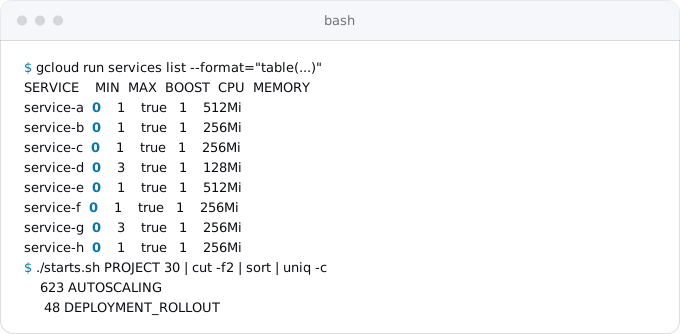
From "Starting new instance" to the probe's success took 0.57 s at the median, 0.84 s at the 90th percentile, 1.49 s at the 99th, and 2.25 s at worst. These are small apps; the old Java sample in our test below took 40 s at 1 CPU.
Of 18,602 requests, 636 were the first on a new instance, 3.4%. Their median latency was 0.43 s; the median of every later request was 0.002 s. For one request in thirty the app was about two hundred times slower, and the difference was the start.
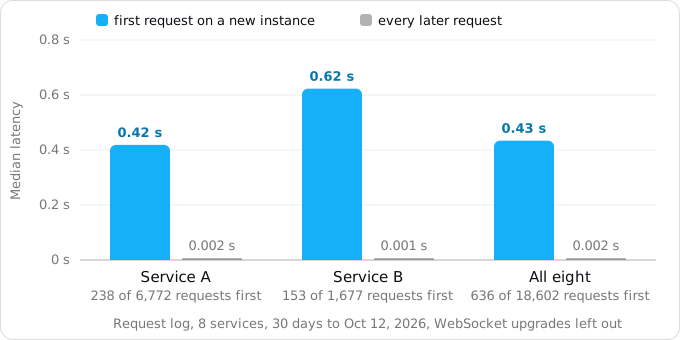
Is half a second worth $9.86 a month? For service A, one minimum instance would remove most of 238 waits of about 0.42 s, some 100 seconds of waiting in a month, on an internal tool. For a public page whose first morning visitor is a customer, the answer can differ. One minimum instance on each of our eight services would cost $68.16 a month at their sizes. We keep them at zero.
Startup CPU boost
Startup CPU boost gives an instance more CPU while it starts and for 10 seconds after. The amount depends on the CPU limit, from Google's CPU page:
- a limit up to 1 vCPU is boosted to 2;
- 2 vCPU to 4;
- 4, 6 or 8 vCPU to 8.
Sidecar containers are boosted too. Much of a start is CPU work: loading code, compiling it just in time, reading configuration. An app that can use two threads at once gains the most; Google's announcement explains Node.js's smaller gain by its single thread.
gcloud turns boost on for new services when you do not say otherwise ("Enabled by default when unspecified on new services", in the help of gcloud run deploy). Services made other ways may have it off. To check one service and to turn boost on or off:
gcloud run services describe SERVICE --region REGION \
  --format='value(spec.template.metadata.annotations."run.googleapis.com/startup-cpu-boost")'

gcloud run services update SERVICE --region REGION --cpu-boost
gcloud run services update SERVICE --region REGION --no-cpu-boost
The first prints true when boost is on. The setting is an annotation on the revision, so a change deploys a new revision.
How much it helps
Google's 2022 announcement reported startup up to 50% faster for the Spring PetClinic sample, 47% for a native Spring service built with GraalVM, 23% for a plain Java function, and up to 30% for Node.js. Its Java tips page repeats "up to 50%".
We could not switch boost off in our project to test it without a production change, so we measured the same effect on our build machine, with Docker limiting the container to 1 CPU and then 2, five starts each, timing from docker run to the first answer on the port. This is not Cloud Run; it shows what one extra CPU does to a start.
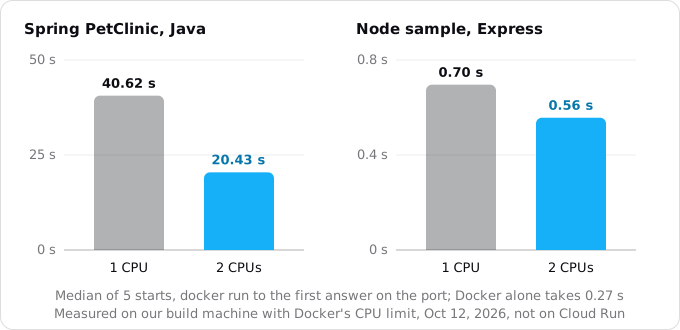
The Java app was the public Spring PetClinic image, an old build on Java 8 and Spring Boot 2.4.5: 40.6 s at 1 CPU, 20.4 s at 2. The Node.js app was a small Express sample: 0.70 s and 0.56 s, of which Docker itself took 0.27 s, so the app's own start fell by about a third. These match Google's numbers closely.
What boost costs
You pay for the boosted CPU during startup and for the 10 seconds after. For a 1 vCPU service that starts in half a second, the extra is at most 10.5 vCPU-seconds, $0.000252 at the active rate of $0.000024 per vCPU-second. Our 671 starts a month would add at most $0.17.
For a slow start the arithmetic can come out even. The PetClinic start at 1 CPU bills 40.6 vCPU-seconds. With boost it is 20.4 seconds at 2 vCPU plus 10 seconds at 2 vCPU, at most 60.9 vCPU-seconds: about $0.0005 more per start, and memory is billed for 20 fewer seconds. For almost every service, boost is worth leaving on.
Minimum instances
A minimum instance is an instance Cloud Run keeps running even when it serves nothing. With a minimum of 1, the first request after a quiet night reaches a warm instance and is answered without a start; that one instance can take as many requests at once as the service's concurrency allows, 80 by default. Above the minimum, Cloud Run scales as usual.
There are two places to set it, and Google recommends one of them.
- Service level. The flag
--min. Set on the service, takes effect without deploying a new revision, and is divided among the revisions that receive traffic. This is the one Google recommends. - Revision level. The flag
--min-instances. Set on each new revision, so changing it deploys one. Google recommends not combining it with the service-level setting.
# keep one instance warm; takes effect without a new revision
gcloud run services update SERVICE --region REGION --min 1

# back to zero
gcloud run services update SERVICE --region REGION --min default

# see it: the "Scaling: Auto (Min: 1, Max: ...)" line
gcloud run services describe SERVICE --region REGION
gcloud run deploy takes the same --min flag. In a service YAML file the service-level setting is the annotation run.googleapis.com/minScale in the service's own metadata. Google's Terraform example sets min_instance_count in the scaling block of the revision template, which is the revision-level setting.
How it behaves
A few rules from Google's page decide what you get for your money.
- It is a target, not a promise. Google calls it "a best-effort target". Minimum instances can be restarted at any time, and the count can drop for a while when a zone runs out of capacity, when Google rebalances machines, when your container crashes on start, or when a quota or disabled billing stops the project. For a service that must stay up, Google suggests at least 3.
- Requests are spread across all minimum instances. Set 10 and need 2, and all 10 do a little work. Set the minimum to what normal traffic needs.
- A traffic split divides it. A service minimum of 10 with a 50/50 split gives each revision 5.
- Tags keep revisions warm. With a revision-level minimum, every revision that has a traffic tag starts its minimum instances and keeps them, even with no traffic. Our revisions and rollbacks guide uses tags for previews; remove them when you are done, or use the service-level setting.
- Maximum wins. When minimums and maximums at the two levels disagree, the largest minimum wins, and any maximum caps it.
A warm instance is not a background worker
On request-based billing, the default, an idle instance keeps its memory but gets almost no CPU. A minimum instance on request-based billing is warm, not working: a timer or a queue consumer inside it will not run between requests. Google's advice for work outside requests is instance-based billing together with at least one minimum instance. Our billing guide compares the two, and our guides on Cloud Scheduler and work after the response show how to move timers and background jobs out of the instance, which is usually cheaper.
What it costs
On request-based billing, an idle minimum instance has its own rate: in europe-west1 and the other Tier 1 regions (the lower-priced group in Google's pricing table), at list prices of October 12, 2026, $0.0000025 per vCPU-second and $0.0000025 per GiB-second. CPU is a tenth of the active rate of $0.000024; memory costs the same. Time spent serving requests is billed at the active rate as usual, the rates the Cloud Run costs guide works through.
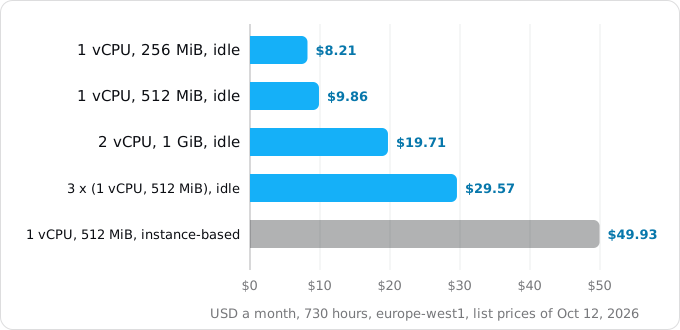
A month is 730 hours, 2,628,000 seconds. Per instance kept idle all month:
- 1 vCPU and 256 MiB: $8.21
- 1 vCPU and 512 MiB: $9.86, or $0.32 a day
- 2 vCPU and 1 GiB: $19.71
- three instances of 1 vCPU and 512 MiB, Google's suggestion for high availability: $29.57
- the same single instance on instance-based billing, where idle time is billed at the full rate of $0.000018 per vCPU-second and $0.000002 per GiB-second: $49.93
Two more facts change these numbers a little.
- The free tier. Cloud Run's monthly free tier, 180,000 vCPU-seconds and 360,000 GiB-seconds on request-based billing, is described as "based on us-central1 active pricing" and applied as a discount on spend. The pricing page does not say whether it covers idle minimum time. Our free tier guide works the example both ways; either way, a minimum instance takes a service out of the free range.
- Committed use discounts. If you commit to an hourly spend for one or three years, request-based Cloud Run gets 17% off, which brings the 1 vCPU, 512 MiB instance to about $8.18. A commitment is worth it only for spend you are sure of for a year.
Cloud Run's Recommender does not suggest minimum instances or boost; its one cost recommendation is a switch to instance-based billing.
Choosing
- Read the start log and the startup metric for a week. If starts are rare or short, stop here.
- Check that boost is on. It is the cheapest fix.
- Make the start shorter (next section).
- If the first request must be fast (a login page that must answer at 3 a.m., a webhook sender with a short timeout), set
--min 1at the service level. - If one warm instance is not enough, because the service must ride out a restart without a cold request, use 3, as Google suggests, and weigh the cost against an outage.
- For a cutover day, a minimum instance costs cents; our cutover checklist sets it the week before and removes it after.
Making the start itself shorter
A shorter start helps every cold start, including the ones a minimum instance cannot prevent. Google's tips:
- Listen early. Open the port first; open pools and load caches lazily, on the first request that needs them. The cost, in Google's words, is a slower first such request.
- Load less. Fewer and smaller dependencies; in Node.js, bundle the code and load rare modules when needed; in Python, import heavy modules where they are used.
- Java. Thin JARs;
-XX:TieredStopAtLevel=1inJAVA_TOOL_OPTIONSto compile less at startup; application class data sharing. - Python with gunicorn. Google's sample runs one worker with 8 threads,
--workers 1 --threads 8; the Node, Python, Rails and Go guide has each stack's container. - The execution environment. The first generation, based on gVisor, has faster cold starts; the second starts slower for some services and runs faster under load. Our buildpacks or a Dockerfile guide covers smaller images.
A keep-warm ping is not the same
A Cloud Scheduler job that calls the service every few minutes often keeps an instance alive, because idle instances may stay up to 15 minutes. It does not guarantee it: Google's container contract says an idle instance "can be shut down at any time". Each ping is also billed at the active rate. A minimum instance is the setting made for this, at the lower idle rate.
What breaks
- A minimum instance that does nothing. A timer or a queue consumer in a minimum instance on request-based billing gets almost no CPU between requests and silently waits.
- Revision-level minimum with tags. Every tagged revision keeps its minimum instances running and billed. A month of forgotten preview tags is a month of idle instances.
- Expecting zero cold starts. Minimum instances restart, and scale-outs and deploys still start new instances.
- Exits in the code. Google warns against code that exits the process in a minimum instance: each exit is a new cold start.
- Boost off. It is on by default only when
gcloudcreates a service. Check the annotation on services made other ways. - Measuring in the wrong place. The
request_latenciesmetric leaves out startup time, so a dashboard of it can look fine while users wait. Usestartup_latenciesand the request log. - A start over 4 minutes. An instance that does not listen within 4 minutes fails its start, whatever the minimum. Boost and lazy loading help; our health checks guide has the probe settings.
Checklist
- List a week of "Starting new instance" lines for each service and read the reasons.
- Look at
startup_latenciesand, if you can, the first request on each instance in the request log. - Check that boost is on, with the
describecommand above; if not,--cpu-boost. - Make the start shorter: listen first, load lazily, trim dependencies.
- Only then decide on
--min 1at the service level, and note the monthly cost: $8.21 to $9.86 for a small instance in a Tier 1 region. - Keep background work out of minimum instances on request-based billing.
- Look at the bill after a month and decide again.
Where Exodus comes in
The report Exodus builds for a repository says, under "What works differently", that "a copy that starts after a quiet spell answers in about 0.5 to 2 seconds. Startup CPU boost shortens that; one copy kept warm removes it, for a few dollars a month." exodus check flags timers inside the process, the code that a minimum instance on request-based billing would not run, and points to Cloud Scheduler. When your coding agent has to decide on minimum instances during a move, it can read this guide through exodus kb and exodus ask.
FAQ
How much does a minimum instance cost on Cloud Run?
On request-based billing in europe-west1, an idle minimum instance of 1 vCPU and 512 MiB costs $9.86 a month, and one of 1 vCPU and 256 MiB $8.21, at list prices of October 12, 2026. On instance-based billing the same instance costs $49.93, because idle time is billed at the full rate.
Does startup CPU boost cost extra?
Yes, a little. You pay for the boosted CPU during startup and for the 10 seconds after: at most $0.000252 for a 1 vCPU service that starts in half a second. Our 671 starts a month would add at most $0.17. New services created with gcloud get boost by default.
Does a minimum instance prevent all cold starts?
No. It removes the start from zero to one, but scale-outs and deploys still start new instances, and Google calls the minimum a best-effort target: minimum instances can be restarted at any time. Startup CPU boost and a shorter start help with the rest.
Can a minimum instance run background jobs?
Not on request-based billing, the default: an idle instance keeps its memory but gets almost no CPU, so a timer or queue consumer inside it waits. Google's advice for work outside requests is instance-based billing with at least one minimum instance; Cloud Scheduler is usually cheaper.
Is a keep-warm ping cheaper than a minimum instance?
Not reliably. A Cloud Scheduler ping every few minutes often keeps an instance alive, since idle instances may stay up to 15 minutes, but Google says an idle instance can be shut down at any time, and each ping is billed at the active rate.
Sources
16
- docs.cloud.google.comSet minimum instances for services, Cloud Run, Google
- docs.cloud.google.comConfigure CPU limits for services, Cloud Run, Google
- cloud.google.comCloud Run pricing, Google
- docs.cloud.google.comCompute flexible committed use discounts for Cloud Run, Google
- docs.cloud.google.comAbout instance autoscaling in Cloud Run services, Google
- docs.cloud.google.comContainer runtime contract, Cloud Run, Google
- docs.cloud.google.comGeneral development tips, Cloud Run, Google
- docs.cloud.google.comJava tips, Cloud Run, Google
- docs.cloud.google.comNode.js tips, Cloud Run, Google
- docs.cloud.google.comPython tips, Cloud Run, Google
- cloud.google.comNew startup CPU boost improves cold starts in Cloud Run, Cloud Functions, Google Cloud blog, Sep 26, 2022
- docs.cloud.google.comExecution environments, Cloud Run, Google
- docs.cloud.google.comOptimize with Recommender, Cloud Run, Google
- docs.cloud.google.comGoogle Cloud metrics, Cloud Monitoring
- docs.cloud.google.comgcloud run services update and gcloud run deploy, Google Cloud SDK
- Exodus team: read-only look at our own project on Oct 12, 2026