Six patterns break on Cloud Run: a worker waiting on a queue, work after the response, timers inside the app, files on local disk, sessions in memory and long-lived connections. Each assumes a process that runs on its own, owns a disk and keeps its memory. Their replacements are Cloud Tasks, Cloud Scheduler, Cloud Storage, signed cookies, and sockets that reconnect.
In short
- With request-based billing, an instance has CPU only while a request is open, and an idle one is stopped within 15 minutes with SIGTERM and 10 seconds.
- After the free tiers, a queue worker kept on at 1 vCPU and 512 MiB costs $44.71 a month, a worker pool $25.95, and 100,000 Cloud Tasks jobs of 0.5 s fit in the free tier.
- Cloud Scheduler gives 3 jobs free per billing account, then $0.10 per job per 31 days, and each job's time zone defaults to UTC.
- Cloud Storage Standard costs $0.02 per GiB a month in europe-west1, and a signed upload URL is valid for at most 7 days.
- exodus 0.1.3 found 5 of the 6 patterns in our sample app; work after the response needs a look by hand.
Prices are Google's Tier 1 list prices, read on October 12, 2026.
The one fact behind all six
Most apps that run on a platform such as Heroku, Railway or Render run on Cloud Run with a handful of changes, and every item in that handful comes from one fact about how Cloud Run runs a service. A product planned for Cloud Run from the first commit never picks them up. A Cloud Run service runs your container on instances. Each instance takes requests, and with request-based billing Cloud Run allocates its CPU only while at least one request is in flight. Between requests the instance still exists, with its memory, but its CPU is taken away, so any code that runs on its own, a loop, a timer, a promise still resolving after the response, makes no progress. After a quiet spell Cloud Run keeps an idle instance for up to 15 minutes and then shuts it down, sending SIGTERM and allowing 10 seconds before the process is killed. When traffic grows it starts more instances, and a request can land on any of them.
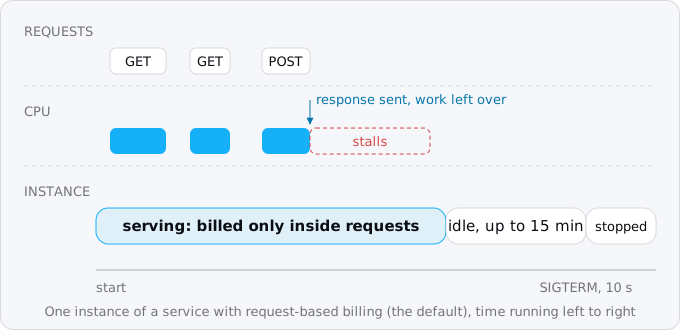
The filesystem adds the last piece. A Cloud Run instance's disk lives in its memory: files written there count against the memory limit, are invisible to other instances and vanish when the instance stops.
Instance-based billing changes the first part, because the instance keeps its CPU for its whole life, but it does not keep one instance alive forever and it does not give you a disk. It also bills every second the instance exists, which turns some of these patterns from broken into expensive.
Finding them in your code
The Exodus CLI looks for all six. We wrote a small Express app that has every one of them, a BullMQ worker, a receipt sent after the response, a node-cron timer, Multer writing uploads to a folder, express-session's default memory store and a WebSocket server, and ran exodus check on it.
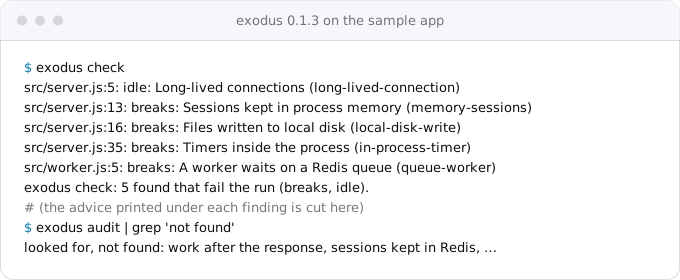
It found five, each with its file and line. It did not flag the sixth, an await sendReceipt() after res.json(), so that one needs a look by hand. A rough search covers the common forms:
grep -rnE "bullmq|sidekiq|celery|rq worker|node-cron|setInterval|apscheduler|whenever" \
  --include='*.js' \
  --include='*.ts' \
  --include='*.py' \
  --include='*.rb' \
  . | grep -v node_modules
grep -rnE "multer|diskStorage|writeFile|:local|FileSystemStorage|sqlite" \
  --include='*.js' \
  --include='*.ts' \
  --include='*.py' \
  --include='*.rb' \
  --include='*.yml' \
  . | grep -v node_modules
grep -rnE "MemoryStore|express-session|WebSocketServer|socket.io|EventSource" \
  --include='*.js' \
  --include='*.ts' \
  . | grep -v node_modules
A Procfile, railway.json or render.yaml with more than one process is a second hint: anything that is not the web process is probably a worker or a clock.
1. A worker waiting on a queue
What it looks like: a BullMQ, Sidekiq, Celery or RQ worker, often its own process in a Procfile or its own service, pulling jobs from Redis.
Why it breaks: the worker is a loop that waits for the next job. On a request-based service it gets no CPU between requests, so jobs stall. On instance-based billing it runs, but bills every second whether there is work or not, and it still has no request to keep Cloud Run from scaling it down.
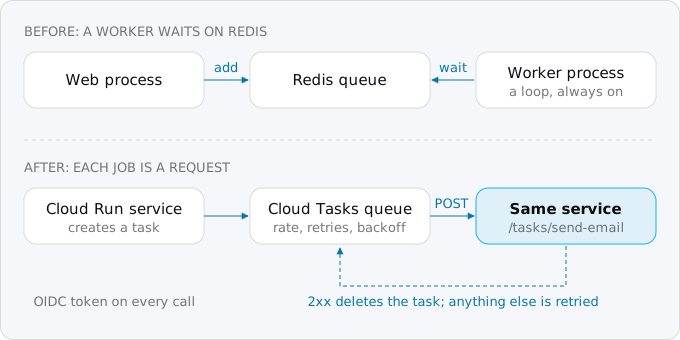
The replacement: Cloud Tasks. Each job becomes an HTTP request to your own service. Where the code pushed a job to Redis, it creates a task, and Cloud Tasks calls a handler with the job's body:
await client.createTask({
  parent: client.queuePath(PROJECT, 'europe-west1', 'emails'),
  task: {
    httpRequest: {
      httpMethod: 'POST',
      url: `${BASE}/tasks/send-email`,
      headers: { 'Content-Type': 'application/json' },
      body: Buffer.from(JSON.stringify({ to })).toString('base64'),
      oidcToken: { serviceAccountEmail: INVOKER, audience: BASE },
    },
  },
})
The handler at /tasks/send-email does the job and answers with a 2xx status, which deletes the task. Any other answer, or no answer in time, is retried with backoff. The handler has a dispatch deadline of up to 30 minutes, so longer jobs belong in a Cloud Run job. Two rules keep it safe: check the OIDC token, so only the queue can call the handler, and make the handler safe to run twice, because Cloud Tasks delivers at least once and in rare cases runs a task more than once.
The limits: a task's body is at most 1 MiB, a task waits in its queue for at most 31 days, and a queue dispatches up to 500 tasks a second. The first million Cloud Tasks operations a month are free, then $0.40 per million.
What waiting costs. Kept as it is, a worker on a service with instance-based billing, 1 vCPU and 512 MiB, costs $44.71 a month after the free tier, whether it handles one job or a million. A worker pool, Cloud Run's resource for processes that pull work, bills $0.000011244 per vCPU-second and comes to $25.95 for the same instance at its default price. The same work as Cloud Tasks, say 100,000 jobs of half a second each, is $1.30 at list price and fits in the free tier if nothing else uses it.
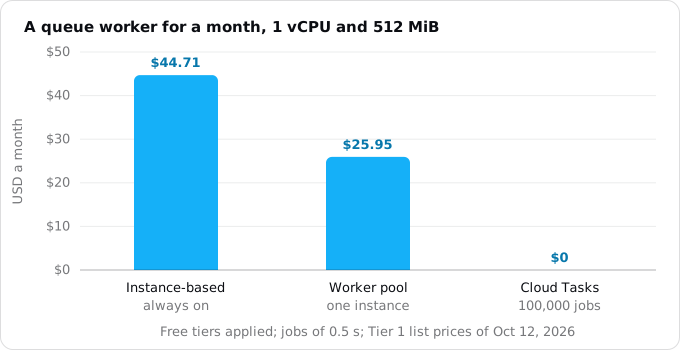
Google's own worker pool example gives $11.61 for one instance of the same size for a month. That figure matches the pool's three-year committed price, $0.000006072 per vCPU-second, less the free tier valued at the default price; at the default price, which is what you pay without a commitment, it is the $25.95 above.
When to keep a loop: a consumer of a stream, a job that holds one connection for hours, or a pull subscription that cannot become a push. Worker pools are generally available since April 14, 2026, run without an endpoint and do not scale on their own: you set the number of instances. Use them for that exception, not for an ordinary job queue. The Cloud Tasks guide has the queue, the IAM roles, the handler and the retries in full.
2. Work after the response
What it looks like: res.send() followed by await sendEmail(), a promise nobody awaits, a "fire and forget" call to an analytics API, a goroutine started by a handler that has already returned, FastAPI's BackgroundTasks.
Why it breaks: once the response is sent, the request is over, and on a request-based service the CPU goes with it. The leftover work stalls until the next request happens to wake the instance, and if the instance is shut down first, it never finishes. Nothing fails loudly: the email arrives an hour late, or not at all.
The replacement: finish the work before you answer, if it is short, or hand it to Cloud Tasks as above and answer at once. For a receipt email, a task is the better choice: the user gets the response without waiting, and the queue retries the email if the mail API is down.
This is the one pattern the CLI did not flag in our sample, and the one most often missed in review, because the code looks correct and works on a server. Read every handler for code after the line that sends the response. The work after the response guide shows the forms it takes in Node, Python, Ruby and Go.
3. Timers and cron inside the app
What it looks like: node-cron, setInterval, APScheduler, Celery beat, whenever, or a separate "clock" process.
Why it breaks: a service scaled to zero has no process to run the timer, and a running one gets no CPU between requests. With several instances, the timer fires once per instance, so a daily email goes out three times on a busy day and zero times on a quiet one.
The replacement: Cloud Scheduler. It sends an HTTP request on a cron schedule. For short work it calls an endpoint of the service, POST /cron/daily-digest, with an OIDC token. For long work it starts a Cloud Run job, the same image with another command, which runs for 10 minutes by default and up to 168 hours (7 days).
gcloud scheduler jobs create http daily-digest \
  --location=europe-west1 \
  --schedule="0 7 * * *" \
  --time-zone="Europe/Berlin" \
  --uri="$SERVICE/cron/daily-digest" \
  --http-method=POST \
  --oidc-service-account-email="$SA"
Three details bite. The time zone: each Scheduler job has its own, and it defaults to UTC, while node-cron used the server's. Overlap: if a run is still going when the next fires, both run, so long work needs a lock or a job. Retries: a Scheduler job does not retry a failed attempt unless you set a retry count, and an HTTP attempt has a deadline between 15 seconds and 30 minutes. Each billing account gets three Scheduler jobs free, then $0.10 per job per 31 days. The Cloud Scheduler guide covers jobs, retries and locks.
4. Files on local disk
What it looks like: Multer's dest, Active Storage's :local service, Django's FileSystemStorage, fs.writeFile into a data/ folder, SQLite on disk, logs written to a file.
Why it breaks: the filesystem of a Cloud Run instance lives in its memory. A file counts against the memory limit, so a few large uploads can crash the instance; it is invisible to the other instances, so an upload saved on one is a 404 on the next; and it disappears when the instance stops.
The replacement: a Cloud Storage bucket. For uploads, let the browser send the file straight to the bucket with a signed URL, so the bytes never pass through your service and never touch its memory:
const [url] = await bucket.file(`uploads/${id}`).getSignedUrl({
  version: 'v4',
  action: 'write',
  expires: Date.now() + 15 * 60 * 1000,
  contentType: type,
})
The service signs a PUT URL for one object, valid for 15 minutes here and for at most 7 days, the browser puts the file there, and the service stores only the key. A file the app generates goes to the bucket through the client library in the same way.
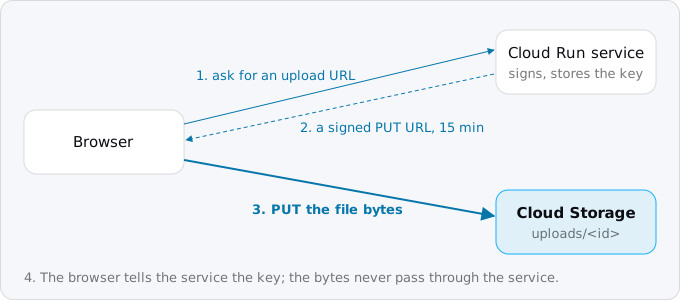
A temporary file inside one request, for a resize or an unzip, can stay in /tmp as long as it fits in memory and is deleted before the response. Logs go to stdout, where Cloud Logging collects them. Standard storage costs $0.02 per GiB a month in europe-west1, so 5 GiB of uploads cost about $0.10.
SQLite is the hard case, because it needs a real disk that one process owns. Move the data to Postgres before the move. The Cloud Storage guide has the bucket, the CORS rule and the download side.
5. Sessions and caches in memory
What it looks like: express-session's default MemoryStore, Flask-Session's filesystem backend, an in-process cache of logged-in users, or a Redis that holds only sessions.
Why it breaks: the next request can land on another instance, which has never seen the session, and scaling to zero drops them all, so people are logged out at random. Session affinity, which Cloud Run offers as an option, is best effort: it is broken as soon as the instance stops or is full, so it cannot hold a login. Keeping a Redis only for sessions works, but bills all month for a few kilobytes.
The replacement: signed cookies. cookie-session in Express, the default cookie store in Rails, signed cookies in Django. Sign them with a key from Secret Manager, keep them small (browsers guarantee at least 4,096 bytes per cookie, enough for a user id, a role and an expiry), and set Secure, HttpOnly and SameSite=Lax. If you need "log out everywhere", keep a session version on the user's row and check it on each request; when the cookie is not enough, a sessions table in the database the app already has does the job.
An in-process cache is fine as long as the app works without it: each instance warms its own, and a new instance starts cold. The sessions guide covers both options.
6. Long-lived connections
What it looks like: WebSockets, server-sent events, a long poll.
Why it is a problem: Cloud Run supports WebSockets, but a socket is a request and lasts no longer than the request timeout, 5 minutes by default and 60 minutes at most, so clients must reconnect. An instance with any open WebSocket is billed as instance-based for as long as the socket is open; one instance held open all month at 1 vCPU and 512 MiB is the $44.71 from the chart above. Messages between users connected to different instances need a shared store or a pub/sub, because there is no single process that sees everyone.
The replacement: for a few sockets, keep them, raise the timeout and let clients reconnect. For a chat or a live dashboard with thousands of connections open all day, a managed realtime service, or staying on an always-on host, usually costs less. The WebSockets and SSE guide works out where the line is.
The small ones
A few smaller habits do not break the app outright but make the first deploy fail. The server must listen on the port in $PORT, 8080 by default, on 0.0.0.0. Logs go to stdout and stderr, not a file. The process must handle SIGTERM and finish its requests within 10 seconds. Secrets come from Secret Manager, not a .env file baked into the image. The stack guide shows each of these for Node, Python, Rails and Go.
A checklist before the move
- Every process other than the web process has a destination: Cloud Tasks, Cloud Scheduler, a job or a worker pool.
- No handler does work after it sends the response.
- Every timer is a Scheduler job with its time zone set and an endpoint or job that tolerates overlap.
- Nothing is written to the local disk except temporary files inside one request.
- Sessions live in signed cookies or the database; the app works if any instance disappears.
- Long-lived connections reconnect, and their cost has been worked out.
- Each change is deployed and tested on the current host first, before anything moves.
The last point matters most. Every replacement here, a Cloud Tasks queue, a bucket, a Scheduler job, a signed cookie, works from an app still running on Heroku, Railway or Render. Making the changes there means the move itself only changes where the container runs; the rest of it is in Moving from Heroku and Moving from Railway or Render.
Where Exodus comes in
exodus audit lists every place these patterns occur, with the file and line, and the report turns each one into a task in the plan, in the order to do them. exodus check runs the same rules in CI and fails the build when a new one appears. As our sample showed, it does not catch every case of work after the response, so read your handlers for that one.
FAQ
Can a Cloud Run service keep working after it sends the response?
Not on request-based billing, the default: the CPU goes with the request, so the leftover work stalls and is lost if the instance stops first. Finish short work before answering, or hand it to Cloud Tasks and answer at once. Instance-based billing keeps the CPU but bills every second the instance exists.
Can I use node-cron or setInterval on Cloud Run?
No. A service scaled to zero has no process to run the timer, and with several instances it fires once per instance. Cloud Scheduler sends an HTTP request on a cron schedule instead; each billing account gets three jobs free, then $0.10 per job per 31 days.
Can a Cloud Run service write files to disk?
Only temporary ones. The filesystem lives in the instance's memory, counts against the memory limit, is invisible to other instances and vanishes when the instance stops. A temporary file inside one request is fine; uploads and generated files go to a Cloud Storage bucket, $0.02 per GiB a month in europe-west1.
Does session affinity keep users logged in on Cloud Run?
No. Session affinity is best effort and breaks as soon as the instance stops or is full, and scaling to zero drops every in-memory session. Keep sessions in signed cookies, which browsers support up to at least 4,096 bytes, or in a table of the database the app already has.
Do WebSockets work on Cloud Run?
Yes, but a socket is a request and lasts no longer than the request timeout, 5 minutes by default and 60 at most, so clients must reconnect. An instance with an open socket is billed as instance-based, $44.71 a month at 1 vCPU and 512 MiB if held open all month.
Sources
20
- docs.cloud.google.comBilling settings, Cloud Run docs, Google
- docs.cloud.google.comAbout instance autoscaling, Cloud Run docs, Google
- docs.cloud.google.comContainer runtime contract, Cloud Run docs, Google
- cloud.google.comCloud Run pricing, Google
- docs.cloud.google.comCreating HTTP target tasks, Cloud Tasks docs, Google
- docs.cloud.google.comCloud Tasks quotas and limits, Google
- docs.cloud.google.comCloud Tasks overview, Google
- cloud.google.comCloud Tasks pricing, Google
- docs.cloud.google.comDeploy worker pools, Cloud Run docs, Google
- docs.cloud.google.comCloud Run release notes, Google
- cloud.google.comCloud Scheduler pricing, Google
- docs.cloud.google.comCloud Scheduler job reference, Google
- docs.cloud.google.comSet task timeout for jobs, Cloud Run docs, Google
- cloud.google.comCloud Storage pricing, Google
- docs.cloud.google.comSigned URLs, Cloud Storage docs, Google
- docs.cloud.google.comSet session affinity for services, Cloud Run docs, Google
- datatracker.ietf.orgRFC 6265, HTTP State Management Mechanism, IETF
- docs.cloud.google.comUsing WebSockets, Cloud Run docs, Google
- docs.cloud.google.comRequest timeout, Cloud Run docs, Google
- Exodus team: exodus 0.1.3 check and audit on a sample app with all six patterns, Oct 12, 2026