Most small apps on Cloud Run do not need Redis. Each of its jobs has a home that costs nothing extra: sessions in a signed cookie, the cache, rate limits and locks in the Postgres you already run, and queues in Cloud Tasks. Redis stays for libraries that speak only Redis, its data structures and hot keys, and Memorystore bills every hour, from $25.55 a month in Belgium.
In short
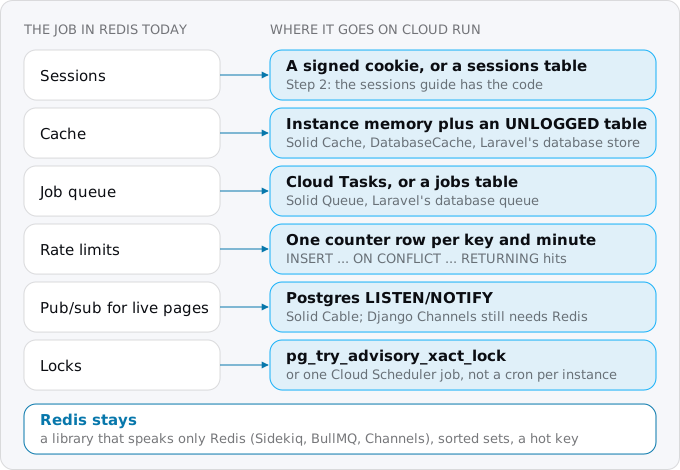
- A PaaS Redis usually does 6 jobs: sessions, a cache, a job queue, rate limits, pub/sub and locks.
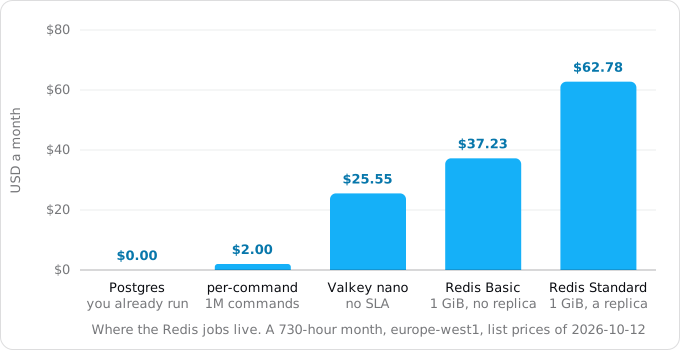
- Memorystore bills every hour, used or not: $25.55 a month for the Valkey nano node, $37.23 for Redis Basic with 1 GiB, $62.78 for Standard.
- With one client, Valkey answered a GET in about 0.02 ms, and Postgres read a cache row in 0.06 ms and ran the rate-limit upsert in 0.08 ms.
- A per-command Redis outside Google costs $0.20 per 100,000 commands and passes the Valkey nano at about 12.8 million commands a month.
- If Redis stays, Direct VPC egress needs a subnet of /26 or larger, and a Basic instance is unavailable for about five minutes during maintenance.
What a Redis does in a typical app
On Heroku, Render or Railway a Redis is one click, in a Docker Compose stack one more service, and over the years it collects jobs: each library finds the REDIS_URL and uses it. Six, in rough order of how often they show up:
- Sessions. The login lives in Redis because the app runs on more than one process.
- A cache. Rendered fragments, API responses, expensive queries, with a time to live.
- A job queue. Sidekiq, BullMQ, Celery, RQ or Laravel's
redisqueue keep their jobs in Redis lists and sorted sets. - Rate limits. A counter per IP or per user, incremented on each request and expired after a minute.
- Pub/sub. Action Cable, Django Channels, Socket.IO and Laravel broadcasting fan messages out between processes through Redis.
- Locks.
SET key value NX EX 60, so that only one process runs the nightly report.
Each job needs state shared by every instance. On Cloud Run that need gets stronger, because instances start and stop with traffic and each request goes to whichever one is free. What changes is the price of the place where the state lives.
What a Redis costs on Google Cloud
Prices are Google's list prices of October 12, 2026 for europe-west1 (Belgium), before VAT, read from the Cloud Billing Catalog API; a month is 730 hours. Google's pricing pages show a cheaper US region by default, so their figures are lower than these.
- Memorystore for Valkey, shared-core-nano (1.4 GB): $0.035 an hour, $25.55 a month. Valkey is an open source, Redis-compatible engine (Sidekiq, for one, lists it as a supported alternative), and Memorystore runs it as a separate product. Google says this node has no SLA and is unsuitable for production. The smallest node Google recommends for production, standard-small (6.5 GB), is $0.1569 an hour: $114.54 a month, or $229.07 with one replica.
- Memorystore for Redis, Basic, 1 GiB: $0.051 per GiB-hour, $37.23 a month. One node and no replica; Google calls Basic suitable for a cache that can withstand a cold restart and a full flush, and maintenance makes it unavailable for about five minutes.
- Memorystore for Redis, Standard, 1 GiB: $0.086 per GiB-hour, $62.78 a month. A replica and automatic failover; maintenance is a failover of about 15 seconds.
- A per-command Redis outside Google: Upstash's pay-as-you-go plan is $0.20 per 100,000 commands. A million commands a month is $2.00, ten million $20.00, and at about 12.8 million it passes the Valkey nano. An app that makes 10 requests a second around the clock with two Redis calls each sends 52.6 million commands a month: $105.12. Traffic to it leaves Cloud Run as internet egress, see egress on Google Cloud.
- The Postgres you already run: $0.00 extra. A cache table and a counter table on a database that is already billed.
Memorystore bills for provisioned capacity per second, whether anyone uses it or not, and it does not scale to zero. For an app whose Cloud Run bill is a few dollars, the Redis is often the largest line.
Step 1: find out what your Redis does
Start with the code. From the repository root:
grep -rniE "redis|valkey|sidekiq|bullmq|celery" --exclude-dir=node_modules --exclude-dir=.git .On a test folder with one example per stack it found the BullMQ import, an ioredis client, the Celery broker URL, the Sidekiq gem, Django Channels' RedisChannelLayer, Laravel's 'limiter' => 'redis' and the REDIS_URL in .env, and skipped node_modules. Each hit is a job to move or a reason to keep Redis.
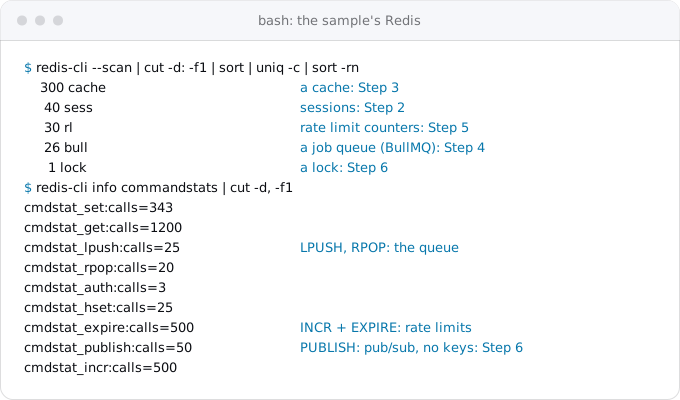
Then ask the Redis itself, because libraries use it without saying so in your code. redis-cli reads the password from the REDISCLI_AUTH environment variable, so it never goes on the command line; read -rs takes it without echoing it:
read -rs REDISCLI_AUTH && export REDISCLI_AUTH
redis-cli -h HOST -p PORT --tls --scan | cut -d: -f1 | sort | uniq -c | sort -rn
redis-cli -h HOST -p PORT --tls info commandstats | cut -d, -f1
Drop --tls if the provider's URL starts with redis:// rather than rediss://. The first command counts keys by their first segment; --scan walks the keyspace with SCAN, a cursor that returns a few keys per call. The second lists how many times each command ran since the server started: GET and SET are a cache or sessions, LPUSH and BRPOP a queue, INCR with EXPIRE a rate limiter, PUBLISH pub/sub. Pub/sub leaves no keys, which is why the command counts matter.
Step 2: sessions
Sessions have their own guide, sessions without Redis: a signed cookie with keys from Secret Manager, or a sessions table in Postgres, plus a session_version column so "log out everywhere" still works. Both cost nothing extra.
Step 3: the cache
A cache has two layers worth separating.
Instance memory. Google's own tip for Cloud Run is to keep expensive objects in global variables, because an instance serves many requests and reuses them; it also says you cannot know which request benefits. A small in-process cache with a time to live is free and the fastest option there is, and it fits values that are the same for every user: a config document, a price list, a parsed template. Its limits: each instance has its own copy, a new instance starts empty, and deleting a key on one instance does not delete it on the others. Django's default cache, LocMemCache, is exactly this: per-process.
A shared table. For what every instance must see the same way, a table in Postgres does the job. Make it UNLOGGED: Postgres then skips its write-ahead log for that table, which makes writes considerably faster, and empties it after a crash or an unclean shutdown. On Cloud SQL, Google adds that unlogged tables do not survive a failover on an HA instance, are not replicated to read replicas and are wiped when a backup is restored. For a cache that is the right trade.
create unlogged table if not exists cache (
  key        text primary key,
  value      jsonb not null,
  expires_at timestamptz not null
);

-- read: a miss is no row
select value from cache where key = $1 and expires_at > now();

-- write
insert into cache (key, value, expires_at) values ($1, $2, now() + interval '10 minutes')
on conflict (key) do update set value = excluded.value, expires_at = excluded.expires_at;

-- clean up, on a schedule
delete from cache where expires_at < now();
Run the cleanup from Cloud Scheduler, see cron and timers. The frameworks have this built in:
- Rails: Solid Cache is the default cache store for new apps since Rails 8.0. It is database-backed and evicts first in, first out.
- Django:
DatabaseCache, afterpython manage.py createcachetable. - Laravel: the
databasestore is already the default. - Express: no built-in shared cache; the three statements above are the whole implementation.
Step 4: the job queue
A queue in Redis comes with a worker process that runs all the time and pulls jobs. On Cloud Run that worker has nowhere natural to live: with the default, request-based billing, a service gets CPU only while it handles requests (see work after the response).
The usual move is to let Cloud Tasks hold the queue and call your service over HTTP for each job, with retries and rate limits. Background workers with Cloud Tasks sets it up end to end.
If the framework already has a database queue, that works too, with a process that polls the table:
- Rails: Solid Queue keeps jobs in Postgres and takes them with
FOR UPDATE SKIP LOCKED, so several workers never pick the same job. - Laravel: in new applications the
databaseconnection is already the default queue.
Some libraries need Redis and nothing else. Sidekiq requires Redis 7.0, Valkey 7.2 or Dragonfly; BullMQ is built on Redis; Celery's stable brokers are RabbitMQ, Redis and Amazon SQS, with Google Pub/Sub listed as experimental. Keeping one of them means keeping both the Redis and an always-on worker. On Cloud Run that worker is a worker pool, which Google built for continuous background work: no URL, and a number of instances you set rather than autoscaling. See services, jobs and worker pools.
Step 5: rate limits
A limiter that counts in memory counts per instance. express-rate-limit, for example, ships with a memory store and needs an external store to share hit counts across nodes; with five instances, a limit of 5 a minute quietly becomes up to 25.
One upsert in Postgres replaces INCR and EXPIRE. It counts hits per key in the current 60-second window and returns the count, so the app compares it with the limit:
create unlogged table if not exists rate_limits (
  key          text primary key,
  window_start timestamptz not null,
  hits         integer not null
);

insert into rate_limits as r (key, window_start, hits)
values ($1, date_bin('60 seconds', now(), timestamptz 'epoch'), 1)
on conflict (key) do update
  set hits = case when r.window_start = excluded.window_start then r.hits + 1 else 1 end,
      window_start = excluded.window_start
returning hits;
date_bin rounds the time down to the start of the minute. Postgres guarantees ON CONFLICT DO UPDATE an atomic insert or update even under high concurrency, so two instances hitting the same key at once both count. Delete old rows on the same schedule as the cache (delete from rate_limits where window_start < now() - interval '1 hour').
Laravel's rate limiter already uses the default cache, and the database store increments atomically. For limits that should stop traffic before it reaches your container, Cloud Armor has throttle and rate-based ban rules; they live in a security policy on a load balancer, which is a separate setup and bill.
Step 6: pub/sub and locks
Pub/sub. A live page needs every instance to hear about a new message. Postgres has this built in as LISTEN/NOTIFY; WebSockets and SSE on Cloud Run wires it up, with the replay table that makes it reliable. Rails' Solid Cable does the same for Action Cable from the database. Django Channels is the exception: its docs name channels_redis as the only official layer for production, and the in-memory layer is not for production.
Locks. A transaction-level advisory lock is held until the transaction ends and cannot be leaked by a crashed process:
begin;
select pg_try_advisory_xact_lock(hashtext('nightly-report'));  -- true: run it; false: another instance is
-- ... the work ...
commit;  -- the lock goes with the transaction
Often the lock is there because every server ran the same cron. On Cloud Run the better fix is one Cloud Scheduler job that calls the service once, and the lock stays only as a guard against retries. Laravel's WithoutOverlapping and unique jobs need a cache driver with locks, and the database driver has them.
Try it before the deploy
The sample's script fills a local Valkey the way a typical app does, runs Step 1's commands on it (above), then runs the SQL from this guide from separate Postgres sessions standing in for two instances, and times the same operations on both stores:
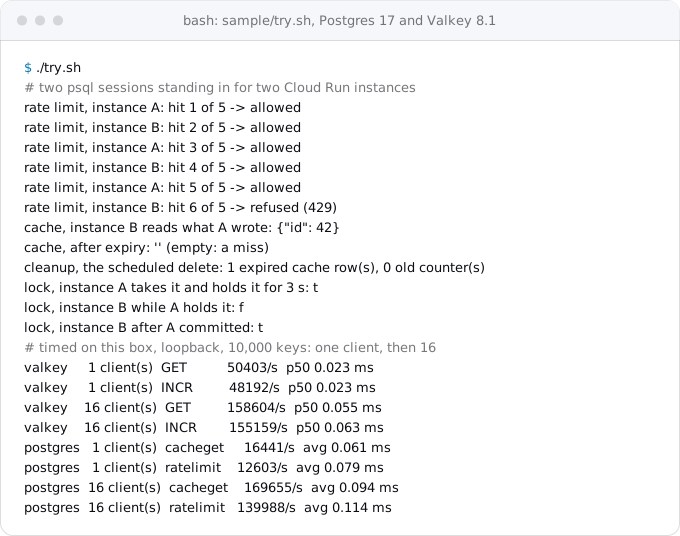
With one client on this box, Valkey answers a GET in about 0.02 ms and Postgres reads a cache row in 0.06 ms and runs the rate-limit upsert in 0.08 ms. Redis is faster, and both are far below the time of a web request. On Google Cloud both sit across a network hop, which adds the same delay to each. The numbers come from one machine over loopback, Valkey's tool reports the median and pgbench the average, so read them as an order of magnitude, not a benchmark of Cloud SQL.
The real cost is the extra load: a rate-limit check is one more write per request on your database. If the database is already near its limits, measure before you move the counters.
When Redis stays
Keep the Redis when:
- A library speaks only Redis and you are not replacing it: Sidekiq, BullMQ, Celery on Redis, Django Channels.
- You use its data structures: sorted sets for leaderboards, streams, HyperLogLog, or Lua scripts that do several steps in one round trip.
- One key is hot: thousands of writes a second to the same counter, where a row lock in Postgres would queue them.
- The cache is large and busy enough that it would crowd the database's memory.
Then pick the size by the job. A cache that can be lost fits Basic or the Valkey nano; a queue whose jobs must not vanish during maintenance needs Standard or a Valkey node Google recommends for production.
If it stays: Memorystore on Cloud Run
Memorystore for Redis uses internal IP addresses on your VPC network, so the service needs a way into that network. Google recommends Direct VPC egress: the service's instances get addresses in one of your subnets, and you pay only for network traffic, with no VMs. The alternative, a Serverless VPC Access connector, runs at least two VMs that bill even when there is no traffic.
gcloud services enable redis.googleapis.com
gcloud redis instances create cache --region=europe-west1 --tier=basic --size=1 --enable-auth
gcloud redis instances describe cache --region=europe-west1 --format='value(host,port)'
The instance joins the network called default unless --network says otherwise, and new instances use direct peering. With AUTH on, every connection must send a 36-character AUTH string first. Move it into Secret Manager through a pipe, so it is never printed:
gcloud redis instances get-auth-string cache --region=europe-west1 --format='value(authString)' \
  | gcloud secrets create redis-auth --data-file=-
Grant the service's account roles/secretmanager.secretAccessor on that secret, as sessions without Redis shows, then deploy with Direct VPC egress:
gcloud run deploy shop --image IMAGE --region=europe-west1 \
  --network=default --vpc-egress=private-ranges-only \
  --set-env-vars=REDISHOST=10.0.0.3,REDISPORT=6379 --set-secrets=REDISAUTH=redis-auth:1
Use the host and port that describe printed. With only --network, the subnet takes the network's name; it must be a /26 or larger, and Cloud Run uses about two of its addresses per instance. private-ranges-only sends only traffic for internal addresses through the VPC, so calls to the internet do not change path.
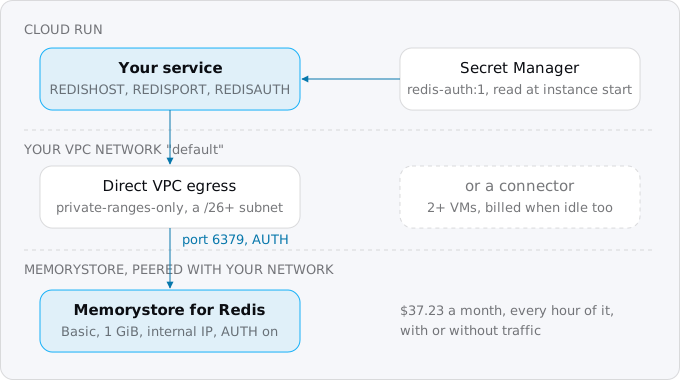
Two more decisions:
- Encryption in transit. AUTH alone is not encrypted on the wire.
--transit-encryption-mode=server-authenticationat creation turns on TLS: the client connects on port 6378 and must trust the instance's certificate authority, which you download and ship with the app. - Valkey instead of Redis. Memorystore for Valkey connects only through Private Service Connect, which needs a service connection policy on the network before the first instance; it is more setup than direct peering, for a cheaper smallest node that Google does not recommend for production.
Write the client to reconnect. Both tiers reset connections during maintenance, and a Basic instance is gone for about five minutes of it.
What breaks
- Rate limits stop working after the move. The limiter still counts in instance memory. Point it at a shared store.
- Counters reset at random. The
UNLOGGEDtable was emptied by a crash, a Cloud SQL failover or a restore. Acceptable for counters and a cache, never for anything you cannot recompute. - The database is slower after the move. Rate-limit writes on every request add up. Check only the routes that need limits, or keep a Redis for counters.
- Jobs pile up in a queue nobody reads. The worker was a separate process on the old platform and was never deployed. Move to Cloud Tasks or deploy a worker pool.
- The service cannot reach Memorystore. It has no VPC egress, egress points at another network, or the instance is in another region.
gcloud redis instances describe cache --region=europe-west1 --format='value(authorizedNetwork)'names the network to use.
Checklist
- Grep the code and run
--scanandinfo commandstatson the current Redis; write down each job. - Move sessions to a signed cookie or a table.
- Move the cache to instance memory plus an
UNLOGGEDtable, or the framework's database store. - Move queues to Cloud Tasks or a database queue; for Sidekiq, BullMQ or Celery, plan a worker pool.
- Move rate limits and locks to Postgres, and crons to Cloud Scheduler.
- Schedule the cleanup of expired cache rows and old counters.
- Run
info commandstatsagain after the deploy: the counts should stop growing. - If Redis stays: Basic or Valkey nano for a cache, Standard or an SLA node for a queue; Direct VPC egress; the AUTH string in Secret Manager.
- Delete the old Redis only after a week with no new commands.
Where Exodus comes in
Exodus's CLI reads the repository with your coding agent and lists what the Redis is used for: the session store, the cache backend, the queue library, the limiter and the channel layer. Each becomes a finding in the report with the replacement from this guide, and the cost comparison shows the month with and without Memorystore. Your agent can read this guide from the terminal with exodus kb.
FAQ
How much does Memorystore cost?
The smallest Memorystore for Valkey node, shared-core-nano with 1.4 GB, is $25.55 a month in europe-west1, but Google says it has no SLA and is unsuitable for production. Memorystore for Redis Basic with 1 GiB is $37.23 and Standard $62.78. It bills for provisioned capacity per second and does not scale to zero.
Can Postgres replace Redis as a cache?
For most small apps, yes. An UNLOGGED table skips the write-ahead log and is emptied after a crash; on Cloud SQL it also does not survive a failover or a restore, which a cache can accept. Rails' Solid Cache, Django's DatabaseCache and Laravel's database store do this for you.
How do I run Sidekiq or BullMQ on Cloud Run?
Both need Redis: Sidekiq requires Redis 7.0, Valkey 7.2 or Dragonfly, and BullMQ is built on Redis. Keep a Memorystore instance and run the always-on worker as a Cloud Run worker pool, which has no URL and a number of instances you set, or move the jobs to Cloud Tasks.
How does Cloud Run connect to Memorystore?
Through your VPC network. Google recommends Direct VPC egress, on a subnet of /26 or larger, with traffic to private ranges only, and you pay only for network traffic. A Serverless VPC Access connector also works, but it runs at least two VMs that bill even with no traffic.
Why do rate limits stop working after moving to Cloud Run?
A limiter that counts in memory counts per instance, so with five instances a limit of 5 a minute becomes up to 25. Point it at a shared store: one upsert into an UNLOGGED Postgres table per request, or Laravel's database cache store.
Sources
42
- docs.cloud.google.comConnect to a Redis instance from a Cloud Run service, Google
- cloud.google.comMemorystore for Redis pricing, Google
- docs.cloud.google.comRedis tier capabilities, Google
- docs.cloud.google.comMemorystore for Redis: about maintenance, Google
- docs.cloud.google.comCreate and manage Redis instances, Google
- docs.cloud.google.comMemorystore for Redis networking, Google
- docs.cloud.google.comAbout Redis AUTH, Google
- docs.cloud.google.comManage in-transit encryption, Google
- docs.cloud.google.comMethod instances.getAuthString, Memorystore for Redis API, Google
- cloud.google.comMemorystore for Valkey pricing, Google
- docs.cloud.google.comMemorystore for Valkey: instance and node specification, Google
- docs.cloud.google.comMemorystore for Valkey networking, Google
- docs.cloud.google.comCompare Direct VPC egress and VPC connectors, Google
- docs.cloud.google.comVPC with connectors, Google
- docs.cloud.google.comDirect VPC egress with a VPC network, Google
- docs.cloud.google.comGeneral development tips, Cloud Run, Google
- docs.cloud.google.comCloud SQL backups overview, Google
- docs.cloud.google.comDeploy worker pools to Cloud Run, Google
- docs.cloud.google.comBilling settings for services, Google
- docs.cloud.google.comMemorystore for Valkey: about scaling instance capacity, Google
- docs.cloud.google.comCloud Armor security policy overview, Google
- docs.cloud.google.comCloud Armor rate limiting overview, Google
- guides.rubyonrails.orgCaching with Rails, Rails guides
- rubyonrails.orgRails 8.0: No PaaS Required, Rails blog
- github.comrails/solid_queue README
- docs.djangoproject.comDjango's cache framework
- channels.readthedocs.ioDjango Channels: channel layers
- laravel.comLaravel cache
- laravel.comLaravel queues
- laravel.comLaravel rate limiting
- github.comSidekiq README
- docs.bullmq.ioWhat is BullMQ
- docs.celeryq.devCelery: backends and brokers
- npmjs.comexpress-rate-limit
- redis.ioRedis CLI and INFO, redis.io
- redis.ioSCAN, redis.io
- postgresql.orgCREATE TABLE, PostgreSQL
- postgresql.orgAdvisory lock functions, PostgreSQL
- postgresql.orgINSERT, PostgreSQL
- postgresql.orgdate_bin, PostgreSQL
- upstash.comUpstash Redis pricing
- Exodus team: Cloud Billing Catalog API read for Memorystore SKUs in europe-west1, gcloud 587.0.0 help for every command shown, and a local run of the sample