An AI agent backend on Cloud Run is a service that runs the model-and-tools loop: it streams each step as server-sent events, keeps every turn in Firestore, calls Gemini or Claude with its own service account, and hands runs over 15 minutes to a worker. The loop mostly waits, so one instance at concurrency 80 carries dozens of runs, and the model's tokens are most of the bill.
In short
- Run the agent as a Cloud Run service with request-based billing, 1 vCPU, 512 MiB and concurrency 80: in our test 50 runs at once used 0.61 seconds of CPU in 3.5 seconds.
- Keep every turn in Firestore, never in memory; its free 50,000 reads and 20,000 writes a day cover 30,000 runs a month.
- Cap the loop at 8 model calls and retry only the model call on 429, with backoff.
- Send runs longer than 15 minutes through Cloud Tasks to a worker, and stop the run when the client leaves.
- At 30,000 runs a month Gemini 3.5 Flash tokens cost $594 and Claude Sonnet 5 tokens $738, against at most $11.37 for Cloud Run.
What the backend does, and where the time goes
One run of an agent looks like this. The user sends "Where is order A-1001?". The backend sends the conversation, a system instruction and a list of tools to the model. The model answers with a tool call: get_order with id: "A-1001". The backend runs that function, appends the result to the conversation, and calls the model again. This time the model answers in text, and the run ends. A real agent may go around this loop five or ten times.
Each model call takes from about a second to tens of seconds. The backend's own work between calls (parse JSON, query a database, write a row) takes milliseconds. In our test, 50 runs at once on one instance held to 1 CPU used 0.61 seconds of CPU in total while the runs took 3.5 seconds of wall time. The instance was waiting, not working.
So concurrency should stay high: request-based billing charges for the time an instance has a request open, so fifty waiting runs on one instance are billed once, not fifty times. And a long request needs visible progress and has to survive a dropped connection.
Which Cloud Run resource
Google's page on hosting agents names four Cloud Run resources (what Cloud Run is covers the basics):
- Service. Request-driven agents behind an API or a chat window, with autoscaling. This guide uses a service.
- Instance. One always-on agent with its own address that you start and stop by hand. In Preview, with no persistent disk.
- Worker pool. A fleet of agents that pull work from Pub/Sub or Kafka and expose no HTTP endpoint.
- Job. Run-to-completion work: a batch evaluation, a nightly sync. See services, jobs and worker pools.
Google also sells a managed host for agents, Agent Runtime, in its Agent Platform. It bills $0.085 per vCPU-hour and $0.009 per GiB-hour after 50 vCPU-hours and 100 GiB-hours free a month, and does not bill the idle time between turns. Cloud Run's request-based rate works out to $0.0864 per vCPU-hour and $0.009 per GiB-hour. The price is close; on Cloud Run you own the container, the framework and the data.
The shape
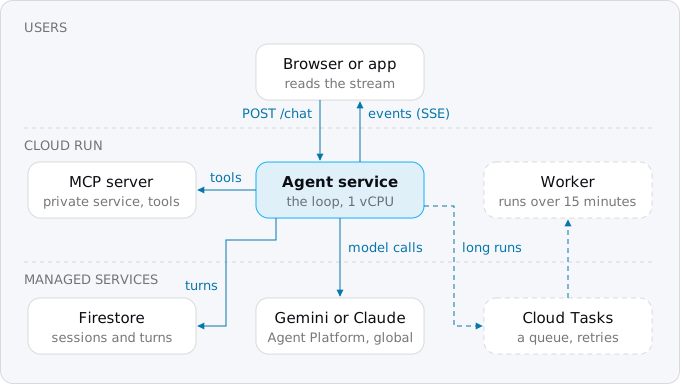
The agent service is the only public piece. Turns go to Firestore, model calls to Agent Platform's global endpoint. Tools with their own permissions run as private services, often MCP servers. Runs too long for one request go through a Cloud Tasks queue to a worker.
Step 1. A project, APIs, and an identity without keys
Turn on the APIs, create a service account for the agent, and give it two roles: Vertex AI User to call models and Cloud Datastore User to read and write Firestore. Then create the Firestore database in the same region as the service.
gcloud services enable run.googleapis.com aiplatform.googleapis.com firestore.googleapis.com cloudbuild.googleapis.com
gcloud iam service-accounts create agent-api
gcloud projects add-iam-policy-binding PROJECT_ID \
  --member=serviceAccount:agent-api@PROJECT_ID.iam.gserviceaccount.com \
  --role=roles/aiplatform.user
gcloud projects add-iam-policy-binding PROJECT_ID \
  --member=serviceAccount:agent-api@PROJECT_ID.iam.gserviceaccount.com \
  --role=roles/datastore.user
gcloud firestore databases create \
  --location=europe-west1
On Cloud Run the service gets a short-lived access token for this account from the metadata server, so the code holds no secret. If you call a vendor's API directly instead (an OpenAI or Anthropic key), keep the key in Secret Manager, as in secrets on Cloud Run, never in an environment variable typed into a deploy command. More on roles in IAM for a Cloud Run app.
Step 2. The loop
The sample is plain Node with one dependency, the Firestore client. It calls Gemini's REST method generateContent; frameworks such as Google's ADK, LangGraph or the vendors' SDKs wrap the same loop. The model call gets a token from the metadata server and retries 429 (too many requests) and 5xx with exponential backoff and jitter (a longer wait after each failure, shifted by a random amount), which is what Google's retry page asks for:
let token = { value: "", until: 0 };
async function accessToken() { // the service account's token from the metadata server, no key file
  if (Date.now() < token.until) return token.value;
  const r = await fetch(`${META}/computeMetadata/v1/instance/service-accounts/default/token`,
    { headers: { "Metadata-Flavor": "Google" } });
  const j = await r.json();
  token = { value: j.access_token, until: Date.now() + (j.expires_in - 60) * 1000 };
  return token.value;
}

async function callModel(contents, signal) {
  const url = `${API}/v1/projects/${PROJECT}/locations/global/publishers/google/models/${MODEL}:generateContent`;
  for (let attempt = 0; ; attempt++) {
    const r = await fetch(url, {
      method: "POST", signal,
      headers: { authorization: `Bearer ${await accessToken()}`, "content-type": "application/json" },
      body: JSON.stringify({ systemInstruction: SYSTEM, tools: TOOLS, contents }),
    });
    if (r.ok) return r.json();
    if (![429, 500, 503].includes(r.status) || attempt === 4) throw new Error(`model: ${r.status}`);
    await new Promise((ok) => setTimeout(ok, 2 ** attempt * 1000 * (0.5 + Math.random() / 2)));
  }
}
MODEL is gemini-3.5-flash, API is https://aiplatform.googleapis.com and META is http://metadata.google.internal; the last two are variables only so the local test can point them at a stand-in. The loop itself, inside the POST /chat handler:
for (let turn = 0; turn < MAX_TURNS; turn++) {
  const reply = await callModel(contents, stop.signal);
  usage.calls++;
  usage.in += reply.usageMetadata?.promptTokenCount ?? 0;
  usage.out += reply.usageMetadata?.candidatesTokenCount ?? 0;
  const content = reply.candidates[0].content;
  await save(content);
  const calls = content.parts.filter((p) => p.functionCall);
  if (calls.length === 0) {
    send("answer", { text: content.parts.map((p) => p.text ?? "").join("") });
    return;
  }
  const results = [];
  for (const { functionCall: { name, args } } of calls) {
    send("tool", { name, args });
    const response = tools[name] ? await tools[name](args) : { error: `no tool ${name}` };
    results.push({ functionResponse: { name, response } });
  }
  await save({ role: "user", parts: results });
}
send("error", { message: `stopped after ${MAX_TURNS} model calls` });
MAX_TURNS (8) stops a model that keeps calling tools. save writes each turn to Firestore before the next step. usage collects the token counts the model reports, logged as one JSON line per run, so Cloud Logging can sum the cost per user or feature.
Step 3. Sessions in Firestore, not in memory
A chat has many messages, and Cloud Run sends each request to whichever instance has room. Session affinity can route a client back to the same instance, but Google calls it best effort: it breaks when the instance ends or is full. So the conversation lives in Firestore, one document per turn under sessions/{id}/turns, and the handler loads it at the start of every message:
const turns = (session) => db.collection("sessions").doc(session).collection("turns");

const past = await turns(session).orderBy("n").get();
const contents = past.docs.map((d) => d.data().content);
const save = (content) => {
  contents.push(content);
  return turns(session).doc(String(contents.length).padStart(6, "0")).set({ n: contents.length, content });
};
The session id comes from the client, so the handler checks it against ^[\w-]{1,64}$ before it becomes part of a document path, and refuses anything else with 400. In a real product the id also belongs to a signed-in user, checked on the server, as in a SaaS architecture on Cloud Run.
The same trap sits inside frameworks. ADK's adk deploy cloud_run keeps sessions and artifacts in memory unless you give it a session service and an artifact service (the session_service_uri and artifact_service_uri options), and its documentation says they are lost whenever an instance is recycled. Firestore is one choice; Postgres works as well, see Cloud SQL, Firestore or serverless Postgres.
Step 4. Deploy
gcloud run deploy agent-api \
  --source . \
  --region europe-west1 \
  --service-account agent-api@PROJECT_ID.iam.gserviceaccount.com \
  --cpu 1 \
  --memory 512Mi \
  --concurrency 80 \
  --timeout 15m \
  --max-instances 10 \
  --set-env-vars GOOGLE_CLOUD_PROJECT=PROJECT_ID,MODEL=gemini-3.5-flash \
  --no-allow-unauthenticated
The timeout is 5 minutes by default and 60 at most; this sets 15. The instance cap limits what a spike can spend. The service starts private; a web app in front or a sign-in check decides who may call it.
Streaming, and what happens when the client leaves
The handler answers with content-type: text/event-stream and writes one event per step: tool when the model asks for a tool, answer at the end, error when the run stops. Node sends a response without a length as Transfer-Encoding: chunked, which is all Cloud Run needs to stream it. By default Cloud Run downgrades HTTP/2 to HTTP/1 on the way to the container, which is fine for server-sent events. WebSockets and SSE on Cloud Run covers the client side.
When the user closes the tab, the request ends. With request-based billing Cloud Run gives an instance CPU only while it is processing requests, so a loop that carries on after the client is gone runs without guaranteed CPU, and every model call it makes is still billed. The sample does the opposite: on close it aborts the model call in flight and stops.
const stop = new AbortController();
res.on("close", () => { if (!res.writableEnded) stop.abort(); });
In the test the client left after 2 seconds, during the second model call. The stand-in saw that call aborted, made no further calls, and Firestore held three saved turns, so the user can send the next message and the conversation continues from there. See work after the response for the general rule.
Runs longer than a request
Google's timeout page recommends, for any timeout over 15 minutes, retries and handlers that resume where they left off, because a long connection is more likely to drop and a client that reconnects is not guaranteed the same instance. An agent that researches for 20 minutes should not hold an HTTP request open.
Split it. POST /runs writes the run to Firestore, queues a Cloud Task, and returns the run id at once. A private worker service does the loop, writing each event to Firestore. The client reads the events with GET /runs/{id}/events?after=N, and after a dropped connection it asks again from the last event it saw. A Cloud Tasks HTTP handler gets 10 minutes by default and 30 at most per attempt; longer work is cut into steps, one task per step, or goes to a job. The queue and its permissions are in background workers with Cloud Tasks; the receiver-queue-worker shape is the same as in Stripe webhooks on Cloud Run.
Tools: MCP servers and running code
A tool that is a few lines of code lives in the agent's container, like get_order here. A tool with its own data, permissions or release cycle becomes its own service, and the Model Context Protocol (MCP) is the common way to expose it. Cloud Run hosts MCP servers that use the streamable HTTP transport; servers that only speak stdio do not run there.
Keep an MCP server private. An agent on Cloud Run calls it with an ID token, the same service-to-service authentication as any private service, or runs it as a sidecar container and calls http://localhost on another port. From a laptop, gcloud run services proxy exposes a private server on localhost with your own credentials.
An agent that writes and runs code needs a box it cannot climb out of. Cloud Run sandboxes, in Preview, run a command in an isolated environment inside the instance, with no access to the parent's environment variables, secrets or the metadata server, and with outbound traffic blocked unless you allow it. You turn them on with the sandbox-launcher flag of gcloud beta run deploy and call the binary at /usr/local/gcp/bin/sandbox:
sandbox do \
  -- /usr/bin/python3 -c "print(1+2)"
Sandboxes share the instance's CPU and memory, so size the instance for the agent plus its running sandboxes. For code from your customers rather than from your own agent, Google's guide on untrusted code recommends one project per tenant.
Concurrency, measured
The sample ran in two containers, each held to 1 CPU and 512 MiB like a 1 vCPU Cloud Run instance, against the Firestore emulator and a stand-in that answers in Gemini's format after 1.5 seconds:
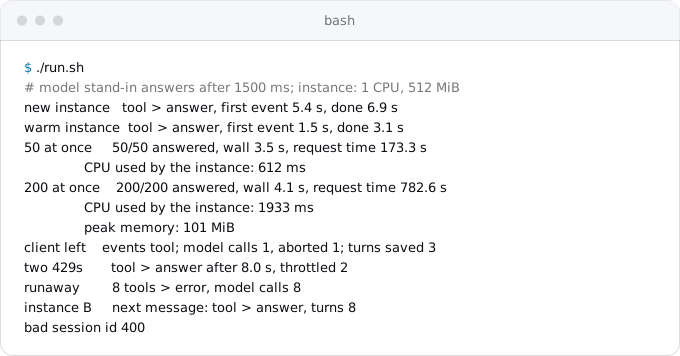
Fifty runs at once all answered in 3.5 seconds of wall time and used 0.61 seconds of CPU. Two hundred took 4.1 seconds and 1.9 seconds of CPU, with memory peaking at 101 MiB (154 MiB in an earlier run). The first run on a new instance took 3.8 seconds longer than a warm one; a separate check put it on the Firestore client's first query, 3.75 seconds against the emulator and 7 ms after that. Start the client and send one cheap query at startup, or keep a minimum instance. The same first work, a database connection and a token from the metadata server, shows in the measurements of Rust on Cloud Run.
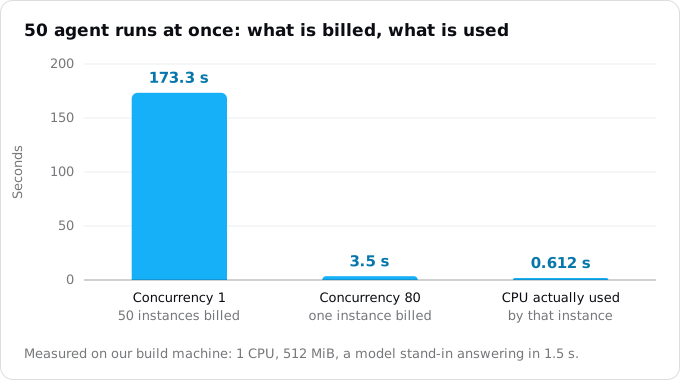
With concurrency 1, each of those 50 runs would sit on its own instance and Cloud Run would bill the sum of their times, 173.3 seconds. With concurrency 80 the same work is 3.5 billed seconds on one instance. Concurrency 1 is common advice for CPU-heavy apps; for an agent it multiplies the compute bill. The default of 80 per vCPU fits; at 200 runs at once Cloud Run would start a third instance. More in concurrency on Cloud Run.
Rate limits, retries and runaway loops
On pay-as-you-go, Agent Platform answers 429 "Resource exhausted, please try again later." when shared capacity runs short. Google's advice is the global endpoint, which spreads requests across regions, and truncated exponential backoff; its SDKs default to a 1 second first delay, 5 attempts, base 2 and a 60 second ceiling. In the test, two 429s in a row made a run 4.9 seconds slower, and it still answered. Claude models launched after May 26, 2026 share one quota per model family on the global endpoint, and only requests that return 200 are charged.
Retry the model call, never the whole run. A run that already charged a card or sent an email must not do it again because a later model call failed; give such tools an idempotency key. In the runaway case the stand-in asked for a tool every time, and the loop stopped after 8 calls with an error event. Pair the cap with the per-run token log and a budget alert.
What it costs
Take an assistant with 30,000 runs a month (1,000 a day), each with three model calls and two tools: 7,800 input tokens in total (the context grows with each call), 900 output tokens, 15 seconds of wall time. List prices of October 12, 2026, global endpoint, Cloud Run in europe-west1:
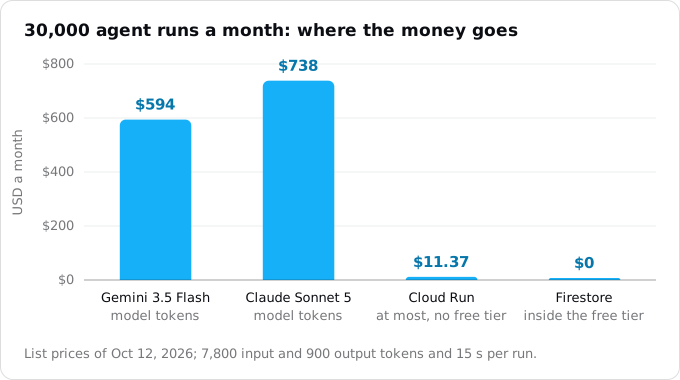
- Gemini 3.5 Flash at $1.50 per million input tokens and $9.00 per million output: $0.0198 a run, $594.00 a month. Output includes the model's reasoning, and from Gemini 3.5 the tool declarations count as input on every call.
- Claude Sonnet 5 at $2.00 and $10.00: $0.0246 a run, $738.00 a month. Regional and multi-region endpoints cost 10% more for either vendor.
- Cloud Run, 1 vCPU and 512 MiB, counted as if no two runs overlapped: 450,000 instance-seconds, $11.37 a month with the free tier spent elsewhere, $6.48 with it. Overlap makes it lower.
- Firestore: 6 writes and 10 reads a run is 6,000 writes and 10,000 reads a day, inside the free 20,000 and 50,000.
At 3,000 runs the Gemini tokens are $59.40 and Cloud Run $0 to $1.14. At 300,000 runs they are $5,940 against at most $113.75, plus $1.68 for Firestore. The levers are on the model side: a smaller model for easy steps, a shorter history, and caching (cached Gemini 3.5 Flash input is $0.15 per million instead of $1.50; a Claude cache read is 10% of the input price). For a model you host yourself, see GPUs on Cloud Run.
What breaks
- Sessions in memory. Lost when an instance is recycled or the next message lands elsewhere.
- Work after the client leaves. No guaranteed CPU, and the model calls are still billed.
- The 5 minute default timeout. A long run is cut mid-stream.
- No cap on the loop. A model that calls tools forever spends until something stops it.
- Retrying side effects. Retrying a whole run repeats the tools that already ran.
- Concurrency 1. Fifty runs bill fifty times the time.
- An API key in an environment variable or the image.
- Model-written code in the agent's own container, with its service account and network.
Checklist
- The agent runs as a service with request-based billing, 1 vCPU, 512 MiB, concurrency 80 and an instance cap.
- The service has its own service account with
roles/aiplatform.userandroles/datastore.user, and no key file. - Every turn is in Firestore or Postgres; the client's session id is validated and tied to a signed-in user.
- Events stream as SSE; a closed connection aborts the model call.
- The loop has a cap, and only the model call is retried, with backoff and jitter.
- Each run logs its model calls and tokens as one JSON line.
- Runs over 15 minutes go through Cloud Tasks to a worker, and the client can resume from the last event.
- Tools with their own data are private services; generated code runs in a sandbox.
- A budget alert watches the model's spend as well as Cloud Run's.
Where Exodus comes in
exodus audit on this sample found one thing: the text/event-stream line in server.js, reported as a long-lived connection that keeps its instance billed while it is open, with a link to the patterns that break on Cloud Run. It also confirmed what was not there: no sessions in memory, no work after the response, no files on disk. It does not recognize model SDKs or MCP, and its estimate does not include model tokens, so for an agent add the token line from the section above to the report's number yourself.
FAQ
Can Cloud Run stream a language model's output to the browser?
Yes. Cloud Run streams any response sent with chunked transfer encoding, with no setting, so a handler that answers with the event stream type and writes one server-sent event per step works. Cloud Run downgrades HTTP/2 to HTTP/1 on the way to the container by default, which is fine for server-sent events.
Where should an agent keep conversation history on Cloud Run?
In a database such as Firestore or Postgres, never in the instance's memory. Cloud Run sends each request to whichever instance has room, and session affinity is best effort. ADK keeps sessions in memory unless it gets a session service, and loses them when an instance is recycled.
How long can an agent run on Cloud Run?
A request runs 5 minutes by default and 60 at most. For timeouts over 15 minutes Google recommends retries and handlers that resume, so a long run goes through Cloud Tasks to a private worker, which gets 10 minutes per attempt by default and 30 at most, with longer work cut into steps.
What concurrency should an AI agent service use?
Keep the default of 80 per vCPU. The loop waits on the model, so in our test 50 runs on one instance used 0.61 seconds of CPU and were billed 3.5 seconds. At concurrency 1 the same runs would be billed 173.3 seconds on separate instances.
Does a Cloud Run service need an API key to call Gemini?
No. The service gets a short-lived access token for its own service account from the metadata server, and the account needs the Vertex AI User role. A vendor's key for a direct API call belongs in Secret Manager, never in an environment variable typed into a deploy command.
Sources
25
- docs.cloud.google.comHost AI agents on Cloud Run resources, Google
- docs.cloud.google.comCreate and manage Cloud Run instances, Google
- docs.cloud.google.comConfigure request timeout for services, Cloud Run, Google
- docs.cloud.google.comInvoke with an HTTPS request, Cloud Run, Google
- docs.cloud.google.comBilling settings for services, Cloud Run, Google
- docs.cloud.google.comMaximum concurrent requests for services, Cloud Run, Google
- docs.cloud.google.comSet session affinity for services, Cloud Run, Google
- cloud.google.comCloud Run pricing, Google
- docs.cloud.google.comHost MCP servers on Cloud Run, Google
- docs.cloud.google.comCode execution in Cloud Run and Configure sandboxes for services, Google
- docs.cloud.google.comCloud Run for multi-tenant platforms running untrusted code, Google
- google.github.ioDeploy to Cloud Run, Agent Development Kit documentation
- docs.cloud.google.comBuild and deploy an AI agent to Cloud Run using ADK, Google
- docs.cloud.google.comGemini 3.5 Flash, Gemini Enterprise Agent Platform, Google
- cloud.google.comAgent Platform generative AI pricing, Google
- platform.claude.comClaude on Google Cloud, Anthropic
- platform.claude.comPricing, Anthropic
- docs.cloud.google.comQuotas for Anthropic Claude models, Google
- docs.cloud.google.comError code 429 and Retry strategy, Gemini Enterprise Agent Platform, Google
- cloud.google.comGemini Enterprise Agent Platform pricing: Agent Runtime, Google
- cloud.google.comFirestore Standard edition pricing, Google
- docs.cloud.google.comFirestore IAM roles, Google
- docs.cloud.google.comCreate HTTP target tasks, Cloud Tasks, Google
- docs.cloud.google.comgcloud CLI reference, Google
- Exodus team: the sample agent service in this guide ran on our build machine on Node 24 with @google-cloud/firestore 9.3.1, against the Firestore emulator and a local stand-in that answers in Gemini's REST format after 1.5 s, in containers held to 1 CPU and 512 MiB; exodus 0.1.1 audit on the sample; read-only gcloud commands against our own project; Oct 12, 2026