Sessions on Cloud Run without Redis go into a signed cookie, with the signing keys in Secret Manager, or into a table in the database the app already has. A session kept in an instance's memory or on its disk is lost when a request reaches another instance, when an idle instance stops, and at every deploy. Both replacements cost nothing extra; the smallest Memorystore costs $25.55 a month.
In short
- Google shuts an instance down after up to 15 minutes idle, and every deploy starts new instances, so a session in memory is lost; session affinity is best effort.
- A signed cookie or a sessions table in your Postgres costs $0.00 extra; Memorystore costs $25.55 to $37.23 a month in europe-west1.
- Browsers allow at least 4,096 bytes per cookie; a signed cookie holds an id and a session version, 63 bytes in our sample.
- A key rotation is 2 deploys: the new key first and the old one second, then the new key alone after the cookie's 14-day lifetime.
Why a session in memory breaks on Cloud Run
A Cloud Run service runs your container as a number of instances that changes with traffic, and a request goes to whichever instance is free. Each of three facts loses a session kept in memory:
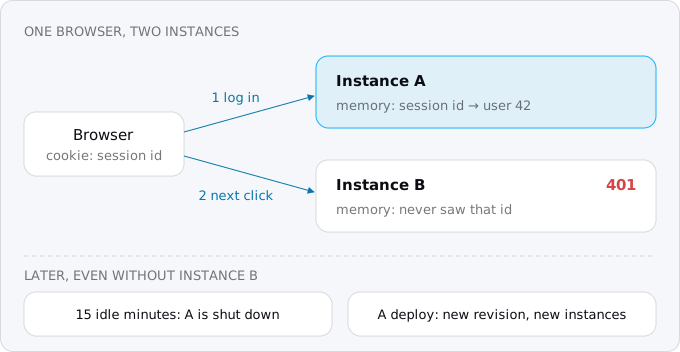
- The next request can reach another instance. Instance A stores the session and sends back a cookie with its id. The next click lands on instance B, which has never heard of that id.
- Idle instances stop. Google keeps an instance idle for up to 15 minutes after its last request, then shuts it down, and says idle instances, minimum instances included, can be shut down at any time. Every session in that instance's memory goes with it.
- Every deploy starts new instances. A deploy or a configuration change creates a new revision, and traffic moves to the new revision's instances. After a deploy, everyone whose session lived in memory is logged out at once.
Patterns that break on Cloud Run lists the other habits that fail for the same reasons.
express-session's documentation says it of its own default store: MemoryStore is "purposely not designed for a production environment", leaks memory and "does not scale past a single process".
Files are no better. The container's file system is in memory, does not persist when the instance stops, and is separate on each instance. Laravel's file driver, Django's file backend, or anything that writes sessions under /tmp behaves exactly like MemoryStore.
Session affinity is not the fix
Cloud Run has a setting called session affinity: it sets its own cookie (valid for 30 days) and tries to send the same browser to the same instance. Google calls it "best effort". If the instance is terminated, or reaches its maximum concurrency or CPU, the request goes elsewhere, and you "cannot assume that a client will always reconnect to the same instance, even when session affinity is enabled". It does nothing about deploys either, because a new revision means new instances.
Affinity helps a cache answer faster; it cannot keep something that must survive, and WebSockets and SSE on Cloud Run shows the same limit for reconnecting clients. To see whether it is on for a service:
gcloud run services describe shop --region europe-west1 \
  --format='value(spec.template.metadata.annotations."run.googleapis.com/sessionAffinity")'
It prints false on a service where it was never turned on, which is the default.
Three places a session can live
The session has to be somewhere every instance can reach:
- The browser. The whole session goes into the cookie, signed (the server adds a checksum made with a secret key, so a cookie the user edited is refused) and encrypted if the user must not read it. Whichever instance gets the request checks the signature and reads the cookie. This is the default in Rails and Flask, and an option in Express, Django and Laravel.
- The database you already have. The cookie holds a random session id, and a
sessionstable holds the data. This is the default in Django and Laravel. It costs one indexed read per request on a database that is already running and billed. - A shared store. A Redis (Memorystore on Google Cloud) or Firestore. Fast, but one more service to set up and pay for.
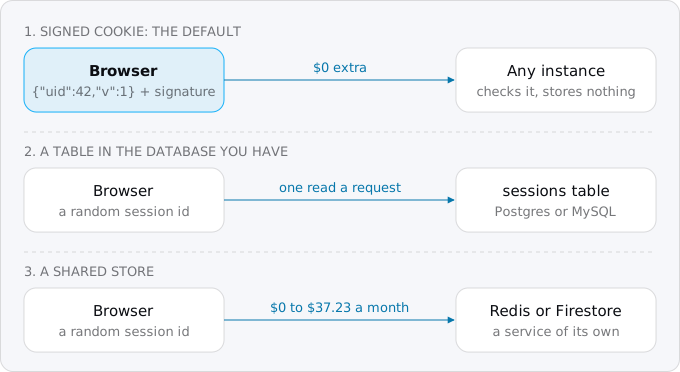
For most apps that move from a PaaS, and for a new product planned for Cloud Run, the first is the right default: no new service, no network setup, no cleanup job, and the session survives every instance, deploy and scale to zero. What it gives up, and how to get that back with one column, is in Step 4.
What each costs
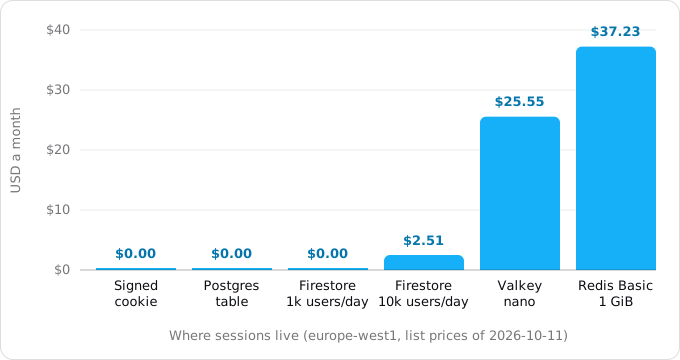
The prices below are Google's list prices of October 11, 2026 for europe-west1 (Belgium), before VAT, read from the Cloud Billing Catalog API. A month is 730 hours, Google's own figure on the Memorystore page; Firestore's free quota is daily, so its month is 30 days.
- A signed cookie: $0.00. The signing keys live in Secret Manager. The first 6 active secret versions and the first 10,000 access operations a month are free; a secret read into an environment variable is read once per instance start, so a small app stays inside that.
- A sessions table in Postgres you already run: $0.00 extra. A few thousand rows of a few hundred bytes each fit in storage you already pay for.
- Firestore: one free database per project, with 50,000 document reads and 20,000 writes a day free. After that, reads are $0.033 per 100,000 and writes $0.099 per 100,000 in Belgium, and TTL deletes (the cleanup of expired sessions) are $0.011 per 100,000 with no free tier. With one read per request and one write per login, 1,000 users a day at 30 requests each make 30,000 reads a day, inside the free quota: $0.00 (TTL deletes come to a third of a cent). 10,000 users a day make 300,000 reads a day, 7.5 million paid reads a month: $2.51.
- Memorystore for Valkey, the smallest node (shared-core-nano, 1.4 GB): $0.035 an hour, $25.55 a month. Google says this node has no SLA and is unsuitable for production.
- Memorystore for Redis, Basic, 1 GiB: $0.051 per GiB-hour, $37.23 a month. Basic has no replica. It bills for provisioned capacity per second, whether anyone logs in or not.
Step 1: find where your sessions live today
Find out which store the app really uses; it is often not the framework's default. From the repository root:
grep -rnE "express-session|cookie-session|MemoryStore|connect-redis|connect-pg-simple" \
  --include='*.js' --include='*.ts' --include='*.mjs' . | grep -v node_modules
grep -rnE "SESSION_ENGINE|SESSION_DRIVER|session_store|SESSION_TYPE" \
  --include='*.py' --include='*.rb' --include='*.php' --include='.env*' .
For each hit, note where the session is stored, what goes into it and how big it can get. A user id and a role fit in a cookie; a cart of fifty items or a set of OAuth tokens belongs in a table (see "When a cookie is not enough"). What the frameworks do:
- Rails:
CookieStoreis the default and encrypts the cookie with keys derived fromsecret_key_base. Only the key's source changes (Step 2). - Flask: the session is a cookie signed with
SECRET_KEY, readable by the user. - Django: sessions are in the database by default, which works as long as the database is not SQLite on the container's disk.
- Laravel:
databaseis the default in the version read for this guide; thefiledriver breaks. - Express:
express-sessionwithout astoreoption is MemoryStore, which breaks.
Step 2: put the signing keys in Secret Manager
The signing key must be the same on every instance and must not be in the repository. Secret Manager is Google's store for such values; secrets on Cloud Run covers its roles and rotation. Pipe a random value in, so the key never appears on a command line or in shell history:
gcloud services enable secretmanager.googleapis.com
openssl rand -hex 32 | gcloud secrets create session-keys --data-file=-
Grant the service's own runtime account read access to this one secret:
gcloud secrets add-iam-policy-binding session-keys \
  --member="serviceAccount:shop-run@PROJECT_ID.iam.gserviceaccount.com" \
  --role="roles/secretmanager.secretAccessor"
Pass it as an environment variable and pin a version number: environment variables are resolved when an instance starts, so with latest two instances can hold different keys after a new version is added.
gcloud run deploy shop --source . --region europe-west1 \
  --set-secrets=SESSION_KEYS=session-keys:1
In Rails the same secret becomes SECRET_KEY_BASE, in Flask and Django SECRET_KEY, in Laravel APP_KEY.
Step 3: move the session into a signed cookie
In Express, replace express-session with cookie-session. This is the sample the article was tested with; it keeps a user id and a session version in the cookie (Step 4 explains the version).
import express from 'express'
import cookieSession from 'cookie-session'
import pg from 'pg'

const db = new pg.Pool({ connectionString: process.env.DATABASE_URL })
const app = express()

// Cloud Run ends TLS in front of the container and sends plain HTTP with
// X-Forwarded-Proto: https. Without this line a Secure cookie is never set.
app.set('trust proxy', 1)

app.use(cookieSession({
  name: 'sid',
  // From Secret Manager, newest first: "new-key,old-key" during a rotation.
  keys: process.env.SESSION_KEYS.split(','),
  maxAge: 14 * 24 * 60 * 60 * 1000, // 14 days
  secure: true,
  httpOnly: true,
  sameSite: 'lax',
}))

// Every request: is the cookie's session version still the user's?
app.use(async (req, res, next) => {
  if (!req.session?.uid) return next()
  const { rows } = await db.query('select session_version from users where id = $1', [req.session.uid])
  if (rows[0]?.session_version !== req.session.v) req.session = null
  next()
})

app.post('/login', async (req, res) => {
  // Check the password here; the sample trusts ?user=.
  const { rows } = await db.query('select id, session_version from users where id = $1', [Number(req.query.user)])
  if (!rows[0]) return res.sendStatus(401)
  req.session = { uid: rows[0].id, v: rows[0].session_version }
  res.json({ ok: true })
})

app.get('/me', (req, res) => req.session?.uid ? res.json({ uid: req.session.uid }) : res.sendStatus(401))

app.post('/logout', (req, res) => { req.session = null; res.json({ ok: true }) })

// "Log out everywhere": every cookie issued before this is refused.
app.post('/logout-everywhere', async (req, res) => {
  if (!req.session?.uid) return res.sendStatus(401)
  await db.query('update users set session_version = session_version + 1 where id = $1', [req.session.uid])
  req.session = null
  res.json({ ok: true })
})

app.listen(Number(process.env.PORT ?? 8080))
Four details in it matter:
- Trusting the proxy. Cloud Run ends HTTPS before your container and passes plain HTTP with an
X-Forwarded-Proto: httpsheader. Express ignores the header unless told to trust the proxy, and then silently sets noSecurecookie: the login answers 200 and the user stays logged out, as our test run shows. - The cookie attributes.
Securesends it only over HTTPS,HttpOnlyhides it from scripts on the page, andSameSite=Laxkeeps the browser from sending it on most requests that start on another site, which is how cross-site request forgery works: a page on another site makes your browser act as the logged-in user. cookie-session setshttpOnlyby default but notsameSite. - Signed is not encrypted. A second cookie,
sid.sig, carries the signature, so a changed value is refused, but the value is base64 JSON anyone with the cookie can read. Keep it to an id and a version. Rails and Laravel'scookiedriver encrypt; in Express, keep private data in a table. - Size. The cookie standard, RFC 6265, asks browsers to allow at least 4,096 bytes per cookie, name and attributes included, and cookie-session's documentation advises staying under 4,093 bytes per domain. A larger cookie is usually dropped by the browser; Rails raises
CookieOverflowinstead. Our cookie is 63 bytes.
Step 4: log out everywhere with one column
A cookie cannot be revoked: the server stores nothing to delete, and a stolen cookie stays valid until it expires. "Log out of all devices", a disabled account and a changed password all need a way to refuse older cookies. A session version on the user's row gives it back. Add the column as a migration (the migrations guide shows how to run one on Cloud Run):
alter table users add column session_version integer not null default 1;At login the version goes into the cookie, and every request compares it with the row, a primary key lookup. "Log out everywhere" adds one to the column, and every older cookie on every device stops working at its next request. If that read is too much, check only on requests that change something, and accept that a revoked cookie can still read pages until it expires.
Step 5: try it before the deploy
The sample's script runs the old and the new code as two local instances each, A and B, and sends them what a browser would. The real output:
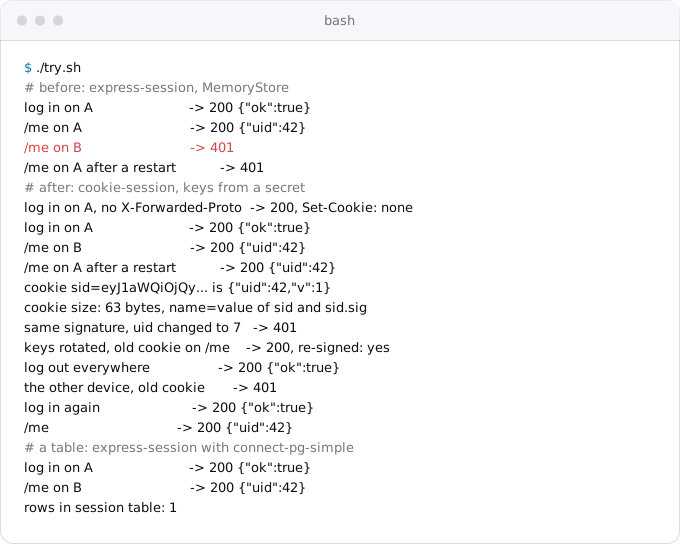
A user id changed without the key gives 401, and after a key rotation (Step 6) the old cookie still works and comes back signed with the new key. On Cloud Run, log in with the browser's developer tools open and look for the Set-Cookie header of sid with Secure, HttpOnly and SameSite=Lax; then deploy again and reload. Still logged in means the session no longer lives in an instance.
Step 6: rotate the keys without logging everyone out
Changing a signing key outright logs everyone out, as the Rails guide warns about secret_key_base. cookie-session signs with the first key in its list and accepts any of them, so a rotation is two deploys:
- Add a version with the new key first and the old one second, and deploy it. Every instance now accepts both, and every cookie it touches is re-signed with the new key.
- After the cookie's lifetime (14 days in the sample), add a version with only the new key, deploy it, and destroy the old versions.
printf '%s,%s' "$(openssl rand -hex 32)" "$(gcloud secrets versions access 1 --secret=session-keys)" \
  | gcloud secrets versions add session-keys --data-file=-
gcloud run services update shop --region europe-west1 --update-secrets=SESSION_KEYS=session-keys:2
The value goes from one command to the next through a pipe and is never printed. Django has the same idea as SECRET_KEY_FALLBACKS, and Flask added SECRET_KEY_FALLBACKS in version 3.1. A version that is no longer used should be destroyed (gcloud secrets versions destroy 1 --secret=session-keys): Google bills disabled versions as active, and only destroyed ones are free and unreadable.
When a cookie is not enough: a table in your database
A large cart, a multi-step form or OAuth tokens do not belong in a cookie. Keep a session id in the cookie and the data in a table.
In Express, connect-pg-simple is a store for express-session backed by Postgres. It can create its own table (createTableIfMissing) and deletes expired rows every 900 seconds by default. From MemoryStore it is one option:
import session from 'express-session'
import connectPg from 'connect-pg-simple'
const PgStore = connectPg(session)

app.use(session({
  store: new PgStore({ pool: db, createTableIfMissing: true }),
  secret: process.env.SESSION_KEYS.split(','),
  resave: false, saveUninitialized: false,
  cookie: { secure: true, httpOnly: true, sameSite: 'lax', maxAge: 14 * 24 * 60 * 60 * 1000 },
}))
The cost is a read per request and a write when the session changes, and revocation is deleting the user's rows. Watch two things: the session table grows if nothing prunes it (Django's clearsessions command is meant to run on a schedule, see cron and timers), and a database outage now also means nobody can log in.
Firestore, if there is no SQL database
An app with no SQL database can keep sessions in Firestore, whose free quota covers a small app (see "What each costs"). A TTL policy on an expiry field removes old sessions. Turn it on once, here for a collection called sessions whose documents have a timestamp field expireAt:
gcloud firestore fields ttls update expireAt --collection-group=sessions --enable-ttlGoogle says expired documents are typically deleted within 24 hours, so the app must still check the expiry itself, and the deletes are billed from the first one.
Google's own express store for Firestore, @google-cloud/connect-firestore, was marked on its repository for deprecation in July 2024; a get, a set and a delete by id against the Firestore client do the same job.
When Redis stays
Rate limits counted across instances, a shared cache, pub/sub and job queues need a shared store too, so moving sessions out removes one reason for a Redis, not always all of them. Queues have their own replacement in background workers with Cloud Tasks.
If a Redis does stay, Memorystore is Google's managed one, from $25.55 a month (the prices are above). The Redis guide moves the other jobs to Postgres and shows how a service reaches Memorystore. What does not make sense is paying for a Redis whose only job was sessions.
What breaks
- Login answers 200 but nobody stays logged in.
trust proxyis missing, so Express will not set aSecurecookie behind Cloud Run. - Some users are logged out, others are not. The cookie is over the browser's limit and is dropped. Check its size in the browser's developer tools and move the data into a table.
- Everyone is logged out after a deploy. The key changed: a new random key per instance (generated at start),
latestwith a new secret version, or a missing secret falling back to a default. Every instance must read the same pinned version. - Someone reads private data from the cookie. It was signed, not encrypted. Keep only ids in a signed cookie.
- A deleted account still works. There is no version check, so old cookies are valid until they expire. Add Step 4.
- The session table fills up. Nothing prunes it. Schedule the cleanup.
- A login form on another domain stops working.
SameSite=Laxdoes not send the cookie on cross-site POSTs. If the app really is embedded across sites, that needsSameSite=None; Secureand protection against cross-site request forgery by other means.
Checklist
- Find the session store in the code and what goes into the session.
- Choose: a signed cookie for an id and a role, a table for anything larger or private.
- Create the signing key in Secret Manager from a pipe, grant
roles/secretmanager.secretAccessoron that secret to the service's account, and pin a version. - Switch the store, set
trust proxy,Secure,HttpOnly,SameSite=Laxand a lifetime. - Add
session_versionto the users table and check it on each request. - Run the old and the new code as two local instances and confirm the session survives the second instance and a restart.
- Deploy, log in, deploy again, and confirm you are still logged in.
- Write down the rotation: new key first, wait one cookie lifetime, drop the old one.
- Remove the Redis only when nothing else uses it.
Where Exodus comes in
Exodus's CLI reads the repository with your coding agent and finds where sessions live: express-session without a store, SESSION_DRIVER=file, a Redis used only by the session library, a hardcoded secret. Each becomes a finding in the report with this article as its fix. Your agent can read this article from the terminal with exodus kb.
FAQ
Does Cloud Run support sticky sessions?
Cloud Run has session affinity: its own cookie, valid for 30 days, asks it to send a browser back to the same instance. Google calls it best effort. A terminated instance, or one at its concurrency or CPU limit, sends the request elsewhere, and a deploy brings new instances, so affinity cannot keep a login.
Can I use express-session on Cloud Run?
Not with its default MemoryStore, which loses sessions between instances and at every deploy and which its own documentation says is not designed for production. Switch to cookie-session for a signed cookie, or keep express-session with connect-pg-simple so sessions live in Postgres. Either way, tell Express to trust the proxy.
Why does my login on Cloud Run answer 200 but nobody stays logged in?
Cloud Run ends HTTPS in front of the container and passes plain HTTP with an X-Forwarded-Proto header. Express ignores that header unless its trust proxy setting is on, and then silently sets no Secure cookie, so the browser never stores the session.
How do I log a user out of all devices with a cookie session?
Keep a session version on the user's row and put it in the cookie at login. Each request compares the two with a primary key lookup. Logging out everywhere adds one to the column, so every older cookie on every device is refused at its next request.
How much does Memorystore cost just for sessions?
In europe-west1 the smallest Memorystore for Valkey node, shared-core-nano with 1.4 GB, costs $25.55 a month and has no SLA; Memorystore for Redis Basic with 1 GiB costs $37.23. Both bill whether anyone logs in or not, against $0.00 extra for a signed cookie or a table in your database.
Sources
24
- expressjs.comexpress-session, Express
- expressjs.comcookie-session, Express
- docs.cloud.google.comSet session affinity for services, Google
- docs.cloud.google.comAbout instance autoscaling, Google
- docs.cloud.google.comBilling settings for services, Google
- docs.cloud.google.comManage revisions, Google
- docs.cloud.google.comContainer runtime contract, Google
- docs.cloud.google.comInvoke with an HTTPS request, Google
- docs.cloud.google.comConfigure secrets for services, Google
- cloud.google.comSecret Manager pricing, Google
- cloud.google.comMemorystore for Redis pricing, Google
- docs.cloud.google.comConnect to a Redis instance from a Cloud Run service, Google
- cloud.google.comMemorystore for Valkey pricing and node specification, Google
- cloud.google.comFirestore pricing, Google
- firebase.google.comManage data retention with TTL policies, Firebase
- github.comgoogleapis/nodejs-firestore-session, Google
- npmjs.comconnect-pg-simple
- guides.rubyonrails.orgSecuring Rails Applications, Rails guides
- docs.djangoproject.comHow to use sessions, Django
- docs.djangoproject.comDjango settings: SECRET_KEY_FALLBACKS
- flask.palletsprojects.comFlask configuration
- laravel.comLaravel HTTP session
- developer.mozilla.orgSet-Cookie, MDN
- Exodus team: Cloud Billing Catalog API read for Memorystore, Firestore and Secret Manager SKUs in europe-west1, gcloud 587.0.0 help for every command shown, and a local run of the sample