On Cloud Run, a background job queue moves to Cloud Tasks: each job becomes an HTTP request that the queue delivers to a route in your own service, with retries and rate limits, for about $0.51 a month at 1,300 jobs a day. A worker pool, one always-on instance at $31.17 a month, fits stream consumers, long connections and volumes above about 74,000 jobs a day.
In short
- Cloud Tasks bills $0.40 per million operations after a free first million a month; a small task that succeeds first time is two operations.
- One job type at 1,300 jobs a day costs about $0.51 a month with the service's time; a worker pool of one instance costs $31.17 at any volume.
- A queue dispatches at most 500 tasks a second, and a task's deadline is 10 minutes by default, 30 at most.
- Delivery is at least once (more than 99.999% of tasks run once), so a handler must be idempotent.
- With the default settings a failing task gets 100 attempts over about 3.5 days, then it is deleted, with no dead-letter queue.
Prices are Google's list prices in europe-west1, read on October 11, 2026.
Why a queue worker breaks on Cloud Run
Most web apps have a second process, a BullMQ, Sidekiq or Celery worker that loops all day waiting on Redis. A Cloud Run service with the default request-based billing gets CPU only while a request is in flight. A worker loop is not a request, so between requests its CPU is throttled to almost nothing and jobs sit in Redis. With instance-based billing the loop runs, but you pay for every second of the instance's life, and Cloud Run still scales by requests, which a worker never gets. The billing guide explains both modes.
Work started after the response has the same problem. A res.send() followed by sendEmail() loses its CPU once the response is out. The patterns guide lists this next to the other habits that break.
There are two ways out: make each job a request (Cloud Tasks, which fits most job queues), or keep the loop in a worker pool and pay for it all month.
What Cloud Tasks is
Cloud Tasks is a managed queue that pushes. Your code creates a task: an HTTP method, a URL, headers and a body of up to 1 MiB. The queue stores it and later sends that request to the URL. If the target answers with a 2xx status, the task is done and deleted. Any other answer, or no answer before the deadline, and the queue tries again later with backoff.
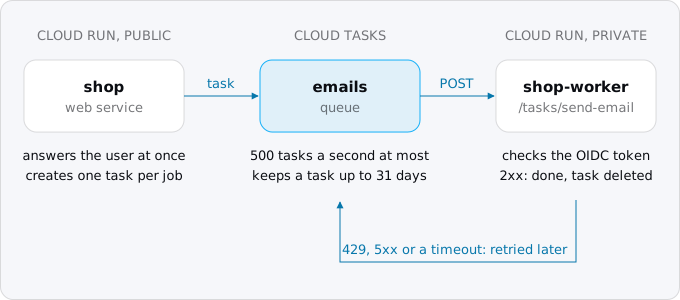
What Google promises, from the Cloud Tasks pages read on 2026-10-11:
- Delivery is at least once. Google aims for exactly once and says that in production more than 99.999% of tasks run only once, but duplicates do happen, so a handler must be idempotent: running a task twice must do what running it once does.
- There is no order. Tasks are not delivered in the order they were created, and newer ones often run first.
- A queue dispatches at most 500 tasks a second. For more, use more queues.
- A task can wait. You can schedule it up to 30 days ahead, and a task is deleted 31 days after it was created whatever its state.
- The deadline is 10 minutes by default. For an HTTP task it can be set from 15 seconds to 30 minutes.
Google's comparison with Pub/Sub comes down to who decides: with Cloud Tasks the code that creates the task names the endpoint, the time and the retries, which is what a job queue does.
What it costs
Cloud Tasks bills operations: every API call and every delivery attempt is one. The first million operations a month are free per billing account, then $0.40 per million (list price, 2026-10-11). Tasks are counted in 32 KB chunks, so creating a 96 KB task costs three operations. A task under 32 KB that succeeds on the first try is two operations: one to create it, one to deliver it. Each retry adds one.
The handler's time is billed as any Cloud Run request. To compare, take one job type that needs 0.5 seconds of one vCPU with 512 MiB, on a request-based service in europe-west1 at list prices of 2026-10-11 ($0.000024 per vCPU-second, $0.0000025 per GiB-second, $0.40 per million requests), and assume the web traffic already used the free tier:
- 1,300 jobs a day (39,000 a month): CPU $0.47, memory $0.02, requests $0.02, operations free. $0.51 a month.
- 10,000 jobs a day (300,000 a month): $3.91. Still inside the free million operations.
- 100,000 jobs a day (3 million a month): CPU $36.00, memory $1.88, requests $1.20, operations $2.00. $41.08.
A worker pool with one instance of 1 vCPU and 512 MiB, running all month, costs $31.17 at the worker pool rates ($0.000011244 per vCPU-second and $0.000001235 per GiB-second in the Catalog API). Google's pricing page has an example of this exact worker pool and gives $16.83 before the free tier; the per-second prices on the same page times 730 hours give $31.17, and that is the number used here.
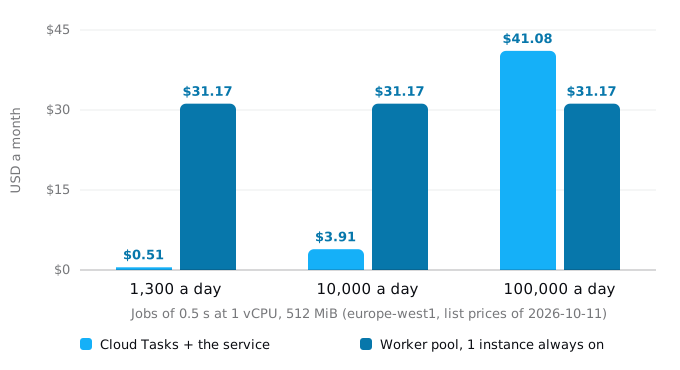
The two cost the same at about 2.2 million jobs a month, about 74,000 a day, when the one worker instance would be busy 42% of the time. Below that the queue costs less; above it a busy worker pool does. The model is the worst case, CPU-bound jobs. An email job mostly waits on the mail API, and a Cloud Run instance bills its active time once however many requests overlap in it: with 20 such jobs sharing an instance, the 100,000-a-day case drops to about $5. A queue also scales with a burst; a worker pool of one instance makes it wait.
Exodus team: in one of our moves, the always-on worker that the queue replaced cost $9.80 a month, so the worker above is not a minimum.
Step 1. Enable the API and create the queue
Cloud Tasks is a separate API. Enable it once per project, then create a queue in a region:
gcloud services enable cloudtasks.googleapis.com
gcloud tasks queues create emails --location=europe-west1 \
  --max-attempts=10 --min-backoff=10s --max-backoff=300s --max-doublings=3 \
  --max-concurrent-dispatches=20
Always pass --location: without it gcloud looks for an App Engine app, which an HTTP queue does not need.
Cloud Tasks is not in every Cloud Run region. On 2026-10-11 gcloud tasks locations list printed 28 locations: europe-west1, europe-west2, europe-west3, europe-west6 and europe-central2 are there, europe-west4 and europe-north1 are not. A queue calls a URL, so it can live in a nearby region; see the region guide.
Step 2. A service account for the queue
The queue has to prove to Cloud Run who is calling. It does that with an OIDC ID token, a short-lived proof of identity that Google signs, made out for a service account you name on each task. Make one account for that job only:
PROJECT=$(gcloud config get-value project)
gcloud iam service-accounts create tasks-invoker --display-name="Cloud Tasks invoker"
INVOKER=tasks-invoker@$PROJECT.iam.gserviceaccount.com
Four permissions make the chain work, and the last one comes in step 3:
- The web service's runtime account (here
shop-web@) may create tasks in this queue (Enqueuer). - The same account may name the invoker on a task: Service Account User on the invoker, which carries
iam.serviceAccounts.actAs. - Cloud Tasks' own service agent, the Google-managed account the queue acts as, gets Service Account User on the invoker, as Google's HTTP target page asks, so it can mint the token.
- The invoker account gets Run Invoker on the worker service.
gcloud tasks queues add-iam-policy-binding emails --location=europe-west1 \
  --member="serviceAccount:shop-web@$PROJECT.iam.gserviceaccount.com" --role=roles/cloudtasks.enqueuer
gcloud iam service-accounts add-iam-policy-binding "$INVOKER" \
  --member="serviceAccount:shop-web@$PROJECT.iam.gserviceaccount.com" --role=roles/iam.serviceAccountUser
NUMBER=$(gcloud projects describe "$PROJECT" --format='value(projectNumber)')
gcloud iam service-accounts add-iam-policy-binding "$INVOKER" \
  --member="serviceAccount:service-$NUMBER@gcp-sa-cloudtasks.iam.gserviceaccount.com" \
  --role=roles/iam.serviceAccountUser
Step 3. Decide where the handler runs
A separate private service from the same image. Deploy the image a second time as shop-worker, without public access. Cloud Run checks the token and the Run Invoker role before your code sees the request, and the worker gets its own timeout and instance limit, so a burst of jobs cannot crowd out web requests:
gcloud run deploy shop-worker --image="$IMAGE" --region=europe-west1 \
  --no-allow-unauthenticated --service-account="shop-worker@$PROJECT.iam.gserviceaccount.com" \
  --timeout=330 --max-instances=5 --concurrency=20
gcloud run services add-iam-policy-binding shop-worker --region=europe-west1 \
  --member="serviceAccount:$INVOKER" --role=roles/run.invoker
Routes on the public web service. Fewer moving parts, but anyone can call them, so the handler must check the token itself. The X-CloudTasks-* headers are not identity, Google's page says.
Set the audience either way: it is the address the token is made out for, and the handler refuses a token made out for another. If a task names none, Cloud Tasks uses the full task URL with its path, while Google's Cloud Run pages say it should be the service URL. Name it on every task, as below.
Step 4. Create tasks from your code
Where the app pushed a job to Redis, it now creates a task. In Node, with @google-cloud/tasks (6.3.0 on 2026-10-11):
import { CloudTasksClient } from '@google-cloud/tasks'
import { createHash } from 'node:crypto'

const { PROJECT, REGION = 'europe-west1', QUEUE = 'emails', BASE, INVOKER } = process.env
const client = new CloudTasksClient()
const parent = client.queuePath(PROJECT, REGION, QUEUE)

export async function enqueue(job, payload, key) {
  const name = key && `${parent}/tasks/${createHash('sha256').update(`${job}:${key}`).digest('hex').slice(0, 32)}`
  try {
    await client.createTask({
      parent,
      task: {
        name,
        httpRequest: {
          httpMethod: 'POST',
          url: `${BASE}/tasks/${job}`,
          headers: { 'Content-Type': 'application/json' },
          body: Buffer.from(JSON.stringify(payload)).toString('base64'),
          oidcToken: { serviceAccountEmail: INVOKER, audience: BASE },
        },
        dispatchDeadline: { seconds: 300 },
      },
    })
  } catch (e) {
    if (e.code !== 6) throw e // 6 is ALREADY_EXISTS: this job was enqueued already
  }
}

// at checkout: await enqueue('send-email', { to, order: order.id }, `order-${order.id}`)
BASE is the worker service's run.app URL, INVOKER the account from step 2. Three details matter:
- The name stops double enqueueing. A task with a name that exists, or existed recently, is refused: Google remembers names for up to 24 hours after a task is deleted. A checkout retried by the browser creates one email. Google asks for hashed names, because named tasks are slower to create. Leave
keyout for jobs that may repeat. - The deadline should match the service. Set
dispatchDeadlinea little under the worker's--timeout; if the queue gives up first, it retries while the first attempt may still run. - The body is bytes. The Node client takes it as base64; the handler receives the original JSON.
We checked this request offline against the library's CreateTaskRequest type. scheduleTime delays a task up to 30 days. Since 2026-09-30 a batch call creates up to 100 tasks at once (not atomically), and a task can carry retry settings that override the queue's. For a test from the terminal:
gcloud tasks create-http-task --queue=emails --location=europe-west1 \
  --url="$BASE/tasks/send-email" --method=POST \
  --header="Content-Type: application/json" --body-content='{"to":"you@example.com"}' \
  --oidc-service-account-email="$INVOKER" --oidc-token-audience="$BASE"
Step 5. Write the handler
A 2xx answer means done; anything else means try again later, including a 400 for a malformed body, which will be retried until the attempts run out.
import http from 'node:http'
import { OAuth2Client } from 'google-auth-library'

const { TASKS_AUDIENCE, TASKS_INVOKER, PORT = 8080 } = process.env
const auth = new OAuth2Client()
const done = new Set() // stands in for a table with a unique key on the task name

class Permanent extends Error {}

const jobs = {
  'send-email': async ({ to }) => {
    if (!to) throw new Permanent('no address')
    // call the mail API here
  },
}

async function fromQueue(req) {
  const m = /^Bearer (.+)$/.exec(req.headers.authorization ?? '')
  if (!m) return false
  try {
    const ticket = await auth.verifyIdToken({ idToken: m[1], audience: TASKS_AUDIENCE })
    const p = ticket.getPayload()
    return p.email === TASKS_INVOKER && p.email_verified === true
  } catch {
    return false
  }
}

http.createServer(async (req, res) => {
  const job = jobs[req.url.replace(/^\/tasks\//, '')]
  if (req.method !== 'POST' || !req.url.startsWith('/tasks/') || !job) return res.writeHead(404).end()
  if (!(await fromQueue(req))) return res.writeHead(401).end()

  const name = req.headers['x-cloudtasks-taskname']
  if (done.has(name)) return res.writeHead(200).end() // a duplicate delivery
  let body = ''
  for await (const chunk of req) body += chunk
  try {
    await job(JSON.parse(body || '{}'))
    done.add(name)
    res.writeHead(200).end()
  } catch (e) {
    if (e instanceof Permanent || e instanceof SyntaxError) return res.writeHead(200).end() // log it: a retry cannot fix it
    res.writeHead(503).end()
  }
}).listen(PORT)
In production the done set is a table, written in the same transaction as the job's own write:
CREATE TABLE task_runs (name text PRIMARY KEY, finished_at timestamptz NOT NULL DEFAULT now());
-- BEGIN; INSERT INTO task_runs (name) VALUES ($1) ON CONFLICT DO NOTHING RETURNING name;
-- no row: done before, answer 200. A row: do the work, COMMIT, answer 200.
A mail or payment API cannot share that transaction; pass it the task name as its idempotency key where it takes one. We ran this handler locally with a real Google-signed ID token (gcloud's own, with the handler set to expect its audience and email) and sent it what Cloud Tasks sends:
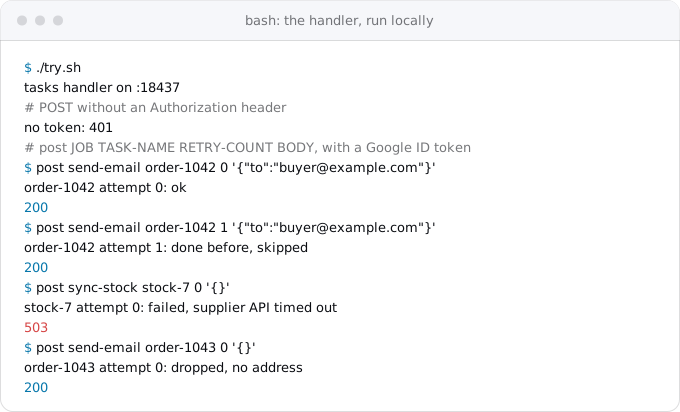
For logs, Cloud Tasks adds X-CloudTasks-TaskName, X-CloudTasks-QueueName, X-CloudTasks-TaskRetryCount (0 on the first attempt) and, on a retry, X-CloudTasks-TaskPreviousResponse.
Retries, and what happens after the last one
A queue retries a failed task with exponential backoff. The interval starts at min-backoff, doubles max-doublings times, then grows by a fixed step, and stops growing at max-backoff. The task stops being retried when it has had max-attempts attempts and max-retry-duration has passed; both have to hold.
With the defaults (0.1 s, 3,600 s, 16 doublings, 100 attempts, no time limit) a task that keeps failing is tried 17 times in the first 1.8 hours, then once an hour, and the 100th attempt comes 84.8 hours, about three and a half days, after the first.
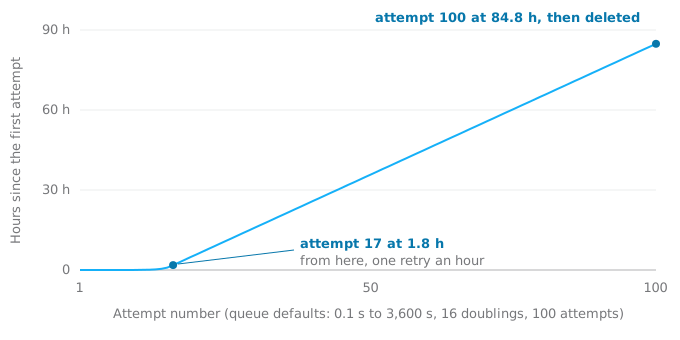
Then it is deleted. Cloud Tasks has no dead-letter queue (a place that keeps tasks which ran out of attempts), unlike Sidekiq's Dead set or Pub/Sub's dead-letter topics, and nothing tells you. So:
- Pick limits you can live with. The queue in step 1 (10 attempts, 10 s to 300 s, 3 doublings) retries after 10, 20, 40, 80, 160, 240, 300, 300 and 300 seconds: about 24 minutes in all, then gives up. A job that should outlast a supplier's outage wants
--max-retry-durationas well. - Write down the last failure. When
X-CloudTasks-TaskRetryCountreaches your last attempt, store the payload and the error in a table before answering, and alert on that table. - Answer 200 for what retries cannot fix. A missing address, a deleted order, a body that does not parse.
When a handler answers 429 or 503, or many tasks fail at once, the queue slows down on its own and honours a Retry-After header.
Rate and concurrency
A queue has two limits of its own. max-dispatches-per-second caps how many tasks start each second; max-concurrent-dispatches caps how many are in flight at once. Use the second to protect what the jobs touch: a database that allows 25 connections should not face 1,000 tasks at once.
The worker service has its own limits too: --max-instances times --concurrency is how many requests it takes at once. Keep the queue's concurrency at or below that number. Above it, Cloud Run answers 429 and the queue backs off. The concurrency guide explains the instance side.
A new or idle queue ramps up slowly, and long jobs slow it further. During an incident, gcloud tasks queues pause emails --location=europe-west1 holds the tasks and resume lets them go.
When to keep a loop
Some workers are not a pile of separate jobs: a consumer of Kafka or a Pub/Sub pull subscription, a process holding one connection for hours, a job longer than the 30-minute deadline. For the first two, Cloud Run worker pools (generally available since April 2026) run a container with no URL, always on, billed per instance for the time it runs. They do not scale by themselves; you set --instances. For long jobs, a Cloud Run job runs to completion for up to 7 days per task, and a task handler can start one execution through the Cloud Run API. The services, jobs and worker pools guide has the commands for both.
A repeating job, such as a nightly report or a cleanup every five minutes, is Cloud Scheduler's work, not the queue's; the cron and timers guide covers it.
How a worker library maps
Most of a worker library's ideas have a place in Cloud Tasks. Sidekiq retries 25 times over about 21 days and then moves the job to its Dead set; BullMQ retries only when you set attempts; Celery's max_retries defaults to 3. On Google the policy lives on the queue, or since September 2026 on the task.
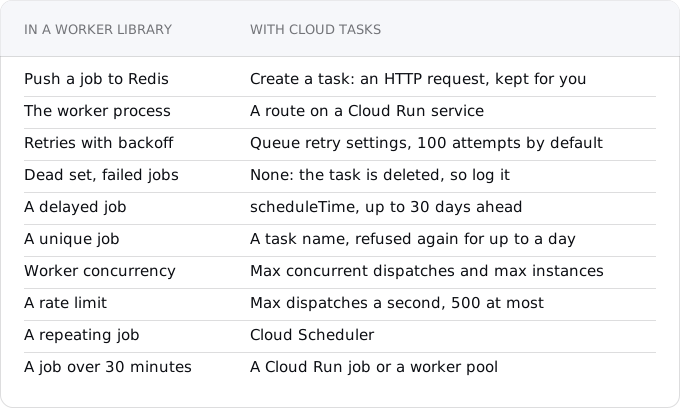
Priorities are the one feature with no setting. Use a queue per priority, each with its own rate.
What breaks
- The handler answers before the work is done. The CPU goes away, as before. Answer when the job has finished.
- Tokens fail after a move to a custom domain. The audience is the URL the token was minted for. Keep the
run.appURL as the audience, or add the domain as a custom audience on the service. - Tasks pile up and nothing alerts. Watch the queue depth metric, and alert on your failure table.
- A deleted queue cannot be recreated by name for up to 3 days. Rename instead of deleting during a migration.
- The queue is in another region. The request crosses regions and the egress is billed.
Checklist
- Find every place that pushes to the queue and every consumer.
- One handler per job type, on a private worker service or behind a token check. Make it idempotent, because a task can run twice.
- Create the queue with retry limits you chose, in a region that has Cloud Tasks.
- Grant Run Invoker to the invoker account, Enqueuer and Service Account User to the web service's account.
- Answer 2xx for done and for what cannot be fixed, 503 for what can. Store the last failure.
- Keep the queue's concurrency at or below what the worker service and the database can take.
- Remove Redis if it only held the queue. The compose guide shows what Redis costs on Google if it stays.
Where Exodus comes in
Exodus's CLI reads the repository with your coding agent and finds the worker: the BullMQ, Sidekiq or Celery setup, the places that enqueue, the jobs that run after a response, the Procfile line that starts the loop. Each one becomes a finding in the report with this article as its fix, the report's cost calculator prices the queue from Google's catalog, and exodus plan puts "rewrite the worker" in the move order before the old worker is switched off. Your agent can read this article from the terminal with exodus kb.
FAQ
Can Cloud Run run a Sidekiq, BullMQ or Celery worker?
Not as a loop on a request-billed service: between requests its CPU is throttled to almost nothing and jobs sit in Redis. With instance-based billing the loop runs, but you pay for every second of the instance's life. Turn each job into a Cloud Tasks request, or keep the loop in a worker pool billed all month.
Can Cloud Tasks deliver the same task twice?
Yes. Delivery is at least once: Google says more than 99.999% of tasks run only once in production, but duplicates happen. Make the handler idempotent by recording each task name in a table with a unique key, in the same transaction as the job's own write, and answer 200 to a name that is already done.
How long can a Cloud Tasks job run?
An HTTP task's deadline is 10 minutes by default and can be set from 15 seconds to 30 minutes. Set it a little under the worker service's timeout, or the queue retries while the first attempt still runs. A job longer than 30 minutes belongs in a Cloud Run job, which runs up to 7 days per task.
Does Cloud Tasks have a dead-letter queue?
No. A task that runs out of attempts is deleted, and nothing tells you. When the retry count header reaches your last attempt, store the payload and the error in a table before answering, and alert on that table. Answer 200 for failures a retry cannot fix, such as a missing address.
Sources
22
- cloud.google.comCloud Tasks pricing, Google
- docs.cloud.google.comCloud Tasks quotas and limits, Google
- docs.cloud.google.comCloud Tasks issues and limitations, Google
- docs.cloud.google.comCloud Tasks overview and task deduplication, Google
- docs.cloud.google.comConfigure queue routing, limits and retries, Google
- docs.cloud.google.comRetryConfig reference, Google
- docs.cloud.google.comTask reference
- docs.cloud.google.comCreate HTTP target tasks with authentication tokens, Google
- docs.cloud.google.comCreate tasks and batches of tasks, Google
- docs.cloud.google.comCloud Tasks release notes, Google
- docs.cloud.google.comChoose Cloud Tasks or Pub/Sub, Google
- docs.cloud.google.comExecuting asynchronous tasks on Cloud Run, Google
- docs.cloud.google.comCloud Run service-to-service authentication, Google
- cloud.google.comCloud Run pricing, Google
- docs.cloud.google.comCloud Run worker pools, Google
- docs.cloud.google.comCloud Run request timeout, Google
- docs.cloud.google.comgcloud tasks queues create reference, Google
- github.comSidekiq wiki: error handling
- docs.bullmq.ioBullMQ docs: retrying failing jobs
- docs.celeryq.devCelery docs: tasks, retrying
- Exodus team: Cloud Billing Catalog API read for Cloud Tasks and worker pool SKUs, gcloud 587.0.0 help and gcloud tasks locations list, and a local run of the sample handler with a Google-signed ID token, Oct 11, 2026
- Exodus team: the always-on worker one of our moves replaced cost $9.80 a month