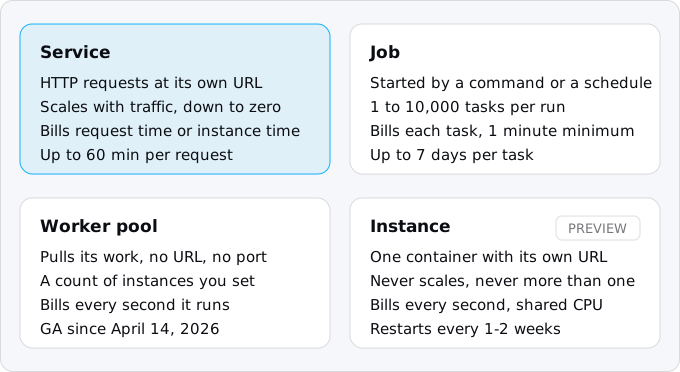
Cloud Run runs a container in one of four shapes. A service answers HTTP and scales to zero. A job runs a script to the end, up to 7 days per task. A worker pool has no URL and pulls work at a fixed instance count. An instance, in Preview since August 2026, is one long-lived container. Most PaaS apps become one service, a job or two and some schedules.
In short
- A service takes 80 requests per instance by default, up to 1,000, and with request-based billing pays $0.000024 per vCPU-second only while it handles requests.
- A job task runs up to 168 hours (7 days) and is retried 3 times by default; Cloud Scheduler starts it for $0.10 per schedule per 31 days, with 3 schedules free.
- A worker pool bills every second at $0.000011244 per vCPU-second, 37.5% under an instance-billed service, busy or not.
- The same 1,300 half-second jobs a day cost $31.17 a month on a one-instance worker pool and $0.52 as Cloud Tasks calling a service.
Prices are Google's list prices for the cheaper price tier, such as europe-west1, read on October 11, 2026.
What the four shapes share
Cloud Run is Google's place to run a container: your code packed with its libraries and a small Linux, plus the command that starts it. You hand it an image, or source code that Cloud Build (Google's build service) turns into one, say how much CPU and memory one copy gets, and Cloud Run starts and stops the copies; what Cloud Run is covers the platform as a whole. The shapes bill and fail differently, so picking one for each part of your app is most of the design work of a move.
Anything that runs in Docker runs here. Each running copy is an instance, and you set its size, from a fraction of a vCPU (a virtual CPU) up to 8 vCPU and 32 GiB of memory. One vCPU and 512 MiB is enough for most small web apps.
Three rules hold for all of them, and they are the rules an app from a platform like Heroku, Railway or Render (a PaaS: you push code, it runs the process) usually breaks:
- The disk is memory. Each container has a writable file system, but it lives in the instance's memory and is gone when the instance stops. Files that must outlive a request go to a Cloud Storage bucket.
- An instance can stop at any time. Cloud Run first sends the process
SIGTERM, the Unix signal that asks a program to shut down, andSIGKILL, which ends it at once, 10 seconds later on a service or a worker pool, a few seconds later on a job task that ran out of time. Your code should trapSIGTERMand finish or hand back what it was doing. - Each deploy is a new revision. A revision is a saved version of the service's image and settings. Services and worker pools keep their old revisions, so you can send part of the traffic, or part of the instances, to a new one and roll back by pointing at the old one.
All four get a service account, an identity for the program that lets it call Google APIs without a key file, and logs in Cloud Logging. They differ in how work arrives and how they bill:
Services: code that answers requests
A service is your web process. Your container listens on the port Cloud Run passes in the $PORT variable, and Cloud Run gives the service an HTTPS address on run.app. It ends TLS for you and passes HTTP/1, HTTP/2, WebSockets and gRPC through to the container.
How a service scales
One instance takes many requests at once: 80 by default, up to 1,000. This number is the service's concurrency. When requests pile up past it, Cloud Run starts another instance. When requests stop, it removes instances, down to zero if you let it. The next request after zero waits while an instance starts, which is the cold start discussed below. Concurrency on Cloud Run explains how to choose the number.
The ceiling on the number of instances is --max-instances. If you do not set it, the ceiling is whatever your regional quota allows. A quota is Google's limit on the total CPU and memory your project may use in a region; A 1,000 vCPU quota, Google's example, lets a 1 vCPU service grow to 1,000 instances. That is also a ceiling on the bill, so set a small number on day one and raise it when the graphs say so. The floor is --min-instances, which keeps instances warm and is billed for it.
A request may run for 5 minutes by default and up to 60 minutes. Anything over 15 minutes should be safe to retry, as Google advises, because a long connection is more likely to break.
How a service bills
A service has two billing settings, and you pick one per service. Choosing a Cloud Run region explains the price tiers.
Request-based billing is the default. The instance is billed while it starts, while it shuts down, and while it handles at least one request, rounded up to 100 ms. Between requests the CPU is throttled close to zero and nothing is billed. The price is $0.000024 per vCPU-second and $0.0000025 per GiB-second of active time, plus $0.40 per million requests.
Instance-based billing keeps the CPU on for the instance's whole life and bills all of it, from start to stop, with a minimum of one minute. Each second is cheaper, $0.000018 per vCPU-second and $0.000002 per GiB-second, and there is no request fee, but every second the instance exists is billed, busy or not. You switch with --no-cpu-throttling. It suits a service whose CPU is busy most of the day, or one that must keep working between requests.
Each billing account also gets a monthly free allowance, so an app with a few thousand visits a day often stays inside it. Request-based or instance-based billing has the second-by-second rules and where the two prices cross, the Cloud Run free tier explained has the allowance, and what Cloud Run costs works through both with numbers.
Creating a service
From a folder with a Dockerfile, or with code that Google's buildpacks recognize, one command builds and deploys:
gcloud run deploy web \
  --source . \
  --region europe-west1 \
  --cpu 1 --memory 512Mi \
  --concurrency 80 \
  --max-instances 3 \
  --timeout 300
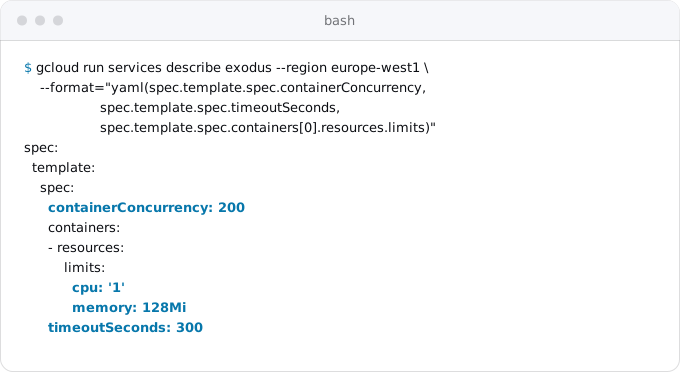
To see what a running service is set to, describe it. This is the service behind the Exodus site, read on October 11, 2026:
What changes for your code
Under request billing the CPU is there only while a request is in flight, and the next request may land on a different instance. Four habits of a PaaS app break because of this:
- Timers inside the process (
setInterval,node-cron, a clock process) fire late or never. - Work done after the response is sent stalls, because the CPU is gone.
- Files written to local disk vanish and are not shared between instances.
- Sessions and queues held in memory are lost, and a Redis kept only for them bills all month.
Each has a standard replacement on Google Cloud: Cloud Scheduler (Google's cron) and jobs for timers, Cloud Tasks (a queue that calls your service back over HTTP) for work after the response, a Cloud Storage bucket for files, signed cookies for sessions. The patterns that break on Cloud Run goes through them one by one.
Cold starts
A cold start is the wait that a request pays when no instance is running. When a service at zero gets a request, an instance starts first, and the request waits for it: Cloud Run holds it for up to 3.5 times the service's average startup time, or 10 seconds, whichever is longer. Google publishes no typical figure. Exodus team: a small Rust API we moved answers its first request in 0.8 to 1.7 seconds at 1 vCPU and 256 MiB in europe-west1. If a second on the first visit after a quiet hour matters, keep one minimum instance and pay for it, or turn on startup CPU boost, which gives an instance extra CPU while it starts. Cloud Run cold starts, measured has the numbers.
Jobs: code that runs to the end
A job runs a command until it exits. It has no URL and does not listen on a port. A migration, a nightly export, a report or a backfill is a job.
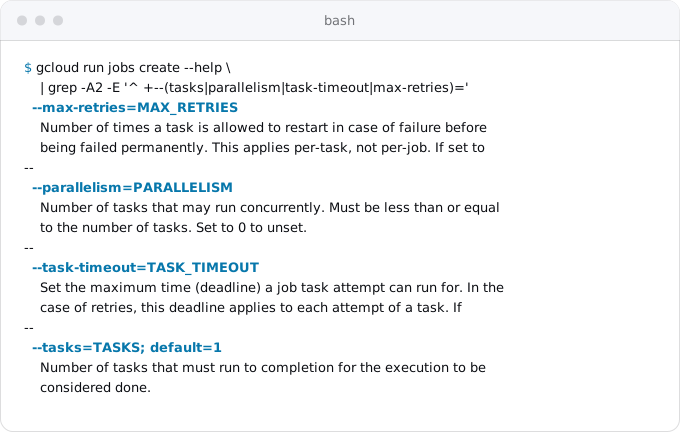
The job is the configuration: image, command, size, environment, how many tasks, how long each may run. An execution is one run of the job. A task is one container inside an execution. A job with one task runs your script once. A job with many tasks is an array job: Cloud Run starts that many containers, up to 10,000 per execution, runs as many at once as --parallelism and your quota allow, and ends the execution when every task has finished.
Each task learns which one it is from environment variables Cloud Run sets: CLOUD_RUN_TASK_INDEX (from 0), CLOUD_RUN_TASK_COUNT, and CLOUD_RUN_TASK_ATTEMPT (0 on the first try). A job that resizes 1,000 images with 10 tasks lets task 3 take every tenth image from the 4th.
A task may run for 10 minutes by default and up to 168 hours (7 days); with a GPU on Cloud Run the limit is one hour. The 7-day limit replaced a 24-hour one in November 2025. A failed task is retried 3 times by default and up to 10. A retry starts the task's container from the beginning, so a task should be safe to run twice: a migration tool that records what it applied is, a script that emails every customer is not.
Creating and running a job
From source, the same way as a service. This builds the image, creates the job migrate with a command of its own, runs it once and waits for the result:
gcloud run jobs deploy migrate \
  --source . \
  --region europe-west1 \
  --command npm --args run,migrate \
  --tasks 1 --max-retries 0 \
  --task-timeout 10m \
  --execute-now --wait
After that, every run is one command, and --wait makes the shell fail when the job fails, which a deploy script needs before it shifts traffic:
gcloud run jobs execute migrate --region europe-west1 --waitexecute also takes overrides for a single run, such as --args and --tasks, so one job can backfill a different month without a new deploy.
Running a job on a schedule
Cloud Run has no cron of its own. Cloud Scheduler is the cron: it sends an authenticated POST to the job's run address on a schedule. Give it a service account that may run this job, then create the schedule:
gcloud run jobs add-iam-policy-binding report \
  --region europe-west1 \
  --member serviceAccount:scheduler@PROJECT_ID.iam.gserviceaccount.com \
  --role roles/run.invoker

gcloud scheduler jobs create http report-nightly \
  --location europe-west1 \
  --schedule "0 3 * * *" --time-zone "Europe/Berlin" \
  --uri "https://run.googleapis.com/v2/projects/PROJECT_ID/locations/europe-west1/jobs/report:run" \
  --http-method POST \
  --oauth-service-account-email scheduler@PROJECT_ID.iam.gserviceaccount.com
Cloud Scheduler costs $0.10 per schedule per 31 days, and each billing account gets 3 schedules free. Cron and timers with Cloud Scheduler covers time zones, retries and calling a service instead.
How a job bills
A job bills like an instance-billed service: $0.000018 per vCPU-second and $0.000002 per GiB-second, for the whole life of each task's container, with a minimum of one minute per container. There is no request fee. A 1 vCPU, 512 MiB job that runs one minute every hour costs $0.83 a month before the free tier, which covers it.
Since September 2026 there is a cheaper way to run work that can wait: a delayed execution (Preview) starts some time in the next 12 hours, may run for at most 12 hours, and is billed at $0.0000126 per vCPU-second and $0.0000014 per GiB-second, 30% under the normal job price. Nightly reports and bulk processing fit it; a migration that a deploy waits for does not.
Worker pools: code that pulls its work
A worker pool runs containers that are never sent requests. They have no URL, need no port, and do not scale with traffic, because there is no traffic. They start, run your loop, and keep running: a Kafka consumer, a Pub/Sub pull subscriber, a RabbitMQ worker, a bot that holds a connection open. Worker pools were in Preview from June 2025 and became generally available on April 14, 2026.
You set the number of instances yourself. The default is 1; --instances 0 stops the pool without deleting it. Changing the count does not create a new revision. Google's pages disagree on whether a pool scales by itself. The only mechanism documented step by step is CREMA, an autoscaler you deploy as a Cloud Run service of its own, which reads a Kafka lag, a Pub/Sub backlog or a Prometheus query and sets the instance count. Plan for a fixed count.
The CPU is always on, and the pool bills every second each instance runs, whether it found work or not. All requested instances count as active. In exchange the price is lower than any other always-on option on Cloud Run with a full CPU: $0.000011244 per vCPU-second and $0.000001235 per GiB-second, 37.5% under an instance-billed service for CPU and 38% for memory.
gcloud run worker-pools deploy consumer \
  --source . \
  --region europe-west1 \
  --cpu 1 --memory 512Mi \
  --instances 1

# later: two consumers, no new revision
gcloud run worker-pools update consumer --region europe-west1 --instances 2
A successful deploy only means Cloud Run started the container, not that the worker is healthy, so configure a startup or liveness probe and read the logs after the first deploy.
Instances: one container that stays (Preview)
Cloud Run instances entered Preview on August 25, 2026. "Preview" is Google's word for a feature that is still being tested: it is offered with limited support and may change. An instance is exactly one container with its own URL, started and stopped by you, that runs for hours or days. With a restart policy of always or on-failure it comes back after Google's infrastructure updates, which happen every 1 to 2 weeks; one continuous run is capped at 7 days. It starts in about 20 seconds.
Google aims it at long-running AI agents, development environments and small always-on servers of the kind people rent a VPS for. The CPU is shared: it bursts to the full amount on a budget and falls to 6.25% outside it, which is why the list price is low, $0.00000027 per vCPU-second and $0.00000193 per GiB-second. The command is gcloud beta run instances create. We do not plan moves on a Preview feature yet; for load that is steady around the clock, moving from a Compute Engine VM to Cloud Run shows when a VM costs less.
Which shape each part of your app becomes
An app on Heroku, Railway, Render or Fly usually has a web process, maybe a worker, a release step and some timer. On Heroku a file called Procfile lists them, one line per process; other platforms keep the same list in their own settings. On Cloud Run they become different shapes, and the worker is the one with a choice.
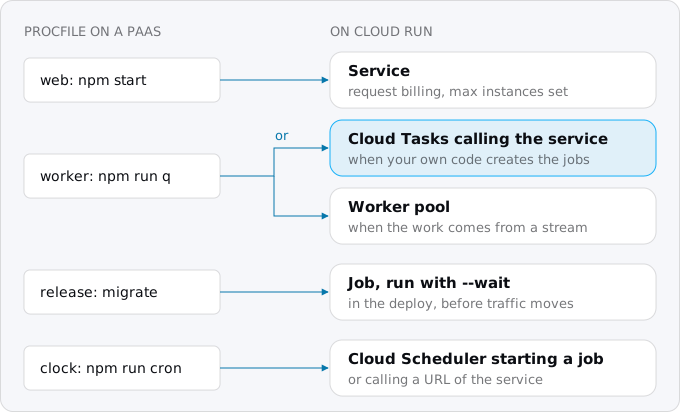
- web becomes a service, with request billing unless the CPU is busy most of the day.
- release (migrations) becomes a job that the deploy script runs with
--waitbefore it moves traffic to the new revision, as database migrations as Cloud Run jobs shows. - clock, or any timer inside the app, becomes Cloud Scheduler starting a job, or calling a URL of the service for work that takes seconds.
- worker has two answers. If its jobs come from your own code, each job becomes an HTTP request: the app creates a Cloud Tasks task, Cloud Tasks calls a handler on your service, retries it with backoff on failure, and the service bills only for the seconds the handler runs (background workers with Cloud Tasks has the steps). If the work comes from a stream you do not control, or the worker must hold a connection for hours, it becomes a worker pool.
The same work, four ways, priced
Take one queue: 1,300 jobs a day, half a second each, on 1 vCPU and 512 MiB, for a 730-hour month in europe-west1 at the list prices of October 11, 2026, before any free tier.
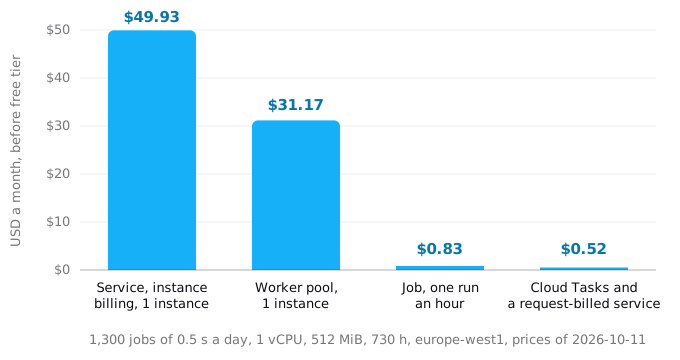
- An instance-billed service kept at one instance, which is what a PaaS worker turns into if you move it as is: $49.93.
- A worker pool with one instance: $31.17. Cheaper per second, but it still bills the 99% of the month the worker waits.
- A job that drains the queue once an hour, each run billed at the one-minute minimum: $0.83, if the jobs can wait up to an hour.
- Cloud Tasks calling a request-billed service: $0.52 for about 19,800 busy seconds and 39,500 requests. Cloud Tasks itself is free under a million operations a month, and this queue makes about 80,000.
The free tier is worth $4.32 of CPU and $0.90 of memory a month per billing account, so the last two cost nothing in practice. The first two do not fit inside it.
The worker pool figure comes from the price table on Google's pricing page. Google's own example of a one-instance pool shows $16.83 before the free tier, which we could not reproduce from the same table; this article uses the table, and the free tier guide lists the other examples that do not add up.
So a worker pool is the exception, not the default home for a job queue: the right shape when there is no request to turn the work into. When the work can become requests, it costs about a sixtieth of the worker pool.
What comes with it
Whatever the shape, you get 43 regions as of October 2026 and a 99.95% monthly uptime SLA on every non-GPU service, 99.9% in the few regions the SLA page lists separately. Logs go to Cloud Logging, metrics to Cloud Monitoring.
There is no ceiling on spending: Cloud Run bills what runs. Set --max-instances on every service, keep worker pools at the count you mean to pay for, and put a budget alert on the billing account before the first deploy (setting up a Google Cloud project shows how).
Checklist
- List every process your app runs today: web, workers, release steps, timers, one-off scripts.
- Make the web process a service with request billing and
--max-instancesset. - Make each release step a job, and run it with
--waitin the deploy before traffic moves. - Turn each timer into a Cloud Scheduler schedule that starts a job or calls the service.
- For each worker, try Cloud Tasks first; keep a worker pool only for work that cannot become a request.
- Trap
SIGTERMin every container, and keep nothing on local disk you cannot lose.
FAQ
Can Cloud Run run cron jobs?
Not by itself. Cloud Scheduler is the cron: on a schedule it sends an authenticated POST to a job's run address, or calls a URL of a service for work that takes seconds. A schedule costs $0.10 per 31 days, and each billing account gets 3 schedules free.
How long can a Cloud Run job run?
A job task may run for 10 minutes by default and up to 168 hours, which is 7 days; with a GPU the limit is one hour. A failed task is retried 3 times by default and up to 10, from the beginning, so each task should be safe to run twice.
When should I use a worker pool instead of a service?
Use a worker pool when the work does not arrive as requests: a Kafka consumer, a Pub/Sub pull subscriber, or a bot that holds a connection open. When your own code creates the work, Cloud Tasks calling a request-billed service costs far less: $0.52 a month against $31.17 for a one-instance pool in our example.
Does a Cloud Run worker pool scale by itself?
Plan for a fixed count. You set the number of instances, 1 by default, and changing it creates no new revision. The only autoscaler Google documents step by step is CREMA, which you deploy as a Cloud Run service of its own to read a Kafka lag, a Pub/Sub backlog or a Prometheus query.
Does an idle Cloud Run service cost money?
Not with request-based billing and no minimum instances: between requests the CPU is throttled and nothing is billed, and the service can scale to zero. Instances kept warm with a minimum are billed, and instance-based billing charges every second an instance exists, busy or not.
Sources
25
- docs.cloud.google.comWhat is Cloud Run, Google
- docs.cloud.google.comDeployment options and resource model, Google
- cloud.google.comCloud Run pricing, Google
- cloud.google.comCloud Run quotas and limits, Google
- docs.cloud.google.comContainer runtime contract, Google
- docs.cloud.google.comExecute jobs, Google
- docs.cloud.google.comJob task timeout, Google
- docs.cloud.google.comJob maximum retries, Google
- docs.cloud.google.comExecute jobs on a schedule, Google
- docs.cloud.google.comDelayed jobs, Google
- docs.cloud.google.comDeploy worker pools, Google
- docs.cloud.google.comManual scaling for worker pools, Google
- docs.cloud.google.comAutoscale worker pools with external metrics
- docs.cloud.google.comCreate a Cloud Run instance
- docs.cloud.google.comCloud Run release notes, Google
- docs.cloud.google.comRequest timeout, Google
- docs.cloud.google.comConcurrency, Google
- docs.cloud.google.comMaximum instances, Google
- docs.cloud.google.comCPU limits and startup CPU boost, Google
- docs.cloud.google.comBilling settings, Google
- cloud.google.comCloud Run SLA, Google
- cloud.google.comCloud Tasks pricing, Google
- cloud.google.comCloud Scheduler pricing, Google
- docs.cloud.google.comCloud Run locations, Google
- Exodus team: first-request times of a Rust API we moved, europe-west1, measured Oct 5, 2026