A Docker Compose app moves to Cloud Run by splitting the stack: the web container becomes a Cloud Run service, the worker a worker pool or Cloud Tasks, Postgres Cloud SQL, named volumes a Cloud Storage bucket, and .env secrets Secret Manager. gcloud run compose up deploys the whole file as one service with one instance at most, which fits a demo, not production.
In short
gcloud run compose up, generally available since March 25, 2026, deploys the file as one Cloud Run service with 1 maximum instance and 1 vCPU and 1 GiB per container.- For the model in this guide, a Hetzner VPS costs $8.39 a month, the split stack $17.24 to $83.24, and
compose upkept running $209.91. - Memorystore starts at $25.55 a month without an SLA and $37.23 with Basic Redis, the largest line of the split bill.
- A worker pool with one instance of 1 vCPU and 512 MiB is $31.17 a month; Cloud Tasks is free for the first million operations.
- Cloud Run stops an instance 10 seconds after
SIGTERM, and Cloud SQL'sdb-f1-microallows 25 connections.
What it costs
The model is a typical compose stack for a small app (web, worker, Postgres with its data in a named volume, Redis): 1 million requests a month of 200 ms each, 50 GB of traffic out, and 100,000 background tasks of about a second. Prices are list prices of October 11, 2026, before VAT, in europe-west1 (Belgium) for Google and Germany for Hetzner.
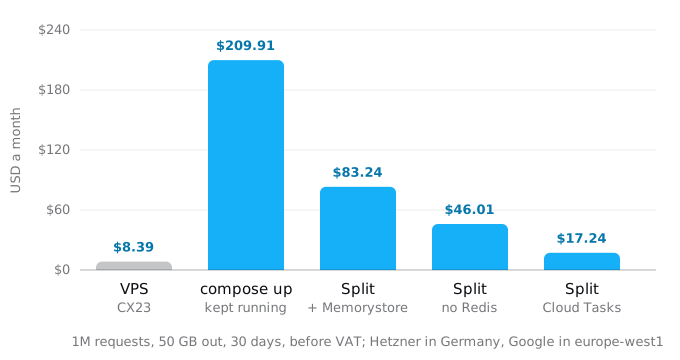
- On a VPS: the whole stack fits a Hetzner CX23 (2 vCPUs, 4 GB) at $8.39 a month with its IPv4 address and backups, and 20 TB of traffic included. The VPS guide has the prices.
- compose up, kept running: $209.91. The command gives each of the four containers 1 vCPU and 1 GiB, so the one instance is 4 vCPUs and 4 GiB. For the worker and the database to run between requests, the instance needs instance-based billing and a minimum of one instance: 4 vCPUs at $0.000018 a second for 730 hours is $189.22, the memory $21.02, minus the free tier's $5.22, plus $4.89 of traffic.
- Split, with Redis on Memorystore: $83.24. The web service on request-based billing costs $0.48 of CPU past the free tier (an upper bound, with no two requests sharing an instance). Traffic is $4.89 at $0.105 per GiB. A worker pool with one instance of 1 vCPU and 512 MiB runs all month for $31.17. Cloud SQL's
db-f1-microis $9.37, 5 GiB of uploads in Cloud Storage $0.10, and Memorystore for Redis Basic with 1 GiB $37.23. - Split, without Redis: $46.01. The same without Memorystore, when Redis was only a cache or can move into Postgres.
- Split, with the worker replaced by Cloud Tasks: $17.24. Cloud Tasks sends each task to the web service as an HTTP request, so the worker pool goes away. The tasks add $2.40 of CPU to the service, and the first million task operations a month are free.
So the VPS is cheaper at every size of this model, and the lift-and-shift is the most expensive way to run the stack on Google Cloud. A move pays for the work it takes off you (patching, backups, a machine that can fail, spikes), not on the bill; the VPS guide makes that case in full. If you move, the shape of the stack decides the bill more than any price: an always-on worker and a managed Redis are the two largest lines after the lift itself.
What gcloud run compose up does
The command reads a compose.yaml, builds the services that have a build: section with Cloud Build into an Artifact Registry repository named cloud-run-source-deploy, creates a Secret Manager secret for each compose secret and one Cloud Storage bucket for the volumes, and deploys one Cloud Run service. Every compose service becomes a container in that one service. One container is the ingress container that receives requests; the others are sidecars in the same instance, sharing its network, so they reach each other on localhost. Cloud Run adds each compose service name to /etc/hosts, which is why db:5432 keeps working.
gcloud run compose up compose.yaml --region europe-west1It has been generally available since March 25, 2026. Google's page says what it is for: development, and the step from a laptop to the cloud. For production it recommends Terraform, and it lists the limits: one service, a subset of Compose, and 1 maximum instance by default.
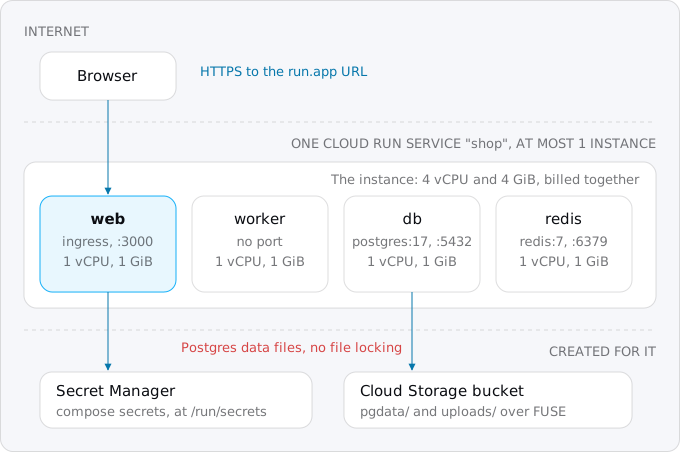
To see what it builds, we took a sample stack (web and worker built from one Dockerfile, postgres:17 with a named volume, redis:7) and ran the translation step on our machine. gcloud installs it as a component named run-compose, and its translate command works offline:
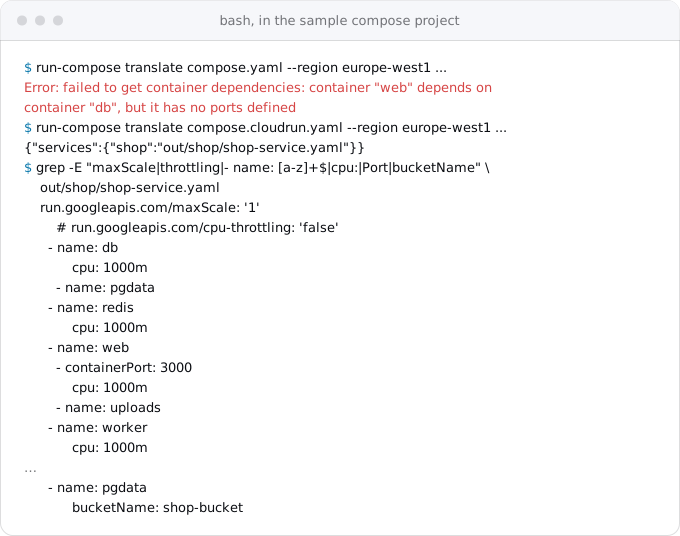
What came out, and what it means:
- A dependency needs a port.
depends_on: dbfailed untildbhadexpose: ["5432"], because Cloud Run starts dependencies first and checks them with a TCP probe on their port. Our file had no ports on Postgres or Redis, like most compose files. - The ingress container needs marking. Without
x-google-cloudrun: ingress-container: trueonweb, the translator gave the public port toredis, the only other service with a port. Mark it. - Every container gets 1 vCPU and 1 GiB. The
cpus:key is the only size hint, andcpus: 0.5still came out as 1 vCPU. Four services make a 4 vCPU instance. - One instance at most, with CPU throttled.
maxScaleis 1, so traffic cannot add instances. CPU throttling is left on, so the service uses request-based billing: Cloud Run gives CPU to all containers only while a request is being handled, and the worker barely runs between requests. - Postgres on a bucket. The named volume
pgdatabecame a folder in a Cloud Storage bucket, mounted with Cloud Storage FUSE. Google's FUSE page says it is not POSIX compliant and has no file locking, and a database expects both. When the instance scales to zero, Postgres stops, and during a deploy the new revision's instance can start a second Postgres on the same files while the old one still runs. - Values from env_file in plain text. The
STRIPE_KEYfrom.envwent into the service as a plain environment variable, visible to anyone who can read the service's settings. Only a composesecrets:entry goes to Secret Manager. - PORT is reserved. We validated the generated file with
gcloud run services replace --dry-runagainst our project, and Cloud Run refused it: "The following reserved env names were provided: PORT". OurwebsetPORT: "3000"inenvironment, as many compose files do. Remove it; Cloud Run setsPORTitself.
One more thing we found in the source: in gcloud 587.0.0, gcloud run compose up --dry-run is accepted but never used. The command still creates the repository, builds, creates the bucket and secrets, and deploys. To preview, read the translation as above, or deploy into a scratch project.
So compose up fits a demo or a disposable staging copy. For production, split the stack.
The split: what each compose service becomes
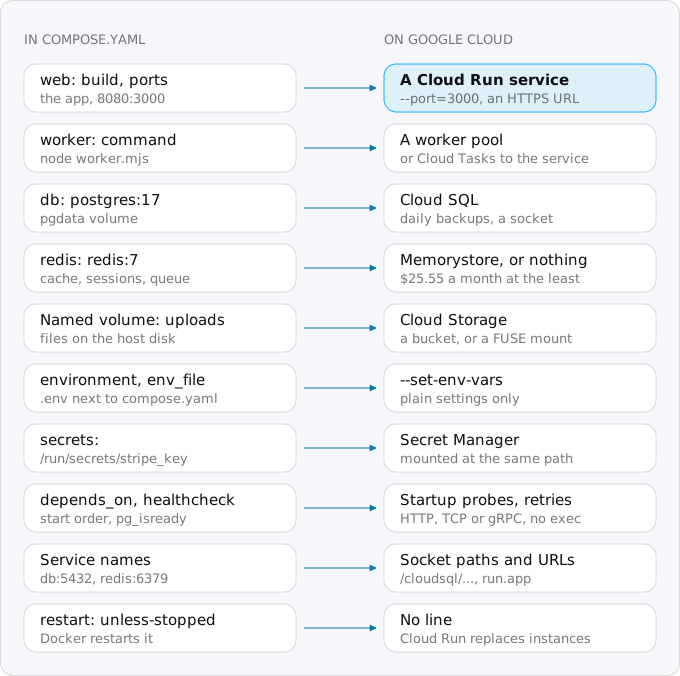
The app and the worker are already images and move as containers. The rest of the file describes a machine (a disk that keeps the database, a network where names resolve), and those parts become Google services.
Step 1: read the compose file
docker compose config prints the file as Docker sees it, with every override and variable applied. These lines list the services, their images, ports, volumes and dependencies without printing the environment, which holds the passwords:
docker compose config --services
docker compose config --volumes
docker compose config --format json | jq -r '.services | to_entries[]
  | "\(.key)\t\(.value.image // "build")\tports=\([.value.ports[]?.target] | join(","))\tvolumes=\([.value.volumes[]?.source] | join(","))\tdepends=\((.value.depends_on // {}) | keys | join(","))"'
Plain docker compose config prints the values from .env, so do not paste it anywhere. Our sample printed:
db      postgres:17  ports=      volumes=pgdata   depends=
redis   redis:7      ports=      volumes=         depends=
web     build        ports=3000  volumes=uploads  depends=db,redis
worker  build        ports=      volumes=         depends=db,redis
Services you built are your code and move as containers. Services from public images (postgres, redis, nginx) are infrastructure, and each becomes a managed service or goes away. Volumes are data that needs a new home. A crontab or nginx outside compose is covered in the VPS guide.
Step 2: the images
Cloud Run pulls images from Artifact Registry or Docker Hub. Create a repository once and push the image your web and worker services build. Cloud Run runs Linux x86_64 images, so on an ARM Mac build with --platform linux/amd64:
gcloud artifacts repositories create shop --repository-format=docker --location=europe-west1
gcloud auth configure-docker europe-west1-docker.pkg.dev
docker build --platform linux/amd64 -t europe-west1-docker.pkg.dev/PROJECT_ID/shop/shop:1 .
docker push europe-west1-docker.pkg.dev/PROJECT_ID/shop/shop:1
Or use gcloud builds submit --tag with the same name. When web and worker differ only by command:, one image serves both.
Check four things in the code. The app must listen on 0.0.0.0 and on the port Cloud Run sends requests to: set it with --port=3000 at deploy time and drop PORT from the environment. It must handle SIGTERM, because Cloud Run stops an instance 10 seconds after sending it. It must log to stdout. And it must not keep files on local disk, since every instance starts from the image; run it with docker run --read-only --tmpfs /tmp to find the writes, as the VPS guide shows.
Step 3: the database
The db service and its pgdata volume become Cloud SQL, a Postgres that Google runs and backs up daily. Create the instance as the Cloud SQL guide describes; the smallest, db-f1-micro, is $9.37 a month with 10 GiB of disk.
Dump the data through compose, with the app stopped so nothing writes:
docker compose stop web worker
docker compose exec -T db pg_dump -Fc --no-owner --no-acl -U shop shop > shop.dump
-T matters: without it compose attaches a terminal, which corrupts a binary dump. We ran this against the sample's postgres:17 with 1,234 rows, and pg_restore --list read the dump back. Restore it into Cloud SQL through the Auth Proxy as the App Platform guide shows, and compare row counts. For a large database that cannot stop, the VPS guide describes Database Migration Service.
DATABASE_URL changes from postgres://shop:...@db:5432/shop to a socket:
postgresql://shop:PASSWORD@/shop?host=/cloudsql/PROJECT_ID:europe-west1:shop-dbThe service gets --add-cloudsql-instances and its service account the Cloud SQL Client role. In compose the app had one connection pool to a database on the same machine; on Cloud Run each instance opens its own pool, and the micro allows 25 connections, so set --max-instances with the pool size in mind.
Step 4: Redis
Ask what Redis did before you move it, because the managed version is the largest line of the split bill; do you still need Redis on Cloud Run finds each job and its replacement.
- A cache. Each Cloud Run instance can keep a small cache in memory, or the cache can go. Many small apps lose nothing measurable.
- Sessions. Signed cookies or a table in Postgres; the patterns guide has the options.
- A job queue (Sidekiq, BullMQ, Celery, RQ). Either keep Redis, or move the jobs to Cloud Tasks (Step 5).
If it stays, Memorystore for Redis Basic with 1 GiB costs $0.051 per GiB-hour in Belgium, $37.23 a month; Basic has no replica. Memorystore for Valkey, which speaks the same protocol, starts with the shared-core-nano node at $0.035 an hour, $25.55 a month, but Google says that node has no SLA and recommends it only for development and testing. Either one lives in a VPC network, so the service reaches it with Direct VPC egress, which Google recommends for this:
gcloud redis instances create shop-cache --region=europe-west1 --tier=basic --size=1 --redis-version=redis_7_2
gcloud run services update shop --region europe-west1 \
  --network=default --subnet=default --vpc-egress=private-ranges-only
REDIS_URL then points to the instance's private IP, which this prints:
gcloud redis instances describe shop-cache --region=europe-west1 --format='value(host)'Step 5: the worker
In compose the worker was a container that ran forever next to the app. On Cloud Run that is a worker pool: instances with no URL that run all the time, billed at $0.000011244 per vCPU-second, which is $31.17 a month for one instance of 1 vCPU and 512 MiB.
gcloud run worker-pools deploy shop-worker --region europe-west1 \
  --image europe-west1-docker.pkg.dev/PROJECT_ID/shop/shop:1 \
  --command=node --args=worker.mjs --instances=1 \
  --cpu=1 --memory=512Mi \
  --service-account=shop@PROJECT_ID.iam.gserviceaccount.com \
  --set-secrets=DATABASE_URL=DATABASE_URL:latest
A worker reading a Redis queue also needs the network flags from Step 4. The services, jobs and worker pools guide explains how worker pools scale.
The cheaper shape is to stop running a worker at all. With Cloud Tasks, the app adds a task to a queue and Cloud Tasks calls an HTTP endpoint of the app for each one, retrying on failure. The work then runs inside the web service and is billed like any request. A task may run 30 minutes at most, so longer jobs still need a worker pool or a Cloud Run job. A queue is one command:
gcloud tasks queues create shop-jobs --location=europe-west1 --max-attempts=5The job code changes from "pull from Redis" to "handle a POST". The background workers guide has the producer, a handler that checks the token, the retry settings and the volume at which a worker pool becomes cheaper. Scheduled work that compose ran with a cron container becomes a Cloud Scheduler job; the cron and timers guide has the commands.
Step 6: volumes, settings and secrets
Named volumes with user files (uploads) go to a Cloud Storage bucket. The clean way is to write files with Google's client library, as the files guide shows. The quick way is a FUSE mount at the old path, with the limits above: fine for uploads with unique names, wrong for anything that is edited in place or locked. Copy the old files out of the volume first:
docker compose cp web:/srv/app/uploads ./uploads
gcloud storage rsync ./uploads gs://PROJECT_ID-uploads --recursive
Volumes for scratch files become in-memory volumes, which use the containers' memory, or nothing.
Bind-mounted config files go into the image with a COPY line; there is no host to mount from.
Environment variables and env_file split in two. Settings that are not secret go to --set-env-vars. Passwords and keys go to Secret Manager, piped from .env so they never show on screen; the VPS guide has the exact pipe.
Compose secrets were files at /run/secrets/<name>. Cloud Run can mount a Secret Manager secret at the same path, so the code does not change:
tr -d '\n' < stripe_key.txt | gcloud secrets create STRIPE_KEY --data-file=-Then deploy with the mount in --set-secrets, as in Step 7: a key that starts with / is a mount path, any other key an environment variable.
Step 7: deploy the service
gcloud iam service-accounts create shop
gcloud run deploy shop --region europe-west1 \
  --image europe-west1-docker.pkg.dev/PROJECT_ID/shop/shop:1 \
  --service-account=shop@PROJECT_ID.iam.gserviceaccount.com \
  --allow-unauthenticated --port=3000 \
  --cpu=1 --memory=512Mi --max-instances=5 \
  --add-cloudsql-instances=PROJECT_ID:europe-west1:shop-db \
  --set-env-vars=NODE_ENV=production,UPLOAD_BUCKET=PROJECT_ID-uploads \
  --set-secrets=DATABASE_URL=DATABASE_URL:latest,/run/secrets/stripe_key=STRIPE_KEY:latest
The service account needs the Cloud SQL Client role, roles/secretmanager.secretAccessor on each secret, and access to the bucket. Test everything on the run.app URL before DNS changes.
depends_on and healthcheck have no equivalent across services. Compose waited for pg_isready before starting web; on Cloud Run the database is already running, but retry the first connection in code anyway, and give the service a startup probe on an endpoint that checks the database, as health checks and startup probes describes. Cloud Run probes are HTTP, TCP or gRPC; a healthcheck that runs a command inside the container has to become an endpoint.
Service names stop resolving: there is no db or redis host any more. The database is a socket path, Redis a private IP, and another web service in the stack is its own Cloud Run service with its own URL. If only your services should call it, deploy it with --ingress=internal and --no-allow-unauthenticated, and have the caller send an ID token, as Google's service-to-service page describes.
An nginx service in front of the app usually goes: Cloud Run serves HTTPS with a managed certificate. If you depend on its rules, it can run as a sidecar in the same service, the one place where Cloud Run's multi-container model matches compose. Sidecars are deployed with --container flags, one per container, with --depends-on for the start order and --port on the one that receives requests.
restart: unless-stopped goes: Cloud Run replaces crashed instances.
The switch
Lower the DNS TTL a day ahead, then:
docker compose stop web worker, so nothing writes.- Take the final dump and restore it.
docker compose cpandgcloud storage rsyncthe uploads one last time.- Change DNS to Cloud Run, as the Vercel guide describes, and stop any cron container or host crontab so nightly jobs do not run twice.
- Keep the machine with
docker compose down(no-v, so the volumes stay) for a week as the way back, then back up the volumes and delete it.
Keep compose.yaml for development
The compose file stays the way to run the stack on a laptop. Production is now described by the deploy commands above, in a script or a CI workflow, or by Terraform as Google recommends. Keep the environment variable names the same in both, so only the values differ.
What breaks most often
PORTset in the compose environment, which Cloud Run refuses.- Code that still connects to
db,redisor another service by name. - Postgres or SQLite left on a volume, whether a FUSE bucket or memory, losing data on the next deploy or scale-down.
- A worker deployed as a service, which gets almost no CPU between requests.
env_filepasswords that ended up as plain environment variables.- A
healthcheckcommand with no HTTP endpoint behind it. - One connection pool per instance against a database that allows 25 connections.
- Images built on an ARM Mac without
--platform linux/amd64.
Test a sign-in, an upload and a background job on the run.app URL first.
Where Exodus comes in
A compose file is the most complete description of a self-hosted stack, and Exodus's CLI reads it along with the Dockerfile and the code. Your coding agent maps each service to its Cloud Run shape, finds the service names, PORT settings, volumes and secrets in env_file, and the report shows the bill of each shape, like the five bars above, before anything moves.
FAQ
Can Cloud Run run a docker-compose.yml file?
Yes. Since March 25, 2026, gcloud run compose up deploys a compose file as one Cloud Run service, each compose service a container in it. Google describes it as a step from a laptop to the cloud and recommends Terraform for production; it supports a subset of Compose and 1 maximum instance by default.
Can I run Postgres in a container on Cloud Run?
Not for data you need. A named volume becomes a Cloud Storage bucket mounted with FUSE, which is not POSIX compliant and has no file locking. Postgres stops when the instance scales to zero, and a deploy can start a second Postgres on the same files. Move it to Cloud SQL, from $9.37 a month.
How do compose services reach each other on Cloud Run?
Service names stop resolving after the split. The database becomes a Cloud SQL socket path, Redis a private IP reached with Direct VPC egress, and another web service its own Cloud Run service with its own URL. A private one gets internal ingress, and the caller sends an ID token.
What replaces depends_on and healthcheck on Cloud Run?
Nothing across services. Retry the first database connection in code, and give the service a startup probe on an endpoint that checks the database. Cloud Run probes are HTTP, TCP or gRPC, so a healthcheck that runs a command inside the container has to become an endpoint.
Is Cloud Run cheaper than Docker Compose on a VPS?
Not for the small app in this guide: a Hetzner CX23 runs the whole stack for $8.39 a month, against $17.24 to $83.24 for the split stack on Google Cloud. A move pays for the work it takes off you, such as patching, backups and a machine that can fail, not on the bill.
Sources
29
- docs.cloud.google.comDeploy services using Compose, Cloud Run
- docs.cloud.google.comCloud Run release notes, Google
- docs.cloud.google.comDeploy container images to Cloud Run services, Google
- docs.cloud.google.comConfigure containers for services, Cloud Run
- docs.cloud.google.comContainer runtime contract, Cloud Run
- cloud.google.comCloud Run pricing, Google
- docs.cloud.google.comBilling settings for services, Cloud Run
- docs.cloud.google.comConfigure container health checks for services, Cloud Run
- docs.cloud.google.comConfigure in-memory volume mounts for services, Cloud Run
- docs.cloud.google.comCloud Storage volume mounts for services, Cloud Run
- docs.cloud.google.comCloud Storage FUSE overview, Google
- cloud.google.comCloud Storage pricing, Google
- cloud.google.comMemorystore for Redis pricing, Google
- cloud.google.comMemorystore for Valkey pricing, Google
- docs.cloud.google.comInstance and node specification, Memorystore for Valkey
- docs.cloud.google.comConnect to a Redis instance from a Cloud Run service, Memorystore
- cloud.google.comCloud Tasks pricing, Google
- docs.cloud.google.comCloud Tasks REST reference, Task
- docs.cloud.google.comInstances, Memorystore for Redis
- docs.cloud.google.comAuthenticating service-to-service, Cloud Run
- docs.cloud.google.comRestrict network ingress, Cloud Run
- docs.docker.comControl startup and shutdown order in Compose, Docker docs
- docs.docker.comManage secrets securely in Docker Compose, Docker docs
- docs.docker.comDefine services in Docker Compose, Docker docs
- exodus.elim.ioMoving from a VPS to Cloud Run, Exodus
- exodus.elim.ioCloud SQL's smallest instances and what they cost, Exodus
- exodus.elim.ioEgress on Google Cloud explained, Exodus
- exodus.elim.ioCloud Run services, jobs and worker pools, Exodus
- Exodus team: europe-west1 prices read from the Cloud Billing Catalog API