Cron on Cloud Run runs through Cloud Scheduler, Google's managed cron, because a timer inside the app is missed while the service is at zero, late without CPU, and doubled on two instances. A Scheduler job calls an endpoint of your service for work of a few minutes, or starts a Cloud Run job for anything longer, at $0.10 a job a month with 3 free per billing account.
In short
- Cloud Scheduler bills $0.10 per job per 31 days, paused jobs included, with 3 jobs free per billing account.
- An HTTP attempt may last 15 seconds to 30 minutes, 3 minutes by default; a Cloud Run job's task may run up to 168 hours.
- A new Scheduler job has 0 retries; up to 5 can be set.
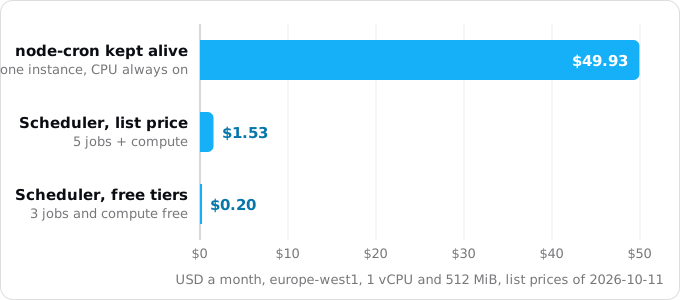
- Five timers in our example cost $1.53 a month at list price and $0.20 with the free tiers, against $49.93 for one always-on instance.
Prices are list prices in europe-west1, read on October 11, 2026.
Why a timer inside the app breaks
Almost every app has things that run on a clock: a digest at seven in the morning, a cleanup every hour, a sync every five minutes. On a server they live in a crontab; on a PaaS, in the app as node-cron, setInterval, APScheduler or Celery beat, or in a separate "clock" process. A timer library is a loop inside a running process that wakes up, checks the clock and calls your function. That needs two things: a process that is always running, and CPU while it waits. A Cloud Run service gives you neither by default (patterns that break on Cloud Run lists the others like it).
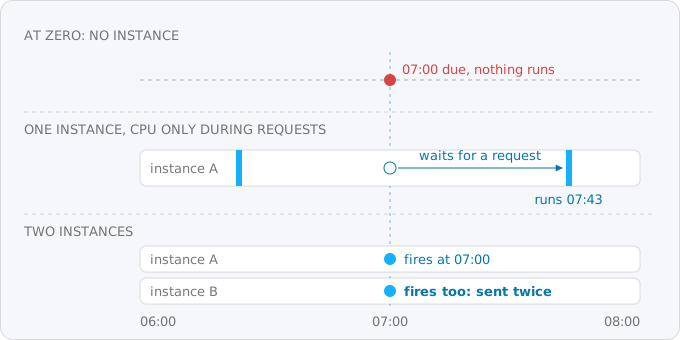
- At zero there is no process. A service with no traffic scales to zero instances. At 07:00 nobody is calling the app, so no instance exists, and the digest never goes out.
- Between requests there is no CPU. With request-based billing, the default, an instance gets CPU only while it handles a request. A timer that comes due between requests waits until the next request arrives, so a 07:00 job may run at 07:43, or never.
- Two instances means two runs. When traffic grows, Cloud Run starts a second instance from the same image, with the same
node-cronline. Both fire. Customers get the digest twice. A deploy does the same for a short while, because the old and new revisions overlap.
The libraries warn about the last one: Celery's docs say only a single beat scheduler may run, "otherwise you'd end up with duplicate tasks", and APScheduler's FAQ says a job store shared by several processes runs jobs twice or misses them.
You can keep one instance with CPU all the time (--min-instances=1 --max-instances=1 --no-cpu-throttling). It works and costs about $50 a month at 1 vCPU and 512 MiB in europe-west1, for a timer busy a few minutes a day. --min-instances=1 alone on a request-billed service costs about $10 and does not help: the warm instance still has no CPU between requests, as min instances and startup CPU boost explains.
What Cloud Scheduler is
Cloud Scheduler is cron as a Google service. A job is a cron schedule, a time zone and a target. When the schedule comes due, Google sends an HTTP request to the target (or a Pub/Sub message); nothing of yours runs in between. A 2xx answer means done; any other status, or no answer in time, is a failure, retried if you asked for retries.
The numbers that matter, from Google's pages (updated Oct 9, 2026):
- Up to 5,000 jobs per region in a project; a request body of up to 1 MB.
- An HTTP attempt may last from 15 seconds to 30 minutes. The default is 3 minutes.
- Delivery is at least once. Google writes that "in some rare circumstances" a job runs more than once for one scheduled time, so your handler must cope.
- A job lives in one region, for example
europe-west1. It does not have to be the region of the service it calls.
Old tutorials say you need an App Engine app first. Google's overview now says you do not, unless App Engine is the target. One leftover remains: without --location, gcloud borrows the region of an App Engine app and fails if there is none, so pass --location every time.
Two shapes: call the service, or start a job
A timer becomes one of two things, depending on how long its work takes.
Short work, up to a few minutes: Scheduler calls an endpoint of your service, such as POST /cron/daily-digest, with an OIDC token (a signed ID token saying "this comes from the scheduler account"). The code stays in the app, behind a route, and the run is a request, so it has CPU.
Long or heavy work: Scheduler starts a Cloud Run job, the same image with another command. A job (services, jobs and worker pools compares the shapes) runs to completion and exits; a task may run up to 168 hours (10 minutes by default), retries 3 times by default, and does not take instances from users. Scheduler starts it through the Cloud Run API, .../jobs/NAME:run, with an OAuth token.
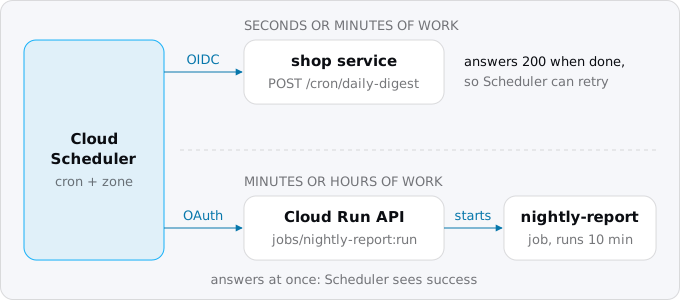
The line between them is the attempt deadline. Work that fits well inside it (3 minutes by default, 30 at most) and inside the service's request timeout (5 minutes by default) goes to an endpoint. Longer work, work that needs more memory than the web instances, or work that would slow users down goes to a job.
One difference is often missed. With an endpoint, Scheduler waits for your answer, so it knows whether the work succeeded and can retry it. The call that starts a job returns at once (an Operation, per the reference), so Scheduler records a success when the execution starts. A job that fails later is retried by its own settings, never by Scheduler's.
What it costs
Cloud Scheduler bills the job, not the runs. Each job costs $0.10 per 31 days, counted by the day ($0.0032 a day), whether it runs once a month or every minute. A paused job still counts. Each billing account gets 3 jobs free, across all its projects: Google's own example is 5 projects with 2 jobs each, which is 3 free jobs and 7 paid ones (pricing page and Cloud Billing Catalog API, read Oct 11, 2026).
The work itself bills like any other Cloud Run work. A call to an endpoint is a request on a request-billed service: $0.000024 per vCPU-second, $0.0000025 per GiB-second, $0.40 per million requests in europe-west1. A job bills at the instance-based rate, $0.000018 per vCPU-second and $0.000002 per GiB-second, for the whole life of its container with a minimum of one minute. Both have free tiers per billing account: 180,000 vCPU-seconds and 2 million requests a month for request-based services, 240,000 vCPU-seconds for jobs.
Take a shop with five timers at 1 vCPU and 512 MiB, in a 730-hour month: sync-stock every 5 minutes for 2 seconds on the service ($0.45), cleanup hourly for 1 second ($0.02), daily-digest at 07:00 for 30 seconds ($0.02), nightly-report as a 10-minute job at 03:00 ($0.35), and weekly-export as a 20-minute job on Mondays at 2 vCPU and 1 GiB ($0.20).
That is $1.03 of compute plus $0.50 for five Scheduler jobs, $1.53 at list price. If nothing else in the billing account uses the free tiers, they cover all the compute and three of the jobs, so the bill is $0.20. Forty timers would cost $3.70 a month in Scheduler fees. One caution: example 5 on the Cloud Run pricing page (an hourly 1-minute job at 1 vCPU and 512 MiB in Belgium) says $0.45 before the free tier, while the page's own rates give $0.83. We use the rates.
Step by step
The examples use a project PROJECT_ID, region europe-west1, a service shop and the app's timers from the list above. Every gcloud flag here was checked against gcloud 587.0.0.
Step 1: list your timers
grep -rnE "node-cron|cron\.schedule|setInterval|CronJob" --include='*.[jt]s' . | grep -v node_modules
grep -rnE "apscheduler|add_job|beat_schedule|crontab\(" --include='*.py' .
grep -nE "^(clock|scheduler|cron):" Procfile; crontab -l
For each timer, write down the schedule, the time zone it ran in, how long a run takes, and what happens if it runs twice. node-cron uses the system's zone unless you pass timezone, APScheduler the local zone, a crontab the server's. Most containers run in UTC, so "7 in the morning" may have been 07:00 UTC all along.
Step 2: turn on the APIs and make an account for the scheduler
gcloud services enable cloudscheduler.googleapis.com run.googleapis.com --project PROJECT_ID

gcloud iam service-accounts create scheduler --display-name "Cloud Scheduler caller" --project PROJECT_ID
Until the API is on, every gcloud scheduler command fails with SERVICE_DISABLED. The new account is the identity in the token Scheduler sends; IAM for a Cloud Run app covers the other accounts and roles. Do not use Google's Cloud Scheduler service agent (service-PROJECT_NUMBER@gcp-sa-cloudscheduler.iam.gserviceaccount.com) as the caller; Google's page says it cannot be. That agent mints the tokens for your account and must keep its role.
Step 3: short work, an endpoint on the service
Give the scheduler account permission to call the service:
gcloud run services add-iam-policy-binding shop --region europe-west1 \
  --member serviceAccount:scheduler@PROJECT_ID.iam.gserviceaccount.com \
  --role roles/run.invoker
A service deployed with --no-allow-unauthenticated has Cloud Run check the token before your code runs. Most web apps are public, though, and Cloud Run cannot make one path private, so anyone can POST /cron/daily-digest and the handler must check the token itself. The handler below:
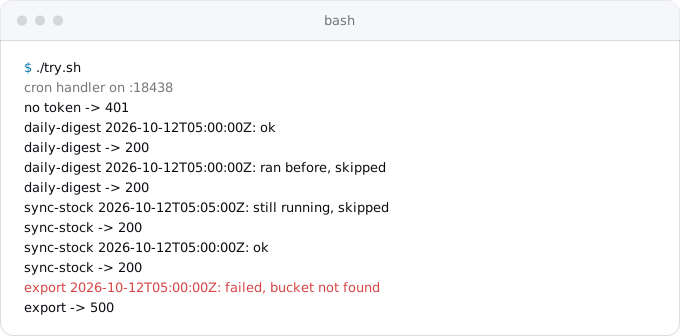
- checks that the token is a Google-signed ID token for this service, issued to the scheduler account;
- takes a Postgres advisory lock named after the timer, so one run of it happens at a time across all instances;
- writes a row keyed by the timer and its scheduled time, so a second request for the same slot does nothing.
// POST /cron/<timer> from Cloud Scheduler. 2xx means done; 500 lets Scheduler retry.
import http from 'node:http'
import pg from 'pg'
import { OAuth2Client } from 'google-auth-library'

const { CRON_AUDIENCE, CRON_INVOKER, DATABASE_URL, PORT = 8080 } = process.env
const db = new pg.Pool({ connectionString: DATABASE_URL })
const auth = new OAuth2Client()
const timers = { 'daily-digest': async () => { /* build and send the digest */ } }

async function fromScheduler(req) {
  const m = /^Bearer (.+)$/.exec(req.headers.authorization ?? '')
  if (!m) return false
  try {
    const t = await auth.verifyIdToken({ idToken: m[1], audience: CRON_AUDIENCE })
    const p = t.getPayload()
    return p.email === CRON_INVOKER && p.email_verified === true
  } catch { return false }
}

async function run(name, slot, timer) {
  const c = await db.connect()
  try {
    const { rows } = await c.query('SELECT pg_try_advisory_lock(hashtext($1)) AS ok', [name])
    if (!rows[0].ok) return 'still running, skipped'
    try {
      const r = await c.query(
        'INSERT INTO cron_runs (timer, slot) VALUES ($1, $2) ON CONFLICT DO NOTHING', [name, slot])
      if (r.rowCount === 0) return 'ran before, skipped'
      try { await timer(); return 'ok' } catch (e) {
        await c.query('DELETE FROM cron_runs WHERE timer = $1 AND slot = $2', [name, slot])
        throw e
      }
    } finally { await c.query('SELECT pg_advisory_unlock(hashtext($1))', [name]) }
  } finally { c.release() }
}

http.createServer(async (req, res) => {
  const name = req.url.replace(/^\/cron\//, '')
  const timer = timers[name]
  if (req.method !== 'POST' || !req.url.startsWith('/cron/') || !timer) return res.writeHead(404).end()
  if (!(await fromScheduler(req))) return res.writeHead(401).end()
  const slot = req.headers['x-cloudscheduler-scheduletime'] ?? new Date().toISOString()
  try {
    console.log(`${name} ${slot}: ${await run(name, slot, timer)}`)
    res.writeHead(200).end()
  } catch (e) {
    console.log(`${name} ${slot}: failed, ${e.message}`)
    res.writeHead(500).end()
  }
}).listen(PORT)
The table it writes to:
CREATE TABLE cron_runs (
  timer   text        NOT NULL,
  slot    timestamptz NOT NULL,
  started timestamptz NOT NULL DEFAULT now(),
  PRIMARY KEY (timer, slot)
);
The slot is the X-CloudScheduler-ScheduleTime header: the scheduled time in UTC, the same across retries. Google's overview names this header, with the job name, as the way to deduplicate. A failed run deletes its row so a retry can run. The advisory lock lives on one connection, so use a direct connection or a session-mode pooler, not PgBouncer with pool_mode = transaction. In production CRON_AUDIENCE is the service URL and CRON_INVOKER the scheduler account's email.
We ran it locally against Postgres 17 with a real Google-signed ID token:
Now the Scheduler job, with the service URL as audience, a deadline under the request timeout, and retries:
gcloud scheduler jobs create http daily-digest \
  --location europe-west1 \
  --schedule "0 7 * * *" --time-zone "Europe/Berlin" \
  --uri "https://shop-xxxx.europe-west1.run.app/cron/daily-digest" \
  --http-method POST \
  --oidc-service-account-email scheduler@PROJECT_ID.iam.gserviceaccount.com \
  --oidc-token-audience "https://shop-xxxx.europe-west1.run.app" \
  --attempt-deadline 300s \
  --max-retry-attempts 3 --min-backoff 30s
Without --oidc-token-audience the audience is the full URI, and the handler must expect that.
Step 4: long work, a job
Deploy the job from the same image as the service, with the command that does the work:
gcloud run jobs deploy nightly-report \
  --region europe-west1 \
  --image europe-west1-docker.pkg.dev/PROJECT_ID/shop/shop:latest \
  --command node --args scripts/nightly-report.mjs \
  --cpu 1 --memory 512Mi \
  --task-timeout 30m --max-retries 1

gcloud run jobs add-iam-policy-binding nightly-report --region europe-west1 \
  --member serviceAccount:scheduler@PROJECT_ID.iam.gserviceaccount.com \
  --role roles/run.invoker
Pass the database and secrets with --set-cloudsql-instances and --set-secrets, as on gcloud run deploy. The schedule calls the Cloud Run API, a googleapis.com address, so the token is OAuth, not OIDC:
gcloud scheduler jobs create http nightly-report \
  --location europe-west1 \
  --schedule "0 3 * * *" --time-zone "Etc/UTC" \
  --uri "https://run.googleapis.com/v2/projects/PROJECT_ID/locations/europe-west1/jobs/nightly-report:run" \
  --http-method POST \
  --oauth-service-account-email scheduler@PROJECT_ID.iam.gserviceaccount.com
To pass arguments for one schedule, add overrides to the body:
  --headers Content-Type=application/json \
  --message-body '{"overrides":{"containerOverrides":[{"args":["--since","7d"]}]}}'
roles/run.invoker allows run.jobs.run but not run.jobs.runWithOverrides; for overrides grant roles/run.jobsExecutorWithOverrides instead.
Step 5: run it once by hand, then read the logs
Find a wrong token now, not at 03:00:
gcloud scheduler jobs run daily-digest --location europe-west1
gcloud scheduler jobs describe daily-digest --location europe-west1 --format "value(state,status,lastAttemptTime)"
gcloud run jobs executions list --job nightly-report --region europe-west1
jobs run starts an attempt now, outside the schedule. describe shows the state (ENABLED, PAUSED) and the last attempt's result, with no error code when it succeeded. Scheduler logs each attempt's start and finish with the HTTP code: a 403 usually means the account lacks roles/run.invoker, a 401 from your handler means the audience or email does not match.
Step 6: remove the old timer
Delete the node-cron line, the beat process or the clock: line in the same deploy that creates the Scheduler jobs, and list them on the cutover day checklist so the old platform's timers stop the same day.
Time zones and daylight saving
Each Scheduler job has its own time zone, from the tz database (Europe/Berlin, America/New_York). The default is UTC; gcloud prints it as Etc/UTC. The schedule runs on wall-clock time in that zone, so 0 7 * * * in Europe/Berlin is 05:00 UTC in summer and 06:00 UTC in winter, which is what a person expecting a digest at seven wants.
The trouble is the hour that clocks skip or repeat. In Berlin, 02:30 happens twice on Oct 25, 2026, and not at all on Mar 28, 2027. Google's page says only that a job scheduled at such a time "might observe execution anomalies", and recommends UTC "to avoid the problem completely".
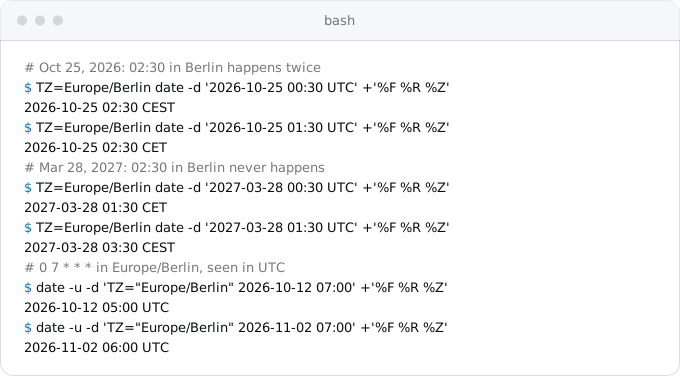
So use UTC for intervals and night runs, a local zone only for times people see, outside 01:00 to 03:00, and in --time-zone the zone the timer really ran in (Step 1).
Scheduler's cron has five fields: minute, hour, day of month, month, day of week. There is no seconds field and no L for the last day of the month, and day of month and day of week combine with OR: 0 0 1 * SAT runs on the 1st and on every Saturday. gcloud also takes Google's English format, such as every 336 hours or 1st friday of quarter 9:00.
Retries, deadlines and overlap
A new job does not retry. retryCount and maxRetryDuration both default to 0, which means a failed attempt waits for the next scheduled time. --max-retry-attempts takes 0 to 5. The wait between retries starts at --min-backoff (5 seconds by default), doubles --max-doublings times (5), and never exceeds --max-backoff (an hour). Retries can run into the next scheduled time, and then that scheduled run is skipped.
The attempt deadline is how long Scheduler waits for an answer, 15 seconds to 30 minutes. A slower endpoint gets DEADLINE_EXCEEDED and a retry while the first run may still be working, one more reason for the lock. Keep the deadline below the service's request timeout.
While an attempt is open, Scheduler skips later runs of the same job, so an endpoint does not overlap itself through Scheduler. A job can: the attempt ends when the execution starts, so a 20-minute job on a 15-minute schedule runs twice at once. Keep the schedule longer than the longest run, or take the same lock inside the job.
For work the app starts itself, such as "send this in 24 hours", use a Cloud Tasks task with scheduleTime instead of a timer; the background workers guide shows how.
What breaks
- A timer left in the app after the move, firing alongside Scheduler on whichever instances happen to be warm.
- The schedule moved without its time zone, so the job runs an hour or two off. Check what the old code ran in.
- A handler that is not idempotent, so that a second run does harm. At-least-once delivery, retries after a deadline, and a manual
jobs runall send a second request. - A public
/cron/...route with no token check. Anyone who finds it can start your expensive report. - An OIDC audience that does not match: Scheduler sends the full URI by default, the handler expects the service URL.
- A job whose failure nobody sees, because Scheduler counted it a success when it started. Set an alert on failed executions.
- A region picked without checking: Scheduler runs in 34 regions, fewer than Cloud Run's 43.
- Staging and production under one billing account, doubling the jobs; the 3 free jobs are per billing account.
- A deleted job's name reused: Google's page says a name cannot be reused in a project, even after deletion.
Checklist
- Every timer listed with its schedule, real time zone, run time and effect of a double run.
- A
scheduleraccount withroles/run.invoker; endpoints that check the token, lock and write one row per slot. --location,--time-zone, a deadline and retries on every job; one manualjobs runeach; old timers deleted.
Where Exodus comes in
Exodus's CLI reads the repository with your coding agent and finds the timers: node-cron, setInterval, APScheduler, Celery beat, a clock: line, a crontab. Each becomes a finding in the report with this article as its fix, the cost calculator adds the Scheduler jobs, and exodus plan puts "move the timers" before the old app is switched off. Your agent can read this article from the terminal with exodus kb.
FAQ
Does node-cron or setInterval work on Cloud Run?
Not reliably. A service with no traffic scales to zero, so a timer has no process to run in. With request-based billing an instance gets CPU only during requests, so a timer due in between waits for the next one. With two instances, both fire. Celery and APScheduler warn about the same double runs.
How much does Cloud Scheduler cost?
Each job costs $0.10 per 31 days, counted by the day, however often it runs, and a paused job still counts. Each billing account gets 3 jobs free across all its projects. The work the job triggers bills as normal Cloud Run time, so five timers came to $1.53 a month at list price in our example.
Does Cloud Scheduler need an App Engine app?
No. Google's overview says App Engine is needed only when it is the target. One leftover remains in gcloud: without the location flag it borrows the region of an App Engine app and fails if there is none, so pass the location on every Scheduler command.
Can a Cloud Scheduler job run twice for the same time?
Yes. Delivery is at least once, and Google writes that in rare circumstances a job runs more than once for one scheduled time. Retries after a missed deadline and manual runs also send a second request. Key each run on the X-CloudScheduler-ScheduleTime header, which stays the same across retries, and do nothing for a slot that already ran.
What time zone does Cloud Scheduler use?
UTC by default, shown by gcloud as Etc/UTC, and each job can set its own zone from the tz database. Schedules follow wall-clock time in that zone, so 07:00 in Europe/Berlin is 05:00 UTC in summer and 06:00 in winter. Google recommends UTC to avoid anomalies in the hour that clocks skip or repeat.
Sources
21
- cloud.google.comCloud Scheduler pricing, Google
- docs.cloud.google.comCloud Scheduler quotas and limits, Google
- docs.cloud.google.comCloud Scheduler overview, Google
- docs.cloud.google.comCron job format and time zone, Google
- docs.cloud.google.comRetry jobs, Google
- docs.cloud.google.comCloud Scheduler Job REST reference, Google
- docs.cloud.google.comUse authentication with HTTP targets, Google
- docs.cloud.google.comTroubleshoot Cloud Scheduler, Google
- docs.cloud.google.comCloud Scheduler locations, Google
- docs.cloud.google.comExecute Cloud Run jobs on a schedule, Google
- docs.cloud.google.comRunning Cloud Run services on a schedule, Google
- docs.cloud.google.comCloud Run jobs.run REST reference, Google
- docs.cloud.google.comSet task timeout for Cloud Run jobs, Google
- docs.cloud.google.comCloud Run jobs retries and checkpoints, Google
- docs.cloud.google.comCloud Run billing settings, Google
- docs.cloud.google.comCloud Run request timeout, Google
- cloud.google.comCloud Run pricing, Google
- nodecron.comnode-cron: scheduling options
- apscheduler.readthedocs.ioAPScheduler 3.x FAQ
- docs.celeryq.devCelery: periodic tasks
- Exodus team: Cloud Billing Catalog API read for Cloud Scheduler and Cloud Run SKUs in europe-west1, gcloud 587.0.0 help for every command shown, and a local run of the sample handler against Postgres 17 with a Google-signed ID token, Oct 11, 2026