Cloud Run costs less than a VPS for a small or uneven app: 1 million requests of 200 ms a month cost $0.48 on Cloud Run against $7.09 for a Hetzner CX23. A VPS costs less for an app that keeps a CPU busy around the clock: $7.09 against $63.11 on Cloud Run. The database, the traffic out and your own time can change the answer.
In short
- 1 million requests a month of 200 ms on 1 vCPU and 512 MiB: $0.48 on Cloud Run, $7.09 on a Hetzner CX23 with IPv4, $18.10 on an e2-small.
- Cloud SQL's smallest instance, $9.37 a month, brings that app on Cloud Run to about $9.85, more than the Hetzner server with Postgres on it.
- One vCPU busy around the clock with 4 GiB: $63.11 on Cloud Run with instance-based billing, $31.56 on an e2-medium, $7.09 on a Hetzner CX23.
- A Hetzner cloud server in the EU includes 20 TB of traffic a month; Google bills internet traffic out at $0.12 per GiB.
Prices are list prices read on October 12, 2026, without VAT.
How each one bills
Cloud Run has two billing settings. With request-based billing, the default for a service, an instance gets CPU only while it handles a request, and you pay for that time, rounded up to the next 100 ms, plus a fee per request. In a Tier 1 region such as europe-west1 (Belgium) the prices are $0.000024 per vCPU-second, $0.0000025 per GiB-second of memory and $0.40 per million requests. Each billing account gets 180,000 vCPU-seconds, 360,000 GiB-seconds and 2 million requests free every month. What Cloud Run costs goes through each of these lines.
With instance-based billing an instance keeps its CPU all the time, and you pay for its whole life at $0.000018 per vCPU-second and $0.000002 per GiB-second, with a free tier of its own: 240,000 vCPU-seconds and 450,000 GiB-seconds. The two free tiers belong to different settings, so a service never gets both. Cloud Run also has worker pools, for processes that pull work instead of answering requests, at $0.000011244 per vCPU-second.
A VPS has one price for the month: it costs the same at three in the morning with no visitors as at noon with a thousand. Hetzner's CX23, with 2 shared vCPUs, 4 GB of memory and a 40 GB disk, costs €5.49 a month in Germany and Finland since the price change of June 15, 2026, or $6.49 in Hetzner's dollar column. A public IPv4 address adds €0.50 ($0.60). DigitalOcean's Basic droplets run from $4 a month (512 MiB) to $24 (2 vCPUs, 4 GiB). All of these exclude VAT.
A Compute Engine VM is billed by the second for as long as it runs. Google's E2 machines are priced per vCPU-hour and per GiB-hour of memory, and the two shared-core sizes bill a fraction of a vCPU: an e2-small counts as half a vCPU and 2 GiB, an e2-medium as one vCPU and 4 GiB. A VM also needs a disk and, to be reached from the internet, an external address at $0.005 an hour.
Reading Google's prices yourself
Google's pricing pages draw their tables with JavaScript, so the most reliable copy is the Cloud Billing Catalog API, which lists every SKU with its price and the date it took effect. The call is read-only and needs any signed-in account. Here is the query for the E2 machine prices and the balanced disk in Belgium:
gcloud auth print-access-token \
  | sed 's/^/Authorization: Bearer /' > auth.txt
chmod 600 auth.txt
CATALOG=https://cloudbilling.googleapis.com/v1
TOKEN=""
while :; do
  curl -s -H @auth.txt \
    "$CATALOG/services/6F81-5844-456A/skus?pageSize=5000&pageToken=$TOKEN" > page.json
  jq -r '.skus[]
    | select(.serviceRegions | index("europe-west1"))
    | select(.description | test("^E2 Instance (Core|Ram) running"))
    | "\(.pricingInfo[0].pricingExpression.tieredRates[-1].unitPrice.nanos / 1e9) \(.description)"' page.json
  TOKEN=$(jq -r '.nextPageToken // empty' page.json)
  [ -z "$TOKEN" ] && break
done
rm auth.txt page.json
The Compute Engine catalog is longer than one page, so the loop follows nextPageToken until it is empty. The token goes into a file with tight permissions and is deleted afterwards, so it never appears in your shell history.
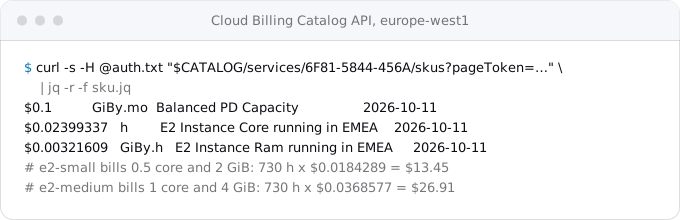
With those prices an e2-small is $13.45 a month, and $18.10 once a 10 GiB balanced disk ($1.00) and an external address ($3.65) are added. An e2-medium is $26.91, or $31.56 with the same disk and address.
A small app
Take an app that answers 1 million requests a month, 200 ms each, on 1 vCPU and 512 MiB, and assume no request overlaps another. That assumption makes the Cloud Run figure an upper bound, because overlapping requests share the instance's billed time; the worked examples of Cloud Run costs by traffic model that overlap for one app from 100 thousand to 100 million requests a month.
- Cloud Run: 200,000 vCPU-seconds, of which 180,000 are free, so 20,000 x $0.000024 = $0.48. Memory (100,000 GiB-seconds) and requests (1 million) stay inside the free tier. Total: $0.48 a month. Without the free tier, because another app in the same billing account already uses it, the same traffic is $5.45.
- Hetzner CX23 with its IPv4 address: €5.99, or $7.09.
- DigitalOcean, 1 GiB droplet: $6.00; 2 GiB: $12.00.
- Compute Engine e2-small with disk and address: $18.10.
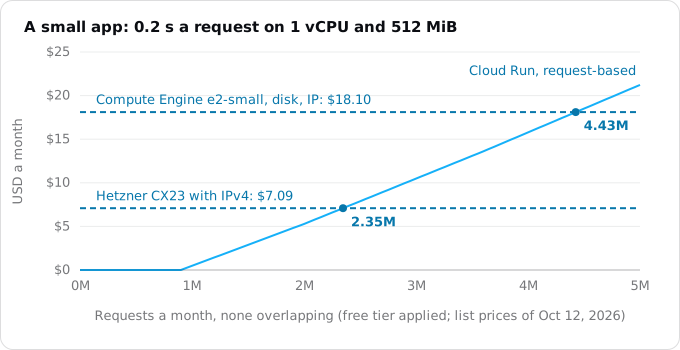
The chart is the same arithmetic stretched over traffic. The Cloud Run line is flat at zero while the free tier lasts, then rises by about $5 for every additional million requests of this size. It crosses the Hetzner price at about 2.35 million requests a month and the e2-small at about 4.43 million. Below those lines, Cloud Run costs less, and on a quiet month it costs less again, while the server's price never moves.
A busy app, and why overlap matters
Google's own pricing page has a worked example for a busier service: 10 million requests a month at 400 ms each, 1 vCPU and 512 MiB, up to 20 requests at once on an instance, in europe-west1. Google puts it at $13.69 a month, or $18.91 without the free tier.
If those requests did not overlap at all, the same traffic would bill 4 million vCPU-seconds, about $98.98 a month. The difference is concurrency. Cloud Run bills an instance's time once, however many requests it is serving in that time, so an app that waits on a database or another API, as most web apps do, packs many requests into the same billed second. Google's second example shows the opposite case: the same 10 million requests on a service that takes one request per instance, because the code is CPU-heavy or not safe to run in parallel, cost $81.72.
So two apps with the same traffic can differ by a factor of six on Cloud Run, while on a VPS they would cost the same. Before comparing, find out how long your requests take and whether they spend that time computing or waiting. The billable instance time Cloud Run reports in Cloud Monitoring answers it after the move; before the move, your current server's CPU graph is the closest guide. The concurrency guide explains how to set it.
An app that never rests
The picture turns when one instance is busy every hour of the month. Take a process that keeps one vCPU working around the clock with 4 GiB of memory, a month of 730 hours:
- Cloud Run, instance-based: (2,628,000 - 240,000) vCPU-seconds x $0.000018 = $42.98, plus (10,512,000 - 450,000) GiB-seconds x $0.000002 = $20.12. Total $63.11.
- Cloud Run, request-based, with requests in flight every second: $84.13. This is the case request-based billing is not made for.
- Compute Engine e2-medium with disk and address: $31.56.
- DigitalOcean, 2 vCPUs and 4 GiB: $24.00.
- Hetzner CX23, 2 shared vCPUs and 4 GB, with IPv4: $7.09.
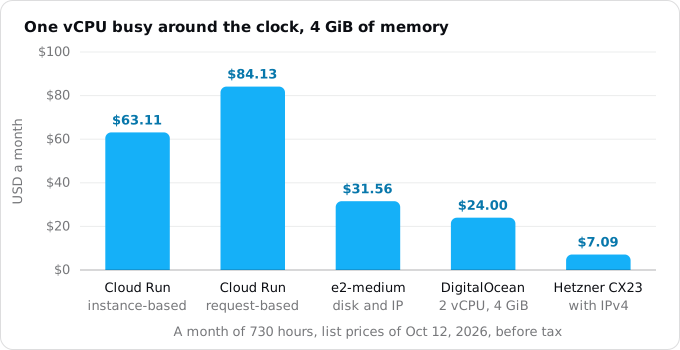
For steady load, a Google VM costs half as much as Cloud Run, and a VPS costs a fraction of either. Committed use discounts narrow the gap but do not close it: Cloud Run's own commitment takes 17% off, and Compute Flexible commitments 28% for one year or 46% for three, but they are a promise to pay for the capacity whether you use it or not. A worker pool is cheaper than instance-based billing for a process that pulls work, but it is still billed for every second it exists. If your app looks like this, a server is the cheaper home, and the request-based or instance-based billing guide shows where the line between the two settings falls.
What the monthly price leaves out
The figures above compare compute. A real app has a few more lines, and they do not fall the same way on both sides.
The database. On a VPS, Postgres usually runs on the same machine, and its cost is part of the $7.09. On Cloud Run the container keeps no data, so the database is a separate service. Cloud SQL's smallest instance, db-f1-micro, is $0.0105 an hour, $7.67 for 730 hours, plus $1.70 for 10 GiB of SSD: $9.37 a month, and shared-core instances are not covered by Cloud SQL's SLA. Add it to the small app and Cloud Run comes to about $9.85, more than the Hetzner server with Postgres on it. A serverless Postgres from another provider can take that line lower, and the database choice guide compares them.
Backups. Hetzner's backups are a flat 20% of the server price, $1.30 for a CX23. DigitalOcean charges 20% for weekly and 30% for daily backups. Cloud SQL includes automated backups and charges for their storage.
Traffic out. A Hetzner cloud server in the EU includes 20 TB of traffic a month, with €1 per TB above it. A DigitalOcean droplet includes 500 to 4,000 GiB depending on its size, then $0.01 per GiB. Google bills internet traffic out at $0.12 per GiB after the first GiB, so 1 TiB a month is about $122.76. An app that serves video, large downloads or a busy API to the public can spend more on traffic than on compute. The egress guide has the regional prices and the ways to lower them.
The disk. A CX23 comes with 40 GB of disk that keeps its files. A Cloud Run instance's filesystem lives in its memory and disappears with the instance, so uploads and generated files go to Cloud Storage at $0.02 per GiB a month in europe-west1.
Your time. This is the line no price list shows. Hetzner's terms say it plainly: for cloud servers, the client is "completely responsible for the management, maintenance and security of the server". That means operating system updates, TLS certificates and their renewal, restarts after a crash, monitoring, a firewall, and, when traffic grows, a second machine and a load balancer in front of both.
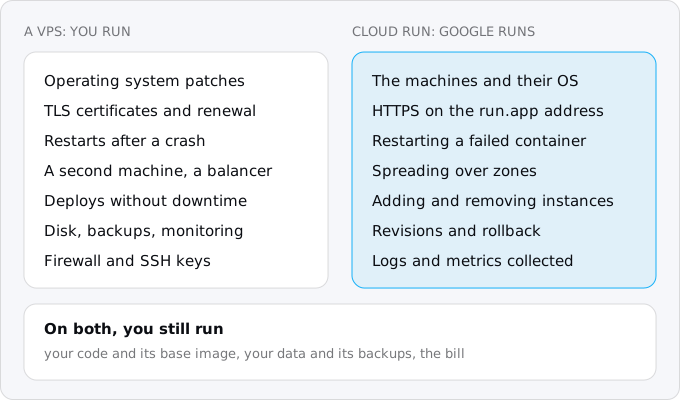
On Cloud Run, Google runs the machines and their operating system, serves HTTPS on the service's address, spreads instances over the region's zones, adds and removes them with traffic, restarts a container that fails and keeps every earlier revision so a release can be rolled back in one command. The service is covered by a 99.95% monthly uptime SLA, 99.9% in Mexico and Stockholm. What stays yours is the container: your code, its dependencies and the base image they sit on, which still need updates unless you build on Google's buildpacks base images with automatic updates turned on. For a first look at the model, see what Cloud Run is.
What Cloud Run takes away in return
A VPS is a computer and does whatever a computer does. Cloud Run sets limits, and each one is a reason some apps stay on a server:
- No persistent local disk. Files written by the app use the instance's memory and vanish with it. SQLite and uploads in a folder have to move.
- CPU only during requests under request-based billing. A process that runs on its own, such as a queue worker or a timer, gets no CPU between requests. It belongs in a worker pool, on instance-based billing, or rewritten as requests; the patterns guide goes through each case.
- A request lasts 60 minutes at most, 5 minutes by default. Longer work runs as a Cloud Run job.
- The first request after a quiet spell waits for an instance to start. Keeping one minimum instance removes most of that wait, at a price; the minimum instances guide works it out.
- Shutdown is not yours to choose. Cloud Run keeps an idle instance for up to 15 minutes and then stops it, and a stopping instance gets SIGTERM and 10 seconds before it is killed.
Which one is yours
Put your app through these questions in order:
- Does it hold a CPU busy most hours of the day? Then a server costs less, by a wide margin. Stay on the VPS, or move to Compute Engine if you want to be inside Google Cloud.
- Does it send out more than a few hundred GiB a month? Price the traffic first. At $0.12 per GiB it can outweigh everything else.
- Does it depend on a local disk that cannot move to a database or a bucket? Then it stays on a server until that changes.
- Is its traffic small, or does it come in waves with quiet nights and weekends? Then Cloud Run's compute is likely free or close to it, and the database becomes the main line.
- Who keeps the server running today, and what is an hour of their time worth? If the answer is "me, on weekends", Cloud Run's managed parts are worth something even where it costs a few dollars more.
Most small web apps and APIs land on question 4. Apps that stream, transcode, crunch numbers all day or hold thousands of open connections land on question 1, and a server is the honest answer for them.
Where Exodus comes in
The Exodus audit reads your repository, your current bill and your answers about traffic, and does this arithmetic for your app, part by part: each process, the database, the files, the traffic out. Its report shows today's cost and the estimated Cloud Run cost side by side, with every line's formula, and its verdict says so when your app is cheaper where it is. If you are already on a VPS and the numbers favour the move, Moving from a VPS to Cloud Run covers the steps, and moving from Railway or Render to Cloud Run does the same for apps on a managed platform.
FAQ
Is Cloud Run cheaper than a VPS?
For a small or quiet app, yes: its compute is often inside the free tier. In this guide's example, 1 million requests of 200 ms a month cost $0.48 on Cloud Run against $7.09 for a Hetzner CX23. Above about 2.35 million such requests a month, the Hetzner server costs less.
How much does a database add on Cloud Run?
Cloud SQL's smallest instance, db-f1-micro, is $7.67 for 730 hours plus $1.70 for 10 GiB of SSD: $9.37 a month, and shared-core instances are not covered by Cloud SQL's SLA. On a VPS, Postgres usually runs on the machine you already pay for.
Does Cloud Run charge for bandwidth?
Yes. Google bills internet traffic out at $0.12 per GiB after the first GiB, so 1 TiB a month is about $122.76. A Hetzner cloud server in the EU includes 20 TB a month, and a DigitalOcean droplet 500 to 4,000 GiB depending on its size.
Can a background worker run on Cloud Run?
Yes, but not on request-based billing, where an instance gets CPU only during requests. A process that pulls work belongs in a worker pool, at $0.000011244 per vCPU-second, or on instance-based billing. Both bill every second the instance exists, so steady work still costs more than on a server.
What does a VPS leave to you?
Hetzner's terms make the client completely responsible for the management, maintenance and security of a cloud server: operating system updates, TLS certificates, restarts after a crash, monitoring, a firewall, and a second machine with a load balancer when traffic grows. On Cloud Run Google runs the machines, under a 99.95% monthly SLA.
Sources
19
- cloud.google.comCloud Run pricing and its pricing examples, Google
- docs.cloud.google.comBilling settings, Cloud Run docs, Google
- docs.cloud.google.comCommitted use discounts, Cloud Run docs, Google
- docs.cloud.google.comContainer runtime contract, Cloud Run docs, Google
- docs.cloud.google.comRequest timeout, Cloud Run docs, Google
- docs.cloud.google.comConfigure automatic base image updates, Cloud Run docs, Google
- cloud.google.comCloud Run SLA, Google
- cloud.google.comCompute Engine E2 and disk prices in europe-west1, Cloud Billing Catalog API, service 6F81-5844-456A
- cloud.google.comGeneral-purpose machine pricing, Compute Engine, Google
- cloud.google.comNetwork pricing, Google
- cloud.google.comCloud SQL pricing, Google
- cloud.google.comCloud Storage pricing, Google
- docs.hetzner.comPrice adjustment of June 15, 2026, Hetzner docs
- docs.hetzner.comIP pricing, Hetzner docs
- docs.hetzner.comTraffic, Hetzner docs
- docs.hetzner.comBilling FAQ, Hetzner docs
- docs.hetzner.comTechnical and organizational measures, Hetzner docs
- digitalocean.comDroplet pricing, DigitalOcean
- docs.digitalocean.comBandwidth billing, DigitalOcean docs