Moving from a Compute Engine VM to Cloud Run changes where the code runs; the database, buckets, secrets, network and load balancer stay in the same project. The app gets a container image, its own service account, Direct VPC egress and Cloud Storage for files, then takes traffic by weight behind the same load balancer. Idle or bursty apps get cheaper; steady ones do not.
In short
- The container startup agent stopped taking new deployments on July 31, 2026, and Google stops supporting workloads still running through it on July 31, 2027.
- A small app costs $5.73 a month on Cloud Run against $25.10 on an
e2-small; steady load is cheaper on VMs, $57.81 against $110.41. - Direct VPC egress needs a subnet of
/26or larger and has no charge of its own. - Keeping the load balancer in front of Cloud Run costs $41.80 a month in the busy case: the rule, the processing, and $0.12 instead of $0.105 per GiB.
Prices are Google's list prices in europe-west1, read on October 11, 2026.
The container agent's shutdown
An app on Compute Engine runs on one VM with an external IP, or on a managed instance group (MIG) of identical VMs behind a load balancer, directly or in a container the VM starts at boot. The second way has a deadline.
Compute Engine used to run a container for you: the "Deploy container" option in the console, gcloud compute instances create-with-container, or the gce-container-declaration metadata key in an instance template. A program on the VM, the container startup agent (konlet), read that metadata and started the container.
Google deprecated the agent on July 21, 2025. Its schedule:
- July 31, 2026: new container deployments on VMs and MIGs through the agent stop working. A deploy script or Terraform that sets
gce-container-declarationon a new VM or template no longer gets a running container. - July 31, 2027: Google stops supporting workloads still running that way.
Find out whether you are affected with Google's own filter:
gcloud compute instances list --filter="metadata.items.key:gce-container-declaration"Google lists the replacements: a VM that starts the container from a startup script or cloud-init, GKE, Batch for jobs, and Cloud Run for stateless apps. A startup script keeps everything as it is, including the VM to patch. If the app answers HTTP requests and keeps nothing on its disk, Cloud Run is the shorter move, because the image already exists.
When moving pays, and when it does not
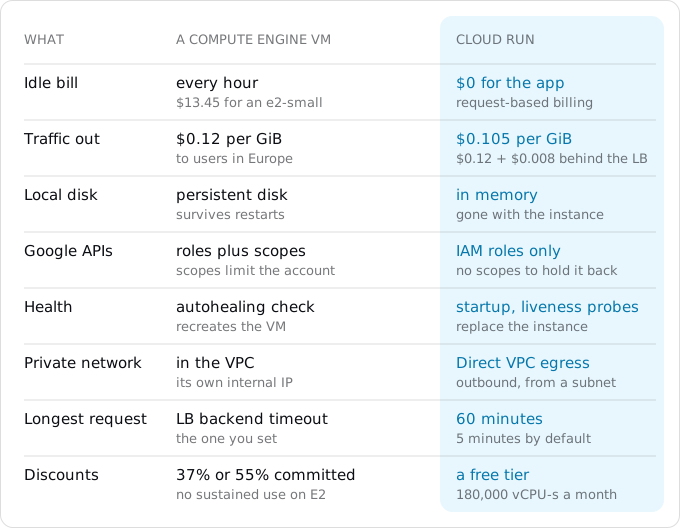
Compute Engine bills a VM for every hour it runs, busy or idle. Cloud Run, with request-based billing, charges only while requests are being handled. That decides most of the comparison.
The prices first, all list prices in europe-west1 on October 11, 2026:
- The VM. An E2 VM costs $0.02399337 per vCPU-hour and $0.00321609 per GiB-hour. The shared-core sizes get a fraction of their two vCPUs: an
e2-small(2 GiB) is billed as half a vCPU, $13.45 a month; ane2-medium(4 GiB) as one vCPU, $26.91. - Next to it. A 20 GiB balanced disk is $2.00 a month ($0.10 per GiB), an external IPv4 address in use $0.005 an hour, $3.65 a month.
- Traffic. Traffic from a VM to users in Europe costs $0.12 per GiB for the first TiB. From Cloud Run it is $0.105 (the egress guide explains the two prices).
- A load balancer, if there is one: $0.025 an hour for the forwarding rule ($18.25 a month) and $0.008 per GiB it processes.
- Cloud Run in a Tier 1 region: $0.000024 per vCPU-second, $0.0000025 per GiB-second and $0.40 per million requests, after a free tier of 180,000 vCPU-seconds, 360,000 GiB-seconds and 2 million requests a month.
Google's pricing page shows Iowa (us-central1) by default, where the same e2-medium is $24.46. To get the price for your region, read the Cloud Billing Catalog API, which is what we did:
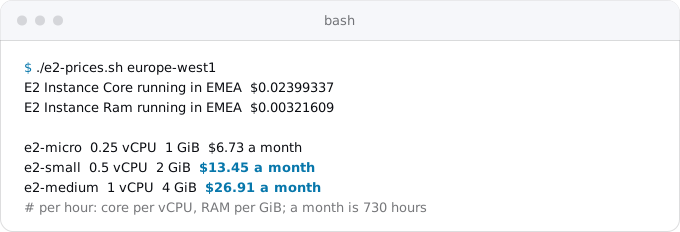
The script reads Compute Engine's SKUs (service 6F81-5844-456A) with a token from gcloud auth print-access-token and keeps the region's E2 Instance Core and E2 Instance Ram lines.
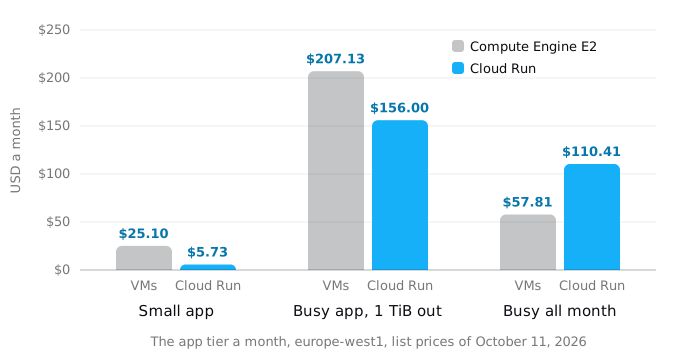
Three cases, the app tier only:
- A small app, 1 million requests of 200 ms and 50 GiB out a month, on one
e2-smallwith a 20 GiB disk and an IP address: $13.45 + $2.00 + $3.65 + $6.00 of traffic = $25.10. On Cloud Run: $0.48 of CPU past the free tier and $5.25 of traffic, $5.73. - A busy app, 10 million requests and 1 TiB out, on a MIG of two
e2-mediumVMs behind a global load balancer: $53.81 for the VMs, $4.00 of disks, $18.25 for the rule, $8.19 of processing and $122.88 of traffic, $207.13. On Cloud Run without the load balancer: $43.68 of CPU, $1.60 of memory, $3.20 of requests and $107.52 of traffic, $156.00. Keep the load balancer in front of Cloud Run and traffic goes back to the VM rate: $197.80. - Steady load, two instances busy every hour of the month. Two
e2-mediumVMs with their disks are $57.81, or $37.90 with a one-year commitment (37% off). Cloud Run with instance-based billing, two instances of 1 vCPU and 2 GiB, is $110.41.
So Cloud Run costs less when the app is idle much of the time or its traffic comes in bursts, and a VM costs less for load that is steady around the clock. E2 VMs get no automatic sustained use discount (only N1, N2 and N2D do), but they do get commitments of 37% for a year and 55% for three. If the app fits Google's free tier, one e2-micro in us-west1, us-central1 or us-east1, the comparison is about work, not money.
The database is not in these numbers. If it is already Cloud SQL, it stays as it is. If Postgres runs on the same VM as the app, you can either move it to Cloud SQL ($9.37 a month for the smallest instance, see the Cloud SQL guide) or leave it on a VM of its own and reach it over the private network, as Step 3 shows. Connection pooling on Cloud Run sizes the app's pool for either.
The other reasons to move are the work: no operating system to patch, no instance templates to roll, rollbacks in one command, scaling by requests instead of CPU. The container image still needs rebuilding for patches, unless you build with Google's buildpacks and turn on automatic base image updates.
What the VM setup consists of
List what exists before changing it. These commands only read:
gcloud compute instances list --format="table(name,zone.basename(),machineType.basename(),status)"
gcloud compute instances describe VM_NAME --zone=ZONE \
  --format="yaml(metadata.items,serviceAccounts,disks,networkInterfaces,tags)"
gcloud compute instance-groups managed list
gcloud compute backend-services list
gcloud compute url-maps list
gcloud compute addresses list
gcloud compute firewall-rules list --format="table(name,network.basename(),sourceRanges.list(),targetTags.list())"
The describe line shows how the app starts (a startup-script or a gce-container-declaration), the service account and its access scopes, the disks, the network and the tags. The rest list the MIG, the load balancer's parts, reserved addresses and firewall rules. If the app runs directly on the VM, also look inside it for systemd units, crontabs and files it writes, with the commands from the VPS guide.
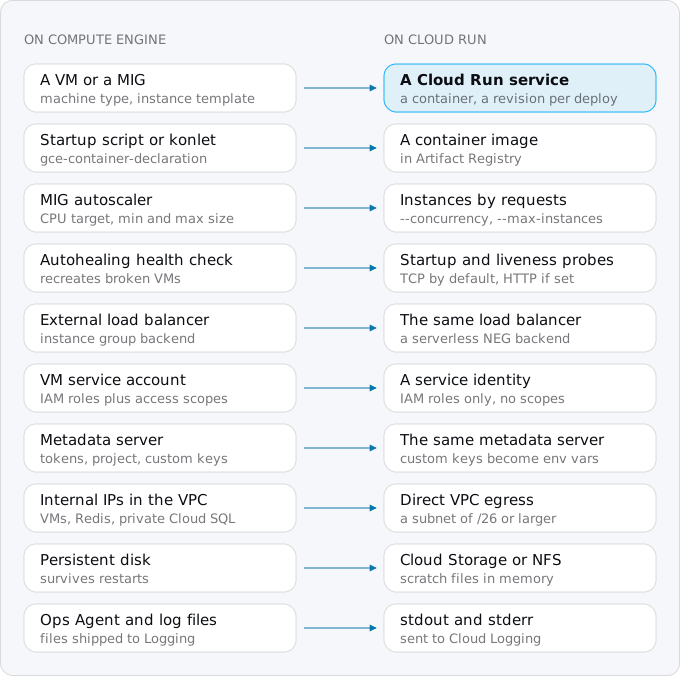
Step 1: the image
If konlet ran the container, the image exists and the declaration translates to deploy flags. Google's migration page shows a declaration like this:
spec:
  containers:
  - name: shop
    image: europe-west1-docker.pkg.dev/PROJECT_ID/shop/shop:41
    command: ["node"]
    args: ["server.mjs"]
    env:
    - name: NODE_ENV
      value: production
  restartPolicy: Always
image becomes --image, command becomes --command, args becomes --args, and each env pair goes into --set-env-vars. restartPolicy has no flag, because Cloud Run replaces failed instances itself. securityContext.privileged, stdin and tty have no Cloud Run equivalent; Google's own comparison sends privileged containers to a VM with a startup script. If the image path starts with gcr.io, check where it lives: Container Registry shut down on March 18, 2025, and new images go to Artifact Registry.
If the app runs straight on the VM, from a startup script that installs packages and starts a process, it needs a Dockerfile. The startup script is a good draft: its package installs become RUN lines, its last command becomes CMD. The VPS guide goes through the rest: listening on PORT and 0.0.0.0, one process per instance, finishing within 10 seconds of SIGTERM, and building for x86_64.
Either way, run the image once with docker run --read-only --tmpfs /tmp to find every file it writes (the VPS guide shows how), because Cloud Run's file system lives in memory and goes away with the instance.
Step 2: the service account
A VM calls Google APIs as its service account, and its access is limited twice: by the IAM roles of that account, and by the access scopes set on the VM. Scopes are the legacy part. Many VMs run as the Compute Engine default service account, which Google grants the Editor role on the whole project when it is created, with the default scopes keeping the VM to a few APIs.
Cloud Run has no access scopes, only roles, and uses the same default account when you name none. So an account that could only read buckets and write logs on the VM can change almost anything in the project on Cloud Run. Google says to avoid it. Check what the VM uses:
gcloud compute instances describe VM_NAME --zone=ZONE \
  --format="value(serviceAccounts[0].email,serviceAccounts[0].scopes)"
If the email ends in -compute@developer.gserviceaccount.com, create an account for the app and give it only what it calls:
gcloud iam service-accounts create shop --display-name="shop on Cloud Run"
gcloud projects add-iam-policy-binding PROJECT_ID \
  --member=serviceAccount:shop@PROJECT_ID.iam.gserviceaccount.com --role=roles/cloudsql.client
gcloud secrets add-iam-policy-binding DATABASE_URL \
  --member=serviceAccount:shop@PROJECT_ID.iam.gserviceaccount.com --role=roles/secretmanager.secretAccessor
Add a role on each bucket it reads or writes. If the VM already used an account of its own with narrow roles, reuse it on Cloud Run.
The code does not change for this. Cloud Run has the same metadata server at metadata.google.internal, so Google's client libraries find credentials the way they did on the VM, and a token from its service-accounts/default/token path works the same. What is missing is custom metadata: values the app read from instance/attributes/ on the VM have no Cloud Run counterpart (gcloud run deploy has no metadata flag) and become environment variables or secrets.
Step 3: the private network
A VM sits in a VPC network and reaches other VMs, a Memorystore Redis or a Cloud SQL private IP by their internal addresses. A Cloud Run service does not, until you connect it with Direct VPC egress. Then its instances take addresses from a subnet you name, and requests to private ranges go through the VPC:
gcloud run deploy shop --region=europe-west1 --image=IMAGE \
  --network=default --subnet=default --vpc-egress=private-ranges-only
The subnet must be /26 or larger, and Cloud Run reserves addresses in blocks of 16 as it scales, so a small subnet limits how far the service can grow. Direct VPC egress has no charge of its own; only the network traffic is billed, as if it came from a VM.
On the other side, rules that let the app VMs reach the database usually name a network tag, and a Cloud Run service's tags or service account cannot be the source of an ingress rule. Allow the subnet's range:
gcloud compute firewall-rules create db-from-run --network=default \
  --allow=tcp:5432 --source-ranges=10.132.0.0/20 --target-tags=postgres
Use your subnet's range; 10.132.0.0/20 is the default network's subnet in europe-west1. This is how Postgres on a VM can stay where it is while the app moves, and Google recommends the same path for Memorystore. For a Cloud SQL private IP, see connecting Cloud Run to Cloud SQL.
A partner that allowlists the VM's external IP needs a static outbound address through Cloud NAT, as the VPS guide describes. VMs that called the app on an internal address now call its URL with an identity token, or go through an internal load balancer.
Step 4: disks
A persistent disk has no counterpart on a Cloud Run service. Sort what is on it:
- Uploads and generated files go to Cloud Storage, through the client library or a Cloud Storage FUSE mount (the files guide covers both and their limits).
- A shared directory that several VMs used through NFS can stay. Cloud Run mounts any NFS server it can reach over the VPC, including one on a Compute Engine VM, or Filestore:
gcloud run services update shop --region=europe-west1 --execution-environment=gen2 \
  --add-volume=name=files,type=nfs,location=10.132.0.5:/share \
--add-volume-mount=volume=files,mount-path=/srv/app/files- Caches and scratch files go to
/tmp, which counts against the instance's memory, or away. - Log files the Ops Agent shipped become lines on stdout, which Cloud Run sends to Cloud Logging itself.
Step 5: deploy
With the image, the account and the network settled, one command creates the service:
gcloud run deploy shop --region=europe-west1 \
  --image=europe-west1-docker.pkg.dev/PROJECT_ID/shop/shop:41 \
  --service-account=shop@PROJECT_ID.iam.gserviceaccount.com \
  --network=default --subnet=default --vpc-egress=private-ranges-only \
  --cpu=1 --memory=512Mi --min-instances=0 --max-instances=10 \
  --set-env-vars=NODE_ENV=production \
  --set-secrets=DATABASE_URL=DATABASE_URL:latest \
  --allow-unauthenticated
The MIG's settings map like this:
- Autoscaling. The MIG's minimum and maximum size become
--min-instancesand--max-instances. A MIG scales on CPU; Cloud Run starts instances by the requests in flight, up to--concurrencyper instance (80 per vCPU by default when deployed with gcloud; the concurrency guide explains how to set it). - Autohealing. The MIG's health check that recreated broken VMs becomes probes. Cloud Run checks a TCP connection on the port by default at startup; add an HTTP startup probe if the app needs time to load, and an HTTP liveness probe to replace instances that hang. Probe flags are in the ECS guide.
- Work after the response. A VM kept its CPU between requests, so code that finished work in the background just ran. On a request-billed service it is throttled; use instance-based billing, a worker pool or a Cloud Tasks queue; the services, jobs and worker pools guide explains why. Cron on the VM becomes a Cloud Run job and a Scheduler job, as in the cron and timers guide.
Test on the service's run.app URL, including everything that crosses the VPC, before user traffic moves.
Step 6: the switch behind the same load balancer
A MIG behind Google's load balancer needs no DNS change: the load balancer keeps its IP address, certificate, Cloud Armor policy and URL map, and gets Cloud Run as a second backend. Google describes this exact use, shifting traffic from Compute Engine to Cloud Run gradually by weight.
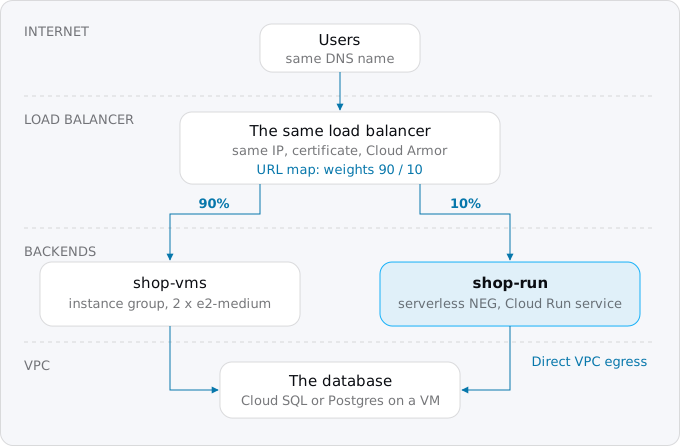
A serverless NEG cannot share a backend service with an instance group, so it gets its own:
gcloud compute network-endpoint-groups create shop-neg --region=europe-west1 \
  --network-endpoint-type=serverless --cloud-run-service=shop
gcloud compute backend-services create shop-run --global \
  --load-balancing-scheme=EXTERNAL_MANAGED
gcloud compute backend-services add-backend shop-run --global \
  --network-endpoint-group=shop-neg --network-endpoint-group-region=europe-west1
Then export the URL map, keep a copy, and add a route rule with weights:
gcloud compute url-maps export shop-lb --global --destination=url-map.yamlpathMatchers:
- name: main
defaultService: projects/PROJECT_ID/global/backendServices/shop-vms
routeRules:
- priority: 1
matchRules:
- prefixMatch: /
routeAction:
weightedBackendServices:
- backendService: projects/PROJECT_ID/global/backendServices/shop-vms
weight: 90
- backendService: projects/PROJECT_ID/global/backendServices/shop-run
weight: 10gcloud compute url-maps import shop-lb --global --source=url-map.yamlWatch errors and latency in Cloud Monitoring, then import the map again with 50/50 and 0/100. Rolling back is importing the saved copy. Google notes that session affinity and weighted splitting do not mix, so an app that keeps sessions in VM memory has to move them first (see the patterns guide).
A serverless backend has no health check, so the load balancer cannot see a broken service unless you turn on outlier detection, and its timeout is fixed at 60 minutes; Cloud Run's own --timeout decides. Weights need the global external Application Load Balancer (EXTERNAL_MANAGED). The older classic one has none: migrate it with Google's steps, or switch at once with gcloud compute url-maps set-default-service shop-lb --global --default-service=shop-run, and back the same way.
Once all traffic goes through the load balancer to Cloud Run, close the side door so nobody bypasses Cloud Armor through run.app:
gcloud run services update shop --region=europe-west1 \
  --ingress=internal-and-cloud-load-balancing --no-default-url
Keeping the load balancer costs $41.80 a month in the busy case above: the rule, the processing, and $0.12 instead of $0.105 per GiB. It is worth it for a fixed IP address, Cloud Armor, Cloud CDN or several services under one domain. A single VM with an IP and a DNS record has nothing to keep: test on run.app, then change DNS as the Vercel guide describes.
Step 7: retiring the VMs
Keep the old setup for a week as the way back. A MIG can be resized to zero (gcloud compute instance-groups managed resize shop-mig --size=0 --zone=ZONE), which deletes its VMs and keeps the template, so it can be scaled back. A single VM can be stopped, but its disk still bills, and so does a static external IP address: $0.005 an hour while attached to a running VM, $0.01 when reserved and unused.
Then take a last copy and delete:
gcloud compute machine-images create shop-final --source-instance=shop-vm --source-instance-zone=ZONEA machine image holds the configuration, metadata and every disk of the instance, so the VM can be recreated if something was missed; it is billed by its size. Then remove the instance template, the VM backend service and its health check, the firewall rules for the app VMs' tags, and unused static addresses, which cost $0.01 an hour each.
What breaks most often
- The default Compute Engine service account running with full Editor rights, without the scopes that held it back.
- Private IPs that time out: no Direct VPC egress, or a firewall rule that names a tag instead of the subnet's range.
- Files on the persistent disk that the app expected after a restart.
- Values read from custom VM metadata.
- Background work after the response, starved of CPU.
- Session affinity on the load balancer next to weighted routing.
- A pipeline that still creates VMs with
gce-container-declarationand has not deployed anything since July 31, 2026.
All of these show up on the run.app URL or at 10% of traffic if you test an upload, a sign-in and a call into the VPC.
Where Exodus comes in
A Compute Engine setup often lives outside the repository, in templates, startup scripts and metadata. Exodus's CLI reads what is committed (a Dockerfile, a startup script, Terraform with gce-container-declaration), and your coding agent reads the code for what the VM provided silently: files on disk, private addresses, metadata reads, background work. The report lists each piece from the map above with what it becomes, and compares the month on Cloud Run with what the VMs cost now. When the load is steady and a committed VM is cheaper, the report says that too.
FAQ
Is Cloud Run cheaper than a Compute Engine VM?
For idle or bursty apps, yes: a small app costs $5.73 a month on Cloud Run against $25.10 on an e2-small with its disk and address. For load that is steady around the clock, no: two e2-medium VMs cost $57.81, or $37.90 with a one-year commitment, against $110.41 on Cloud Run.
What replaces the Compute Engine container startup agent?
Google lists four replacements: a VM that starts the container from a startup script or cloud-init, GKE, Batch for jobs, and Cloud Run for stateless apps. New container deployments through the agent stopped working on July 31, 2026, so a pipeline that relies on it gets no running container.
Can Cloud Run reach private IP addresses in my VPC?
Yes, with Direct VPC egress: instances take addresses from a subnet you name, at least a /26, reserved in blocks of 16. Firewall rules must allow the subnet's range, because a Cloud Run service's network tags or service account cannot be the source of an ingress rule.
Can I keep my load balancer when moving to Cloud Run?
Yes. Cloud Run joins as a second backend through a serverless NEG, and the URL map moves traffic by weight, with no DNS change. Weights need the global external Application Load Balancer. In the busy example, keeping it costs $41.80 a month more than letting users reach Cloud Run directly.
Sources
36
- docs.cloud.google.comCompute Engine container startup agent deprecation, Google
- docs.cloud.google.comPrepare for the container startup agent shutdown, Compute Engine
- docs.cloud.google.comMigrate containers that were deployed on VMs during VM creation, Compute Engine
- docs.cloud.google.comgcloud compute instances create-with-container, Google Cloud SDK reference
- cloud.google.comGeneral-purpose VM pricing, Compute Engine
- docs.cloud.google.comGeneral-purpose machine family, Compute Engine
- cloud.google.comVM instance pricing, Compute Engine
- docs.cloud.google.comSustained use discounts, Compute Engine
- cloud.google.comNetwork pricing, Google
- docs.cloud.google.comGoogle Cloud Free Tier, Google
- cloud.google.comCloud Load Balancing pricing, Google
- cloud.google.comCloud Run pricing, Google
- exodus.elim.ioEgress on Google Cloud explained, Exodus
- exodus.elim.ioCloud SQL's smallest instances and what they cost, Exodus
- docs.cloud.google.comService accounts, Compute Engine
- docs.cloud.google.comService account overview, IAM
- docs.cloud.google.comIntroduction to service identity, Cloud Run
- docs.cloud.google.comContainer runtime contract, Cloud Run
- docs.cloud.google.comDirect VPC egress with a VPC network, Cloud Run
- docs.cloud.google.comCompare Direct VPC egress and connectors, Cloud Run
- docs.cloud.google.comConnect to a Redis instance from Cloud Run, Memorystore
- docs.cloud.google.comNFS volume mounts for services, Cloud Run
- docs.cloud.google.comConfigure container health checks for services, Cloud Run
- docs.cloud.google.comInstance groups, Compute Engine
- docs.cloud.google.comServerless network endpoint groups overview, Cloud Load Balancing
- docs.cloud.google.comSet up traffic management for global external Application Load Balancers, Google
- docs.cloud.google.comMigrate from classic to global external Application Load Balancer, Google
- docs.cloud.google.comIngress settings, Cloud Run
- docs.cloud.google.comMachine images, Compute Engine
- docs.cloud.google.comConfigure automatic base image updates, Cloud Run
- docs.cloud.google.comTransition from Container Registry, Artifact Registry
- docs.cloud.google.comIPv4 subnet ranges, VPC
- docs.cloud.google.comMaximum concurrent requests per instance, Cloud Run
- docs.cloud.google.comStructured logging, Cloud Logging
- docs.cloud.google.comConfigure request timeout for services, Cloud Run
- Exodus team: E2 prices for europe-west1 read from the Cloud Billing Catalog API with e2-prices.sh