Work after the response on Cloud Run stalls because request-based billing, the default, takes the CPU away once the response is sent. An email or webhook started after the answer waits for the next request to the same instance, or is lost when the instance stops within 15 idle minutes. The four ways out are finishing it in the request, Cloud Tasks, Pub/Sub and instance-based billing.
In short
- On request-based billing an idle instance is kept at most 15 minutes and can be shut down at any time, taking stalled work with it.
- Moving 50,000 emails a month costs $0.38 finished in the request and $0.44 through Cloud Tasks; at 500,000 emails, $3.79 and $4.39.
- Keeping the CPU on with instance-based billing and one instance always up costs $49.93 a month, or $44.71 with the free tier unused.
- Cloud Tasks retries failed work and allows up to 30 minutes per attempt.
- On SIGTERM Cloud Run waits 10 seconds before SIGKILL, with the CPU on, which is the last chance for work still in memory.
Prices are europe-west1 list prices, read on October 11, 2026.
What Cloud Run does after the response
Most web apps do a little work after they answer. The signup handler returns "201 Created" and then sends the welcome email; a checkout answers, then posts a webhook to the warehouse; a page renders, then writes an analytics event. On your own server or a platform that keeps its containers running, the process keeps its CPU and the email goes out a few hundred milliseconds later. This is the long version of one section of the patterns that break on Cloud Run.
A Cloud Run service has one of two billing settings, and the setting decides when your container gets CPU. Request-based billing, the default, charges only while instances handle requests, start and shut down, and "CPU is only allocated during request processing". Instance-based billing charges for the instance's whole life and keeps the CPU on all that time. In gcloud the switch is still named after the CPU: --cpu-throttling for request-based, --no-cpu-throttling for instance-based. The billing guide explains how the two bills compare.
Google's development tips are direct about the default: when a service on request-based billing "finishes handling a request, the instance's access to CPU will be disabled or severely limited. You shouldn't start background threads or routines that run outside the scope of the request handlers". Google calls this "background activity", meaning "anything that happens after your HTTP response has been delivered".
Three things follow, and all three show up in real apps:
- The work stalls. Nothing crashes. The email call has no CPU, so it sits half-done.
- The next request wakes it. Google's tips say that "any subsequent request to the same container instance resumes any suspended background activity". The email from 10:02 goes out when someone else loads a page at 10:40, and its CPU time is taken from that request.
- Or it never finishes. An idle instance is kept for at most 15 minutes unless minimum instances keep it, and "can be shut down at any time". The stalled work dies with it. Google's functions page adds that network calls made after the end usually fail with
ECONNRESET, because the connection was reset while it waited.
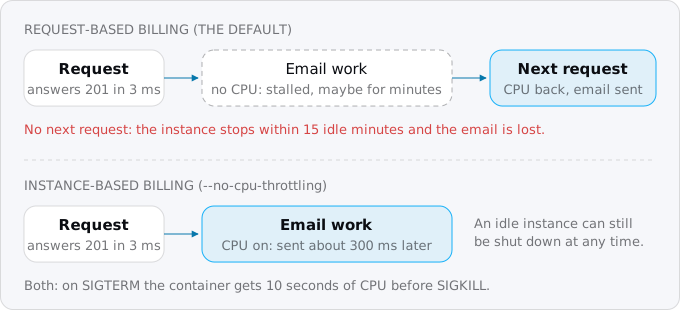
The 15-minute and shutdown rules hold on instance-based billing too. The CPU stays on, so work after the response finishes, but an idle instance can still be shut down. Instance-based billing makes short background work possible. It does not keep a process running forever on a normal service.
See it before you deploy
Locally there is no throttling, so the bug hides until production. You can imitate it. Our sample in docs/research/blog/work-after-the-response/sample/ is a 50-line Node server with no dependencies. Its /signup handler answers 201, then sends a fake welcome email: 200 ms of network wait and about 100 ms of CPU. try.sh runs it in Docker and, after a response, cuts the container to 1% of a CPU with docker update --cpus 0.01. That stands in for "severely limited". It is an imitation, not Cloud Run, but the code reacts the same way Google's page describes:
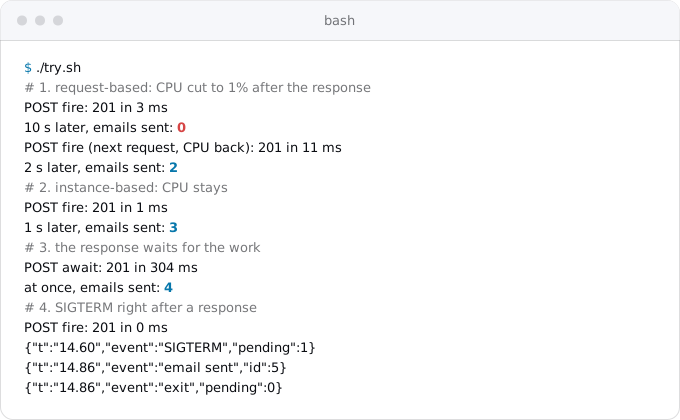
The first block is the bug: ten seconds pass and the email has not been sent, then the next request arrives and both emails go out. The other three blocks are the fixes this guide walks through.
Four ways out
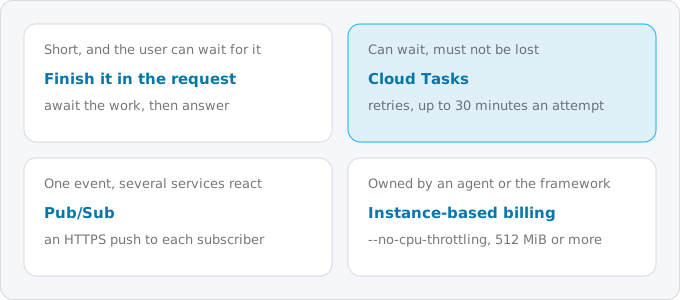
Every piece of work after the response ends up in one of four places. Pick per piece, not per app:
- Finish it in the request. The response waits for the work. Right when the work is short (well under a second) and the user can wait that long.
- Hand it to Cloud Tasks. The request creates a task, Google calls your service back with it, retries on failure, and allows up to 30 minutes per attempt. Right for anything that must not be lost: emails, webhooks, image processing.
- Publish it to Pub/Sub. The request publishes an event, and every subscriber gets its own copy as an HTTP request. Right when several things react to the same event.
- Switch to instance-based billing. The CPU stays on and the code does not change. Right when the background work is the runtime's habit and not your code's: tracing agents, metric exporters, frameworks that schedule their own work.
Cloud Run jobs are a fifth home for work that runs for hours or on a schedule, and the cron guide covers them. Work started by a user's request rarely needs one.
What each costs
The model is a service with 1 vCPU and 512 MiB in europe-west1 that sends emails like the sample's, 300 ms each. Cloud Run bills the time a request is open, rounded up to 100 ms, whatever the CPU does in it, so 300 ms with 100 ms of real CPU is still billed as 300 ms. The figures are the extra cost of the email work on top of the app's normal traffic. They assume that traffic already uses the free tier and that no requests overlap, so they are an upper bound.
- Finish it in the request: 50,000 emails a month add 15,000 instance-seconds, $0.38. At 500,000 emails, $3.79. The price is in latency: each of those responses is 300 ms slower.
- Cloud Tasks: the same Cloud Run time for the handler, plus one request fee per task ($0.40 per million) and two Cloud Tasks operations per email, the create call and the delivery attempt ($0.40 per million after the first free million a month). $0.44 at 50,000 emails, $4.39 at 500,000. Below a million operations a month the queue itself is free.
- Pub/Sub: $40 per TiB after the first 10 GiB a month. Small events cost nothing at this scale, and the subscriber's Cloud Run time is the same as above.
- Instance-based billing with one instance always up (
--min-instances=1): $49.93 a month, or $44.71 if the account's instance-based free tier is unused. Nothing per email, because the instance is paid for already.
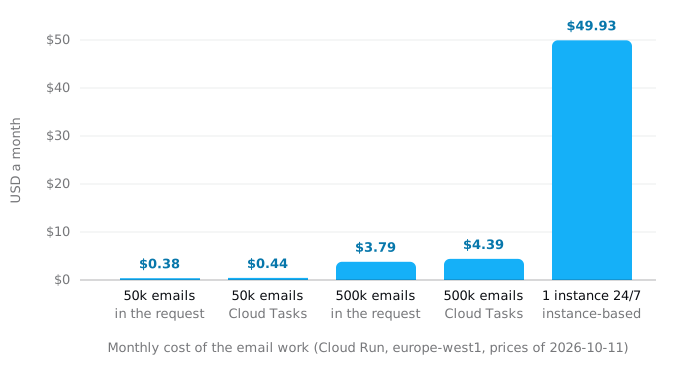
For a small app the queue and the in-request options cost about the same, so choose by what the work needs, not by price. Instance-based billing is the expensive choice only because of the always-up instance. Without minimum instances, instance-based billing charges for each instance's whole life, up to 15 idle minutes after its last request, at a lower rate per second, and the billing guide shows where that crosses over.
Step 1. Find the work after the response
Start with a search. This catches the common forms in six languages:
grep -rnE --exclude-dir=node_modules --exclude-dir=.git --exclude-dir=vendor \
  '\b(after|waitUntil|defer)\(|afterResponse\(|add_task\(|BackgroundTasks|onConnection\(.(deferred|background)|queue_adapter|deliver_later|perform_later|go func\(|@Async|runAsync\(' .
It finds the named helpers, not the plain bug. The plain bug is a promise nobody awaits: res.send() followed by sendEmail(), or a .then() with no await in front of it. Read each request handler for calls made after the response is written. A coding agent does this well if you ask it to list every call that runs after the handler has sent its response.
Then ask the logs. Google's tip is to look for "anything that is logged after the entry for the HTTP request". This read-only command prints a service's recent lines in order, the request lines with their status and latency, and the app's own lines with their text:
gcloud logging read \
  'resource.type="cloud_run_revision" AND resource.labels.service_name="SERVICE"' \
  --freshness=1h --order=asc --limit=200 \
  --format='value(timestamp,httpRequest.status,httpRequest.latency,textPayload)'
A line like "email sent" that appears seconds or minutes after its request ended is work after the response. Check the billing setting too. This prints true for request-based billing (an empty value means the same) and false for instance-based:
gcloud run services describe SERVICE --region REGION \
  --format='value(spec.template.metadata.annotations["run.googleapis.com/cpu-throttling"])'
Step 2. Finish short work in the request
The cheapest fix is a move of one line: await the work, then answer. From the sample:
if (url.searchParams.get("mode") === "await") {
  await sendWelcomeEmail(id); // the response waits for the work
  res.writeHead(201).end(`user ${id}\n`);
}
The sample's response went from 3 ms to 304 ms. That is fine for a signup and wrong for a page view, so keep this for work that is short and rare per user. Two limits to keep in mind: the request timeout (5 minutes by default) now covers the work too, and long requests and timeouts lists every timeout in the chain; and if the work fails, the user sees the error. Sometimes that is right: a payment confirmation the user never received is worse than an error page. An AI agent backend on Cloud Run keeps a model loop inside its request the same way.
Step 3. Hand the rest to Cloud Tasks
For work that can wait but must not be lost, the request creates a task and answers. Cloud Tasks then sends the task to your service as its own HTTP request, so the work runs inside a request again and has CPU. The background workers guide sets up the queue, the service account and the handler step by step; here is only what changes in the handler that used to work after the response:
// before: the response is out, the work is not
res.status(201).json(user)
sendWelcomeEmail(user.id)

// after: the task is created inside the request, then the response goes out
await enqueue('send-welcome-email', { user: user.id }, `welcome-${user.id}`)
res.status(201).json(user)
enqueue is the function from that guide. Three rules make it safe:
- Create the task before you answer. The create call is itself network work. Done after the response, it stalls like the email did. It takes milliseconds, so the user does not notice.
- Name the task. The third argument becomes the task's name, and Cloud Tasks uses names to drop duplicates, so a signup retried by the browser sends one email.
- Make the handler safe to run twice. Delivery is at least once and in no particular order. Record that the welcome email was sent, and skip it if the record exists.
If the database write and the task must succeed or fail together, write the task into a table in the same transaction and let a small handler create tasks from that table. This is called an outbox. Most apps do not need it, and can return a 500 when creating the task fails, so the client retries.
Pub/Sub is the same move with a different shape: the request publishes an event, and a push subscription delivers it to each subscriber as an HTTPS request. A 2xx answer acknowledges it, anything else makes Pub/Sub send it again. Use it when the event has several readers, for example the email service and the analytics service both reacting to a signup.
Step 4. Or keep the CPU on
Some background work is not yours to move. Google's billing page lists the usual owners: "monitoring agents like OpenTelemetry that may assume to be able to run in the background", "Go's Goroutines, Node.js async, Java threads, and Kotlin coroutines", and "application frameworks that rely on built-in scheduling or background functionalities". For those, switch the service to instance-based billing:
gcloud run services update SERVICE --region REGION --no-cpu-throttling --memory 512MiInstance-based billing needs at least 512 MiB of memory, hence the second flag. Add --min-instances=1 only if something must run while no one is using the app; that is the $49.93 line above, and min instances and startup CPU boost shows what a warm instance costs. Without it, instances still stop after at most 15 idle minutes, and anything still queued in memory is lost unless you handle the next step.
OpenTelemetry is the common case. Its batching span processor sends spans every 5,000 ms by default and keeps up to 2,048 of them in memory. On request-based billing those exports wait for CPU like the email did, and traces show up late or not at all. Either switch the service to instance-based billing, or call the SDK's forceFlush at the end of each request, which costs some latency, and shutdown on SIGTERM.
Step 5. Drain on SIGTERM, whatever you chose
Before an instance stops, Cloud Run sends SIGTERM and waits 10 seconds before SIGKILL. Google's runtime contract says that "during this period, the instance is allocated CPU and billed", on either billing setting. Those 10 seconds are the last chance for work that is still in memory. The sample keeps every piece of work after the response in a set, and waits for it on SIGTERM:
const pending = new Set();
function after(promise) {
  pending.add(promise);
  promise.catch((e) => log("after failed", { error: String(e) })).finally(() => pending.delete(promise));
}

process.on("SIGTERM", async () => {
  log("SIGTERM", { pending: pending.size });
  server.close();
  // Cloud Run sends SIGKILL 10 seconds after SIGTERM; give the work 8 of them.
  await Promise.race([Promise.allSettled([...pending]), sleep(8000)]);
  log("exit", { pending: pending.size });
  process.exit(0);
});
In the sample's last block the signal arrived right after a response, the email went out 0.26 s later, and the process exited with nothing pending. On request-based billing this does not rescue work that stalled long before: it only catches what is in flight at the end. It is still worth having on every service. Next.js does the same on its own: its self-hosting guide says that on SIGTERM the server finishes in-flight requests and runs pending after() callbacks before it exits.
Framework by framework
Each of these runs code after the response in the same container, so each stalls on request-based billing:
- Next.js after(). Next.js says
afteris "fully supported when self-hosting withnext start", but on Cloud Run's default billing the callback runs without CPU. Vercel extends the invocation withwaitUntil, and Cloud Run has no equivalent. Move the callback's body to a task, or keep it short andawaitit in the handler. - FastAPI background tasks. They run "after returning a response", in the same process. Move them to Cloud Tasks; FastAPI's own docs send heavy background computation to Celery.
- Django 6.0 Tasks. The default
ImmediateBackendruns a task at once, inside the request, so it works on Cloud Run as is. The built-in backends are for development and testing, and a real backend needs a worker; the background workers guide shows where that worker can run. - Rails mailers and jobs.
deliver_laterandperform_laterboth go through Active Job. Its:asyncadapter runs jobs in a thread pool inside the web process and "drops pending jobs on restart". Rails 8 defaults to Solid Queue, whose workers have to run somewhere; the same guide covers where. - Laravel deferred work.
defer(),dispatchAfterResponse()and thedeferredandbackgroundqueue connections all run after the response is sent, in the same process or a PHP process started next to it, inside the same container. Dispatch to a real queue instead; do you still need Redis on Cloud Run covers queues kept in Redis. - Go goroutines.
go sendEmail(r.Context(), user)fails even off Cloud Run, because the request's context is canceled when the handler returns. Pass a fresh context and it stalls on Cloud Run. Do the work before returning, or create a task. - Java threads and Kotlin coroutines. Spring's
@Asyncincluded, the same rule holds: work that outlives the handler needs instance-based billing or a task.
What breaks
- Emails arrive minutes late, in bursts. Work after the response is waiting for the next request to free the CPU. Find it (Step 1).
- Some emails never arrive, mostly at night. No next request came, and the instance was shut down. Move the work to Cloud Tasks (Step 3).
- Connection reset errors in logs with no request around them.
ECONNRESETmeans a call made after the response woke up on a connection that had been reset. Same fix. - A request is slow for no reason in its own code. It is carrying stalled work from an earlier request on the same instance.
- Traces and metrics are missing or arrive late. The exporter runs in the background. Use instance-based billing or flush (Step 4).
- The bill went up after the switch to instance-based billing. Instance-based billing charges for idle minutes too; with
--min-instances=1that is every hour of the month. Check whether a queue would do instead. - Duplicate emails. A task or a push message was delivered twice. Name tasks and record what has been sent.
Checklist
- Run the search and read each handler for calls after the response (Step 1).
- Look in the logs for lines written after their request ended.
- Await short work in the handler (Step 2).
- Create a named Cloud Tasks task, before answering, for work that must not be lost (Step 3). Use Pub/Sub when several services react to the same event.
- Switch to instance-based billing only for background work you cannot move, such as agents and framework threads (Step 4).
- Track work in flight and wait for it on
SIGTERM, up to 8 of the 10 seconds (Step 5). - Run the sample's throttling trick on your own app before the deploy: answer a request, cut the CPU, and see what is left unfinished.
Where Exodus comes in
Exodus's CLI reads your repository with your coding agent and lists the work after the response with file and line: after() and waitUntil, background task helpers, Active Job on :async, deferred dispatches, goroutines and promises started after the response is written. Each one becomes a finding in the report with a proposed home (in the request, a task, an event, or instance-based billing) and this guide as the explanation. The plan prices the choice next to the rest of your Cloud Run bill, so a switch to instance-based billing shows up as the cost it is.
FAQ
Why are emails from my Cloud Run service delayed?
On request-based billing a Cloud Run instance has no CPU after it sends a response, so an email started after the answer stalls. It goes out when the next request reaches the same instance, which is why emails arrive minutes late and in bursts. If no request comes, the instance is shut down and the email is lost.
Does Next.js after() work on Cloud Run?
Next.js supports after() with next start, but on Cloud Run's default billing the callback runs without CPU. Vercel extends the invocation with waitUntil, and Cloud Run has no equivalent. Move the callback's body to a Cloud Tasks task, or keep it short and await it in the handler.
Do FastAPI background tasks work on Cloud Run?
FastAPI background tasks run after returning a response, in the same process, so they stall on Cloud Run's request-based billing like any other work after the response. Move them to Cloud Tasks, which calls the service back with each task as its own HTTP request, so the work has CPU again.
Does instance-based billing fix background work on Cloud Run?
Instance-based billing keeps the CPU on, so short work after the response finishes, and the code does not change. An idle instance can still be shut down after at most 15 minutes, so it does not keep a process running forever. With one instance always up it costs $49.93 a month.
Sources
24
- docs.cloud.google.comGeneral development tips, Cloud Run
- docs.cloud.google.comBilling settings for services, Cloud Run
- docs.cloud.google.comContainer runtime contract, Cloud Run
- docs.cloud.google.comFunctions best practices, Cloud Run
- cloud.google.comCloud Run pricing, Google
- cloud.google.comUse Cloud Run always-on CPU allocation for background work, Google Cloud blog, March 28, 2022
- cloud.google.comCloud Tasks pricing, Google
- docs.cloud.google.comCreate HTTP target tasks, Cloud Tasks
- docs.cloud.google.comIssues and limitations, Cloud Tasks
- cloud.google.comPub/Sub pricing, Google
- docs.cloud.google.comPush subscriptions, Pub/Sub
- nextjs.orgafter, Next.js docs
- nextjs.orgSelf-hosting, Next.js docs
- fastapi.tiangolo.comBackground Tasks, FastAPI
- docs.djangoproject.comDjango's Tasks framework, Django 6.1 docs
- api.rubyonrails.orgActive Job Async adapter, Rails API
- guides.rubyonrails.orgActive Job Basics, Rails guides
- guides.rubyonrails.orgAction Mailer Basics, Rails guides
- laravel.comHelpers: deferred functions, Laravel 11.x docs
- laravel.comQueues, Laravel 11.x docs
- laravel.comQueues, Laravel docs
- pkg.go.devnet/http, Go standard library
- opentelemetry.ioTracing SDK specification, OpenTelemetry
- Exodus team: a local sample that cuts a container's CPU to 1% after each response to imitate request-based billing, the Catalog API price read, gcloud 587.0.0 help and a read-only describe in our own project, Oct 11, 2026