A Cloud Run request ends at 5 minutes by default and at 60 minutes at most, but the shortest clock on its way ends it first: gunicorn's 30 seconds, Firebase Hosting's 60, or a caller's deadline. After Cloud Run's 504 the code keeps running. Work longer than a page should stay open goes to Cloud Tasks, up to 30 minutes, or a Cloud Run job, up to 7 days.
In short
- Cloud Run's request timeout is 300 seconds by default and 3,600 at most, and it counts container startup.
- Gunicorn's sync worker ends a request after 30 seconds and Firebase Hosting after 60; Cloud Scheduler waits 3 minutes and a Pub/Sub push 10 seconds by default.
- After a 504 the instance keeps running the request's code: our Node report ran its full 6 seconds after the client left at 3.
- Cloud Tasks runs a handler for up to 30 minutes, a Cloud Run job task for up to 168 hours.
- 1,000 requests that hang until a 5-minute timeout cost $7.58 at 1 vCPU and 512 MiB; until a 60-minute timeout, $90.90.
Prices are europe-west1 list prices of October 12, 2026.
Every clock a request passes
On your own server a slow endpoint (the monthly report, the CSV export, the AI call that thinks for two minutes) takes as long as it takes. Behind a router it meets a clock: Heroku's router ends a request after 30 seconds with an H12 error while the app keeps working on it.
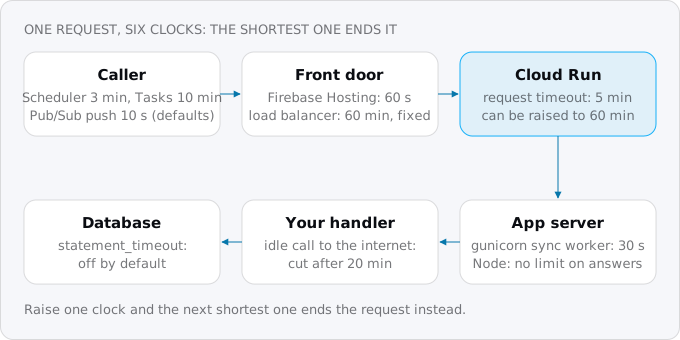
- The caller. A browser's wait depends on the browser and your code; Google's callers have documented deadlines. Cloud Scheduler waits 3 minutes by default for an HTTP target (15 seconds to 30 minutes). Cloud Tasks waits 10 minutes by default (30 at most). A Pub/Sub push subscription waits for its acknowledgment deadline, 10 seconds by default and 600 at most, then sends the message again.
- The front door. If your domain goes through Firebase Hosting, its rewrite to Cloud Run has a 60-second timeout of its own, and a slower request gets a 504 there. A Google load balancer in front of Cloud Run (a "serverless NEG") has a fixed 60 minutes that you cannot change, so it never ends a request before Cloud Run does.
- Cloud Run. The service's request timeout: 300 seconds unless you set it, up to 3,600. It counts from the moment the request reaches the service, container startup included, so a cold start eats into it.
- The app server. Some servers have a clock of their own. Gunicorn kills a worker that has been silent for 30 seconds. Rails apps that use the rack-timeout gem raise an exception after 15 seconds by default. Node has no limit on how long an answer takes, and Uvicorn's settings list none.
- Your handler. Calls your code makes have clocks too. Cloud Run cuts an outbound connection that has been idle for 20 minutes (10 minutes to a VPC), and your HTTP client or SDK may give up much sooner.
- The database. Postgres has
statement_timeout, off by default.
Raising one clock only moves the problem to the next shortest. Google's timeout page says to "check your language framework to see whether it has its own request timeout setting that you must also update", and that some clients "might also impose a more restrictive timeout".
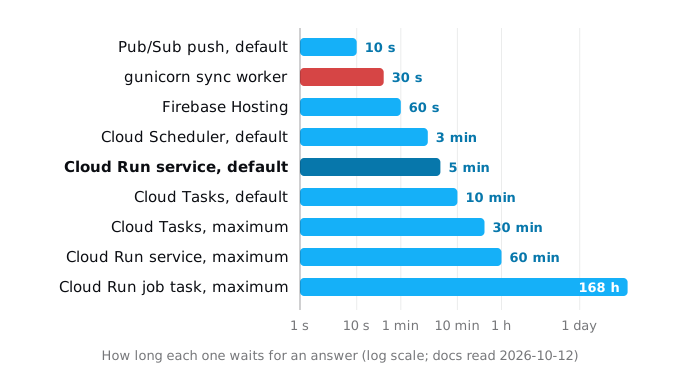
The last bar is the way out for the longest work: a Cloud Run job's task runs for up to 7 days, and it is not a request.
What happens when the clock runs out
When Cloud Run's timeout runs out, the caller gets a 504 with the text "The request has been terminated because it has reached the maximum request timeout", and the connection is closed. Then, in Google's words: "the container instance that served the request is not terminated. The container or code might keep processing the terminated request and might have its execution time interfere with processing other requests."
So the report keeps building for nobody. It holds memory and a database connection, and on request-based billing it now runs outside a request with almost no CPU, the stall from the work after the response guide. If the user clicks "Export" again, a second copy starts next to the first.
An app server's clock ends the request early with an error. Google's troubleshooting page lists 503s that arrive "before reaching the request timeout set in Cloud Run" and names gunicorn's WORKER TIMEOUT and Node's server.setTimeout as the causes to check.
A caller's clock makes the caller give up and retry while the first attempt still runs. Cloud Scheduler's docs warn that a deadline shorter than the target's can mark a job failed "even though the target successfully returned", and Cloud Tasks and Pub/Sub retry on their own, so a slow handler runs twice.
See it before you deploy
Our sample in docs/research/blog/long-requests-and-timeouts/sample/ has two tiny servers with one slow endpoint each: a 12-line WSGI app for gunicorn, and a Node server whose handler works in 100 ms slices. try.sh runs them in Docker and calls them with curl:
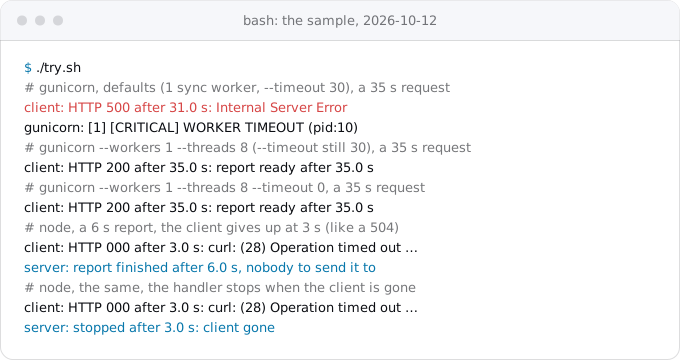
Three things to read in it:
- Gunicorn's defaults end a 35-second request at 31 seconds with a 500 and
[CRITICAL] WORKER TIMEOUT. That is one sync worker and--timeout 30, what you get from a baregunicorn app:app. - With threads, the same 30 seconds did not end the request. Gunicorn's docs explain why: for workers other than sync, the timeout means the worker process is still talking to gunicorn, and "is not tied to the length of time required to handle a single request". Google's Python page recommends
--workers 1 --threads 8 --timeout 0, which removes the question. - A handler whose client is gone keeps working. The Node report ran its full 6 seconds after curl gave up at 3. That is what Cloud Run's 504 leaves behind. The handler that listens for the closed connection stopped at 3.0 seconds.
The curl timeout stands in for Cloud Run's 504.
Five ways out
A slow endpoint ends up in one of five places. Choose by how long the work takes and whether the user must wait for it:
- Raise the timeout, for work of a few minutes that the user waits for.
- Stream the answer, for long work that can show progress or partial results.
- Start it, then poll, for work longer than a page should stay open: the request answers at once with an id, Cloud Tasks (up to 30 minutes) or a Cloud Run job (up to 7 days) does the work, and the browser asks for the status.
- Send big files around the service, straight between the browser and Cloud Storage.
- Make the work shorter: batch the queries, add the missing index, cache the result. Often the cheapest fix.
What it costs
Cloud Run bills a request-based service for the time requests are open, rounded up to 100 ms, so a request that waits costs the same as one that computes. The model is one vCPU and 512 MiB in europe-west1 at 2026-10-12 list prices: $0.000024 per vCPU-second and $0.0000025 per GiB-second, $0.00002525 a second together. The figures assume no other requests share the instance and the free tier is used by the rest of the app, so they are an upper bound.
- A four-minute report in the request: $0.00606 each, $6.06 for 1,000 a month.
- The same report started, then polled, with Cloud Tasks: the same handler time, plus the start request and 48 polls at 5-second intervals, billed as 100 ms each with a request fee. $6.20 for 1,000. The two Cloud Tasks operations per report are inside the free million a month.
- The same report as a Cloud Run job: jobs are billed at the instance-based rate, $0.000018 and $0.000002, with a minimum of one minute. $4.70 for 1,000, polls included.
- A request that hangs until the timeout: a dead connection or a stuck API call. At the default 5 minutes, 1,000 of them cost $7.58. At 60 minutes, $90.90, twelve times more, for nothing.
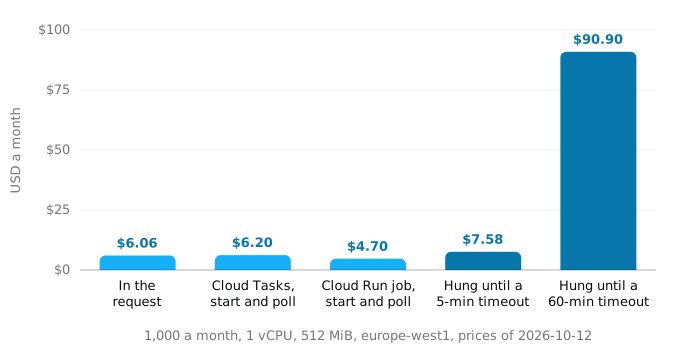
So choose where the work runs by what it needs, not by price. What does cost money is a timeout set much higher than the work needs: it does not make anything faster, it only lets a stuck request bill longer. Set it to the slowest real request plus a margin, not to 60 minutes "to be safe". With concurrency above one, a request that waits on another service shares its instance with other requests, so real costs are lower; the concurrency guide shows how much.
Step 1. Find the slow requests and the clocks
Start with the logs. Cloud Run writes one request log line per request, with its status and latency. This read-only command lists a week of requests that ended in a 504 or took 30 seconds or more:
gcloud logging read \
  'resource.type="cloud_run_revision" AND resource.labels.service_name="SERVICE" AND (httpRequest.status=504 OR httpRequest.latency>="30s")' \
  --freshness=7d --limit=50 \
  --format='value(timestamp,httpRequest.status,httpRequest.latency,httpRequest.requestUrl)'
Compare the latencies with the service's timeout, which this prints in seconds:
gcloud run services describe SERVICE --region REGION \
  --format='value(spec.template.spec.timeoutSeconds)'
A 504 at exactly the timeout is Cloud Run's clock. A 504 or 503 well below it came from something else in the chain. Exodus team: in our own project, the query above found ten 504s logged at 120 seconds on a service whose timeout is 3,600, so a clock inside the app or behind it ended them, not Cloud Run. It also found WebSocket upgrades (status 101) logged at 3,601 seconds: connections closed by a 60-minute timeout, as the WebSockets guide describes.
Then search the code and the container files for the other clocks:
grep -rnE --exclude-dir=node_modules --exclude-dir=.git --exclude-dir=vendor \
  'gunicorn|uvicorn|Rack::Timeout|service_timeout|requestTimeout|headersTimeout|setTimeout\(0\)|statement_timeout|attempt.deadline|ack.deadline|dispatch.deadline' .
Write down each clock next to the endpoint it limits.
Step 2. Raise the timeout, and every clock behind it
For work that takes minutes and that a user waits for, set the timeout to the slowest real request plus a margin:
gcloud run services update SERVICE --region REGION --timeout 10mThe value is seconds or a duration such as 10m or 1m20s, and it must be under 60 minutes. Like any configuration change, it creates a new revision. Then fix the clocks behind it:
- Gunicorn: use Google's line, or at least threads. In a Dockerfile:
CMD exec gunicorn --bind :$PORT --workers 1 --threads 8 --timeout 0 main:app. The Node, Python, Rails and Go guide has the rest of each stack's start command. - Node: since version 13,
server.timeoutis 0, no limit, so a long answer needs no change.server.requestTimeout, 300,000 ms since version 18, limits the time to receive the whole request, which matters for slow uploads and not for slow answers. - Rails with rack-timeout: raise its
service_timeoutabove the slow route's time, or keep it at 15 seconds and move the work out. - Callers: raise their deadline to the service's timeout, for example
gcloud scheduler jobs update http JOB --location REGION --attempt-deadline 10morgcloud pubsub subscriptions update SUBSCRIPTION --ack-deadline 600, Google's own value in its Pub/Sub tutorial. - Firebase Hosting: its 60 seconds cannot be raised; send slow routes to the service's own URL or a load balancer, as in moving a Netlify site to Cloud Run.
Past 15 minutes, Google adds a warning: "the longer the timeout is, the more likely the connection can be lost due to failures on the client side or the Cloud Run side. When a client re-connects, a new request is initiated and the client isn't guaranteed to connect to the same instance." It recommends retries and handlers that are idempotent (safe to run twice) or can resume. At that point step 4 is less work.
Whatever the timeout, stop work nobody is waiting for. In Node, the response's close event fires when the client, or Cloud Run's timeout, closes the connection. From the sample:
const gone = new AbortController();
res.on("close", () => { if (!res.writableFinished) gone.abort(); });
Check gone.signal.aborted between slices of work, and pass gone.signal to fetch and to your database driver where it takes one. Google's second piece of advice, "track the amount of time left during execution. Then perform cleanup and return early", is the same idea run against the clock: compare elapsed time with your timeout, and stop with a clear error or a partial result before Cloud Run stops you.
Step 3. Stream the answer
If the work can show progress or produce its result in pieces, send it as it goes. Cloud Run streams responses with no configuration, as long as the server answers with Transfer-Encoding: chunked. A Node handler that writes with res.write() and sets no Content-Length does that on its own; we checked the header on Node 24:
res.writeHead(200, { "Content-Type": "text/plain" });
for (const month of months) {
  res.write(`${month}: ${await buildMonth(month)}\n`);
}
res.end();
Streaming does not change the clock: the timeout covers the whole stream, and the bill counts the time it is open. It does lift one limit. Over HTTP/1, the default, a response is limited to 32 MiB unless it is chunked or streamed, and a request body to 32 MiB unless the container speaks HTTP/2 end to end. Server-sent events are a stream too, and the WebSockets and SSE guide covers reconnecting when the clock ends one.
Step 4. Start it, then poll
For work that runs longer than a page should stay open, or must survive the user closing it, split the request in two. The first request records the work, starts it somewhere else, and answers at once with 202 Accepted and an id. The browser then asks for the status every few seconds until the work is done:
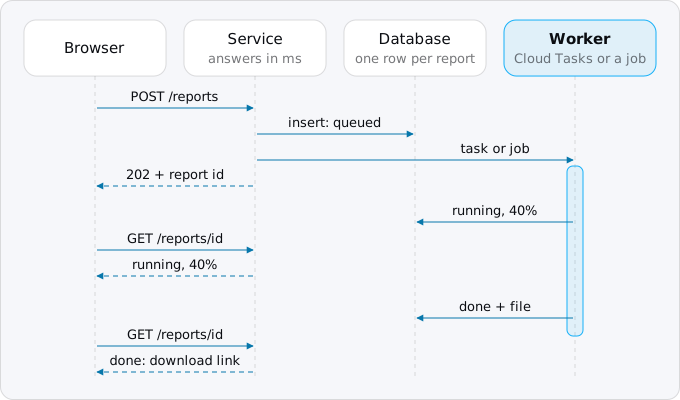
The service side is two short handlers. enqueue is the function from the background workers guide, which sets up the queue and its service account:
app.post("/reports", async (req, res) => {
  const id = randomUUID();
  await db.query("insert into reports (id, status) values ($1, 'queued')", [id]);
  await enqueue("build-report", { id }, `report-${id}`);
  res.status(202).location(`/reports/${id}`).json({ id, status: "queued" });
});

app.get("/reports/:id", async (req, res) => {
  const { rows } = await db.query("select status, progress, file from reports where id = $1", [req.params.id]);
  rows.length ? res.json(rows[0]) : res.sendStatus(404);
});
The worker updates the row as it goes, and writes done with the file's location at the end. Choose the worker by how long the work takes:
- Up to 30 minutes: Cloud Tasks. The task calls an endpoint on your service, so the work runs inside a request and has CPU. An HTTP task waits 10 minutes by default; set the task's
dispatch_deadline(Google's Python sample takes it asdeadline_in_seconds) up to 30 minutes, and the service's timeout at least as high. A failed attempt is retried, so the handler must be safe to run twice: check the row's status first. - Longer, or heavy: a Cloud Run job. A task runs for up to 168 hours, set with
--task-timeoutwhen you create the job. The service starts an execution and passes the report id, for examplegcloud run jobs execute report --region REGION --args=REPORT_ID --asyncfrom a script, or the client libraries'RunJobRequestwith overrides from code. To execute a job, the service's identity needs Cloud Run Invoker on it; to override arguments, it needs Cloud Run Developer. The services, jobs and worker pools guide explains jobs from the start.
Polling every 5 seconds for 4 minutes is 48 requests of a few milliseconds each, about $0.00014 per report in the model above. If the user should not wait at all, send an email with the link at the end and skip the polling.
Step 5. Send big files around the service
An upload over a slow connection is a long request too: a 200 MB video on a phone holds a request open for minutes, and over HTTP/1 Cloud Run refuses a body over 32 MiB anyway. Let the browser talk to Cloud Storage directly. Your service starts a resumable upload and hands the session URI to the browser, which sends the file in pieces and can resume after a dropped connection; a session must be completed within a week. Downloads work the same way in reverse, with a signed URL to the finished file instead of streaming it through the service. The files and uploads guide has the commands and the code.
What breaks
- A caller's deadline below the service's timeout: the work runs twice.
- Work after a 504: it competes with other requests and stalls without CPU.
- A reused dead connection: Google notes that a 504 can mean the app waited on a connection the infrastructure had reset. Reconnect on error rather than raise the timeout.
- Cold starts: the timeout includes container startup, which the health checks and startup probes guide covers.
Checklist
- List the slow endpoints and 504s from the request logs (Step 1).
- Write down every clock in their chain: caller, front door, Cloud Run, app server, outbound calls, database.
- Start gunicorn with threads or
--timeout 0. - Set the timeout to the slowest real request plus a margin, and the callers' deadlines to match (Step 2).
- Stop work when the client is gone.
- Move work longer than a page should stay open to start and poll (Step 4), and big files to Cloud Storage (Step 5).
Where Exodus comes in
Exodus's CLI reads your repository with your coding agent and lists what will meet a clock on Cloud Run, with file and line: a gunicorn command line without threads, a Firebase Hosting rewrite in front of a slow route, a Scheduler or Pub/Sub deadline shorter than its handler, an export endpoint that builds a large file inside the request. Each one becomes a finding in the report with a proposed fix (a higher timeout, a stream, start and poll, or a direct upload) and this guide as the explanation. The plan prices the choice next to the rest of your Cloud Run bill.
FAQ
How do I change the request timeout on Cloud Run?
Use the gcloud run services update command with its timeout flag, in seconds or a duration such as 10m, under 60 minutes. The change creates a new revision. Set it to the slowest real request plus a margin, then raise the clocks behind it: gunicorn, rack-timeout, and the deadlines of Cloud Scheduler, Cloud Tasks or Pub/Sub.
Why does my Cloud Run request fail after 30 seconds?
Usually gunicorn. Its default sync worker kills a worker silent for 30 seconds, and the request ends with a 500 and WORKER TIMEOUT in the log, long before Cloud Run's 5 minutes. Google's recommended start command uses one worker, 8 threads and a timeout of 0.
Does my code stop when Cloud Run returns a 504?
No. Cloud Run closes the connection but does not terminate the instance, so the handler keeps working for nobody, holding memory and a database connection. Listen for the closed connection and stop: in Node, the response's close event fires when the client or the timeout closes it.
Can a Cloud Run request run longer than 60 minutes?
No, 60 minutes is the maximum. Work that runs longer goes to a Cloud Run job, whose task runs for up to 168 hours, started by the service and polled by the browser. Cloud Tasks covers work of up to 30 minutes inside a request.
Why does Firebase Hosting return a 504 after 60 seconds?
A Firebase Hosting rewrite to Cloud Run has its own 60-second timeout, which cannot be raised, whatever the service allows. Send slow routes to the service's own URL or to a load balancer, whose fixed 60 minutes never ends a request before Cloud Run does.
Sources
29
- docs.cloud.google.comConfigure request timeout for services, Cloud Run
- docs.cloud.google.comCloud Run quotas and limits
- docs.cloud.google.comContainer runtime contract, Cloud Run
- docs.cloud.google.comTroubleshoot Cloud Run issues
- docs.cloud.google.comInvoke with an HTTPS request, Cloud Run
- docs.cloud.google.comUsing HTTP/2, Cloud Run
- docs.cloud.google.comUsing WebSockets, Cloud Run
- docs.cloud.google.comSet task timeout for jobs, Cloud Run
- docs.cloud.google.comExecute jobs, Cloud Run
- cloud.google.comCloud Run pricing, Google
- docs.cloud.google.comServerless network endpoint groups overview, Cloud Load Balancing
- firebase.google.comServe dynamic content with Cloud Run, Firebase Hosting
- docs.cloud.google.comCreate HTTP target tasks, Cloud Tasks
- cloud.google.comCloud Tasks pricing, Google
- docs.cloud.google.comCloud Scheduler RPC reference, Job.attempt_deadline
- docs.cloud.google.comCreate and configure cron jobs, Cloud Scheduler
- docs.cloud.google.comSubscription properties, Pub/Sub
- docs.cloud.google.comPush subscriptions, Pub/Sub
- docs.cloud.google.comUse Pub/Sub with Cloud Run tutorial
- docs.cloud.google.comOptimize Python applications for Cloud Run
- docs.cloud.google.comResumable uploads, Cloud Storage
- docs.cloud.google.comSigned URLs, Cloud Storage
- docs.gunicorn.orgSettings, gunicorn docs
- nodejs.orgHTTP, Node.js docs
- uvicorn.devSettings, Uvicorn docs
- github.comrack-timeout settings, rack-timeout on GitHub
- devcenter.heroku.comRequest timeout, Heroku Dev Center
- postgresql.orgClient connection defaults, PostgreSQL docs
- Exodus team: a local sample with gunicorn 23.0.0 on Python 3.13 and Node 24.21 in Docker, the Catalog API price read, gcloud 587.0.0 help, and read-only gcloud commands and log queries in our own project, Oct 12, 2026