Moving from AWS Lambda or App Runner to Cloud Run turns each function into a container with a web server, where one instance takes up to 80 requests at once by default and is billed while requests run. Short requests cost less on Lambda; requests that wait cost less on Cloud Run, $73.21 against $172.90 in our model. App Runner closed to new customers on April 30, 2026.
In short
- Lambda bills each request's duration and runs one request per environment; Cloud Run bills instance time shared by up to 80 concurrent requests by default.
- In our model 10 million requests of 200 ms with 1 TB out cost $103.90 on Lambda and $146.27 on Cloud Run; 10 million requests that each wait 2 seconds cost $172.90 and $73.21.
- An idle App Runner service with 1 vCPU and 2 GB costs $10.08 a month; an idle Cloud Run service costs nothing.
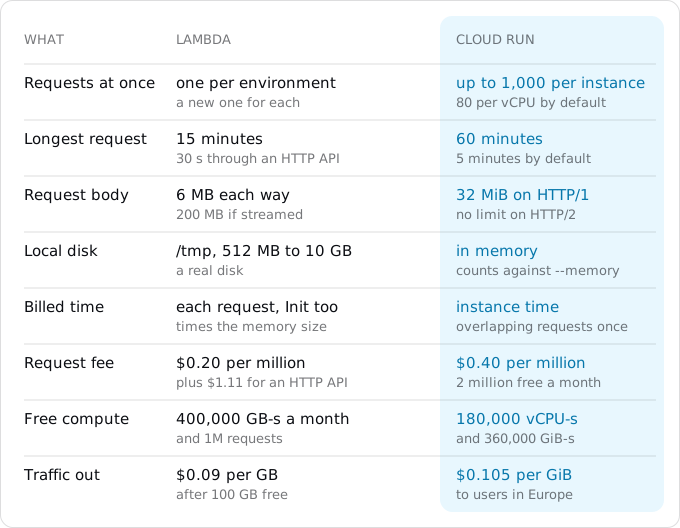
- Cloud Run allows 60-minute requests and 32 MiB bodies on HTTP/1, against 30 seconds behind an HTTP API and Lambda's 6 MB.
- SQS becomes Pub/Sub push, S3 events Eventarc, and EventBridge schedules Cloud Scheduler jobs at $0.10 a month after 3 free.
Prices are list prices of October 11, 2026, Lambda in eu-west-1 and Cloud Run in europe-west1.
When moving pays, and when it does not
Lambda bills two things. Requests cost $0.20 per million. Duration costs $0.0000166667 per GB-second (x86, eu-west-1): the memory you gave the function times the time each request ran. Since August 1, 2025 the Init phase, the code that runs before the first request in a new environment, is billed too. The free tier is 1 million requests and 400,000 GB-seconds a month. A web app usually sits behind an HTTP API in API Gateway, at $1.11 per million requests in Ireland, and traffic out of AWS costs $0.09 per GB after 100 GB a month that AWS gives free across all services (prices of October 11, 2026).
Cloud Run's free tier is per billing account: 180,000 vCPU-seconds, 360,000 GiB-seconds and 2 million requests a month. Past it, a service with request-based billing pays $0.000024 per vCPU-second and $0.0000025 per GiB-second while it handles requests, and $0.40 per million requests (Tier 1 regions). Traffic to users in Europe is $0.105 per GiB from the first gigabyte; the egress guide explains the lines.
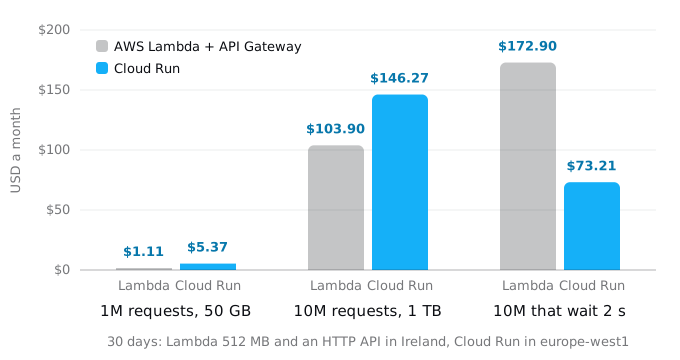
The model is one API. In the first two cases every request takes 200 ms, and Cloud Run is an upper bound: no two requests share an instance.
- 1 million requests and 50 GB a month. Lambda's compute and requests fit in its free tier, the 50 GB fit in AWS's free 100 GB, and the HTTP API costs $1.11. Cloud Run's compute is $0.48 past the free tier, and 50 GB of egress is $4.89: $5.37.
- 10 million requests and 1 TB. Lambda: $10.00 of duration, $1.80 of requests, $11.10 of API Gateway and $81.00 of traffic: $103.90. Cloud Run: $43.68 of CPU, $1.60 of memory, $3.20 of requests and $97.79 of egress: $146.27.
- 10 million requests that each wait 2 seconds on another API, a database or a model, with 100 GB out. Lambda bills each request's 2 seconds separately: $160.00 of duration, $172.90 in all. On average 7.7 requests are in flight, which one Cloud Run instance with the default concurrency of 80 holds. Even busy for the whole month, it costs $57.89 of CPU, $2.34 of memory, $3.20 of requests and $9.78 of egress: $73.21.
So for short requests at these volumes Lambda costs less, mostly because of AWS's free 100 GB and its lower traffic price. Cloud Run costs less when requests overlap: an API that waits on other services most of the time, a chat backend, a proxy. Google's own migration guide says it plainly: Lambda's model equals Cloud Run with a concurrency of 1, and overlapping requests on Cloud Run are billed once.
Other reasons to move are not on the chart. You may need requests longer than the 30 seconds an HTTP API allows (Cloud Run allows 60 minutes) or bodies over Lambda's 6 MB (Cloud Run takes 32 MiB on HTTP/1). Lambda opens one database connection per environment, while Cloud Run shares a pool across concurrent requests. And you may want a container that runs the same on a laptop, or the rest of your system already lives on Google Cloud. If none of these applies, the move costs time and saves nothing. From AWS to Cloud Run covers the whole AWS picture, including when to stay.
What Lambda did for you
Start with an inventory, because a Lambda app is often more than its code. These commands only read:
aws lambda list-functions \
  --query 'Functions[].[FunctionName,Runtime,PackageType,MemorySize,Timeout]' --output table
aws lambda get-function-configuration --function-name api \
  --query '{handler: Handler, role: Role, layers: Layers[].Arn, vpc: VpcConfig.SubnetIds, env: keys(Environment.Variables)}'
aws lambda list-event-source-mappings --function-name api \
  --query 'EventSourceMappings[].[EventSourceArn,BatchSize,State]' --output table
aws lambda get-policy --function-name api --query Policy --output text
aws scheduler list-schedules --query 'Schedules[].[Name,Target.Arn]' --output table
The second command prints the names of the environment variables, not their values. Event source mappings are the queues and streams that call the function; the policy lists the services allowed to invoke it. Each line needs a home on Google Cloud.
Step 1: from a handler to a web server
Cloud Run sends HTTP requests to a server listening on PORT (8080 by default). What you do depends on how the function is packaged now.
An image with the Lambda Web Adapter. If the Dockerfile copies aws-lambda-adapter into /opt/extensions and the image starts a normal web server, the image already runs on Cloud Run. The adapter is a Lambda extension; outside Lambda nothing starts it. We built such an image on node:24-slim with adapter 1.1.0 and ran it with plain Docker: the server answered on 8080 and the adapter sat unused in /opt/extensions. Delete the COPY line when you no longer deploy to Lambda.
A framework wrapped for Lambda. Express with serverless-http, FastAPI or Flask with Mangum, and similar wrappers turn events into requests for an app that is a web server underneath. Remove the wrapper and start the server the usual way, listening on 0.0.0.0 and PORT: app.listen(process.env.PORT || 8080) in Express, uvicorn main:app --host 0.0.0.0 --port $PORT for FastAPI.
Plain handlers. A function written as handler(event) needs a small server that builds the event from the request and writes the result back. This one serves a handler written for an HTTP API (payload format 2.0):
// server.mjs
import http from "node:http";
import { handler } from "./index.mjs";

const server = http.createServer(async (req, res) => {
  const url = new URL(req.url, "http://localhost");
  const chunks = [];
  for await (const chunk of req) chunks.push(chunk);
  const event = {
    version: "2.0",
    rawPath: url.pathname,
    rawQueryString: url.search.slice(1),
    queryStringParameters: Object.fromEntries(url.searchParams),
    headers: req.headers,
    requestContext: { http: { method: req.method, path: url.pathname } },
    body: Buffer.concat(chunks).toString(),
    isBase64Encoded: false,
  };
  try {
    const r = await handler(event, {});
    const full = typeof r === "object" && r !== null && "statusCode" in r;
    res.writeHead(full ? r.statusCode : 200, full ? r.headers : { "content-type": "application/json" });
    res.end(full ? (r.isBase64Encoded ? Buffer.from(r.body, "base64") : r.body) : JSON.stringify(r));
  } catch (err) {
    console.error(err);
    res.writeHead(500).end();
  }
});
server.listen(Number(process.env.PORT) || 8080, "0.0.0.0");
process.on("SIGTERM", () => server.close(() => process.exit(0)));
It fills only the fields most handlers read. A handler that reads pathParameters, cookies, the authorizer's claims or binary bodies needs those added, and a REST API handler (payload 1.0) reads httpMethod and path instead. With more than a few routes, moving them into a small router is less work than imitating API Gateway. The Dockerfile is four lines:
FROM node:24-slim
WORKDIR /app
COPY package.json *.mjs ./
CMD ["node", "server.mjs"]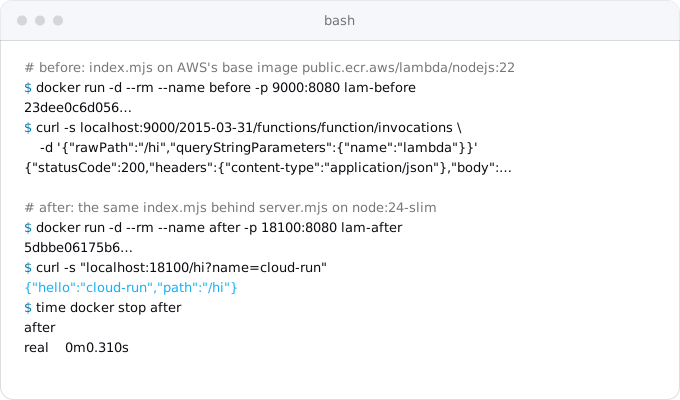
The SIGTERM line matters. Cloud Run sends SIGTERM before it stops an instance and kills it 10 seconds later. Node running as process 1 in a container ignores the signal unless the code handles it. With the handler, our container stopped in 0.310 seconds; the Fly guide shows the 10-second kill without one.
Google also offers a route closer to Lambda: gcloud run deploy --source . --function NAME deploys a function built with Google's Functions Framework library, the way Cloud Run functions are built. The framework calls your function with its own arguments, not Lambda's event, so each handler's signature is rewritten instead of adding one server.
Step 2: what changes inside the code
Lambda taught the code a few habits that hold only when one environment serves one request.
- Global state per request. A module-level variable that holds the current user or request ID was safe on Lambda. With 80 requests in one process, requests overwrite each other's values. Search for such variables, or deploy with
--concurrency=1first and raise it once the code is fixed. At 1, Cloud Run bills like Lambda. - Database connections. Each Lambda environment opened its own connection for its one request at a time. On Cloud Run one pool per instance serves all its requests: size it for
--concurrencyand set--max-instancesso instances times pool size stays under the database's limit. - The disk. Lambda's
/tmpis a real disk of 512 MB to 10 GB. Cloud Run's file system lives in memory: a 300 MB file in/tmptakes 300 MB of the instance's memory. - Work after the response. Lambda freezes the environment when the handler returns, and Cloud Run with request-based billing gives no CPU after the response, so nothing changes here.
- Time and size limits. Requests can run 60 minutes (the default is 5, set with
--timeout) and bodies can reach 32 MiB on HTTP/1.
Step 3: secrets and settings
Lambda keeps environment variables encrypted at rest, but anyone allowed to call GetFunctionConfiguration gets them back in clear text. So copying them takes one pipe each. Pipe each value straight into Secret Manager, so it never lands on screen, in a file or in shell history:
gcloud iam service-accounts create api
aws lambda get-function-configuration --function-name api \
  --query Environment.Variables.STRIPE_KEY --output text | tr -d '\n' \
  | gcloud secrets create STRIPE_KEY --data-file=-
aws secretsmanager get-secret-value --secret-id prod/db \
  --query SecretString --output text | tr -d '\n' \
  | gcloud secrets create DATABASE_URL --data-file=-
aws ssm get-parameter --name /prod/sendgrid --with-decryption \
  --query Parameter.Value --output text | tr -d '\n' \
  | gcloud secrets create SENDGRID_KEY --data-file=-
--output text ends with a newline, and tr -d '\n' drops it. It drops newlines inside the value too, so copy a multi-line value such as a PEM key by hand. A Secrets Manager secret stored as JSON with several keys needs | jq -j .password in place of tr, one secret per key. If the function decrypted variables itself with KMS, the stored value is ciphertext; take the value from its source instead. Then give the service account access and compare lengths, never values:
gcloud secrets add-iam-policy-binding STRIPE_KEY \
  --member=serviceAccount:api@PROJECT_ID.iam.gserviceaccount.com \
  --role=roles/secretmanager.secretAccessor
gcloud secrets versions access latest --secret=STRIPE_KEY | wc -c
Code that called the Secrets Manager SDK at Init can now read process.env, because Cloud Run puts the secret in an environment variable at start. The execution role becomes the service account; give it only the roles the code needs.
Step 4: deploy
gcloud run deploy api --source . --region europe-west1 \
  --service-account=api@PROJECT_ID.iam.gserviceaccount.com \
  --allow-unauthenticated \
  --cpu=1 --memory=512Mi --concurrency=80 --timeout=60 \
  --max-instances=10 \
  --set-secrets=STRIPE_KEY=STRIPE_KEY:latest,DATABASE_URL=DATABASE_URL:latest
--source . builds the Dockerfile in Cloud Build and deploys it, as the Vercel guide describes. The output ends with a URL on run.app; test there before anything else moves.
Lambda's settings map like this. Memory becomes --memory, and --cpu is now its own setting where Lambda tied CPU to memory. Reserved concurrency, the ceiling, becomes --max-instances; one instance takes up to --concurrency requests. Provisioned concurrency becomes --min-instances, billed at the idle rate while warm; the cold start guide has numbers that help decide. Functions in a VPC need Direct VPC egress (--network and --subnet) to reach private resources.
Step 5: triggers
API Gateway and function URLs. The service URL replaces them; routing moves into the app. Authorizers become middleware that checks the token. Cloud Run itself has no usage plans or per-client throttling; --max-instances caps cost, and per-client limits move into the app.
SQS queues. The closest match is a Pub/Sub topic with a push subscription that posts each message to a private Cloud Run service:
gcloud pubsub topics create jobs
gcloud iam service-accounts create pubsub-push
gcloud run services add-iam-policy-binding worker --region europe-west1 \
  --member=serviceAccount:pubsub-push@PROJECT_ID.iam.gserviceaccount.com \
  --role=roles/run.invoker
gcloud pubsub subscriptions create jobs-push --topic=jobs \
  --push-endpoint=https://WORKER_URL/pubsub \
  --push-auth-service-account=pubsub-push@PROJECT_ID.iam.gserviceaccount.com \
  --ack-deadline=600
Deploy worker with --no-allow-unauthenticated, so only the push account can call it. Three things differ from SQS. Each message arrives as its own request, not in a batch, so partial batch responses disappear. The body is a JSON object with the message base64-encoded in message.data. A 2xx status acknowledges; anything else, or no answer in 600 seconds at most, brings the message back. A job that ran close to Lambda's 15 minutes belongs in a Cloud Run job, which the services, jobs and worker pools guide explains. The producer changes too: SendMessage becomes a Pub/Sub publish.
S3 events. Uploads to a Cloud Storage bucket reach a service through an Eventarc trigger:
gcloud eventarc triggers create uploads --location=europe-west1 \
  --destination-run-service=worker --destination-run-region=europe-west1 \
  --event-filters=type=google.cloud.storage.object.v1.finalized \
  --event-filters=bucket=BUCKET \
  --service-account=eventarc@PROJECT_ID.iam.gserviceaccount.com
The event arrives in CloudEvents format with bucket and name, not Records[0].s3; the parsing code changes. Google's trigger page lists the roles the trigger's service account and the Cloud Storage service agent need.
Schedules. EventBridge schedules become Cloud Scheduler jobs, $0.10 a job a month with 3 free per billing account. EventBridge cron has six fields and a ? (cron(0 3 * * ? *)); Scheduler takes five-field unix-cron (0 3 * * *) and its own --time-zone. The Vercel guide has the command with an OIDC token, and the Fly guide the version that starts a Cloud Run job.
If you are on App Runner
App Runner stopped taking new customers on April 30, 2026. Existing customers keep it and can still create services, but AWS plans no new features and points them to ECS Express Mode. App Runner works much like Cloud Run already: an image or source, an HTTPS URL, instances added by concurrency. Express Mode creates a Fargate service, an Application Load Balancer and autoscaling in your account, and its example keeps at least one task running; ECS Fargate to Cloud Run covers moving such a service.
Read the service's settings:
aws apprunner list-services --query 'ServiceSummaryList[].[ServiceName,ServiceArn]' --output table
aws apprunner describe-service --service-arn ARN \
  --query 'Service.{source: SourceConfiguration, cpu: InstanceConfiguration.Cpu, memory: InstanceConfiguration.Memory, scaling: AutoScalingConfigurationSummary}'
Then map them:
- Image and port. An image service deploys the same image (
--imageafter copying it to Artifact Registry, or--source .), with--portset to its port. A source service'sapprunner.yamlbuild and run commands go into a Dockerfile or aProcfilefor Google's buildpacks. - Size. App Runner's CPU and memory pairs (1 vCPU and 2 GB is common) become
--cpu=1 --memory=2Gi. - Scaling. Max concurrency (100 by default) becomes
--concurrency=100. Max size (25 by default) becomes--max-instances=25. Min size (at least 1) has no direct equivalent: Cloud Run's default minimum is 0, and--min-instances=1keeps one warm. - Secrets. App Runner references Secrets Manager and SSM Parameter Store; copy the values as in Step 3.
- VPC connector. Direct VPC egress.
- Automatic deployments. Cloud Build triggers or continuous deployment from a repository.
The bill changes shape. App Runner charges $0.007 per GB-hour for every provisioned instance's memory, all month, and $0.064 per vCPU-hour while an instance is active. One idle 1 vCPU, 2 GB service therefore costs $10.08 a month; on Cloud Run an idle service costs nothing. Busy services are a different story. AWS's pricing page works an example of 80 requests a second for 8 hours a day on one 1 vCPU, 2 GB instance: $25.50 a month. The same traffic on Cloud Run with request-based billing is $46.68, and $26.85 of that is the request fee on 69.1 million requests. With instance-based billing (--no-cpu-throttling) there is no request fee: $13.79 for the 240 hours the instance works, plus however long it stays up between busy periods. The billing guide helps choose.
Data and the switch
Databases. RDS and Aurora for PostgreSQL or MySQL move to Cloud SQL with a dump and a restore during a short write freeze; the App Platform guide has the pg_dump and Auth Proxy commands, and the Cloud SQL guide the sizes and prices. DynamoDB has no drop-in counterpart on Google Cloud, and moving it means rewriting the data layer. It can stay on AWS for a while, with every call crossing the internet and paying egress on both sides.
S3 buckets. Storage Transfer Service copies a bucket, and Google charges nothing for transfers from S3:
gcloud transfer jobs create s3://BUCKET gs://BUCKET --source-creds-file=aws-creds.jsonThe credentials file holds {"accessKeyId": "...", "secretAccessKey": "..."} for a read-only key. Create it with an editor and chmod 600, and delete it and the key afterwards. AWS bills the data leaving S3 at its transfer rates, $0.09 per GB after the free 100 GB.
The switch follows the order in the Vercel guide, which also compares the ways to put the domain on Cloud Run: lower the TTL a day before, test on the run.app URL, add the new OAuth callbacks, make the certificate active, change DNS, keep the old setup for a week. AWS adds four things:
- On the
run.appURL, test a queued job and a schedule run by hand, besides sign-in, a payment in test mode and an upload. - Before the DNS change, freeze writes, copy the database and the buckets again, and point the services at them.
- With the DNS change, point producers at the Pub/Sub topic and disable the EventBridge schedules, so jobs do not run twice.
- Keep the Lambda functions or the App Runner service for the week as the way back. Lambda costs nothing idle; App Runner can be paused. Then delete them.
What breaks most often
- Module-level variables shared between concurrent requests.
- Too many database connections, because nobody set
--max-instances. - Large files in
/tmpthat use up memory. - A handler that reads an event field the wrapper does not fill.
- Six-field EventBridge cron lines pasted into Cloud Scheduler.
- Queue consumers that expect a batch and get one message.
- A container that ignores
SIGTERMand is killed after 10 seconds.
All of them show up on the run.app URL, before users see them. The patterns that break on Cloud Run guide covers the rest.
Where Exodus comes in
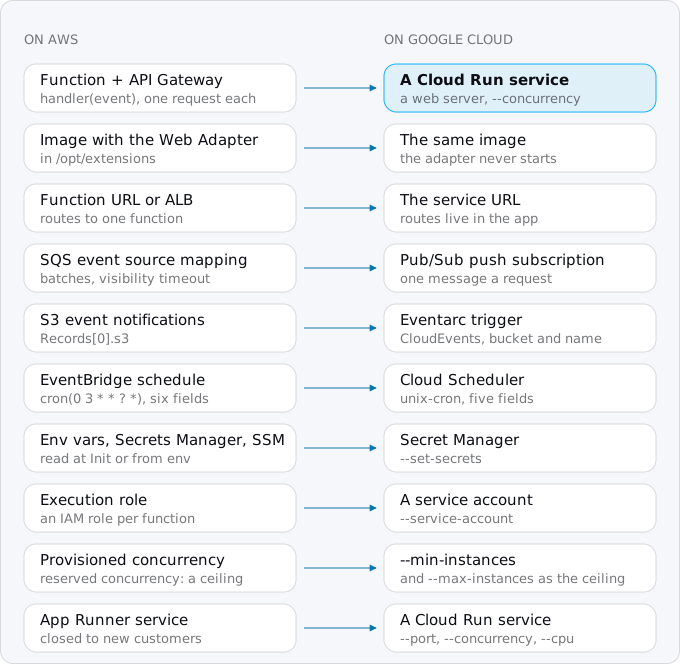
Exodus's CLI reads the repository on your machine (handlers, Dockerfile, and the SAM, Serverless or Terraform files that define triggers), with your coding agent reading the parts that need judgement. The report lists each function and trigger from the picture above with what it becomes, the global state that breaks under concurrency, and the wrappers to remove. It estimates the month on Cloud Run for your traffic next to what Lambda or App Runner charges now, egress included. When staying is cheaper, it says so.
FAQ
Is Cloud Run cheaper than AWS Lambda?
For short requests, usually not: in our model 1 million requests a month cost $1.11 on Lambda behind an HTTP API and $5.37 on Cloud Run, mostly because of AWS's free 100 GB of traffic. When requests wait on other services, Cloud Run bills overlapping requests once and costs less.
Is AWS App Runner being discontinued?
App Runner stopped taking new customers on April 30, 2026. Existing services keep running and existing customers can still create services, but AWS plans no new features and points them to ECS Express Mode. App Runner's settings map onto Cloud Run almost one to one.
What replaces an SQS trigger on Cloud Run?
A Pub/Sub topic with a push subscription that posts each message to a private Cloud Run service. Messages arrive one per request, not in batches, with the data base64-encoded. A 2xx status acknowledges; anything else, or no answer within the deadline of 600 seconds at most, brings the message back.
Does Cloud Run have a 15-minute limit like Lambda?
No. A Cloud Run request can run 60 minutes, 5 by default, and a body can reach 32 MiB on HTTP/1. Queue work that ran close to Lambda's 15 minutes belongs in a Cloud Run job, which runs to completion outside a request.
Sources
29
- docs.aws.amazon.comAWS App Runner availability change, AWS docs
- aws.amazon.comAWS App Runner product page, AWS
- aws.amazon.comAWS App Runner pricing, AWS
- docs.aws.amazon.comCreateAutoScalingConfiguration, App Runner API reference
- docs.aws.amazon.comReferencing environment variables, App Runner docs
- aws.amazon.comAWS Lambda pricing, AWS
- pricing.us-east-1.amazonaws.comAWS price list files for eu-west-1, AWS
- aws.amazon.comAWS Lambda standardizes billing for INIT phase, AWS Compute Blog
- docs.aws.amazon.comLambda quotas, AWS docs
- docs.aws.amazon.comLambda Managed Instances, AWS docs
- docs.aws.amazon.comSecuring Lambda environment variables, AWS docs
- docs.aws.amazon.comQuotas for HTTP APIs, API Gateway docs
- docs.aws.amazon.comLambda function URLs, AWS docs
- docs.aws.amazon.comConfiguring an SQS event source mapping, AWS docs
- github.comAWS Lambda Web Adapter, aws on GitHub
- docs.cloud.google.comMigrate from AWS Lambda to Cloud Run, Google Cloud architecture center
- cloud.google.comCloud Run pricing, Google
- docs.cloud.google.comMaximum concurrent requests for services, Cloud Run docs
- docs.cloud.google.comCloud Run quotas and limits
- docs.cloud.google.comConfigure request timeout for services, Cloud Run docs
- docs.cloud.google.comContainer runtime contract, Cloud Run
- docs.cloud.google.comBuild functions, Cloud Run docs
- docs.cloud.google.comPush subscriptions, Pub/Sub docs
- docs.cloud.google.comSubscription properties, Pub/Sub docs
- docs.cloud.google.comCreate triggers from Cloud Storage events, Cloud Run docs
- cloud.google.comCloud Scheduler pricing, Google
- cloud.google.comStorage Transfer Service pricing, Google
- exodus.elim.ioEgress on Google Cloud explained, Exodus
- Exodus team: a Node.js Lambda handler run in AWS's Lambda base image and behind the wrapper in this guide with Docker; an image carrying the Lambda Web Adapter run outside Lambda; aws-cli 2.37.6 and gcloud 587.0.0 help output and the JMESPath queries checked with jmespath 1.0.1; run on Oct 11, 2026; the cost model and its arithmetic