Moving an app from Fly.io to Cloud Run keeps the Dockerfile and changes who decides how many copies run: Fly starts and stops the Machines you created, Cloud Run starts instances as traffic needs, down to none. The work is turning fly.toml into deploy flags, copying secrets Fly will not display, moving volumes and Postgres, and handling SIGTERM. At list prices Fly stays cheaper for the same app.
In short
- Fly has no free tier: a
shared-cpu-1xMachine with 512 MB is $3.69 for 30 days in its cheapest regions and traffic $0.02 per GB. Cloud Run's free tier is 180,000 vCPU-seconds and 2 million requests a month, then traffic to users in Europe is $0.105 per GiB. - One app at 1 million requests and 50 GB a month costs $4.84 on Fly and $5.37 on Cloud Run; at 10 million requests and 1,000 GB, $35.35 and $146.27.
- Cloud Run sends
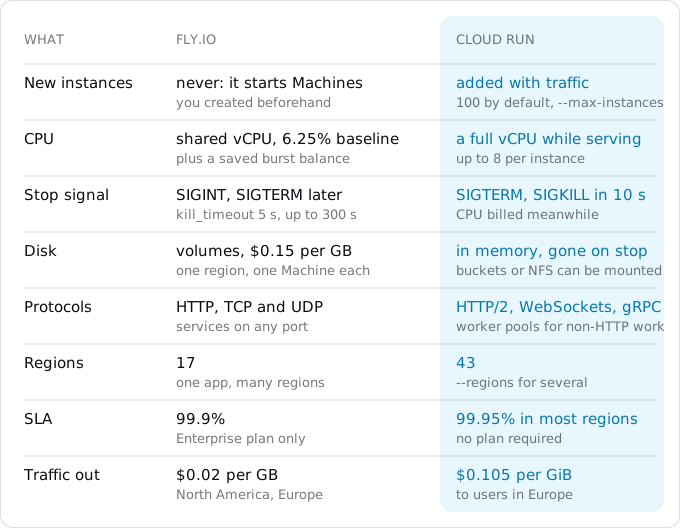
SIGTERMand kills the container 10 seconds later; Fly sendsSIGINTand waits 5 seconds by default. - Cloud Run runs in 43 regions to Fly's 17, with a 99.95% SLA on every service; Fly's 99.9% applies to Enterprise customers.
The model app runs on Fly in Amsterdam and on Cloud Run in europe-west1, at list prices of October 11, 2026, for a 30-day month.
When moving pays, and when it does not
Fly has no platform fee and, for organizations created since October 2024, no free tier: a trial of 2 hours of Machine runtime or 7 days, then you pay for what runs. A shared-cpu-1x Machine with 512 MB costs $3.69 for 30 days of continuous running in Ashburn or Secaucus, Fly's cheapest regions, and about 4% more in Amsterdam. A stopped Machine costs only its root file system, $0.15 per GB a month. Traffic to the internet is $0.02 per GB in North America and Europe. Managed Postgres starts at $38 a month.
Cloud Run has a free tier per billing account: 180,000 vCPU-seconds, 360,000 GiB-seconds and 2 million requests a month. After that a service with request-based billing pays $0.000024 per vCPU-second and $0.0000025 per GiB-second while it handles requests, and $0.40 per million requests (Tier 1 regions, prices of October 11, 2026). Traffic to users is where the two differ most: $0.105 per GiB within Europe on Cloud Run, five times Fly's rate, as the egress guide explains.
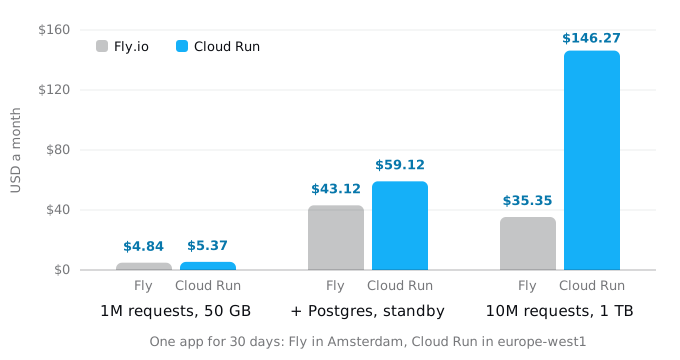
The model is one web app. Every request takes 200 ms, of which 50 ms is CPU. On Cloud Run the service has 1 vCPU and 512 MiB; on Fly the Machines are sized so that their CPU baseline covers the load, because a shared vCPU on Fly may run only 6.25% of the time, plus a burst balance it saves while idle.
- 1 million requests and 50 GB a month. Fly: one
shared-cpu-1x512 MB Machine always on, $3.84, plus $1.00 of traffic: $4.84. Cloud Run: $0.48 of CPU above the free tier and $4.89 for 46.6 GiB of egress: $5.37. - The same, with Postgres that has a standby. Fly's Managed Postgres Basic (shared-2x, 1 GB, high availability, backups) is $38 plus $0.28 for 1 GB of data: $43.12 in all. Cloud SQL's nearest match, a high-availability
db-g1-smallwith 1.7 GB and 10 GB of SSD, is $53.75: $59.12 in all. A single-zonedb-f1-microis about $9 a month, without the standby and outside the SLA; the Cloud SQL guide has every size. - 10 million requests and 1,000 GB. Fly: two
shared-cpu-2x1 GB Machines, $15.35, plus $20 of traffic: $35.35. Cloud Run: $43.68 of CPU, $1.60 of memory, $3.20 of requests and $97.79 of egress: $146.27. If requests overlap on an instance, Cloud Run's CPU line falls; the egress line does not.
At list prices Fly is cheaper in all three. People move anyway for reasons that are not on that chart: the rest of their system is on Google Cloud; they want Google's managed services next to the app (Cloud SQL with point-in-time recovery, Pub/Sub, BigQuery, IAM for every service); they want autoscaling that adds instances rather than starting ones they created; their Postgres is the unmanaged Fly Postgres, which Fly lists as unsupported; or they need a region Fly does not have, since Fly runs in 17 regions and Cloud Run in 43. Cloud Run's 99.95% SLA applies to every service, while Fly's 99.9% applies to Enterprise customers. If none of these is your reason, the move costs time and saves nothing, and Exodus says so in its verdict. The same map for other platforms is in moving from Heroku to Cloud Run and moving from DigitalOcean App Platform.
What Fly did for you
Start with an inventory, because each piece needs a home. fly.toml holds most of it; if it is not in the repository, fly config save -a APP writes the live one. Then list what lives outside it:
fly scale show -a APP
fly secrets list -a APP
fly volumes list -a APP
fly ips list -a APP
fly certs list -a APP
fly mpg list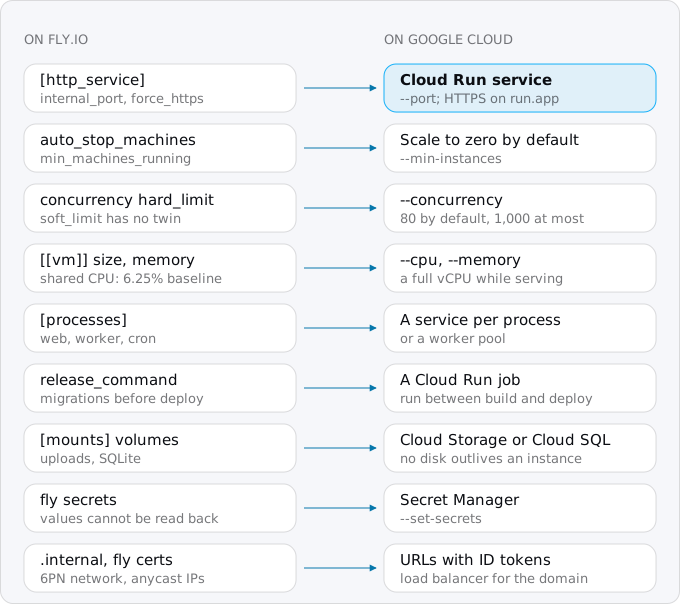
Step 1: the container
The Dockerfile Fly built is the Dockerfile Cloud Run builds; nothing Fly-specific lives in it. Three runtime details differ.
The port and the address. Fly sends traffic to internal_port, 8080 by default. Cloud Run sends it to 8080 by default too and sets PORT in the container; if your app listens elsewhere, deploy with --port=3000. The app must listen on 0.0.0.0. Fly's private network is IPv6, so many Fly apps bind to [::], which on Linux also accepts IPv4 and works on Cloud Run. An app bound only to its Fly private address, or to 127.0.0.1, never answers Cloud Run's startup check.
The stop signal. Fly sends SIGINT when it stops a Machine, waits kill_timeout seconds (5 by default, up to 300), then sends SIGTERM. Cloud Run sends SIGTERM and kills the container 10 seconds later. An app that only handles SIGINT, or none at all, is killed mid-request on every scale-in. Handle both:
for (const signal of ["SIGTERM", "SIGINT"]) {
  process.on(signal, () => {
    console.log(`${signal}: finishing open requests`);
    server.close(() => process.exit(0));
  });
}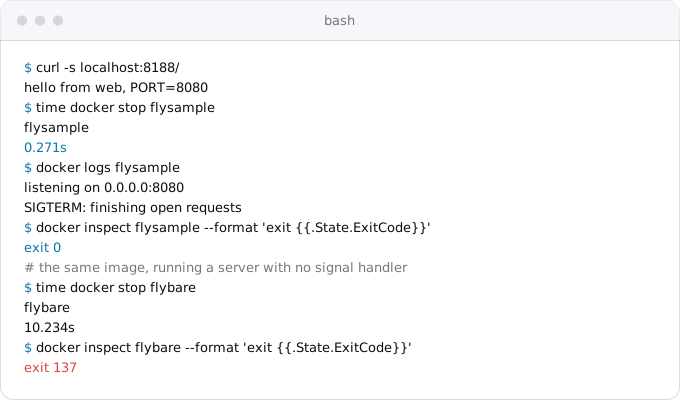
We ran a 15-line Node server with that handler in node:24-slim, and the same image with a server that has none. With the handler the container stops in a quarter of a second with exit code 0; without it Docker waits its 10 seconds and kills it, exit code 137. Cloud Run behaves the same way, and bills the CPU during those 10 seconds.
The disk. A Fly Machine's root file system is thrown away on restart and deploy unless you ask otherwise, and anything durable sits on a volume. On Cloud Run the writable file system lives in memory: what the app writes counts against the instance's memory and disappears with the instance. Step 5 deals with volumes.
Step 2: secrets
Fly does not give secret values back. fly secrets list shows each name and a digest; Fly's documentation says it does not allow read access to the plain-text values, and that they are available only to the application, as environment variables. So the values come either from where they were made (the payment provider's dashboard, the OAuth app, the database) or from inside a running Machine.
Create a service account for the app, then copy each secret from a Machine straight into Secret Manager, so the value never appears on your screen or in your shell history:
gcloud iam service-accounts create web
fly ssh console -a APP -q -C "printenv STRIPE_KEY" | tr -d '\n' \
  | gcloud secrets create STRIPE_KEY --data-file=-
gcloud secrets add-iam-policy-binding STRIPE_KEY \
  --member=serviceAccount:web@PROJECT_ID.iam.gserviceaccount.com \
  --role=roles/secretmanager.secretAccessor
gcloud secrets versions access latest --secret=STRIPE_KEY | wc -c
tr -d '\n' removes the newline printenv adds; it would remove newlines inside a value too, so take multi-line values such as PEM keys from their source. The last command prints only the length, so you can compare it with what you expect without showing the value. The copy is as sensitive as the original: anyone who can SSH into the app or deploy to it could read these values all along, and a move is a good moment to rotate the ones that matter.
Plain settings from [env] in fly.toml go on the service with --set-env-vars. PRIMARY_REGION, FLY_REGION, FLY_APP_NAME and the other FLY_ variables do not exist on Cloud Run; search the code for FLY_ and give anything that reads them its own variable.
Step 3: deploy and scaling
Pick the region next to the database, not next to you. For a Fly app in ams or fra, europe-west1 (Belgium) is a Tier 1 region and europe-west3 is Frankfurt; the region guide covers the trade-offs.
gcloud run deploy web --source . --region europe-west1 \
  --service-account=web@PROJECT_ID.iam.gserviceaccount.com \
  --allow-unauthenticated \
  --cpu=1 --memory=512Mi \
  --concurrency=80 --max-instances=10 \
  --set-env-vars=LOG_LEVEL=info \
  --set-secrets=STRIPE_KEY=STRIPE_KEY:latest
--source . builds the Dockerfile in Cloud Build and deploys it, as the Vercel guide describes. The output ends with a run.app URL; test the app there before the domain moves.
The scaling settings map, but the model underneath changes:
- Stopping when idle.
auto_stop_machines = "stop"andmin_machines_running = 0, whichfly launchwrites by default, are Cloud Run's default behaviour: no traffic, no instances.min_machines_running = 1becomes--min-instances=1, billed at the idle rate while it waits. - The number of Machines was your ceiling: Fly's proxy never creates or destroys Machines, it only starts the ones you made. Cloud Run creates instances as traffic rises, up to 100 per service by default. Set
--max-instancesto the most you are willing to pay for; it is also how you protect a database with a fixed number of connections. - Concurrency.
hard_limitin[http_service.concurrency]becomes--concurrency, the most requests one instance takes at once (80 by default, 1,000 at most).soft_limithas no equivalent; Cloud Run decides when to add an instance. - Machine size, the
vmsection, becomes--cpuand--memory. A Cloud Run vCPU is a whole vCPU while it serves a request, while a Fly shared vCPU has a 6.25% baseline, so an app that was throttled onshared-cpu-1xis not throttled at--cpu=1.
Cold starts change too. When a stopped app gets a request, Fly boots a Machine and Cloud Run starts an instance. A TU Berlin study measured a median of 1.6 s for Fly Machines with fly launch defaults and 0.53 s for Cloud Run functions with startup CPU boost turned off; the cold start guide has the details and the caveats.
Step 4: release command, processes and cron
The release command. release_command runs a migration in a temporary Machine with the new image before Fly updates the app, and stops the deploy if it fails. On Cloud Run the same command becomes a job, run between the build and the deploy. Build the image once, run the job, then deploy that image:
gcloud artifacts repositories create apps --repository-format=docker --location=europe-west1
IMAGE=europe-west1-docker.pkg.dev/PROJECT_ID/apps/web:v42
gcloud builds submit --tag "$IMAGE"
gcloud run jobs deploy migrate --image "$IMAGE" --region europe-west1 \
  --service-account=web@PROJECT_ID.iam.gserviceaccount.com \
  --set-secrets=DATABASE_URL=DATABASE_URL:latest \
  --command=bin/rails --args=db:prepare \
  --execute-now --wait
gcloud run deploy web --image "$IMAGE" --region europe-west1
--wait makes the command fail when the migration fails, so a script or CI step stops there, as Fly's deploy did. The repository is created once; later deploys repeat the last four commands with a new tag.
Process groups. The [processes] section ran several commands from one image on separate Machines. On Cloud Run each process that serves HTTP becomes its own service, deployed from the same image with --command. A queue worker that only pulls work is a worker pool, or a service with instance-based billing and --min-instances=1; a request-billed service gets no CPU between requests, so a worker there stalls.
Cron. On Fly, scheduled work is usually Supercronic in a cron process scaled to one Machine, or a scheduled Machine that runs about once an hour or a day. On Google Cloud the schedule moves out of the container: a Cloud Run job does the work (created like migrate above, here named report) and a Cloud Scheduler job starts it. The console's job page has a Triggers tab for this, or:
gcloud scheduler jobs create http nightly-report \
  --location=europe-west1 --schedule="0 5 * * *" \
  --uri=https://run.googleapis.com/v2/projects/PROJECT_ID/locations/europe-west1/jobs/report:run \
  --http-method=POST \
  --oauth-service-account-email=web@PROJECT_ID.iam.gserviceaccount.com
The service account needs permission to run the job (roles/run.invoker on it). Scheduler costs $0.10 a job a month with 3 free per billing account, and the time zone defaults to UTC.
Step 5: volumes and the database
Cloud Run has no disk that outlives an instance, so every [mounts] entry needs a decision based on what is on it.
- User uploads and generated files go to a Cloud Storage bucket, written through the client library. Cloud Run can also mount a bucket as a directory (
--add-volume=name=files,type=cloud-storage,bucket=BUCKETand--add-volume-mount=volume=files,mount-path=/data), which suits files that are written once and read often. The mount has no file locking: when two instances write the same file, the last write wins. - SQLite or LiteFS cannot move as is. A database file on a bucket mount will be corrupted by two writers, and Cloud Run's other volumes vanish with the instance. Move the data to Cloud SQL, or keep that app on Fly.
- Postgres, managed or not, moves to Cloud SQL with
pg_dumpandpg_restore.
For Postgres, create the Cloud SQL instance and database first, then plan a short write freeze. Stop the app on Fly so nothing writes during the copy, open a tunnel to the Fly database, and dump it in the custom format:
fly scale count 0 -a APP --yes
fly mpg proxy CLUSTER_ID --local-port 15432
pg_dump -Fc --no-owner --no-acl -h localhost -p 15432 -U fly-user -d fly-db -f app.dump
Run the proxy in a second terminal; pg_dump asks for the password, so it never sits in a command line. For the unmanaged Fly Postgres the tunnel is fly proxy 15432:5432 -a PG_APP. Then restore through the Cloud SQL Auth Proxy, also in its own terminal:
cloud-sql-proxy PROJECT_ID:europe-west1:INSTANCE --port 5433
pg_restore --no-owner --no-acl -h 127.0.0.1 -p 5433 -U postgres -d app app.dump
If the restore stops on a CREATE EXTENSION, Google's import page shows how to list the archive's contents, comment the extension statements out, and restore with that list. Check row counts on a few tables on both sides before the app writes again.
Redis from Upstash and object storage from Tigris were bought through Fly but belong to those providers, with their own connection strings. Point the Cloud Run service at them first, and decide later whether to move them to Memorystore or Cloud Storage. Traffic from Google to them is internet egress on your Google bill.
Step 6: private network and regions
On Fly, apps in one organization reach each other over a private IPv6 network at names such as api.internal, with no authentication. Cloud Run has no such network between services. A private service gets --ingress=internal and no --allow-unauthenticated; the caller fetches a Google-signed ID token with the receiving service's URL as its audience and sends it as a Bearer token, and the caller's service account gets roles/run.invoker on the receiver. Traffic between Cloud Run services in the same region is free. For a database or another server on private addresses, Cloud Run reaches a VPC network through Direct VPC egress (--network and --vpc-egress).
A Fly app with Machines in several regions behind one anycast address has a counterpart, with more parts. gcloud run deploy web --regions=europe-west1,us-east4 --image "$IMAGE" deploys one service to several regions, and a global external Application Load Balancer with a serverless network endpoint group in each region sends users to the nearest one. The load balancer costs $0.025 an hour for its forwarding rule, about $18 a month. If the database lives in one region, app instances far from it wait on every query, so check whether the extra regions helped before you rebuild them.
Step 7: the domain and the switch
Fly issued the certificate (fly certs add) for A and AAAA records pointing at the app's addresses, or a CNAME to its fly.dev name. Cloud Run offers three ways to put your domain on a service. Google recommends a global external Application Load Balancer; Firebase Hosting can front the service; Cloud Run's own domain mapping is in Preview, which Google says is not production-ready. The Vercel guide walks through the same choice.
The switch follows the order in the Vercel guide: lower the TTL a day before, test on the run.app URL, add the new OAuth callback, make the certificate active, change DNS, keep the old app for a week. Fly adds three things:
- Test the parts Fly had on the
run.appURL: the migration job, an upload, and a scheduled job run by hand withgcloud run jobs execute report --region europe-west1 --wait. - Before the DNS change, freeze writes, copy the database (Step 5), point the service at Cloud SQL and deploy.
- Leave the Fly app scaled to zero for the week: stopped Machines cost only their root file system, and volumes still cost $0.15 per GB. Then destroy the app, its volumes and the database, which Fly bills separately from the app.
What breaks most often
- The app listens on its Fly private address or on
127.0.0.1, and the first deploy fails its startup check. - Shutdown code waits for
SIGINT, so instances are killed mid-request when Cloud Run scales in. - A secret copied with its trailing newline breaks an API key comparison.
- Files written to a volume are written to memory, and vanish when the instance stops; uploads disappear a few minutes later.
- A worker or Supercronic process copied into the web service runs on every instance, or gets no CPU between requests.
- Calls to
other-app.internalfail, because that name does not exist on Google Cloud. - No
--max-instances, and a traffic spike opens more database connections than Postgres allows.
All of them show up when you test on the run.app URL, before users see them. The patterns that break on Cloud Run guide covers the rest.
Where Exodus comes in
Exodus's CLI reads fly.toml, the Dockerfile and the code on your machine, with your coding agent reading the parts that need judgement. The report lists every piece from the picture above with what it becomes: the release command as a job, each process group as a service or worker pool, the mounts and what is on them, the FLY_ variables the code reads, the shutdown handling, the calls to .internal names. It estimates the month on Cloud Run for your traffic next to what Fly charges now, egress and database included, and says plainly when staying on Fly is cheaper.
FAQ
Is Cloud Run cheaper than Fly.io?
Usually not at list prices. One app with 1 million requests and 50 GB of traffic a month costs $4.84 on Fly and $5.37 on Cloud Run, and at 10 million requests and 1,000 GB, $35.35 against $146.27. Most of the gap is traffic: $0.02 per GB on Fly, $0.105 per GiB on Cloud Run within Europe.
How do I get my secret values out of Fly.io?
Fly does not show them: fly secrets list prints each name and a digest. Take each value from where it was made, or pipe it from a running Machine with fly ssh console and printenv straight into Secret Manager, so it never appears on screen. Rotate the ones that matter after the move.
Can I run SQLite or LiteFS on Cloud Run?
Not as is. A database file on a Cloud Storage mount is corrupted by two writers, because the mount has no file locking, and Cloud Run's other volumes vanish with the instance. Move the data to Cloud SQL, or keep that app on Fly.
What replaces Fly's release_command on Cloud Run?
A Cloud Run job with the same image, run between the build and the deploy. With --execute-now --wait the command fails when the migration fails, so the deploy stops there, as it did on Fly.
Sources
34
- docs.fly.ioFly.io resource pricing
- docs.fly.ioFly.io free trial
- docs.fly.ioFly.io Managed Postgres
- docs.fly.ioFly.io CPU performance
- docs.fly.ioFly.io app configuration, fly.toml
- docs.fly.ioFly.io autostop and autostart
- docs.fly.ioFly.io secrets
- fly.iofly secrets list
- docs.fly.ioFly.io private networking
- docs.fly.ioFly.io custom domains
- docs.fly.ioFly.io, migrate from Heroku
- docs.fly.ioFly.io task scheduling
- docs.fly.ioFly.io regions
- fly.ioFly.io uptime SLA
- cloud.google.comCloud Run pricing, Google
- cloud.google.comCloud SQL pricing, Google
- docs.cloud.google.comContainer runtime contract, Cloud Run
- docs.cloud.google.comCloud Run quotas and limits
- docs.cloud.google.comWhat is Cloud Run, Google
- docs.cloud.google.comCloud Storage volume mounts, Cloud Run
- cloud.google.comRunning database migrations with Cloud Run jobs, Google Cloud blog
- docs.cloud.google.comExecute jobs on a schedule, Cloud Run
- cloud.google.comCloud Scheduler pricing, Google
- docs.cloud.google.comDirect VPC egress, Cloud Run
- docs.cloud.google.comConnect using the Cloud SQL Auth Proxy, Cloud SQL for PostgreSQL
- docs.cloud.google.comMap custom domains, Cloud Run
- cloud.google.comCloud Load Balancing pricing, Google
- docs.cloud.google.comServe traffic from multiple regions, Cloud Run
- docs.cloud.google.comAuthenticating service-to-service, Cloud Run
- docs.cloud.google.comExport and import using pg_dump and pg_restore, Cloud SQL for PostgreSQL
- cloud.google.comCloud Run SLA, Google
- docs.cloud.google.comCloud Run locations, Google
- arxiv.orgSchirmer et al., New Kids: An Architecture and Performance Investigation of Second-Generation Serverless Platforms, TU Berlin, ACM TOIT 2026
- Exodus team: a Node.js sample with the signal handler from this guide, run with Docker on Oct 11, 2026; flyctl v0.4.115 and gcloud 587.0.0 help output; the cost model and its arithmetic