Moving from ECS on Fargate to Cloud Run keeps the image: copy it from ECR to Artifact Registry, turn the task definition into gcloud run deploy flags, and pipe the secrets into Secret Manager. The Application Load Balancer, target groups and public addresses go away. A mostly idle service drops from $47.12 to $5.47 a month; under steady load the two cost about the same.
In short
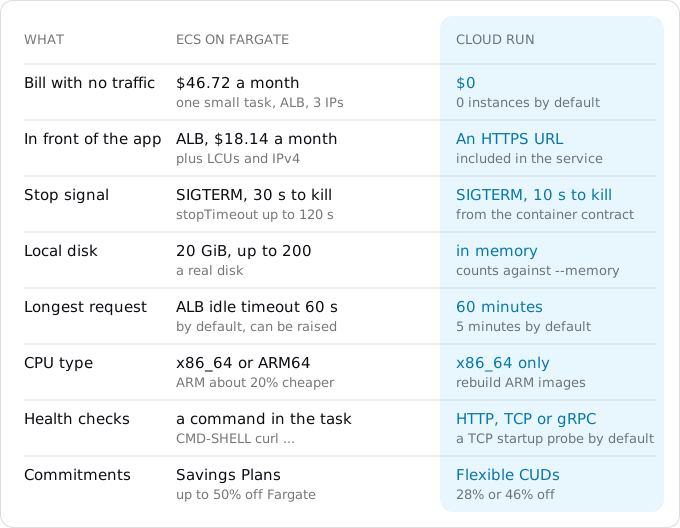
- At 1 million requests and 50 GB a month, ECS with an ALB costs $47.12 and Cloud Run $5.47; $46.72 of the ECS bill is paid with no traffic.
- With two instances busy all month, Fargate costs $290.64 and Cloud Run $304.41: Fargate is $0.04048 per vCPU-hour against $0.0648 on Cloud Run.
- Cloud Run waits 10 seconds between
SIGTERMandSIGKILL; Fargate'sstopTimeoutis 30 seconds by default and up to 120. - A Fargate task has 20 GiB of disk; Cloud Run's file system lives in memory.
- Cloud Run runs Linux x86_64 only, so an ARM-only Graviton image must be rebuilt for
linux/amd64.
Prices are list prices of October 11, 2026, in eu-west-1 for AWS and europe-west1 for Google.
When moving pays, and when it does not
Fargate bills each task for the vCPU and memory it asks for, per second, from the moment the image starts downloading until the task stops. In Ireland (eu-west-1) that is $0.04048 per vCPU-hour and $0.004445 per GB-hour for Linux on x86, and about 20% less on ARM (Graviton). Each task gets 20 GB of disk included. A service runs its desired count of tasks all month, busy or idle.
Around the tasks come three more lines. An Application Load Balancer costs $0.0252 an hour, which is $18.14 a month, plus $0.008 per LCU-hour; an LCU is AWS's unit of load, one GB processed an hour or 25 new connections a second, whichever is larger. Every public IPv4 address costs $0.005 an hour, $3.60 a month, and an internet-facing ALB spans at least two Availability Zones, each holding an address, as does each task with a public IP. Traffic out of AWS is free for the first 100 GB a month across your account, then $0.09 per GB. Tasks in private subnets usually reach the internet through a NAT gateway, $0.045 an hour plus $0.045 per GB in AWS's US East example.
Cloud Run's free tier is per billing account: 180,000 vCPU-seconds, 360,000 GiB-seconds and 2 million requests a month. With request-based billing a service then pays $0.000024 per vCPU-second and $0.0000025 per GiB-second while it handles requests, and $0.40 per million requests (Tier 1 regions such as europe-west1). With instance-based billing it pays $0.000018 and $0.000002 for every second an instance is up, with no request fee. Traffic to users in Europe is $0.105 per GiB from the first gigabyte; the egress guide explains the lines.
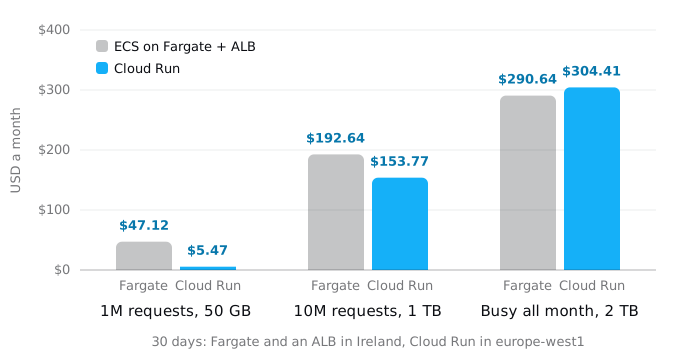
The model is one web service, three ways:
- 1 million requests of 200 ms and 50 GB a month. On ECS, the smallest common setup: one task of 0.5 vCPU and 1 GB ($17.77), the ALB ($18.54 with its LCUs) and three public addresses ($10.80); the 50 GB fit in AWS's free 100 GB. That is $47.12, and $46.72 of it is paid even with no traffic at all. Cloud Run, as an upper bound with no two requests sharing an instance: $0.58 of compute past the free tier and $4.89 of egress, $5.47.
- 10 million requests and 1 TB. On ECS, two tasks of 1 vCPU and 2 GB in two zones, the usual minimum for a service that should survive a zone failure: $71.09 of Fargate, $26.14 of ALB, $14.40 for four addresses and $81.00 of traffic, $192.64. Cloud Run with request-based billing, still an upper bound: $43.68 of CPU, $9.10 of memory, $3.20 of requests and $97.79 of egress, $153.77.
- Two instances busy all month, 100 million requests and 2 TB out. Fargate's two tasks are the same $71.09; the ALB is $34.14 and traffic $171.00, $290.64 in all. Cloud Run with instance-based billing for two instances up all month: $88.99 of CPU, $19.84 of memory and $195.58 of egress, $304.41. Request-based billing would cost $379.89 here, which is why steady load belongs on instance-based billing; the billing guide explains the switch.
So Cloud Run costs less for services that are idle much of the time, because nothing runs and no load balancer waits. For steady load the two are close, and Fargate is cheaper per vCPU-hour ($0.04048 against $0.0648 at Cloud Run's instance-based rate). Commitments move both: Compute Savings Plans take up to 50% off Fargate, Fargate Spot up to 70% for work that can be interrupted, and Google's Compute Flexible CUDs take 28% (one year) or 46% (three years) off Cloud Run. If your services run steady and you already pay for a Savings Plan, the move saves little.
Other reasons are not on the chart. Ten small internal services on ECS pay for ten idle task sets; on Cloud Run idle services cost nothing. Cloud Run needs no VPC, subnets, security groups, target groups or certificates to put a container on the internet. Or the rest of your system already lives on Google Cloud; moving a small web app from AWS to Cloud Run gives the whole move in six steps. If none of this applies, stay. Against a machine of your own, steady load is cheaper on the machine, as a Compute Engine VM to Cloud Run and a VPS to Cloud Run show.
What ECS did for you
A task definition describes the containers, an ECS service keeps a number of tasks running, and an Application Load Balancer spreads requests across them. Start with an inventory. These commands only read (replace prod with your cluster name):
aws ecs list-services --cluster prod
aws ecs describe-services --cluster prod --services web \
  --query 'services[].{taskDef: taskDefinition, desired: desiredCount, lb: loadBalancers[].containerPort, connect: deployments[0].serviceConnectConfiguration.enabled}'
aws ecs describe-task-definition --task-definition shop-web --output json > taskdef.json
aws application-autoscaling describe-scalable-targets --service-namespace ecs \
  --query 'ScalableTargets[].[ResourceId,MinCapacity,MaxCapacity]' --output table
aws scheduler list-schedules --query 'Schedules[].[Name,Target.Arn]' --output table
aws events list-rules --query 'Rules[].[Name,ScheduleExpression]' --output table
The second command shows the task definition revision, the task count, the load balancer's port and whether Service Connect is on. The third saves the task definition, which holds most of what moves. Scalable targets give the minimum and maximum task counts. Scheduled tasks live either in EventBridge Scheduler or as older EventBridge rules, so check both. taskdef.json contains the names and ARNs of secrets but never their values, so it is safe to keep in the repository while you work.
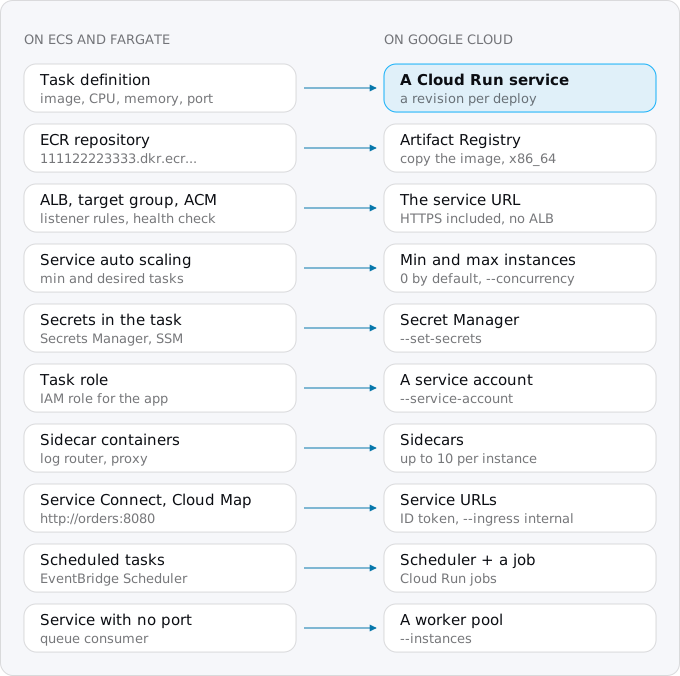
Step 1: the image
Cloud Run deploys images from Artifact Registry, Google's registry, and public images from Docker Hub or GitHub Container Registry. It does not pull from a private ECR repository, so the image moves first. Create a repository once:
gcloud artifacts repositories create shop --repository-format=docker --location=europe-west1
gcloud auth configure-docker europe-west1-docker.pkg.dev
Then log in to ECR with a password piped from the AWS CLI, so it never appears in the shell history, and copy the image:
aws ecr get-login-password --region eu-west-1 \
  | docker login --username AWS --password-stdin 111122223333.dkr.ecr.eu-west-1.amazonaws.com
docker pull 111122223333.dkr.ecr.eu-west-1.amazonaws.com/shop-web:1.8.2
docker tag 111122223333.dkr.ecr.eu-west-1.amazonaws.com/shop-web:1.8.2 \
  europe-west1-docker.pkg.dev/PROJECT_ID/shop/shop-web:1.8.2
docker push europe-west1-docker.pkg.dev/PROJECT_ID/shop/shop-web:1.8.2
We ran the same pull, tag and push between two local registries standing in for ECR and Artifact Registry; the image arrived with the same digest. For many images, Google's gcrane cp copies them registry to registry and skips layers already there.
Check the CPU architecture first. Cloud Run runs Linux x86_64 only, and a multi-architecture image must include linux/amd64. If your tasks run on Graviton with an ARM-only image, docker pull gets an image Cloud Run cannot start. Rebuild it with docker buildx build --platform linux/amd64, or build from source on Google Cloud with gcloud run deploy --source ., as the Vercel guide describes.
Later, the build pipeline pushes to Artifact Registry and gcloud run deploy --image replaces aws ecs update-service.
Step 2: the task definition becomes flags
Most of a task definition maps onto flags of gcloud run deploy. For a service with one container that listens on a port, this jq program prints them:
# flags.jq
.taskDefinition as $t | $t.containerDefinitions[] | select(.portMappings) |
"--cpu=\($t.cpu|tonumber/1024) --memory=\($t.memory|tonumber/1024)Gi",
"--port=\(.portMappings[0].containerPort)",
"--command=\(.command[0]) --args=\(.command[1:]|join(","))",
"--set-env-vars=\([.environment[]|"\(.name)=\(.value)"]|join(","))",
"--set-secrets=\([.secrets[]|"\(.name)=\(.name):latest"]|join(","))"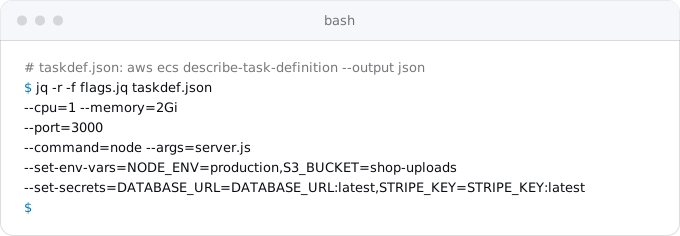
It is a starting point, not a converter. It assumes a command and plain values; drop the --command line if the image's own CMD starts the server, and check commas inside values. The rest of the task definition needs a person to read it:
- CPU and memory. Fargate counts CPU in units of 1,024 per vCPU. Cloud Run takes
--cpuof 1, 2, 4, 6 or 8 and memory inMiorGi. A task of 0.25 or 0.5 vCPU becomes--cpu=1, because Cloud Run allows less than one vCPU only with a concurrency of 1. - The stop timeout. ECS sends
SIGTERM, waitsstopTimeout(30 seconds by default, up to 120 on Fargate), then sendsSIGKILL. Cloud Run's container contract fixes the wait at 10 seconds. A shutdown that drains queues or flushes buffers for 40 seconds must finish in 10, or move its work into a Cloud Run job. Code that ignoresSIGTERMgets killed after the 10 seconds; the Fly guide shows what that looks like. - The disk. A Fargate task has 20 GiB of real disk, up to 200. Cloud Run's file system lives in memory: a 1 GB file in
/tmptakes 1 GB of the instance's memory, and a full disk crashes the instance. Large files go to Cloud Storage, as the files guide shows. - Health checks. An ECS
healthCheckis a command run inside the container, oftencurl -f http://localhost:3000/health. Cloud Run probes from outside, over HTTP, TCP or gRPC. By default it sends a TCP startup probe to the port. To keep the health endpoint, give--startup-probeanhttpGet.path, as the deploy command in Step 4 does, and add--liveness-probe=httpGet.path=/healthif you want restarts on a hung process. The ALB's target group health check disappears with the ALB. - Logs. The
awslogsdriver and a FireLens or Fluent Bit log router sidecar have no job here: Cloud Run sends whatever the container writes to stdout and stderr to Cloud Logging. Remove the log router container. - Other sidecars. A proxy, an agent or a second process next to the app can stay a separate container: Cloud Run runs up to 10 containers per instance, one of which receives requests (
--containerflags, one block per container). Service Connect's proxy container is not one of them; Step 5 replaces it. - The task role. It becomes a service account, created with
gcloud iam service-accounts create weband given only the roles the code needs. The task execution role, which ECS used to pull images and read secrets, has no counterpart; Cloud Run uses the service's own identity for both.
Step 3: secrets
The task definition's secrets list points at Secrets Manager or SSM Parameter Store, and ECS put the values into environment variables when the task started. On Cloud Run, Secret Manager does the same with --set-secrets, so the code keeps reading process.env.DATABASE_URL. Copy each value with a pipe, never through the screen or a file:
aws secretsmanager get-secret-value --secret-id prod/db \
  --query SecretString --output text | jq -j .url \
  | gcloud secrets create DATABASE_URL --data-file=-
aws ssm get-parameter --name /prod/stripe --with-decryption \
  --query Parameter.Value --output text | tr -d '\n' \
  | gcloud secrets create STRIPE_KEY --data-file=-
The first line handles a reference that ends in a JSON key, such as prod/db-AbCdEf:url::: ECS took one key out of a JSON secret, and jq -j .url does the same without a trailing newline. A secret used whole needs tr -d '\n' instead, as in the second line. The Lambda guide covers the edge cases (multi-line values, KMS-encrypted ones). Then grant access and check lengths, never values:
gcloud secrets add-iam-policy-binding DATABASE_URL \
  --member=serviceAccount:web@PROJECT_ID.iam.gserviceaccount.com \
  --role=roles/secretmanager.secretAccessor
gcloud secrets versions access latest --secret=DATABASE_URL | wc -c
Plain values go through --set-env-vars; change the ARNs, bucket names and AWS endpoints among them.
Step 4: deploy and scale
With the flags from Step 2:
gcloud run deploy web --region europe-west1 \
  --image europe-west1-docker.pkg.dev/PROJECT_ID/shop/shop-web:1.8.2 \
  --service-account=web@PROJECT_ID.iam.gserviceaccount.com \
  --allow-unauthenticated \
  --cpu=1 --memory=2Gi --port=3000 --concurrency=80 \
  --min-instances=0 --max-instances=10 \
  --startup-probe=httpGet.path=/health,periodSeconds=5,failureThreshold=12 \
  --set-env-vars=NODE_ENV=production,S3_BUCKET=shop-uploads \
  --set-secrets=DATABASE_URL=DATABASE_URL:latest,STRIPE_KEY=STRIPE_KEY:latest
The output ends with an HTTPS URL on run.app. Test there first.
Scaling works differently. ECS service auto scaling adds tasks when average CPU, memory or the ALB's request count per target crosses a target, and never goes below the minimum task count. Cloud Run adds instances as requests arrive, each instance taking up to --concurrency requests at once (80 by default, up to 1,000), and with --min-instances=0 it stops them all when traffic stops. The settings map like this:
- Minimum tasks become
--min-instances. Zero means the first request after a quiet spell waits for a cold start; the cold start guide has numbers. One warm instance keeps today's behaviour at the idle rate. - Maximum tasks become
--max-instances. Set it: it caps both the bill and the database connections, since every instance opens its own pool. Instances times pool size must stay under the database's limit. - Desired count for two zones has no counterpart. Cloud Run spreads instances across zones in the region on its own.
- A CPU target has a rough equivalent in
--concurrency. If the app was tuned to run at 60% CPU with a few requests at a time, start with a lower concurrency and raise it while watching latency; the concurrency guide shows how.
Tasks in a VPC reached RDS, ElastiCache or internal hosts through private addresses. A Cloud Run service reaches private addresses in a Google VPC with Direct VPC egress (--network and --subnet). Resources that stay on AWS for now are reachable only over the internet, or through a VPN between the two clouds, which is a project of its own.
Step 5: services that are not a single web app
Services that call each other. With Service Connect or Cloud Map, services reached each other at short names such as http://orders:8080 inside the VPC. Cloud Run has no such names. Each service has a URL; a private one gets --ingress=internal and no --allow-unauthenticated, and the caller sends an ID token for the receiving URL. The App Platform guide has the details. Search the code for the short names and give each caller an environment variable with the new URL.
Services with no port. An ECS service whose task has no port mapping and reads from a queue all day is a worker. On Cloud Run it becomes a worker pool, which runs a fixed number of instances with no URL (the background workers guide compares it with Cloud Tasks):
gcloud run worker-pools deploy consumer --region europe-west1 \
  --image europe-west1-docker.pkg.dev/PROJECT_ID/shop/shop-web:1.8.2 \
  --command=node --args=consumer.js --instances=1
If the queue is SQS and moves too, the Lambda guide shows Pub/Sub push, where each message arrives as a request and the worker becomes an ordinary service.
Scheduled and one-off tasks. A schedule that runs a task with RunTask becomes a Cloud Run job, started by Cloud Scheduler; the cron and timers guide has the commands, the price and the time-zone traps. EventBridge cron lines have six fields and a ? (cron(0 3 * * ? *)); Scheduler takes five-field unix-cron (0 3 * * *). One-off tasks, such as a migration run with aws ecs run-task before a deploy, become a job too:
gcloud run jobs deploy migrate --region europe-west1 \
  --image europe-west1-docker.pkg.dev/PROJECT_ID/shop/shop-web:1.8.2 \
  --command=node --args=migrate.js \
  --set-secrets=DATABASE_URL=DATABASE_URL:latest \
  --execute-now --wait
If you are on ECS Express Mode or arrived from App Runner
Express Mode, which AWS recommends to App Runner users, is ECS with defaults: one call with an image creates a Fargate service, an ALB with HTTPS and auto scaling. Its defaults are 1 vCPU, 2 GB, at least 1 task and a 30-second stop timeout, and AWS charges nothing for the mode itself; you pay for the Fargate tasks, the load balancer, logs and traffic. Everything here applies to it; services that share one Express Mode ALB move one by one. If you are still on App Runner, the Lambda guide maps its settings directly.
Data and the switch
Databases. RDS and Aurora for PostgreSQL or MySQL move to Cloud SQL with a dump and a restore during a short write freeze. The App Platform guide has the pg_dump and Auth Proxy commands, and the Cloud SQL guide the sizes and prices. While the database stays on AWS, every query from Cloud Run crosses the internet, adds latency and pays traffic on both sides, so move it in the same week.
S3 buckets. Storage Transfer Service copies them, and the Lambda guide has the command. The task role's S3 access becomes the service account's role on the bucket, and the code's S3 client becomes a Cloud Storage client.
The switch follows the order in the Vercel guide, which also compares the ways to put a domain on Cloud Run: lower the TTL a day before, test on the run.app URL, add new OAuth callbacks, get the certificate active, change DNS, keep the old setup for a week. ECS adds four steps:
- On the
run.appURL, test a scheduled job by running it by hand, and a call between two private services. - Before the DNS change, freeze writes, copy the database and buckets again, and point the services at the new ones.
- With the DNS change, disable the EventBridge schedules, so jobs do not run twice.
- Keep the ECS service for the week as the way back, scaled down to one task. Then set its desired count to 0, and delete the service, the ALB, the target groups and any NAT gateway, because each of them bills by the hour whether traffic arrives or not.
What breaks most often
- An ARM-only image that Cloud Run cannot start.
- A shutdown that needed 30 seconds and gets 10.
- Large files in
/tmpthat used Fargate's 20 GiB and now use memory. - Short names like
http://orders:8080that no longer resolve. - A health check command in the task definition that nobody turned into a probe, so a broken start is noticed late.
- Six-field EventBridge cron lines pasted into Cloud Scheduler.
- An ALB, a NAT gateway or public addresses left running after the switch.
All but the last show up on the run.app URL. The patterns that break on Cloud Run guide covers the rest.
Where Exodus comes in
Exodus's CLI reads the repository on your machine (the Dockerfile, the task definitions, and the CloudFormation, CDK, Copilot or Terraform files that define services, load balancers and schedules), with your coding agent reading the parts that need judgement. The report lists every piece from the picture above with what it becomes: the flags for each service, the secrets to copy, the sidecars to drop, the short names to replace, the schedules to recreate and the shutdown code that needs more than 10 seconds. It estimates the month on Cloud Run for your traffic next to what ECS, the load balancer and the addresses cost now, egress included. When staying is cheaper, it says so.
FAQ
Is Cloud Run cheaper than ECS on Fargate?
For services that are idle much of the time, yes: one service with 1 million requests and 50 GB a month costs $47.12 on ECS with an ALB and $5.47 on Cloud Run. For steady load the two are close, and Compute Savings Plans take up to 50% off Fargate.
Does Cloud Run need a load balancer like an ALB?
No. Each service gets its own HTTPS URL on run.app and spreads instances across zones in the region on its own, so there is no ALB at $18.14 a month, no target group and no public IPv4 addresses at $3.60 a month each.
How long does Cloud Run wait after SIGTERM?
10 seconds, fixed by the container contract, then SIGKILL. ECS on Fargate waits stopTimeout, 30 seconds by default and up to 120. A shutdown that drains queues for longer must finish in 10 seconds or move its work into a Cloud Run job.
What replaces ECS scheduled tasks on Cloud Run?
A Cloud Run job started by Cloud Scheduler. EventBridge cron lines have six fields and a question mark, while Cloud Scheduler takes five-field unix-cron, so rewrite each line rather than pasting it. One-off tasks, such as a migration run before a deploy, become a job too.
Can Cloud Run run ARM images built for Graviton?
No. Cloud Run runs Linux x86_64 only, and a multi-architecture image must include linux/amd64. Rebuild an ARM-only image for linux/amd64 with docker buildx, or let Cloud Run build it from source on Google Cloud.
Sources
32
- aws.amazon.comAWS Fargate pricing, AWS
- pricing.us-east-1.amazonaws.comAWS price list file AmazonECS for eu-west-1, AWS
- pricing.us-east-1.amazonaws.comAWS price list file AWSELB for eu-west-1, AWS
- aws.amazon.comElastic Load Balancing pricing, AWS
- aws.amazon.comAmazon VPC pricing, AWS
- pricing.us-east-1.amazonaws.comAWS price list file AmazonVPC for eu-west-1, AWS
- pricing.us-east-1.amazonaws.comAWS price list file AWSDataTransfer for eu-west-1, AWS
- docs.aws.amazon.comApplication Load Balancers, Elastic Load Balancing docs
- docs.aws.amazon.comAmazon ECS task definition parameters, AWS docs
- docs.aws.amazon.comFargate task ephemeral storage, Amazon ECS docs
- docs.aws.amazon.comPass Secrets Manager secrets through environment variables, Amazon ECS docs
- docs.aws.amazon.comAmazon ECS Express Mode, AWS docs
- docs.aws.amazon.comHow Amazon ECS Express Mode works, AWS docs
- docs.aws.amazon.comUse Service Connect to connect Amazon ECS services with short names, AWS docs
- docs.aws.amazon.comUsing Amazon EventBridge Scheduler to schedule Amazon ECS tasks, AWS docs
- cloud.google.comCloud Run pricing, Google
- docs.cloud.google.comCommitted use discounts, Cloud Run docs
- docs.cloud.google.comContainer runtime contract, Cloud Run
- docs.cloud.google.comDeploying container images to Cloud Run, Google
- docs.cloud.google.comCopy images between repositories, Artifact Registry docs
- docs.cloud.google.comDeploying multiple containers to a service
- docs.cloud.google.comConfigure container health checks for services, Cloud Run docs
- docs.cloud.google.comLogging and viewing logs in Cloud Run, Google
- docs.cloud.google.comDirect VPC egress with a VPC network, Cloud Run docs
- docs.cloud.google.comMaximum concurrent requests for services, Cloud Run docs
- docs.cloud.google.comCloud Run quotas and limits
- docs.cloud.google.comConfigure CPU limits for services, Cloud Run docs
- docs.cloud.google.comZonal redundancy, Cloud Run docs
- cloud.google.comCloud Scheduler pricing, Google
- docs.aws.amazon.comAWS App Runner availability change, AWS docs
- exodus.elim.ioEgress on Google Cloud explained, Exodus
- Exodus team: a Fargate task definition turned into gcloud flags with jq 1.7, the JMESPath queries checked with jmespath 1.0.1, an image copied between two local registries with the same digest, aws-cli 2.37.6 and gcloud 587.0.0 help output; run on Oct 11, 2026; the cost model and its arithmetic