Moving a Next.js app from Vercel to Cloud Run takes the standalone output and a 15-line Dockerfile, secrets collected from their sources into Secret Manager, cron jobs turned into Cloud Scheduler jobs, previews into tagged revisions, and the domain behind a load balancer or Firebase Hosting. At 1 million requests and 100 GB a month, Cloud Run costs $10.26 against Vercel Pro's $20 per deploying seat.
In short
- Vercel Pro is $20 a month per deploying seat with $20 of usage credit and 1 TB of transfer included; Cloud Run has no seats and charges $0.105 per GiB to users in Europe.
- At 10 million requests and 1,000 GB a month the order flips: Cloud Run costs $146.27, Vercel Pro $56.78 for one seat and $96.78 for three.
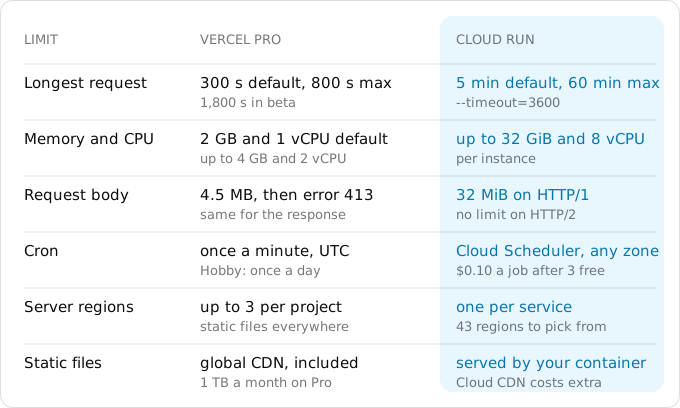
- A request on Cloud Run may run up to 60 minutes on an instance of up to 32 GiB and 8 vCPU, against Vercel's 800 seconds at most on Pro.
- Vercel cron jobs become Cloud Scheduler jobs at $0.10 a job per 31 days, the first 3 free per billing account, with an OIDC token the route verifies.
- Lower the DNS TTL to 300 seconds a day before the switch, and keep the Vercel project for a week as the way back.
Prices are Vercel's Dublin and Google's Tier 1 list prices, read on October 11, 2026.
When moving pays, and when it does not
Vercel builds, caches, schedules and previews a Next.js app without anyone writing infrastructure; Cloud Run runs a container and bills for the time it works. The same steps apply to a Remix, SvelteKit or Express app on Vercel; only the container changes, and moving from Netlify to Cloud Run has its own guide.
Vercel's Hobby plan is free and is for personal, non-commercial use only. Anything that earns money goes on Pro: a $20 platform fee a month that includes one deploying seat and $20 of usage credit, then $20 for every additional seat that deploys. Usage beyond the credit is billed per resource: Active CPU, Provisioned Memory, invocations, data transfer from functions to the CDN, and more. The Pro plan includes 10 million CDN requests and 1 TB of Fast Data Transfer a month, with $0.15 per GB after that in Dublin. (Vercel's Flat Rate CDN page, an option you turn on, sizes the tier included with Pro at 1 million requests and 1 TB; the pricing page's on-demand numbers are what this guide uses.)
Cloud Run has no seats and no platform fee. A service with request-based billing pays $0.000024 per vCPU-second and $0.0000025 per GiB-second while it handles requests, and $0.40 per million requests, after a free tier of 180,000 vCPU-seconds, 360,000 GiB-seconds and 2 million requests a month per billing account (Tier 1 is the price group of regions such as europe-west1; prices of October 11, 2026). What it does not include is traffic: every byte to your users is internet egress, $0.105 per GiB within Europe on Cloud Run's own SKU, as the egress guide explains.
So the bill turns on two numbers: how many people deploy, and how many bytes the app sends.
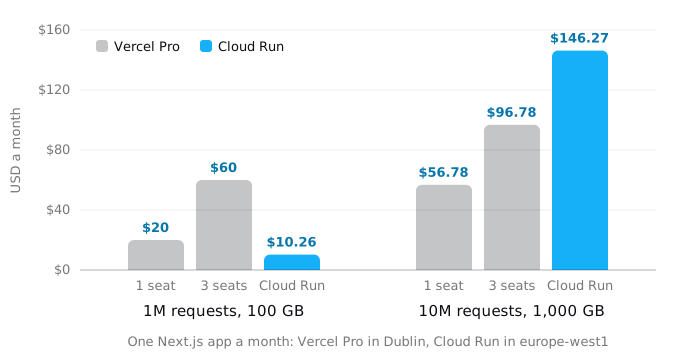
The model behind the picture is the same app on both sides. Every request is rendered by the server and takes 200 ms, of which 50 ms is CPU and the rest is waiting on the database. Responses average 100 KB, assets included, and a fifth of the bytes are HTML from the server. On Vercel the functions run in Dublin at the default 2 GB and 1 vCPU; on Cloud Run the service runs in europe-west1 with 1 vCPU and 512 MiB.
- 1 million requests and 100 GB a month. Vercel's usage comes to $5.68 (invocations $0.60, Active CPU $2.33, memory $1.54, origin transfer $1.20), inside the $20 credit, so the bill is $20 for one seat and $60 for three. Cloud Run charges $0.48 of CPU above the free tier and $9.78 of egress for 93.1 GiB, $10.26 in total, whatever the size of the team.
- 10 million requests and 1,000 GB a month. Vercel's usage is $56.78, $36.78 above the credit, so the bill is $56.78 for one seat and $96.78 for three; the terabyte is still included. Cloud Run charges $43.68 of CPU, $1.60 of memory, $3.20 of requests and $97.79 of egress: $146.27.
Move when the team is several people on a modest amount of traffic, when a request needs more than Vercel's limits allow (below), or when the rest of your system already lives on Google Cloud. Stay when the app sends a terabyte a month to users and one person deploys it: Vercel's included transfer is worth more than Cloud Run's free tier, and a VPS with included traffic may be cheaper than both.
What Vercel did for you
Before any command, list what Vercel provided, because each item needs a home on Google Cloud. The CLI described at the end does this from your repository; by hand, open vercel.json, next.config.*, package.json and the project's settings page side by side.
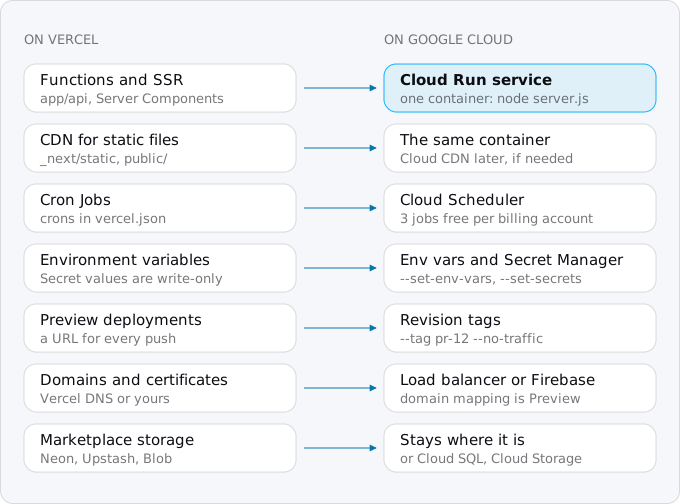
Two of these surprise people. Static files: on Vercel, _next/static and public/ are deployed to every CDN region, while your functions run in one region, iad1 (Washington, D.C.) unless you changed it. On Cloud Run the same container serves both from one region. That is fine for most apps, because the files carry long cache headers and browsers keep them, but a site with a global audience and heavy pages may want Cloud CDN in front later. Storage: Vercel Postgres and Vercel KV moved to the Marketplace, so the database is a Neon, Supabase or Upstash account with a connection string. It does not move with the app. Point the Cloud Run service at the same database first and decide about Cloud SQL later; the Cloud SQL guide has the prices.
Step 1: put the app in a container
Next.js can produce a self-contained server. Add one line to next.config.ts:
const nextConfig: NextConfig = {
  output: "standalone",
};
next build then writes .next/standalone with a minimal server.js and only the parts of node_modules the app uses. It does not copy public/ or .next/static, because Next.js assumes a CDN serves them; the Dockerfile copies them in. Put this Dockerfile in the repository root:
FROM node:24-slim AS build
WORKDIR /app
COPY package.json package-lock.json ./
RUN npm ci
COPY . .
RUN npm run build

FROM node:24-slim
WORKDIR /app
ENV NODE_ENV=production PORT=8080 HOSTNAME=0.0.0.0
COPY --from=build /app/.next/standalone ./
COPY --from=build /app/.next/static ./.next/static
COPY --from=build /app/public ./public
USER node
CMD ["node", "server.js"]
And a .dockerignore, so local builds and secrets stay out of the image:
node_modules
.next
.git
.env*.local
HOSTNAME=0.0.0.0 matters: without it the server listens only inside the container and Cloud Run's health check never reaches it. PORT=8080 is Cloud Run's default. If you use pnpm or yarn, copy that lockfile and use its install command instead of npm ci.
Build and run it before anything touches Google:
docker build -t helloworld .
docker run --rm -p 8187:8080 helloworld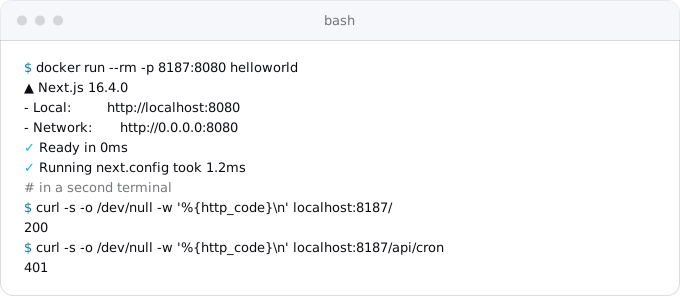
We built a fresh create-next-app@16 project with exactly these files, added the cron route from Step 4, and got the output above. You can also skip the Dockerfile: gcloud run deploy --source . builds a Next.js app with Google's buildpacks, which run npm run build and start with npm start. The Dockerfile is worth the 15 lines, because you see and test exactly what runs. The buildpacks or a Dockerfile guide compares the two.
Step 2: move the environment variables
This is the step that stalls moves. On Vercel, Production and Preview variables are created as the Secret type by default, and a Secret value is write-only after saving. vercel env pull --environment=production cannot give them back. The values of your secrets have to come from where they were made: the database provider's dashboard, the payment provider, the OAuth app. Make the list from the project's settings page before the move day, and get each value from its source.
Then sort the variables into three kinds:
- Variables starting with
NEXT_PUBLIC_are inlined into the JavaScript bundle bynext build. They must exist at build time, and they are public anyway. Put them in.env.productionin the repository; Next.js reads that file during the build. We checked this on the sample: a page that printsNEXT_PUBLIC_SITE_NAMEfrom.env.productionshowed the value in the container. - Plain configuration (a feature flag, an API base URL) goes on the service with
--set-env-vars. - Secrets (database URL, API keys, signing keys) go to Secret Manager, Google's store for secrets. Each becomes an environment variable when the container starts; secrets on Cloud Run covers versions and rotation.
Create a service account for the app (a Google identity for a program, not a person), then each secret, typing or pasting the value on standard input so it never appears in your shell history (finish with Ctrl-D):
gcloud iam service-accounts create web
gcloud secrets create DATABASE_URL --data-file=-
gcloud secrets add-iam-policy-binding DATABASE_URL \
  --member=serviceAccount:web@PROJECT_ID.iam.gserviceaccount.com \
  --role=roles/secretmanager.secretAccessor
Vercel also injected system variables such as VERCEL_URL and VERCEL_ENV. Search the code for VERCEL_; anything that reads them needs its own variable on Cloud Run.
Step 3: deploy
Pick the region first, because it should sit next to the database, not next to you. Vercel's default iad1 is in Washington, D.C.; if the database is in AWS us-east-1, the Cloud Run region nearest to it is us-east4 (Northern Virginia). For a European database, europe-west1 (Belgium) is a Tier 1 region. The region guide covers the trade-offs.
gcloud run deploy web --source . --region europe-west1 \
  --service-account=web@PROJECT_ID.iam.gserviceaccount.com \
  --allow-unauthenticated \
  --set-env-vars=API_BASE_URL=https://api.example.com \
  --set-secrets=DATABASE_URL=DATABASE_URL:latest
With a Dockerfile in the directory, --source . sends the code to Cloud Build, builds that Dockerfile, stores the image in an Artifact Registry repository named cloud-run-source-deploy, and deploys it. The first run asks to enable APIs and to create the repository; answer yes. At the end it prints the service URL, https://web-PROJECT_NUMBER.europe-west1.run.app.
Two settings differ from Vercel's defaults. A request on Cloud Run may run 5 minutes by default and up to 60 with --timeout=3600, against Vercel's 300 seconds, 800 at most on Pro. An instance can have up to 32 GiB and 8 vCPU, and handles many requests at once instead of one.
Step 4: what changes inside Next.js
Most of a Next.js app runs on next start (or the standalone server.js) unchanged. Image optimization through next/image works with no configuration, using sharp in the container. Proxy (the file formerly called middleware) runs in the server too. Redirects, rewrites and headers in vercel.json do not: nothing reads that file on Cloud Run, so move them into next.config.ts (redirects(), rewrites(), headers()), where Next.js applies them itself.
Five things behave differently, because Cloud Run runs several copies of the same container and Vercel's platform no longer stands behind them:
- The ISR (incremental static regeneration) and data cache is per instance. By default Next.js keeps it in memory (50 MB) and on the local disk of each server. On Cloud Run the disk is memory and goes away with the instance, so two instances can serve different versions of a revalidated page, and a
revalidatePathreaches only the instance that ran it. For pages that revalidate rarely, accept it. Otherwise configure acacheHandlerthat stores the cache in Redis or a bucket, as the self-hosting guide shows. - Server Functions keys are per build. Next.js encrypts Server Function closures with a key generated at build time. All instances of one Cloud Run revision run the same image, so they share it. Between revisions they do not, so a page loaded from the old revision can fail with "Failed to find Server Action" after a deploy. Setting
deploymentIdinnext.config.tslets Next.js detect this version skew and reload instead. - Work after the response stops. Next.js
after()and Vercel'swaitUntilrun code after the response is sent. On Cloud Run with request-based billing, CPU is only allocated while a request is being processed, so that code crawls or never finishes. Send it to Cloud Tasks (a queue that calls your service later), or switch the service to instance-based billing; the billing guide explains the cost. - Cold starts are yours. A service with no traffic scales to zero, and the next request waits for a container to start.
--min-instances=1keeps one ready, billed at the idle rate. - Vercel's own packages. Packages under
@vercel/were written for Vercel's platform. Searchpackage.jsonfor them and check in each one's documentation what it does outside Vercel; replace or remove the ones that only work there.
Step 5: cron jobs become Cloud Scheduler
A Vercel cron job is an entry in vercel.json with a path and a schedule; Vercel sends an HTTP GET to the production URL at that time, in UTC, with your CRON_SECRET as a Bearer token. Cloud Scheduler does the same with any HTTP method, in any time zone, and instead of a shared secret it sends an OpenID Connect token, a statement of who is calling signed by Google, for a service account you name. It costs $0.10 a job per 31 days, and the first 3 jobs on a billing account are free.
Because the service is public (--allow-unauthenticated), Cloud Run does not check that token for you: anyone can call /api/cron. The route has to verify it, which replaces the CRON_SECRET comparison:
import { OAuth2Client } from "google-auth-library";

const client = new OAuth2Client();

export async function GET(request: Request) {
  const token = request.headers.get("authorization")?.replace("Bearer ", "");
  if (!token) return new Response("Unauthorized", { status: 401 });
  try {
    const ticket = await client.verifyIdToken({
      idToken: token,
      audience: process.env.CRON_AUDIENCE,
    });
    if (ticket.getPayload()?.email !== process.env.CRON_INVOKER) {
      return new Response("Forbidden", { status: 403 });
    }
  } catch {
    return new Response("Unauthorized", { status: 401 });
  }
  // the work the Vercel cron did
  return Response.json({ ok: true });
}
verifyIdToken checks Google's signature, the expiry and the audience; the email check makes sure the token belongs to your scheduler's service account and not to any other Google identity. Install it with npm install google-auth-library. Then create the account and the job, with the same schedule as in vercel.json:
gcloud iam service-accounts create cron
gcloud scheduler jobs create http nightly-report \
  --location=europe-west1 \
  --schedule="0 5 * * *" \
  --http-method=GET \
  --uri=https://web-PROJECT_NUMBER.europe-west1.run.app/api/cron \
  --oidc-service-account-email=cron@PROJECT_ID.iam.gserviceaccount.com \
  --oidc-token-audience=https://web-PROJECT_NUMBER.europe-west1.run.app/api/cron
gcloud run services update web --region europe-west1 \
  --update-env-vars=CRON_AUDIENCE=https://web-PROJECT_NUMBER.europe-west1.run.app/api/cron,CRON_INVOKER=cron@PROJECT_ID.iam.gserviceaccount.com
--http-method=GET is needed because Cloud Scheduler sends POST by default, and a route that exports only GET would answer 405. The time zone defaults to UTC, as on Vercel; --time-zone=Europe/Berlin changes it. A job that runs longer than an HTTP request should become a Cloud Run job started by the scheduler; the services, jobs and worker pools guide shows when.
Step 6: preview deployments
On Vercel, every push to a branch gets its own URL. Cloud Run's equivalent is a revision with a tag and no traffic:
gcloud run deploy web --source . --region europe-west1 --no-traffic --tag pr-12The new revision gets its own URL, https://pr-12---web-HASH.a.run.app, while production keeps 100% of the traffic. There is a catch Vercel hid from you. Vercel previews had their own Preview variables; a tagged revision inherits the service's configuration, so it reads the production secrets and writes to the production database. For anything more than a visual check, deploy previews to a second service, web-staging, with its own secrets and its own database, and tag revisions there.
To deploy on every push, connect the repository to Cloud Build from the Cloud Run page ("continuous deployment"), or run the same gcloud run deploy from your CI. If what you want is Vercel's workflow on Google's infrastructure, Google's own Next.js quickstart points to Firebase App Hosting: it connects to GitHub, builds with Cloud Build on every push to a branch, serves from Cloud Run and caches in Cloud CDN, all in your project.
Step 7: the domain and the switch
Google gives three ways to put your domain on a Cloud Run service. A global external Application Load Balancer is the one Google recommends: your own certificates, path routing, a CDN cache (Cloud CDN) and a web firewall (Cloud Armor), with a forwarding rule, the entry point, at $0.025 an hour, about $18.25 a month. Firebase Hosting can also front the service and hold the domain. Cloud Run's own domain mapping is the simplest, but it is in Preview, Google says it is not production-ready because of latency issues, and it exists in only 10 regions.
The switch itself, in order:
- A day before, lower the TTL of the DNS records you will change (the time resolvers keep a record) to 300 seconds, so the change spreads and can be undone quickly.
- Deploy to Cloud Run and test on the
run.appURL: sign-in, a payment in test mode, a form, a page with images, the cron route with a manual run of the scheduler job (gcloud scheduler jobs run nightly-report --location=europe-west1). - If the app signs users in with OAuth, add the new domain's callback URL to the provider while the old one still works.
- Set up the load balancer or Firebase Hosting and wait until its certificate is active.
- Change the DNS records. Watch the logs in the Cloud Run console and the error rate for an hour.
- Disable the cron jobs on Vercel (remove them from
vercel.jsonand deploy), so they do not run twice. - Keep the Vercel project for a week as the way back, then delete it.
The database does not move, so there is no data to copy.
What breaks most often
From the limits and the platform differences above, the failures cluster in a few places:
- The container listens on
localhost(noHOSTNAME=0.0.0.0) and the first deploy fails its health check. - A secret was never copied, because
vercel env pullreturned it empty, and the app fails on its first database call. - A
NEXT_PUBLIC_value was set on the Cloud Run service instead of at build time, and the browser seesundefined. - Redirects from
vercel.jsonsilently stop working, because nothing reads the file. - Emails or webhooks sent in
after()arrive late or never. - A preview revision writes to the production database.
- Requests from users far away are slower, because the static files no longer come from a CDN near them.
Every one of these is visible in the run.app test of step 2 of the switch, before users see it. The patterns that break on Cloud Run guide covers the rest: in-process queues, files on disk, sessions in memory.
Where Exodus comes in
Exodus's CLI reads vercel.json, next.config.* and package.json on your machine, with your coding agent reading the code for the ambiguous parts. The report lists each piece from the picture above with what it becomes: the cron entries with their schedules turned into scheduler jobs, the routes that use after() or waitUntil, the @vercel/ packages, the variables the code reads with a note on which are build-time, and whether ISR needs a shared cache. It then estimates the month on Cloud Run for your traffic next to what you pay Vercel now, egress included, and says plainly when staying is cheaper.
FAQ
Is Cloud Run cheaper than Vercel?
It depends on how many people deploy and how many bytes the app sends. At 1 million requests and 100 GB a month, Cloud Run costs $10.26 against $20 for one Vercel Pro seat and $60 for three. At 10 million requests and 1,000 GB, Vercel's included terabyte wins: $56.78 for one seat against $146.27 on Cloud Run.
Can I export secret environment variables from Vercel?
No. Production and Preview variables are created as the Secret type by default, and a Secret value is write-only after saving, so vercel env pull returns it empty. Get each value from where it was made: the database provider's dashboard, the payment provider, the OAuth app. Make the list from the project's settings page before the move day.
Does next/image work on Cloud Run?
Yes. Image optimization works with no configuration, using sharp in the container, and Proxy, the file formerly called middleware, runs in the server too. Redirects, rewrites and headers in vercel.json do not, because nothing reads that file on Cloud Run; move them into next.config.ts.
How do I get Vercel preview deployments on Cloud Run?
Deploy a revision with no traffic and a tag: it gets its own URL while production keeps 100% of the traffic. A tagged revision inherits the service's configuration, so it reads the production secrets and writes to the production database; for more than a visual check, deploy previews to a second staging service with its own secrets and database.
Sources
36
- vercel.comVercel pricing
- vercel.comVercel Pro plan
- vercel.comVercel Hobby plan
- vercel.comVercel Flat Rate CDN
- vercel.comVercel regional pricing, Dublin dub1
- vercel.comFluid compute pricing, Vercel
- vercel.comVercel Functions limits
- vercel.comFluid compute, Vercel
- vercel.comvercel.json reference
- vercel.comCron jobs, Vercel
- vercel.comCron jobs usage and pricing, Vercel
- vercel.comManaging cron jobs, Vercel
- vercel.comConfig and Secret environment variables, Vercel
- vercel.comvercel env, Vercel CLI
- vercel.comStorage on the Vercel Marketplace
- nextjs.orgHow to self-host your Next.js application, Next.js 16.4 docs
- nextjs.orgoutput: standalone, Next.js docs
- nextjs.orgafter, Next.js docs
- docs.cloud.google.comQuickstart: build and deploy a Next.js web app to Cloud Run, Google
- docs.cloud.google.comDeploy services from source code, Cloud Run
- firebase.google.comFirebase App Hosting, Google
- cloud.google.comCloud Run pricing, Google
- docs.cloud.google.comBilling settings, Cloud Run
- docs.cloud.google.comCloud Run quotas and limits
- docs.cloud.google.comRequest timeout, Cloud Run
- vercel.comSystem environment variables, Vercel
- nextjs.orgMigrating from middleware to proxy, Next.js docs
- docs.cloud.google.comContinuous deployment from Git, Cloud Run
- docs.cloud.google.comRollouts, rollbacks and traffic migration, Cloud Run
- cloud.google.comCloud Scheduler pricing, Google
- docs.cloud.google.comUse authentication with HTTP targets, Cloud Scheduler
- docs.cloud.google.comRunning services on a schedule, Cloud Run
- docs.cloud.google.comMap custom domains, Cloud Run
- cloud.google.comCloud Load Balancing pricing, Google
- docs.cloud.google.comCloud Run locations, Google
- Exodus team: a Next.js 16.4 sample built with the Dockerfile in this guide and run with Docker on Oct 11, 2026; the cost model and its arithmetic