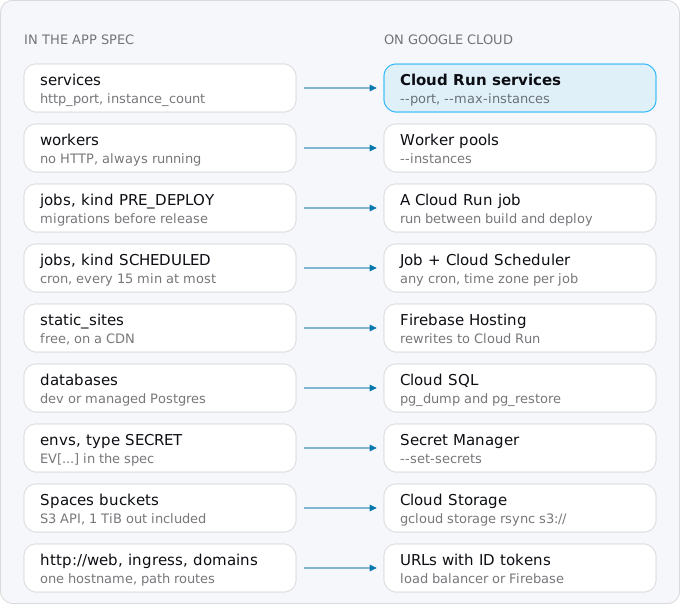
Moving from DigitalOcean App Platform to Cloud Run turns each part of the app spec into a Google Cloud resource: services into Cloud Run services, workers into worker pools, its jobs into Cloud Run jobs, the database into Cloud SQL. The bill changes shape: App Platform charges $5 to $392 a month per container, Cloud Run only while requests run, so idle apps get cheaper and busy ones dearer.
In short
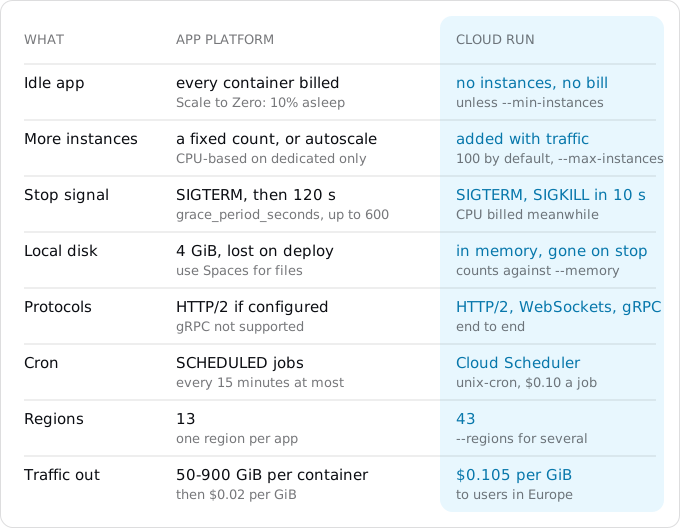
- App Platform's smallest container is $5 a month with 50 GiB of traffic and $0.02 per GiB past it; Cloud Run charges $0.105 per GiB to users in Europe, with no allowance.
- In our model Cloud Run costs $0.49 against $5.00 at 100,000 requests a month, $14.61 against $20.00 at 1 million with Postgres, and $146.27 against $36.63 at 10 million and 1,000 GB.
- Cloud Run kills a container 10 seconds after SIGTERM; App Platform waits 120 by default.
- Encrypted
EV[1:...]variables cannot be decrypted outside DigitalOcean, so values come from their source or the running container. - Scheduled jobs move to Cloud Scheduler, $0.10 a job a month after 3 free, with no 15-minute minimum.
Prices are list prices of October 11, 2026, Cloud Run in europe-west1.
When moving pays, and when it does not
App Platform's price is per container. The smallest, apps-s-1vcpu-0.5gb, is $5 a month with 50 GiB of outbound traffic; apps-s-1vcpu-1gb is $12 with 150 GiB; dedicated-CPU plans run from $29 to $392 with up to 900 GiB. The $5 and $10 plans are fixed: one container, no scaling. Traffic past the allowance costs $0.02 per GiB, and the allowance is pooled across every app of your team. Containers are billed by the second, so a container that runs all month costs its full price. Cloud Run charges for the seconds your code handles requests and starts no instance when there are none.
Cloud Run's free tier is per billing account: 180,000 vCPU-seconds, 360,000 GiB-seconds and 2 million requests a month. Past it, a service with request-based billing pays $0.000024 per vCPU-second and $0.0000025 per GiB-second while it handles requests, and $0.40 per million requests (Tier 1 regions). Traffic to users in Europe is $0.105 per GiB from the first gigabyte, five times App Platform's overage price, with no allowance; the egress guide explains the lines.
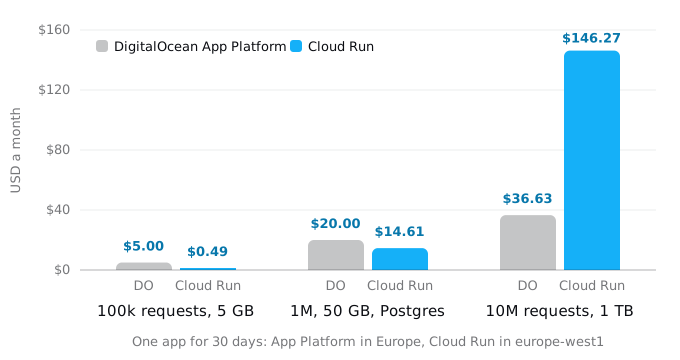
The model is one web app. Every request takes 200 ms, of which 50 ms is CPU; the Cloud Run service has 1 vCPU and 512 MiB.
- 100,000 requests and 5 GB a month. App Platform: one $5 container. Cloud Run: the compute stays inside the free tier, and 4.7 GiB of egress costs $0.49.
- 1 million requests and 50 GB, plus Postgres. App Platform: the $5 container, whose 50 GiB allowance covers the traffic, and a single-node managed Postgres with 1 GiB at $15: $20.00. Cloud Run: $0.48 of CPU and $4.89 of egress, plus a
db-f1-microCloud SQL instance with 10 GiB of SSD at $9.24 (720 hours here; the Cloud SQL guide counts 730 hours and gets $9.37): $14.61. The micro instance has 0.6 GB of memory and is outside Cloud SQL's SLA; that guide has every size. - 10 million requests and 1,000 GB. App Platform: two $12 containers, so a deploy or a crash never leaves the app with none, and their 300 GiB allowance; the other 631 GiB cost $12.63: $36.63. Cloud Run: $43.68 of CPU, $1.60 of memory, $3.20 of requests and $97.79 of egress: $146.27. If requests overlap on an instance, the CPU line falls; the egress line does not.
So Cloud Run is cheaper for an app that is idle most of the day, and App Platform is cheaper for an app that is busy all day or sends a lot of traffic. Other reasons to move are not on the chart: the rest of your system is on Google Cloud; you want Cloud SQL, Pub/Sub, BigQuery or IAM next to the app; you need a region App Platform lacks (it lists 13, Cloud Run runs in 43); or you want instances that appear with traffic instead of a count you pay for all month. Both platforms promise 99.95% a month. If none of these is your reason, the move costs time and saves nothing, and Exodus says so in its verdict.
What App Platform did for you
Everything App Platform runs is described in one file, the app spec. Download the live one, because the console may have changed it since the repository's copy was written:
doctl apps list --format ID,Spec.Name
doctl apps spec get APP_ID > app.yaml
A typical spec has a web service, a worker, a migration that runs before each deploy, a nightly job, a static site and a database:
name: shop
region: fra
services:
- name: web
  github: {repo: acme/shop, branch: main}
  http_port: 8080
  instance_size_slug: apps-s-1vcpu-1gb
  instance_count: 2
  envs:
  - {key: DATABASE_URL, value: "${db.DATABASE_URL}"}
  - {key: STRIPE_KEY, type: SECRET, value: "EV[1:...]"}
workers:
- name: queue
  github: {repo: acme/shop, branch: main}
  run_command: node worker.js
jobs:
- name: migrate
  kind: PRE_DEPLOY
  run_command: npx prisma migrate deploy
- name: nightly
  kind: SCHEDULED
  schedule: {cron: "0 3 * * *", time_zone: Europe/Berlin}
  run_command: node report.js
static_sites:
- name: docs
  output_dir: dist
databases:
- {name: db, engine: PG, production: true, cluster_name: shop-db}
Each component needs a home on Google Cloud, and some of them become more than one thing.
Step 1: the container
If the repository has a Dockerfile, App Platform built it, and Cloud Run builds the same file. Without one, App Platform used Cloud Native Buildpacks, for Node.js the Heroku buildpack; gcloud run deploy --source . uses Google's buildpacks, which detect the same languages and read a Procfile if you have one. If the spec sets run_command or build_command, put them in a Procfile (web: npm start) or in package.json scripts, because Cloud Run does not read the spec. The buildpacks guide covers the choice.
Three runtime details differ.
The port. App Platform sends traffic to http_port, 8080 by default, and sets PORT to it. Cloud Run does the same with 8080 and PORT; deploy with --port if the app listens elsewhere. Both need the app to listen on 0.0.0.0.
The stop signal. Both platforms send SIGTERM before they stop a container. App Platform then waits grace_period_seconds, 120 by default and up to 600, before SIGKILL. Cloud Run waits 10 seconds, and bills the CPU meanwhile. Code that finishes a long job after SIGTERM worked on App Platform and is killed halfway on Cloud Run. Keep the shutdown under 10 seconds and move long work into jobs, which the Fly guide shows with a handler tested in Docker.
The disk. App Platform gives each container up to 4 GiB of local disk, lost on every deploy. On Cloud Run the writable file system lives in memory: a file of 300 MB written to /tmp takes 300 MB of the instance's memory until it is deleted. Code that downloads large files to disk needs more memory, or streams.
Step 2: environment variables and secrets
Plain variables (type: GENERAL) are in the spec in clear text; they go on the service with --set-env-vars.
Encrypted variables are not. App Platform encrypts a SECRET value when you save it and keeps only the encrypted form, EV[1:...], in the spec; nothing decrypts it outside DigitalOcean. The value exists in clear text in one place: the running container. DigitalOcean's documentation says plainly that team members with console access can read it there. So the values come either from where they were made (the payment provider's dashboard, the OAuth app, the database) or from the console.
From the console, doctl apps console APP_ID web opens a shell in the web container, and printenv STRIPE_KEY prints the value on your screen. On your own machine, read it without echo and pipe it into Secret Manager, so it never lands in a file or in your shell history:
gcloud iam service-accounts create web
read -rs VALUE && printf %s "$VALUE" | gcloud secrets create STRIPE_KEY --data-file=- ; unset VALUE
gcloud secrets add-iam-policy-binding STRIPE_KEY \
  --member=serviceAccount:web@PROJECT_ID.iam.gserviceaccount.com \
  --role=roles/secretmanager.secretAccessor
gcloud secrets versions access latest --secret=STRIPE_KEY | wc -c
read -rs waits for you to paste the value and press Enter, without showing it; printf %s adds no newline. The last command prints only the length, to compare with the original. Anyone who could open the console could read these values all along, so a move is a good moment to rotate the ones that matter.
Bindable variables need real values. ${db.DATABASE_URL}, ${db.HOSTNAME}, ${APP_URL}, ${APP_DOMAIN} and the like are filled in by App Platform at deploy time; on Cloud Run they are just strings. Search the spec for ${ and give each one a value: the Cloud SQL connection string (Step 6), the service's URL, the domain.
Step 3: deploy and scaling
Pick the region next to the database. For an app in fra, europe-west3 is Frankfurt; for ams, europe-west4 is the Netherlands; europe-west1 in Belgium is a Tier 1 region with the prices used above. The region guide covers the trade-offs.
gcloud run deploy web --source . --region europe-west1 \
  --service-account=web@PROJECT_ID.iam.gserviceaccount.com \
  --allow-unauthenticated \
  --cpu=1 --memory=1Gi \
  --max-instances=10 \
  --set-env-vars=NODE_ENV=production \
  --set-secrets=STRIPE_KEY=STRIPE_KEY:latest
--source . builds the app in Cloud Build and deploys it, as the Vercel guide describes. The output ends with a run.app URL; test the app there before the domain moves.
The scaling settings map onto different defaults:
- Instance count.
instance_countwas the number of containers you paid for, all month. Cloud Run has no such number: it starts instances as requests arrive, up to 100 per service by default, and stops them when traffic ends. Set--max-instancesto the most you will pay for, and to protect a database with a fixed number of connections. - Autoscaling.
autoscalingwithmin_instance_countbecomes--min-instances. On App Platform the minimum is at least 1; on Cloud Run 0 is the default, and each instance kept warm is billed at the idle rate. An app that must answer the first request quickly keeps one. - Scale to Zero, App Platform's inactivity sleep, is labeled "private" in DigitalOcean's docs, so check that your account has it, and bills a sleeping service at 10% of its price. On Cloud Run an idle service with request-based billing costs nothing.
- Size.
instance_size_slugbecomes--cpuand--memory.
Step 4: workers, deploy jobs and cron
Workers are App Platform components that take no HTTP traffic and run all the time, usually a queue consumer. On Cloud Run that is a worker pool, deployed from the same image, with a fixed number of instances that run all the time, like the worker did:
gcloud run worker-pools deploy queue --source . --region europe-west1 \
  --command=node --args=worker.js --instances=1 \
  --service-account=web@PROJECT_ID.iam.gserviceaccount.com
Putting the worker inside the web service does not work: with request-based billing it gets no CPU between requests, and it runs on every instance. The services, jobs and worker pools guide explains the three kinds.
Deploy jobs. PRE_DEPLOY jobs ran a migration before App Platform released the new version. On Cloud Run the same command becomes a Cloud Run job, run between the build and the deploy. The Fly guide has the whole sequence (gcloud builds submit, jobs deploy, run deploy --image); for this spec the job step is, with IMAGE the tag built in that sequence:
gcloud run jobs deploy migrate --image "$IMAGE" --region europe-west1 \
  --service-account=web@PROJECT_ID.iam.gserviceaccount.com \
  --set-secrets=DATABASE_URL=DATABASE_URL:latest \
  --command=npx --args=prisma,migrate,deploy \
  --execute-now --wait
--wait makes the command fail when the migration fails, so a script or CI step stops before the deploy, as App Platform did. POST_DEPLOY jobs become a step after the deploy, and FAILED_DEPLOY jobs a step your CI runs when the deploy fails.
Scheduled jobs. SCHEDULED jobs become a Cloud Run job started by Cloud Scheduler. App Platform runs a schedule every 15 minutes at most; Scheduler takes any unix-cron line and its own time zone per job (--time-zone=Europe/Berlin). It costs $0.10 a job a month, with 3 jobs free per billing account. The Fly guide has the gcloud scheduler jobs create http command that calls a job's :run endpoint.
Step 5: static sites
App Platform serves static sites from a CDN, free for up to three static-only apps and free inside a paid app. Cloud Run can serve the files from the app's container, but every request then counts as a request and as egress. Firebase Hosting is the closer match: a CDN for the files, free up to 10 GB stored and 360 MB a day transferred, with rewrites that send some paths to a Cloud Run service:
{
  "hosting": {
    "public": "dist",
    "rewrites": [{"source": "/api/**", "run": {"serviceId": "web", "region": "europe-west1"}}]
  }
}
firebase deploy --only hosting uploads the folder. The same file replaces App Platform's ingress rules that sent /api to one component and / to another.
Step 6: the database
App Platform has two kinds. A dev database is a small Postgres for development, $7 a month; a managed database is a DigitalOcean Managed Databases cluster, from $15 a month for a single node with 1 GiB, or $30 plus a $30 standby for high availability. A note for planning: from October 15, 2026 new accounts, and from November 30 all accounts, cannot add standby nodes to new Standard Edition clusters; existing clusters keep theirs. Both kinds move to Cloud SQL the same way, with pg_dump and pg_restore during a short write freeze. The guides for a VPS, Docker Compose and ECS on Fargate restore their dumps with the commands below.
Create the Cloud SQL instance and database first. Managed clusters accept connections only from trusted sources, so add your computer's address in the cluster's Network Access tab or with doctl databases firewalls append CLUSTER_ID --rule ip_addr:YOUR_IP. Stop writes (scale the app's workers to zero and put the app in maintenance), then dump over TLS with the host, port and user from the cluster's Connection Details:
PGSSLMODE=require pg_dump -Fc --no-owner --no-acl \
  -h HOST -p PORT -U doadmin -d defaultdb -f app.dump
pg_dump asks for the password, so it never sits in a command line. Then restore through the Cloud SQL Auth Proxy, in a second terminal:
cloud-sql-proxy PROJECT_ID:europe-west1:INSTANCE --port 5433
pg_restore --no-owner --no-acl -h 127.0.0.1 -p 5433 -U postgres -d app app.dump
Check row counts on a few tables on both sides. On Cloud Run the service connects through a Unix socket: deploy with --add-cloudsql-instances=PROJECT_ID:europe-west1:INSTANCE, give the service account the Cloud SQL Client role, and set DATABASE_URL to postgresql://USER:PASSWORD@/DB?host=/cloudsql/PROJECT_ID:europe-west1:INSTANCE, stored in Secret Manager because it holds the password.
Step 7: Spaces buckets
Spaces speaks the S3 API, and gcloud storage can read from any S3-compatible service. Create a Spaces access key, put it in ~/.aws/credentials with an editor (aws_access_key_id and aws_secret_access_key under [default]), point gcloud at your Spaces region, and copy:
gcloud storage buckets create gs://BUCKET --location=europe-west1
gcloud config set storage/s3_endpoint_url https://fra1.digitaloceanspaces.com
gcloud storage rsync s3://SPACE gs://BUCKET --recursive
gcloud config unset storage/s3_endpoint_url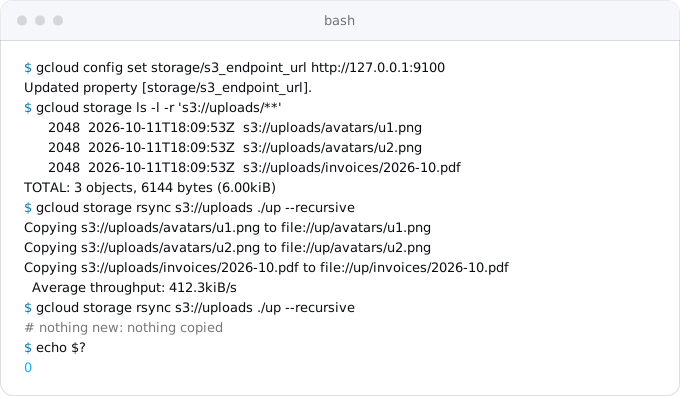
We ran these commands against a local S3-compatible server. rsync copies only what changed, so run it once ahead of the move and again during the write freeze. Unset the endpoint afterwards, or every later s3:// command goes to DigitalOcean. Large buckets can go through Storage Transfer Service instead.
Check what serving the files will cost. Spaces includes 1,024 GiB of outbound traffic for $5 a month and charges $0.01 per GiB past it; Cloud Storage serving files to users in Europe is internet egress at Google's rates. An app that serves a lot of images or video may be better off leaving them on Spaces, or behind a CDN, and moving only the app.
Step 8: internal routing and the domain
Inside an app, components reached each other at http://web over App Platform's private network, with no authentication. Cloud Run has no such network. Each service has its own URL; a private one gets --ingress=internal and no --allow-unauthenticated, the caller sends a Google-signed ID token with the receiving service's URL as audience, and the caller's service account gets roles/run.invoker on the receiver. Search the code for http:// followed by component names, and give each an environment variable holding the new URL.
App Platform issued the certificate for your domain. On Google Cloud, Firebase Hosting can carry the domain and route paths to services (Step 5); a global external Application Load Balancer does the same with more control; Cloud Run's own domain mapping is in Preview. Custom domains and HTTPS on Cloud Run compares the three and their costs.
The switch follows the order in the Vercel guide: lower the TTL a day before, test on the run.app URL, add the new OAuth callback, make the certificate active, change DNS, keep the old app for a week. App Platform adds three things:
- Test every component on the
run.appURL: sign-in, a payment in test mode, an upload, the scheduled job run by hand. - Before the DNS change, freeze writes, copy the database (Step 6) and the buckets again (Step 7), point the services at the new ones and deploy.
- Keep the App Platform app for the week. Archiving it (
maintenance: archive: truein the spec) stops the components' charges; the database and dedicated IPs are still billed. Then delete the app, the database and the Spaces.
What breaks most often
- Shutdown code that took a minute on App Platform is killed after 10 seconds.
- A bindable variable such as
${db.DATABASE_URL}reaches the app as a literal string. - A
run_commandfrom the spec is lost, and the buildpack starts the wrong process. - Large files written to
/tmpuse up the instance's memory. - A worker copied into the web service gets no CPU between requests.
- Calls to
http://apifail, because that name does not exist on Google Cloud. - No
--max-instances, and a traffic spike opens more database connections than Postgres allows. - The endpoint setting stays on, and an unrelated
s3://command reaches DigitalOcean.
All of them show up when you test on the run.app URL, before users see them. The patterns that break on Cloud Run guide covers the rest.
Where Exodus comes in
Exodus's CLI reads the app spec, the Dockerfile or buildpack files and the code on your machine, with your coding agent reading the parts that need judgement. The report lists every component from the picture above with what it becomes: services, workers as worker pools, deploy jobs and their place in the pipeline, scheduled jobs, static sites, bindable variables to replace, internal URLs, Spaces buckets, shutdown handling. It estimates the month on Cloud Run for your traffic next to what App Platform charges now, egress and database included, and says plainly when staying is cheaper.
FAQ
Is Cloud Run cheaper than DigitalOcean App Platform?
For an app that is idle most of the day, yes; for a busy app or heavy traffic, no. In our model Cloud Run costs $0.49 against $5.00 at 100,000 requests a month, but $146.27 against $36.63 at 10 million requests and 1,000 GB, because egress has no allowance.
How do I get secret environment variables out of App Platform?
App Platform keeps only the encrypted form of a SECRET variable in the spec, and nothing decrypts it outside DigitalOcean. Take each value from where it was made, or read it in the running container through doctl apps console, then pipe it into Secret Manager without writing it to a file.
What replaces App Platform workers on Cloud Run?
A worker pool, deployed from the same image with a fixed number of instances that run all the time. Putting the worker inside the web service does not work: with request-based billing it gets no CPU between requests, and it runs on every instance.
Where do App Platform static sites go on Google Cloud?
Firebase Hosting is the closer match: a CDN for the files, free up to 10 GB stored and 360 MB a day transferred, with rewrites that send paths such as /api to a Cloud Run service. Serving the files from the app's container counts every file as a request and as egress.
Sources
37
- docs.digitalocean.comApp Platform pricing, DigitalOcean docs
- digitalocean.comApp Platform pricing page, DigitalOcean
- docs.digitalocean.comApp spec reference, DigitalOcean docs
- docs.digitalocean.comHow to use environment variables in App Platform, DigitalOcean docs
- docs.digitalocean.comHow to scale apps in App Platform, DigitalOcean docs
- docs.digitalocean.comHow to configure Scale to Zero in App Platform, DigitalOcean docs
- docs.digitalocean.comHow to configure app termination settings, DigitalOcean docs
- docs.digitalocean.comApp Platform limits, DigitalOcean docs
- docs.digitalocean.comHow to manage cron jobs and deployment jobs, DigitalOcean docs
- docs.digitalocean.comHow to manage internal routing, DigitalOcean docs
- docs.digitalocean.comHow to manage databases in App Platform, DigitalOcean docs
- docs.digitalocean.comApp Platform buildpacks, DigitalOcean docs
- docs.digitalocean.comApp Platform availability, DigitalOcean docs
- digitalocean.comApp Platform SLA, DigitalOcean
- docs.digitalocean.comPostgreSQL pricing, DigitalOcean docs
- docs.digitalocean.comHow to connect to PostgreSQL clusters, DigitalOcean docs
- docs.digitalocean.comSpaces pricing, DigitalOcean docs
- docs.digitalocean.comSpaces API reference, DigitalOcean docs
- docs.digitalocean.comHow to archive and restore an app, DigitalOcean docs
- cloud.google.comStorage Transfer Service pricing, Google
- docs.digitalocean.comdoctl apps reference, DigitalOcean docs
- cloud.google.comCloud Run pricing, Google
- exodus.elim.ioEgress on Google Cloud explained, Exodus
- cloud.google.comCloud SQL pricing, Google
- docs.cloud.google.comContainer runtime contract, Cloud Run
- docs.cloud.google.comCloud Run quotas and limits
- docs.cloud.google.comAbout Procfiles, Google Cloud buildpacks
- docs.cloud.google.comConnect from Cloud Run to Cloud SQL for PostgreSQL
- docs.cloud.google.comInteroperability with other storage providers, Cloud Storage
- cloud.google.comCloud Scheduler pricing, Google
- firebase.google.comFirebase pricing
- firebase.google.comServe dynamic content with Cloud Run, Firebase Hosting
- docs.cloud.google.comMap custom domains, Cloud Run
- docs.cloud.google.comAuthenticating service-to-service, Cloud Run
- cloud.google.comCloud Run SLA, Google
- docs.cloud.google.comCloud Run locations, Google
- Exodus team: doctl 1.178.0 and gcloud 587.0.0 help output; the sample app spec checked with doctl apps spec validate --schema-only; gcloud storage ls and rsync against a local S3-compatible server standing in for Spaces, run on Oct 11, 2026; the cost model and its arithmetic