A Netlify site moves to Google Cloud in two parts: the built files go to Firebase Hosting, and the functions go to one Cloud Run service that Hosting reaches through a rewrite, so visitors still see one site on one domain. The functions run unchanged through a 50-line adapter. In our model a small site costs $14 a month on Netlify and $3 on Google.
In short
- Firebase Hosting stores 10 GB and sends 10 GB a month at no cost, then $0.15 per GB sent; a site without functions needs nothing else.
- Our model: a small site $14 on Netlify against $3, a medium one $53 against $43.50, a large one $456 against $458.98; bandwidth dominates every case.
- Requests through Firebase Hosting stop at 60 seconds and carry only the
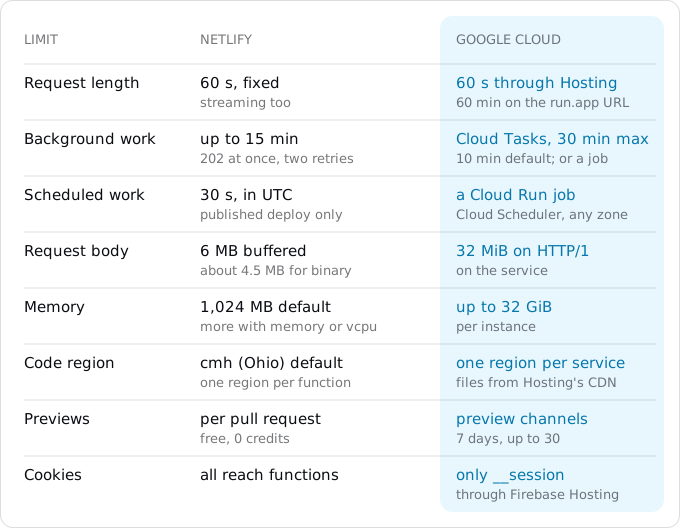
__sessioncookie; therun.appURL allows 60 minutes. - Scheduled functions, 30 seconds at most, become Cloud Run jobs started by Cloud Scheduler; background functions, 15 minutes, become Cloud Tasks, up to 30.
Prices are list prices of October 11, 2026, with the cheapest plan and packs on Netlify.
When moving pays, and when it does not
Netlify moved to credit-based plans on September 4, 2025; teams created before that date keep their Legacy plan unless they switch. On the current plans, Free gives 300 credits a month and pauses the site when they run out. Personal is $9 for 1,000 credits and is meant for one developer. Pro is $20 for 3,000 credits with unlimited members, and larger Pro tiers go up to 20,000 credits for $126. Extra credits come in packs: $5 per 500 on Personal, $10 per 1,500 on Pro.
Every meter draws on those credits. A production deploy costs 15 credits, a GB of bandwidth 20, a GB-hour of function compute 10, and 10,000 web requests 2 (page views, assets, function calls and redirects all count). Deploy Previews and branch deploys are free. At the Pro pack rate a credit is $0.0067, so a GB of bandwidth is about $0.13 and a production deploy about $0.10.
On Google's side, Firebase Hosting on the pay-as-you-go plan (Blaze) stores 10 GB and sends 10 GB a month at no cost, then charges $0.026 per GB stored and $0.15 per GB sent. Cloud Run with request-based billing charges $0.000024 per vCPU-second, $0.0000025 per GiB-second and $0.40 per million requests after a free tier of 180,000 vCPU-seconds, 360,000 GiB-seconds and 2 million requests a month (Tier 1 regions such as europe-west1, prices of October 11, 2026). There is no charge per deploy and none per seat.
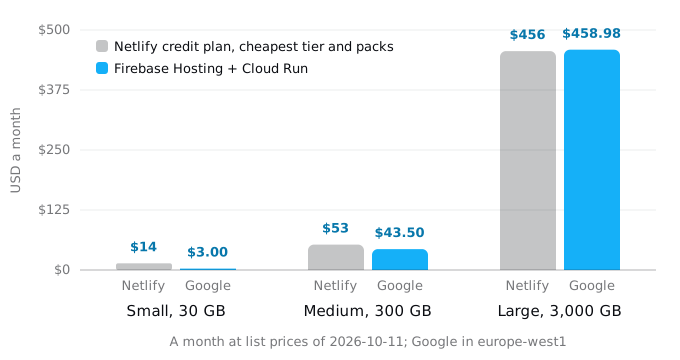
The model behind the picture is one site in three sizes. Functions run 200 ms per call, at Netlify's default 1 GB and on Cloud Run at 1 vCPU and 512 MiB, counted as if no two calls shared an instance.
- Small: 300,000 web requests, 30 GB sent, 30,000 function calls and 40 production deploys a month. That is 1,277 credits: Personal plus one pack, $14. Google charges $3.00 for 20 GB of Hosting transfer above the free 10, and the function calls fit in Cloud Run's free tier.
- Medium: 3 million requests, 300 GB, 300,000 calls, 60 deploys: 7,667 credits, cheapest as Pro 5,000 plus two packs, $53. Google: $43.50, all of it Hosting transfer.
- Large: 30 million requests, 3,000 GB, 3 million calls, 100 deploys: 69,167 credits, Pro 20,000 plus 33 packs, $456. Google: $448.50 of transfer, $10.08 of CPU and $0.40 of requests, $458.98.
Bandwidth dominates every case, and the two providers price it about the same. Deploys are what tip the small site: 40 of them are 600 of its 1,277 credits. A large site that wants a lower bill on Google puts its files in a Cloud Storage bucket behind a load balancer with Cloud CDN instead of Firebase Hosting: cache egress to Europe is $0.08 per GiB, and the same large site comes to about $280 a month with the load balancer ($18.25), cache lookups and fills included. On a Legacy Pro plan the arithmetic is different again: 1 TB is included and each further 100 GB costs $55.
So price alone rarely decides it. Move when the functions outgrow Netlify's limits (a request that needs more than 60 seconds, an upload above 6 MB, a job longer than 15 minutes), when the database and the rest of the system already live on Google Cloud, or when the team deploys to production many times a day.
What Netlify did for you
A Netlify site is four things that arrive together: a folder of built files served from a CDN, a few functions in netlify/functions, routing rules in _redirects and netlify.toml, and platform features such as forms, previews and a domain with a certificate. Google Cloud has no single product that does all four.
Open netlify.toml, the _redirects and _headers files in the publish directory, the netlify/functions folder and the site's settings page, and list every piece. Each one needs a home.
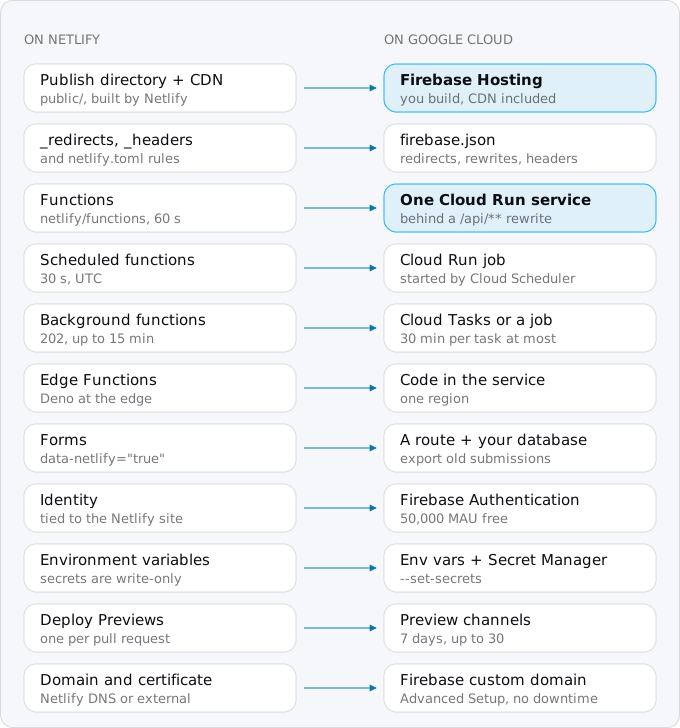
Two pieces have no direct equivalent. Edge Functions run in Deno at Netlify's edge, with 50 ms of CPU per request; Google Cloud has no direct equivalent for your own code, so their logic moves into the Cloud Run service, which runs in one region. Netlify Image CDN (/.netlify/images) resizes images on request; on Google you resize at build time or in your own code.
Step 1: the files go to Firebase Hosting
Install the Firebase CLI (npm install -g firebase-tools), sign in, and add Firebase to your Google Cloud project from the Firebase console. Then put a firebase.json in the repository root that points at the same publish directory Netlify used:
{
  "hosting": {
    "public": "public",
    "ignore": ["firebase.json", "**/.*", "_redirects", "_headers"],
    "cleanUrls": true
  }
}
Netlify built the site for you; Firebase Hosting does not build. Run the same build command from netlify.toml (npm run build) on your machine or in CI, then firebase deploy --only hosting. Every deploy is kept as a version, and a rollback is one click in the console. If the site has no functions, Hosting alone serves the files, the redirects and the domain, and the Cloud Run steps below do not apply.
cleanUrls makes /about.html answer at /about and redirects the .html form there, which is what Netlify's Pretty URLs did. Trailing slashes are the other difference to check: Firebase uses them only for directory index files unless you set trailingSlash, so compare a few of your URLs on both before the switch.
Step 2: _redirects and _headers become firebase.json
Netlify reads _redirects first and netlify.toml second, and the first matching rule wins. A rule does not apply when a file exists at that path unless you force it with !. Firebase has a fixed order: redirects, then exact static files, then rewrites. So a Firebase redirect always wins over a file, as a forced Netlify rule did, and a Firebase rewrite never shadows a file, as an unforced Netlify rewrite did not.
Here is a typical _redirects and its translation:
/blog/*      /posts/:splat              301
/api/*       /.netlify/functions/:splat 200
/*           /index.html                200
"redirects": [
{ "source": "/blog/:rest*", "destination": "/posts/:rest", "type": 301 }
],
"rewrites": [
{ "source": "/api/**", "run": { "serviceId": "shop-api", "region": "europe-west1" } },
{ "source": "**", "destination": "/index.html" }
],
"headers": [
{ "source": "/assets/**",
"headers": [{ "key": "Cache-Control", "value": "public, max-age=31536000, immutable" }] }
]A splat becomes a capture with * (:rest*), a status of 200 becomes a rewrite, and the single-page fallback becomes a rewrite of ** to /index.html. We ran this file in the Firebase Hosting emulator against a sample site:
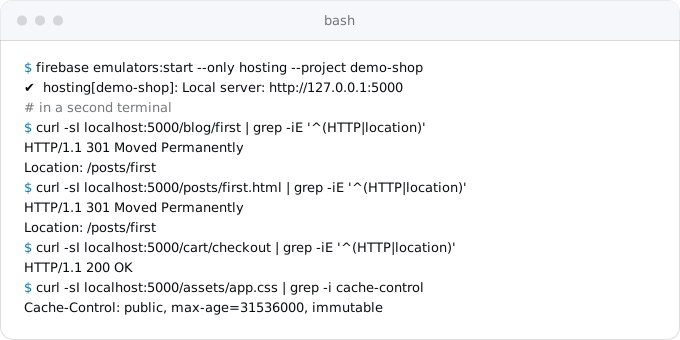
Three kinds of Netlify rule do not translate. Conditions on country, language, role or cookie have no field in firebase.json; that logic moves into the Cloud Run service. A proxy to another site (/search https://api.example.com 200) has no equivalent, because a Firebase rewrite can only point at a file, a function or a Cloud Run service; call the other API from your service instead. Signed proxy redirects go the same way.
Step 3: the functions become one Cloud Run service
A modern Netlify function is a file whose default export takes a web Request and returns a Response. Node.js has had both built in since version 18, so the functions can run unchanged inside an ordinary HTTP server. The adapter below loads every file in netlify/functions, routes /.netlify/functions/NAME and any config.path (with parameters such as /api/orders/:id), supports older Lambda-style exports.handler functions, and skips scheduled ones. Save it as server.mjs in the repository root:
import http from "node:http";
import { readdirSync } from "node:fs";

const dir = new URL("./netlify/functions/", import.meta.url);
const prefix = process.env.API_PREFIX; // /api, if _redirects sent /api/* to functions
const routes = [];
for (const file of readdirSync(dir).filter((f) => /\.[cm]?js$/.test(f))) {
  const name = file.replace(/\.[cm]?js$/, "");
  const mod = await import(new URL(file, dir));
  const cfg = mod.config ?? mod.default?.config ?? {};
  if (cfg.schedule) continue; // runs as a Cloud Run job, Step 5
  const paths = cfg.path ? [cfg.path].flat()
    : [`/.netlify/functions/${name}`, ...(prefix ? [`${prefix}/${name}`] : [])];
  for (const p of paths) routes.push({ pattern: new URLPattern({ pathname: p }), mod });
}

http.createServer(async (req, res) => {
  try {
    const url = new URL(req.url, `http://${req.headers.host}`);
    const route = routes.find((r) => r.pattern.test(url));
    if (!route) return res.writeHead(404).end("not found");
    const params = route.pattern.exec(url).pathname.groups;
    const body = ["GET", "HEAD"].includes(req.method) ? undefined : Buffer.concat(await req.toArray());
    const headers = new Headers();
    for (const [k, v] of Object.entries(req.headers)) for (const x of [v].flat()) headers.append(k, x);
    let response;
    if (route.mod.handler) {
      const r = await route.mod.handler({
        httpMethod: req.method, path: url.pathname, headers: req.headers, rawUrl: url.href,
        queryStringParameters: Object.fromEntries(url.searchParams),
        body: body?.toString("base64") ?? null, isBase64Encoded: Boolean(body),
      }, {});
      response = new Response(r.isBase64Encoded ? Buffer.from(r.body, "base64") : r.body,
        { status: r.statusCode, headers: r.headers });
    } else {
      const fn = route.mod.default.fetch ?? route.mod.default;
      response = (await fn(new Request(url, { method: req.method, headers, body }), { params }))
        ?? new Response(null, { status: 204 });
    }
    const out = Object.fromEntries(response.headers);
    const cookies = response.headers.getSetCookie();
    if (cookies.length) out["set-cookie"] = cookies;
    res.writeHead(response.status, out).end(Buffer.from(await response.arrayBuffer()));
  } catch (err) {
    console.error(err);
    res.writeHead(500).end("error");
  }
}).listen(process.env.PORT ?? 8080, () => console.log(`${routes.length} routes on :${process.env.PORT ?? 8080}`));
The context object your functions receive holds only params. If they read context.geo, context.ip or context.cookies, replace those with the request's headers. URLPattern needs Node.js 24. TypeScript functions need a build step first (tsc or esbuild into .mjs).
The container is short:
FROM node:24-slim
WORKDIR /app
COPY package*.json ./
RUN npm ci --omit=dev
COPY netlify/functions ./netlify/functions
COPY server.mjs run.mjs ./
ENV NODE_ENV=production
USER node
CMD ["node", "server.mjs"]
Add a .dockerignore with node_modules, .netlify and .env*, then try it before anything touches Google:
docker build -t shop-api .
docker run --rm -e API_PREFIX=/api -p 8188:8080 shop-api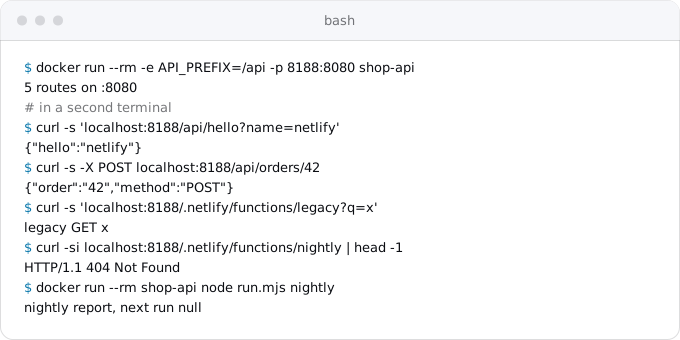
Then deploy. --source . builds the Dockerfile with Cloud Build and stores the image in Artifact Registry:
gcloud run deploy shop-api --source . --region europe-west1 \
  --allow-unauthenticated --set-env-vars=API_PREFIX=/api
The service has to be public, because Firebase Hosting calls it as an anonymous visitor would. Put it in a region Firebase Hosting can rewrite to (Firebase's Cloud Run page lists them) and that sits near your database. Then firebase deploy --only hosting makes /api/** on your site reach the service.
Two limits come with that path. A request through Firebase Hosting times out after 60 seconds, whatever the service allows, the same as Netlify's synchronous limit; a longer request has to call the run.app URL directly, where the limit is 60 minutes, as the timeouts guide explains with the other clocks on the way. And Hosting strips every cookie except one named __session before it reaches the service, so a function that reads a session cookie by another name must rename it. Responses from the service are not cached unless they send Cache-Control: public with s-maxage.
Step 4: environment variables and secrets
Netlify can export variables: netlify env:list --plain --context production prints them in .env format. But a variable marked as containing secret values is write-only and comes back masked in every context except dev, so its value has to come from where it was made: the payment provider, the database, the OAuth app.
Plain settings go on the service with --set-env-vars. Secrets go to Secret Manager, typed on standard input so they never reach your shell history (finish with Ctrl-D):
gcloud secrets create STRIPE_KEY --data-file=-
gcloud run services update shop-api --region europe-west1 \
  --set-secrets=STRIPE_KEY=STRIPE_KEY:latest
The service runs as the default compute service account unless you name another, and that account needs roles/secretmanager.secretAccessor on each secret. The Vercel guide shows a dedicated service account for the app. Variables Netlify set for you, such as CONTEXT, URL and DEPLOY_PRIME_URL, do not exist on Cloud Run; search the code for them.
Step 5: scheduled and background functions
A scheduled function runs on Netlify for at most 30 seconds, in UTC, and only on the published deploy. On Google it becomes a Cloud Run job, a container that runs to completion, started by Cloud Scheduler. The same image does it with a different command. Move any schedule from netlify.toml into the function's config (Netlify accepts both, so nothing changes there yet), and add run.mjs:
const name = process.argv[2];
const mod = await import(new URL(`./netlify/functions/${name}.mjs`, import.meta.url));
const req = new Request("http://localhost/", { method: "POST", body: JSON.stringify({ next_run: null }) });
await (mod.default.fetch ?? mod.default)(req, {});
Then deploy the job from the service's image and schedule it:
IMAGE=$(gcloud run services describe shop-api --region europe-west1 \
  --format='value(spec.template.spec.containers[0].image)')
gcloud run jobs deploy nightly --image "$IMAGE" --region europe-west1 \
  --command=node --args=run.mjs,nightly
gcloud scheduler jobs create http nightly --location europe-west1 \
  --schedule="0 5 * * *" --time-zone=Etc/UTC --http-method POST \
  --uri="https://run.googleapis.com/v2/projects/PROJECT_ID/locations/europe-west1/jobs/nightly:run" \
  --oauth-service-account-email=PROJECT_NUMBER-compute@developer.gserviceaccount.com
A job is not reachable over HTTP, so nobody on the internet can trigger it, and it is not held to 30 seconds. Keep the time zone in UTC to match Netlify, or set your own; the cron and timers guide covers the price, retries and what happens when two runs overlap.
A background function answers 202 at once and keeps working for up to 15 minutes, with two retries. On Google the closest piece is Cloud Tasks: your function adds a task to a queue, and Cloud Tasks calls a route on your service with retries and an OIDC token, for up to 30 minutes. Because the service is public, the route must verify the token. The background workers guide has the code for both sides, the prices and the retry settings; work longer than 30 minutes goes to a job.
Step 6: forms and Identity
Netlify Forms works by detecting data-netlify="true" in your HTML at build time and accepting the POST itself. Nothing on Google does that. Add a function, say netlify/functions/contact.mjs with config.path set to /api/contact, that validates the fields, stores them in your database and sends the notification email, and point the form's action at it. Before you switch, export the old submissions: netlify api listSiteSubmissions --data '{"site_id": "SITE_ID"}' returns them as JSON.
Netlify Identity was deprecated in February 2025 and then kept: Netlify's page now says it remains supported. It is tied to the Netlify site, though, so it cannot follow the domain. Firebase Authentication with Identity Platform covers email, social and anonymous sign-in at no cost up to 50,000 monthly active users. Users will need to sign in again or reset their passwords unless Netlify support exports the accounts for you.
Step 7: previews
Netlify builds a Deploy Preview for every pull request at deploy-preview-42--mysitename.netlify.app, free. Firebase Hosting has preview channels:
firebase hosting:channel:deploy pr-42 --expires 7dA channel lives 7 days by default and 30 at most. Firebase's GitHub Action creates one for each pull request and comments the URL. The catch is that a preview channel shares the project's real backend: the /api rewrite reaches the production Cloud Run service. Add "pinTag": true to the run block so that each Hosting version is pinned to the service revision deployed with it, and for anything that writes data, keep a second project as staging.
Step 8: the domain and the switch
Firebase Hosting gives the domain a certificate at no charge. Its Quick Setup asks you to point the domain's A records at Firebase and then mints the certificate, which can take hours; during that time HTTPS fails. A site already in production should use Advanced Setup, which first proves you own the domain by a TXT record (an ACME challenge, the check certificate authorities use), so the certificate exists before traffic moves. Custom domains and HTTPS on Cloud Run compares Firebase Hosting with a load balancer and domain mapping.
- A day before, lower the TTL of the records you will change to 300 seconds. If the domain uses Netlify DNS, move the zone to another DNS provider first, as its own step.
- Deploy the service, the job and Hosting, and test on
PROJECT_ID.web.app: every redirect, a form, a function, a manual run of the job (gcloud run jobs execute nightly --region europe-west1 --wait). - Connect the domain with Advanced Setup and wait until the certificate is active.
- Change the A records to Firebase's and remove the old ones pointing at Netlify (
75.2.60.5or the CNAME to*.netlify.app). Watch the Cloud Run logs for an hour. - Remove the scheduled functions from the Netlify site, or they run twice.
- Keep the Netlify site for a week as the way back, then delete it.
What breaks most often
- A rule that depended on Netlify's no-shadowing default behaves differently after translation.
- A function reads a cookie that Firebase Hosting stripped, and every user looks signed out.
- A secret came back masked from
env:list, and the function fails on its first call. - A request through Hosting runs longer than 60 seconds and returns 504.
- The certificate is still minting when DNS changes, because Quick Setup was used on a live site.
- A preview channel writes to production through the
/apirewrite. - Forms post to a path nothing handles any more.
Each of these shows up in the test of step 2 of the switch. The patterns that break on Cloud Run guide covers the rest.
Where Exodus comes in
Exodus's CLI reads netlify.toml, _redirects, _headers and netlify/functions on your machine, with your coding agent reading the code for the ambiguous parts. The report lists each piece from the map above with what it becomes: rules that translate to firebase.json and the ones that do not, scheduled and background functions with their schedules, forms found in the HTML, functions that read context fields or cookies, and the variables the code reads. It then estimates the month on Google for your traffic next to your Netlify credits, and says plainly when staying costs less.
FAQ
Is Firebase Hosting cheaper than Netlify?
For a small site, usually: in our model $3 a month against $14 on Netlify, where 40 production deploys use 600 of 1,277 credits. At large traffic the two cost about the same, because bandwidth dominates and both price it near $0.13 to $0.15 per GB.
Can Netlify functions run on Cloud Run without changes?
Yes. A modern Netlify function takes a web Request and returns a Response, which Node.js has built in, so a small adapter can load every file in netlify/functions and route to it inside one container. Functions that read context.geo, context.ip or context.cookies need those replaced with request headers.
Does Firebase Hosting support Netlify's _redirects file?
No, the rules move into firebase.json. Splats become captures, a status of 200 becomes a rewrite, and the single-page fallback becomes a rewrite to index.html. Conditions on country, language, role or cookie, and proxies to other sites, have no field there and move into the Cloud Run service.
Why are users signed out after moving to Firebase Hosting?
Firebase Hosting strips every cookie except one named __session before the request reaches Cloud Run. A function that reads a session cookie by another name sees none, so every user looks signed out. Rename the cookie to __session.
What replaces Netlify scheduled functions on Google Cloud?
A Cloud Run job, built from the same image with a different command and started by Cloud Scheduler. Unlike a scheduled function it is not held to 30 seconds and is not reachable over HTTP. Keep the time zone in UTC to match Netlify, and remove the old schedule so it does not run twice.
Sources
39
- netlify.comNetlify pricing
- docs.netlify.comHow credits work, Netlify
- docs.netlify.comCredit-based pricing plans, Netlify
- netlify.comPersonal vs Free, Netlify
- docs.netlify.comLegacy pricing plans, Netlify
- docs.netlify.comFunctions configuration, Netlify
- docs.netlify.comFunctions API, Netlify
- docs.netlify.comScheduled Functions, Netlify
- docs.netlify.comBackground Functions, Netlify
- docs.netlify.comEdge Functions limits, Netlify
- docs.netlify.comRedirects and rewrites, Netlify
- docs.netlify.comRedirect options, Netlify
- docs.netlify.comRewrites and proxies, Netlify
- docs.netlify.comCustom headers, Netlify
- docs.netlify.comForms setup and submissions, Netlify
- netlify.comNetlify + Auth0: Platform extensibility and Identity changes, Netlify
- netlify.comDeprecation of Netlify Identity, Netlify changelog
- docs.netlify.comEnvironment variables, Netlify
- docs.netlify.comSecrets Controller, Netlify
- docs.netlify.comDeploy Previews, Netlify
- docs.netlify.comConfigure external DNS, Netlify
- firebase.google.comFirebase pricing and Hosting quotas
- firebase.google.comFirebase Hosting product page
- firebase.google.comFirebase Hosting with Cloud Run
- firebase.google.comConfigure Hosting behavior, Firebase
- firebase.google.comManage cache behavior, Firebase Hosting
- firebase.google.comManage live and preview channels, Firebase Hosting
- firebase.google.comDeploy to preview channels via GitHub pull requests, Firebase
- firebase.google.comConnect a custom domain, Firebase Hosting
- cloud.google.comIdentity Platform pricing, Google
- cloud.google.comCloud Run pricing, Google
- docs.cloud.google.comCloud Run quotas and limits
- docs.cloud.google.comAllowing public access, Cloud Run
- docs.cloud.google.comExecute jobs on a schedule, Cloud Run
- cloud.google.comCloud Scheduler pricing, Google
- cloud.google.comCloud Tasks pricing, Google
- docs.cloud.google.comCloud Tasks Task reference
- cloud.google.comCloud CDN pricing, Google
- Exodus team: a sample Netlify project with v1 and v2 functions run through the adapter in this guide with Docker, and its firebase.json in the Firebase Hosting emulator, on Oct 11, 2026; the cost model and its arithmetic