Stripe webhooks on Cloud Run need two services from one image: a public one that verifies the signature against the raw body, records the event id in Postgres, queues a named Cloud Task and answers 200, and a private worker that does the work once per event. Stripe retries for up to three days, keeps no order and may send an event twice.
In short
- The public service answered in a median 6.2 ms in our local test; Stripe does not publish its timeout, so plan for seconds.
- Stripe retries a failed delivery for up to three days in live mode; the event id table and a task name Cloud Tasks refuses twice for up to 24 hours keep the work to once.
- In our test a valid delivery got 400 when a JSON parser ran before the route or the secret ended in a newline; a repeated delivery got 200 and changed nothing.
- An allow list of Stripe's 15 addresses needs a load balancer and Cloud Armor, about $25 a month; the signature alone keeps forged requests out.
- 100,000 events a month cost $0 inside the free tier, a million $3.28, ten million $91.75 with the free tier spent.
Prices are Google's list prices of October 12, 2026 in europe-west1.
How Stripe delivers an event
Stripe tells your app what happened to money by calling it: a checkout completed, an invoice was paid, a charge was disputed. Each call is a webhook, an HTTPS POST to a URL you register, and on Cloud Run that URL is an ordinary service; what Cloud Run is covers the basics.
Everything that happens in a Stripe account becomes an Event with an id starting evt_. You register an event destination, a URL and the event types it wants, in the Dashboard's Workbench or with the API; up to 16 per account and mode. Each endpoint has its own signing secret starting whsec_, different in test and live mode. For each event Stripe sends a POST with a JSON body and a Stripe-Signature header, and expects:
- A 2xx status, quickly, "before any complex logic that might cause a timeout". Stripe does not publish the limit. A 3xx redirect is a failure, like 4xx and 5xx.
- HTTPS with TLS 1.2 or 1.3 in live mode. Every Cloud Run service gets an HTTPS address when it deploys.
- Retries. Without a 2xx answer, Stripe retries for up to three days with exponential backoff in live mode, three times over a few hours in a sandbox, each attempt newly signed. An endpoint failing for several days is disabled.
- No order. Creating a subscription may produce
customer.subscription.created,invoice.created,invoice.paidandcharge.created, in any order.createdcounts whole seconds, so it cannot order them. - Duplicates. Record the event ids you processed and skip the ones you have seen, Stripe says.
Stripe also recommends "an asynchronous queue", because a burst, such as subscriptions renewing on the first of the month, can overwhelm the endpoint. Google's page on webhook targets says the same: hand the work to Cloud Tasks or Pub/Sub and return success at once.
The shape on Cloud Run
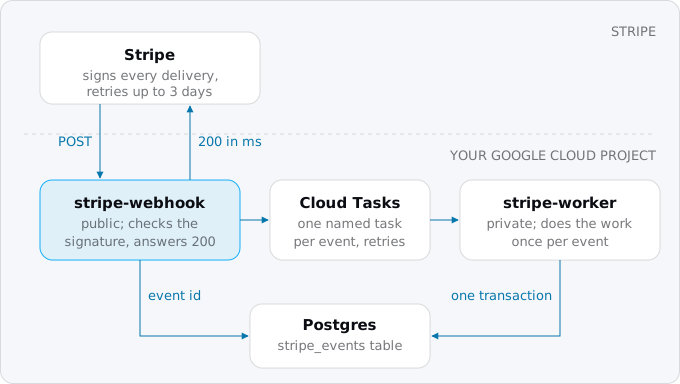
Build one container image and deploy it twice:
- stripe-webhook, public. It checks the signature, inserts the event into a
stripe_eventstable, creates a Cloud Task named after the event, and answers 200. - stripe-worker, private. Cloud Run admits only requests with an ID token from an account holding the Run Invoker role, which Cloud Tasks sends. It does the work and marks the event processed.
A slow email provider then never touches Stripe's timeout, the work gets its own retries, and the public surface is one route. If the work is one database update, you can do it in the webhook request and skip the queue; once it calls another API, queue it.
Step 1. The events table
The table is the memory that turns at-least-once delivery (an event can arrive more than once, but not less) into once-only work:
CREATE TABLE stripe_events (
  id           text PRIMARY KEY,
  type         text NOT NULL,
  payload      jsonb NOT NULL,
  received_at  timestamptz NOT NULL DEFAULT now(),
  processed_at timestamptz
);
The primary key does the deduplication; processed_at stays empty until the work is done. The payload lets you read and replay exactly what Stripe sent.
Step 2. The webhook handler
In Node with Express 5 and the stripe package (23.0.0 on October 12, 2026). The line that matters is express.raw: the signature covers the bytes Stripe sent, and a JSON parser that runs first leaves an object instead.
import express from "express";
import Stripe from "stripe";
import pg from "pg";

const stripe = new Stripe(process.env.STRIPE_KEY);
const db = new pg.Pool({ connectionString: process.env.DATABASE_URL, max: 5 });
const app = express();

app.post("/stripe/webhook", express.raw({ type: "application/json" }), async (req, res) => {
  let event;
  try {
    event = stripe.webhooks.constructEvent(
      req.body, req.get("stripe-signature"), process.env.STRIPE_WEBHOOK_SECRET);
  } catch (err) {
    return res.status(400).send(err.message.split("\n")[0]);
  }
  await db.query(
    "INSERT INTO stripe_events (id, type, payload) VALUES ($1, $2, $3) ON CONFLICT (id) DO NOTHING",
    [event.id, event.type, event]);
  const { rows } = await db.query(
    "SELECT processed_at FROM stripe_events WHERE id = $1", [event.id]);
  if (rows[0].processed_at) return res.status(200).send("already processed");
  await enqueue(event.id);
  res.status(200).send("queued");
});

app.use(express.json()); // other routes, after the webhook
app.listen(process.env.PORT || 8080);
The event is stored before it is queued, so after a crash between the two Stripe's retry finds the row unprocessed and queues it again. If the insert or the queue call fails, Express 5 answers 500 and Stripe retries. An event already processed gets 200, which stops the retries.
enqueue names the task after a hash of the event id. Cloud Tasks refuses a second task with that name for up to 24 hours with ALREADY_EXISTS, so two early deliveries queue the work once. Google asks for hashed names, because sequential ones slow every task command.
import { CloudTasksClient } from "@google-cloud/tasks";
import { createHash } from "node:crypto";
const tasks = new CloudTasksClient();

async function enqueue(eventId) {
  const id = createHash("sha256").update(eventId).digest("hex");
  try {
    await tasks.createTask({
      parent: process.env.QUEUE,
      task: {
        name: `${process.env.QUEUE}/tasks/${id}`,
        httpRequest: {
          httpMethod: "POST",
          url: process.env.WORKER_URL + "/tasks/stripe-event",
          headers: { "content-type": "application/json" },
          body: Buffer.from(JSON.stringify({ id: eventId })).toString("base64"),
          oidcToken: { serviceAccountEmail: process.env.TASKS_SA, audience: process.env.WORKER_URL },
        },
      },
    });
  } catch (err) {
    if (err.code !== 6) throw err; // 6 is ALREADY_EXISTS: queued by an earlier delivery
  }
}
The task carries only the event id: a task is at most 1 MiB and billed in 32 KB chunks. Other frameworks need the same raw body for one route; Stripe's troubleshooting page lists fixes for common ones. Rails and Django check a CSRF token on every POST, so exempt the route.
Step 3. The worker
The worker takes a row lock on the event, does the work and sets processed_at in one transaction. If anything fails, the transaction rolls back, the worker answers 500, and Cloud Tasks retries.
app.post("/tasks/stripe-event", express.json(), async (req, res) => {
  const client = await db.connect();
  try {
    await client.query("BEGIN");
    const { rows } = await client.query(
      "SELECT payload FROM stripe_events WHERE id = $1 AND processed_at IS NULL FOR UPDATE",
      [req.body.id]);
    if (rows.length === 1) {
      const event = rows[0].payload;
      if (event.type === "checkout.session.completed") {
        await client.query("UPDATE accounts SET plan = 'pro' WHERE stripe_customer = $1",
          [event.data.object.customer]);
      }
      await client.query("UPDATE stripe_events SET processed_at = now() WHERE id = $1",
        [req.body.id]);
    }
    await client.query("COMMIT");
    res.sendStatus(200);
  } catch (err) {
    await client.query("ROLLBACK");
    res.sendStatus(500);
  } finally {
    client.release();
  }
});
Two rules keep the worker correct:
- Do not trust the order. If
invoice.paidarrives before its subscription, fetch the subscription from the Stripe API. For state that changes often, read the current object rather than the event's snapshot, which Stripe says can be stale. - Make outside calls safe to repeat. An email or API call made before a failed commit happens again on the retry. Stripe accepts an
Idempotency-Keyheader, up to 255 characters, on every POST; build it from the event id so a retried refund is one refund.
Map the Stripe customer to your account from your own table, never from metadata a browser could set; with many customers in one database that is the tenant lookup in a SaaS architecture on Cloud Run.
Step 4. Deploy
The webhook secret first, read without echoing and piped with printf, which adds no newline. Create STRIPE_KEY and DATABASE_URL the same way:
read -rs WHSEC && printf %s "$WHSEC" | gcloud secrets create STRIPE_WEBHOOK_SECRET \
  --data-file=-
unset WHSEC
Secrets on Cloud Run covers access and rotation. Then the queue, with retries spread over a bad hour in someone else's API:
gcloud tasks queues create stripe-events \
  --location=europe-west1 \
  --max-attempts=50 \
  --min-backoff=10s \
  --max-backoff=600s \
  --max-concurrent-dispatches=10
The queue needs a service account for the tasks' tokens ($INVOKER below), the Enqueuer role for the webhook's account, and Service Account User on $INVOKER for that account and the Cloud Tasks service agent; background workers with Cloud Tasks has the commands, and IAM for a Cloud Run app explains each role. Then the two services, from one image:
gcloud run deploy stripe-worker \
  --image="$IMAGE" \
  --region=europe-west1 \
  --no-allow-unauthenticated \
  --service-account="stripe-worker@$PROJECT.iam.gserviceaccount.com" \
  --set-env-vars=ROLE=worker \
  --set-secrets=DATABASE_URL=DATABASE_URL:latest
gcloud run services add-iam-policy-binding stripe-worker \
  --region=europe-west1 \
  --member="serviceAccount:$INVOKER" \
  --role=roles/run.invoker

gcloud run deploy stripe-webhook \
  --image="$IMAGE" \
  --region=europe-west1 \
  --allow-unauthenticated \
  --service-account="stripe-webhook@$PROJECT.iam.gserviceaccount.com" \
  --set-env-vars="ROLE=webhook,QUEUE=$QUEUE,WORKER_URL=$WORKER_URL,TASKS_SA=$INVOKER" \
  --set-secrets="STRIPE_WEBHOOK_SECRET=STRIPE_WEBHOOK_SECRET:latest,STRIPE_KEY=STRIPE_KEY:latest,DATABASE_URL=DATABASE_URL:latest"
QUEUE is the queue's full name, projects/PROJECT/locations/europe-west1/queues/stripe-events; WORKER_URL is the worker's URL. In the sample, both handlers sit in one file: if (process.env.ROLE === "worker") mounts the worker route and the else branch mounts the webhook route, so each service exposes only its own. If an organization policy forbids granting roles to allUsers, replace --allow-unauthenticated with --no-invoker-iam-check, which turns the invoker check off. The database side is in connecting Cloud Run to Cloud SQL.
Last, register the service's URL with the path, /stripe/webhook, in Stripe, and subscribe only to the event types you handle, as Stripe asks.
The signature, and what breaks it
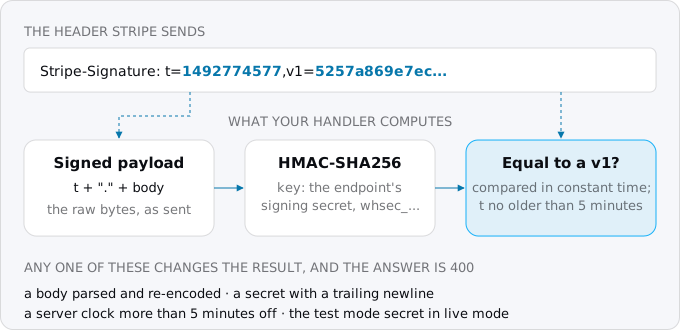
During a secret roll, which can keep the old secret alive for up to 24 hours, the header carries one v1 per secret. The libraries reject a timestamp over 5 minutes old, which stops a captured request from being replayed later; a tolerance of 0 turns that check off. We ran the sample on our build machine with Postgres 17, sending deliveries signed by the library's test helper:
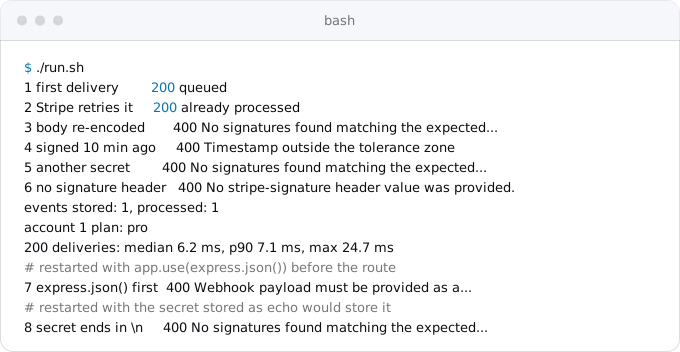
- The repeat of an event, as Stripe's retry sends it, got 200 and changed nothing; the account changed once.
- A body parsed and written back as JSON failed, though it held the same data.
- With
app.use(express.json())above the route, every valid event failed, the first trap on Stripe's troubleshooting page. So did a secret stored with a trailing newline, asechowould store it. - 200 deliveries took a median 6.2 ms, p90 7.1 ms, with the database and, locally, the worker. That is our machine, not Cloud Run.
Testing against Stripe
The Stripe CLI forwards your sandbox's events to a local port:
stripe listen \
  --forward-to localhost:8080/stripe/webhook
stripe trigger checkout.session.completed
stripe listen prints a signing secret, stable between restarts, for the local server. stripe trigger creates sandbox objects and so real events. For the deployed service, register a sandbox destination and read each attempt's status in the Dashboard's event deliveries tab.
Snapshot or thin events
A snapshot event carries the whole Event with a copy of the resource, versioned by the destination's API version. A thin event carries the type and the resource's id, and your code fetches the rest from the API. Stripe recommends thin events for new integrations, with thin versions of classic events such as v1.invoice.paid. The shape is the same: parseEventNotification replaces constructEvent, still on the raw body, and the worker makes the slow fetch.
When the service was down
A bad deploy or a broken database can make the webhook answer 500 for an hour. Stripe's retries bring the events later; to catch up sooner:
- List the events you missed with the List Events API, anchored with
ending_beforeat the last event delivered before the outage and filtered withdelivery_success=false. Stripe returns events from the last 30 days only. - Resend one event from the Dashboard (up to 15 days after it was created) or with
stripe events resend, which works for up to 30 days. - Stripe keeps retrying events you processed by hand; the handler answers them 200.
On your side, run a job every 15 minutes that queues again any row still unprocessed after 15 minutes. Cloud Tasks drops a task after the queue's last attempt, and keeps one 31 days at most, so this job catches a worker that failed fifty times; Cloud Scheduler runs it, and an alert should fire when it finds any.
Timeouts and cold starts
Cloud Run and the sender both have a timeout and the shorter applies, Google's page says. Cloud Run's is 5 minutes by default; Stripe's is unpublished, so plan for seconds. On a new instance the request also waits for the container to start: a median 0.43 s for first requests on our own services. A JVM app that starts in 20 seconds is a risk; minimum instances and startup CPU boost shows how to shorten it. A retry after a timeout is harmless with the table. The worker's limit is Cloud Tasks': 10 minutes by default, 30 at most.
Do you also need Stripe's IP list?
Stripe publishes the 15 addresses its webhooks come from and asks for an allow list as well as the signature. Cloud Run's ingress setting cannot filter by address, so the list needs a global external Application Load Balancer with a Cloud Armor policy; a rule holds 10 addresses, so two rules. At list prices of October 12, 2026: $18.25 a month for the forwarding rule, $5.00 for the policy, $1.00 a rule, about $25 before $0.75 per million requests and $0.008 per GiB processed each way, and the rules need updating when Stripe's list changes.
Without the secret nobody can make a request the handler accepts, so many small apps start with the signature alone. If you already run a load balancer for custom domains, add the policy.
What it costs
Each event is two Cloud Run requests and two Cloud Tasks operations, a creation and a delivery. We counted 0.1 s for the webhook and 0.2 s for the worker on 1 vCPU and 512 MiB, with no overlap, so these are upper bounds.
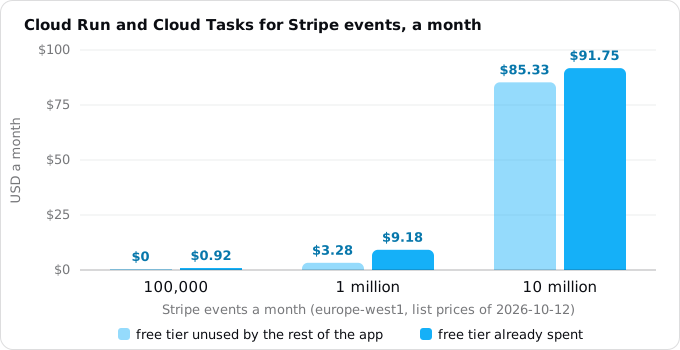
A million events a month cost $3.28, almost all CPU, or $9.18 if the rest of the app has used the free tier. The database is the app's own; a row per event is a few KB.
What breaks
- A JSON parser before the route, or a secret with a newline or from the other mode. Every real event fails.
- Work before the answer. An email or API call in the webhook request risks a timeout, and Stripe resends while the first attempt may still finish.
- No event id check. A retry fulfills an order twice or extends a subscription twice.
- Trusting the order.
invoice.paidbeforecustomer.subscription.createdis normal. Fetch what you need from the API. - A redirect, such as a framework adding a trailing slash: 3xx is a failure.
- 400 for an event type you do not handle. Stripe retries it for three days; answer 200 to any validly signed event.
- The worker route on the public service. Anyone could post an event id to it.
- No catch-up. A worker that exhausts its retries leaves an event unprocessed forever unless a scheduled job finds it.
Checklist
- The route reads the raw body and verifies with
constructEvent. - The secret is in Secret Manager without a trailing newline, one per mode.
- The handler records the event id, queues a named task and answers 200.
- The worker is private and sets
processed_atin the transaction that does the work. - Stripe API calls carry idempotency keys.
- The endpoint subscribes only to handled event types.
- A scheduled job requeues events unprocessed after 15 minutes, with an alert.
stripe listenandstripe triggerpass locally, and a sandbox destination against the deployed URL.
Where Exodus comes in
When you plan a new product with exodus init in its new-product mode and say it takes payments, the report adds a decision. On the CLI's new-product sample, an offline exodus report wrote "Payment webhooks answer at once; the work goes to a task", with a task in the plan. For an app you move, the audit asks which outside services it calls, because their webhook URLs change at the cutover. Exodus does not read your Stripe account or your signature code; your coding agent can read this guide through exodus kb and exodus ask.
FAQ
Why does Stripe signature verification fail on Cloud Run?
Usually a JSON parser runs before the webhook route, so the handler checks a parsed object instead of the exact bytes Stripe signed. A signing secret stored with a trailing newline, or taken from the other mode, fails the same way. In our test either one rejected every valid event.
How long does Stripe retry a failed webhook?
In live mode Stripe retries for up to three days with exponential backoff; in a sandbox, three times over a few hours. Any status other than 2xx is a failure, a 3xx redirect included, and an endpoint that keeps failing for several days is disabled.
How do I stop a Stripe event from being processed twice?
Record each event id in a table whose primary key refuses a second row, queue a Cloud Task named after a hash of that id, and let the worker set a processed time in the same transaction that does the work. A second delivery then gets 200 and changes nothing.
Do I need to allow-list Stripe's IP addresses on Cloud Run?
Stripe asks for it, but Cloud Run's ingress setting cannot filter by address, so the list needs a global external Application Load Balancer with a Cloud Armor policy, about $25 a month. Without the signing secret nobody can make a request the handler accepts, so many small apps start with the signature alone.
How much do Stripe webhooks cost on Cloud Run?
At list prices of October 12, 2026 in europe-west1, 100,000 events a month cost $0 inside the free tier, a million cost $3.28, almost all CPU, or $9.18 if the rest of the app has used the free tier, and ten million cost $91.75 with the free tier spent.
Sources
26
- docs.stripe.comReceive Stripe events in your webhook endpoint, Stripe
- docs.stripe.comManage webhook endpoints, Stripe
- docs.stripe.comEvent destinations and how events work, Stripe
- docs.stripe.comMigrate from snapshot events to thin events, Stripe
- docs.stripe.comIP addresses, Stripe
- docs.stripe.comStripe CLI reference: listen, Stripe
- docs.stripe.comStripe CLI reference: trigger, Stripe
- docs.stripe.comIdempotent requests, Stripe API reference
- support.stripe.comWhy is Stripe trying to reach my webhook endpoints?, Stripe Support
- support.stripe.comWebhooks: how to investigate and fix Timed out, Stripe Support
- github.comstripe-node README, Stripe on GitHub
- docs.cloud.google.comHosting webhooks targets, Cloud Run, Google
- docs.cloud.google.comAllowing public
- docs.cloud.google.comRestrict network ingress for Cloud Run, Google
- docs.cloud.google.comConfigure request timeout for services, Cloud Run, Google
- cloud.google.comCloud Run pricing, Google
- docs.cloud.google.comCreate HTTP target tasks, Cloud Tasks, Google
- docs.cloud.google.comUnderstand Cloud Tasks and Create tasks, Google
- docs.cloud.google.comConfigure queue routing, limits, and retries, Cloud Tasks, Google
- docs.cloud.google.comCloud Tasks quotas and limits, Google
- cloud.google.comCloud Tasks pricing, Google
- cloud.google.comCloud Armor pricing, Google
- docs.cloud.google.comCloud Armor quotas and limits, Google
- cloud.google.comCloud Load Balancing pricing, Google
- docs.cloud.google.comgcloud CLI reference, Google
- Exodus team: the sample handler and worker in this guide run on Node 24 with stripe 23.0.0, Express 5.3.0 and Postgres 17 on our build machine, 8 cases and 200 signed deliveries; exodus 0.1.1 report --offline on the CLI's new-product sample; the 0.43 s median wait of a first request on a new instance is from 30 days of our own request logs, measured for the min-instances guide; Oct 12, 2026