A Postgres database moves to Cloud SQL without losing data in four moves: rehearse a pg_dump and pg_restore while the old app runs, compare counts, checksums and sequences, freeze writes in the database, then copy and compare again before the domain switches. In our rehearsal a 71 MB database with 520,000 rows dumped in 2.2 seconds and restored in 1.5.
In short
pg_dumpdoes not block writers: our restored copy had 499,953 orders while the source already had 499,960.- Dump with
--format=custom --no-owner --no-acland restore with--exit-on-error, which must exit with status 0. - Cloud SQL's own import cannot load Postgres 16 or earlier into a 17 instance;
pg_restorethrough the Auth Proxy can. - A db-f1-micro instance costs $0.0105 an hour, about $0.25 for a day of rehearsals; Database Migration Service adds no charge.
Prices are europe-west1 list prices of October 12, 2026.
Where data gets lost
Code can be deployed again and a bucket can be copied twice, but a row a customer wrote after you took the copy is gone if you switch without it. Every command here was run on a rehearsal from Postgres 16 to 17, for a database leaving Heroku, Render, Railway, a VPS or any other Postgres.
pg_dump makes a consistent copy even while the database is in use, and it does not block readers or writers, as the PostgreSQL documentation says. That is the trap: the copy is a snapshot of the moment the dump started. Anything written after that moment is not in the file. In our rehearsal a writer added a row every fifth of a second; the restored copy had 499,953 orders while the source already had 499,960 when we compared.
The second loss is quieter. By default pg_restore keeps going when a statement fails, prints a count of "errors ignored on restore" at the end and exits with status 1. A script that does not check the status reports success over a database with missing tables or grants.
The third loss is in what a copy does not carry. Logical replication, the engine behind Database Migration Service, does not copy sequence values, so the next id on the new side can collide with rows that are already there. Roles are not in a single database's dump. Files on disk and secrets in a dashboard are not in the database at all.
The order
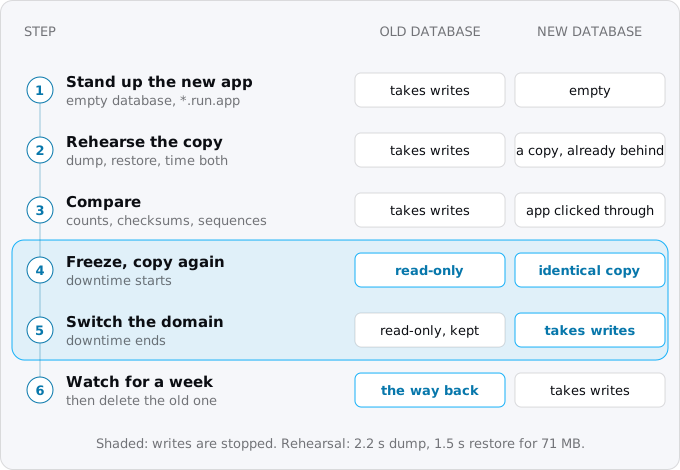
- Stand up the new app at its
*.run.appaddress with an empty database, deployed from CI without a JSON key. - Rehearse the copy while the old app runs: dump, restore, and time both. That time is how long writes will be frozen.
- Compare: row counts and a checksum of the key tables on both sides, and the sequences. Then run the new app against the copy and walk its main paths.
- Freeze writes on the old app, copy again, compare again. This time the numbers must match exactly.
- Switch the domain to the new app, as custom domains and HTTPS on Cloud Run describes. Leave the old app and its database as they are.
- Watch errors and latency for a day, then a week. Only then remove the old app and its database.
The steps below do this with commands. They assume Cloud Run and a Cloud SQL instance already exist; the smallest Cloud SQL instances and what they cost creates one, and connecting Cloud Run to Cloud SQL wires the app to it.
Step 1: an empty database on the new side
Create the database the app will use and give the built-in postgres user a password. The flag reads the password from your terminal, so it does not end up in your shell history:
gcloud sql databases create app --instance=INSTANCE
gcloud sql users set-password postgres --instance=INSTANCE --prompt-for-password
One thing differs from the database you are leaving. On Cloud SQL nobody has SUPERUSER. The postgres user belongs to a role called cloudsqlsuperuser with CREATEROLE, CREATEDB and LOGIN, and that is all. A dump that says "this table belongs to role X" or "grant this to role Y" will fail on those lines, which is why the flags in step 3 exist.
Step 2: look at what you are moving
Before the first dump, ask the old database four questions. The commands below take the connection from PGHOST, PGUSER and PGDATABASE and the password from ~/.pgpass, so no password appears on a command line:
psql -c 'show server_version'
psql -c 'select extname, extversion from pg_extension'
psql -c 'select pg_size_pretty(pg_database_size(current_database()))'
psql -c '\du'- The version.
pg_dumpcan read servers older than itself, back to 9.2, but refuses a newer one: in our rehearsalpg_dump16 against a 17 server stopped with "aborting because of server version mismatch". PostgreSQL also does not promise that a dump loads into an older major version. So create the Cloud SQL instance at the same major version as the source or a newer one, and runpg_dumpandpg_restoreof the newer of the two. - The extensions. Cloud SQL runs only the extensions on its supported list, which differs by major version. Check each name from the query against Google's list before you go further. An extension that is not there is a code change, not a restore flag.
- The size. It predicts the time of the copy, and a large database is where the next sections differ.
- The roles. With the flags below no role travels with the data. Write down the ones the app logs in as, and create them on Cloud SQL yourself.
Step 3: the rehearsal dump
From any Postgres you can reach, the dump Google asks for is the custom format without owners and without grants:
pg_dump --format=custom --no-owner --no-acl --file=app.dump
pg_restore --list app.dump | sed -E 's/(.* EXTENSION )/; \1/g' > app.toc
The second line is Google's own: it writes the dump's table of contents to a file with every extension statement commented out, because Cloud SQL already has plpgsql and you create the other extensions yourself in the next step. Our rehearsal's list commented out two lines, EXTENSION - pgcrypto and COMMENT - EXTENSION pgcrypto.
Platforms give you the same file in their own way.
- Heroku takes backups with
pg_dump's custom format.heroku pg:backups:capture --app APPmakes one andheroku pg:backups:download --app APPsaves it aslatest.dump. Heroku notes that restores outside Heroku can fail on itsheroku_extschema; create that schema on the new side if they do. - Render gives logical exports from the dashboard as a
.dir.tar.gzin the directory format, but not on the Free plan; there you runpg_dumpagainst the external URL yourself. - Railway documents
railway connect postgres --tunnel-onlyfor reaching the database from your machine, and says traffic over its public TCP proxy is billed as egress.
The rest of the app moves as the guides for Heroku to Cloud Run, Railway or Render to Cloud Run and AWS to Cloud Run describe.
Step 4: restore through the Auth Proxy
The simplest way into Cloud SQL from your machine is the Cloud SQL Auth Proxy, which opens an encrypted connection checked by your Google login and listens on a local port. In one terminal:
cloud-sql-proxy --port 5433 PROJECT:REGION:INSTANCEIn another, create the extensions from step 2, then restore with the edited list:
export PGHOST=127.0.0.1 PGPORT=5433 PGUSER=postgres PGDATABASE=app
psql -c 'create extension pgcrypto'
pg_restore --no-owner --no-acl --jobs=4 --exit-on-error --use-list=app.toc --dbname=app app.dump
echo $?
--exit-on-error turns the quiet failure from the start of this guide into a loud one, and echo $? should print 0. --jobs restores several tables at once; Google suggests the number of cores of the destination instance, so on a shared-core instance leave it out. It cannot be combined with --single-transaction.
Time the dump and the restore. In our rehearsal a 71 MB database with 520,000 rows dumped in 2.2 seconds and restored in 1.5 seconds, both on one machine. Over the internet add the time to move the file; that is your number, not ours.
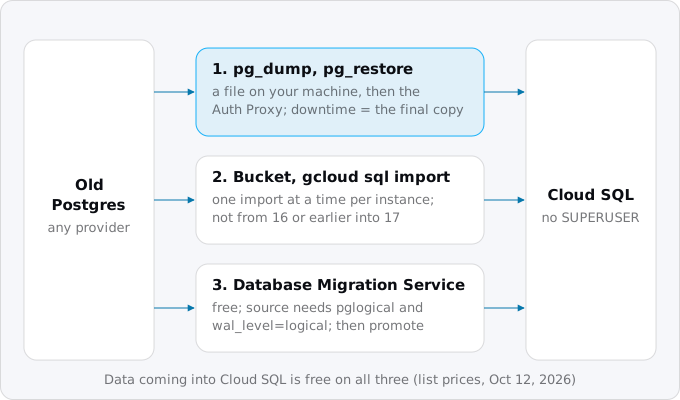
Cloud SQL can also import a file itself: upload it to a Cloud Storage bucket, give the instance's service account read access to it, and run:
gcloud sql import sql INSTANCE gs://BUCKET/app.sql.gz --database=appGoogle's known-issues page lists two limits that make the proxy the easier path for a move. Only one import or export runs on an instance at a time. And Cloud SQL's own import cannot load databases from Postgres 16 or earlier into a Postgres 17 instance; for that Google points to Database Migration Service. A pg_restore through the proxy has neither limit: our rehearsal restored 16 into 17.
Step 5: compare
Google's advice after an import is to connect and check the contents. Make that a query you run on both sides and diff:
SET TimeZone = 'UTC';
SELECT 'customers' AS t, count(*), md5(string_agg(md5(c::text), '' ORDER BY id)) FROM customers c
UNION ALL
SELECT 'orders', count(*), md5(string_agg(md5(o::text), '' ORDER BY id)) FROM orders o
UNION ALL
SELECT 'orders_id_seq', last_value, '' FROM orders_id_seq
ORDER BY 1;
Each table gives a count and a checksum of every row in key order, and each sequence gives its last value. The time zone line matters: a timestamptz turns into text in the session's zone, and two servers with different defaults would give different checksums for the same rows. On a large table, checksum the tables that hold money and users and count the rest.
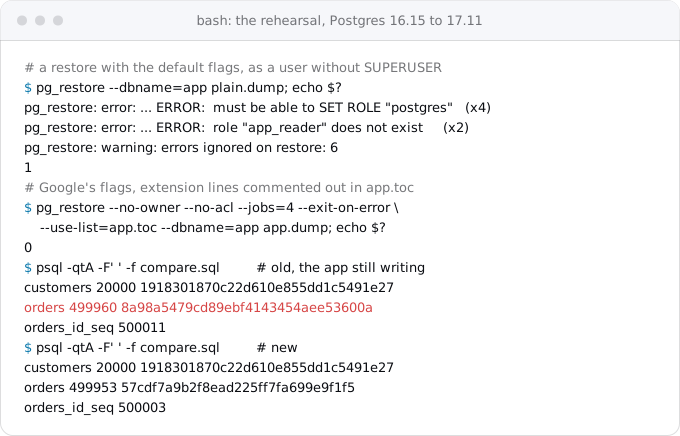
During the rehearsal the counts will not match, because the old app is still writing. What you are checking is that every table is there, that tables nobody writes to match exactly, and that the restore exited with 0. Then point a copy of the new app at this database and click through sign-in, the main pages and anything that writes.
Step 6: freeze writes, copy again
Now stop the writes. The application way is your platform's maintenance mode, but check what it stops: on Heroku it blocks HTTP requests while worker dynos and Scheduler jobs keep running, so scale the workers to zero as well (heroku ps:scale worker=0).
The database way works on any Postgres where you own the database, and catches the writers you forgot:
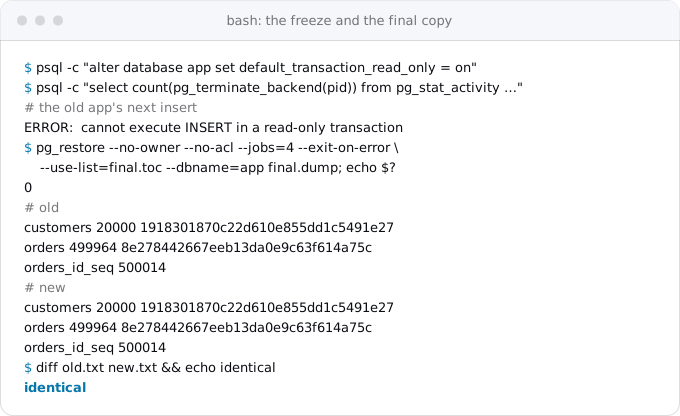
psql -c "alter database app set default_transaction_read_only = on"
psql -c "select count(pg_terminate_backend(pid)) from pg_stat_activity where datname = 'app' and pid <> pg_backend_pid()"
The first line makes every new session read-only; the second ends the sessions that are already open, so they reconnect into read-only mode. In our rehearsal the writer's next insert failed with "cannot execute INSERT in a read-only transaction". This is a guard against your own app, not a lock: a session can still switch it off for itself, so do not rely on it against a person who means to write.
Empty the new database, create the extensions again, then dump, list and restore exactly as in steps 3 and 4:
gcloud sql databases delete app --instance=INSTANCE
gcloud sql databases create app --instance=INSTANCE
Run the compare query on both sides once more. This time the outputs must be the same line for line, sequences included.
Step 7: switch, watch, and the way back
Point the domain at the new app (lower the DNS record's TTL a day before so the change spreads fast) and watch the new app's errors and latency. Leave the old app in maintenance mode. The cutover day checklist lays out the rest of that day.
Until you delete the old database it is the way back: point the domain back, take the old app out of maintenance mode and undo the freeze with alter database app reset default_transaction_read_only. Writes made on the new database after the switch would have to be copied back by hand, so keep the time between the switch and the decision short and know which tables take writes.
When the copy takes too long: Database Migration Service
If the rehearsal says the freeze would last longer than you can accept, Database Migration Service (DMS) copies the database once and then streams every change until you promote the new instance. For Postgres to Cloud SQL Google charges nothing extra for it; you pay for the instance.
What it needs is the hard part. The source must have the pglogical extension in shared_preload_libraries, wal_level set to logical and a user with the REPLICATION attribute, which means a restart and settings that managed platforms often keep to themselves. Heroku documents managed logical replication for its Postgres Advanced databases. Render enables it through support, for Pro workspaces and databases with at least 10 GB of storage. On your own server you set it yourself.
Google's list of limits is long; these are the ones that lose data if you miss them:
- Schema changes are not replicated. Do not deploy migrations during the move.
- Tables without a primary key get only their
INSERTs; updates and deletes are lost. - Sequence values on the destination may differ from the source. Set them before you switch, for example
SELECT setval('orders_id_seq', (SELECT max(id) FROM orders));. - Large objects, unlogged tables, materialized view contents, users and roles do not move.
The switch still has downtime, only shorter: stop writes on the source, wait until the replication delay is zero, then promote. That is the same freeze as in step 6, but it lasts as long as the last changes take to arrive rather than a whole copy.
What it costs
At list prices of October 12, 2026 in europe-west1, a db-f1-micro Cloud SQL instance costs $0.0105 an hour and SSD storage $0.17 per GiB a month. A day of rehearsals on a micro is about $0.25 for the instance; a month with 10 GiB is $9.37, as the instance price guide works out. Data coming into Cloud SQL is free, Google's pricing pages list no price for the Auth Proxy, and DMS has no charge for this kind of move.
The bill you may not expect comes from the side you are leaving: reading the dump out of the old provider can count as its egress, as Railway's page says for its proxy. Egress on Google Cloud covers the other direction.
One cost hides in the disk. Google notes that disk use can be much higher after an import when point-in-time recovery is on, because of the logs it keeps. Storage grows automatically by default and can only be increased, never reduced, so a few rehearsals into a small instance can leave it on a bigger disk than the data needs. Rehearse into a database you will delete, and look at the disk size before the final copy. Once the final copy is in, set the new instance's backups, log days and deletion protection as in backups and point-in-time recovery on Cloud SQL.
What breaks
- "must be able to SET ROLE" and "role ... does not exist" during the restore: the dump carries owners and grants. Dump or restore with
--no-owner --no-acl. - "errors ignored on restore: N" with exit status 1: the restore went on past failures. Add
--exit-on-errorand fix the first error. - "aborting because of server version mismatch": your
pg_dumpis older than the server. Use the client tools of the newer major version. - "permission denied for schema public" on Postgres 15 and later: Google's fix is
GRANT ALL ON SCHEMA public TO cloudsqlsuperuser. - `CREATE EXTENSION` fails: the extension is not on Cloud SQL's list for that version, or the dump still carries extension statements. Use the edited
--use-list. - Duplicate key errors on the first insert after the switch: a sequence is behind. Compare
last_valueon both sides;setvalit frommax(id). - The counts match and a user's latest order is missing: writes were not frozen, or a worker or a timer kept writing. Freeze in the database, not only in the router.
- "HTTP Error 409: Operation failed because another operation was already in progress" with
gcloud sql import: one import or export at a time per instance.
Files and secrets
The database is one of three places data lives. Files the app saved to disk or to the old platform's storage move to a Cloud Storage bucket: copy them before the freeze and again during it, as files and uploads with Cloud Storage shows. Move secrets into Secret Manager one at a time, as secrets on Cloud Run shows, and rotate those that sat in a platform's dashboard, because the old platform still holds the old values.
Checklist
- A Cloud SQL instance at the source's major version or newer, an empty database, a password set with
--prompt-for-password. - Extensions checked against Cloud SQL's list and created by hand; the app's roles created by hand.
- Client tools of the newer major version on the machine that runs the copy.
- A rehearsal with
--format=custom --no-owner --no-acl, the extension lines commented out,--exit-on-error, exit status 0, and a time you have written down. - A compare query that covers the key tables and every sequence, run on both sides.
- The new app clicked through against the copy.
- A freeze in the database, workers and timers stopped, a final copy and an identical compare.
- DNS TTL lowered a day before; the old database untouched until the new app has served a week.
- Files copied twice, secrets moved and rotated.
Where Exodus comes in
When Exodus audits a repository, the database size is one of the questions it asks, because it decides between a dump and restore and Database Migration Service. The plan it writes for the move has the data copy and the compare as their own tasks, placed right before the domain switch, so the agent that runs the move rehearses, compares and freezes in this order and points to this guide for the commands.
FAQ
Does pg_dump lock the database while it runs?
No. pg_dump takes a consistent snapshot without blocking readers or writers, which is the trap: rows written after the dump starts are not in the file. Freeze writes before the final copy, and compare counts, checksums and sequences on both sides before you switch.
How long does it take to move a Postgres database to Cloud SQL?
As long as your rehearsal says. In ours a 71 MB database with 520,000 rows dumped in 2.2 seconds and restored in 1.5, on one machine; over the internet add the time to move the file. That time is how long writes stay frozen during the final copy.
Why does a restore into Cloud SQL fail on owners and grants?
On Cloud SQL nobody has SUPERUSER: the postgres user belongs to cloudsqlsuperuser with CREATEROLE, CREATEDB and LOGIN only. A dump that sets owners or grants fails on those lines. Dump or restore with the no-owner and no-acl flags, and create the app's roles by hand.
When is Database Migration Service worth it for Postgres?
When the rehearsal says the freeze would last longer than you can accept, and the old provider lets it read the change stream. It costs nothing extra for Postgres to Cloud SQL, but the source needs pglogical, wal_level set to logical and a user with REPLICATION.
How do I stop all writes to Postgres during the final copy?
Set default_transaction_read_only on the database, then end the open sessions so they reconnect read-only. That catches workers and timers that a platform's maintenance mode leaves running, as Heroku's does. Undo it with a reset if you need the way back.
Sources
27
- docs.cloud.google.comExport and import using pg_dump, pg_dumpall, and pg_restore, Cloud SQL for PostgreSQL, Google
- docs.cloud.google.comBest practices for importing and exporting data, Cloud SQL for PostgreSQL, Google
- docs.cloud.google.comKnown issues, Cloud SQL for PostgreSQL, Google
- docs.cloud.google.comAbout PostgreSQL users and roles, Cloud SQL, Google
- docs.cloud.google.comConfigure PostgreSQL extensions, Cloud SQL, Google
- docs.cloud.google.comExport and import using SQL dump files, Cloud SQL for PostgreSQL, Google
- docs.cloud.google.comInstance settings, Cloud SQL for PostgreSQL, Google
- cloud.google.comCloud SQL pricing, Google
- cloud.google.comCloud Billing Catalog API, Google
- cloud.google.comDatabase Migration Service pricing, Google
- docs.cloud.google.comKnown limitations, Database Migration Service for PostgreSQL, Google
- docs.cloud.google.comConfigure your source, Database Migration Service for PostgreSQL, Google
- docs.cloud.google.comDatabase Migration Service for PostgreSQL FAQ, Google
- docs.cloud.google.comPromote a migration, Database Migration Service, Google
- docs.cloud.google.comQuick-start migrations for homogeneous PostgreSQL, Database Migration Service, Google
- postgresql.orgpg_dump, PostgreSQL 18 documentation
- postgresql.orgpg_restore, PostgreSQL 18 documentation
- postgresql.orgLogical replication restrictions, PostgreSQL 18 documentation
- postgresql.orgClient connection defaults, PostgreSQL 18 documentation
- devcenter.heroku.comImporting and exporting Heroku Postgres databases, Heroku Dev Center
- devcenter.heroku.comMaintenance mode, Heroku Dev Center
- devcenter.heroku.comManaged logical replication on Heroku Postgres Advanced, Heroku Dev Center
- render.comRender Postgres recovery and backups, Render
- render.comLogical replication with Render Postgres, Render
- docs.railway.comBack up and restore Postgres, Railway
- docs.cloud.google.comgcloud reference, Google
- Exodus team: a rehearsal from Postgres 16.15 to 17.11 with a restoring user without SUPERUSER, 500,000 rows and a writer running during the dump, on our own machine, Oct 12, 2026